


Factories in Thailand that are considering a labor hour management system tend to be in a very similar situation. Workers write on a paper time ticket (daily work report) “which order I worked on and for how many hours,” the team leader collects the tickets, a clerk types them into Excel, and everything is totaled at month end. By the time the totals are done it is already the middle of the following month, and even then the results do not clearly show “whether the quoted hours were right” or “where the overtime came from.” This is a familiar scene at Japanese-affiliated metal processing, plastic molding, assembly and electronic component plants around Ayutthaya, Chonburi, Rayong and the Bangkok area.
This article is a practical guide for plant managers, production control managers, cost staff and IT staff at those factories. It sets out, for introducing a labor hour management system, “what to record, at what granularity, by which method, how to reconcile it with attendance, what it costs, and how to proceed.”
First, here is the argument of this article in brief.
An attendance system tells you “the time the company paid for.” Labor hour management records “which order, process and task that time was used for.” The purpose is not to cut paperwork but to correct quotes, costs and staffing plans with actual data.
There are 3 typical reasons why a labor hour management system fails.
- (1) The booking granularity is too fine, so people cannot keep up with data entry
- (2) The hours do not match attendance time, so nobody trusts the data
- (3) There is no decision on how the collected data will be used (quotes, costs, efficiency improvement)
So, before comparing products, we recommend deciding the following 3 points first.
- (a) Decide the coarsest granularity you need, working back from the question you want to answer (for example, “do our quoted hours match actual hours?”)
- (b) Decide operating rules that bring the gap with attendance time (unassigned time) close to zero every day
- (c) Write down how the collected data will be fed back into quotes and costs
Note that this article does not recommend any specific product or rank products. It is not legal, tax or labor advice either. Thai labor law and the Personal Data Protection Act (PDPA) are introduced as “points to check,” and final judgments should be confirmed with specialists. All headcounts, hours, rates and costs in the calculations are hypothetical figures set for this article.
Why Thai Factories Should Revisit Labor Hour Management Now
Production and orders are growing
Recent figures for Thai manufacturing show orders increasing. According to Reuters, the Ministry of Industry’s Manufacturing Production Index (MPI) rose 4.44% year on year in August 2026, beating the +1.0% market forecast in a Reuters poll. However, the ministry revised the MPI calculation method at that time, for example by adding new electronic products and changing weights. Figures from August 2026 onward cannot simply be compared with the old series.
S&P Global’s Thailand Manufacturing PMI was 54.3 in September 2026 (53.8 in August), the highest level since December 2025. According to Trading Economics, output grew at the fastest pace in 9 months and new orders were the strongest in 6 months, while employment edged down through natural attrition.
The cost of an hour of people’s time is rising
At the same time, the cost of an hour of people’s time is not going down.
Thailand’s current minimum wage is set by Wage Committee Notification No. 14, which took effect on July 1, 2025 (according to the unofficial English translation published by the Thai Ministry of Labour). The daily rate ranges from 337 to 400 baht depending on the province or area band, and the notification is divided into 17 bands.
| Daily rate | Main areas covered (Notification No. 14, excerpt) |
|---|---|
| 400 baht | Bangkok, Chachoengsao, Chonburi, Phuket, Rayong, Ko Samui District of Surat Thani, etc. |
| 372 baht | Nakhon Pathom, Nonthaburi, Pathum Thani, Samut Prakan, Samut Sakhon |
| 357 baht | Khon Kaen, Chiang Mai (Mueang Chiang Mai District is in a separate band), Prachinburi, Phra Nakhon Si Ayutthaya, Saraburi |
| 337 baht | Narathiwat, Pattani, Yala (the lowest band) |
The same notification treats the “day” of the minimum wage as normal working hours, which shall not exceed 7 hours for work that is hazardous to health and safety and 8 hours for other work. So for the 400-baht rate in Chonburi or Rayong, 400 ÷ 8 = 50 baht is a guide figure per hour. As of October 2026, WageIndicator’s minimum wage page lists rates “effective from July 1, 2025” for all 77 provinces, and Trading Economics also still shows the top band for 2026 as 400 baht/day. Within the scope of this article’s research, no minimum wage revision after No. 14 could be confirmed.
However, the minimum wage is not the only thing moving. According to a June 4, 2026 article on the Thai economic news site mitihoon, the Wage Committee decided to adjust skill-based wage rates for 129 occupations using 2.9% as the benchmark (this is not a revision of the minimum wage itself).
In addition, contributions to the Employee Welfare Fund started on October 1, 2026. According to an explanation by the accounting firm Forvis Mazars, the fund covers employers with 10 or more employees (counted per legal entity, with branches combined). For now, employers and employees each contribute 0.25% of wages, and this is planned to rise to 0.50% in the future. There is no cap or floor on the wage base, which includes salary, allowances, performance pay and so on. Overtime pay and bonuses are not included in the wage base. Payment is due by the 15th of the following month, with the first payment due on November 15, 2026. Employers that have a provident fund or similar scheme covering all employees are exempt (according to an explanation by the law firm DFDL).
Adding people is not easy
On the labor market side as well, coping by adding people is becoming harder. In figures for the second quarter of 2026 from the National Economic and Social Development Council (NESDC) (as reported by The Thaiger), the unemployment rate was low at 0.95%, while the average monthly wage was 15,937 baht and real wages, taking 2.70% inflation into account, were −2.88%. The number of people working more than 50 hours a week rose to 6.5 million, which the authorities explained as extra work to cover living costs.
Productivity growth is also slowing. According to an Asian Productivity Organization (APO) press release dated August 28, 2026, the APO Productivity Database 2025 shows that Thailand’s labor productivity growth averaged 2.1% over 2015–2023, down from 4.8% over 2010–2015, and total factor productivity growth averaged zero. The APO says that because population aging is constraining the growth of the labor force, value added per hour and per unit of capital needs to be raised.
“Orders are rising, but the cost of an hour of people’s time is rising too”
In short, orders are increasing, yet the cost of an hour of people’s time is going up, and adding people is not easy either. Under these conditions, the approach of issuing quotes without knowing “what that hour was used for” and continuing to absorb the gap with overtime gradually stops paying off. This is the reason to revisit labor hour management. The approach of using automation to reduce people’s working time itself is covered in our article on labor cost reduction through automation. This article focuses on the step before that: “measuring how time is used.”
What Is Labor Hour Management? How It Differs from Attendance Time
Defining man-hours
Labor hour management means recording the people’s time spent on work by unit of work (order, process, task) and using it by comparing it with plans or standards.
The Japanese standard for production management terminology, JIS Z 8141:2022, defines “kosu” (man-hours) as “a measure expressing the total amount of work, being the time required for one worker to carry out the work” (term number 1227; for this article we checked it on a site that reproduces the standard). The earlier edition, JIS Z 8141:2001, gives the units of man-hours as “person-hours” and “person-days.” For example, a job that took 3 workers 2 hours is 3 workers × 2 hours = 6 person-hours.
The idea is the same in English-language ERP. SAP’s glossary describes a “time ticket” as “a document that records an employee’s actual time and production quantity,” used to confirm that work is complete and to pay work-based remuneration. A paper time ticket on the shop floor is exactly this.
Attendance management and labor hour management look at different time
The important point here is the difference between attendance management and labor hour management.
| Item | Attendance management | Labor hour management |
|---|---|---|
| What it records | Clock-in and clock-out, breaks, overtime, leave | Which order, process and task that time was used for |
| Main purpose | Payroll, legal compliance on working hours | Quotes, costs, staffing plans, efficiency improvement |
| Master record of time | The master record for payroll | A breakdown of attendance time |
| Main users | HR and payroll staff | Production control, cost staff, plant managers, team leaders |
An attendance system correctly records “how many hours of wages the company paid.” But it cannot tell how many of those hours went into machining or assembling products and how many went into setups or waiting for materials. Labor hour management is the mechanism that splits attendance time by “how it was used.” For that reason, attendance and labor hours are counterparts to be reconciled against each other. How to choose an attendance system, including shifts, overtime and PDPA compliance, is covered in our article on attendance management systems.
Direct labor, indirect labor, setup, waiting and unassigned time
How labor hours are categorized differs from company to company, but the categories commonly used in factories are as follows. Note that the terms direct labor hours and indirect labor hours were not found defined in the parts of JIS Z 8141:2022 we were able to check this time, so they are explained here as common usage.
- Direct labor hours: time used directly for machining or assembling a specific order or product
- Setup: time for order changeovers, changing jigs and dies, preparing materials, and so on. JIS Z 8141:2022 treats the time directly needed to carry out the main operation and preparation/setup operations as “net time”
- Indirect work: time for work not tied to a specific order, such as cleaning, meetings, training and helping with maintenance
- Waiting: time when a worker is able to work but has no work, such as waiting for materials, equipment breakdowns or waiting for instructions
- Unassigned: time when the worker is working according to attendance records but the time is not booked to any work
The last item, “unassigned,” is the first number to look at in a labor hour management system. A large amount of unassigned time means the labor hour records cannot explain the attendance time; in other words, the data cannot be trusted yet.
Breaking down one worker’s month
To make this concrete, let us break down one worker’s month. The following are hypothetical figures for this article.
- Paid time on attendance records: 26 scheduled days × 8 hours = 208 hours, plus 12 hours of overtime, for 220 hours
- Breakdown: 150 hours of direct labor, 18 hours of setup, 22 hours of indirect work (cleaning, meetings, training), 14 hours of waiting (waiting for materials, equipment breakdowns) and 16 hours unassigned
Checking the total, 150 + 18 + 22 + 14 + 16 = 220 hours, which matches the attendance time.
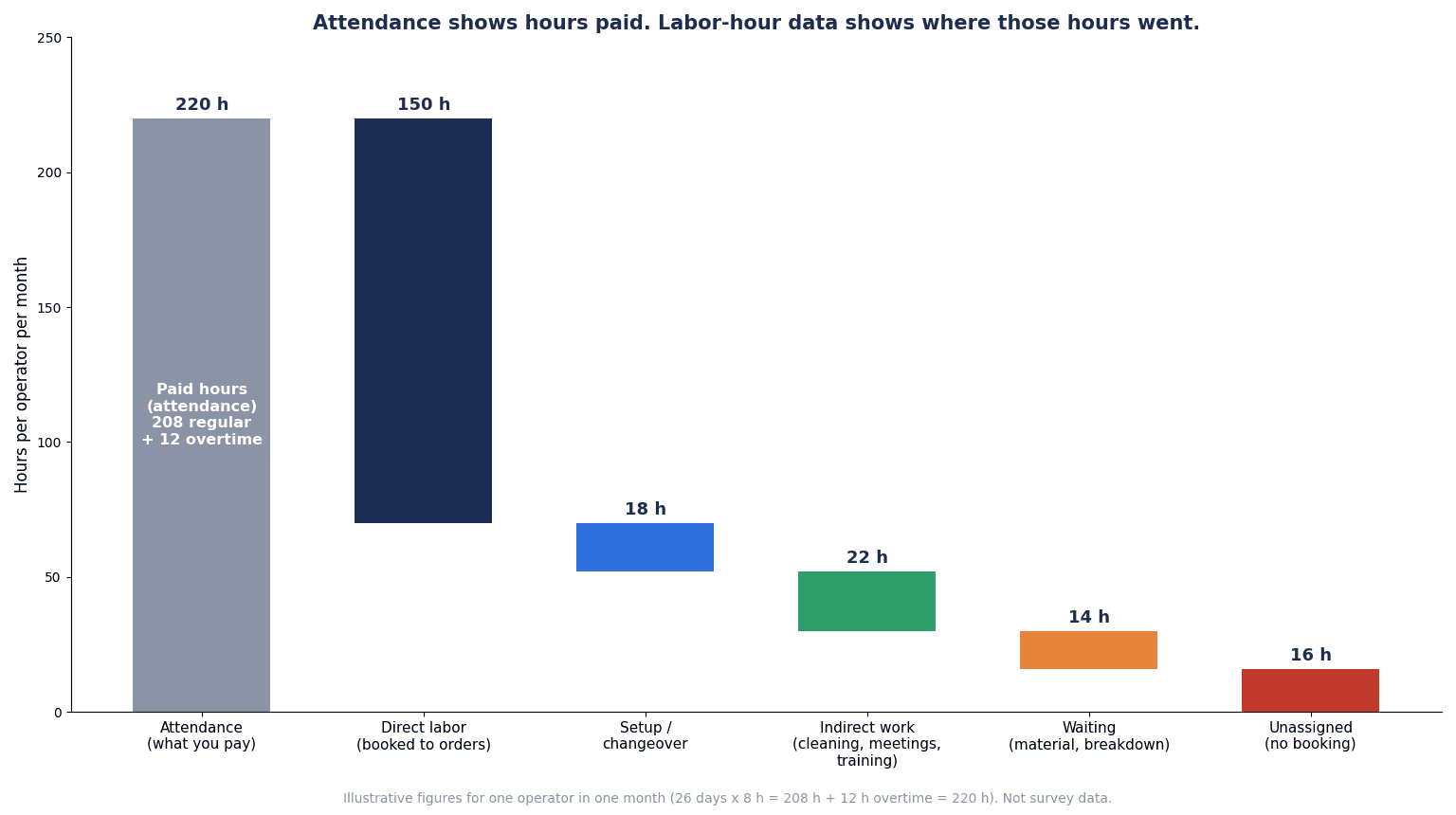
The chart above stacks up the breakdown of these 220 hours. Looking only at the attendance system, this worker’s time appears only as “220 hours (including 12 hours of overtime).” Once the labor hours are split out, you can see that 150 hours were spent directly on products, and that the 30 hours of waiting and unassigned time combined (14 + 16) are either time whose use cannot be explained or time spent waiting. These 30 hours exceed the 12 hours of overtime. Only when labor hours are split out can you take the view that reducing waiting and unassigned time may make it possible to reduce overtime.
Standard Hours vs Actual Hours, Labor Efficiency and Utilization
Standard hours and actual hours
To use labor hour data, you need something to compare it with. That is standard hours.
JIS Z 8141:2022 defines “standard time” as the time required for a worker who is suited to and skilled in the work to carry it out under specified working conditions, with the necessary allowances, at a normal working pace. According to the Japan Institute of Industrial Engineering (JIIE), standard time = net time + allowance time, and net time = observed time × rating factor.
In factory practice, this standard time multiplied by quantity is often called “standard hours,” and the time actually recorded is called “actual hours.” Besides time observation with a stopwatch, methods for measuring standard time include automatically measuring work time from camera video. The latter is covered in our article on AI motion analysis.
Labor efficiency and utilization
“Labor efficiency” (work efficiency) is commonly used as the indicator for comparing standard hours with actual hours. A commonly used formula is as follows.
- Labor efficiency = standard hours ÷ actual hours
However, this formula was not found defined in the parts of JIS Z 8141:2022 we were able to check this time, so it is presented as common usage. Before using it internally, you need to decide the formula and which time goes into the denominator.
On the other hand, “utilization rate” and “productivity” are defined in JIS Z 8141:2022.
- Utilization rate: the ratio of effective operating time to working hours for people, or to available time for machines
- Productivity: the ratio of output to input
The international standard for manufacturing operations KPIs, ISO 22400, also lists KPIs such as Worker efficiency and Setup ratio among its production KPIs (according to a summary in a paper from Bialystok University of Technology; check the formula details in the paid standard itself).
A simple calculation example
The following are hypothetical figures for this article.
Suppose a part has a standard time of 6 minutes per piece, and an order of 100 pieces is run.
- Standard hours: 6 minutes × 100 pieces = 600 minutes = 10 hours
- Actual hours (recorded time): 12.5 hours
- Labor efficiency: 10 ÷ 12.5 = 0.8 → 80%
Labor efficiency of 80% means the job took 2.5 hours (12.5 − 10) more than standard. As a way to turn this gap into money, the US accounting textbook OpenStax *Principles of Accounting, Volume 2* gives the direct labor time variance as follows.
- Direct labor time variance = (actual hours worked − standard hours for the actual production) × standard rate
If the hourly rate is assumed to be 70 baht, (12.5 − 10) × 70 = an unfavorable variance of 175 baht. For a single order this is a small amount, but if it happens every time on a repeat part number, it is a reason to revise the quote itself.
The utilization rate can also be calculated from the one-worker monthly example in the previous section. If the 150 hours of direct labor and 18 hours of setup are counted as “effective operation,” then (150 + 18) ÷ 220 = 168 ÷ 220 ≈ 76%. The figure changes depending on whether setup is included in effective operation, so this definition also needs to be decided internally. The approach of dividing factory KPIs by frequency and measuring only the bottleneck is covered in our article on factory KPI management.
3 Reasons Labor Hour Management Systems Fail to Take Hold
Manual recording is still common
Much factory data is still recorded by hand. In a survey by the Manufacturing Leadership Council, part of the National Association of Manufacturers (NAM) (published in August 2024; mainly US-based, and the article does not state the sample size), 70% of manufacturers said they still collect data manually. According to an estimate by the research firm IoT Analytics (from an article introducing a report published in December 2025; the method is not disclosed), 54% of factories worldwide in 2024 managed manufacturing operations with pen and paper or spreadsheets.
However, getting away from manual work is not the only goal. This article’s view is that factories where a labor hour management system fails to take hold often fit one of the following 3 reasons.
Reason (1): The granularity is too fine, so people cannot keep up with data entry
A common request is, “Since we are putting in a system anyway, we want start and end times for every work element.” But the more entries there are, the more of workers’ and team leaders’ time goes into data entry. When entry becomes a burden, workers start entering everything later in one go, and the recorded times drift away from reality. Data that you thought was captured in detail can actually turn out to be estimates based on memory.
Reason (2): The hours do not match attendance time, so nobody trusts them
If the total labor hours do not match attendance time, managers will not trust the data. This is in the context of payroll, but in a survey of 508 US payroll professionals conducted by EY (released by the payroll software company Paycom in December 2022; covering US-headquartered companies with 250 to 10,000 employees, not limited to manufacturing), correcting missed or incorrect punches was the most time-consuming task, taking 26 minutes per employee in the previous fiscal year. Attendance punches alone require this many corrections. Labor hours are a further breakdown of that time, so without a rule for closing the gap every day, reconciling them at month end becomes almost impossible.
Reason (3): There is no decision on how the data will be used
Even if you collect labor hour data, if you have not decided what it will be used to fix, all you get is one more page in the monthly report. In the Manufacturing Leadership Council survey mentioned above, only 30% were using manufacturing data to forecast performance. There are 3 main uses for labor hour data.
- Quotes: compare quoted hours with actual hours, and revise quotes and prices for repeat part numbers
- Costs: calculate labor costs by order and by part number from actuals
- Efficiency improvement: eliminate the causes of waiting and unassigned time, and revise overtime and staffing plans
Which use you choose changes both the granularity you need and what you compare against. The next section explains this approach of “working back from the question to the granularity.”
How to Decide Booking Granularity: Designing Man-Hour Tracking in Manufacturing
4 levels of granularity
The granularity for recording labor hours can be roughly divided into 4 levels.
| Granularity | Example of what is recorded | Questions it can answer | Guide to entries per worker per day |
|---|---|---|---|
| Daily report level | Split the day’s time into “direct / indirect / waiting” | How much indirect work and waiting there is overall | 1 |
| Order level | How many hours were spent on which production order | Labor cost by order and by part number, gap versus quoted hours | A few |
| Process level | How many hours were spent on which process of an order (cutting, bending, welding, assembly, etc.) | In which process actuals diverge from the quote, actuals at the bottleneck process | About 5–10 |
| Work element level | Start and end of each element such as setup, machining, inspection and transport | Revising standard times, work improvement | A dozen or more |
The higher in the table, the lighter the entry burden; the lower in the table, the more detailed the questions you can answer.
Working back from the question
The way to decide granularity is to work back from “the question you want to answer.”
- You want to know “whether quoted hours match actual hours” → order level is often enough
- You want to know “in which process actuals diverge from the quote” → use process level only for the bottleneck process
- You want to know “how much indirect work and waiting there is” → daily report level can tell you
- You want to “revise standard times” → measure at work element level, limited to the target part numbers and processes and for a set period
The key is not to apply the same granularity to every process and every worker. For example, a combination such as “order level normally, process level only at the bottleneck process, and work element level for one month only at the target process when revising standard times” is a realistic design.
Count the time spent on data entry
When deciding granularity, always count the time spent on data entry. The following are hypothetical figures for this article. Suppose 220 direct workers each take 10 seconds per entry (scanning a barcode or tapping a screen). Monthly figures are converted using 25 working days per month.
| Entries per worker per day | Calculation | Whole factory per day | Whole factory per month (25 days) |
|---|---|---|---|
| 1 (daily report level) | 220 workers × 1 entry × 10 seconds = 2,200 seconds | About 0.6 hours | About 15 hours |
| 4 (order level) | 220 workers × 4 entries × 10 seconds = 8,800 seconds | About 2.4 hours | About 61 hours |
| 8 (process level) | 220 workers × 8 entries × 10 seconds = 17,600 seconds | About 4.9 hours | About 122 hours |
| 20 (work element level) | 220 workers × 20 entries × 10 seconds = 44,000 seconds | About 12.2 hours | About 306 hours |
For example, with 4 entries, 8,800 seconds ÷ 3,600 seconds = about 2.44 hours, and 2.44 hours × 25 days = about 61 hours.
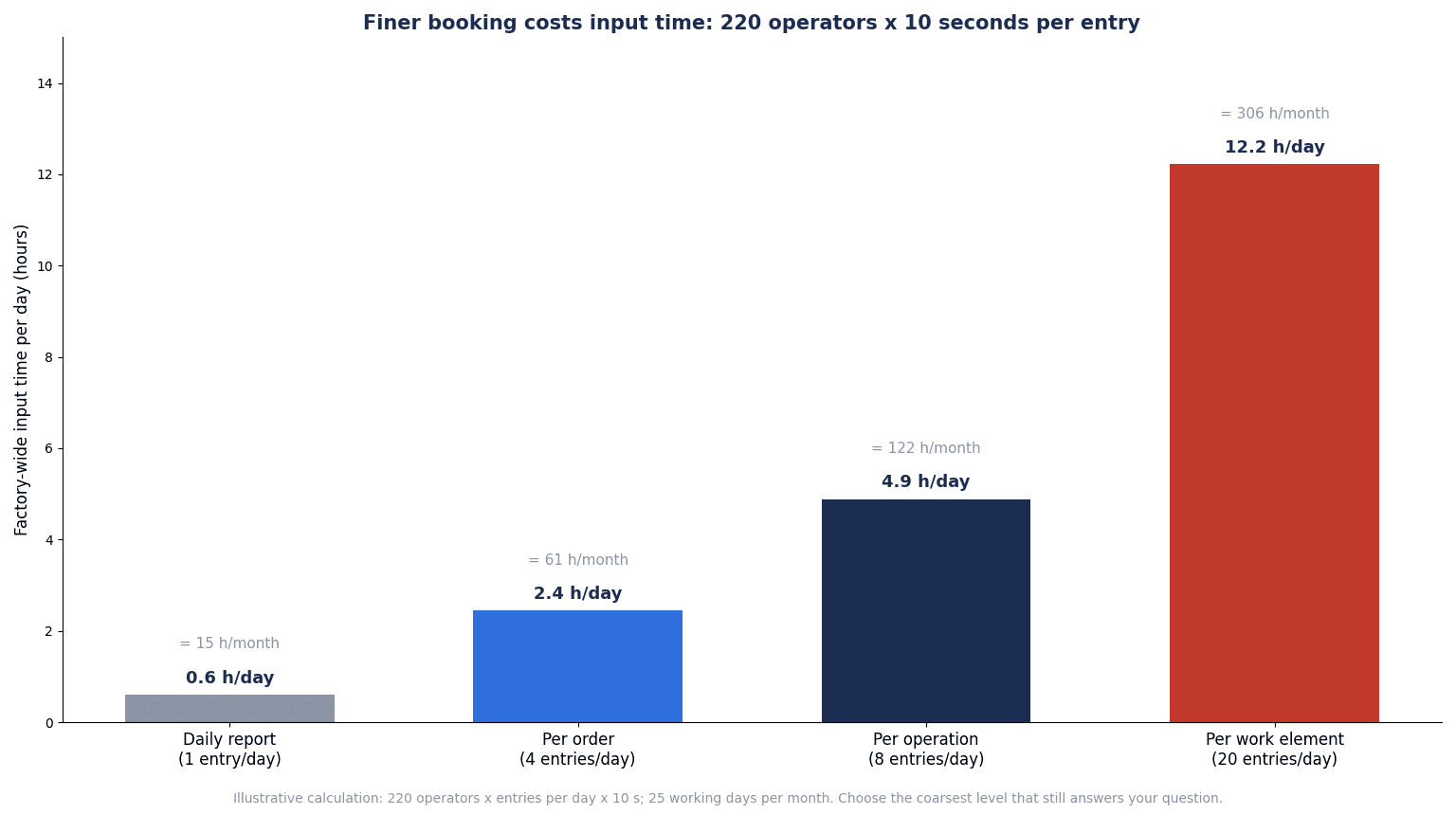
The chart above compares this entry time. With 1 entry a day, the whole factory spends about 0.6 hours a day (about 15 hours a month), but with 20 entries this becomes about 12.2 hours a day (about 306 hours a month). Even just moving from daily report level to order level (4 entries a day) adds about 1.8 hours (2.4 − 0.6) per day across the whole factory.
The 10 seconds per entry is a hypothetical value for the case where a scanning terminal is at hand and reading finishes immediately. If time is added for walking to the terminal, logging in or looking up the order number, each entry takes longer. The finer the granularity, the more this difference matters.
Capturing data in detail is not a problem in itself. The point is that if you capture it in detail, you should confirm that there is a question you want answered badly enough to pay for that time, and narrow down the target processes and period. The approach of digitizing the daily production report itself and eliminating transcription is also covered in our article on digitizing manufacturing daily reports.
Comparing Entry Methods: From Paper to Tablets and Equipment Signals
6 methods
There are broadly 6 methods for recording labor hours.
| Method | Effort on the shop floor | Data freshness | Suitable granularity | Points to watch |
|---|---|---|---|---|
| Paper time ticket → clerk transcribes into Excel | Writing is light, but transcription and totaling are heavy | Weekly to monthly | Daily report level | Transcription errors, illegible handwriting, clerical work concentrated at month end |
| Direct entry into Excel or a shared sheet | Workers have to go to a PC | Daily | Daily report to order level | Hard to check for missing entries, version control |
| Barcode / QR scanning | Just scan the work order and the employee ID card | Near real time | Order to process level | A mechanism for printing codes on work orders, where to place terminals |
| Tablet | Tap the screen; quantity and defects can also be entered | Near real time | Order to work element level | Screen language, operability with gloves or oil, number of units and replacement cost |
| Combined with equipment signals | People enter only “who was in charge” | Real time | Process level | Equipment run time and people’s labor hours are different things; allocation when one person runs multiple machines |
| Face recognition / IC card terminal | Fast identity verification | Real time | Daily report to order level | Biometrics are sensitive data under the PDPA; prepare an alternative |
You do not have to settle on a single method. For example, a combination such as “face recognition or IC card for clock-in and clock-out, barcode for order start and end, and tablets at the bottleneck process to also enter quantities and defects” is often considered. When choosing tablets, the end of OS updates affects the total cost more than the device price. This is explained in detail in our article on choosing factory tablets.
Equipment signals and people’s labor hours are different things
Capturing run signals from equipment can reduce what people have to enter. However, equipment run time and people’s labor hours are not the same. If one person looks after 2 machines, equipment run time can be twice the person’s labor hours. Conversely, setup and inspection are time when people work while the equipment is stopped. Collecting actuals from equipment suits capturing quantities and operation, but the allocation of people’s time needs to be recorded separately. Requirements and acceptance for collecting actuals centered on quantities and equipment signals are covered in our article on automatic production actuals collection and our article on the RFP for actuals collection systems.
Biometrics are a PDPA issue
Face recognition and fingerprint terminals are popular because they prevent buddy punching. However, according to the unofficial English translation of Thailand’s Personal Data Protection Act (PDPA, B.E. 2562), Section 26 treats biometric data (such as facial recognition data, iris recognition data and fingerprint recognition data) as sensitive data alongside race, health and other categories, and in principle prohibits collecting it without the data subject’s explicit consent (exceptions are listed).
An explanation by the law firm Suwanvara (updated September 2026) states that fingerprint and face recognition time clocks involve sensitive data and require explicit consent or a specific legal exception, and in practice recommends obtaining explicit consent and providing an alternative such as a card for people who refuse. An explanation by Athentic Consulting (September 2025) also says consent should be obtained without coercion or unfair conditions, and that withdrawing it should be as easy as giving it. Note that this article’s research could not confirm any guidance or enforcement cases from Thailand’s Personal Data Protection Committee (PDPC) specifically on biometric time clocks in the workplace. If you introduce them, please check with a specialist.
Reconciling with Attendance and Handling Unassigned Time
The master record for payroll stays on the attendance side
The first thing to decide when introducing a labor hour management system is “which side holds the master record of time.” This article recommends keeping the master record for payroll on the attendance side and treating labor hours as its breakdown. If you try to calculate pay from labor hour records, missing entries turn directly into payroll errors and cause distrust among workers.
Some products calculate attendance from labor hour registrations. According to the documentation for Microsoft Dynamics 365 Supply Chain Management (D365 SCM below), when daily registrations are calculated and transferred, a breakdown (pay items) such as standard time, overtime and paid breaks is generated and can be passed to the payroll system as a file. Even when using such a mechanism, which time is treated as authoritative needs to be decided in operation.
Bring unassigned time close to zero every day
The basis of reconciliation is to check the following formula every day for each worker.
- Unassigned time = attendance time − total time booked as labor hours
In the example in “Breaking down one worker’s month,” if 204 hours (150 + 18 + 22 + 14) are booked against 220 hours of attendance, unassigned time is 16 hours. Operating rules can be set, for example, as follows.
- Before the start of work the next morning, the team leader looks at the list of the previous day’s unassigned time
- For anyone whose unassigned time exceeds a set amount (for example, 30 minutes), the team leader checks with the worker and fills it in
- Time whose reason is unknown is left as “unassigned” and not forced into direct labor hours
- After the weekly close, corrections require approval
“Not forcing it” is an important point. If unassigned time is pushed into direct labor hours, the books balance, but the causes of waiting become invisible and order costs also look higher than they really are.
Closing rules
Reconciling everything in one go at month end almost always breaks down. If you set up 3 stages—checking the gap daily, closing weekly, and at month end only totaling data that is already confirmed—the clerical work does not pile up at month end. The D365 SCM documentation also explains that registrations are transferred to related modules after approval, and that by approving and transferring continuously, you can track the actual cost of production orders.
How Thai labor law treats overtime (points to check)
Labor hour management is not a payroll system, but it is closely tied to overtime records, so it is worth understanding the basic structure of Thailand’s Labour Protection Act (B.E. 2541). The following is based on the English translation prepared by the Department of Labour Protection and Welfare (DLPW) (dated February 2014, reflecting amendments up to the 4th amendment, B.E. 2553), and does not reflect the 2017 and 2019 amendments. Please check the latest text with a specialist.
- Section 23: normal working hours are no more than 8 hours a day and no more than 48 hours a week in total. For work that is hazardous to health and safety, no more than 7 hours a day and 42 hours a week
- Section 24: for overtime on working days, the employee’s prior consent must be obtained each time (the Act has separate provisions for work that must be continuous by its nature, emergency work, etc.)
- Section 26 and the ministerial regulation: there is a cap on overtime and holiday work combined, set by ministerial regulation at 36 hours a week according to an explanation by Forvis Mazars
- Section 27: if overtime exceeds 2 hours, a rest of at least 20 minutes is given before the overtime starts (the Act has separate provisions for continuous work where the employee consents, emergency work, etc.)
- Sections 61 to 63: overtime on working days is at least 1.5 times the hourly wage, and overtime on holidays is at least 3 times
- Sections 114 and 115: employers with 10 or more employees must prepare wage-payment-related documents stating working days, working hours and so on, and keep them for at least 2 years from the date of payment
If a labor hour management system shows which order and which cause generated overtime, it also helps with how prior consent is obtained and with identifying people close to the weekly cap. However, preparing and keeping the statutory records is basically done on the attendance and payroll side. If you also hold the same records on the labor hour side, decide in advance which one is authoritative.
Feeding Labor Hour Data Back into Costs and Quotes
Putting direct labor cost onto orders
The first use of labor hour data is costing. The D365 SCM documentation explains that approved and transferred registrations become the basis for time on production orders and projects and for cost per hour. Cost per hour can be calculated either using the pay rates from the attendance side or using the cost category of the work.
In Microsoft Dynamics 365 Business Central (Business Central below), you register finished quantity, scrap, setup time and run time in the Output Journal, and posting it updates production progress, the capacity ledger and manufacturing costs. Setup and run times can be recorded for each operation, and stop reasons and times are also kept in the capacity ledger.
How indirect time is distributed changes cost by part number
Note that the way indirect time is handled changes labor cost by part number. The D365 SCM documentation includes an example like the following.
- Paid break 0.5 hours × rate 8 = 4
- If this is distributed only to the 3.5 hours of production jobs running in parallel, it adds +1.14 per hour (4 ÷ 3.5)
- If it is distributed evenly across all 7.5 hours of jobs that day, it adds +0.53 per hour (4 ÷ 7.5)
Even for the same cost of 4, the surcharge per hour differs by more than 2 times depending on how it is distributed (1.14 versus 0.53). Whether waiting time and indirect work time are distributed to orders, or collected separately as manufacturing overhead and allocated, needs to be decided in advance by accounting and production control.
On allocating manufacturing overhead, the OpenStax textbook gives the predetermined overhead rate = estimated manufacturing overhead ÷ estimated activity level, and lists direct labor hours, direct labor cost and machine hours as traditional allocation bases. It also says that examples using machine hours or production volume as the basis are increasing recently. When direct labor hours are captured correctly through labor hour management, the accuracy of allocation based on direct labor hours also improves.
Compare quoted hours with actuals to find loss-making part numbers
The second use is quotes. Once actual hours are captured at order level, you can line up “quoted hours,” “actual hours” and “labor efficiency” for each part number. If, for a repeat part number, actuals consistently exceed the quote by a wide margin, that part number may be loss-making from the quote stage.
There are 2 possible responses.
- Fix the price: discuss pricing with the customer, using the actual data as evidence
- Fix the process: eliminate the causes behind setup and waiting time, and bring actuals closer to the quote
Both become possible only once several months of order-level actuals are available. Design for tracking cost and progress for each make-to-order job is covered in our article on Seiban job order management systems, and the approach of turning month-end costs into daily decisions in our article on manufacturing cost management systems.
Feeding it back into staffing plans
The third use is staffing plans. Once actual hours by process are available, you can estimate, based on actuals, how many people and hours each process needs for next month’s orders. Planning that considers people, equipment and materials at the same time is covered in our article on implementing finite capacity planning.
Types of Labor Hour Management Systems and How to Combine Them
4 types
Mechanisms for recording labor hours can be broadly divided into the following 4 types.
| Type | Main role | What to look at for labor hour management |
|---|---|---|
| Production order actuals functions in ERP | Registering time and quantity against production orders, reflecting them in costs | Registration at order and process level, link to costing, usability of shop floor screens |
| MES (manufacturing execution system) | Shop floor work instructions, actuals, quality and equipment data | Combining equipment signals with people’s time, terminals, integration with ERP |
| Dedicated labor hour management tools | Recording workers’ time split by project, order and task | Lightness of entry, reconciliation with attendance, output to ERP and costing |
| Extensions of attendance systems | Adding work categories to clock-in/out terminals and data | Integrated management with attendance, whether order-level recording is possible |
Here are examples of ERP manufacturing functions (all based on each vendor’s official documentation; this is not a recommendation of any specific product).
- Manufacturing execution in D365 SCM is a function for registering time, material consumption and costs against production jobs, projects and indirect activities. Registration types include clock-in and clock-out, production jobs, breaks, indirect activities (meetings, cleaning, maintenance) and overtime. When multiple jobs are started at the same time, time is apportioned using a distribution key. On the shop floor screen, workers sign in with a badge ID or employee number, and can start jobs, report good and scrapped quantities (with reason codes), and register indirect activities and breaks, and they can check that day’s registrations in “My day”
- In D365 SCM, the route group settings let you choose whether to post with estimated time when a job starts, or with actual time when it is stopped or completed
- In Odoo’s Shop Floor (19.0 documentation), pressing “Start” on a work order card starts the timer, and after completion the actuals remain listed as time by worker. Work centers can be set with a “Time Efficiency” (for example, 50% if an old machine takes twice as long) and a cost per hour
- As an example of integration with attendance terminals, Odoo’s Attendances app offers a module that imports punches from BioTime, the attendance software of ZKTeco (a third-party product), and turns them into check-in and check-out records (the supported BioTime versions are described differently depending on the documentation version, so this needs to be checked)
How to think about combining them
There is no need to cover everything with one product. A commonly considered combination is “attendance system for clock-in and clock-out, ERP production actuals functions or MES for order and process labor hours, and ERP for costing.” In this case, how employee numbers, dates and hours are passed between attendance and ERP is at the center of the design.
However, the more systems you combine, the more integration work there is. In a Rockwell Automation survey (reported in July 2026; 1,560 respondents in 17 countries; not a Thailand-only figure), 93% were running MES at at least one site, while only 23% had fully integrated it with ERP and other systems. Data formats, resending and cancellation handling for integration are covered in our article on ERP and production management integration. Also, to put labor hours correctly onto orders, the master data for items, routings, workers and work categories needs to be in place. On this point, see our article on manufacturing master data management.
Published prices for reference
As a price guide, here are published list prices. All of the following are published list prices on US sites (retrieved as of October 2026) and do not include prices in Thailand or implementation partner fees. This is not a recommendation of any specific product.
| Product | Published list price (per user per month) | Notes |
|---|---|---|
| Microsoft Dynamics 365 Supply Chain Management | $210, Premium $300 (paid yearly) | Noted as varying by currency, country and region |
| Microsoft Dynamics 365 Business Central | Essentials $80, Premium $110, Team Members $8 (paid yearly) | Manufacturing functions are in Premium. Noted that actual prices may differ |
| Odoo | Standard $21.10, Custom $40.00 (both regular prices with monthly billing) | Covers all apps including manufacturing. Displayed prices are lower with yearly billing, and a discount is also shown for the first 12 months |
In labor hour management, note that the number of workers is large. Which type of account or license each worker needs differs by product and contract. For example, the D365 SCM shop floor screen does not require an SCM user account for workers, but a “time registered worker” account is required. How to estimate costs and how to think about 3-year total cost of ownership are covered in our article on production management system costs.
Model Calculation of Costs and Benefits (Hypothetical Figures)
Here we estimate the benefits and costs of introducing a labor hour management system. All headcounts, hours, rates and costs below are hypothetical figures set for this article. For actual decisions, replace them with your own company’s figures.
Model assumptions
- A make-to-order metal processing and assembly plant with 300 employees (220 of whom are direct workers)
- 800 production orders per month
- Currently, a clerk transcribes paper time tickets into Excel
- Currency is Thai baht (THB)
Benefit (1): Transcription and totaling work
- Current: 200 hours a month (160 hours of transcription + 40 hours of monthly totaling)
- After introduction: 30 hours a month (a reduction of 170 hours)
- Assuming a clerical hourly rate of 200 baht: 170 hours × 12 months × 200 baht = 408,000 baht/year
Benefit (2): Overtime reduction
- 220 direct workers × average overtime of 12 hours/month = 2,640 hours/month
- If the causes of waiting and unassigned time (waiting for materials, setup delays) are eliminated and overtime falls by 10%: 2,640 × 10% = 264 hours/month
- The overtime hourly rate is set at 105 baht (assuming a normal hourly rate of 70 baht × 1.5)
- 264 hours × 12 months × 105 baht = 332,640 baht/year
The normal hourly rate of 70 baht and the 1.5 multiplier are assumptions for this calculation. For reference, in the 400-baht minimum wage band, 400 ÷ 8 = 50 baht is a guide figure per hour, and the English translation of the Labour Protection Act states that overtime on working days is at least 1.5 times the hourly wage. Replace the actual rates with your company’s wages and allowances.
Benefit (3): Revising quotes and prices
- For repeat part numbers where quoted hours were below actuals, improve gross profit through price revisions or process improvements
- The improvement is set at 600,000 baht/year
- This benefit is realized only if price negotiations with customers succeed or process improvements can actually be made
Total benefit and payback period
| Item | Calculation | Annual benefit |
|---|---|---|
| (1) Transcription and totaling work | 170 hours × 12 × 200 baht | 408,000 THB |
| (2) Overtime reduction | 264 hours × 12 × 105 baht | 332,640 THB |
| (3) Revising quotes and prices | Assumed value | 600,000 THB |
| Total | 408,000 + 332,640 + 600,000 | 1,340,640 THB |
Costs are set as follows.
- Initial cost: 1,800,000 baht (software configuration, 20 scanning terminals and tablets, integration with ERP and attendance, master data cleanup, training)
- Annual cost: 360,000 baht (subscription, maintenance)
The calculation is as follows.
- Annual net benefit: 1,340,640 − 360,000 = 980,640 baht/year
- Payback period: 1,800,000 ÷ 980,640 ≈ 1.84 → about 1.8 years
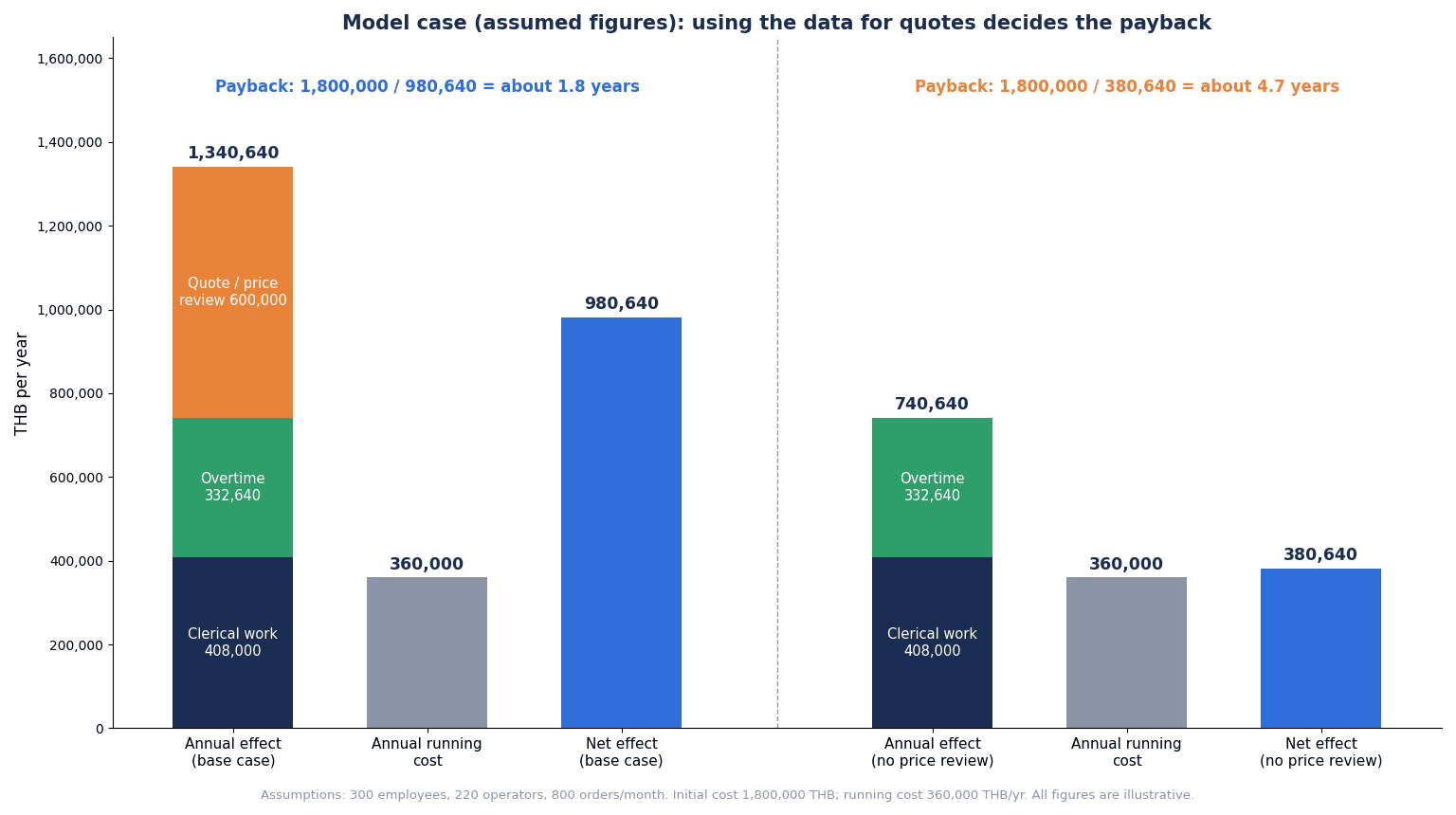
The chart above compares the breakdown of benefits and the payback period with and without Benefit (3).
Sensitivity: if the data is not used for quotes and prices
Benefit (3) appears only when there is a mechanism for using labor hour data to revise quotes and prices. If the data is only collected and not fed back into quotes, Benefit (3) is zero.
- Benefit: 408,000 + 332,640 = 740,640 baht/year
- Annual net benefit: 740,640 − 360,000 = 380,640 baht/year
- Payback period: 1,800,000 ÷ 380,640 ≈ 4.73 → about 4.7 years
How to read this calculation
In this model, clerical savings and overtime reduction alone take nearly 5 years to pay back. Adding Benefit (3) brings it to about 1.8 years. In other words, the factories that decide first on a mechanism for feeding data back into quotes, prices and process improvement are the ones that pay back sooner.
That is exactly why, before deciding to introduce a system, you need to write down “which part numbers’ quotes will be compared with actuals, by whom, and how often.” If you are not yet at the stage where you can write this, one possible decision is to start by measuring the size of waiting and unassigned time at daily report level and confirming whether Benefit (2) can be expected.
What this calculation does not include
- Quality improvement, responses to hiring difficulties
- Tax incentives such as those from the BOI (not covered in this article)
- The cost of the entry time itself. As seen in the section “How to Decide Booking Granularity,” moving from daily report level (1 entry a day) to order level (4 entries a day) adds about 1.8 hours of entry time per day across the whole factory. Note that the finer the granularity, the more this eats into Benefit (2)
What to Check in an RFP and Demo for a Labor Hour Management System
Instead of asking whether functions exist, have them run one day of your operation
In an RFP (request for proposal) for a labor hour management system, if you ask “Can it record labor hours?”, almost every product will answer “Yes.” The difference shows when one day of your own shop floor is run through: how much manual work remains.
We therefore recommend giving vendors one day of an actual worker’s activity in advance (for example, 3 orders, 1 setup, a 30-minute meeting, 20 minutes waiting for materials and 1 hour of overtime), and having them run it in the demo all the way through “entry → reconciliation with attendance → approval → comparison with costs and quotes.”
Checklist
| No. | Item to check | What to confirm in the demo or acceptance test |
|---|---|---|
| 1 | One-day scenario | Whether one worker’s day (3 orders, setup, meeting, waiting for materials, overtime) can be run on screen from entry through comparison with costs and quotes |
| 2 | Using different granularities | Whether the granularity (daily report, order, process, work element) can be changed by process or worker group |
| 3 | Number of entries and time | Measure the seconds per entry on the actual terminal, including logging in and looking up orders |
| 4 | Reconciliation with attendance | Whether time can be imported from the attendance system and unassigned time listed by worker and by day |
| 5 | Corrections and approval | Whether corrections after closing can be made subject to approval, and whether a correction history is kept |
| 6 | Indirect work categories | Whether categories such as cleaning, meetings, training, maintenance and waiting can be set by the company, with reason codes attached |
| 7 | Simultaneous work | How time is apportioned when one person handles multiple orders at the same time, or for team work |
| 8 | Link to costing | How actual hours are reflected in production order costs, and whether the method for distributing indirect time can be chosen |
| 9 | Comparison with quotes | Whether quoted hours, actual hours and labor efficiency can be shown side by side by part number, with trends for repeat part numbers |
| 10 | Multilingual UI | Whether shop floor screens can be used in Thai, and whether names of work categories and reason codes can be held per language |
| 11 | Terminals and authentication | Which of barcode, IC card and face recognition are supported, and whether an alternative that does not use biometrics can be provided |
| 12 | Permissions and data visibility | Whether who can see individual labor hours can be separated by role |
| 13 | Data output | Formats and frequency of output to ERP, attendance, cost accounting and BI, and resending on errors |
| 14 | Support structure | Support desk in Thailand, supported languages, support hours, how fees for configuration changes are set |
In acceptance testing, run not only normal days but also deliberately difficult ones. For example, a day with a missed punch, a day when equipment broke down in the middle of an order, a day when someone handled 2 orders at the same time, and a day when a correction was needed after closing. How such days are handled makes a big difference to the operational burden. The approach of comparing demos using real orders in high-mix low-volume plants is also introduced in our article on production management systems for high-mix low-volume manufacturing.
How to Introduce a Labor Hour Management System: 90 Days from Defining Questions to a One-Line Pilot and Attendance Reconciliation
This is a guide to what to do in the 90 days before fully rolling out a product. The period varies with the size of the factory.
Days 1–30: Define the questions and measure the current state
- Narrow the questions you want labor hour data to answer to no more than 3 (for example, “Do quoted hours for repeat part numbers match actuals?” and “What causes overtime?”)
- For each question, decide the coarsest granularity needed
- Measure the time currently spent on transcription and totaling (this becomes the baseline for Benefit (1) in the calculation)
- Choose one line for the pilot. A line with a lot of overtime and many repeat part numbers is suitable
- Draft the work categories (direct, setup, indirect, waiting, unassigned) and reason codes
Days 31–60: Pilot on one line and reconcile with attendance
- On the pilot line, start recording with the chosen granularity and method (for example, order-level barcode scanning)
- Every day, reconcile against attendance time and produce unassigned time by worker
- Measure the time per entry and the number of entries per worker per day
- Measure the time team leaders spend checking unassigned time. If the team leaders’ burden is larger than expected, revisit the granularity or method
- Explain to workers (why it is being recorded, what is recorded and who can see it)
Days 61–90: Try feeding the data back into quotes and costs
- For repeat part numbers on the pilot line, line up quoted hours and actual hours
- Review the top causes of waiting and unassigned time together with team leaders
- Replace the figures in the calculation with measured values. In particular, check whether Benefit (2) and Benefit (3) hold
- Summarize the requirements needed for rolling out to the whole factory and for the product selection RFP
The goal in 90 days is not to put the system into the whole factory. It is to confirm 2 things on one line: “whether unassigned time can be kept small every day” and “whether the people and procedure for feeding data back into quotes have been decided.” Once these 2 are confirmed, comparing products becomes a comparison not of feature lists but of how much manual work would remain in your own operation.
Points to Check Especially for Labor Hour Tracking in Thailand
Multilingual UI and names of work categories
It is common for shop floor workers to use Thai, office staff English or Thai, and managers Japanese. In labor hour management, it is especially important that the names of work categories and reason codes (“waiting for materials,” “equipment breakdown,” “waiting for instructions,” etc.) do not drift apart between languages. If the Thai category names are ambiguous, the categories chosen vary from worker to worker, and the causes cannot be seen even after totaling. The safe order is to decide the category names in Thai together with team leaders, and map Japanese and English to them afterwards.
Team leaders’ burden
In running labor hour management, the heaviest burden usually falls on team leaders. Even though collecting paper goes away, checking unassigned time, approving corrections and explaining things to workers are added. Measure team leaders’ time during the pilot, and if the burden is too heavy, narrow down the frequency or scope of checks.
PDPA and explanation to employees
Labor hour data is a record tied to individual workers. According to the unofficial English translation of the PDPA, Section 24 states that personal data must not be collected without the data subject’s consent, while also listing bases that do not rely on consent, such as when it is necessary for performing a contract to which the data subject is a party, when it is necessary for the legitimate interests of the data controller or others, and when it is necessary for compliance with law.
Suwanvara’s explanation sets out, for employee data, that payroll, contracts and leave fall under contract performance; tax, social security and labor records under legal obligation; and security, CCTV and IT monitoring under legitimate interest. It then advises that because employees’ consent to their employer is unlikely to be regarded as fully free and can be withdrawn, consent should be limited to processing that is truly optional. The basis on which labor hour data is handled may change depending on the purpose of use, so please check with a specialist.
When explaining to employees, communicating at least the following points makes distrust less likely.
- Why it is recorded (quotes, costs, understanding the causes of waiting)
- What is recorded (order, process, work category, time)
- Who can see it and how long it is kept
- If biometrics are used, that there is an alternative that does not use them
Cautions when using the data for individual evaluation
Requests to use labor hour data for individual evaluation are common. However, efficiency figures are strongly affected by factors the worker cannot control (waiting for materials, equipment breakdowns, errors in the standard time itself). If the data is used for individual evaluation from the start, workers stop recording waiting and unassigned time honestly, and the very causes you need to see become invisible. In the early stage of introduction, it is likely easier to maintain data quality if you use the data to improve processes and part numbers and explain that it will not be used for individual evaluation. If you do use it for individual evaluation, confirm the way it is used and its legal treatment with a specialist, and also sort out its relationship with work rules and internal regulations.
Explaining to labor unions and employee committees
In factories with a labor union or a forum for employee representatives, we recommend holding an explanation session before introduction. If labor hour management is perceived as “a mechanism for surveillance,” you will not get cooperation in the pilot stage. It is safest to explain in advance the purpose, the scope of what is recorded, how the data is shown, and whether it will be used for evaluation. Please check with a specialist whether any procedure is legally required.
Keeping records
The English translation of the Labour Protection Act requires employers with 10 or more employees to prepare wage-payment-related documents stating working days, working hours and so on, and to keep them for at least 2 years (Sections 114 and 115). These records are basically held on the attendance and payroll side, but if labor hour data is used as supporting material for overtime, align its retention period and the handling of correction history with the attendance side.
Frequently Asked Questions
What is labor hour management?
It means recording the people’s time spent on work by unit such as order, process or task, and using it by comparing it with standards or quotes. JIS Z 8141:2022 defines “kosu” (man-hours) as a measure expressing the total amount of work, being the time required for one worker to carry out the work. It is expressed in units such as person-hours and person-days. The purpose is not the recording itself but correcting quotes, costs and staffing plans with actual data.
What is the difference between labor hour management and attendance management?
Attendance management records clock-in and clock-out, breaks and overtime, and is used for payroll and legal compliance on working hours. Labor hour management records that attendance time split by “which order, process and task it was used for.” We recommend keeping the master record for payroll on the attendance side, treating labor hours as its breakdown, and checking the gap with attendance time (unassigned time) every day.
What is the difference between standard hours and actual hours?
Standard hours are the time it should take: standard time (the time needed for a skilled worker to do the work under specified conditions, with the necessary allowances, at a normal pace) multiplied by quantity. Actual hours are the time actually recorded. For example, against a standard of 6 minutes per piece × 100 pieces = 10 hours, if actuals are 12.5 hours, labor efficiency is 10 ÷ 12.5 = 80% (hypothetical figures for this article). Looking at the gap between the two by part number leads to revising quotes and processes.
How should indirect labor be tracked?
Indirect work such as cleaning, meetings, training and helping with maintenance is recorded as a “work category” separate from orders. Recording waiting (waiting for materials, equipment breakdowns, etc.) separately with reason codes makes the causes visible. The key to making indirect labor visible is not forcing time whose reason is unknown into direct labor hours, but leaving it as “unassigned.” Also, because the way indirect time is distributed to product costs changes cost by part number, decide the distribution method with accounting in advance.
How much does a labor hour management system cost?
It varies greatly depending on the product, the number of workers, the number of terminals and the scope of integration with attendance and ERP. As examples of published list prices, on the US sites Microsoft Dynamics 365 Business Central Premium is $110 per user per month and Supply Chain Management is $210 (retrieved as of October 2026, paid yearly). Prices in Thailand and implementation partner fees are separate. In this article’s hypothetical calculation, we set the initial cost at 1,800,000 baht and the annual cost at 360,000 baht.
Is Excel not good enough?
Excel is not ruled out. With a small number of people and daily report level recording, Excel or a shared sheet can be enough. Problems arise at the stage where headcount grows, order-level or finer granularity becomes necessary, and reconciliation with attendance is done every day. A guide for considering a system is when continuing transcription work, checking for missing entries, keeping correction history and linking to costing in Excel becomes too heavy. In this article’s hypothetical calculation as well, transcription and totaling work was set at 200 hours a month.
How long does implementation take?
It varies greatly by product and scope, so no single period can be given. This article showed a guide for the 90 days before rolling out to the whole factory, proceeding through deciding the questions you want answered, a pilot on one line, reconciliation with attendance, and a trial of feeding data back into quotes. More important than the length of the period is confirming during the pilot whether unassigned time can be kept small every day and whether the people and procedure for feeding data back into quotes have been decided.
Summary
- An attendance system tells you “the time paid for.” Labor hour management records “which order, process and task” that time was used for, and its purpose is to correct quotes, costs and staffing plans with actual data
- While orders are growing, the minimum wage is now 337–400 baht per day under Notification No. 14 (effective July 1, 2025), and contributions to the Employee Welfare Fund (for now 0.25% each for employers and employees) also started on October 1, 2026. The cost of an hour of people’s time is rising
- The typical reasons labor hour management systems fail to take hold are 3: (1) the granularity is too fine, (2) the hours do not match attendance, and (3) there is no decision on how the data will be used
- Work back from “the question you want to answer” to the granularity, and start with the coarsest granularity. In the hypothetical calculation, if 220 people make 20 entries a day, about 306 hours a month go into data entry
- Keep the master record for payroll on the attendance side, treat labor hours as its breakdown, and bring unassigned time close to zero every day. Do not force time whose reason is unknown into direct labor hours
- How indirect time is distributed changes cost by part number. Decide the distribution method with accounting in advance
- In the hypothetical calculation, payback is about 1.8 years if the data is fed back into quotes and prices, and about 4.7 years if it is not. The factories that decide the use first pay back sooner
- In the RFP, have vendors run one day of your own worker’s activity in the demo, and compare by how much manual work remains
- In Thailand, decide in advance the Thai names of work categories, the team leaders’ burden, PDPA and the explanation to employees, and whether the data will be used for individual evaluation
TOMAS TECH helps factories in Thailand design how labor hour and actuals data is captured, integrate it with attendance and ERP, and select shop floor terminals. You can also consult us before choosing a product, for example at the stage of deciding the questions you want answered and the booking granularity, or at the pilot stage of measuring the gap with attendance on one line. Please contact us through this form.
References
- The Star (Reuters): Thai August factory output rises 4.44% y/y, beats forecast (September 30, 2026)
- Trading Economics: Thailand Manufacturing PMI (October 1, 2026)
- Thai Ministry of Labour: Notification of the Wage Committee on Minimum Wage Rate (No.14), unofficial English translation (notified June 17, 2025)
- WageIndicator: Minimum wage – Thailand (viewed October 2026)
- Trading Economics: Thailand Minimum Daily Wage (viewed October 2026)
- mitihoon: Article on the adjustment of skill-based wage rates (June 4, 2026)
- Forvis Mazars: Payroll Flash News – September 2026 (September 4, 2026)
- DFDL: Thailand’s Employee Welfare Fund Contributions to Start in October 2026 (updated September 11, 2026)
- The Thaiger: Thailand unemployment hits 400,000 as real wages fall (August 24, 2026)
- APO: Thailand Puts Productivity at the Center of AI Transformation with National AI Roadmap (August 28, 2026)
- FAOLEX: The Labour Protection Act B.E. 2541 (DLPW English translation, February 2014)
- Forvis Mazars: Overtime hours (November 11, 2019)
- Mahasarakham University PDPA site: Personal Data Protection Act B.E. 2562 (2019), unofficial English translation
- Suwanvara Law: PDPA for HR in Thailand (updated September 18, 2026)
- Athentic Consulting: Workplace Privacy: Biometric Technology for Employee Attendance Tracking (September 2, 2025)
- jis.eomec.com (reproduction): JIS Z 8141:2022 Production management terminology (man-hours, utilization rate, productivity) (in Japanese)
- jis.eomec.com (reproduction): JIS Z 8141:2022 Production management terminology (standard time, net time) (in Japanese)
- kikakurui.com: JIS Z 8141:2001 Production management terminology (in Japanese)
- Japan Institute of Industrial Engineering: Standard time (IE terminology) (in Japanese)
- OpenStax: 8.3 Compute and Evaluate Labor Variances (2019)
- OpenStax: 4.4 Compute a Predetermined Overhead Rate and Apply Overhead to Production (2019)
- SCITEPRESS (Kikolski): Determination of ISO 22400 KPIs using Simulation Models (2020)
- SAP Library: time ticket (PT)
- Microsoft Learn: Registration for manufacturing execution
- Microsoft Learn: How workers use the production floor execution interface
- Microsoft Learn: Set up worker accounts to use the production floor execution interface
- Microsoft Learn: Pay based on registrations
- Microsoft Learn: Batch post production output and run times (Business Central)
- Odoo: Shop Floor time tracking (19.0 Documentation)
- Odoo: Work centers (19.0 Documentation)
- Odoo: BioTime integration (Documentation, master)
- Microsoft: Supply Chain Management pricing (viewed October 2026)
- Microsoft: Business Central pricing (viewed October 2026)
- Odoo: Pricing (viewed October 2026)
- Manufacturing Leadership Council: Seventy Percent of Manufacturers Still Enter Data Manually (August 15, 2024)
- IoT Analytics: MES Market 2025–2031 (December 2025)
- Paycom IR: EY survey: Payroll errors average $291 each (December 22, 2022)
- MarketScale: Rockwell Automation report: 93% of manufacturers have MES (July 2026)


