


When a factory starts looking for a high-mix low-volume production management system, it usually runs into the same wall as everyone else. You installed a package, or you watched a demo and were told “it can do anything.” Yet the production plan is still built in Excel, paper work instructions still circulate on the shop floor, and new part numbers keep appearing almost every month. Among Japanese-affiliated companies running make-to-order plants in metal processing, plastic molding, precision stamping, jigs and parts machining, and electronic components around Ayutthaya, Chonburi, Rayong and the Bangkok area, this is a familiar scene.
This article is a practical guide for plant managers, production control managers and IT staff at those factories. It sets out, for a high-mix low-volume plant choosing a production management system, “what to decide first, what to ask vendors for, how to compare, what it costs, and how to proceed.”
This article makes one argument. When a production management system “doesn’t fit” a high-mix low-volume factory, the reason is not missing functions. It is that the product was chosen before the following 4 points were decided to match the shape of the company’s own orders.
- (1) How items and BOMs (bills of materials) are structured
- (2) The planning unit and how setups are handled
- (3) The granularity at which actuals are collected
- (4) The costing method
Before comparing the feature lists in product catalogs, split your production by “order frequency x lot size” and write down your answers to the 4 points above. In the RFP (request for proposal), instead of asking “Do you have this function?”, hand vendors 3 of your real orders and have them run each one all the way through in the demo. That is the approach this article proposes.
Note that this article does not recommend any specific product or rank products. It is not legal or tax advice either. All amounts, hours and counts in the model calculation are hypothetical figures set for this article.
Why Revisit Your High-Mix Low-Volume Production Management System Now
Production and orders are growing
Recent figures for Thai manufacturing show orders increasing. According to Reuters, the Ministry of Industry’s Manufacturing Production Index (MPI) rose 4.44% year on year in August 2026, beating the +1.0% market forecast in a Reuters poll. The director of the Office of Industrial Economics (OIE) cited higher output of electronic products, government stimulus measures and a weaker baht as drivers. However, the ministry revised the MPI calculation method at that time, for example by adding new electronic products and changing weights. Note that figures from August 2026 onward cannot be compared directly with the old series.
S&P Global’s Thailand Manufacturing PMI was 54.3 in September 2026 (53.8 in August), the highest level since December 2025. According to Trading Economics, output grew at the fastest pace in 9 months and new orders were the strongest in 6 months, while employment edged down through natural attrition.
Exports point the same way. According to Nation Thailand, Thai exports in August 2026 rose 24.3% year on year, and exports of industrial products rose 27.1%. Demand for electronics driven by AI infrastructure investment is reported to have led the increase.
Applications for equipment and digital investment are also rising
According to a press release from the BOI (Thailand Board of Investment) dated July 23, 2026, investment promotion applications in the first half of 2026 totaled 1,299 projects worth about 1.47 trillion baht, up 37% year on year. Of these, the “Smart and Sustainable Industry” measure, which covers efforts to raise productivity by upgrading machinery, adopting digital technology, and integrating automation and robots, received 132 applications worth about 17.2 billion baht in the first half. The move to rebuild what happens inside factories is showing up in the numbers.
The cost of adding people to cope is rising
On the other hand, the cost of running operations with people is not going down. According to an explanation by the law firm Tilleke & Gibbins, the minimum wage effective January 1, 2025 ranges from 337 to 400 baht per day depending on the province (330 to 370 baht before the revision). In addition, according to Chambers, contributions to the Employee Welfare Fund began on October 1, 2026. Employers with 10 or more employees are covered, and from October 2026 to September 2031, employers and employees each contribute 0.25% of wages (companies with a provident fund, among others, are exempt).
Orders are increasing, but so is the number of product variants. Absorbing re-planning, progress checks and rush-order interruptions by adding people is gradually becoming uneconomical. The more high-mix low-volume a factory is, the larger this volume of “coordination work absorbed by people,” so reviewing the production management system means more for such plants.
What Is High-Mix Low-Volume Production? Classifying Production Types
Definition and characteristics
High-mix low-volume production is a mode of producing many kinds of products, each in small quantities. A 2025 report by the Netherlands Organisation for Applied Scientific Research (TNO) describes HMLV (High-Mix Low-Volume) production systems as producing “a wide variety of products (high-mix) in small quantities (low-volume),” with a focus on one-off products or small batches of the same product.
In general, make-to-order means producing to specifications set by the customer, while make-to-stock means producing in anticipation of demand and shipping from inventory. The high-mix low-volume plants this article has in mind are mainly make-to-order plants.
The TNO report lists as weaknesses of high-mix low-volume production that changeovers are frequent and economies of scale are small, so cost per product is generally higher than in low-mix high-volume production. It also points out that conventional scheduling methods and commercial tools often cannot adequately handle the complexities specific to high-mix low-volume production, such as material switching, setup times, rush-order interruptions and job flexibility. Machine tool maker Brother Industries, in its own explainer article, likewise lists as drawbacks that changeovers and process management become complex because parts differ for each product, that frequent changeovers reduce actual operating time, and that the training burden on operators is heavy.
Order types: repetitive, configure-to-order and engineer-to-order
From the production management system’s point of view, there is more than one production type. SAP’s older Production Planning (PP) documentation treats make-to-order (including variable configuration), make-to-stock, repetitive manufacturing, process industries and kanban as separate production types. Microsoft Dynamics 365 Supply Chain Management (D365 SCM below) describes “unified manufacturing,” in which production orders (producing a specific product or variant based on a BOM and route), batch orders (formula-based), kanban (repetitive lean) and projects (bundling products and services by budget and schedule) can be run together within the same system. However, the manufacturing part of a project cannot be carried out with kanban.
What this shows is that it is normal for a single factory to contain “items close to repetitive production,” “items where options are selected and combined (configure-to-order, CTO),” and “items designed one by one (engineer-to-order, ETO),” and that systems provide different handling for each. Design for tracking cost and progress by job order (seiban) for engineer-to-order items is covered in detail in our article on implementing a job order (seiban) management system.
Four categories by order frequency x lot size
There is a clear framework for classifying your items. A Q&A on J-Net21, run by Japan’s Organization for Small & Medium Enterprises and Regional Innovation (SMRJ), recommends that precision stamping companies responding to a shift toward high-mix low-volume classify products into 4 categories by order frequency and lot size.
| Category | J-Net21 approach | Focus required of the production management system (this article’s summary) |
|---|---|---|
| High frequency, large lots | Dedicated line / stock | Repetitive production, inventory replenishment planning, kanban, standard costing |
| High frequency, small lots | Strategic stock | Stock of semi-finished goods and common parts, reorder points, fast re-planning, sequencing to group setups |
| Low frequency, large lots | Make-to-order | Requirements calculation from orders, material procurement lead times, finite-capacity scheduling |
| Low frequency, small lots | Make-to-order | Structures that do not multiply item masters, setup-aware scheduling, cost and progress by job order, link to quotations |
For make-to-order products, J-Net21 recommends shortening setup times by changing layouts and improving work methods. The rightmost column is this article’s own summary of what to require of the system for each category.
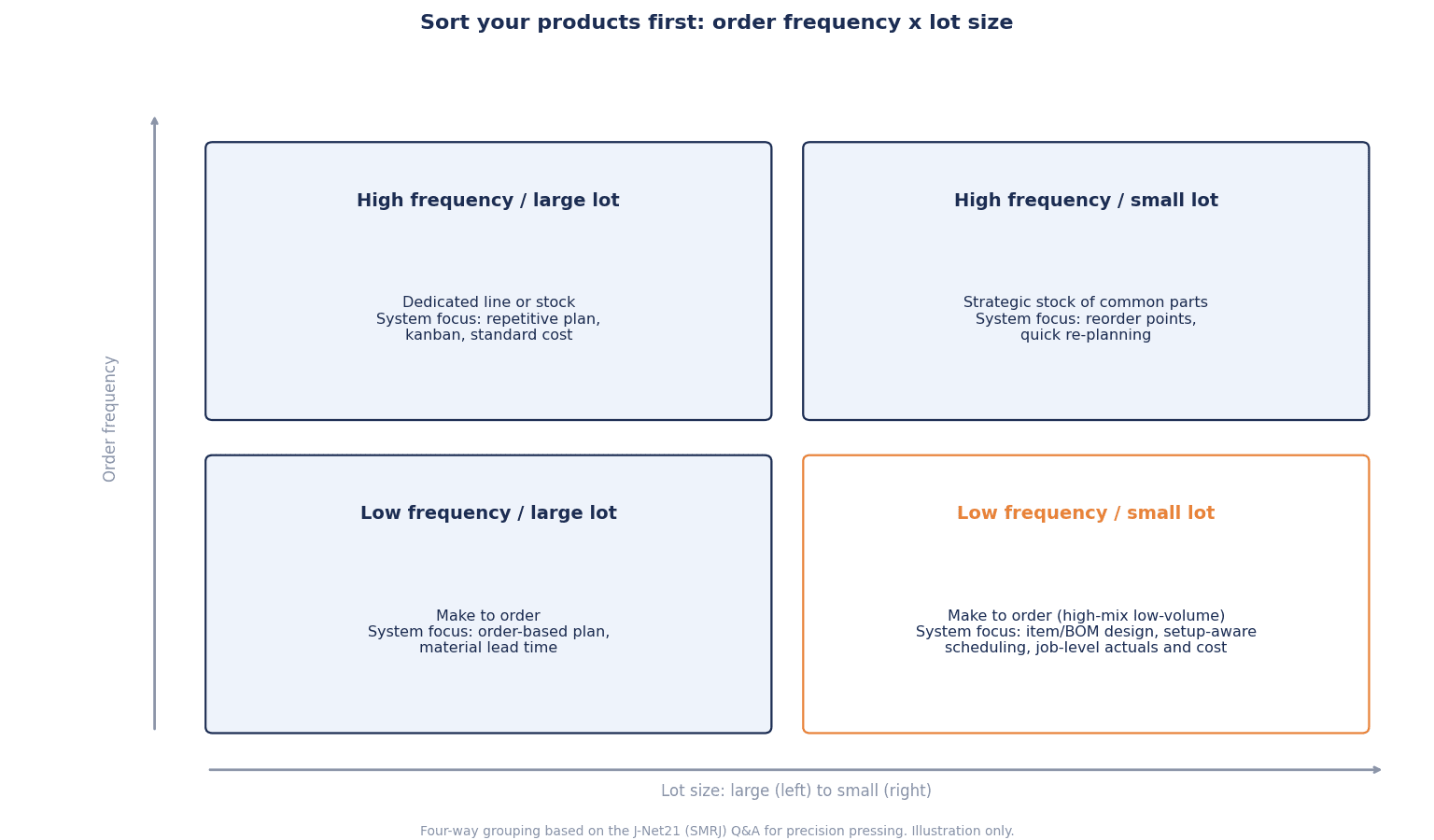
The figure above divides items into 4 categories by order frequency and lot size, and lists the focus required of the system in each. If you first count how your active part numbers are distributed across these 4 quadrants, the later requirements become easier to write. For example, if most items are low frequency and small lots, item master structure and job order management become the core of the requirements; if many are high frequency and small lots, setup sequencing and strategic stock become the core.
Four Reasons a Production Management System Doesn’t Fit
The functions exist, but go unused
When a high-mix low-volume factory remains in a state of “the system went in, but Excel never went away,” people tend to blame missing functions. In practice, however, this article’s view is that the cause is often that the product was chosen while the following 4 design decisions were postponed.
- How items and BOMs are structured: Do you create a part number for each order, or represent it with a configurable item and options?
- The planning unit and how setups are handled: Which processes do you plan with finite capacity, and do you hold setup times that depend on sequence?
- The granularity of actuals: Do you record start and finish for each operation, or report in bulk?
- The costing method: Standard costing, or actual/specific costing?
These 4 may look like things you can decide after choosing the product. In reality, each product has structures it handles well, and changing them becomes difficult once implementation is under way.
Misfits are found late
In its 2026 ERP Report (released March 4, 2026, covering mid-sized to large organizations worldwide), the ERP implementation consultancy Panorama Consulting reported that more than 25% of organizations exceeded their project budgets, and that the main cause was “additional technical needs.” The firm commented that points that do not fit (fatal misfits) are found in the later stages of projects, leading to additional technology, expanded scope and custom development.
There is also research showing how hard integration is. In a Rockwell Automation survey (reported in July 2026; 1,560 manufacturing and industrial operations decision-makers in 17 countries responded; these are not Thailand-only figures), 93% had MES (manufacturing execution systems) running in at least one site, while 28% had deployed them company-wide and 23% had fully integrated them with ERP, PLM, quality and OT. Integration was the top requirement when buying MES (44%).
The only way to bring late-stage misfits forward is to write the 4 design decisions down first and test them with real orders. The following chapters look at the 4 one by one.
Structuring Items and BOMs: A Design That Does Not Multiply Part Numbers
How part numbers keep multiplying
The most common practice seen in high-mix low-volume plants is “copying a similar part number and creating a new one with small changes.” It is quick to start, but as order variations grow, item masters, BOMs, routings and unit prices grow by the same number, and nobody can tell which is the latest.
The idea of configurable items (variant configuration)
In contrast, major ERPs have mechanisms that “do not create an item master for each combination.” SAP’s variant configuration represents variants with characteristics and values, and covers all variants with one configurable material plus a super BOM and super routing that include every option. In an SAP Learning example, a forklift could theoretically have 17,010 variants, but constraints that prohibit invalid combinations (object dependencies) narrow this to a realistic number, and it is explained that there is no need to create up to 17,010 item masters, BOMs, work instructions, and costing and pricing records.
D365 SCM’s “product configuration” follows the same idea. According to Microsoft’s documentation, a configuration model uses attributes to control whether BOM lines and route operations are included and to control attribute values (for example, material length or the processing time of a grinding operation), and a unique configuration ID is assigned to each configuration and used for inventory tracking. Configuration can be run from sales order lines, quotation lines, purchase order lines, production order lines and so on. It also states that in configure-to-order, semi-finished goods can be stocked as generic components rather than finished products, which reduces the capital tied up in inventory.
Cautions: too many domain values, and the effort of migration
Configuration models do come with cautions, however. The same Microsoft documentation warns that defining too many domain values (options) for an attribute slows down the configurator. It also states that moving from make-to-stock to configure-to-order requires analyzing product structures, identifying product families and componentizing parts. In other words, configurable items are not “a function that works once installed”; they are master data design work in themselves.
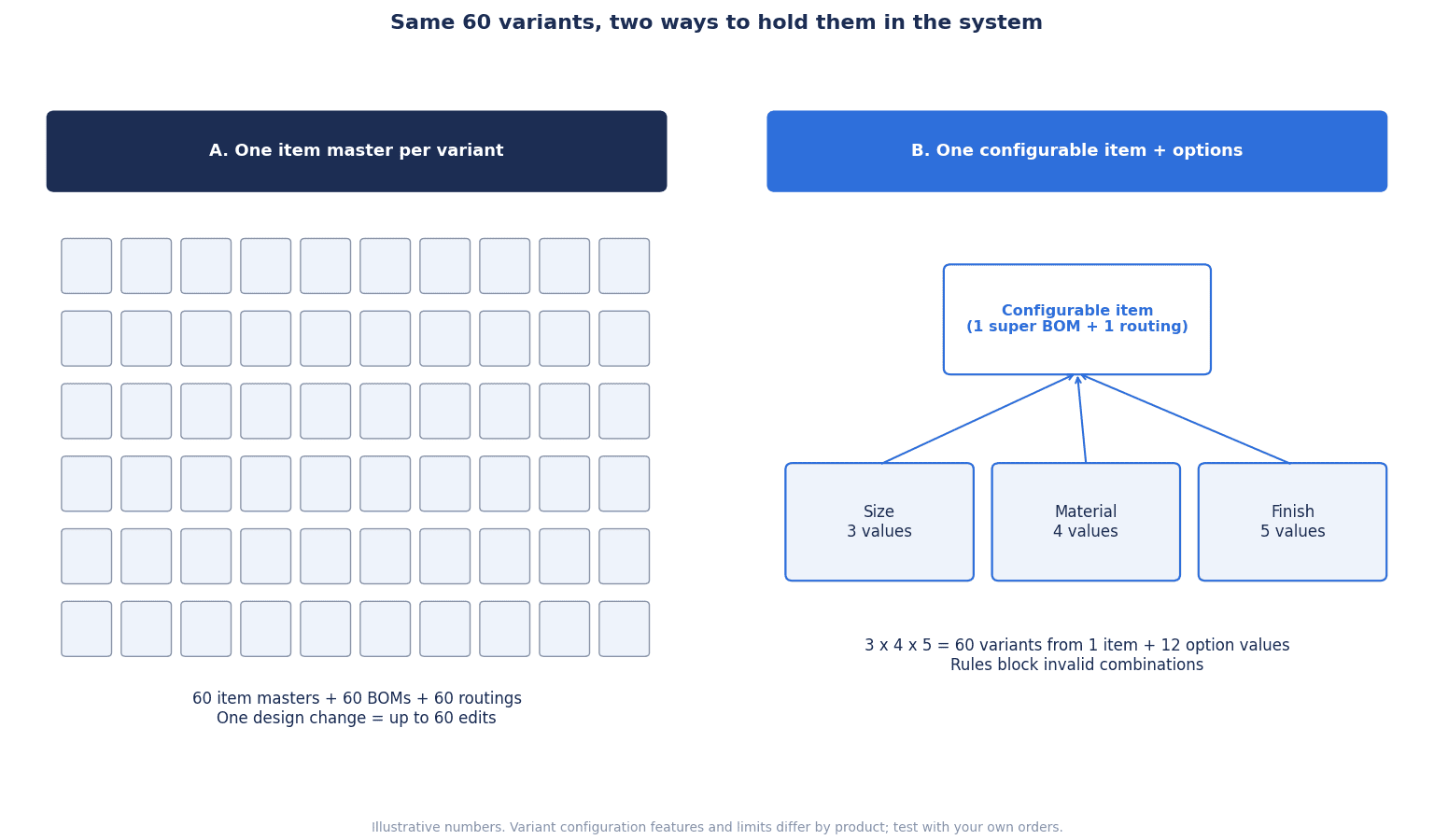
The figure above compares the 2 approaches using hypothetical figures. For example, if a product’s options are “3 sizes x 4 materials x 5 surface treatments,” there are 3 x 4 x 5 = 60 combinations.
| Approach | Number of item masters (hypothetical example) | What tends to happen |
|---|---|---|
| Create a master for each part number (copying similar items) | 60 (and 60 BOMs and routings each) | Every revision means fixing 60 records. Old part numbers linger |
| Configurable item + options | 1 configurable item + 12 option values (3 + 4 + 5) | Designing the configuration rules up front takes effort. Constraints for invalid combinations are needed |
Neither is “the right answer.” For low-frequency, small-lot engineer-to-order products where most specifications are set by each drawing, managing by job order may fit better than building a configuration model. Conversely, if many items are ordered as combinations of options, a configurable structure is worth considering. Deciding which to use for each item group first is the first requirement.
The steps for cleaning up item, BOM and routing masters in 90 days are summarized in our article on implementing manufacturing master data management. The idea of narrowing options at the sales quotation stage and connecting seamlessly through to production instructions is covered in our article on implementing manufacturing CPQ.
HMLV Production Planning: Finite Capacity and Setup Handling
Why infinite-load plans go unused on the shop floor
In high-mix low-volume production planning, the biggest reason Excel never goes away is that the system’s plan is built on the assumption that “capacity has no upper limit.” Microsoft’s D365 SCM documentation describes finite capacity as “a method for determining how much can be produced in a period while taking resource constraints into account,” and explains that it creates more realistic schedules than infinite loading. When capacity is insufficient, the due date moves later and the work is allocated to the point when capacity becomes available.
The same documentation also notes practical cautions. In D365 SCM, finite capacity must be enabled in 3 places: the global setting, the master plan and each resource. It states that the finite capacity function should not be used where capacity varies with demand, for example through shifts, because processing times are not calculated correctly. It also says that a time fence of 1 day is very likely too short for most manufacturers. Conditions differ by product, but it is important to understand that behind the single phrase “supports finite capacity” lie settings and assumptions like these. Design for finite capacity planning that handles equipment, people and materials together is explained in detail in our article on implementing finite capacity planning.
Can the system hold sequence-dependent setup times? (Setup-aware scheduling)
What matters most in high-mix low-volume planning is how setups are handled. Even on the same machine, setup time changes depending on what ran before. Going from a light-colored resin to a dark one is short; the reverse is long. Within the same mold family it is short; across families it is long. Whether the system can hold such sequence-dependent setup times is a central checkpoint when considering a production scheduler (APS).
As the TNO report pointed out, material switching, setup times and rush-order interruptions are areas that conventional methods and commercial tools struggle with. A Master’s thesis from MIT (May 2024) also treats scheduling in a high-mix low-volume job shop as a problem of diverse production requirements, optimizing resource utilization and minimizing lead time.
When considering a setup-aware production scheduler, checking the following 3 points concretely makes the differences between products easier to see.
- Can setup time be held as a “previous item -> next item” combination rather than a “fixed value per item”?
- Can it propose sequences that group setups (running the same family consecutively) within the range that still meets due dates?
- Can it be used selectively, for example planning only the bottleneck process in detail with finite capacity and treating other processes roughly?
Improvement that shortens setup time itself is also something to do before the system. An approach to analyzing setups with SMED and data is covered in our article on changeover time reduction analysis.
Rush-order interruptions and freeze windows
In high-mix low-volume plants, rush-order interruptions are a daily occurrence. If the whole plan is rebuilt every time one comes in, the shop floor stops trusting the plan fixed the day before. What is needed is a freeze window, “the plan for this period is in principle not changed,” plus approval rules for when exceptions are made. What to require of the system is that it can set a freeze window, show the impact on later schedules when an interruption is inserted, and keep a history of changes. How to set the freeze window and run change approvals is summarized in our article on how to set a production plan freeze window.
Granularity of Actuals: The Smaller the Lot, the More Input
Count the inputs per lot
In a high-mix low-volume plant, the large number of orders flowing each day means the number of actuals entries grows too. If “start,” “finish,” “quantity” and “defects” are entered for each lot, then doubling the number of orders doubles the input. When a plant that ran on paper daily reports moves to a system, this input load becomes a source of resistance on the shop floor.
Post with estimated time or actual time?
Some products provide settings that reduce this load. According to D365 SCM’s documentation on “registration for manufacturing execution,” workers register time and item consumption for production jobs on the shop floor execution screen, and after approval these are transferred to the related modules. By approving and transferring continuously, managers can track the actual cost of production orders.
The same documentation states that, in the route group settings, you can choose whether to post with estimated time when a job is started, or with actual time when it is stopped or completed. It also supports job bundling, in which several jobs are started at the same time and the time is apportioned with an allocation key, as well as registering indirect activities such as meetings, cleaning and maintenance.
For a high-mix low-volume plant, this is an important choice.
- Posting with estimated time: Less input is needed, but you do not know how long the work actually took. Costs come out close to standard
- Posting with actual time: More input, but the actual setup and processing times are kept. The accuracy of the next quotation and plan improves
There is no need to collect actual time for every process. A realistic split is to collect actual time only for the bottleneck process and processes with long setups, and post the others with estimated time. Other options include reducing input effort with barcodes or tablets, or capturing data automatically from machines. How to define requirements for and accept automatic actuals collection is covered in our article on implementing automatic production actuals collection.
Costing: Standard Cost or Actual/Specific Cost?
Plants that suit standard costing, and plants that don’t
The costing method is another point that causes trouble later in high-mix low-volume plants. Microsoft Dynamics 365 Business Central (Business Central below) documentation states that the standard costing method is used “where cost control is important,” “in repetitive manufacturing, to value the costs of direct materials, direct labor and manufacturing overhead,” and “where there is the discipline and staff to maintain standards.” Once actual costs come in, adjustments are made through variances. It also describes the standard method as “easy to use, but requires diligent maintenance.”
Applied to a high-mix low-volume plant, keeping standards up to date for every item is a heavy burden in a plant where part numbers increase every month and processes and materials differ for each product. On the other hand, the same documentation says the specific method suits items that are easy to identify and relatively high in unit price, regulated items, and serial-numbered items, and that item tracking is required on both inbound and outbound transactions.
The point here is not that “standard costing can’t be used because you are high-mix low-volume.” A realistic way to think about it is to split methods by item group, for example standard costing for high-frequency items close to repetitive production, and collecting actual costs per job order or production order for engineer-to-order items.
Decide the costing method before implementation
The thing to watch is that the costing method is hard to change later. Business Central’s documentation clearly states that the costing method cannot be changed for an item that has item ledger entries. Also, under the standard method, the unit cost on the item card is based on the standard cost and cannot be edited by users. Specifications differ by product, but proceeding with “let’s start operating first and think about costing later” means postponing a decision that is hard to reverse. Accounting and production control need to decide the costing method for each item group before implementation.
Product Types and How to Combine Them
Four types, from job shop ERP to scheduler
Products considered in the production management area can be broadly divided into the following 4 types.
| Type | Main role | What a high-mix low-volume plant should look at |
|---|---|---|
| ERP manufacturing module | Handles sales orders, purchasing, inventory, production orders, costing and accounting on one set of data | Item/BOM structure, costing method, link to accounting |
| Production management package | Handles job orders, processes, progress and costing for make-to-order plants | Support for job orders and engineer-to-order, ease of use on the shop floor, integration with accounting |
| MES (manufacturing execution system) | Handles shop floor work instructions, actuals, quality and machine data | Granularity of actuals, terminals, connection to machines |
| APS (production scheduler) | Builds schedules considering finite capacity and setups | Sequence-dependent setups, re-planning for interruptions, integration with upper-level systems |
There is no need for one product to cover everything. A combination is often considered in which ERP holds orders, inventory and costing, an APS schedules the bottleneck process, and MES or tablets collect actuals. However, the more you combine, the more integration work there is. That only 23% had achieved full integration with ERP and other systems in the Rockwell survey seen in the previous chapter illustrates how hard combining is.
Published prices for reference
As a price guide, here are some published list prices. All of the following are list prices published on US websites (as viewed on October 9, 2026) and do not include prices in Thailand or implementation partner fees. They are not recommendations of any specific product.
- Microsoft Dynamics 365 Business Central: Essentials 80 dollars, Premium 110 dollars, Team Members 8 dollars (all per user per month, paid yearly). Manufacturing functions are included in Premium
- Microsoft Dynamics 365 Supply Chain Management: 210 dollars, Premium 300 dollars (per user per month, paid yearly). The page states that prices are for reference and vary by currency and region
- Odoo: The Standard and Custom plans include all apps, including Manufacturing (MRP), with displayed prices ranging from a little over 10 dollars to the 30-dollar range per user per month (the display changes with annual or monthly billing and first-year discounts)
License fees are only part of the total cost. How to estimate costs and how to think about 3-year total cost of ownership (TCO) are covered in our article on production management system cost.
Internal staff are part of the cost too
Internal staffing is easy to overlook. In figures Panorama Consulting presented citing its 2019 ERP Report, ERP implementations required an average of 7 full-time internal staff at mid-sized and small companies and an average of 24 at large companies (this is a 2019 survey and the data is old). More important than the figures themselves is the point that you need to decide at the start “who from production control and the shop floor will contribute what share of their time during implementation.”
Model Cost Calculation (Hypothetical Figures)
Here, the benefits and costs of a high-mix low-volume plant implementing a production management system are estimated with hypothetical figures. The headcount, number of part numbers, hours, unit rates and costs below are all hypothetical figures set for this article. For real decisions, replace them with your own figures.
Model assumptions
- A make-to-order metal processing and plastic molding plant with 150 employees
- 2,400 active part numbers, 600 production orders per month, 25 system users
- Currency is Thai baht (THB)
Benefit (1): Planning and progress-check administration
- Re-planning and progress-check administration goes from 300 hours per month to 150 hours (a reduction of 150 hours)
- At an hourly rate of 250 baht, 150 hours x 12 months x 250 baht = 450,000 baht/year
Benefit (2): Revising setup sequences
- If the bottleneck process has 400 hours of setups per month and revising the sequence cuts 15% of that, 400 x 15% = 60 hours/month
- Per year, 60 hours x 12 months = 720 hours
- At a value added of 1,200 baht per machine hour, 720 hours x 1,200 baht = 864,000 baht/year
- This benefit is realized only when the setups are at the bottleneck process and additional orders can be run in the freed-up time
Benefit (3): Expedited freight
- Expedited freight to recover late deliveries goes from 40,000 baht per month to 15,000 baht
- The difference is 25,000 baht/month, and 25,000 x 12 months = 300,000 baht/year
Total benefit and payback period
| Item | Calculation | Annual benefit |
|---|---|---|
| (1) Planning and progress-check administration | 150 hours x 12 x 250 baht | 450,000 THB |
| (2) Revising setup sequences | 60 hours x 12 x 1,200 baht | 864,000 THB |
| (3) Expedited freight | 25,000 baht x 12 | 300,000 THB |
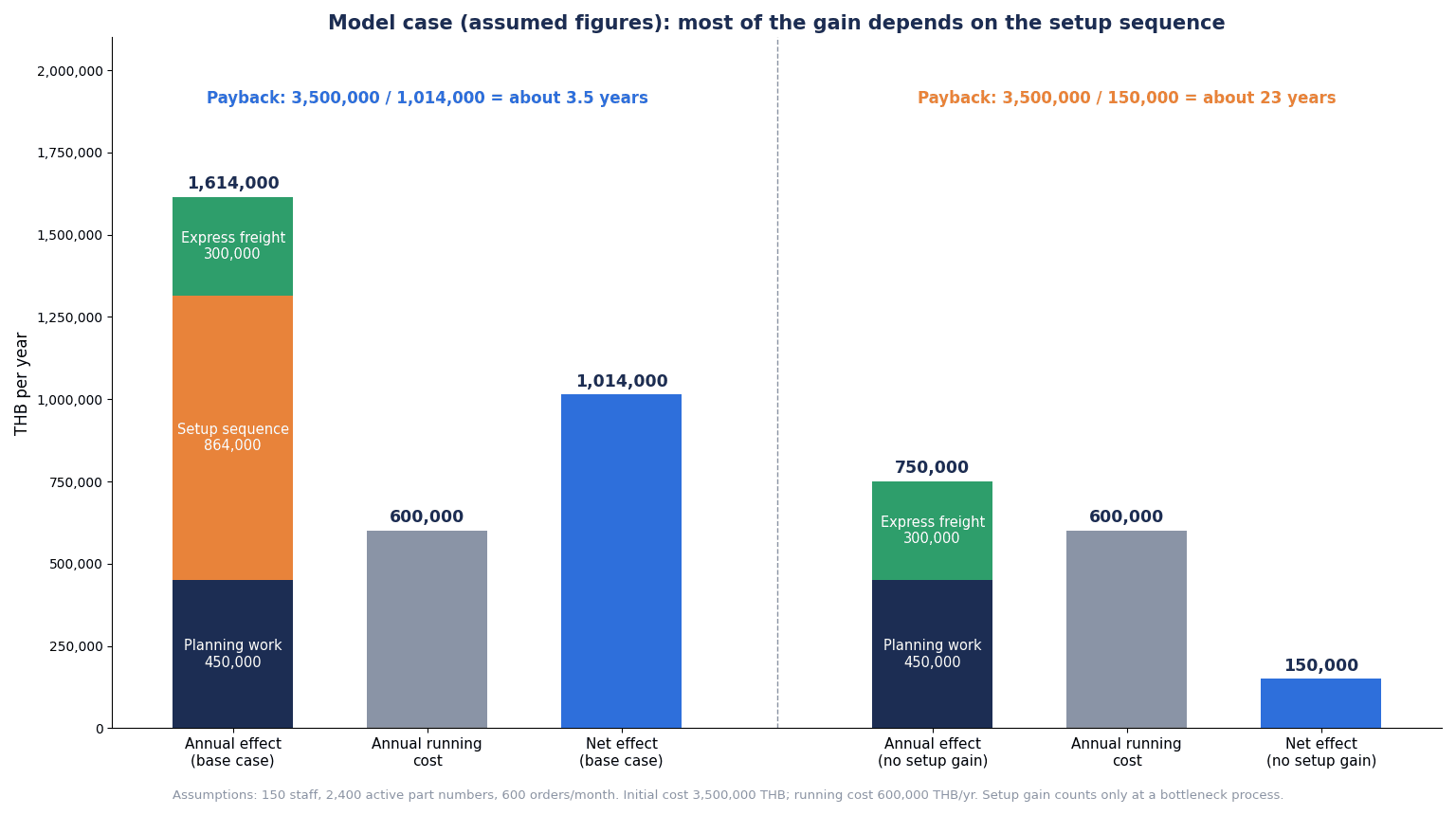
| Total | 450,000 + 864,000 + 300,000 | 1,614,000 THB |
Costs are set as follows.
- Initial cost: 3,500,000 baht (licenses, implementation, master data cleanup, data migration)
- Annual cost: 600,000 baht (subscription, maintenance)
The calculation is as follows.
- Annual net benefit: 1,614,000 – 600,000 = 1,014,000 baht/year
- Payback period: 3,500,000 / 1,014,000 ≈ 3.45 -> about 3.5 years
Sensitivity: when setups are not the bottleneck
Benefit (2) assumes that setups are eating into the bottleneck process’s capacity and that additional orders can be run in the freed-up time. In plants where this is not the case, benefit (2) is zero.
- Benefit: 450,000 + 300,000 = 750,000 baht/year
- Annual net benefit: 750,000 – 600,000 = 150,000 baht/year
- Payback period: 3,500,000 / 150,000 ≈ 23.3 -> about 23 years. In practice, the investment is not recovered
How to read this calculation
In this model, more than half of the benefit (864,000 of the 1,614,000 baht, about 54%) comes from revising setup sequences. In other words, before deciding on implementation, the first step is to measure whether the bottleneck process is clogged by setups. In a plant where setups are not the constraint, the same spending may not be recovered. In that case, options to consider include narrowing the implementation scope to administrative savings to lower the cost, or improving setups first.
What this calculation does not include
- Quality improvement, inventory reduction, overtime reduction
- Responding to difficulty in hiring
- Taxes and BOI incentives (not covered in this article)
Production Management System Selection: What to Check in the RFP and Demo
Ask with scenarios, not about whether functions exist
The key to production management system selection is not to ask “Do you have this function?” Most products can answer “Yes” when asked. The real question is how much configuration and manual work it takes to run your own orders.
So pick 3 of your real orders, give them to vendors in advance, and have them run each one all the way through in the demo (a scenario test).
- A typical order: A perfectly ordinary order from your highest-volume item group. Run it from order entry through material procurement, production instruction, actuals and shipment to costing
- A rush-order interruption: A rush order received after the plan was built. Look at the impact on the existing schedule, how the freeze window is handled and how setups are re-sequenced
- An order with an engineering change: An order whose specifications changed partway through production. Look at how BOM revisions, work in progress and costs are handled
If you are building a comprehensive list of functions, our article on production management system functions and RFP requirements can serve as a reference. This article summarizes in a table the items that high-mix low-volume plants should check in particular.
Checklist
| No. | Item | What to verify in the demo and acceptance |
|---|---|---|
| 1 | 3 scenario tests | Can your 3 real orders be run on screen all the way from order entry to costing? Where along the way are Excel or manual steps needed? |
| 2 | Item/BOM structure | Can you choose, per item group, between creating part numbers and using configurable items? How much effort do creating similar items and revisions take? |
| 3 | Setup handling | Can setup time be held as “previous item -> next item”? Can it propose sequences that group setups? |
| 4 | Scope of finite capacity | Can you choose which resources are planned with finite capacity? How are shifts and overtime handled? |
| 5 | Interruptions and freeze windows | Can you set a freeze window, show the impact of interruptions and keep a change history? |
| 6 | Granularity of actuals | Can you choose estimated-time or actual-time posting per process? Does it support starting multiple jobs at once? |
| 7 | Costing method | Can costing methods be split by item group? How much can be changed after go-live? |
| 8 | Master data migration | In what formats can items, BOMs and routings be imported from existing Excel files or legacy systems? Who cleans them up? |
| 9 | Multilingual UI | Does it support Thai, English and Japanese screens and reports? Can the language of item names and work instructions be switched? |
| 10 | Shop floor terminals | How far can tablets, barcodes and machine data capture reduce the number of shop floor inputs? |
| 11 | External integration | Integration methods with accounting, CAD/PLM, schedulers and machines, and resending on errors |
| 12 | Locks and permissions | Can rights to modify plans, masters and actuals be separated by role? How is simultaneous editing handled? |
| 13 | Support structure | Support desk in Thailand, supported languages, support hours, and how modification costs are determined |
In acceptance testing, please include deliberately difficult conditions, not just normal orders. For example, tests that run long-setup combinations back to back, insert an interruption inside the freeze window, or change the BOM revision partway through production. Perspectives for comparing several products side by side are also covered in our production management system comparison article and our production scheduler comparison article.
How to Proceed: From Production-Type Inventory to Scenario Tests in 90 Days
This is a guide to what to do in the 90 days before deciding on a product. The period varies with the size of the plant and the number of part numbers.
Days 1-30: Take stock of production types
- Split active part numbers into the 4 categories of order frequency x lot size (based on order history for the most recent year)
- For each item group, write “provisional answers” for (1) item/BOM structure, (2) planning unit and setup handling, (3) granularity of actuals and (4) costing method
- Identify the bottleneck process and measure its setup times for 1 month (this becomes the baseline for benefit (2) in the calculation)
- Measure how many hours per month go into re-planning and progress checks
Days 31-60: Prepare requirements and scenarios
- Agree on the answers to the 4 points among accounting, production control, the shop floor and sales. Decide the costing method with accounting in particular
- Choose 3 orders for the scenario tests (a typical order, a rush-order interruption, an order with an engineering change)
- Take stock of the current state of master data (duplicate part numbers, BOM revisions, whether routings exist)
- Write the RFP and give it to candidate vendors together with the 3 orders
Days 61-90: Demos and scenario tests
- In each vendor’s demo, have them run the 3 orders all the way through
- List the points where manual work or additional development was needed along the way, and compare across vendors
- Redo the benefit calculation with the measured figures. In particular, confirm whether the setup benefit holds
- Decide the internal staffing plan (who contributes what share of their time, for how many months)
The goal of the 90 days is not to decide on the product itself, but to assemble “4 answers that match the shape of your orders” and “the results of testing them.” Once you have that, comparing products becomes a comparison of the amount of manual work and additional development, not a comparison of feature lists.
What to Check Specifically at Thai Factories
Multiple languages and shop floor input load
In Thai factories, it is normal for managers to use Japanese, office staff English or Thai, and the shop floor Thai. If you do not first sort out who sees screens, reports, work instructions and item names in which language, you will end up rebuilding reports after implementation. Ease of input for shop floor operators is also as important as the granularity of actuals. If input becomes a burden, data gets entered in bulk afterwards, and comparing plan against actuals loses its meaning.
Relationship with equipment automation
In high-mix low-volume plants, equipment automation is sometimes considered at the same time as the production management system. Equipment concepts for reducing setup losses are covered in our article on high-mix variable-volume automation. If system and equipment plans proceed separately, both can move forward without deciding whether actuals will be captured from machines or entered by people, so it is safer to align the contact points for the two.
BOI and public digitalization support
The BOI’s “Smart and Sustainable Industry” measure is an investment promotion framework covering the adoption of digital technology and automation, and as seen earlier, it received 132 applications in the first half of 2026. However, whether your investment qualifies and what incentives apply are case-by-case judgments, so this article does not cover them. Please check with the BOI.
For SMEs, there is also the “SMEs Growth 2026” program led by Thailand’s Electronic Transactions Development Agency (ETDA). According to OpenGov Asia, SMEs’ digital maturity averages 2.45 out of 4.00; in 2026 the program is expanding to 16 provinces in 4 regions, with depa, OSMEP, SME D Bank and TCG cooperating. Manufacturing is also covered. However, the budget and subsidy rates were not stated in the article. Please check with each agency whether you can use it.
Frequently Asked Questions
What is high-mix low-volume production?
It is a mode of producing many kinds of products, each in small quantities. A 2025 report by TNO in the Netherlands describes it as focusing on one-off products or small batches of the same product, and states that because changeovers are frequent and economies of scale small, cost per product is generally higher than in low-mix high-volume production. If you divide items into 4 categories by order frequency and lot size (the J-Net21 classification), you can see which of your own items count as high-mix low-volume.
How do you choose a production management system suited to high-mix low-volume production?
Before comparing whether functions exist, decide the 4 points, (1) item/BOM structure, (2) planning unit and setup handling, (3) granularity of actuals and (4) costing method, to match the shape of your orders. Then give vendors 3 of your real orders (a typical order, a rush-order interruption and an order with an engineering change) and have them run each one all the way through in the demo. Comparing the amount of manual work and additional development needed along the way reveals the differences.
Is a production scheduler necessary?
It depends on the plant. In plants with a bottleneck process where setup time varies greatly depending on the combination of preceding and following items, a scheduler that can handle sequence-dependent setups has a large effect. In this article’s hypothetical calculation as well, more than half of the benefit came from revising setup sequences. Conversely, if setups are not the bottleneck, the planning functions of an ERP or production management package may be enough. We recommend first measuring setup times at the bottleneck process.
How much does it cost?
It varies greatly with the product, number of users, implementation scope and amount of master data cleanup. As examples of published list prices, on US websites Microsoft Dynamics 365 Business Central Premium is 110 dollars per user per month and Supply Chain Management is 210 dollars (viewed October 9, 2026, paid yearly), but prices in Thailand and implementation partner fees are separate. In this article’s hypothetical calculation, the initial cost was set at 3,500,000 baht and the annual cost at 600,000 baht. For how to think about total cost, see also the cost article.
Can we migrate from Excel?
Yes, but we do not recommend copying Excel straight into the system. Excel production planning sheets often mix duplicate part numbers, old BOMs and setup adjustments entered by individual judgment. First take stock of the item, BOM and routing masters and decide the structure for each item group, then migrate. Please confirm the migration format and who will clean up the master data with vendors at the RFP stage.
Can’t we use standard costing?
It is not that you can’t. Business Central’s documentation says the standard costing method suits repetitive manufacturing and cases where there is the discipline and staff to maintain standards. Even in high-mix low-volume plants, one approach is to split by item group, such as standard costing for high-frequency items close to repetitive production, and actual costs per job order or production order for engineer-to-order items. However, the costing method cannot be changed for items that have item ledger entries (in the case of Business Central), so it needs to be decided before implementation.
How long does implementation take?
It varies greatly by product and scope, so no single period can be given. This article showed a guide for the 90 days before deciding on a product, proceeding through taking stock of production types, agreeing on the 4 requirement points and running scenario tests. On internal staffing during implementation, Panorama Consulting’s 2019 ERP Report shows an average of 7 full-time staff for mid-sized and small companies (this is old data). As important as the period is deciding first who will contribute how much time.
Summary
- When a production management system doesn’t fit a high-mix low-volume plant, the cause is often not missing functions but choosing a product before deciding 4 points: (1) item/BOM structure, (2) planning unit and setup handling, (3) granularity of actuals and (4) costing method
- First split active part numbers into the 4 categories of order frequency x lot size (J-Net21), and write answers to the 4 points for each item group
- In plants where part numbers keep multiplying, consider representing items as configurable items and options. However, designing configuration rules is master data design work in itself
- In planning, check sequence-dependent setup times, the scope of finite capacity, and how interruptions and freeze windows are handled
- Actuals do not need to be collected in detail for every process; a realistic split is to focus on the bottleneck process and processes with long setups
- The costing method is hard to change later (in Business Central, it cannot be changed for items with item ledger entries), so decide it with accounting before implementation
- In the hypothetical calculation, more than half of the benefit came from revising setup sequences. If setups are not the bottleneck, the payback period stretches to about 23 years. Measure setups at the bottleneck process before implementation
- In the RFP, instead of asking whether functions exist, have vendors run 3 of your real orders (a typical order, a rush-order interruption and an order with an engineering change) all the way through in the demo
TOMAS TECH helps factories in Thailand organize production management system requirements, design master data and plan product selection to match the shape of their orders. You can also consult us before choosing a product, for example at the stage of dividing your items into the 4 categories of order frequency x lot size, or choosing orders to use in scenario tests. Please contact us through this form.
References
- The Star (Reuters): Thai August factory output rises 4.44% y/y, beats forecast (September 30, 2026)
- Trading Economics: Thailand Industrial Output Growth Beats Forecasts (September 30, 2026)
- Trading Economics: Thailand Manufacturing Sector Hits 9-Month High (October 1, 2026)
- Nation Thailand: Thai exports surge 24.3% in August as AI demand lifts electronics (September 25, 2026)
- BOI: Press Release No.117/2569 (July 23, 2026)
- Tilleke & Gibbins: Thailand Increases Minimum Wage across All Provinces (January 2, 2025)
- Chambers: Thailand Employee Welfare Fund Contributions to Commence (August 19, 2026)
- OpenGov Asia: Thailand expands SMEs Growth 2026 programme (May 6, 2026)
- TNO: Performance engineering of high-mix low-volume production systems (March 14, 2025)
- SAP Help: Production Planning and Control (PP)
- SAP Learning: Introducing Variant Configuration
- Microsoft Learn: Product configuration overview
- Microsoft Learn: Understand unified manufacturing
- Microsoft Learn: Finite capacity planning and scheduling
- Microsoft Learn: Registration for manufacturing execution
- Microsoft Learn: Design details – Costing methods (Business Central)
- Microsoft Learn: About unit cost calculation (Business Central)
- J-Net21 (SMRJ): Q&A on improving efficiency in high-mix low-volume production (in Japanese)
- MIT DSpace: Scheduling in a High-Mix Low-Volume Job Shop (May 2024)
- Brother: What Is High-Mix Low-Volume Production? (May 13, 2026)
- MarketScale: Rockwell Automation report: 93% of manufacturers have MES (July 17, 2026)
- Panorama Consulting: Release of the 2026 ERP Report (March 4, 2026)
- Panorama Consulting: How Much Does It Cost To Implement An ERP System On Average? (March 1, 2020)
- Microsoft: Business Central pricing (viewed October 9, 2026)
- Microsoft: Supply Chain Management pricing (viewed October 9, 2026)
- Odoo: Pricing (viewed October 9, 2026)


