


When selecting stack lights (tower lights) for a factory, simply thinking “as long as red, yellow, and green light up, it’s fine” can lead to problems after installation: they may not be visible or audible, may not match equipment status, there may be insufficient PLC outputs, or maintenance staff may not be able to explain their meaning. Stack lights are terminals that communicate equipment status to people. You must define not only the colors, but also which signals are received, when to turn on/off, who will view them from where, and what actions operators should take—all as a set. This article is a practical guide for updating or installing equipment in Thai factories, enabling control panel designers, HMI engineers, maintenance, purchasing, and production engineering to compare candidates under the same conditions.
There are five central questions: ① Are the displayed statuses and color meanings consistent on the shop floor? ② Can they be reliably driven from the PLC or I/O? ③ Is the structure suitable for noise, dust, cleaning, and viewing distance? ④ Can maintenance staff manage replacements and setting changes? ⑤ Can misdisplays or communication loss be reproduced in RFP and FAT/SAT? This is not a recommendation of specific manufacturers or model numbers. IEC public guides are used to confirm the scope of standards, and manufacturer materials are used to check connection examples for those products, but individual product specifications are not generalized.
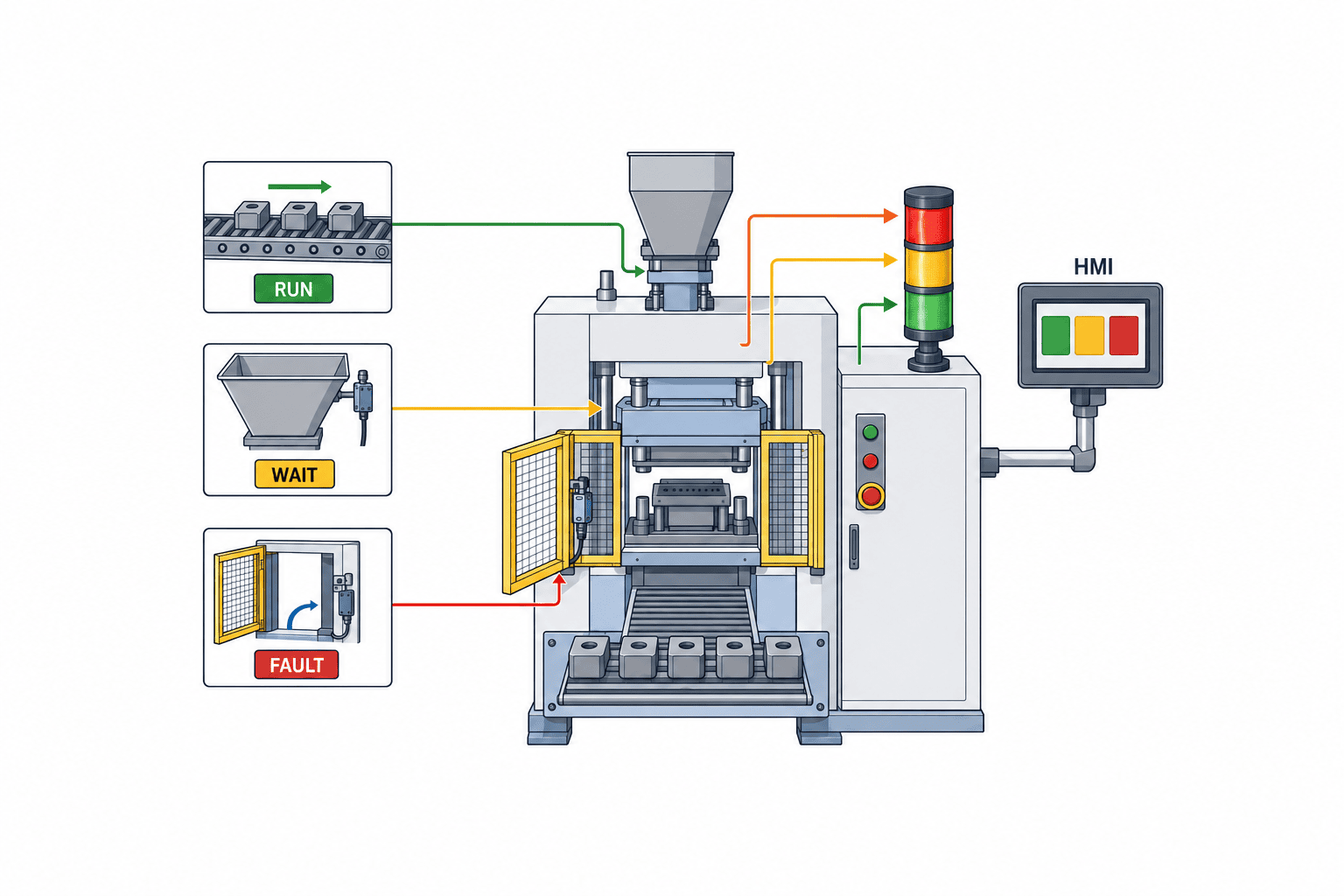
First, Define “Equipment Status → Human Action”
Do not start stack light design by choosing colors; start by listing the possible equipment statuses and the expected actions. For example, during automatic operation, setup changeover waiting, material supply waiting, quality check waiting, abnormal stop, emergency stop, communication error, or during maintenance, the equipment may all be “stopped,” but the required operator response differs. List all signals the equipment can output, decide the priority when statuses overlap, and separate the roles of stack lights, HMI, buzzers, and Andon screens. If you need to record stop reasons, align with the article on manufacturing downtime reason code management.
For example, if both “no material” and “safety door open” are indicated by the same yellow light, operators must return to the equipment to investigate the cause. On the other hand, if you use too many colors, they become indistinguishable from a distance, and meanings may vary across multiple lines. Use colors for major statuses, blinking or buzzers for priority, HMI for detailed reasons, and history screens for time and duration—thus separating information granularity. Divide the people who need the display into equipment operators, line leaders, maintenance, and quality assurance, and check on-site who will view it from what distance and angle. A light installed behind a pillar, invisible from the opposite side of the aisle, will not serve its purpose even if its catalog brightness is sufficient.
| Example Status | Action Taken by Person | What to Define in Display Design | Where to Place Detailed Info |
|---|---|---|---|
| Automatic Operation | Routine monitoring | Lighting conditions, handling immediately after startup | HMI operation screen |
| Material Supply Waiting | Supply specified material | Delay from empty detection to display | HMI part number/location |
| Quality Check Waiting | Hold item until judgment | Who can release | Quality records |
| Equipment Abnormality | Ensure safety, call responder | Priority, blinking, buzzer | Alarm history |
| Communication Error | Check display reliability | Default state and recovery method | Diagnostic screen |
Stack Light Colors and Meanings: Check Against Standards, Factory Rules, and Customer Requirements
IEC 60073:2002 covers coding principles for indicators and actuators in human-machine interfaces, and IEC 61310-1:2007 covers requirements for display, marking, and actuation on machinery. Do not conclude detailed standard wording such as “red always means this on all equipment” based only on these public pages. Confirm the scope of application, the version cited in contracts, the current version, and the safety assessment of the machinery, and cross-check with the equipment specification’s definitions for color, blinking, and sound. If your factory has its own color coding, ensure it is understandable to first-time operators through training and display charts.
Colors alone cannot fully express status. Contradictions such as red and green lighting simultaneously, green remaining on during changeover, or operation indication lighting during maintenance can cause operators to misinterpret equipment status. Create a state transition table, clarify priorities when multiple requests occur, mutual exclusion conditions for lights, meanings of blinking patterns, behavior immediately after power-on, and after PLC restart. Consider color vision differences, ambient lighting, visibility from the rear, and confusion with lights from other lines. Use multiple cues such as position, blinking, HMI text, and sound in addition to color. However, do not overuse blinking or sound, as they may be ignored due to habituation—reserve them for high-urgency states.
Distinguish between safety functions and display. Do not rely solely on stack lights for the safety performance of emergency stop circuits. Safety inputs and interlocks should be handled by appropriate safety design, and stack lights should be used as an auxiliary to communicate results and required actions. For example, for safety door opening/closing, select the door switch and safety control first, and then match the display state afterward. Also refer to the article on safety door switch selection. If a design would lose safety function when the stack light fails, do not try to solve it by stack light selection alone—review the safety architecture.
PLC Connection Methods: Compare Individual Outputs, Relay Contacts, and IO-Link
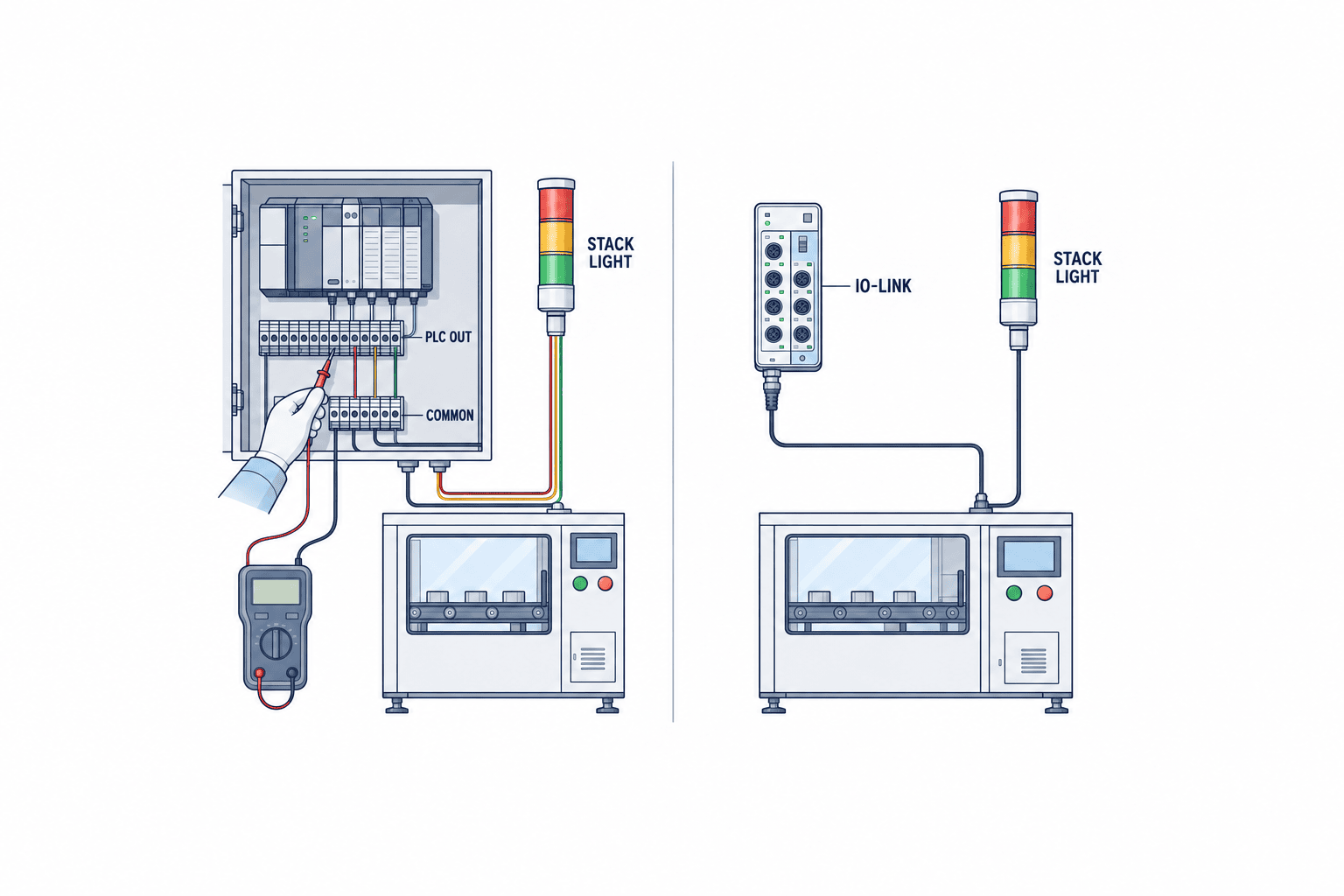
Connecting stack lights to PLCs can be done via individual control for each color, multi-wire types including buzzers, or communication-capable models. The best choice depends on the number of available PLC outputs, wiring distance, panel space, future status additions, and the need for fault diagnostics. Before purchase, cross-check PLC output method, supply voltage, current consumption, wiring polarity, common line, protection devices, and connector type in both sets of documentation. Even similar model numbers may have different power and control methods, so do not create drawings based only on series names. For terminal block specifications and maintainability, refer to the article on control panel terminal block selection.
The individual output method allows each color and buzzer to be directly controlled by PLC outputs, and may be easy to add to existing panels. However, you must check the number of output points and wires, load capacity, and fault isolation. Confirm whether the PLC outputs are transistor or relay, sink or source, and which type the stack light accepts, based on the actual model numbers. For relay contacts, consider contact capacity and lifespan; for semiconductor outputs, consider micro-lighting due to leakage current; for inductive loads, consider whether protection is needed. Perform required tests according to the adopted model’s manual—do not decide wiring based on generalities alone.
If selecting IO-Link compatible products, according to the IO-Link Community, IO-Link is a point-to-point communication technology for sensors/actuators and masters. The advantages are settings and diagnostics via communication, but on the PLC side, you need a compatible master, device description, data mapping, setting restoration, and display policy in case of failure. WERMA’s eSIGN IO-Link function manual shows segment and effect settings for a specific product, but not all IO-Link stack lights have all those features. In purchasing, do not score only on “IO-Link compatible”—require tests for necessary display patterns, diagnostic items, and master-device combinations. Whether it is worth fully upgrading existing PLCs and panels for communication depends on replacement frequency and expected operational changes.
| Connection Method | Suitable Situations | Design Points to Check | FAT/SAT Focus |
|---|---|---|---|
| Individual PLC Output | Limited number of statuses, existing I/O usable | Output points, polarity, load, common line | Individual control of all lights/buzzer |
| Contact/Relay | Need for panel-side isolation or contact separation | Contact capacity, wiring, state during failure | Contact disconnection, re-energizing |
| IO-Link | Utilize setting changes/diagnostics | Master, IODD, mapping, recovery | Communication loss, setting restoration, alternatives |
Installation Environment: Confirm IP Rating, Visibility, and Mounting Method On-Site
IEC 60529 deals with the classification of enclosure protection ratings, commonly known as the IP Code. For stack lights, the IP rating indicated depends on the selected model number, mounting orientation, gasket, cable entry, buzzer section, and assembly condition. For example, “having an IP rating in the series” is not the same as being resistant to local cleaning agents, high-pressure washing, or cutting oil. Always read the manufacturer’s instruction manual for the intended environment and installation conditions, and consider protective covers or changing the installation position if necessary. Do not lump together heat, vibration, sunlight, dust, and chemicals as a generic “factory environment”—record the specific conditions for each installation location.
The height and orientation of the stack light should be determined based on whether it is visible to operators beside the equipment, supervisors in the aisle, and AGV drivers. There are factors that cannot be understood from drawings alone, such as the light being hidden when a machine door is opened, being blocked by cranes or piping, or overlapping with adjacent lines. Temporarily fix a sample unit and check visibility under both daytime and night shift lighting conditions; if the light is too bright and causes fatigue, also evaluate the possibility of adjustment. When installing multiple machines, prevent confusion between lights of the same color by displaying equipment numbers, aligning installation intervals, and standardizing viewing directions. A key selection criterion is ensuring that operators do not mistake which equipment to go to next based on the lights.
If a buzzer is included, check the factory’s background noise, use of earplugs or protective gear, sounds from adjacent equipment, and nighttime noise restrictions. Do not assume “it can be heard” based solely on the catalog’s sound pressure value—test it at the actual work location. If you need to distinguish between short alerts and long fault calls, document the meaning of each sound, and ensure that silencing the buzzer does not clear fault indications or safe states. The buzzer is a means to call people and does not necessarily meet safety alarm requirements. Confirm the relevant risk assessment and workplace rules separately.
Wiring, Installation, and Maintenance: Do Not Assume Model Compatibility
The PATLITE LR Series operation manual and WERMA eSIGN function manual are primary references for checking assembly, connection, configuration, and maintenance by model number. The order of modules, usable colors, base section, power section, buzzer, mounting parts, and cable outlets all depend on the product configuration. Even if the appearance is similar, parts may not be interchangeable; when replacing, cross-check the adopted configuration table with the manufacturer’s compatibility list. For spare parts, do not just order “one light”—confirm the replacement unit, color modules, base, mounting hardware, connectors, and gaskets required for replacement.
For cables from the control panel to the stack light, consider the number of power and signal wires, need for shielding, bending at moving parts, routing with other power lines, protective conduits, and connector maintainability. Malfunctions where the display is reversed after installation can be caused not only by logic errors but also by mistakes in wiring numbers or common wires. Align terminal block diagrams, I/O tables, cable numbers, output addresses for each color, PLC program versions, and on-site labels to the same revision, and check each line during FAT (Factory Acceptance Test). If wiring is changed on-site during installation, do not just mark it with a red pen—reflect the changes in the final drawings.
If you change the stack light that the equipment manufacturer installs as standard, check the output capacity of the existing PLC, warranty conditions, and impact on internal panel circuits. For stack lights added later by the factory, the alarm and status definitions may differ from those of the equipment manufacturer, so clearly define the division of responsibilities. The on-site replacement procedure should include conditions for cutting power, checking replacement parts, testing all colors and buzzer after restoration, and maintenance records. For lines where equipment shutdown is difficult, measure the required downtime for replacement during prototyping, and if necessary, evaluate detachable structures or spare units.
Status Logic: Define Priorities, Flashing, Muting, and Recovery in a Status Table
In PLC programming, explicitly define the priority when multiple requests become true at the same time. For example, if a material shortage occurs during operation and then a safety door is opened, use a status table to decide whether the previous indication remains or switches to the higher-priority state. Also specify whether the abnormal state indication remains after the buzzer is silenced, whether the fault history is retained until a confirmation operation even after the fault is cleared, and from which state to resume after power restoration. “The PLC will handle it automatically” is not sufficient for testing. Clearly document state transitions, timers, holding conditions, and reset authority.
The stack light indicating an abnormality and the command to operate the equipment are separate. If a remote HMI clears an alarm but the problem remains on-site, consider whether the stack light should also be turned off. When passing status to networked Andon or operation monitoring systems, link the stack light’s lighting conditions and the upper-level data status to the same PLC signal, and prepare a diagnostic method for when inconsistencies occur. If the upper-level system loses communication, one design approach is for the PLC to continue local indication, while the upper-level screen shows the last received time and an unknown state. However, the final operation should be determined by on-site safety and operational requirements.
Even if the stack light model has self-diagnosis, whether it is physically visible to operators is a separate issue. During monthly inspections, check all segments, buzzer, mounting condition, and cleanliness, and record in the maintenance ledger which equipment cannot display in case of failure. To prevent display patterns from becoming person-dependent, manage a factory-wide status dictionary, exceptions for individual equipment, and the approved revision date. When adding new statuses later, do not arbitrarily reuse colors or flashing patterns—update training materials, HMI, display tables, and test records simultaneously.
RFP Requirements: Make Questions Comparable
Design the Display for Power Loss and Restart to Prevent Misinterpretation on the Shop Floor
Whether the stack light’s power is sourced from the same circuit as the main equipment or from the control panel’s auxiliary power affects what is visible during a power outage. There may be cases where only the PLC restarts while the tower light remains powered, or conversely, only the light turns off. Even if the equipment has safely stopped, operators may see the light off and assume it means “stopped.” Ensure that the cause of the stop and whether restart is allowed can be checked from another information source. Clearly indicate the power circuits and monitoring points on the panel diagram, and do not leave ambiguity about whether a lamp being off means “normal,” “stopped,” or “power loss.”
During restart testing, observe the brief indeterminate state immediately after power is applied, PLC program initialization, communication master recovery, and HMI startup sequence. Momentary misindications—such as all lights turning on for an instant, or green lighting up before switching to an abnormal state—can confuse on-site judgment. If you implement filters or lighting delays, adjust them based on risk assessment and state priority so that necessary alarms are not delayed. For failures where outputs are fixed, cable disconnections, or communication loss, confirm with the actual product and PLC implementation which state the stack light will fall into; do not simply call it “fail-safe” as a general rule.
In processes where equipment stoppage directly affects quality, the stack light status may be linked to maintenance or quality records. However, the lighting time of the tower light does not always match the equipment stop time. For example, if the red light is set to remain on until the alarm is acknowledged, the light will stay red even after the stop is resolved. For KPI aggregation, separately record PLC operation events and alarm histories, and treat the stack light as an interface to prompt operator action. If operators manually record stop reasons based on the color, display the reason codes on the HMI to avoid confusion.
In Multilingual Thai Factories, Do Not Rely Solely on Translation for Display Meanings
When Thai, Japanese, and English-speaking staff use the same line, the meaning of colors may be common, but translations of terms like “abnormal,” “standby,” or “setup” can differ by department. In the state dictionary, link state codes with Thai operator explanations, English terms for equipment drawings, and Japanese terms for head office reports, to standardize actions rather than just translations. For example, when “waiting for material” is displayed, specify whether to bring materials, check the production plan, or call the responsible person. Do not rely solely on color for operator training; use the actual equipment to practice lighting patterns and initial actions.
Night shift and backup staff have fewer opportunities to experience exceptional equipment states, so initial training should include not only normal operation but also simultaneous multiple alarms, mute operations, and post-recovery checks. Keep quick reference charts posted inside panel doors or on the HMI up to date, ensuring old color rules do not remain. When the head office modifies PLC logic for a Thai factory, update local procedures, HMI wording, training materials, and FAT/SAT records with the same change notice. If only the meaning of the stack light changes after a remote program update, the shop floor may operate without knowing the new rules.
Include local operators in verifying installation positions. The position engineers view during equipment stoppage and the position operators see while carrying materials are different. In multilingual environments, do not rely on color or sound alone to convey urgency; use short action messages and equipment numbers on the HMI as well. Adding small text labels to the stack light is ineffective from a distance, so separate the states that need to be known from afar from the details checked up close.
Evaluate Economic Efficiency by Including Changes and Maintenance, Not Just Unit Price
If you select a stack light based only on price differences, costs may increase later due to additional PLC output points, control panel space, extra cabling, equipment downtime, and spare parts inventory. In the comparison table, include initial configuration, installation work, testing, training, spare parts, future segment changes, maintenance software or masters, and replacement compatibility at removal. When replacing old models, it is also important to check if existing mounting holes and wiring can be used, and if the same display meanings can be reproduced. Even if a low-cost compatible product appears to have the same color, differences in brightness or flashing speed may deviate from the factory standard.
From a lifecycle perspective, check whether only one color can be replaced in case of failure, whether the whole unit must be replaced, and whether the same model number can be procured locally. If you keep spare parts, manage storage conditions and model revisions, and verify the configuration before handing parts over to the shop floor. For IO-Link compatible products, save the configuration files and IODD version, and test whether the same display is achieved after replacement. For multi-wire types, it is important to correctly transfer wiring numbers and terminal diagrams. In both cases, simply “having spare parts” is not enough for recovery; include replacement and recovery testing in the procedures.
From a business continuity perspective, you may choose to use high-function models only for critical equipment, prioritize common parts, or reduce configuration complexity. There is no universally optimal solution. On lines with frequent changes, flexible configuration is valuable; on simple equipment with fixed states, the clarity of direct wiring may be more valuable. In the RFP, have vendors present the total cost and maintenance conditions for the entire configuration over the same period and scope, so that the reasons for selection can be explained later by the shop floor.
Even after standardizing the selection results, regularly check alternative candidates in preparation for product discontinuation or component changes. When adopting alternatives, do not replace them just because mounting dimensions or power supply are the same; retest color visibility, buzzer, PLC signals, configuration restoration, and environmental conditions. Record the target equipment and installation quantity, old and new model numbers, test results, and whether operator retraining is needed in the change management form. Even though stack lights are small components, the more they are standardized across many pieces of equipment in the factory, the greater the impact of changes.
If you write only “three-color stack light, with buzzer, for indoor use” in the purchasing RFP, vendors will propose products with different wiring methods, mounting methods, and environmental conditions. Attach the machine state table, site photos, installation positions, PLC model and I/O method, distance from the panel, power supply, cleaning/dust/vibration conditions, existing maintenance parts, and desired diagnostic items. Divide specifications into mandatory, conditional, and future consideration, and have each vendor respond in the same table with conformity, differences, and alternatives. If you require a specific manufacturer’s function, verify whether it is operationally necessary.
The quotation scope should include the light body, base, mounting brackets, cables, connectors, additional PLC outputs, IO-Link master, configuration software, spare parts, installation, on-site testing, drawing revisions, and training. Even if the unit price is low, if control panel modifications are extensive, the total cost may be higher. Before ordering, ask about parts supply period, local procurement, configuration restoration during replacement, and deployment units for multiple pieces of equipment. Record performance values together with the applicable conditions from manufacturer documentation, and do not treat specification values as equivalent if test conditions differ. Also distinguish whether you require self-declaration of standard compliance, certification, or test reports.
| RFP Item | Vendor Response Required | Acceptance Check |
|---|---|---|
| Status Display | Color, flashing, and sound mapping to state table | Demonstrate simultaneous states and recovery |
| PLC Connection | Power supply, polarity, load, terminal diagram by model | Wiring and operation of all outputs |
| Environmental Suitability | IP rating conditions, temperature, washability | Check mounting orientation and installation |
| Visibility & Sound | Installation drawing, light/sound adjustment method | Confirm at actual work positions |
| Maintenance | Replacement unit, spare parts, configuration backup | Demonstrate failure replacement and recovery |
FAT and SAT: Testing Not Just for Illumination, but Also for Incorrect Indication
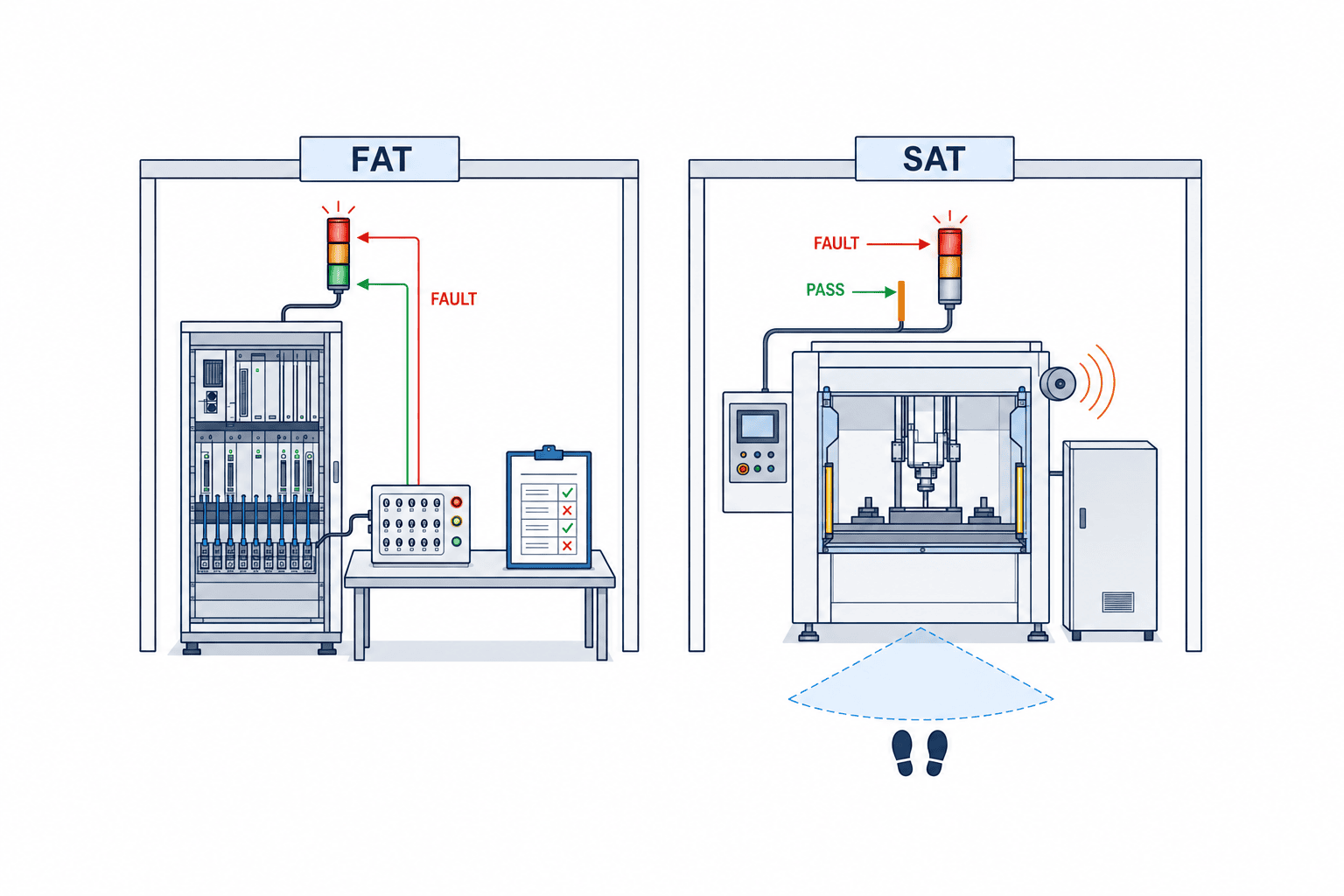
During FAT (Factory Acceptance Test), at the vendor’s or equipment manufacturer’s site, each segment and buzzer of the stack light/tower light is individually activated according to the I/O list and PLC program, and the priority of each status is checked. Simulated inputs such as “Operating + Material Out,” “Material Out + Safety Door Open,” “Communication Failure,” “Power Recycle,” and “Output Disconnection” are created, and it is recorded whether the indications transition as planned. For individual output types, each terminal and load are checked; for IO-Link types, the master settings, IODD, parameter restoration after communication recovery, and replacement with alternatives are included. Passing FAT does not prove that the system can be seen and heard on-site, so environmental conditions are checked during SAT.
During SAT (Site Acceptance Test), the stack light is installed on actual equipment at the Thai factory, and checks are made for lighting conditions during day and night shifts, ambient noise during normal operation, operator positions, door opening/closing, cleaning methods, and line-of-sight from aisles. Tests that generate actual PLC signals are conducted following safety procedures, and downtime is secured if necessary. On-site workers are asked to confirm the possibility of confusion with adjacent lines, the orientation of the stack light, and the audible range of the buzzer. When simulating a failure where the indicator turns off, it is also tested whether the site can confirm the status via HMI or patrol. Requirements related to machine safety are handled by separate verification procedures, not as part of the stack light test.
The pass/fail criteria are not just “the light turned on,” but also specify input conditions, expected color, flashing, sound, response, logs, and recovery actions. For example, it is checked that the green operation indication does not remain during a red abnormality request, that the abnormal indication is maintained even after the buzzer is silenced, and that old alarms are not automatically cleared when communication is restored. The test conditions are design examples and should be finalized according to the risk assessment and work procedures of the equipment being adopted. As evidence, prepare the I/O list, PLC version, wiring diagram, on-site photos, operation logs, and records of nonconformities and corrective actions. To prevent transitioning to mass production with unresolved incorrect indications, assign a responsible person for Go/No-Go decisions.
Implementation and Standardization: Learn from One Line Before Expanding
First, investigate the colors and meanings used in existing equipment, and list whether red or yellow are used for different purposes within the same factory. There is no need to retrofit all equipment at once. For a single unit on a new line, prepare a status dictionary, PLC signals, stack light configuration, installation position, and acceptance test, and check the on-site response. While the meanings differ between old and new equipment, prepare a transition indication table and training materials. If only the color change is implemented first, experienced workers may judge by the old rules, which is dangerous. Before expanding, assess the risks during the mixed-use period.
Next, standardize control panel design drawings, I/O naming, HMI alarm messages, maintenance spare parts, and test procedures. Connection reliability, discussed in the industrial connector selection article, is also important for movable equipment and locations with frequent replacements. However, standardization does not mean using the same stack light for all equipment. Even if the models differ due to cleaning requirements on food lines, sunlight on outdoor equipment, or close-range visibility on assembly lines, the meanings of statuses and actions can be unified. The one-page status table distributed to the site should include color, flashing, sound, responsible person, initial safety action, and the HMI screen for detailed confirmation.
After implementation, do not judge effectiveness solely by the “number of abnormality notifications.” Check whether operators could identify the cause by looking at the stack light, whether the call reached the responsible person, whether there were any incorrect indications or alarms that would not clear, and whether replacement took too long. If the cause code and indication state do not match, cross-check the PLC signals, HMI, upper-level data, and operator recognition. Stack lights are a small interface to speed up on-site decision-making. Rather than adding more indication patterns, it may be more effective to reduce unnecessary alarms and consistently maintain the intended meanings.
Troubleshooting When “The Indicator Light Is Wrong” Is Reported On Site
When the indicator display does not match expectations, before immediately replacing the indicator itself, check in the following order: ① the actual equipment status, ② PLC input, ③ PLC internal status judgment, ④ output address, ⑤ signal at the terminal, and ⑥ indicator illumination. Even if the site reports “the red light is on,” the PLC may be holding a different error code. Conversely, even if the PLC is outputting the correct signal, wiring swaps, connector contact failures, or module mounting mistakes can cause the wrong color to appear. For maintenance records, log the occurrence time, equipment status, photos, PLC signal values, recent modifications, and reproduction conditions, so that the issue is not simply closed as “indicator lamp failure.”
If the issue is intermittent, investigate whether it is related to vibration, door opening/closing, immediately after cleaning, temperature, or specific operation modes. If the HMI and the indicator show different statuses, check whether both are referencing the same status code and whether only one is set to retain past states. For IO-Link models, check the master port status, communication quality, configuration version, and parameters after replacement. For multi-wire types, measure the voltage of each output and the common line according to safety procedures. Changing PLC logic before isolating the cause may hide the conditions that reproduce the incorrect display.
Also, decide on temporary operation procedures when a fault is found. If you continue to use equipment with unreliable indicators, inform the site, prepare alternative checks such as HMI displays or operator patrols, and set a repair deadline and responsible person. If safety-critical states were monitored only by the indicator, reassess the risk to ensure alternative procedures are sufficient. After replacement, do not finish with just normal operation checks—retest abnormal, standby, mute, power cycle, and multiple state priority conditions. If the problem occurs not just on one machine but on multiple units of the same model, check installation methods and common program versions across all affected units.
For post-installation acceptance records, do not simply copy catalog specifications; also document who was able to read the display and from where. Define observation points for each role, such as the front of the equipment, material supply positions, and leader patrol routes, and reproduce the conditions for both day and night shifts. If the indicator light overlaps with lighting from adjacent equipment, do not rely solely on camera photos—verify visibility from the operator’s perspective and while moving. For sound signals, record actual conditions such as normal operation, ventilation system running, and while wearing protective equipment. By documenting the locations and conditions of these tests, you can later determine whether retesting is necessary if the equipment is relocated.
After acceptance, if the line layout, equipment numbers, adjacent machines, or operator flow change, the visibility and conveyed meaning of indicator lights may be affected, even if the lights themselves are functioning correctly. The same applies to PLC program revisions, HMI alarm message changes, or buzzer setting adjustments. In change management, do not only check whether the indicator model has changed; also inspect state inputs, priority settings, outputs, mounting positions, and observation points. For critical states, have site representatives confirm the actions they take upon seeing the indicator, and continuously verify that what is shown on the drawings matches actual communication on the shop floor.
Frequently Asked Questions: Selection and Acceptance of Stack Lights
Should the meaning of stack light colors be the same across the entire factory?
Create a common status dictionary to avoid contradictions in meaning within the factory. However, it is not necessary to express detailed causes by color alone. Check the applicable scope and version of IEC 60073 and IEC 61310-1, and prioritize machine safety assessments and customer requirements when defining equipment specifications. Also test on-site, including color vision, visibility position, HMI wording, flashing, and sound.
What should be checked when connecting stack lights to a PLC?
Check the power supply of the selected model, PLC output type/polarity/capacity, common lines, cables, terminal diagrams, and the required number of I/O points. For IO-Link types, also check the master, IODD, data mapping, and indication and setting restoration after communication failure. Do not judge wiring compatibility by series name alone; during FAT, test all colors and buzzer in simultaneous operation.
How should buzzers and IP ratings be selected?
Check the IP rating of the model and installation conditions, and compare with actual site conditions such as cleaning, oil, dust, and outdoor use. Do not assume chemical resistance or high-pressure wash compatibility based solely on IEC 60529 classification. For buzzers, test whether they can be heard during normal operation noise, with protective equipment, at operator positions, and under nighttime restrictions, and decide in the status table whether the abnormal indication remains after silencing.
What are the pass/fail criteria for RFP and FAT/SAT?
Specify the status table, wiring/environment/installation/maintenance conditions, additional parts, and test scope in the RFP. During FAT, check PLC logic and outputs, simultaneous states, communication failure, and recovery; during SAT, check actual visibility, audibility, confusion with other equipment, and installation condition. Test not only for normal illumination, but also whether incorrect simultaneous color indications or behavior during no signal are as expected.
Summary
When selecting stack lights for a factory, do not choose based on the number of colors or price alone. Integrate equipment status, operator actions, PLC signals, installation environment, maintenance, and acceptance testing into a single specification. Use IEC standard pages as an entry point to check the scope of coding and IP classification, and verify the specifications of the selected model with the manufacturer’s current manual. By testing overlapping statuses, communication failures, and visibility/audibility during night shifts, you can turn a simple light into an indicator that the site can trust and use.
At TOMAS TECH, we can support you in organizing RFP and FAT/SAT items for stack lights by checking the control panel, PLC, HMI, and on-site indication rules at Thai factories. Even before comparing candidate models, feel free to contact us.
Reference Information
- IEC 60073:2002 Public Information (Principles for coding of indicators and actuators. Check the main text for detailed requirements and applicable versions.)
- IEC 61310-1:2007 Public Information (Indication, marking, and actuation of machinery. Check the main text for detailed requirements and applicable versions.)
- IEC 60529 IP Code Public Information (Classification of degrees of protection provided by enclosures)
- PATLITE LR Series Operation Manual (Installation and connection documentation specific to the LR Series)
- WERMA eSIGN IO-Link Functional Description (Configuration documentation specific to eSIGN)
- IO-Link Community: Technology (Overview of point-to-point communication)


