


When you are put in charge of BOI raw material inventory, the first problem you run into is that “the three balances don’t match.” There is the quantity shown by your in-house inventory system, the physical stock counted in the warehouse, and the balance in RMTS Online at the Investor Club Association (IC). These three drift apart every month-end, write-offs after export pile up, and the person in charge scrambles every time Max Stock has to be applied for again. When that person leaves, nobody can explain the formulas in the Excel files left behind. This is not an unusual sight at BOI-promoted Japanese-affiliated automotive parts, electronic components, plastic molding and metal processing plants in Thailand.
This article is a practical guide for production control managers, warehouse and materials staff, accounting and import/export staff, and plant managers at Thai factories that import raw materials duty-free under BOI Section 36(1). It explains how to hold raw material inventory “in a form IC can reconcile.”
This article makes one argument. BOI raw material inventory management is not “clerical work of reporting correctly to IC.” It is a “design” problem: holding your in-house item master, formulas (BOM) and export entry data at a granularity that RMTS can reconcile. In most cases, the reason write-offs pile up is not a lack of effort by the staff in charge. Most causes come down to the following 4 points.
- (1) Item names and units do not correspond one-to-one with the RMTS raw material list
- (2) Formula revisions and the actual production BOM are managed separately
- (3) Export entry numbers (14 digits), line numbers and model names are not linked to shipment data
- (4) Loss (within the formula) and scrap (outside the formula) are not recorded separately
And from January 2027, the IC fee schedule raises the fee for “write-off of export entries more than 1 year after export.” Now that the cost of letting entries pile up is rising, this is a good time to fix the in-house system side.
Note that this article explains the general mechanism of the scheme and system design; it is not tax or legal advice. It does not calculate customs duty payable, surcharges or the corporate income tax treatment. For individual decisions, check with the BOI, IC and your accounting firm. The amounts, counts and hours in the model calculation are placeholder figures set for this article.
Why review BOI raw material inventory management now
The IC fee revision from January 2027
The most recent development is the fee schedule dated September 17, 2026, published by IC. This fee schedule carries the note “these fees apply until December 31, 2026,” and it then specifies 3 items revised from January 1, 2027.
| Item | Until December 31, 2026 | From January 1, 2027 |
|---|---|---|
| Write-off of export entries more than 1 year after export | 100 baht per entry | 500 baht per entry |
| Write-off of export entries that cannot be written off paperless because conditions are not met | 1,000 baht per entry | 500 baht per entry |
| Write-off based on a permit to export raw materials overseas, where the raw material name does not match the conditions | — | 500 baht per entry (new) |
All of these exclude VAT. For write-off of entries older than 1 year, 0.50 baht per line is added when an entry exceeds 100 lines. The same fee schedule also lists, as fees for regular machinery and raw material services, a tier of 40 baht per item if the monthly number of invoices and entries is 1 to 1,000, and 30 baht per item if it is 1,001 or more.
The key point here is that, from 2027, export entries left unwritten-off for more than 1 year will cost 5 times as much per entry. On the other hand, the fee for entries that cannot be processed paperless goes down. In other words, the fee schedule can be read as steering companies toward “writing off early, paperless, and in line with the conditions.” However, this fee schedule is only a time-limited table. Beyond the 3 items it specifies, the overall fees from 2027 onward cannot be stated with certainty. Check the latest fees with IC.
RMTS Operation Manual Version 3.0 and the Service Catalogue
IC posted the “RMTS Operation Manual Version 3.0” (83 pages) dated August 31, 2026, and in the same month of August also posted the RMTS Online Service Catalogue. Both are primary sources in which you can confirm the current screen layout, input fields and processing times. When writing requirements for an in-house system, it is safest to use these 2026 documents as the baseline.
The IC official website appears to have been redesigned, and as of October 9, 2026, the old URLs of previous RMTS-related pages and manuals no longer open. If your internal procedures contain old URLs, it is a good idea to update them.
No change to Section 36 itself was found in this research
On the other hand, no BOI announcement from 2025 to 2026 that changes the Section 36 raw material rules themselves was found in this research. The BOI press releases of September 2026 (the “BOI to IPO” measure and the review of investment promotion direction on September 11, and the approval of 55 Business Transformation and Skill Bridge projects on September 9) also do not touch on Section 36 raw material procedures. However, it cannot be stated with certainty that “there is no change.” Always check the current practice with the BOI and IC.
In summary, no announcement changing the framework of the scheme was found in this research, while IC’s fees and operational documents were updated in 2026. If you are going to fix your setup, now, before the fee revision, is a time when the decision is easier to make.
How the BOI Section 36(1) raw material duty exemption works
Four benefits related to raw materials
A seminar presentation by the BOI Chiang Mai office dated June 16, 2023, organizes the raw-material-related benefits under the Investment Promotion Act into 4.
| Section | Content (as organized in the 2023 BOI seminar presentation) |
|---|---|
| Section 36(1) | Exemption of import duty on raw and essential materials used to manufacture products for export |
| Section 36(2) | Exemption of import duty on items imported by a promoted company for re-export |
| Section 30/1 | Exemption of import duty on items for research and development and related testing |
| Section 30 | Reduction of or exemption from import duty on raw and essential materials for products sold domestically |
The subject of this article is Section 36(1). In exchange for exemption from customs duty on raw materials imported for products that are exported, a company takes on an ongoing obligation to explain in IC’s system “what was imported, how much, which products it was used in, and when it was exported.”
Scope of raw materials and essential materials
According to the same 2023 presentation, “raw materials” are items used to manufacture, mix or assemble a product, including those that do not retain their original form after processing, and also including items that contain the product (packaging materials). “Essential materials” are items consumed during manufacturing and needed for efficiency, quality, standards, loss reduction or productivity. The fact that packaging materials count as raw materials is easy to overlook when flagging “BOI-covered or not” in the in-house item master.
Terms defined by the 2013 announcement
The primary source for the basic rules is BOI Announcement Por.3/2556 (June 19, 2013). The unofficial English translation published by the BOI defines the following terms.
- Production formula: the list and usage quantities of raw materials per unit of product
- Maximum stock (Max Stock): the quantity of raw materials for which import duty exemption is granted
- Raw materials release: notifying Customs of the duty exemption for customs clearance, duty refund, or release of a bank guarantee
- Imported stock adjustment (write-off): submitting documents after the finished goods are exported to reduce the balance of imported stock
- Export entry form: includes domestic transfer export entries, export entries to a free zone, and Report V
In other words, Section 36(1) raw material inventory is a ledger that “increases on import (release) and decreases on export (write-off).” That differs both in timing and in units from in-house inventory, which “increases on receipt and decreases on issue.” This difference is the root reason the three do not match.
Conditions for using the benefit
The 2023 BOI seminar presentation lists the conditions for using the Section 36 benefit as: (1) having completed machinery imports in line with the approved stages; (2) using duty-free raw materials to manufacture the promoted products in line with the approved process; (3) obtaining approval before using the benefit; (4) using it within the specified period; and (5) complying with the various regulations.
JETRO’s Q&A (updated August 2025) explains that BOI approval is granted per individual business (project), not to the company as a whole. Even within the same company, raw material ledgers are split by investment promotion certificate. Because the current figure for the length of the benefit period could not be confirmed in this research, check it in your own investment promotion certificate.
Whether items appear in the ledger depends on the source
The 2023 BOI seminar presentation contains a table summarizing the differences by source.
| Source | Release and stock posting |
|---|---|
| Imported from overseas | Released and posted to stock |
| Procured from a free zone | Released and posted to stock |
| Procured from a bonded warehouse | Released and posted to stock |
| Purchased from another company using the Section 36(1) benefit | No release needed, no stock posting needed |
| Items under Section 29 of the Customs Act (Section 19 bis under the former act) | No release needed, no stock posting needed |
Parts bought from BOI companies in Thailand do not appear in your own RMTS balance. When you export your product, they are used for the seller’s write-off through Report V (transfer of rights to the vendor). If the in-house item master does not distinguish “items that enter BOI inventory” from “items that do not,” in-house inventory and the RMTS balance cannot be compared in the first place.
The roles of IC and RMTS Online
IC is the operational contact point
The operational contact point for BOI raw material benefits is the Investor Club Association (IC). On the IC official website as of October 2026, the raw material system is called “RMTS Online” and the machinery system is called “eMT Online.” eMT Online is for machinery, not for raw materials. If people in your company talk about “eMT write-off,” confirming whether they mean raw materials or machinery reduces confusion. The IC website also has data inquiry systems for machinery and raw materials.
What RMTS Online covers
IC’s “RMTS Online Service” page divides the work into the following 4 areas.
- Raw material database (raw material list, production formulas, applications for balance adjustment)
- Raw material release
- Raw material write-off (Paperless)
- Release cancellation
In Manual V3.0 dated August 31, 2026, RMTS Online consists of 4 main menus: Main, Raw Material Database, Raw Material Release, and Raw Material Write-off. Login uses a user ID and password plus an SMS one-time password (to be entered within 5 minutes), and new users register through IC-UM. The database menu includes the raw material list, product formulas, setting the first import date, and permits to export raw materials overseas, and the write-off menu includes Paperless submission, declaration of intent to use entries older than 1 year, export data download, and Vendor data download.
Note that the system requirements section of Manual V3.0 still lists old operating systems and browsers. The reliable way to confirm the supported environment is to check with IC.
Project codes are split by section
According to IC’s explanatory material on raw material database services (posted February 2026), IC handles raw materials under Section 36(1), Section 36(2) and Section 30, and IC’s project code is 8 digits, formed by adding a section identifier to the BOI’s 6-digit code. In the material’s examples, 36(1) is 12345613, 36(2) is 12345623 and 30 is 12345632, with the last 2 digits representing the section and stock type. When managing investment promotion certificates in an in-house system, you need to hold not only the BOI number but also this 8-digit IC code.
Processing times (2026 Service Catalogue)
The Service Catalogue posted in August 2026 states the processing time for each service.
| Service | Processing time (2026 Service Catalogue) |
|---|---|
| Database (raw material list, formulas, balance adjustment) | Within 16 business hours from receipt |
| Release (duty exemption, bank guarantee, duty refund) | Within 45 minutes from receipt |
| Write-off under the old method | Within 24 business hours (IC 16 hours, BOI 8 hours) |
| Paperless write-off | Within 2 business hours |
Paperless and Auto Approve services run 24 hours a day. Services that require document review or a signature by BOI officials are processed on government business days from 8:30 to 17:00 (12:00 to 13:00 excluded). This means that if you can produce data in-house that can be processed paperless, the write-off processing time is stated to be within 2 business hours.
Automatic matching of release and write-off
The 2023 BOI seminar presentation describes the paperless release flow as follows: the customs broker receives the import invoice and drafts the import entry; the company enters a BIRTIMP file and sends it online to IC; IC sends the approval information to Customs via ebXML; and the company confirms the approval number and the customs broker fills it in on the entry form.
On the write-off side, the system approves the write-off when Customs’ export data, the company’s data and RMTS match. The items used for matching are (1) export entry number, (2) loading date, (3) model name of the exported product, (4) name of the exported product, (5) export quantity, (6) unit, and (7) investment promotion certificate number. If any of these 7 items differs from your in-house data, automatic matching will not pass.
As commentary from an accounting firm, Deloitte Thailand’s Gi3 Alert of May 2021 explains that the BOI issued new RMTS guidelines, under which formulas, Max Stock, release, guarantees, permits to export raw materials overseas and balance adjustments are applied for on an online platform designated by the BOI. The move online has been a trend progressing over the past several years.
How Max Stock, the raw material list (MML) and formulas relate
Max Stock is “4 months’ worth” (2023 and 2026 documents)
Max Stock is the upper limit on the quantity of raw materials for which import duty exemption is granted. The 2023 presentation by the BOI Chiang Mai office explains that Max Stock approval is calculated from the production formula, within a range not exceeding 4 months of production capacity. The calculation example is “4 months’ production = production capacity on the investment promotion certificate ÷ 3,” so with an annual production capacity of 3 million units, 4 months’ worth is 1 million units. IC’s Manual V3.0 of August 2026 also defines the Product Capacity field of a formula as “the quantity produced in 4 months,” and specifies that the total of multiple formulas does not exceed 4 months of production capacity.
One point to note is that the text of the 2013 announcement Por.3/2556 says “6 months’ worth.” This can be read as 6 months in 2013 that was later shortened to 4 months, but the effective date of the change and the number of the announcement on which it is based could not be confirmed in primary sources in this research. If old internal procedures say “6 months,” check the current treatment with the BOI and IC.
Under the 2013 announcement, there are 2 types of stock: Revolving stock and Max Import (the approved maximum stock quantity). The 2023 presentation explains that non-revolving Max Import is based on customer orders and is used for things like fabrication of metal structures and repair of oil platforms. For volume parts plants, revolving stock is likely to apply in many cases, but confirm this with your own approval.
The raw material list (MML) and main and sub-names
IC’s Manual V3.0 calls the list of approved raw material limits the MML (Material Maximum List), and specifies that the group number (GRP_NO) in balance adjustment files follows the MML.
According to the 2023 BOI presentation, raw materials have a “main name” and “sub-names.”
- Main name: a common name that is the unit for Max Stock and formula approval. Each raw material has 1 main name
- Sub-name: the name used for release. It must match what is written on the import invoice and import entry, and is approved in the Max Stock list. Every sub-name is given Customs’ 8-digit HS code
- Unit: the main name and sub-names must have the same unit, which must be the unit of the customs statistical code (Unit Code)
This is where the gap with the in-house item master is most likely to open up. In-house, the same resin may have separate item codes by color, supplier or lot. On the RMTS side, these are rolled up into 1 main name and linked to import documents through sub-names. Without a correspondence table between in-house items and RMTS main names and sub-names, matching becomes manual work.
Unit checks and unit conversion
The 2023 BOI presentation describes the unit check specification as follows. When the unit of the statistical code is a weight unit (KGM, CTM), the system does not check the quantity unit field, so SET, C62 and so on can also be used. For units other than weight, the unit must match the statistical code’s unit, and if it differs, conversion is required. As an example, for an item under HS 8542.39.00 (statistical code 000, unit C62), even if the invoice says “5 SET,” it is converted to C62 on the entry.
It is perfectly normal for in-house inventory to be counted in “reels,” “boxes” or “pieces,” the invoice to be in “SET,” and RMTS to hold “C62” or “KGM.” Unless you hold a unit conversion master per item, the quantities in the three cannot be compared.
Net, Loss and Gross in a formula
According to Manual V3.0, a reference formula in RMTS requires the product name on the investment promotion certificate, the product name, the product code (35 characters, model), the quantity produced in 4 months (integer), the product unit, the weight per product (KGM only), the 6-digit raw material group number, the raw material description, the unit (the unit of the customs statistical code), and 3 usage values.
- QTY_NET (net usage)
- QTY_LOSS (loss)
- QTY_GROSS (gross usage)
The rule is “Qty_Gross = Qty_Net + Qty_Loss,” and each can be entered to 8 decimal places. If there is no loss, 0 is entered, and for countable units such as C62 or SET the loss is 0. Loss within a formula is allowed only for raw materials imported by weight, volume or area. In the example in the 2023 BOI presentation, a product’s net 0.50 kg plus loss of 0.02 kg gives gross usage of 0.52 kg.
There are also rules on the file format: Excel workbooks only, file names of 50 characters or fewer, 2 MB or less, 1 formula per sheet, no empty sheets, and a maximum of 50 sheets per product formula file. Whether the in-house system can output files in this format is one of the requirements discussed later.
Revisions and effective periods
When a correction to a formula’s usage quantities is approved, it is recorded as the next Revision. Changing the product unit is treated as a new formula. A Return formula for repair and re-export is defined as Revision 0, one-to-one, zero loss, and 1 raw material item only.
If no Revision is specified at write-off, the system automatically writes off using the Revision that was effective in the period containing the export date on the export entry. In the example in the 2023 BOI presentation, where Rev1 ran from January 1 to December 31, 2012, and Rev2 was revised on January 1, 2013, an entry exported on December 10, 2012, and written off on January 10, 2013, uses Rev1. The version is determined by the export date, not the date of write-off. This is why the in-house BOM revision history needs to hold an “effective period.”

The figure above sets side by side the RMTS balance, which increases on import (release), passes through production and decreases on write-off after export, together with in-house inventory and physical stock. Because the three increase and decrease at different times, they will not match every day. What needs to be achieved is a state in which you can explain “which transaction was reflected in which ledger, and at what point.”
Write-off after export: deadlines, matching keys and common mismatches
RMTS write-off deadlines
The 2013 announcement Por.3/2556 sets the deadline for applying for write-off at within 1 year from the export date stated on the export entry, or from the date stated on the Report V. It can be extended when necessary, but the extension does not exceed 1 year. The invoice states that the raw material is under the Section 36 benefit.
If there are export entries that have not been written off for more than 1 year, then when applying to extend the import period at IC, a “declaration of intent to use export entries for write-off” is made (processed in 1 business day). The 2023 BOI presentation lists, as a condition for extending the import period, “there being no export entries left unwritten-off for more than 1 year as of the application date.” This means that a backlog older than 1 year affects not only fees but also the procedure for extending the import period.
After the benefit period ends
According to the 2023 BOI presentation, after the benefit period ends, write-offs are completed within 2 years from the benefit end date, and the account is closed with the balance at zero. If a balance remains at closing, customs duty is paid based on the condition as of the import date. The 2026 Service Catalogue also states write-off within 2 years from the end of the benefit as a condition. The 2013 announcement specifies manufacturing and exporting within 1 year from the benefit end date, writing off with export evidence within 2 years, and paying tax on the remainder based on its condition on the first import date.
The related deadlines are also summarized below.
| Deadline | Content | Source year |
|---|---|---|
| Within 1 year from the export date | Application for write-off (extension does not exceed 1 year) | 2013 announcement |
| Within 2 years from the end of the benefit | Complete write-offs and close with a zero balance | 2023 BOI presentation, 2026 Service Catalogue |
| Within 2 years from the import date | Release for duty refund purposes (within 1 year from the end date for companies whose benefit has ended) | 2013 announcement, 2023 BOI presentation |
| Within 1 year from the guarantee date | Release of the bank guarantee (guarantee period 1 year) | 2013 announcement, 2023 BOI presentation |
| From 3 months before to within 6 months after the end of the benefit | Application to extend the import period (up to 2 years per extension) | 2023 BOI presentation |
| Within 1 month from the transfer | Application to IC for balance adjustment after transferring raw materials to another company | 2023 BOI presentation |
As for the timing of applications to extend the import period, the text of the 2013 announcement says “no later than 6 months before the last day of the benefit,” which differs from the explanation in the 2023 presentation. Here too, check the current treatment with the BOI and IC.
For adding a benefit (additionally obtaining Section 36(1) or (2), i.e. a project change), the 2023 presentation explains that if a company did not apply for an extension within the deadline but is within 2 years from the end of the benefit, it must first finish writing off export entries more than 1 year after export.
Matching keys in the write-off file
According to Manual V3.0, the Paperless write-off file (BIRTEXP) has the following fields.
| Field | Content |
|---|---|
| PROJ_CODE | IC project code (8 digits) |
| EXP_ENTRY | Export entry number or Report V number (14 digits) |
| EXP_DATE | Export date (loading record date, DD/MM/YYYY) |
| EXP_DECLARE_LINE_NO | Line number within the export entry |
| PRODUCT_CODE | Product code (35 characters) |
| ENGLISH_DESC | English product name (254 characters) |
| QTY | Quantity (8 decimal places) |
| UOP | Approved product unit |
| REVISION | Formula Revision |
As requirements for completing the export entry, the 2023 BOI presentation asks that the BOI LICENSE field contain the investment promotion certificate number, the ENGLISH DESC field contain a product name matching the invoice and the approved formula, the PRODUCT CODE field contain a model name matching the invoice and formula, and the UNIT field contain a unit matching the invoice and formula.
Exports include direct exports, where a company imports raw materials itself and exports the product itself, and indirect exports, where the product is sold to another company that then exports it (IC explanatory material on write-off services, posted February 2026). For indirect exports, the design must cover not only your own shipment data but also how to link it to the exporter’s entries.
Common mismatches and what the system will not accept
Manual V3.0 and the Service Catalogue list the following 3 points of caution for write-off.
- The export entry data must match the approved formula
- An export entry or Report V can be written off only once per number
- The selected Revision must match the actual export
In addition, the system does not accept applications that would leave a negative balance after write-off. If the balance goes negative, the cause has to be investigated and corrected.
Mapping possible mismatches against the specifications above gives the following (these are examples for explanation).
| What happens | Cause in the specification |
|---|---|
| The same export entry was counted twice in Excel | Each number can be written off only once |
| The product name on the export entry differs by 1 character from the name in the formula | The product name must match the invoice and formula |
| Shipped in “PCS,” but the approved unit is different | The unit must match the approved unit in the formula |
| Tried to write off using the usage quantities after a design change | The Revision effective on the export date is used |
| The balance goes negative when trying to write off | Missing releases, missing transfer or loss adjustments, etc. Negative balances are not accepted |
Scrap, loss, surplus, domestic sales and transfers to other companies
If exports were the only thing that reduced the balance, it would be simple, but in a real plant loss, scrap, leftover raw materials, products that could not be exported, and transfers to other companies always occur. This is the area most likely to create gaps between in-house inventory and the RMTS balance.
Definitions of loss and scrap (2000 announcement)
The unofficial English translation of BOI Announcement Por.5/2543 (July 24, 2000, Section 36(1)) defines them as follows.
- Loss: (1) raw materials that are defective, off-spec or unusable for their intended purpose (before use or left over from manufacturing), (2) processing loss, and (3) defective or off-spec products and parts made from those raw materials
- Scrap: loss that has been destroyed to the point of not retaining its original form
Loss within the formula and loss outside the formula
The 2023 BOI presentation explains the practical distinction as follows.
- Loss within the formula: written off at the same time as the product is exported. The quantity is calculated from “product export quantity × formula loss quantity” and the in-house loss storage records. Disposal methods are a permit to export overseas, or domestic sale (paying tax in the condition of waste)
- Loss outside the formula: requires a separate write-off. Disposal methods are export overseas, destruction followed by domestic sale of the waste (if it has commercial value, tax is paid in the condition of waste before sale), or donation
If the in-house system records “defects” and “disposal” under a single category, you cannot later separate which were within the formula and which were outside it. Recording the category at the point of occurrence determines how long write-off preparation takes.
Procedures for destruction, sale, donation and export
The 2000 announcement specifies applying to the BOI for permission to sell, destroy, export or donate loss as its disposal, preparing a list of loss (type, quantity or weight, value, cause), and storing loss and scrap for inspection by the BOI and others. Destruction is carried out by a method approved and controlled by the BOI or a designated person, with disposal that causes no environmental damage. Donation recipients are government agencies, public organizations and charities approved by the BOI, and export requires prior approval. After implementation, details and evidence are submitted and the balance is adjusted.
The 2023 BOI presentation describes the destruction flow as “applying for approval of the destruction method, listing the raw materials and quantities to be destroyed, destroying by the approved method, compiling types and quantities for taxation if there is commercial value, and applying for write-off and paying tax.” Inspection and certification are performed by inspection agents recognized by the BOI. If the waste after destruction is disposed of by the method specified by the Ministry of Industry and a contractor licensed by the Ministry of Industry issues a certificate of completed disposal, it is deemed to have no commercial value. Exporting work in progress requires an inspection report from an inspection agent.
Balance adjustment at IC is done with the balance adjustment file in Manual V3.0. The fields are the project code, the group number following the MML, the name matching the BOI approval letter, the quantity (with a minus sign), the reason (e.g. “ADJ SCARP,” “ADJ RETURN”), the BOI approval number and the approval date. Each balance adjustment requires BOI approval. If the in-house system holds the approval number and approval date linked to each transaction, this file can be produced as is.
Domestic sale of waste with commercial value and tax payment
Item 9 of the 2000 announcement specifies that loss outside the formula is adjusted in the balance with evidence of tax paid at the duty rate, condition and price as of the import date, that loss within the formula is adjusted with evidence of product export, and that when it is sold or transferred, tax is paid at the current duty rate based on its condition as waste. Scrap with commercial value is taxed at the current duty rate based on its condition.
The 2023 BOI presentation also explains that revenue from selling waste after paying tax in the condition of waste is included in project revenue subject to the Section 31 corporate income tax exemption. Because this involves tax judgments, this article limits itself to noting that “the BOI presentation says so.” Check the treatment with your accounting firm.
Raw materials not exported and products that could not be exported
The 2023 BOI presentation explains that tax payment on raw materials that are not exported refers to customs duty based on the condition as of the import date, VAT, a surcharge on VAT, and fines. Applications use the same items as at import, are split by the port of release, and state the invoice number, release approval number, import entry number and the item line within the entry. Calculating surcharges and fines is in the tax domain, so it is not covered here. What matters from a system design perspective is that unless you hold data that can be traced back to “import entry number and line” and “release approval number,” you cannot even prepare the application.
For domestic sale of products that could not be exported, according to the 2023 BOI presentation, the points listed are being a mainly exporting business (80%), paying before the products are sold, and the import duty rate being the general rate. The announcement number on which the 80% requirement is based could not be confirmed this time, so if it applies to you, check with the BOI.
Transfers to other companies and Report V
For transferring raw materials to another company, the 2023 BOI presentation lists the following conditions.
- As of the permission date, both the transferor and the recipient are within their Section 36(1) benefit periods
- The raw material name is the same
- The quantity received does not exceed the recipient’s approved Max Stock
- An application for balance adjustment is made to IC within 1 month
- Raw materials received are deemed to have been imported by the recipient
Exporters that buy parts from BOI-promoted vendors in Thailand transfer the write-off rights for the quantity on the export entry to the vendor through Report V. In Manual V3.0, the vendor name, the vendor’s 13-digit corporate number, the vendor type (“B” for BOI companies), the transfer quantity (not exceeding the quantity available for write-off), the vendor’s product code and the vendor’s English product name are entered. The exporter needs to match the product name and model name on the vendor’s approved formula, and the transfer is not possible unless the vendor’s parts are included in the exporter’s own formula. The 2023 BOI presentation also explains that giving the main name and sub-name the same name makes transfers easier, and that for exports via traders there are entry rules such as “1 vendor per item.”
Returns overseas and storage locations
When returning imported raw materials overseas (Return), the same items as imported are exported during the benefit period (within 1 year after it ends). A permit is required before export, and if exported before the permit, the items cannot be written off. Applications are made in RMTS Online, and if the items are the same and within the imported quantity, they are approved automatically. On the export entry, the BOI benefit is selected, the permit number is entered in the permit number field, and the BOI taxpayer number (Tax ID) is also entered.
For re-imports for repair (related to Section 36(2)), the 2023 presentation explains exporting within 1 year from the import date, that spare parts for repair are not covered by the exemption, that items are approved in the Max Stock list with an “R” prefix, and that formulas are one-to-one, and it gives, as an example, Return Max Stock of within 5% of the production capacity on the investment promotion certificate.
In addition, storing or taking raw materials, products or waste outside the promoted establishment requires prior permission (Item 10 of the 2013 announcement, 2023 BOI presentation). For plants using external warehouses, distinguishing “inside or outside the promoted establishment” in the in-house system’s location management speeds up checks.
Comparison with other duty exemption schemes: free zones, bonded warehouses and Customs Act Section 29
The current Customs Act took effect in 2017
Thailand’s current customs law is the Customs Act B.E.2560 (2017), which took effect on November 13, 2017, repealing all previous customs acts. The Thai Customs Department’s Tax Incentives Guidebook (September 9, 2021) lists duty refunds (centered on Section 29), bonded warehouses and free zones as tax incentives. The “Section 19 bis” refund system under the former law (the Customs Act of 1926) corresponds to Section 29 under the current law. Some documents still say “19 bis,” but the current section is Section 29.
Differences among the four schemes
| Aspect | BOI Section 36(1) | Customs Act Section 29 (refund) | Bonded warehouse | Free zone |
|---|---|---|---|---|
| Administering contact | IC’s RMTS Online | Customs | Customs | Customs (permission of the Director-General) |
| Duty treatment | Exempted at import (release) | Paid (or guaranteed) first, refunded after export | Duty suspended while stored in the warehouse, levied when moved into the domestic market | Duty suspended while stored in the zone, levied when moved into the domestic market |
| Main deadlines | Write-off within 1 year from the export date | Export within 1 year from the import date, refund claim within 6 months from the export date | 2 years from the import date, extendable by 1 year | 2 years from the import date, extendable by 1 year |
| Formula | Formula and Max Stock approved in RMTS | Formula submitted on Kor Sor Kor 96 (valid for 5 years) | A manufacturing type (bonded factory) exists | Industrial activities are possible |
| Included in your RMTS inventory? | Yes | No (no release or stock posting needed) | Amounts procured from a bonded warehouse are released and posted | Amounts procured from a free zone are released and posted |
The sources are the Thai Customs Department’s Guidebook (2021), the unofficial English translation of the Customs Act B.E.2560, and the 2023 BOI seminar presentation.
On the practice of Customs Act Section 29, the 2021 Guidebook explains applying for approval in principle on Kor Sor Kor 29 before import and submitting the production formula on Kor Sor Kor 96 before export; that providing a guarantee is subject to certain requirements (a record of cash payments for 2 years or more, a profit in the most recent period and no arrears, or AEO status); and that approval in principle with no import record for 3 consecutive years is revoked. According to the English translation of Customs Act Section 29, the export deadline (1 year from the import date) can be extended by the Director-General by up to 6 months in cases of force majeure, and the deadline for refund claims (6 months from the export date) can be extended by the Director-General by up to 6 months. Storage periods in bonded warehouses have exceptions, such as 1 year for LPG, export within 60 days after the exhibition for exhibition goods, and 3 years for shipyards. Permission to establish a free zone carries company requirements such as paid-up capital of 60 million baht or more.
JETRO’s “Thailand trade control system” page (updated October 30, 2025) presents side by side the refund systems under Customs Act Sections 29 and 30, bonded warehouses, free zones, IEAT Free Zones (formerly EPZ), and import duty exemption on raw materials and machinery for BOI-promoted companies. ASEAN Briefing (November 10, 2025), published by a consulting firm, explains that the choice among refunds, free zones and bonded warehouses is made based on “export ratio, document management and cash flow,” and states that refunds require traceable links between import entries, production records and export documents.
Which scheme is advantageous varies with each company’s business and transaction structure, so this article makes no recommendation. What can be said from a system design perspective is that every scheme requires data linking “import documents,” “production records” and “export documents” by item and quantity. In plants using several schemes in parallel, unless the in-house item master and inventory categories hold “which scheme the stock belongs to,” reconciliation with the RMTS balance does not work.
Four reasons the three do not match
From here, we look at the four causes listed at the start of the article in concrete situations. The examples below are typical cases for explanation, not cases from a specific plant.
Cause (1): Item names and units do not correspond one-to-one with the RMTS raw material list
Consider a plastic molding plant. In-house, the same resin is managed under 3 item codes by color. On the RMTS side, these 3 are rolled up into 1 main name, and 2 sub-names matching the import invoices are approved. In-house inventory is by item code and RMTS is by main name, so without a correspondence table that determines which in-house item is aggregated into which main name, the person in charge ends up adding things up in their head at month-end.
Units work the same way. If in-house receipts are in “bags,” the invoice is in “KGM” and RMTS is also in “KGM,” converting by the weight per bag is enough. But for electronic components where the in-house unit is “reels,” the invoice is “SET” and the statistical code unit is “C62,” quantities will not match unless you know both the number of pieces per reel and the number of pieces in a SET. For units other than weight, the unit must match the statistical code unit, so conversion errors turn directly into balance gaps.
The countermeasure is to hold in the system, as a master, an “item correspondence table” that puts the in-house item code, the RMTS main name, sub-name and GRP_NO, the 8-digit HS code, the statistical code unit and the conversion factor on a single row. How to build up master data is covered in detail in our article on manufacturing master data management.
Cause (2): Formula revisions and the actual production BOM are managed separately
Suppose a metal processing plant changes its material cutting method to improve yield and reduces the usage quantity in the production BOM. The BOM in the production management system was updated right away, but the application to revise the RMTS formula was made half a year later. Products exported in the meantime are written off with the old Revision effective on the export date. If the old Revision’s usage quantity is larger, the RMTS balance falls faster than in-house inventory, at some point goes negative, and write-offs stop.
Conversely, if usage increases due to a design change but the formula stays on the old version, more balance remains in RMTS than in reality, becoming a balance that cannot be explained at the end of the benefit. For linking design changes with BOM version control, our article on engineering change PLM–ERP integration is also a useful reference.
The countermeasure is to give each version of the production BOM an “RMTS formula Revision number” and an “effective period,” and to build into the workflow a step that determines “whether a formula revision application is needed” whenever the BOM is changed.
Cause (3): Export entry numbers, line numbers and model names are not linked to shipment data
Suppose an automotive parts plant manages shipments with shipping documents in the ERP, the customs broker prepares the export entries, and accounting saves the PDFs in a folder. The person in charge of write-off opens each PDF, reads the 14-digit entry number and line numbers, checks them by eye against the shipping documents, and transcribes them into Excel. If one entry contains several models, each line is checked against its formula. If the model name differs by even 1 character between the invoice and the formula, automatic matching will not pass.
If this work runs to several hundred items a month, it is only natural that it piles up. The countermeasure is to build a mechanism that receives export entry data from the customs broker (entry number, line number, loading date, product code, product name, quantity, unit) and automatically matches it against shipping documents. If a file in BIRTEXP format can be output from the matched results, preparation for Paperless write-off becomes almost mechanical.
Cause (4): Loss (within the formula) and scrap (outside the formula) are not recorded separately
Suppose an electronic components plant records in-process defects, raw materials rejected at incoming inspection, and offcuts from setups all in a single account as “defect disposal.” Loss within the formula is written off at the same time as the product is exported, whereas loss outside the formula separately requires approval and a balance adjustment. Without the distinction, at the time of applying to the BOI, work arises to go back through past records and re-sort them.
The countermeasure is to hold, at the point of recording defects and disposal, the category “loss within the formula,” “loss outside the formula” or “scrap (destroyed),” the disposal method (export, domestic sale, donation, destruction) and the BOI approval number.
First steps when the three do not match
When the three do not match, first classify “which transaction in which ledger has not been reflected.” Examples are released but not received in-house, shipped in-house but not yet written off, and disposed of in-house but not yet adjusted in RMTS. Isolating the causes of inventory discrepancies in general and daily reconciliation, including three-way reconciliation of the BOI balance, are organized in our article on the causes of and solutions for inventory discrepancies.

The figure above shows how the in-house data corresponding to the four causes (item master and unit conversion, linking of formula Revisions and the production BOM, export entry numbers and lines, and the loss/scrap distinction) flows into the files submitted to RMTS.
Requirements for in-house systems (ERP, inventory and production management)
From the primary sources so far, we summarize the data requirements for in-house systems. Whether you introduce a new system or modify an existing ERP or inventory system, check these items in the design of the integration with your core systems.
Data requirements
| Area | Data the in-house system should hold | Supporting source |
|---|---|---|
| Raw material master | Main name, sub-name, GRP_NO (6 digits), 8-digit HS code, unit of the customs statistical code | 2023 BOI presentation, 2026 IC manual |
| Unit conversion | Conversion between invoice unit and statistical code unit (units other than weight must match) | 2023 BOI presentation |
| BOM | The 3 values Net, Loss and Gross (Gross = Net + Loss, zero loss for countable units), product weight (KGM), Revision and effective period | 2026 IC manual, 2023 BOI presentation |
| Import-side links | Invoice number and line, import entry number and line, IC approval number, 8-digit project code per section | 2023 BOI presentation, 2026 IC materials |
| Export-side links | Export entry number (14 digits), line number, loading date, product code, product name and unit matching the formula | 2026 IC manual, 2023 BOI presentation |
| Domestic sales and vendors | Report V number, vendor’s 13-digit corporate number, vendor-side model name | 2026 IC manual, 2023 BOI presentation |
| Exception transactions | Loss (within and outside the formula), approval numbers and dates for destruction, donation, return, transfer and tax payment | 2026 IC manual |
| Deadline management | 1 year from the export date, 2 years from the end of the benefit, 1 month after a transfer, 2 years from import for release for refund purposes | 2013 announcement, 2023 BOI presentation |
| Balance | Applications that would go negative after write-off are not accepted, so simulate in-house beforehand | 2026 IC materials, 2023 BOI presentation |
Functional requirements
Holding the data alone does not keep write-offs flowing. The following functions are needed.
- Item correspondence table management: manage the correspondence between in-house items and RMTS main names and sub-names, with change history
- Unit conversion: convert between in-house units, invoice units and statistical code units using per-item conversion factors
- Linking formula Revisions with production BOM versions: give each BOM version an RMTS Revision and effective period, and determine whether a revision application is needed when the BOM changes
- Export entry data import: import export entry data from the customs broker and match it to shipping documents by entry number and line
- Categorized recording of loss and scrap: record the category, disposal method and approval number when recording defects and disposal
- RMTS upload file output: output formula, write-off (BIRTEXP) and balance adjustment files in the format in the manual
- Prevention of double write-off: never output the same export entry number or Report V number twice
- Advance detection of negative balances: before output, calculate the RMTS balance in-house and warn of items that would go negative
- Deadline alerts: list entries not yet written off that are approaching 1 year from the export date
- Monthly three-way reconciliation report: show in-house inventory, physical stock and the RMTS balance (data downloaded from IC) side by side per main name, with a breakdown of differences
- Audit log: record who changed masters, BOMs and write-off output, and when
The approach to data integration between ERP and production management systems is covered from the perspectives of data contracts, resending and cancellation in our ERP–production management integration guide.
Whether to connect ERP and RMTS directly
What could be confirmed in this research is that RMTS Online accepts work by sending files from screens after login (Excel formula files, write-off files such as BIRTEXP, balance adjustment files). Whether IC publishes an API for direct connection to external systems could not be confirmed in the primary sources this time. A realistic design is for the in-house system to take responsibility up to “correctly creating files in IC’s format,” with the person in charge submitting them in RMTS Online. If you are considering direct integration, check with IC.
Model cost calculation (placeholder figures)
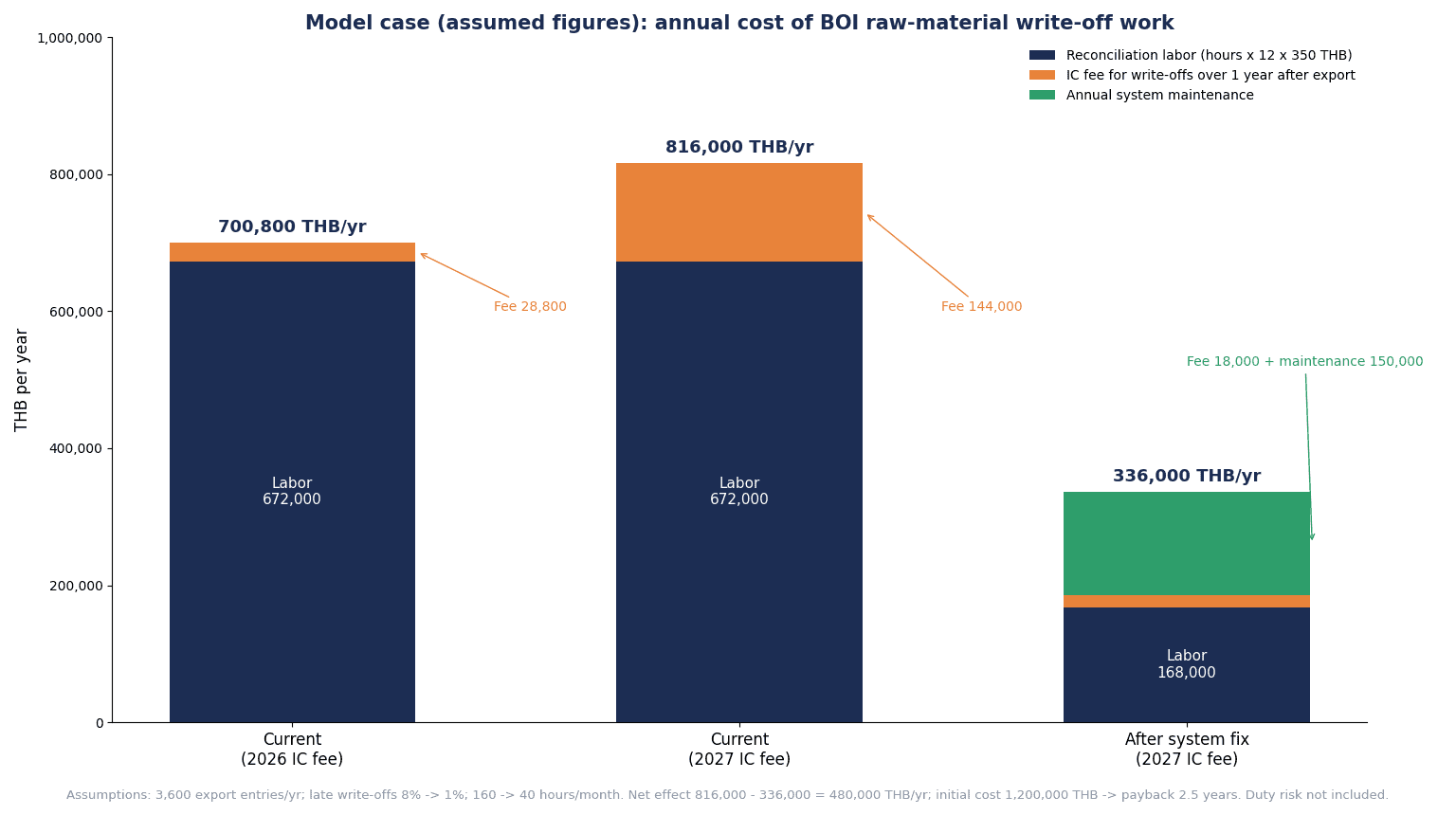
Here we estimate the effect of modifying the in-house system using placeholder figures. All of the counts, percentages, hours, labor costs and modification costs below are placeholder figures set for this article. For actual decisions, replace them with your own number of export entries, backlog and working hours.
Model assumptions
- One Japanese-affiliated parts plant in Thailand importing raw materials under BOI Section 36(1)
- 300 export entries per month (3,600 per year)
- Currency is the Thai baht (THB)
- For IC fees, only “write-off of export entries more than 1 year after export” from the fee schedule dated September 17, 2026, is used: 100 baht per entry (until December 31, 2026) and 500 baht (from January 1, 2027). VAT excluded. The surcharge for entries over 100 lines is not included in the calculation
- Labor cost is assumed at 350 baht per hour
Current state (no modification of the in-house system)
- If the share of entries written off after more than 1 year is assumed at 8%, 3,600 entries × 8% = 288 entries/year
- At the 2026 fee, the fee is 288 entries × 100 baht = 28,800 baht/year; from 2027 it is 288 entries × 500 baht = 144,000 baht/year. The increase is 144,000 − 28,800 = 115,200 baht/year
- Work on three-way reconciliation and write-off preparation is 160 hours per month
After modification (item correspondence table, formula Revision linkage, export entry data import, RMTS upload file output)
- If the share older than 1 year is assumed at 1%, 3,600 entries × 1% = 36 entries/year. At the 2027 fee, 36 entries × 500 baht = 18,000 baht/year
- Work is 40 hours per month
Annual effect (based on 2027 fees)
| Item | Current | After modification | Difference |
|---|---|---|---|
| Write-offs older than 1 year | 288 entries/year | 36 entries/year | 252 entries/year |
| IC fees (2027 fees) | 144,000 THB/year | 18,000 THB/year | 126,000 THB/year |
| Reconciliation and preparation hours | 160 hours/month | 40 hours/month | 120 hours/month |
| Labor cost of the work | 672,000 THB/year | 168,000 THB/year | 504,000 THB/year |
The calculation is as follows.
- Fee difference: 144,000 − 18,000 = 126,000 baht/year
- Work difference: (160 − 40) hours × 12 months × 350 baht = 504,000 baht/year (current 160 × 12 × 350 = 672,000; after modification 40 × 12 × 350 = 168,000)
- Total: 126,000 + 504,000 = 630,000 baht/year
The fee difference is fees paid to IC and the work difference is in-house labor cost; they are separate cost items, so this is not double counting.
Payback period
- Initial modification cost (assumed): 1,200,000 baht
- Annual maintenance (assumed): 150,000 baht
- Annual net effect: 630,000 − 150,000 = 480,000 baht/year
- Payback period: 1,200,000 ÷ 480,000 = 2.5 years
Sensitivity (if the work reduction is halved)
Consider the case where working hours fall from 160 hours per month only to 100 hours, rather than to 40 hours.
- Work difference: (160 − 100) hours × 12 months × 350 baht = 252,000 baht/year
- Total: 126,000 + 252,000 = 378,000 baht/year
- Annual net effect: 378,000 − 150,000 = 228,000 baht/year
- Payback period: 1,200,000 ÷ 228,000 ≈ 5.3 years
How to read the calculation
In this model, most of the effect comes not from the fee difference but from the difference in working hours. Against a fee difference of 126,000 baht, the work difference is 504,000 baht. If the work reduction is only half, the payback period lengthens from 2.5 years to about 5.3 years, so when deciding the scope of modification, it is important to first measure “which work will be reduced by how many hours.” The fee revision can be a trigger for a review, but it alone does not necessarily justify the investment.
What this calculation does not include
- The risk of paying customs duty if a balance remains at the end of the benefit
- The opportunity loss from being unable to import because Max Stock is exceeded
- Effort for audit response
- The fee for entries that cannot be processed paperless (falls from 1,000 baht to 500 baht from 2027)
Because customs duty amounts are a tax judgment, this article does not calculate them.
Items to confirm in the RFP and vendor selection
When comparing Thailand inventory management systems or ERP BOI modules, the words “BOI-ready” or “RMTS-compatible” alone do not tell you what the system can do. We recommend writing the following items concretely into the RFP and confirming them in demos. The general approach to RFPs, costs and acceptance for inventory management systems is summarized in our article on inventory management system implementation.
| No. | Item | What to confirm in demos and acceptance |
|---|---|---|
| 1 | Item correspondence table | Can it map in-house items many-to-one to RMTS main names, sub-names, GRP_NO and HS codes, and keep change history? |
| 2 | Unit conversion | Can it hold conversion factors among in-house units, invoice units and statistical code units per item? |
| 3 | The 3 BOM values | Can it hold Net, Loss and Gross to 8 decimal places and validate Gross = Net + Loss? |
| 4 | Revision and effective period | Can it hold the RMTS Revision and effective period on BOM versions and automatically select the applicable version from the export date? |
| 5 | Formula file output | Can it output Excel in the IC manual format (1 formula per sheet, file name of 50 characters or fewer, 2 MB or less)? |
| 6 | Export entry data import | Can it import the 14-digit entry number, line number, loading date, product code and product name and match them to shipments? |
| 7 | Write-off file output | Does it output a file following the BIRTEXP fields, without outputting the same entry number twice? |
| 8 | Advance detection of negative balances | Can it calculate the RMTS balance in-house before output and warn of items that would go negative? |
| 9 | Loss and scrap categories | Can it record within/outside-formula categories, disposal methods, and BOI approval numbers and dates, and output balance adjustment files? |
| 10 | Report V | Can it hold the vendor’s 13-digit corporate number and vendor-side model name and manage transfer quantities? |
| 11 | Deadline alerts | Can it list and warn of deadlines such as 1 year from the export date and 2 years from the end of the benefit? |
| 12 | Three-way reconciliation report and audit log | Can it show in-house inventory, physical stock and the RMTS balance side by side per main name, and keep change history for masters and file output? |
In acceptance testing, confirm not only normal transactions but also whether the system stops when deliberately wrong data is entered. Examples include importing the same export entry number twice, writing off after a design change a shipment exported the day before the change, and entering loss for a raw material in a countable unit.
IC documents and manuals are also updated. Just as Manual V3.0 came out in August 2026, it is reassuring to write into the maintenance contract who will fix the output format, and at what cost, when file formats or fields change.
How to proceed: 90 days from stocktaking to established monthly reconciliation
Proceeding in stages is less likely to fail than building everything at once. Here we show a 90-day guide. The duration varies with plant size and the number of items.
Days 1 to 30: stocktaking and building the correspondence table
- Download the MML, approved formulas, export data and Vendor data from IC
- Build the correspondence table between in-house items and RMTS main names and sub-names, and identify items with no match
- Confirm the unit conversion factor for each item
- List export entries not yet written off that are approaching 1 year
- Measure how many hours per month current three-way reconciliation and write-off preparation take (this becomes the baseline for the calculation)
Days 31 to 60: linking BOM versions with formulas, and importing export data
- Compare production BOM versions with RMTS formula Revisions and identify products with gaps
- For products with large gaps, check with the BOI and IC whether a formula revision application is needed
- Agree with the customs broker on the handover format for export entry data (fields, frequency, file format)
- Add loss and scrap categories to defect and disposal records
Days 61 to 90: file output and establishing monthly reconciliation
- Output write-off and balance adjustment files from the in-house system and try Paperless write-off on a small number of entries
- Run the monthly three-way reconciliation report and classify the breakdown of differences
- Decide who operates deadline alerts and on which dates they are checked
- Rewrite procedures to match the 2026 Manual V3.0
The goal for the 90 days is not for everything to be automated, but for a “state in which you can explain the reasons for differences” to continue every month. If you manage inventory across several sites, such as Thailand and Vietnam, our article on overseas factory inventory management is also a useful reference.
Frequently asked questions
What is BOI Max Stock?
It is the upper limit on the quantity of raw materials for which import duty exemption is granted. The 2023 BOI seminar presentation and IC’s 2026 Manual V3.0 state that it is calculated from the production formula within a range not exceeding 4 months of production capacity. The text of the 2013 announcement said 6 months’ worth, but the current treatment can be read as 4 months’ worth. The timing of the change and the number of the announcement on which it is based could not be confirmed this time, so check the details with the BOI and IC.
What is the RMTS write-off deadline?
Under the 2013 announcement, it is within 1 year from the export date on the export entry, or from the date stated on the Report V. It can be extended when necessary, but the extension does not exceed 1 year. In addition, under IC’s fee schedule dated September 17, 2026, the fee for writing off entries more than 1 year after export rises from 100 baht to 500 baht per entry (excluding VAT) from January 1, 2027.
How is scrap handled?
According to the 2023 BOI presentation, loss within the formula is written off at the same time as the product is exported, while loss outside the formula is handled separately by export overseas, destruction followed by domestic sale of the waste, or donation, and the balance is adjusted. Destruction is carried out by an approved method, and an inspection agent recognized by the BOI inspects and certifies it. Balance adjustment requires BOI approval. Check the tax treatment with your accounting firm and the BOI.
What is the difference between a free zone and Section 36?
BOI Section 36(1) is a mechanism in which formulas, Max Stock, release and write-off are managed in IC’s RMTS Online, and customs duty is exempted at import. A free zone is an area based on Chapter 6 of the Customs Act, in which duty is suspended while goods are stored in the zone and levied when they are moved into the domestic market. When a Section 36 company procures raw materials from a free zone, it releases them in RMTS and posts them to inventory (2023 BOI presentation). Which is advantageous differs from company to company.
Can ERP and RMTS be connected directly?
In the documents confirmed this time, RMTS Online works by sending files such as formulas, write-offs and balance adjustments from its screens. Whether there is an API for direct connection with external systems could not be confirmed. Realistically, a setup in which the ERP or inventory system creates files in IC’s format and the person in charge submits them in RMTS Online can be considered. When considering direct integration, check with IC.
What should we do when the BOI balance and in-house inventory don’t match?
First, classify the differences, for example “released but not received in-house,” “shipped in-house but not written off,” and “disposed of in-house but not adjusted.” Then, checking the 4 points of item and unit correspondence, formula Revision versus production BOM version, linkage of export entry numbers and lines, and the loss/scrap distinction will reveal many of the causes. The system does not accept applications that would leave a negative balance after write-off, so if a negative balance appears, the cause needs to be investigated and corrected.
Do parts bought from BOI companies in Thailand also enter RMTS inventory?
According to the 2023 BOI presentation, parts purchased from another company using the Section 36(1) benefit require neither release nor stock posting. When your company exports its product, they are used for the seller’s write-off through Report V. For that reason, the vendor’s parts need to be included in your own formula, matching the product name and model name on the vendor’s approved formula.
Summary
- BOI raw material inventory management is not reporting work to IC; it is a design problem of holding the in-house item master, formulas (BOM) and export entry data at a granularity RMTS can reconcile
- Most of the reasons the three (in-house inventory, physical stock, RMTS balance) do not match come down to 4 points: item and unit correspondence, Revision versus production BOM version, linkage of export entry numbers and lines, and the loss/scrap distinction
- Max Stock is 4 months’ worth in the 2023 BOI presentation and the 2026 IC manual. The 6 months’ worth in the 2013 announcement should not be treated as current
- Write-off is within 1 year from the export date (2013 announcement). Under IC’s fee schedule dated September 17, 2026, write-off of entries older than 1 year becomes 500 baht per entry (excluding VAT) from January 1, 2027
- The in-house system should be required to provide an item correspondence table, unit conversion, Revision linkage, export entry data import, RMTS upload file output, advance detection of negative balances, deadline alerts, monthly three-way reconciliation and an audit log
- In the placeholder calculation, most of the effect comes from reduced working hours rather than fees. Replace the figures with your own counts and hours when making decisions
- No announcement from 2025 to 2026 changing the Section 36 raw material rules themselves was found in this research. Always check the current practice with the BOI and IC
At TOMAS TECH, we help Thai plants with the data design and integration of inventory management systems, ERP and production management systems, matched to how they manage BOI raw materials. You are welcome to consult us even before choosing a system, for example while you are building the correspondence table between in-house items and the RMTS raw material list, or taking stock of gaps between formulas and production BOMs. For digitalizing a plant using BOI incentives, see also our article on going smart-factory with BOI incentives. Please reach us through this contact form.
References
- IC (Investor Club Association) official website
- IC: RMTS Online service
- IC: eMT Online service
- IC: Frequently asked questions
- IC: RMTS Operation Manual Version 3.0 (August 31, 2026)
- IC: Service Catalogue RMTS Online (August 2026)
- IC: Fee schedule (September 17, 2026)
- IC: Explanation of raw material database services (posted February 2026)
- IC: Explanation of raw material write-off services (posted February 2026)
- BOI: Announcement Por.3/2556, unofficial English translation (June 19, 2013)
- BOI: Announcement Por.5/2543, unofficial English translation (July 24, 2000)
- BOI Chiang Mai office: Raw material seminar presentation (June 16, 2023)
- BOI: Press release 155/2569 (September 11, 2026)
- BOI: Press release 152/2569 (September 9, 2026)
- Thai Customs Department: Customs Act B.E.2560, unofficial English translation
- Thai Customs Department: Tax Incentives Guidebook (September 9, 2021)
- JETRO: Thailand trade control system (updated October 30, 2025)
- JETRO: Customs duties and procedures for import clearance in Thailand (updated August 2025)
- Deloitte Thailand: Gi3 Alert BOI Announcements (May 2021)
- ASEAN Briefing: Customs Strategy in Thailand (November 10, 2025)


