


An engineering change does not reach a factory merely because an approved notice reaches ERP. The plant must know which item, bill of materials (BOM), routing, purchase order, stock lot and work order should use the new revision, and from which boundary. This guide turns ECO/ECN approval into practical PLM–ERP–MES requirements for a Thai factory, including a request for proposal (RFP) and factory and site acceptance tests (FAT/SAT).
What should engineering change PLM–ERP integration solve?
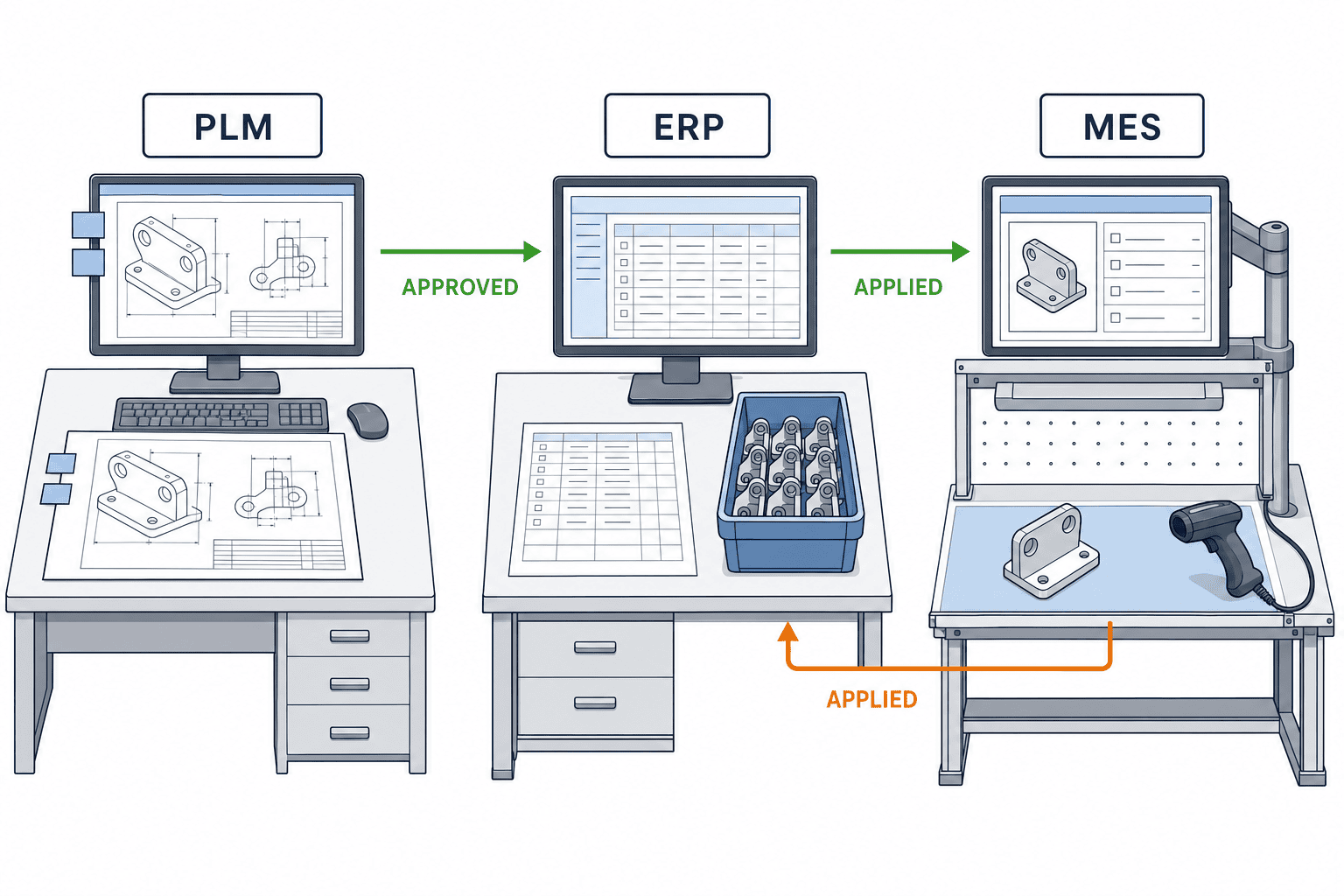
PLM commonly governs design information and change approval; ERP manages purchasing, inventory, costs and production orders; MES records shop-floor execution. Ownership cannot be settled by a system name alone. Decide the owner for each data element and state: for example, the approved drawing and engineering BOM in PLM, purchasable items and orders in ERP, and evidence of components and instructions actually used in MES. Our earlier guide to ERP and production management integration covers wider system interfaces. Here the focus is the changeover of a released engineering change during live production.
Imagine an approved ECO replacing component A with component B. ERP continues to purchase against the old BOM, while MES displays the new instruction. The design revision, planned materials and actual build now disagree. Updating ERP instantly is not automatically safer: open work orders and WIP containing A may need to finish under the old revision. The goal is a reproducible rule for which orders switch, plus proof that each receiving system applied it.
Microsoft’s Engineering change management overview distinguishes versioning, product lifecycle control, requests and change orders. Its change order documentation describes approval, processing and impact checks on open transactions. These are examples of one vendor’s behavior, not a claim that every PLM or ERP behaves that way. They are useful prompts for separating request, approval, release, effectivity and execution in an RFP.
Approval, release, effectivity and closure are separate states
A drawing may be approved before a replacement component is available. A PLM release, ERP BOM update, MES instruction publication and first physical build can have different timestamps. If they are compressed into a single “done” flag, a missing update is difficult to isolate. Keep the change ID alongside site, item, revision, intended effectivity, delivery status, application status and acknowledgement for each destination. Notification and actual application must be verified separately. Our article on AI-assisted design change management discusses notification; this guide deals with the controlled application that follows it.
Define the change unit from ECO/ECN to ERP and MES
ECR often means engineering change request, ECO an engineering change order and ECN a change notice, but organizations use these terms differently. Define their roles, issue conditions, approvers and cancellation rules before building an interface. Use immutable change IDs and line IDs, rather than a free-text subject line. An ECO may cover several products and factories; an all-or-nothing status is insufficient for recovering one failed line.
A change record should identify the affected item and old/new revisions, affected BOM lines and operations, effectivity conditions, approval and release state, issue time, source and event ID. Send explicit before-and-after values for quantity, unit, alternative component, drawing reference or work instruction when these change. Align the ERP payload with the transactions the receiving ERP can commit. MES needs the revision, instruction and inspection conditions relevant to execution. Rather than copying entire CAD files into ERP, control links to the approved source and its access permissions.
| Change object | Example owner | Stable linking key | Evidence of completion |
|---|---|---|---|
| Drawing and engineering BOM | PLM | Item, design revision, change ID | Approval and release record |
| Manufacturing BOM and routing | Agreed PLM or ERP owner | Manufacturing revision, plant, effectivity | Usable ERP structure |
| Purchase orders, stock and work orders | ERP | PO, lot, work order | Impact assessment and disposition |
| Work, inspection and actual build | MES | Work order, serial, used revision | Consumption and inspection record |
The table is a responsibility template, not a product specification. Whether MBOM belongs in PLM or ERP depends on the current process. Siemens’ MBOM discussion explains that engineering and manufacturing BOMs serve different purposes and must remain aligned as designs change. Define how substitutions, assembly sequence and plant-specific consumables are reviewed instead of blindly copying EBOM into MBOM.
Revision control extends beyond a label on a screen
Whether a change creates a new item number or a new revision of the same item depends on interchangeability, stock segregation, customer approval and sourcing. Decide whether old and new revisions may share inventory and whether a specific shipped unit must be traceable to its revision. Microsoft’s FAQ on tracking versions in transactions notes that version-as-transaction-dimension provides detailed traceability but also adds inventory and planning overhead. Without that dimension, effectivity dates can govern BOM and routing selection, while transaction-level traceability needs separate examination.
An RFP should therefore state whether the plant must trace supplier lot to finished serial, whether mixed revisions can ship, whether obsolete revisions can be rebuilt, and how service parts are handled. Classify products by interchangeability, investigation needs and customer requirements rather than forcing identical controls on all items. Product-specific legal obligations should be checked for the relevant market; a generic “compliant” label is not sufficient.
Define effectivity for the engineering change
“Use the new design from October” leaves essential questions unanswered: which Thai local time, the work-order creation time or start time, which plant, and which material already issued? Effectivity may require a date plus plant, work order, lot, serial number or customer order. Record the business rule first, then confirm the software can enforce it. A text field holding a date is not proof that order selection will be correct.
SAP documentation describes linking BOM, routing and documents through a change number with a valid-from date. Oracle’s work-definition documentation shows item revisions, component effective dates and the effective work definition for a selected date; dates introduced through an ECO can display its number. Those are vendor examples supporting a testable rule, not a promise that all systems automatically resolve every WIP case.
Can the changeover rule be written in one sentence?
A useful example is: “At Thailand Plant A, apply approved ECO X to product P only to work orders issued from the specified date and not yet started; finish started orders under the prior revision; review customer-designated lots separately.” This is an illustrative rule, not a recommended universal default. Engineering, purchasing, quality and planning should all derive the same list of affected orders from it.
Approval, component availability, ERP master update, MES instruction update, operator training and tooling readiness occur at different times. Confirm all readiness conditions before releasing a start boundary. When effectivity changes after approval, record the previous rule, reason, new approver, retransmission to ERP/MES and reassessment of open orders. A proposed date that has already passed should trigger review rather than silent retroactive application.
Handle WIP, stock and open purchase orders at cutover
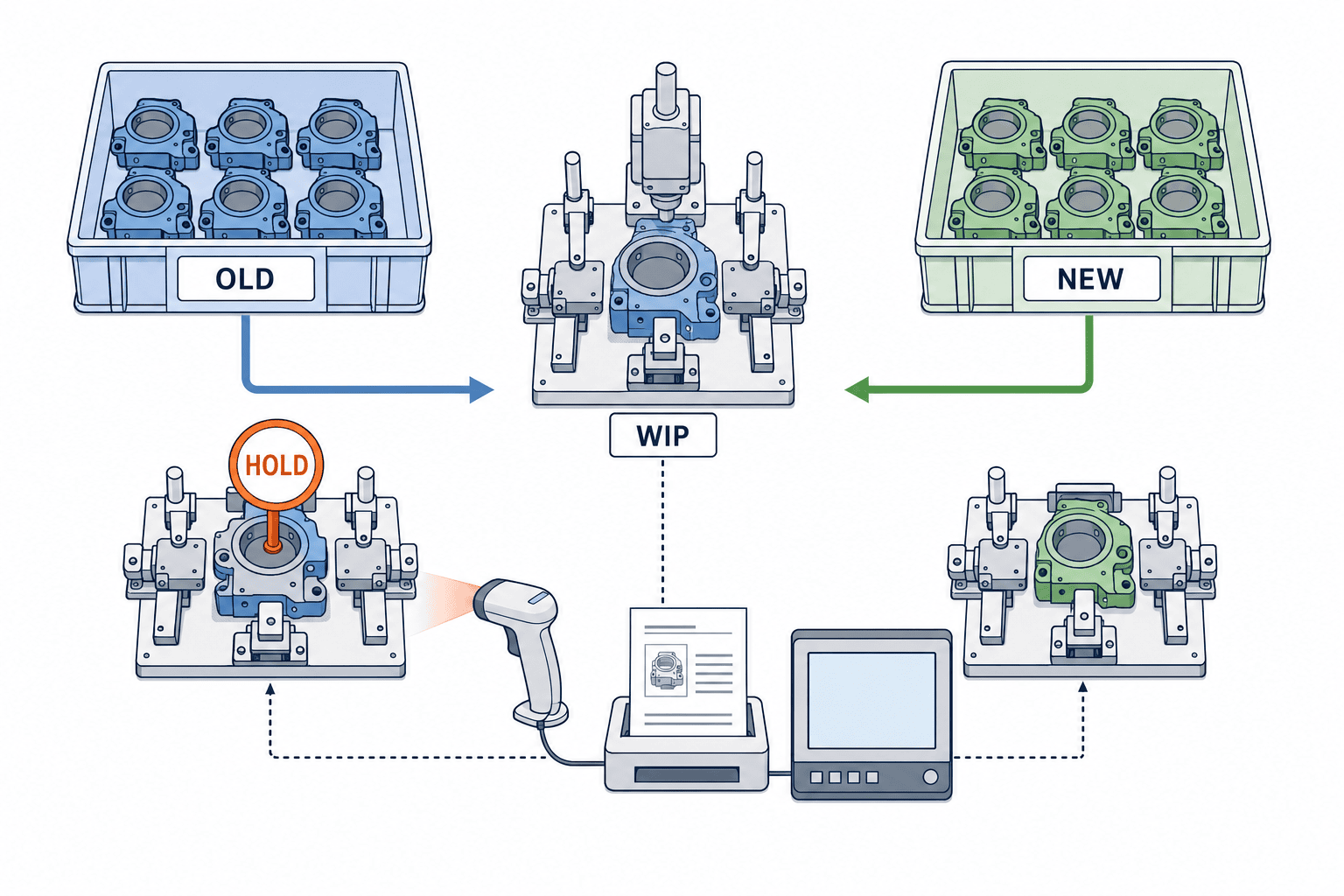
A revised BOM does not physically transform components already in a plant. List old-revision stock, inbound shipments, open POs, issued materials, WIP and finished goods. Choose a documented disposition for each. Microsoft’s change order guidance includes assessing open sales and production orders and on-hand inventory. Combine system quantities with a physical-location check.
Possible dispositions include consuming old stock, reworking WIP, approving a substitute, quarantining material, scrapping it or amending supplier orders. The correct choice depends on compatibility, quality and customer conditions, supply and cost. Link the decision to lot, work order and approver, then reflect it in ERP stock state and MES execution. A verbal “use up the old stock” instruction is difficult for the next shift to apply consistently.
Turn WIP exceptions into acceptance scenarios
Test at least five states: not started, material issued, assembly in progress, awaiting inspection and completed. For each, decide whether the new revision applies automatically, needs a hold and review, or leaves the old revision in force. “Started” alone can hide the fact that a material was issued but not installed; operation and consumption records matter.
| Object | Information to check | Disposition to record |
|---|---|---|
| Unstarted order | Planned revision, reserved material, start time | Re-explode new BOM or retain old one |
| WIP with issued material | Consumption, physical location, operation | Return, replace, finish old, or hold |
| Open PO/inbound | Supplier acceptance, date, old quantity | Amend, concession, or quarantine |
| Finished stock | Lot/serial and customer conditions | Sell old, rework, or block shipment |
This is a design worksheet. An ERP order revision alone cannot prove the as-built revision if MES never captures actual materials and instruction version. Link component lot scans, work instructions and inspection results where the product risk requires it. Too much mandatory entry can reduce recording quality; apply the strictest controls to the changes that justify them.
Turn the PLM–ERP–MES interface into an RFP
“Has an API” is not a comparable requirement. Define what triggers each event, mandatory fields, ownership, acknowledgement, retry, deduplication and recovery. Do not equate ECO approval with release to production. Decide whether production starts when ERP has updated but MES has not, and whether an ERP update failure blocks the release. These controls are needed whether data travels through an API or a file.
Require immutable change and revision IDs, an event ID for idempotency, behavior for out-of-order events, explicit timezone, retry limits, monitoring and an audit trail for manual recovery. Provide sample parent-child BOMs, quantities, units, alternatives, operations and plant differences. Include code mapping, replacement and retirement rules, drawing access, partner permissions and data location. Ask the vendor to demonstrate these with the plant’s representative change, not a generic clean-room demo.
| RFP topic | Input to provide | Evidence to request |
|---|---|---|
| Change states | ECR/ECO/ECN, approval, release, cancellation | State-specific transmissions and logs |
| Revision/effectivity | Item, BOM line, operation, plant, date | Old/new revision per work order |
| Impact | WIP, stock, open POs, finished goods | Affected-object list and disposition |
| Recovery | Delays, duplicate events, reversed order | Safe retry, alert and recovery log |
| Shop floor | Instruction, component, inspection | MES record linked back to change ID |
Compare quotes on the same scope: licenses, EBOM/MBOM cleanup, revisioning existing items, site-specific rules, API work, migration, FAT/SAT, training and monitoring. Separate standard features from custom development by running the cases above. No product or price range can be recommended without the actual scope and system configuration.
What changes at a Thai plant?
Headquarters and the Thai plant may use different item codes, units, operation names, shifts, timezones and approval roles. A global ECO may therefore need a local adoption decision. If suppliers work across countries, notification language and response deadlines also belong in the workflow. These are multi-site design checks, not claims about a particular Thai regulation. State which plant-level adaptations are permitted and who approves them.
Prove the change in FAT and SAT
FAT should execute a representative change end to end in a test environment. SAT should repeat it with plant-like master data, permissions, network paths and instructions. A new revision displayed on a screen is insufficient. Verify that the intended orders use the new BOM and route, prior orders retain the intended old revision, and MES actuals show what was built. Use identifiable synthetic test data rather than copying customer information into a test system without authorization.
Test a normal future-dated change, a last-minute change, cancellation after approval, successive changes on one item, duplicate events, reversed delivery order, ERP downtime, delayed MES update, different plant effectivity and WIP on hold. For each case, fix the expected affected orders, BOM/route version, stock disposition and failure notification before testing. Tie PLM event logs, ERP acknowledgement, MES execution and any physical check to the same change ID.
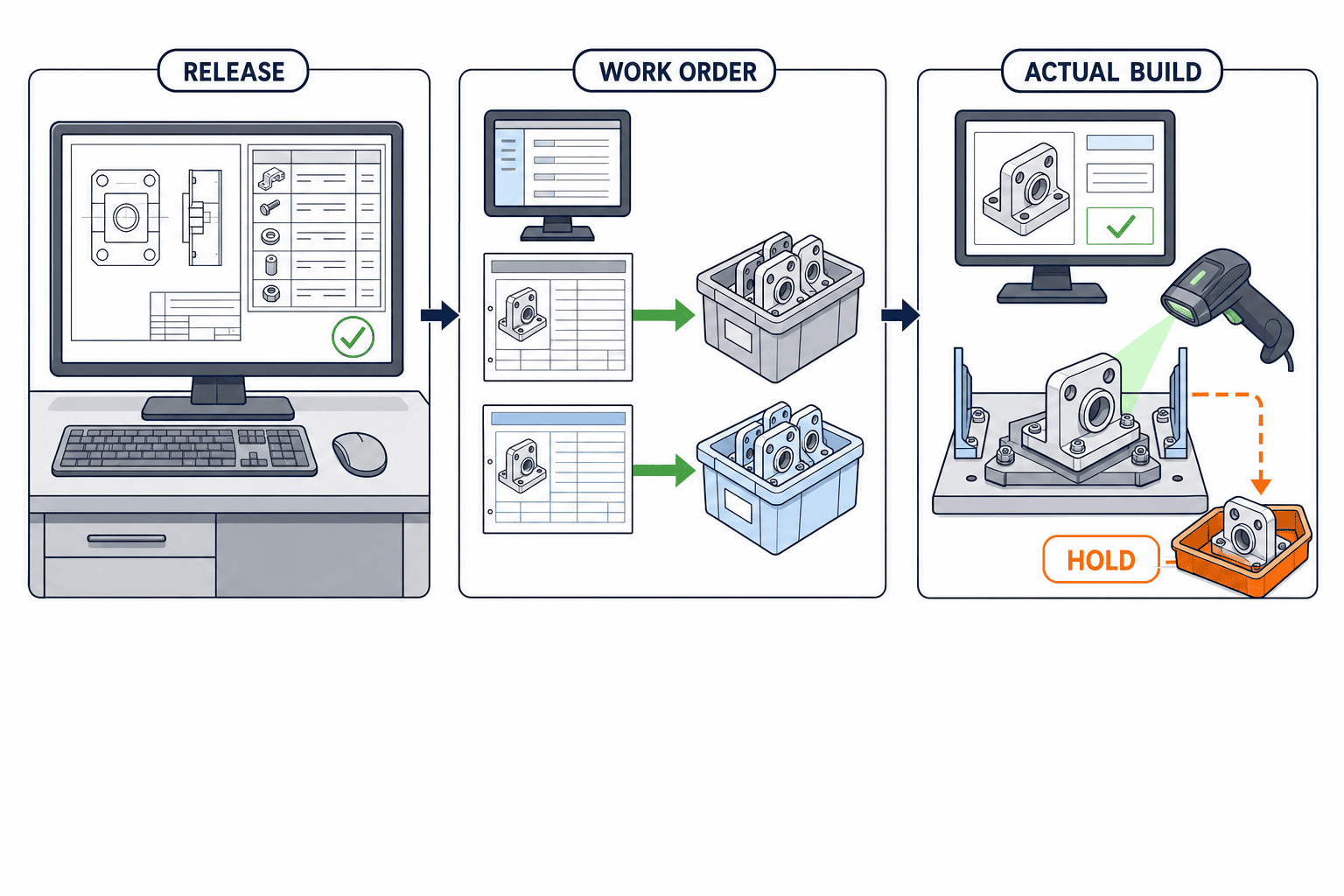
SAT completion requires no unresolved critical defects, approval of the disposition and operating instructions by business owners, and evidence that on-duty staff can retry and roll back safely. Begin live operation with a limited product set containing old stock, frequent changes and at least one meaningful inspection step. Agree on stop criteria before the first exception, so a failed interface does not lead to an improvised production decision.
Implementation sequence and responsibilities
First trace a few historical ECOs from approval to actual production. Find manual re-entry, who allowed use of old revisions and what record could explain a shipment to a customer. Next assign ownership and model the keys joining change, item, BOM, operation, order and lot. Implement one product family and one plant, testing WIP and failure recovery before scaling. On expansion, reassess local codes, rules and permissions.
Engineering owns the change content and interchangeability; quality owns concessions and inspection; purchasing owns supplier and open PO treatment; production planning owns order cutover; IT owns the data contract and monitoring; shop-floor teams own execution evidence. Name a person who decides each exception and a deadline. A meeting minute is helpful, but the operational record must let a reviewer follow a change ID through approval, effectivity, disposition and actual build.
Decision checklist
- Can a PLM-approved ECO wait before ERP/MES release?
- Can the item, BOM and routing revisions and effectivity be found from one change ID?
- Can open POs, stock, WIP and finished goods be listed by plant?
- If revision is absent from transactions, is required as-built traceability available elsewhere?
- Can duplicate, reversed and interrupted deliveries be recovered safely?
- Can FAT/SAT show old and new work orders and actual shop-floor results?
- Are hold, cancellation and reapproval owners named?
If any answer is uncertain, document the business cutover rule before evaluating a product demo. The existence of an “effective date” field does not prove how WIP is handled. The ability to reproduce the rule at work-order level determines whether the integration is fit for production.
Include cancellation and re-release
An approved change may be postponed when a component fault or customer condition is discovered. Cancelling the PLM ECO may not reverse ERP master data or MES instructions already delivered. Separate the cases where the revision has not gone live, new orders exist, and finished goods have already been built. Sometimes a further controlled change with an audit trail is safer than editing history. Confirm the method for the selected systems and audit requirements.
If ERP accepts the new BOM while MES still shows the old instruction, a plant owner must decide whether to pause the line or continue under the old revision during recovery. A later successful retry must not silently change orders that have progressed. Record transmission time, receiving response, actual application state and confirmer separately for every destination.
Measure applied consistency, not merely notification speed
The interval from approval to notification says little about shop-floor correctness. Useful measures include whether orders matched the intended effectivity, the count of undisposed affected objects, recovery time for failed deliveries, missing quarantine actions and absent as-built records. Each needs a local definition and baseline; there is no universal target figure. Review the same sample change with design, purchasing, warehouse, planning and MES teams. Disagreement over affected counts often reveals inconsistent keys, revision rules, dates or plant scope before more software is built.
How to Handle Legacy Change Histories During Data Migration
At the time of implementation, a key question is whether all past versions of drawings and BOMs should be migrated to the new system. Migrating the entire history significantly increases workload and verification scope. However, if only currently effective configurations are transferred, you may lack the basis to investigate issues relating to finished products based on previous versions. Confirm with the Quality department what products are in scope, required retention periods, and the level of detail needed for customer explanations, and decide on a migration approach divided into “currently effective masters,” “uncompleted changes,” and “past histories for reference.” Reference histories should be displayed separately from editable current masters to avoid confusion, and verify that you can search by change ID, drawing version, BOM version, approval record, and applicable period.
In migration testing, do more than match data counts; also compare parent-child BOM relationships, alternate materials, units, processes, sites, and date boundaries. If the legacy system stores times in local time, and the new system uses UTC, test that the version selected does not change before and after the effective date during conversion. If legacy item codes and new item codes do not have a one-to-one correspondence, a simple substitution table will not suffice. Define the method for referencing history for merged, split, or discontinued items.
To determine the completion of migration, have Engineering search drawings, Purchasing check outstanding orders, Production Control examine work instructions, and Quality track past lots—all using the same change example. Even if the data matches in one screen, migration is not complete operationally if it cannot be traced to the associated transactions. If the legacy system will remain accessible as read-only for a period after migration, define the viewers, retention period, and relationship to the official record to prevent updates from proceeding separately in both systems.
Embedding Integration Monitoring into Daily Operations
After go-live, monitor not only API success rates but also the business status of changes. For example, display lists actionable by staff, including the number of changes released in PLM but not received by ERP, those reflected in ERP but yet to be confirmed by MES, and the count of WIP where action has not been finalized past the planned date. Alerts should include the change ID, relevant item, plant/location, failure stage, resendability, and directives requiring decision. Simply passing technical error codes from logs to the shop floor doesn’t provide the necessary information to halt production when needed.
During daily handovers, confirm unresolved changes by change ID, and share details of affected orders, instructions, lots, interim measures, and the next review timing. If exceptions increase after system startup, don’t just continue to add manual interventions; instead, review whether the root cause is shared across masters, versions, application conditions, or permissions. By including this kind of monitoring and improvement in requirements, you will be better able to avoid ending up with a situation where “notifications are received but cannot be used in the factory.”
Concrete Example: Tracking a Change to Substitute Parts
Consider a scenario where, due to supply difficulties, part A in an assembly product is switched to part B, which has verified compatibility. First, the Engineering department specifies in the ECO which product versions B can be used in, required drawings and inspection conditions, and whether A and B can coexist. The Quality department checks for customer approvals and additional inspection needs. The Purchasing department reviews outstanding orders for A and the start of supply for B. Production Control reviews already issued instructions, those to be issued next week, and separates WIP issued with A. Applying “B valid immediately” before confirming these impacts can cause discrepancies between ERP’s planned quantity and the actual materials on hand.
In this case, initial delivery and completion of incoming inspection for B are set as prerequisites for application. Even after the PLM ECO is approved, transmission of the manufacturing BOM to ERP is held until preparations are complete. After data release, confirm that new instructions in ERP are rolled out with B, and that A remains in old instructions. In MES, test whether new work procedures and inspection items appear when scanning B’s barcode, and whether a warning appears if A is scanned in unintended instructions. For WIP already assembled with A, decide case-by-case based on product and customer conditions whether to complete with the old version or rework with B.
The condition for calling this change a “success” is not just having B visible in screens of all three systems. B must be reserved, issued, and implemented in the instructions where necessary, instructions that should be completed with A must not be automatically updated, and for either completed product, you must be able to explain the process history via lot or serial number. On the Purchasing side, check that outstanding orders for A have been modified and that the first delivery of B arrives as planned. By reconciling the PLM ECO approval record, ERP work order and inventory actions, and MES usage results under the same change ID, you can clearly identify which department should take the next action during the change.
Sequence to Request in Vendor Demonstrations
First, provide the vendor with small, realistic sample data sets containing both old and new versions for the same item, as well as both old and new components. Ask the vendor to demonstrate the process from submitting and approving a change in PLM, viewing the affected list in ERP, reflecting data after approval, to work instructions and actuals in MES. Next, include a scenario where the arrival of B is delayed; confirm how information already sent is re-evaluated when the effective date is postponed. Finally, transmit the same event twice and test that after a system failure and resend, BOM lines or instructions do not become duplicated.
Record which operations the vendor can execute with standard screens, which can be handled by configuration, and which require additional development or manual work. Prioritize the consistency of change IDs, versions, application conditions, and exception handling over the speed of screen transitions. Involve manufacturing personnel in the demonstration to check whether unresolved changes can be found at shift handover and whether operations on the incorrect version are blocked. Linking these results with your RFP responses and FAT/SAT checklists will prevent you from making a decision based solely on a flashy demo.
FAQ: engineering change PLM–ERP implementation
Is sending an ECO/ECN to ERP enough for BOM revision control?
No. Delivery of a notice and application of a BOM are separate outcomes. Confirm which orders use each item, BOM and route revision, how old stock is dispositioned, and whether MES instructions and inspection follow. Completion should include order-level selection and actual build evidence.
Which system should own the engineering change effective date?
Separate engineering approval from plant adoption. The owner depends on the operating model: PLM may approve plant-specific effectivity for ERP to apply, or ERP may confirm the local execution date. In either case, conflicting dates or scopes must be visible and held for review.
Should a new BOM automatically apply to WIP?
There is no safe blanket rule. Material issue, operation progress, interchangeability and quality or customer conditions can change the answer. Define the automatic and hold cases in FAT/SAT using real production states.
What matters most in an RFP?
Ask a vendor to reproduce one complete changeover: revision mapping, plant effectivity, WIP and stock impact, safe retry and MES actuals. Distinguish standard functionality from customization and remaining manual decisions.
Conclusion
A useful engineering change PLM–ERP integration traces an approved ECO through ERP update, MES application and actual build under one change ID. Revision and effectivity must be tested per order. WIP, stock and open POs need documented dispositions, while failures need a practiced recovery path. Write the cutover rule and acceptance criteria before comparing products.
If your Thai factory is defining changeover rules or the boundary between PLM, ERP and MES, contact TOMAS TECH. We can discuss representative products and changes from the early requirements stage.
Sources
- Microsoft Learn: Engineering change management overview
- Microsoft Learn: Manage changes to engineering products
- Microsoft Learn: Engineering change management FAQ
- SAP Help: Engineering Change Management in Document Management
- Oracle Fusion Cloud SCM: How You Edit Work Definitions
- Siemens Teamcenter Manufacturing: MBOM Management


