


When a manufacturer introduces a production order change control system, the hard question is not whether a user can edit a field. It is what happens after an order has been released to the shop floor: who assesses a change in quantity, due date, BOM or routing; which revision is approved; how old instructions are retired; and how work in progress, recorded actuals and ERP stay consistent. This guide turns that chain into testable procurement requirements. Products differ in which released-order fields they permit users to change, so define your operating rules before choosing a screen design.
Why a post-release production order change is different
At the planning stage, a team may edit a quantity or routing and recalculate before dispatch. After release, an operator may see the order, printed job cards may exist, materials may be reserved or picked, and start or completion actuals may already be recorded. Microsoft describes Released as the state that makes an order executable on the shop floor and available to warehouse processes.Microsoft: Release production orders A change therefore has to reconcile instructions already communicated, physical materials already moved and history already posted.
This article addresses a specific order after release. Engineering change approval and BOM-master integration are covered in our PLM and ERP engineering-change guide. The physical issue of components is covered in our material-issue control guide. An engineering change number answers what should be made; an order change number answers how this order, already in motion, should be made from a defined point onward.
Define the boundary: what can change in each status?
The first RFP exhibit should map order status to editable attributes and controls. Planned, scheduled, released, started, partly completed, completed and closed orders have different consequences. “Editable after release” does not say whether a started operation or picked lot may be silently rewritten. Microsoft limits the BOM-item replacement described in its last-minute-change feature to orders in Estimated or Scheduled status. SAP Business ByDesign documents certain quantity and date changes after release or start. These are product-specific behaviors, not universal MES or ERP rules.Microsoft: Last-minute changes SAP: Production Orders Quick Guide
| Order status | Proposed control policy | Required check |
|---|---|---|
| Planned or scheduled | Change and replan | Recalculate material, capacity and dates; preserve prior plan |
| Released, not started | Publish a new revision after impact review | Retire old job cards and terminal display; check picked materials |
| Started | Set a physical effectivity point | Separate recorded quantity from unstarted balance; assess WIP and stop/restart |
| Partly completed | Apply to remaining units or split the order | Trace finished, unfinished and nonconforming units; avoid duplicate actuals |
| Completed or closed | Use a separate history-correction process | Do not silently overwrite posted actuals; preserve reason and accounting effect |
This is a buyer’s proposed policy, not a statement of standard product functionality. Define who may authorize exceptions and how they are evidenced. Corrections to posted actuals belong in a separate production actuals correction and approval process. Changing an order revision and correcting past production should not be one undifferentiated action.
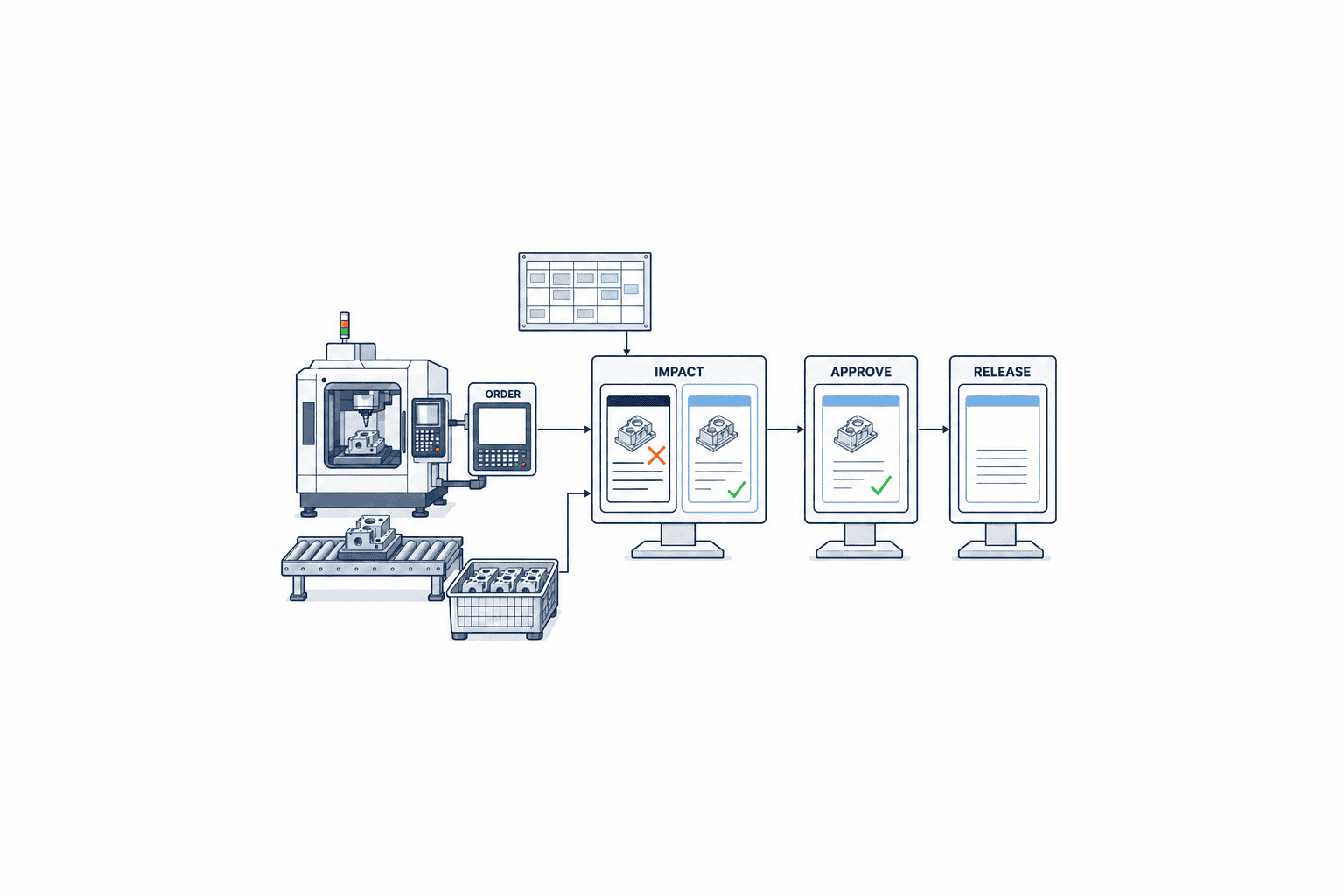
Turn a request into structured, reviewable data
A request should identify the order and current revision, item, lot, line and operation; the change class; old and proposed values; requested effectivity; reason; and a link to customer or engineering approval when relevant. Keep a free-text explanation, but make quantity, due-date, component/BOM, and routing/equipment changes structured fields so the system can select impact checks and approvers. Give each request a unique change ID linked to both order ID and revision. An email approval transcribed later does not reliably show the precise before/after values that the approver saw.
For a quantity change, distinguish total order quantity, good completions, scrap, WIP and unstarted balance. Suppose 40 of an order for 100 units are complete, 10 are in process, and the new total is 80. Merely changing an uncompleted balance from 60 to 40 leaves the 10 WIP units unresolved. These figures are an illustrative assumption, not a standard allocation rule. Decide which lots and operations the reduction affects and whether WIP will be finished, held or scrapped before approval.
For dates, keep customer promise, planned order completion, operation start/end and material arrivals separate. Changing a date field alone does not reconcile capacity and supply. Microsoft explains that a manual planned-order change may not flow through the rest of a plan until the next planning run and that component delay can propagate through a BOM. The RFP should therefore specify when replanning runs and how its result is shown.Microsoft: Production planning
For a component change, distinguish a new engineering BOM revision from a substitute used only on this order. The former needs upstream PLM/ERP approval; the latter may still need quality approval and lot traceability. For a routing change, list operation sequence, equipment, tooling, inspection points, standard time and work instructions separately. Distributing an updated PDF while the terminal still enforces an old sequence creates a conflicting instruction.
Impact review must identify the affected work
An impact screen should do more than return a green or red signal. Planning, purchasing, warehouse, production, quality, logistics and costing should view consequences under the same change ID. ISA-95 offers a framework for information exchanged between enterprise planning and manufacturing operations management. We use that boundary to propose an item-level source-of-truth matrix for ERP and MES; ISA-95 itself does not mandate a particular approval workflow.ISA: ISA-95 Standard
| Change | Review before approval | Verify after application |
|---|---|---|
| Quantity | WIP, completed units, reservations, open purchasing, capacity and pack size | Remaining quantity matches picking instructions; no duplicate issue |
| Earlier or later due date | Machine availability, incoming material, shipping slot, subcontractor | Revised schedule matches the customer commitment revision |
| BOM or substitute | Engineering approval, affected lots, issued stock, inspection | Old and new consumption remain traceable by lot |
| Routing or equipment | Started operations, job cards, tools, inspection, qualifications | Only the current operation displays; obsolete operation cannot be booked |
Preserve the impact snapshot. Recheck it if inventory, WIP or equipment status changes between request and approval. “Material was available at request time” does not mean it is still available when approval is granted. Thresholds for quantity difference, remaining-balance ratio or lead-time shift should be set from the plant’s product mix; there is no defensible universal percentage in this guide.
Link approval rules to physical effectivity
Change reason alone is too weak to choose approvers. Consider the altered field, order status, material financial effect, customer approval, quality risk and lot-trace requirement. In one workable model, planning checks capacity and dates, warehouse checks materials, production checks shop-floor application, quality checks specification and inspection, and the customer-facing owner confirms promises when required. That is an operating example, not a prescribed organization chart.
The approval view should freeze the old/new values, target lots and units, and effectivity rule. Define effectivity in a unit that can be checked on the floor: from the next unstarted operation, from the next serial number, from a named lot, or after current WIP is isolated. Record approval time separately from operator acknowledgement time. If a terminal has not synchronized, show “application pending” even after approval. Otherwise old and new revisions may coexist unnoticed.
Retire rather than erase the old revision. Keep revision ID, approver, timestamp, rationale, effectivity point and last-valid time. Oracle’s manufacturing documentation describes audit records that can capture old and new values, update time and user when audit trail is enabled. Verify in the selected product which fields and events are actually covered.Oracle: Using Manufacturing
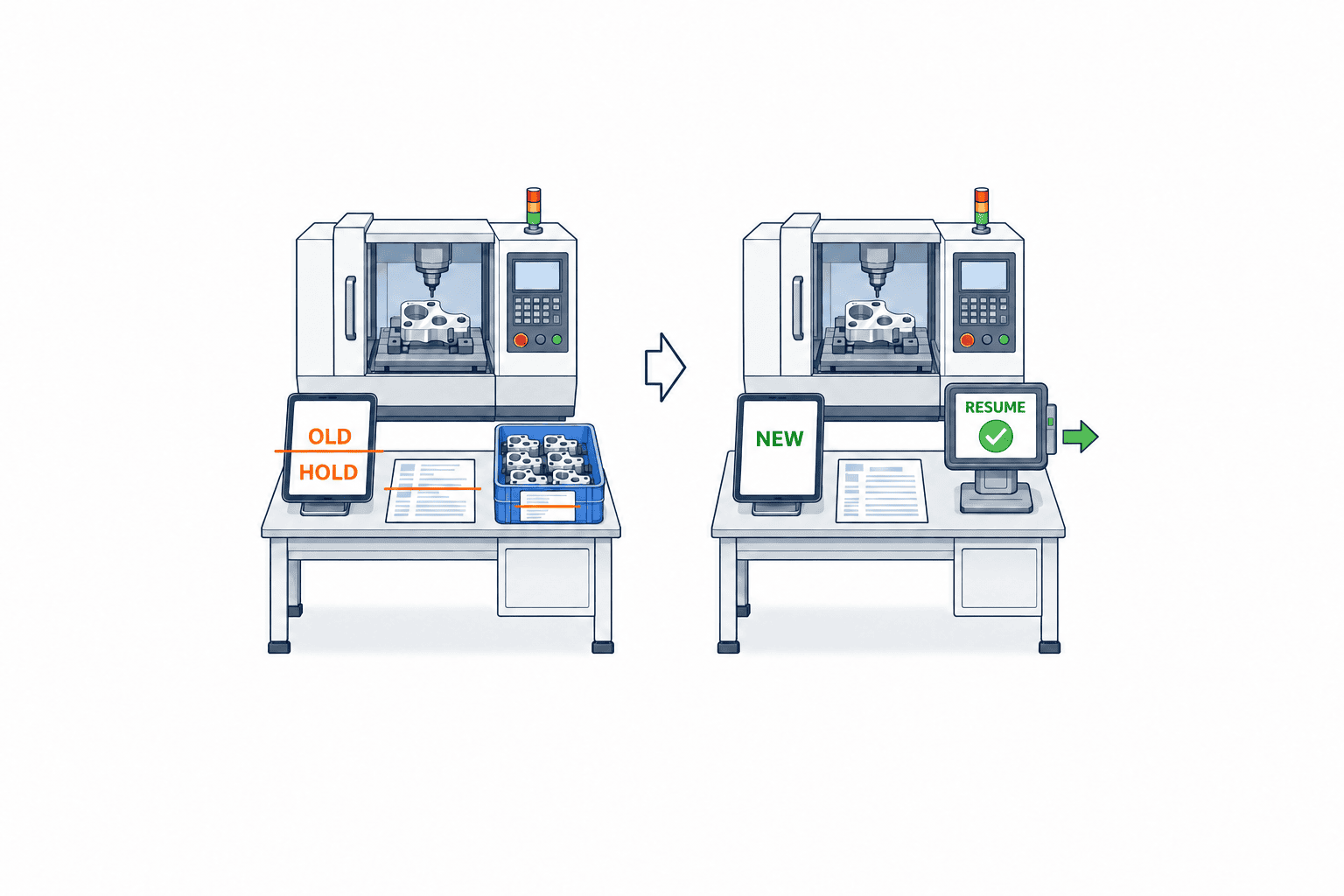
Shop-floor rollout must retire every old instruction
Displaying a new revision on one tablet does not remove printed job cards, offline caches, equipment settings or warehouse picks. For every distribution target, specify old-revision stop, new-revision receipt, detection of non-updated terminals and restart conditions. SAP ME documentation describes a product-specific flow in which an update to an already released shop order places the shop order and active SFC numbers on hold and notifies an operator. It is a useful acceptance-test example of how work may be contained during change, not proof that every system behaves this way.SAP: Update of Released Production Order
Show operators a concise revision difference and collect acknowledgement against the order, lot and operation. A screen left open before the update must not accept old-revision actuals after its effectivity point. Where paper remains, define who retrieves old sheets, how a missing sheet is contained and how reprinted sheets are identified. A QR code should check the current server revision rather than simply display embedded old content.
Routing changes may touch equipment recipes or inspection plans. Remote parameter overwrite needs a separate equipment and safety review. It may be appropriate to keep the change-control system responsible for approval, distribution and receipt while handling automatic machine-parameter changes through another controlled process. With physical WIP, locate the units before treating a data update as complete.
Reconcile ERP, MES and actuals by revision
One possible ownership model makes ERP authoritative for order header and planned quantity while MES owns operation execution and actuals. Your existing architecture may differ. Document ownership for each field. Put order ID, revision and change ID in integration messages so receivers distinguish applied, stale and missing intermediate revisions. A repeated message with the same change ID must not apply twice. Failed messages need a visible reason and controlled retry. ISA-95 Part 5 addresses business-to-manufacturing transactions; the idempotency and retry rules here are proposed implementation requirements at that boundary.ISA: Part 5
Link actuals recorded before and after the change to their respective revisions. Do not make old-revision output appear as if it were produced with the new BOM. Reconcile total quantity, good completions, scrap, WIP and unstarted balance after a quantity change. Retain reservation, issue, return and consumption events for materials, and show discrepancies to an owner instead of silently netting them away. The handoff to finished goods is detailed in our finished-goods receipt guide.
ERP may still show an old revision after the floor has switched, or the reverse. Show “approved,” “sent to MES,” “acknowledged by terminal,” “updated in ERP” and “reconciled” as separate states. A reconciliation job should list differences, determine retry eligibility and retain reasons for manual correction. Whether production must stop depends on material, routing and quality risk.
Gather real change cases and data definitions before buying
Before writing the specification, select recent change cases and reconstruct the timeline from request to floor application. Record the order revision the requester saw, which shift received a verbal instruction, the material lot actually used, when printed cards were retrieved, who changed ERP and when actuals were closed. This reveals whether delay sits in approval or in distribution after approval. Include cases after material issue, on a night shift, after partial completion and during an outage. Comparing physical cards with system records matters more than collecting a large count of superficial examples.
“Quantity” can mean sales-order quantity, production-order quantity, operation input, good output or goods receipt; each has a different owner. For every field, document name, unit, authoritative system, editor, eligible order status, references, retention and downstream recipients. Likewise distinguish engineering BOM, manufacturing BOM and component lines exploded into a particular order. If systems use different revision identifiers, map order and BOM revisions explicitly rather than compressing them into one string. Otherwise an approval might refer to order revision A while the tablet only receives BOM revision B.
An integration event needs at least order ID, order revision, change ID, affected operation or lot, effectivity rule, event time and sender. Assume a terminal retry or an ERP resend and let the receiver identify duplicates. Separate the timestamp shown to users from the stored integration timestamp. A Thai plant connected to an overseas ERP can otherwise misread approval and application order. Do not rely on time alone for event ordering; use revision and event ID as well.
Check missing legacy data early. Printed cards without a revision, handwritten lot numbers or day-end actuals entry cannot be reconstructed perfectly by new software. Define the boundary between historical and new evidence, then agree how WIP at cutover receives a revision with production, quality and finance. The required evidence level depends on product quality and contractual obligations.
Useful discovery outputs are a change-case register, field dictionary, cross-system ownership matrix and exception list. Reuse cases in FAT, the dictionary for API review, the matrix for incident triage and exceptions in SAT. Mark open decisions explicitly in an RFP rather than allowing each vendor to price a different hidden assumption.
Keep emergency changes and cancellation in the controlled workflow
Equipment failure or suspected quality escape may require action before normal approval can finish. That does not justify an “anyone may overwrite immediately” rule. Define who can stop work, who records the temporary containment, when retrospective approval is due, whether customers must be told, and who authorizes restart. A workable two-step process stops and isolates promptly, then reviews impact and approves any lasting order change as a new revision. Retrospective approval completes the record; it must not make an unapproved change appear to have been approved earlier.
Cancellation after approval is also more than switching a display back to the old revision. Lots may already have been produced and materials issued under the new one. Record cancellation as a new change ID, review current WIP, finished units, materials and inspection results, then issue a further valid revision. Test cancellation before distribution, after only some terminals receive it and after some lots are produced under the new instruction. At each stage, identify what stops, what history remains and what requires fresh approval. Quality investigations need to know exactly which instruction applied from which lot.
Write testable RFP requirements
“Provide change management” can be satisfied by a button. State business conditions, expected outcome, evidence and failure behavior. These are sample buyer requirements to adapt to your product, lines and authorization matrix.
| ID | Sample requirement | Evidence requested |
|---|---|---|
| CM-01 | Save post-release quantity, date, component and routing edits as requests with old/new values and reason | Screen and data dictionary |
| CM-02 | On started orders, separate posted quantity and unstarted balance and define affected units | Demonstration and state diagram |
| CM-03 | Show material, capacity, quality and promise impacts before approval | Impact input/output example |
| CM-04 | Retain approval difference, person, time, rationale and effectivity in an auditable history | Audit export and permissions |
| CM-05 | Retire old revisions and detect offline or paper endpoints that remain outdated | Distribution failure/recovery demo |
| CM-06 | Reconcile ERP/MES by revision and change ID; handle duplicate and out-of-order messages | API, retry design, exception screen |
| CM-07 | Trace actuals, materials and goods across revisions | Lot/serial trace demonstration |
| CM-08 | Safely reject or hold unauthorized changes, cancellation, concurrent requests and network outages | Negative FAT results |
Ask vendors to classify every line as standard, configurable, custom, third-party or unsupported. A screen may support a change that the API does not. Make license, audit retention, offline mobile behavior and ERP modifications explicit pricing assumptions. Compare implementation evidence and the required line-stop scope, not only the quoted price.
FAT scenarios: include failure paths
At factory acceptance testing, combine order status and change type in a test environment that approximates the terminal, warehouse and ERP paths. Dummy items and lots are fine, but preserve evidence in event logs, balances, integration messages and refusal of an old revision.
- Unstarted quantity increase: recalculate materials and capacity; keep the old floor view until approval; publish the new revision afterward.
- Started quantity decrease: distinguish completed, WIP and unstarted units and identify affected lots.
- Expedited date: flag inadequate machine or material availability and expose alternatives and customer response.
- Component substitution: distinguish issued old material from new material and trace actual consumed lots.
- Routing change: leave started operations historically intact and apply the new route only at the defined point.
- Concurrent request: detect a second change against the same order revision and require renewed assessment.
- Outage and retry: prevent acceptance of stale instructions and apply a recovered message exactly once.
- Permission and reversal: reject an unauthorized approver and record post-approval cancellation as a separate event.
Set numerical pass criteria using your volumes and network. Instead of inventing a universal “all terminals within X seconds” target, specify endpoint count, tolerated outage and operations that must stop, then measure. ISO/TC 176 auditing guidance discusses reviewing and controlling changes to production and service provision; it does not prescribe a screen or response time.ISO/TC 176 Auditing Practices Group
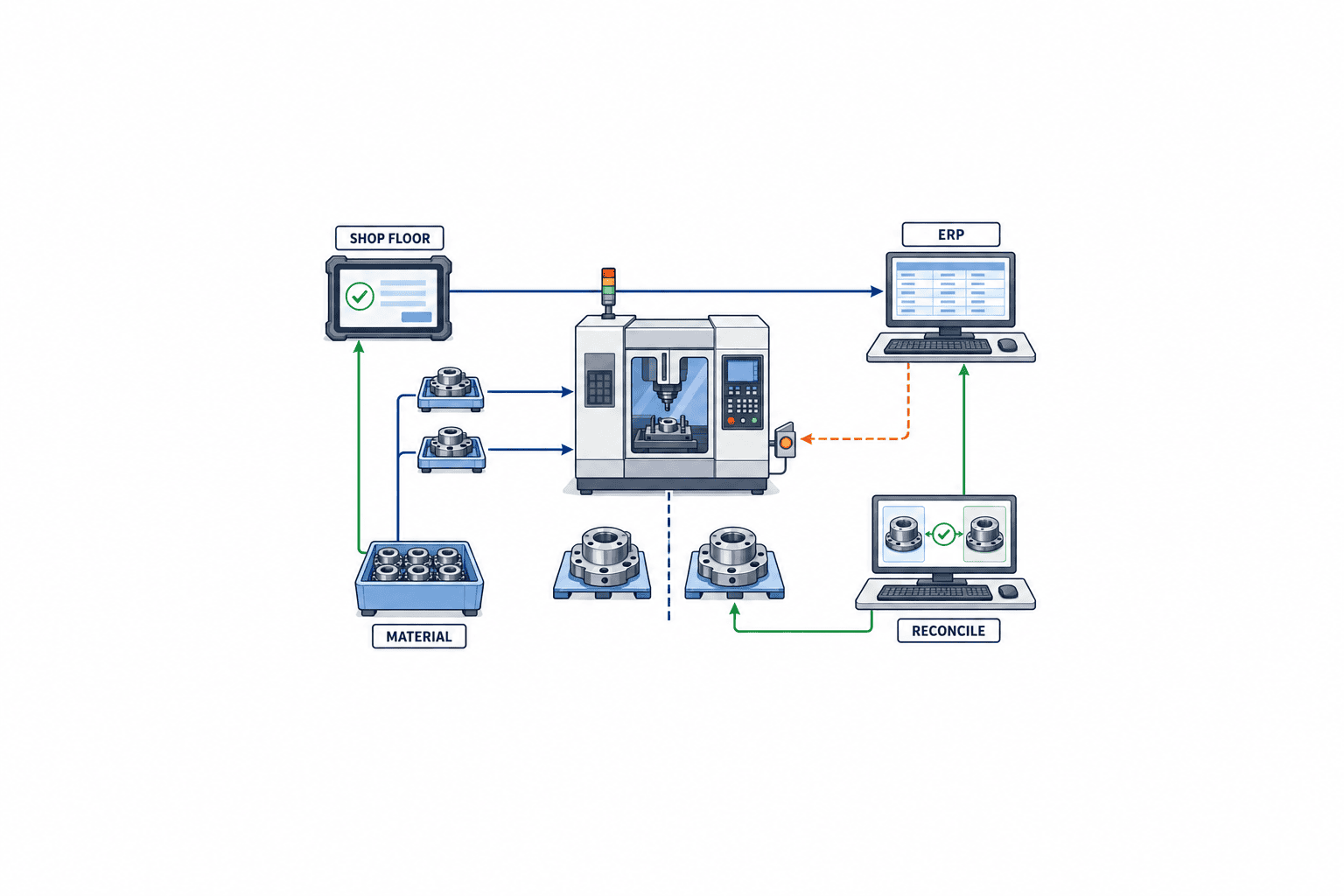
SAT must test the actual plant
At site acceptance testing, repeat core scenarios with real equipment, terminals, permissions and communication routes. Watch the retrieval and invalidation of printed cards. Test novice and supervisor roles, a shift handover, and recovery after connection loss. In a multilingual plant, operators should confirm that translated change reason, approval status and effectivity mean the same thing in practice.
Acceptance evidence should show which revision owns each actual, issue, return and goods receipt after the change. If a negative case stops the system, operators must have a safe waiting instruction and a traceable release authority. Do not close every open exception as “covered by procedure”; record an interim procedure, owner, due date and retest condition.
Implementation sequence and cost drivers
Start by classifying recent change forms and logs by change type, order state, affected teams, delay and rework. Build a minimal model for ownership, revision, approval, floor rollout and reconciliation. Pilot one product and line, then extend to routing, substitutes and outsourced steps based on observed risk. This is a staged implementation pattern, not a rule for every plant; high-risk products may need broader controls from day one.
Estimate more than request/approval screens. Check ERP/MES field differences, printed-card practice, offline terminals, lot traceability, audit retention and equipment or inspection integration. An API without revision and change ID may still require development. If the ERP restricts post-release edits, splitting the order or creating a residual order may be safer than forcing an overwrite. Compare change frequency and risk, modification scope, allowed downtime and acceptance-test effort together. This guide does not claim a universal price or savings percentage.
Frequently asked questions
Can we implement a production order change control system only in MES?
MES may host the workflow, but ERP integration is needed when ERP owns quantity, dates, requirements, stock or costing. Decide field-level authority and update permissions first, then specify where approval results, actuals and discrepancies go. ISA-95 helps name the boundary; the interface depends on your installed systems.
Will a revised engineering BOM automatically update a released order?
Do not assume it. Some products copy the production BOM and route into an order, and editing has status restrictions. Microsoft describes that copy and editing before an order starts.Microsoft: Production order lifecycle Check the target order’s BOM revision, issued stock and start state and explicitly identify which orders are in scope.
Who approves production order quantity and date changes?
Choose by affected responsibility rather than a universal job title. Even a date or quantity change can affect materials, machines, customer commitments and quality. Define routing from order status and impact, including delegation and emergency records. If customer approval is required, internal approval alone does not finish the change.
Do FAT and SAT need the same scenarios?
Keep a common core. FAT tests function, integration and negative paths; SAT tests the plant’s real terminals, paper, permissions, network and WIP. A successful screen operation in FAT cannot prove an old printed sheet or cache has disappeared on site. Agree on evidence and retest conditions before testing.
Conclusion
Treat a post-release change as one controlled chain: request, impact review, approval, floor rollout, old-revision retirement, and reconciliation of actuals and ERP. Specify editable states, physical effectivity, operator acknowledgement, revision-linked history and integration recovery in the RFP. Prove normal and failure paths in FAT and SAT against your own products, materials and quality rules.
If your change forms and ERP/MES flow are still being mapped, recent cases from one line are enough to begin defining the RFP questions. Contact TOMAS TECH.


