


A finished goods receipt system should not treat the last operator’s “complete” button as proof that the product can ship. Completing the last operation, reporting output against a production order, approving quality, receiving physical goods in a warehouse, and posting ERP inventory are different events. A Thai plant needs to connect their quantities, times, lots, locations and accountable people before sales can promise the stock. This guide sets out the process, data, RFP questions and FAT/SAT tests for teams integrating MES, QMS, WMS and ERP.
Define four different completion states first
Use operation complete for the last shop-floor task, production reported finished for good and error quantities against the order, quality disposition for an authorized release or hold, and warehouse receipt confirmed for the physical containers received and located. These are project definitions, not universal software screen labels. Inventory may increase at different points depending on product configuration. Microsoft Dynamics 365’s report-as-finished transaction moves production output into inventory and can generate quality orders and putaway work when configured. SAP S/4HANA supports receipts from production and inspection stock. Therefore, “reported finished” must not be equated with “immediately saleable” in every plant. See Microsoft’s report-as-finished documentation and SAP’s goods-receipt inspection documentation.
| State | Trigger and owner | Evidence | Possible next action |
|---|---|---|---|
| Operation complete | Operator or machine at final operation | Order, operation, equipment, time, actual quantity | Prepare output report |
| Output reported finished | Production controller or MES | Good/error quantities, reason, lot/serial | Await receipt or inspection |
| Quality disposition | Authorized quality person | Plan, result, decision, approver | Release accepted quantity |
| Warehouse receipt | Warehouse team or WMS | Container, actual received quantity, location | Put away, allocate, ship |
The final column is a policy to agree for your plant. Some configurations recognize physical or financial inventory before quality release. If so, separate “exists on the books” from “available to promise.” SAP’s examples show inspection lots and control of stock released by a usage decision. The practical lesson is to reconcile quantities by status, not just one total.
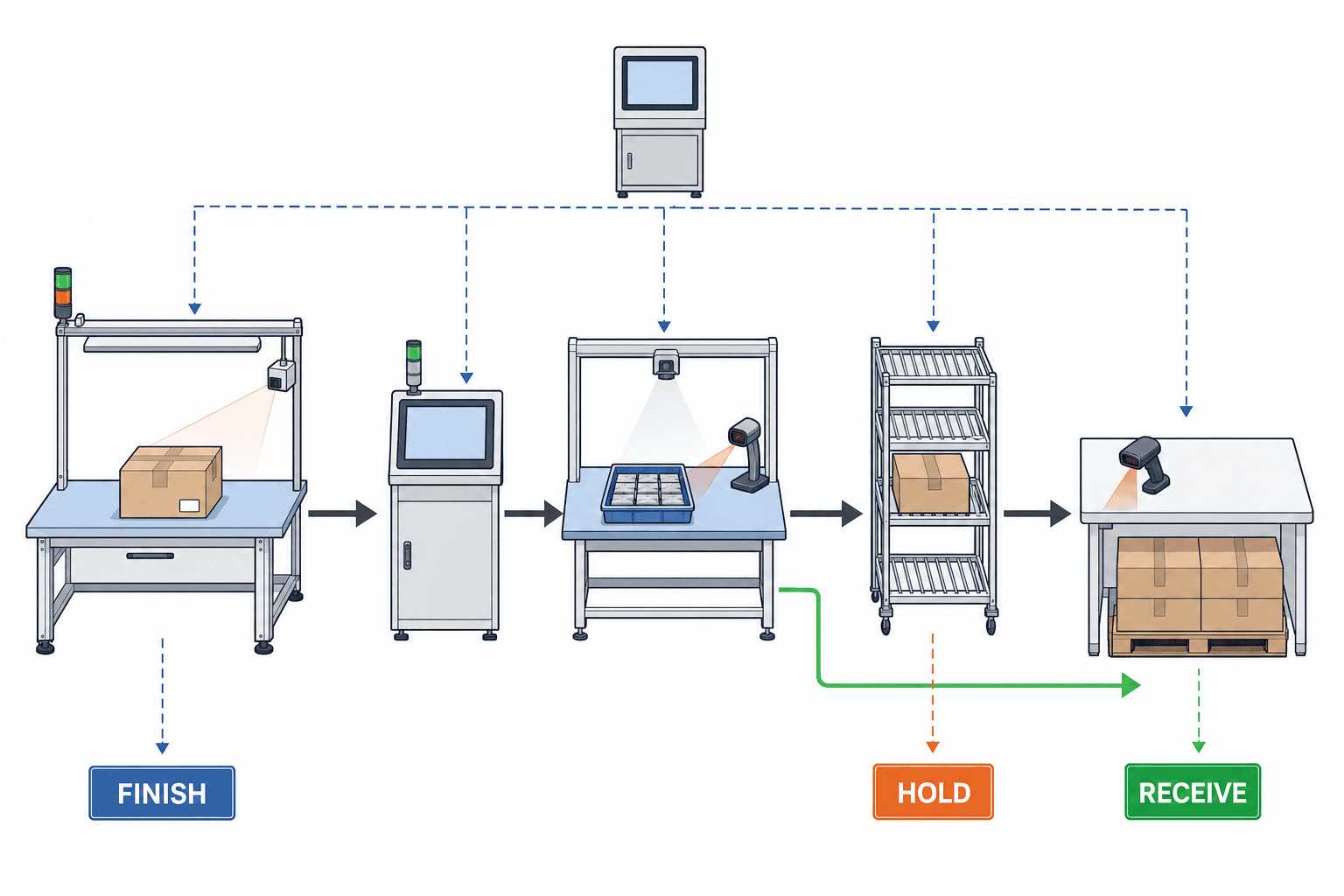
Why this is different from WIP tracking and material issuing
WIP management covers queues between operations. Production material issue control covers reservation, picking and consumption into a released order. Finished goods receipt is downstream: what product actually emerged, in what quality state, which container holds it, which warehouse physically received it, and when it becomes available. An automatic reversal of material issues cannot handle a partially accepted lot, split pallet or wrong label.
Consider an illustrative order for 100 units. The final operation reports 96 candidates for good output and four errors. Quality holds 20 of the 96 and accepts 76. The warehouse has put away only 70 of the accepted 76. “Reported finished 96,” “quality hold 20,” “accepted 76,” and “located 70” are all valid but different numbers. Promising all 96 risks shipping uninspected or missing goods. Counting only 70 as production output hides actual yield. These numbers are a worked example, not industry statistics. ISA-95 provides a framework for information exchange between manufacturing operations and enterprise activities. For a project, assign a system of record to each event before choosing screens.
The finished goods receipt flow, step by step
1. Match the order, item and revision
At output reporting, verify the production order, finished item ID, specification revision, plant, planned quantity, unit and lot-number rule. Do not derive the warehouse destination from a free-text item name. A changed drawing or pack size can leave stock counts correct while the goods no longer match the customer’s order. Use a shared master identifier for the order revision and shipping label revision. Decide which fields must be rechecked after a mid-order change.
2. Report candidate goods, errors and other outcomes separately
A single “completed quantity” field obscures yield. Distinguish candidate good output, process errors, scrap, pending rework and by-products when applicable. Microsoft’s operating procedure has separate good and error quantity fields and an error cause. Oracle Manufacturing also supports inspection results against work-order activity. Those product examples establish possible capabilities; write down the status model your own business needs. See Microsoft’s reporting procedure and Oracle Manufacturing’s overview.
3. Bind lots, serials and containers
If one order yields several lots, keep each lot’s quantity and material genealogy. For serialized output, prohibit duplicate completion of the same serial. A product identifier must not be confused with a pallet identifier. GS1 distinguishes the GTIN for a trade item, SSCC for a logistics unit and separate batch/lot information. Even with internal codes, keep item, lot and container in separate fields to support repacking and integration. See the GS1 General Specifications.
4. Hold pending quality and release accepted quantities
For inspected items, define the inspection plan, sample unit, result, authorized decision, time and partial acceptance. Do not automatically mark every completed unit as saleable. SAP’s warehouse quality scenario creates an inspection lot and quality stock for a receipt from production or procurement. Accepted products move toward a final bin after a usage decision; rejected products need separate disposition. Design a physical hold area and a route to rework control. See SAP’s warehousing quality scenario.
5. Confirm physical receipt and putaway
The production report may not equal what the warehouse receives. Scan the container at production output and again at the warehouse receipt point. Match container ID and quantity, and open a discrepancy case when they differ. Record who may resolve and approve it. The storage bin turns “on the books” into “findable.” Dynamics 365 can generate putaway work from an output location to a destination bin when configured. That illustrates why reporting completion and putaway should remain distinguishable events.
6. Reconcile ERP inventory and cost
Receipt can affect both quantity and valuation. Test physical stock, accounting entry and closure of the production order separately. Microsoft’s production posting guidance describes inventory updates at report-as-finished and WIP/finished goods journal effects that depend on configuration, with further financial updates at order ending. Do not assume your ERP posts at identical moments. Have finance sign off a transaction test, including month-end timing. See Microsoft’s production posting guide.
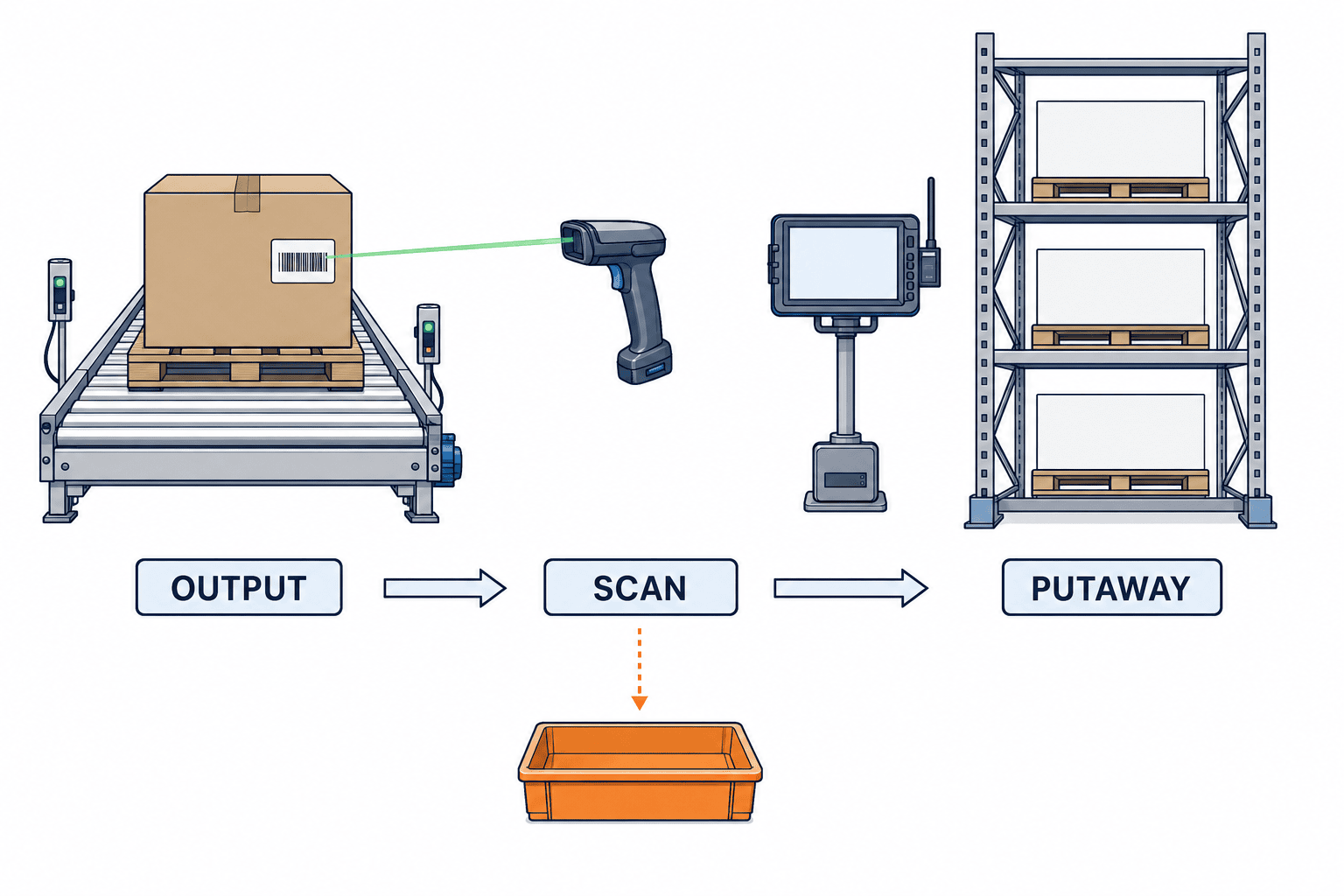
The data dictionary an RFP should include
“MES/WMS integration available” is too vague for vendor comparison. Attach a data dictionary with at least these candidates.
| Area | Candidate fields | Meaning to agree |
|---|---|---|
| Transaction identity | Event ID, order and line IDs, event time | Idempotent resend boundary |
| Product | Item ID, revision, lot/serial | Which item and which specification |
| Quantity | Candidate good, error, rework, received, accepted, held | What each state counts |
| Unit | Piece, carton, kg, conversion factor | Packing versus base units |
| Place | Operation, output point, quality hold, bin | Where the goods physically are |
| Quality | Plan ID, inspection lot, decision, approver | When stock became usable |
| Logistics | Container/pallet ID, label revision, putaway task | How to find the goods |
| Finance | Valuation basis, costing method, posting date, document reference | Quantity/value reconciliation |
Not every item requires every field. Define branches for untracked, lot-controlled, serialized and weight-based items. Distinguish “not collected” from “not applicable”; one blank value for both cannot support an audit. Separate device display time, server event time and time zone. Plants across Thailand, Japan and Vietnam should define UTC storage and local display so date boundaries remain consistent.
Decide responsibility across MES, QMS, WMS and ERP
A useful starting allocation is MES for shop-floor events and output, QMS for inspection decisions, WMS for containers and locations, and ERP for item masters, orders, valued inventory and accounting. Adjust this to the installed systems and actual process owner. If ERP already owns quality, a separate QMS is not automatically required. A small plant may cover several roles with one ERP module. The goal is to avoid two systems independently confirming the same event.
An interface specification needs more than “send completion to ERP.” State the trigger, recipient, acknowledgment, retry window, duplicate detection key and failure queue. Suppose MES sends a completion event and the connection breaks before ERP’s success response. MES resends. If ERP lacks an event ID guard, it can post two receipts for one physical box. Define that a retry with the same ID returns the original outcome without reposting. This is an integration acceptance condition, not a claim that every vendor supplies it out of the box.
Likewise, a QMS release and a WMS move may occur before ERP sees the saleable-state update. Decide acceptable delay, alerts and daily reconciliation. Conversely, if ERP enables allocation before the WMS location exists, a picker may search for an invisible pallet. “Real time” is not a measurable requirement; write the tolerated lag in seconds or minutes for each event.
Design the common exceptions before go-live
Partial completion and split receipts
Allow multiple completion events against one order when production is staged. Give each event its own ID, lot, container and quality status. Define approval for reporting beyond planned quantity. Production and receipt may fall on different dates. A Saturday completion put away on Monday can cross a reporting period. Finance, production and warehouse must agree which date drives physical and financial postings and test the month-end case.
Quantity differences and unit conversion
If production reports cartons and the warehouse counts pieces, maintain pieces per carton and partial-carton rules in a shared item master. For weight-based products, define scale readings, tolerance, tare and calibration handling. If production says 100 and warehouse scans 99, do not silently overwrite either record. Open a one-unit discrepancy, assign investigation and document the correction transaction and approval.
Quality hold, partial release and rework
When part of one lot passes, choose whether to split the lot or relabel containers while retaining genealogy. A held container must not enter shipment picking. Rejected output may go to scrap, concession or rework after investigation. Link that disposition to the rework management workflow, and specify whether rework produces a new completion event or a retest on the original record.
Wrong labels and offline devices
For a scan mismatch between physical label and system expectation, decide whether to block receipt until supervisor release. Test an offline handheld resending the same event after reconnecting. Preserve the original and correction event sequence even if messages arrive out of order. Define temporary labels, later verification and quarantine placement when a printer fails.
Reversal, correction and closed periods
Do not delete an incorrect completion; post a reversal or correction referencing the original document. Permissions differ once the order is closed, a period is locked or part of the stock has shipped. Reversing only MES while ERP and WMS stay posted creates another discrepancy. Include cross-system reversal sequence and finance approval in the test pack.
Ten RFP questions for a finished goods receipt system
- Can operation completion, output reporting, quality release, physical receipt and saleable availability be separate states? Show screens and APIs.
- How are partial completion, several lots per order and piece/carton/kg conversions handled?
- Which fields and transactions distinguish good, error, rework, hold and scrap?
- Where are inspection lot, partial acceptance, usage decision and pick blocking controlled?
- How are container and pallet IDs related to lot, serial and bin?
- Which key prevents a repeated MES event from double-posting inventory?
- Where can a receipt discrepancy be investigated and who may confirm a correction?
- What happens for offline handhelds, label reprints and scan failures, with what audit trail?
- How do completion, receipt, cost posting and order closing reconcile by posting date and journal?
- Which reversals, closed-order cases, locked periods and post-shipment corrections are standard versus custom?
Ask vendors to demonstrate each answer, including settings, API examples, exception screens and logs. In a multi-vendor stack, obtain a responsibility matrix and support escalation route. Compare full scope: master-data cleanup, scanners and printers, network, inspection setup, integration, training, finance testing and maintenance, in addition to software licences.
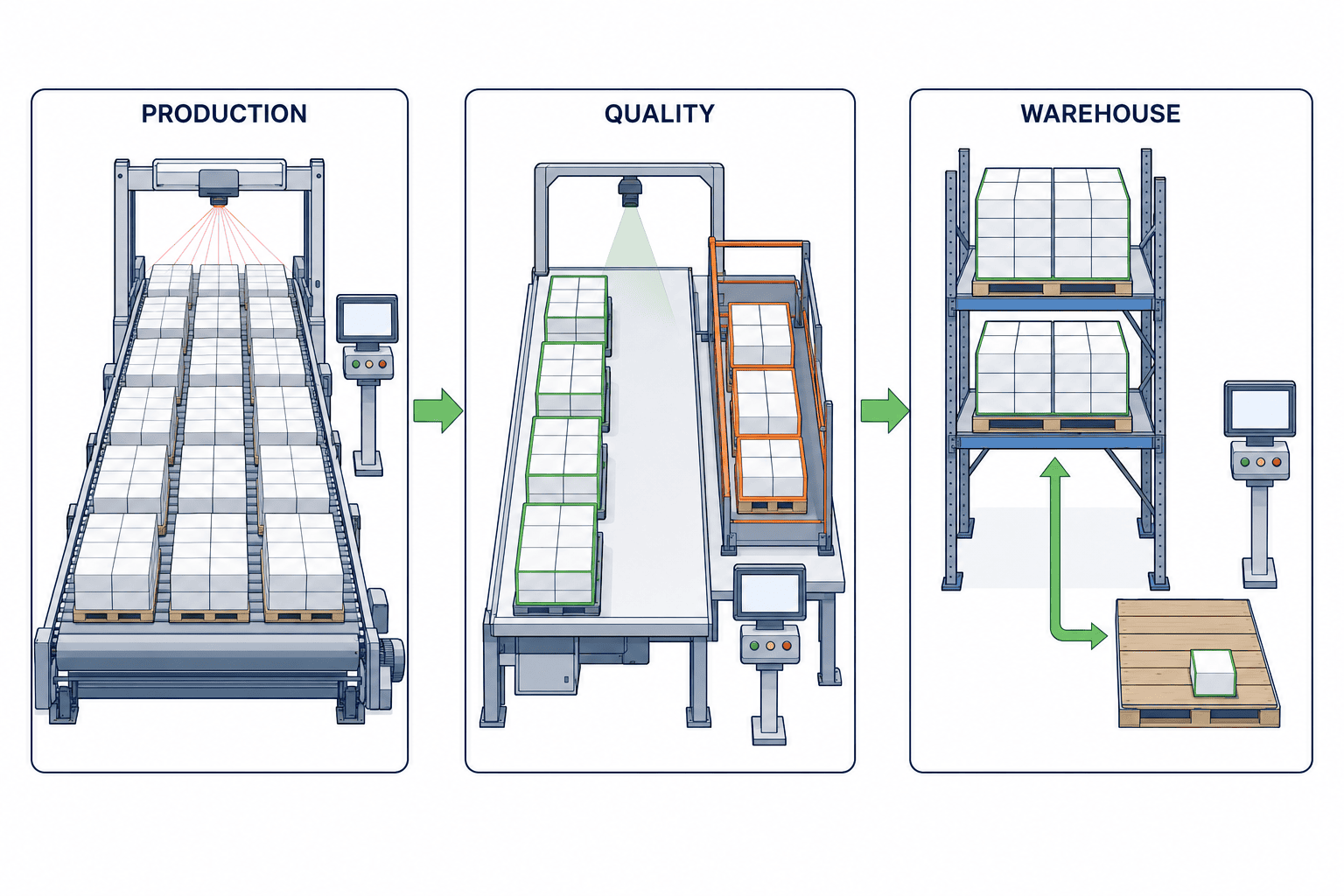
FAT and SAT: test the boundaries, not only the happy path
FAT can prove integration and state transitions in the supplier’s environment. SAT must repeat critical cases with actual devices, labels, bins and users at the Thai site. Agree contractual scope and pass conditions in the RFP. This matrix is an illustrative starting point.
| Test | Action | Pass condition |
|---|---|---|
| T01 | Report 96 candidates and four errors from an order for 100 | Distinct quantities and reasons persist |
| T02 | Hold 20 of the 96 | Held 20 cannot be allocated; only accepted 76 proceed |
| T03 | Put away 70 of the accepted 76 | Bin-level sum and six remaining at receipt are visible |
| T04 | Send the identical output event twice | ERP posts only once and returns the prior result |
| T05 | Production reports 96, warehouse scans 95 | One unresolved discrepancy stays visible, not auto-adjusted |
| T06 | Attempt to pick a quality-held container | Device blocks pick and records why |
| T07 | Reprint a label | Reprint links to original; the container is not counted twice |
| T08 | Correct a receipt after month-end and partial shipment | Permission, closed period and downstream transaction rules are enforced and auditable |
All quantities above are invented test values. Adapt the cases to lots, serials, weights and multiple warehouses. An API success response in FAT does not prove scanners work in a low-signal rack or a printer failure can be handled. Test with real roles, including night-shift staff. Treat a defect that can make held goods saleable as a go-live decision, not merely a training note.
Estimate cost and measure benefits honestly
There is no single credible market price for this scope. Extending an existing ERP differs from connecting new MES, QMS and WMS. Split estimates into process design, master data, interfaces, handhelds and labels, testing, training/cutover and maintenance. Compare one-time and recurring charges on the same scope. Event volume, label variants, offline behavior and finance integrations can matter as much as the number of users.
Measure more than minutes saved per receipt. Track wrong release prevention, search time for pallets, month-end discrepancies, WIP-to-finished-goods accounting differences and reliable customer promise dates. For hard-to-price risks, record incident count and containment time. An illustrative project baseline is four weeks of median and 90th-percentile completion-to-putaway time, open discrepancies and blocked-pick attempts; sparse items need longer. Four weeks is a suggested measurement period, not an external benchmark.
Rollout and data migration
Start with one product family and one warehouse rather than changing every line at once. Trace actual documents from completion to putaway with production, quality, warehouse and finance. Agree the status table and data dictionary before configuring screens and interfaces. Migration includes more than a finished-goods balance: open production orders, containers awaiting quality, reported output not yet received, pallets in putaway and unresolved corrections. At cutover, physically reconcile by lot, container, location and quality status. Map old document references to new transaction IDs. Decide whether each reported-but-unreceived item closes in the old system or crosses into the new one.
If systems run in parallel, designate only one as the live inventory posting source. A test copy should not create a second real receipt. Reconcile discrepancies daily by root cause. Go-live criteria must include blocking held goods, visibility of receipt differences, traceable reversals, reproducible finance entries and the ability to find a pallet. Set rollback conditions and an authorized decision maker in advance. Train operators on wrong labels, quantity mismatch, offline devices and mixed held stock, including whom to contact on night shift. During the first week, review exception queues daily and classify causes as master data, procedure, device or interface defects.
After launch, do not judge success by discrepancy count alone. Detection may reveal more problems during the first weeks. Measure time to alert, time to resolve, and recurrence by cause. A blocked scan of held stock is evidence of a prevented release, not simply an operator mistake. Review the location and cause weekly, improve master data or label placement, and display unresolved age, owner and next action on the management screen.
Frequently asked questions
How does a finished goods receipt system differ from a WMS?
A WMS often manages warehouse containers, locations, receiving, putaway and picking. Finished goods receipt spans the production order, output, quality decision, physical receipt and ERP inventory. Whether one WMS can cover the full scope depends on the product and existing ERP/MES. Allocate events by ownership rather than product name.
May output become saleable as soon as production reports it finished?
That can be acceptable for an item with no required inspection, simultaneous verified receipt and location, and a policy that permits it. It is unsafe as a default for stock awaiting inspection, label confirmation or physical receipt. Configure the rule by item, plant and customer obligation.
How should partial completion or partial acceptance work?
Keep several completion events per order, each with independent quantity, lot and container. Split accepted and held quantities into states with separate movement and shipping permissions. Reconcile cumulative output to planned, rejected and reversed quantities rather than replacing the first entry with the last.
Is an item-number barcode enough?
Not if quality or location is controlled by lot, serial or container. Preserve distinct identifiers for item, lot/serial and logistics unit. Choose GS1 or internal codes based on customer requirements and the existing master-data model.
Does an existing ERP make a new system unnecessary?
Possibly. If its standard functions support the required states, quality, containers, handhelds and audit trail in the actual shop-floor process, extending it may be sufficient. Run a gap test using the exceptions above before deciding what to configure or develop.
Conclusion
Do not collapse operation completion, output reporting, quality disposition, physical putaway and ERP inventory/accounting into one vague “done” flag. Link their quantities, status, lots, containers, times and owners. Test retries, reversals, partial acceptance and count differences. The result is a system that prevents missing pallets or uninspected goods from becoming a sales promise.
If your Thai plant is mapping the path from reported production to quality release, warehouse receipt and ERP stock, contact TOMAS TECH. We can discuss the event boundaries and RFP scope while the project is still being planned.


