


Conversations about putting smartwatches on the shop floor almost always start with a model comparison. Ingress protection, battery life, glove compatibility, price. Yet what decides whether the deployment still produces results six months later is not the specification of the device. It is a design decision: how many alerts per day you allow onto the wrist. On sites that never capped that number, people stop looking even when the watch buzzes. This article starts from the international benchmarks used in alarm management, shows how to split notifications into four tiers so that only the top tier reaches the wrist, and then lays out the five-year total cost and payback period for three different approaches. It closes with the four issues that are specific to running wearables in Thailand. Every figure below is a model calculation stated together with the assumptions it rests on, so you can substitute your own headcount, operating days, and downtime cost and see how the conclusion moves.
Why Starting with Device Selection Goes Wrong
The First Two Weeks Almost Always Look Fine
The first day of a wearable rollout has a good atmosphere. Watches are handed to the line leaders and the maintenance technicians, equipment stops, and a few seconds later a wrist buzzes. A process that until yesterday depended on a landline in the supervisor’s office or on somebody shouting across the aisle suddenly reacts in seconds. Nobody objects at this stage. The technology does exactly what the proposal said it would do, and the people who pushed the project internally feel vindicated.
The change starts somewhere around week three. The gesture of raising the wrist when a notification arrives begins to lag. By week four, some people feel the vibration and do not look. Two months in, there is a watch sitting in a desk drawer with a two-digit badge count on the screen that nobody has cleared.
At that point the explanation coming back from the floor is, with almost no exceptions, about the device. The vibration is too weak. The screen is too small. It does not respond through gloves. Those statements are usually true as observations. They are not the cause. The cause is that too many notifications were reaching the wrist, and the weight of any individual one had gone to zero.
This distinction matters because it determines what you do next. If the diagnosis is the device, the remedy is a procurement cycle. If the diagnosis is the volume, the remedy costs almost nothing in hardware and takes a few weeks of unglamorous cataloging work.
Alerts Stop Being Read in Three Distinct Stages
The path from a working deployment to an ignored one has a clear order to it, and each stage is visible from the outside if you know what to look for.
Stage 1: people start prioritizing on their own. Once the volume arriving at the wrist exceeds what a person can process, the worker begins deciding for themselves which notifications are worth looking at and which are not. That judgment depends on individual experience, so the criteria differ from person to person. Organizational consistency is already gone at this point, even though nothing in the system logs looks wrong.
Stage 2: people start checking in batches. They stop looking at each notification as it arrives and switch to reviewing everything at a break or at shift handover. This is not defiance. It is a rational adaptation to an unmanageable inbox. But it is also the point at which the reason for putting real-time alerts on a manufacturing floor essentially disappears, because the only value the wrist adds over a screen is immediacy.
Stage 3: people take the device off. They forget to charge it, they leave it somewhere, or they simply stop putting it on in the morning. Recovering from this stage costs about as much effort as the original deployment did, because you are no longer introducing a tool, you are reversing a learned conclusion.
The important thing is that from Stage 1 to Stage 3, the specification of the device did not change by a millimeter. The only variable that changed was the number of alerts.
Device Debates Dominate Because They Produce Answers
Meeting time still gets absorbed by device selection. The reason is simple: device comparisons can be put in a table. Ingress rating, weight, battery, price, enterprise management features. Line up circles and crosses across five candidates and the discussion feels like it moved forward.
“Which notifications go to the wrist,” by contrast, does not fit in a table. Equipment faults, quality deviations, forklift requests, material shortages: each belongs to a different department, and each department has its own reason for insisting that its own alerts are the critical ones. That negotiation is tedious, and the person running the project usually does not have the authority to settle it. So it gets deferred, and the deployment goes live with the default configuration, which is to say with everything switched on.
Whether smartwatches become part of how the plant actually runs is decided by whether that tedious negotiation happened before go-live or not. The device can be swapped later. A wrist that has already learned “this is something I do not need to look at” does not reset when you swap the device.

The Real Constraint Is Alert Volume: EEMUA 191 and ISA-18.2
The Ceiling Used in Plant Control Rooms
The claim that people stop responding when there are too many notifications is not shop floor intuition. It is something the process industries have been quantifying for decades. EEMUA 191, one of the principal guides to alarm management, and the American standard ANSI/ISA-18.2 both put the benchmark for steady-state alarm rate at no more than one alarm every 10 minutes per operator. That works out to roughly 150 alarms per day.
It is worth being precise about who that 150 applies to. It is a benchmark for an operator sitting in a dedicated control room, monitoring multiple displays continuously, whose job description is responding to alarms. In other words, 150 is the ceiling under conditions that are close to the best possible for receiving notifications.
The Wrist Is Narrower Still
The conditions a production worker operates under are clearly harsher than those of a control room operator.
- Their primary job is the work itself, not monitoring, so every notification arrives as an interruption to something already in progress.
- The screen is a few centimeters across, and the amount of information readable at a glance is not comparable to a control display.
- Gloves, noise, dust, and direct sunlight all raise the physical cost of the act of checking.
- Because checking often happens while moving, there are periods when it is not safe to look at all.
The ceiling for what may be pushed to the wrist therefore has to sit well below 150. The model in this article designs to a limit of 12 alerts per person per day. To keep the unit consistent with the 150 figure from EEMUA 191, “per day” here means the total volume that one position, meaning one role, receives across 24 hours. On a three-shift operation, those 12 are spread across the three people who cover that position. Against 150, that is 8.0%, or one alert every two hours in time terms. Restated as “the alerts assigned to this position will make the wrist buzz only 12 times across a full day,” it becomes possible for the people on the floor to judge intuitively whether the density is one they can live with.
That is the value of expressing the ceiling as a lived experience rather than as a rate. “Your wrist buzzes 12 times across a full day” is a sentence a shift leader can agree or disagree with on the spot, in a way that “8.0% of the control room benchmark” is not.
An Unrationalized Factory Generates 420 Alerts per Person-Day
So how much does a factory that has never rationalized its notifications actually emit? This model takes 420 alerts per person-day as its starting point. That total includes minor equipment warnings, measured values crossing thresholds, production count progress, quality inspection results, system status messages, and the recovery notifications that follow each of them.
420 is 2.8 times the 150 benchmark for a control room operator. Connect that stream to the wrist unchanged and you are pushing 35 times the wrist ceiling onto a person who is holding a tool in one hand. The outcome is determined at that moment, independently of how good the hardware is.
The task is not to reduce the 420. Those 420 events are information the factory genuinely generates, and most of it is worth keeping. The task is to sort the 420 by where each one is delivered.
That reframing is worth carrying into the first internal meeting. “We are going to cut your alerts” invites every department to defend its own. “We are going to decide which screen each alert appears on, and none of them are being deleted” is a conversation the same people are more willing to join.
Before Pushing Equipment Alerts to a Smartwatch: The Four-Tier Design
The Four Tiers and How the Volume Is Allocated
Split the destinations into four tiers and allocate the 420 alerts per person-day as follows.
| Tier | Destination | Definition | Alerts per person-day | Share |
|---|---|---|---|---|
| L1 | Wrist, meaning the smartwatch | The recipient physically moves right now | 12 | 2.9% |
| L2 | Smartphone or tablet | Be aware of it, act later | 55 | 13.1% |
| L3 | Dashboard | Go and look at it | 143 | 34.0% |
| L4 | Not delivered, logged only | For after-the-fact analysis | 210 | 50.0% |
| Total | 420 | 100.0% |
12 + 55 + 143 + 210 = 420 alerts, and the shares add up as 2.9 + 13.1 + 34.0 + 50.0 = 100.0%. There are two points to hold on to. First, only 2.9% of the total reaches the wrist. Second, 210 alerts, half of everything the plant generates, are delivered to nobody and simply retained as a log.
The two are worth presenting as a pair, because they depend on each other. The 2.9% at the wrist is only sustainable because the 50.0% at L4 exists to absorb what is displaced. Without an explicit “not delivered” tier, alerts that lose their L1 status have nowhere to go but L2 and L3, and the total pushed to people does not fall.
The L1 Test Is “Does the Recipient Move Right Now”
Of the four tiers, L1 is the only one that has to be cut with real rigor. Use a single criterion.
Does the person receiving this notification physically move right now?
Do not cut on “is it important.” There are an unlimited number of important notifications in a factory. Do not cut on “is it urgent” either, because the definition of urgent differs by department, and a criterion that each department interprets for itself is not a criterion. To keep the judgment stable, it has to rest on an observable fact about the recipient’s body.
For a notification to pass this test, three conditions have to hold at the same time.
- The recipient is a specific person. “The whole maintenance team” is not L1. When a notification goes to a wrist without a decided owner, everyone assumes somebody else is going. Anything you cannot narrow to one named person through a duty roster or a skills matrix comes out of L1.
- The action is predetermined. The person who sees the notification should not have to work out where to go and what to do at the moment of reading. Anything that requires that judgment drops to L2, where the recipient can look at the details on a larger phone screen before moving.
- It cannot wait. If the outcome would be the same 10 minutes later, it is not L1. This is where to be cold about it. “Sooner is better” and “cannot wait” are different statements, and only the second one earns a place on the wrist.
Run an actual inventory against all three conditions and the number of qualifying events becomes surprisingly small. The figure of 12 per person-day is less an arbitrary cap than the volume that settles out when the three conditions are applied strictly.
Separating L2, L3, and L4
L2, smartphone or tablet, 55 alerts. This is the “be aware of it, act later” tier. Changeover advance notices, material level warnings, delays in the upstream process, and quality inspection results belong here. These need to be delivered, but they do not need to be delivered at the cost of interrupting work in progress. So they arrive as a badge or a list rather than as a vibration. Most line leaders and supervisors will spend the majority of their attention in this tier rather than in L1.
L3, dashboard, 143 alerts. This is the “go and look” tier, and nothing here is pushed. Equipment availability, output by process, energy consumption, and the history of minor warnings all sit here as material for understanding the situation. Not pushing is the definition of this tier. If that boundary is not held, total notification volume returns to where it started within weeks, usually through a well-intentioned request to “just also send this one to the phone.”
L4, not delivered, 210 alerts. This tier is recorded but never sent to anyone. Normal-range sensor logs, state transition records, events that recovered automatically, and internal system status all belong here. The fact that 50.0% of everything lands in this tier will draw resistance the first time it is proposed. The answer to the concern that “we will lose visibility” is that L4 is fully retained and searchable from the L3 dashboard, and being able to give that answer honestly assumes the design provides for it from the start.
Three Cases That Always Cause Arguments
In practice, the sorting exercise stalls on roughly the same three patterns every time.
Equipment stop alarms. The argument that “a stop is serious, therefore L1” is a natural one, but it depends on the kind of stop. If minor stops that the operator clears within a minute are included in L1, they consume the entire daily budget on their own. This model uses the form “if the stop persists for three minutes or more, send L1 to one named maintenance technician.” The same event can be kept under control simply by adding a time condition to it.
Quality deviations. A deviation in inspection results is important, but the quality engineer who receives the notification does not necessarily move at that moment. In most cases they check the record and look at the trend before acting. That behavior is L2. The exception is the subset that meets the condition “if this continues, a defect at the next process is certain,” and only that subset is raised to L1.
Calls. Notifications in which a person summons another person sit close to L1 by definition. Forklift dispatch requests, calls for help when material runs out, and witness requests for an inspection all fall into this category. They only work when the recipient is a specific person, however, so pairing them with a duty roster is mandatory rather than optional. The design of calls themselves is covered separately in designing a factory call system.
How This Relates to an Existing Andon
Plants that already run an andon tend to reach for “we will just also mirror the andon signals to phones and watches.” As a tiering decision, that is dangerous. An andon is a device for showing something to the people who are present, and it delivers information only for as long as it is in someone’s field of view. The wrist is a device for summoning someone who is not present. The purposes are different, so mirroring the same content verbatim means events that the andon has already resolved still arrive on the wrist.
The correct approach is to define the andon’s illumination condition and the L1 condition separately. The andon may stay lit indefinitely, because it costs nothing in attention from someone who is merely keeping it in view, while L1 fires only when the condition has not been cleared within a set time from illumination. The design of the andon side itself is treated in detail in visual management with an andon system.
Comparing Three Approaches and the Five-Year TCO
Fix the Assumptions First
Before any money is discussed, the assumptions have to be explicit. Everything below is a model calculation at a single scale: one Japanese-affiliated plant in Thailand, 200 workers, of whom 50 are notification recipients. Those 50 break down as 10 maintenance technicians, 20 line leaders, 10 forklift operators, and 10 quality staff. All amounts are stated in Thai baht (THB), with no conversion to any other currency.
Three approaches are compared.
- Option A: consumer-grade smartwatches plus MDM plus an in-house integration app, 50 units
- Option B: a packaged enterprise wearable deployment, dedicated devices plus a notification server, 50 users
- Option C: no watches at all, meaning additional andon plus 20 existing smartphones
Option A: Consumer Smartwatches with In-House Integration
| Item | Unit cost and quantity | Five-year total (THB) |
|---|---|---|
| Devices | 8,000 THB x 50 units. OS support ends at three years, so one refresh in year 3 | 800,000 |
| MDM | 350 THB per device per year x 50 units = 17,500 THB per year | 87,500 |
| Factory Wi-Fi expansion, initial | Lump sum | 200,000 |
| Integration development, initial | PLC and andon to notification platform to watch app | 1,200,000 |
| Operations | Charging routine, spare units, app maintenance, 180,000 THB per year | 900,000 |
| Five-year total | 3,187,500 |
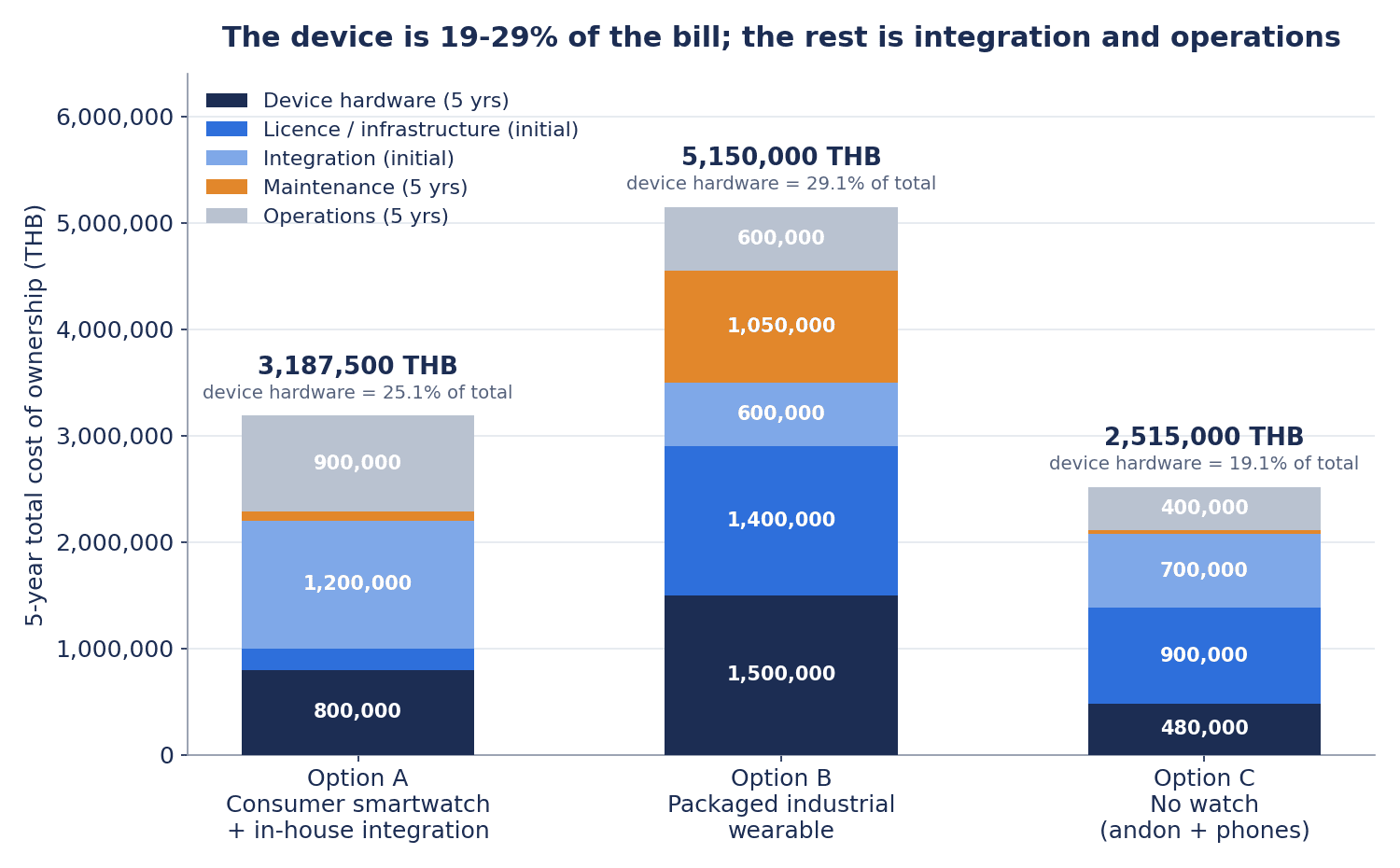
The hardware itself comes to 800,000 THB, which is 25.1% of the 3,187,500 THB five-year total. The largest single line is integration development at 1,200,000 THB, accounting for 37.6% of the total.
The year 3 device refresh is included because support for consumer watch operating systems generally ends at around three years. Continuing to use an unsupported device for business purposes under MDM becomes difficult to justify from a security standpoint. This is a structural weakness of Option A, and it appears again below as one of the common failure modes.
Option B: A Packaged Enterprise Wearable Deployment
| Item | Unit cost and quantity | Five-year total (THB) |
|---|---|---|
| Package license, initial | Lump sum | 1,400,000 |
| Dedicated devices | 15,000 THB x 50 units. One refresh in year 4 | 1,500,000 |
| Annual maintenance | 15% of the license = 210,000 THB per year | 1,050,000 |
| Point integration with existing PLC and MES, initial | Lump sum | 600,000 |
| Operations | 120,000 THB per year | 600,000 |
| Five-year total | 5,150,000 |
Hardware comes to 1,500,000 THB, which is 29.1% of the 5,150,000 THB five-year total. Annual maintenance of 210,000 THB is calculated as 15% of the 1,400,000 THB license.
Option B’s operating cost is 60,000 THB per year lower than Option A’s, 120,000 against 180,000, because app maintenance and first-line support are included on the vendor side. Put differently, Option B moves part of the operational load that would otherwise have to be carried in-house to an external party, in the form of an upfront license and an annual maintenance fee.
Option C: No Watches
| Item | Unit cost and quantity | Five-year total (THB) |
|---|---|---|
| Additional andon and signal towers, initial | Lump sum | 900,000 |
| Additional smartphones | 12,000 THB x 20 units. One refresh in year 3 | 480,000 |
| Notification platform development, initial | Lump sum | 700,000 |
| MDM | 350 THB per device per year x 20 units = 7,000 THB per year | 35,000 |
| Operations | 80,000 THB per year | 400,000 |
| Five-year total | 2,515,000 |
Hardware comes to 480,000 THB, which is 19.1% of the 2,515,000 THB five-year total. Option C does not issue a device to all 50 people, relying instead on 20 smartphones and andon units on the floor, so the hardware share of its total is the lowest of the three.
Hardware Is Only 20 to 30 Percent of the Total
Line the three approaches up and a common structure appears.
| Item | Option A | Option B | Option C |
|---|---|---|---|
| Five-year total (THB) | 3,187,500 | 5,150,000 | 2,515,000 |
| Of which hardware (THB) | 800,000 | 1,500,000 | 480,000 |
| Hardware share | 25.1% | 29.1% | 19.1% |
The share of five-year total cost attributable to hardware falls between 19.1% and 29.1% in every one of the three approaches. The remaining 70 to 80 percent is everything that is not the device: integration development, the notification platform, licenses, maintenance, and operations.
That fact supports the conclusion from the opening of this article, this time from the cost side. Spending most of the meeting time on device selection means putting 80% of the discussion into 20 to 30 percent of the money. And the device is the line item that can be replaced later, while the integration design and the notification design are the line items that are hardest to rebuild after the fact. The order is reversed.
For completeness, the gap between Option A and Option B is 5,150,000 minus 3,187,500, or 1,962,500 THB. The most realistic reading of that roughly 1.96 million THB is not a difference in features. It is the price of extending device life from three years to four, and of not having to keep the operating capability in-house. Whether there is somebody on staff who can look after a mobile app and a notification platform changes what that gap buys you.
Benefits and Payback Period
Keep the Counterfactual to a Single Baseline
The most common way for a benefit calculation to go wrong is holding more than one comparison baseline. Mixing “compared with installing andon,” “compared with running this on spreadsheets,” and “compared with our other plant” causes the same benefit to be counted twice.
This model fixes the comparison to a single baseline: the current state, meaning no notification mechanism at all. The benefits of Options A, B, and C are all differences against that same current state. Even when the options are compared with each other, all that happens is that their respective against-current-state values are placed side by side.
The Cost of the Current State
The assumptions for the current state are as follows.
- From the moment a call is raised to the moment the responsible person arrives on site, an average of 12 minutes
- 8 qualifying events per day, 300 operating days per year
- Lost profit from equipment downtime of 4,500 THB per hour, which is the assumed value used in this article
Annual equipment downtime is therefore 12 minutes x 8 events x 300 days = 28,800 minutes = 480 hours per year. In money, 480 hours x 4,500 THB = 2,160,000 THB per year. That is the loss occurring every year in the state where no notification mechanism exists, and it decomposes into unit rates of 75 THB per minute and 900 THB per event.
Annual Benefit by Option
| Option | Time to arrival | Annual downtime | Hours saved | Annual benefit |
|---|---|---|---|---|
| Current state | 12 minutes | 480 hours | — | — |
| A, wrist notification | 5 minutes | 200 hours | 280 hours | 1,260,000 THB per year |
| B, wrist notification | 5 minutes | 200 hours | 280 hours | 1,260,000 THB per year |
| C, andon plus smartphone | 8 minutes | 320 hours | 160 hours | 720,000 THB per year |
For Options A and B, 5 minutes x 8 events x 300 days = 12,000 minutes = 200 hours. The reduction is 480 minus 200 = 280 hours, and 280 x 4,500 = 1,260,000 THB per year. Checked per event, 7 minutes x 75 THB = 525 THB, and 2,400 events per year gives 1,260,000 THB, which agrees.
For Option C, 8 minutes x 8 events x 300 days = 19,200 minutes = 320 hours. The reduction is 480 minus 320 = 160 hours, and 160 x 4,500 = 720,000 THB per year. Expressed as a downtime reduction rate, A and B deliver 280 / 480 = 58.3% and C delivers 160 / 480 = 33.3%.
Options A and B produce the same annual benefit because in both cases the notification reaches the wrist and time to arrival becomes the same 5 minutes. Since nothing separates them on the benefit side, the choice between A and B is decided entirely on the cost side.
Payback Period
Payback is calculated as the point at which cumulative cash flow first turns positive. Device refresh costs that occur mid-period are recognized as an outflow in the year they occur. That treatment affects only Option C, because for A and B the payback point falls before the refresh year.
| Option | Initial investment | Annual running cost | Annual net benefit | Mid-period device refresh | Payback |
|---|---|---|---|---|---|
| A | 1,800,000 | 197,500 | 1,062,500 | Year 3, 400,000 | 1.7 years |
| B | 2,750,000 | 330,000 | 930,000 | Year 4, 750,000 | 3.0 years |
| C | 1,840,000 | 87,000 | 633,000 | Year 3, 240,000 | 3.3 years |
The workings are as follows.
Option A. Initial investment of 1,800,000, comprising Wi-Fi 200,000 plus integration development 1,200,000 plus the first device purchase 400,000. Annual running cost of 197,500, comprising MDM 17,500 plus operations 180,000. Over five years, 1,800,000 + 197,500 x 5 + the year 3 device refresh of 400,000 = 3,187,500, which agrees with the five-year total. Annual net benefit is 1,260,000 minus 197,500 = 1,062,500. At the end of year 1, 1,800,000 minus 1,062,500 = 737,500 remains unrecovered, and 737,500 / 1,062,500 = 0.69 years. Payback is 1.69 years, or about 1.7 years.
Option B. Initial investment of 2,750,000, comprising license 1,400,000 plus the first device purchase 750,000 plus integration 600,000. Annual running cost of 330,000, comprising maintenance 210,000 plus operations 120,000. Over five years, 2,750,000 + 330,000 x 5 + the year 4 device refresh of 750,000 = 5,150,000, which agrees. Annual net benefit is 1,260,000 minus 330,000 = 930,000. At the end of year 2, 2,750,000 minus 1,860,000 = 890,000 remains unrecovered, and 890,000 / 930,000 = 0.96 years. Payback is 2.96 years, or about 3.0 years.
Option C. Initial investment of 1,840,000, comprising andon 900,000 plus the first smartphone purchase 240,000 plus notification platform 700,000. Annual running cost of 87,000, comprising MDM 7,000 plus operations 80,000. Over five years, 1,840,000 + 87,000 x 5 + the year 3 smartphone refresh of 240,000 = 2,515,000, which agrees. Annual net benefit is 720,000 minus 87,000 = 633,000. At the end of year 2, 1,840,000 minus 1,266,000 = 574,000 remains unrecovered. The year 3 smartphone refresh of 240,000 then occurs, so the balance to be recovered rises to 574,000 + 240,000 = 814,000, which the year 3 net benefit of 633,000 does not cover. The balance at the end of year 3 is 814,000 minus 633,000 = 181,000. Since 181,000 / 633,000 = 0.29 years, payback is 3.29 years, or about 3.3 years. Option C is the only one whose device refresh deadline of three years falls before the payback point, and that single refresh pushes payback back by roughly 0.4 years. Ignoring the refresh, the figure would have been 2.91 years.
“Drop the Watch and It Gets Cheaper” Does Not Hold
There are three conclusions to draw from that table.
First, Option A recovers fastest and also has the best five-year position. Looking only at expenditure, the cheapest is Option C at 2,515,000 THB, and Option A’s five-year total of 3,187,500 THB is higher than that. But on a five-year cumulative basis including benefits, 1,260,000 x 5 minus 3,187,500 = 3,112,500 THB positive, the largest of the three approaches. The fact that “the cheapest approach” and “the best investment” are not the same option is characteristic of this area.
Second, Option C has the lowest total cost yet the slowest payback of the three. C takes 3.3 years against B’s 3.0 years. On a five-year cumulative basis, C returns 720,000 x 5 minus 2,515,000 = 1,085,000 THB while B returns 1,260,000 x 5 minus 5,150,000 = 1,150,000 THB, so B comes out 65,000 THB ahead. This happens because not using the wrist limits the improvement in arrival time to a move from 12 minutes to 8 minutes, so the benefit side does not grow, and on top of that a device refresh lands in year 3, before payback. The intuition that skipping the watch keeps things cheap does not hold under these assumptions.
Third, Option A’s advantage is not unconditional. A already builds in a year 3 refresh on the assumption that OS support ends at three years, but it still requires the internal discipline of not using unsupported devices for business purposes. It also assumes there is somebody who can maintain the notification platform and the watch app in-house. In a plant where those two conditions cannot be met, the roughly 1.96 million THB premium that Option B pays becomes a reasonable expenditure.
What Is Not Included in the Money
The only item converted to money in this model is the reduction in equipment downtime. None of the following benefits, all of which are commonly expected in practice, are included in the figures.
- Heat stress countermeasures: anomaly detection from vital signs and the effect of prompting breaks
- Labor and safety: fall detection, welfare checks on lone workers, emergency calls
- Quality: suppressing defect escapes through earlier notification of inspection deviations
- Indirect labor: less walking and searching time spent on making calls
- Training: leveling response quality using notification history
They are excluded not because they produce nothing. They are excluded because the way each one is measured differs by plant, and the assumptions in this article are not sufficient to make the resulting figures defensible. The payback periods shown here, A at 1.7 years, B at 3.0 years, and C at 3.3 years, should therefore be read as conservative values with every upside factor stripped out. In a real investment decision, these items would be evaluated separately as qualitative points in favor.

Four Additional Issues When Using Smartwatches in Thai Factories
Everything above applies to factories in general. When the deployment happens in Thailand, there are four issues where a design carried over unchanged from Japan will not pass. None of them are converted to money here. They are qualitative requirements to be resolved during the design phase.
1. PDPA: Vital Signs Are Sensitive Personal Data
Under Thailand’s Personal Data Protection Act (PDPA), vital sign information such as heart rate and body temperature falls under the sensitive personal data defined in Section 26, covering biometric and health data, and handling it requires explicit consent as a general rule. In addition, under Section 19, collecting employee data requires consent before or at the time of collection, and that consent must as a general rule be explicit and given in writing or by electronic means.
Location data is not biometric data as such, but in practice it is safer to place it under the same consent design.
The design consequence is clear. Separate the functions that exist to deliver notifications from the functions that measure health and location, and make the latter optional. Without that separation, an employee who does not consent cannot be given the notification function at all. With it, notifications can be provided to everyone on the basis of business necessity while vital sign collection applies only to those who have consented.
2. NBTC: You May Not Be Able to Bring the Device In
Under the framework of the NBTC, the National Broadcasting and Telecommunications Commission, which governs type approval of radio equipment, devices with transmit power above 20 mW, or devices used within 20 cm of the body, are treated as Class A. A smartwatch worn on the wrist falls into that category.
In practice there are four constraints that matter.
- The applicant for type approval must be a Thai legal entity, and an overseas manufacturer cannot hold the license directly. There are cases where the arrangement of using the device the Japanese head office has under contract, unchanged, at the Thai entity does not work.
- Where FCC or CE test reports can be reused, the process takes roughly three to five weeks. Where they cannot be reused, that period extends.
- Equipment that supports only 2G and 3G cannot obtain type approval on or after June 30, 2025. Enterprise devices carrying older communication modules are affected.
- From January 1, 2026, the de minimis threshold for low-value imports is abolished, and imports are subject to VAT from the first baht. Even sending a small number of devices as samples is taxed.
Building a schedule on the assumption that the devices already in use in Japan will simply be brought in leads to a stop at one of these four points. Before deciding on a device, confirm the certification status of the specific model within Thailand and identify the Thai entity that will act as the applicant.
3. Heat and WBGT: Measuring Alone Achieves Nothing
The ministerial regulation on heat, light, and noise (B.E. 2559, that is 2016) requires workplaces to manage WBGT, the wet bulb globe temperature, according to work intensity. The threshold values are 30 degrees Celsius or below for heavy work, 32 degrees Celsius or below for moderate work, and 34 degrees Celsius or below for light work.
A wearable function that measures body temperature and heart rate only becomes meaningful when it is tied to the operation of those thresholds. Concretely, that means building a mechanism in which the measured WBGT and individual vital signs are used together to decide when to switch between work and rest.
Conversely, a deployment that measures simply because measurement is possible accumulates data without changing how anything is run. And because the operation is by then handling sensitive personal data under the PDPA, only the risk remains. If vital sign measurement is going in, decide first what thresholds the readings will be evaluated against and how they will be used.
4. Labor Relations and Perception: Document It Before It Is Read as Surveillance
A state in which location and heart rate are continuously visible is, from the employee’s point of view, surveillance. This is not a matter of how skillfully it is explained. It is a matter of what the functionality actually does.
What works in practice is documenting the following four points before deployment and agreeing them between management and labor.
- Who will see the data, identifying the role and department. Write the job position rather than something like “the administration department.”
- Which data will be seen, listing notification read receipts, location, heart rate, and step count separately.
- At what time granularity it will be seen, whether in real time, as a daily summary, or only in the event of an anomaly.
- What it will not be used for. If it will not be used for performance evaluation or attendance assessment, say so explicitly.
The last item matters most. A mechanism where “will not be used” has not been put in writing will be assumed to be used for those purposes eventually. From the moment that assumption takes hold, the read rate on notifications falls. The system may be working exactly as designed technically and still fail operationally.
How to Roll Out: Four Steps
Step 1: Inventory the Notifications
The first thing to do is neither device selection nor a conversation with a vendor. It is writing down every notification the factory currently emits. The scope is all of the following.
- Alarms raised by PLCs and equipment controllers
- Alerts from SCADA, MES, and production management systems
- Illumination conditions for andon and signal towers
- Deviation notices from quality inspection systems
- Person-to-person calling practices such as public address, telephone, raised hands, and intercoms
- Informal calling that happens tacitly on the floor, such as running to the supervisor’s office
For each one, record five fields: the trigger condition, the count per day, the current destination, the recipient, and the action the recipient takes. Where counts can be aggregated mechanically from logs, aggregate them. For human practices, record by hand for a single week.
The reason this step cannot be skipped is that every later decision depends on the counts produced here. The 420 in this article and the 12 for L1 only become meaningful once they are replaced with your own measured values.
Step 2: Sort into Four Tiers
Sort the inventoried notifications into L1 through L4. The order matters. Start with L4.
Trying to start with L1 causes every department to push its own notifications upward and the discussion to diverge. Entering instead through “which of these go to nobody and are only logged” keeps the judgment grounded in facts. Any notification that has not caused a person to take action even once in the past six months is L4. Close to half of the total should drop out at this stage.
Next, cut L1 strictly using the three conditions above: the recipient is a specific person, the action is predetermined, and it cannot wait. What remains is divided between L2 and L3. That division does not have to be as strict as L1, because it can be adjusted later.
If the sorting produces an L1 count above 20 per person-day, the conditions are too loose. Add time conditions, such as how many minutes the state must persist, or count conditions, such as how many consecutive occurrences are required, and bring it down to around 12.
Step 3: Pilot Small, with L1 Only
Run the pilot with only the notifications sorted into L1, in a single process and a single job role. Do not load every function at once.
- Duration: four to six weeks
- Scope: 5 to 10 people, either maintenance or line leaders but not both
- Metrics: only three, namely time from notification to arrival on site, notification read rate, and the actual L1 count
Vital sign measurement, location tracking, attendance integration, and chat features are not included at this stage. There are two reasons. One is that adding functions makes it impossible to tell what produced the effect. The other is that they trigger the need for a PDPA consent design, which delays the start of the pilot by several weeks.
If the read rate in the pilot falls short of the target, the cause is almost always the L1 count. Before changing the device, tighten the L1 conditions. Recording the actual count alongside the other metrics exists precisely so that this diagnosis can be made.
Step 4: Expand
Once the pilot confirms a reduction in arrival time, expand sideways across job roles. A workable sequence is maintenance, then line leaders, then forklift operators, then quality. The first two have clear L1 definitions, while the second two require negotiation with operating rules.
Only at the expansion stage do the following elements come up for consideration.
- Wi-Fi and network expansion. Run the pilot within the reach of existing infrastructure and design coverage at the point of plant-wide rollout. This part translates directly into notification latency, and outdoor yards and high-ceiling warehouses need particular care. The design principles are collected in building a factory wireless LAN.
- Automating notifications from the equipment side. Move from buttons pressed by people to automatic triggering based on equipment state. This is the stage at which the scope of connection to PLCs and sensors is decided. For details, see the architecture of an equipment alert notification system.
- Adding vital signs and location. Add these as optional functions, together with the PDPA consent design.
- Standardizing the charging routine. As discussed below, handing out devices without settling this always breaks down.
Common Failure Modes
Failure 1: Adding Devices Without Reducing Notifications
This is the most common failure. Leave the existing notification configuration untouched and add the watch as another output destination. It is the technically easiest path and the easiest one to get approved internally. It is also the most reliable way to fail.
In this pattern, all 420 alerts per person-day flow straight to the wrist. As covered above, that is 2.8 times the 150 benchmark for a control room operator and 35 times the wrist ceiling of 12. People stop looking in week three and take the device off two months later. What remains inside the company is the single conclusion that “wearables are not suited to manufacturing,” and the next proposal does not get through for three years.
There is one way to avoid it: do not place a device order before the inventory and the sorting are complete.
Failure 2: Making Vital Sign Measurement the Objective
“It can also handle health management” is easy to use as a persuasion point, and executives respond well to it. But putting vital signs at the center of the objective creates three problems at the same time.
First, handling sensitive personal data under the PDPA becomes unavoidable, which brings with it the design and operation of consent collection. Second, without a decision about what the readings will be used for, data accumulates and nothing about the operation changes. Third, employee perception tilts toward surveillance, which lowers acceptance of the notification function itself.
Add vital signs as an optional function only where a concrete operating rule tied to WBGT management thresholds, meaning the decision to switch between work and rest, has already been designed. The point is not to reverse that order.
Failure 3: Choosing a Model Without Checking the OS Support Deadline
Support for consumer smartwatch operating systems generally runs about three years. Choose a model that is already a year past launch at the time of deployment and the refresh point arrives in effectively two years.
The reason this model includes a 400,000 THB device refresh in year 3 for Option A is that it takes this constraint as given. If the five-year calculation were instead built on the premise of continuing to use unsupported devices, the five-year total would fall to 2,787,500 THB, but that figure would represent a decision to keep devices with no remaining security updates connected to the business network for five years. The lower number on the spreadsheet is exchanged for a risk of an entirely different character.
When selecting a model, check the launch date and the scheduled end of OS support before looking at the specification sheet. A model with less than two years remaining there can be expensive on a total basis even when its unit price is low.
Failure 4: Handing Out Devices Without Deciding the Charging Routine
Easy to overlook, and yet the item with the largest influence on whether the deployment sticks.
Continuous operating time on wearable devices is frequently not long enough to cover an entire shift in a three-shift plant, which means charging inevitably spans shift boundaries. Four things need to be decided here.
- Personally assigned or shared across shifts. Personal assignment means one device per person, while sharing means procedures for cleaning and handover.
- Where and when charging happens. Charging everything at once during handover makes the number of chargers the bottleneck.
- How many spares to hold. Decide the quantity needed to absorb failures, losses, and forgotten charging up front, expressed as a ratio to deployed units. Without that decision, every failure triggers a fresh procurement approval, and the person concerned receives no notifications in the meantime.
- The fallback when the battery is dead. Leaving somebody without a working watch and therefore without notifications means that process alone reverts to the old way of working.
The charging routine is a floor rule rather than a system feature, so the system owner cannot settle it alone. Document it explicitly as a deliverable of the deployment project.
Failure 5: Framing the Project as an Intercom Replacement
There is a clear line between what a smartwatch can replace about a two-way radio and what it cannot. Declaring “we are eliminating intercoms” while conflating the two draws resistance from the floor. The FAQ below sets out the distinction.
Frequently Asked Questions
Which Jobs Are a Good Fit for a Smartwatch in a Factory?
Jobs where the person moves around, is on the receiving end of calls, and physically acts when called. Concretely, that means equipment maintenance, line leaders and supervisors, in-plant logistics such as forklift operation, and quality staff who attend inspections. The 50 notification recipients in this model are made up on exactly that basis: 10 maintenance, 20 line leaders, 10 forklift, and 10 quality.
The poor fits are jobs performed at a fixed position with a screen already close at hand, such as inspection benches, offices, and control rooms, and jobs where both hands are fully occupied for long stretches. The former is served by a dashboard, and in the latter the act of looking at the wrist never happens. Any plan framed as “issue one to every worker” is almost certain to be excessive from this perspective. That is why this model narrows the recipients to 50 out of 200 workers.
How Much Does a Smartwatch Deployment Cost?
Looking only at device prices leads to the wrong answer. In this model, covering a Japanese-affiliated plant in Thailand, 50 notification recipients, over five years, the five-year total is 3,187,500 THB for Option A, 5,150,000 THB for Option B, and 2,515,000 THB for Option C. The share of that total accounted for by the hardware itself is only 25.1%, 29.1%, and 19.1% respectively.
The remaining 70 to 80 percent is integration development, the notification platform, licenses, maintenance, and operations. The largest element is the integration development connecting existing PLCs, andon, and MES to the notification platform, which accounts for 1,200,000 THB in Option A, or 37.6% of the total. When comparing quotations, align them on how much of that integration scope is included rather than on the unit price of the device.
Where Should Wearables in Manufacturing Start?
With equipment downtime response in the maintenance department. There are three reasons. First, it is the easiest area in which to satisfy the L1 test, namely a specific recipient, a predetermined action, and an event that cannot wait. Second, the benefit can be measured with a single metric, downtime. Third, the population is small, so the pilot is inexpensive.
In this model, when average arrival time falls from 12 minutes to 5 minutes, annual downtime drops from 480 hours to 200 hours, a reduction of 280 hours, which at the assumed 4,500 THB per hour comes to a benefit of 1,260,000 THB per year. Once that single point can be measured, expansion to the next job role can be justified internally.
Can a Smartwatch Replace an Intercom?
It replaces the call, but it does not replace the conversation.
What an intercom does can be broken into two functions. One is summoning somebody. The other is exchanging information about the situation after the summons. For the first, the smartwatch is better. It can name a single individual, it leaves a record, read status can be confirmed, and vibration gets through in a noisy environment. It also resolves the intercom’s weakness of being audible to everyone, which means nobody treats the call as theirs.
The second function cannot be replaced. Conducting a back-and-forth exchange on a small screen at the wrist is not realistic. The workable configuration is therefore a combination: calls and alerts go to the watch as L1, and conversation stays on the intercom or the phone. A plan framed as eliminating intercoms entirely and replacing them with watches will stall on the floor if it proceeds without making that distinction.
Why Not Just Mirror Andon Signals to Phones and Watches?
You can mirror them, but that alone is not a tiering design. An andon is a device that keeps showing information to people who are present, and it can stay lit without fatiguing anyone. The wrist is a device that interrupts people who are not present in order to summon them, so it cannot tolerate the same frequency.
In implementation terms, define the andon illumination condition and the L1 trigger condition separately. For example, “only if the condition has not been cleared within three minutes of illumination, send to the wrist of one named maintenance technician.” Adding that single time condition sharply reduces the number of alerts reaching the wrist.
Can Devices Used in Japan Be Used As-Is in a Thai Factory?
Not necessarily. There are three things to confirm.
First, NBTC type approval. Devices with transmit power above 20 mW, or used within 20 cm of the body, are treated as Class A, and smartwatches fall into that category. The applicant must be a Thai legal entity, and an overseas manufacturer cannot hold the license directly. Where FCC or CE test reports can be reused, the process takes roughly three to five weeks.
Second, the communication technology. Equipment that supports only 2G and 3G cannot obtain type approval on or after June 30, 2025.
Third, import taxes. From January 1, 2026, the de minimis threshold for low-value imports is abolished, and imports are subject to VAT from the first baht. Sending a few units for evaluation is taxed as well.
Even where the Japanese head office has standardized on a particular model, confirm separately whether it can be used on the Thai side. Leaving this until later produces a model change in the back half of the schedule.
Should We Collect Vital Signs Such as Heart Rate and Body Temperature?
Design them separately from the notification function, and make them optional.
Under Thailand’s PDPA, vital signs such as heart rate and body temperature fall under the sensitive personal data of Section 26, covering biometric and health data, and explicit consent is required as a general rule. Under Section 19, collecting employee data requires consent before or at the time of collection, and that consent must as a general rule be explicit and given in writing or by electronic means. Location data is not biometric data as such, but placing it under the same consent design is the safer course.
Collection is worth doing where it is tied to the operation of the WBGT thresholds set by the ministerial regulation on heat, light, and noise (B.E. 2559, that is 2016), namely 30 degrees Celsius or below for heavy work, 32 degrees Celsius or below for moderate work, and 34 degrees Celsius or below for light work. If there is a working mechanism that uses the readings to decide when to switch between work and rest, it has a purpose. If there is not, not collecting keeps both the administrative cost and the risk lower.
How Quickly Does the Investment Pay Back?
In this model, Option A takes 1.7 years, Option B 3.0 years, and Option C 3.3 years. Annual net benefit is 1,260,000 minus 197,500 = 1,062,500 THB for Option A, 1,260,000 minus 330,000 = 930,000 THB for Option B, and 720,000 minus 87,000 = 633,000 THB for Option C. Option C is the only one where a device refresh of 240,000 lands in year 3, before payback, which is why the figure is 3.3 years rather than the 2.91 years that ignoring the refresh would give.
That said, these payback periods put a value on the reduction in equipment downtime only. Heat stress countermeasures, labor and safety, quality, indirect labor, and training are not added into the money. The periods shown should therefore be read as a conservative line with the upside factors removed.
Summary
What decides whether smartwatches work in a factory is not the specification of the device. It is the number of notifications raised to the wrist.
EEMUA 191 and ANSI/ISA-18.2, the reference points for alarm management, put the steady-state ceiling at no more than one alarm every 10 minutes per control room operator, which is roughly 150 per day. The wrist of somebody working while moving is narrower still. This model sets the ceiling at 12 per person per day. Against 150 that is 8.0%, a density of one alert every two hours across 24 hours.
Meanwhile, a factory that has not rationalized its notifications emits on the order of 420 per person-day, which is 2.8 times the 150 benchmark. Rather than cutting that number, sort it into four tiers. L1 at the wrist, 12 alerts, 2.9%. L2 on the phone, 55 alerts, 13.1%. L3 on the dashboard, 143 alerts, 34.0%. L4 not delivered, 210 alerts, 50.0%. The total is 420. The only events permitted at L1 are those where the recipient physically moves right now, limited to the ones that satisfy all three conditions of a specific recipient, a predetermined action, and an inability to wait 10 minutes.
The cost side supports the same conclusion. The share of five-year total cost taken by the hardware itself is 25.1% for Option A, 29.1% for Option B, and 19.1% for Option C, which is 20 to 30 percent in every case. The remaining 70 to 80 percent is integration development, the notification platform, licenses, maintenance, and operations. Meeting time should be allocated in the same proportion.
Benefits were calculated against a single fixed counterfactual, the current state. At an average of 12 minutes from call to arrival, 8 qualifying events per day, and 300 operating days per year, annual downtime is 480 hours, and at 4,500 THB per hour that is a loss of 2,160,000 THB per year. Shortening arrival to 5 minutes with wrist notifications brings annual downtime to 200 hours, a reduction of 280 hours, and 280 x 4,500 = 1,260,000 THB per year. Option C, using andon plus smartphones, only reaches 8 minutes, giving a reduction of 160 hours and 160 x 4,500 = 720,000 THB per year. Payback is 1.7 years for Option A, 3.0 years for Option B, and 3.3 years for Option C. Option C, which does not use the wrist, has the lowest total cost at 2,515,000 THB, but its benefit does not grow and a device refresh lands before payback, so it recovers the slowest of the three. “Drop the watch and it gets cheaper” does not hold. All of these are conservative values that monetize only the downtime reduction, with heat stress countermeasures, labor, and quality left out.
For a deployment in Thailand, resolve four points before choosing a device: the PDPA, where vital signs are sensitive personal data and must be separated from the notification function and made optional; the NBTC, where smartwatches are Class A, the applicant must be a Thai entity, 2G and 3G only equipment cannot be approved on or after June 30, 2025, and de minimis is abolished from January 1, 2026; WBGT, at 30 degrees Celsius for heavy work, 32 for moderate work, and 34 for light work; and the labor relations dimension, meaning documenting in advance who sees what data at what time granularity.
The first thing to do is not to collect catalogs. It is to count how many notifications your own factory emits in a day. That exercise takes a few weeks, and its results underpin a decision worth several million THB over five years.
You do not need to have decided on a deployment to start that conversation. We are happy to sit down with whatever you have on hand, an alarm list or a memo describing how calls are made today, and work through how many notifications per person-day your operation produces and how many of them survive as L1. Even just substituting your own headcount, operating days, and hourly downtime cost into the three-option breakdown in this article changes the footing of the internal discussion. If that would be useful, the contact form is the place to start.
References
- Alarm Rationalization Explained, covering the EEMUA 191 and ANSI/ISA-18.2 alarm rate benchmarks
- What is Alarm Management, an ISA-18.2 overview, 2026
- Employee Data Protection in Thailand, obligations for employee data under the Thai PDPA
- Workplace Privacy: A Case Study on Biometric Technology, biometric data and workplace privacy under the Thai PDPA
- Thailand Type Approval and NBTC Certification, covering Class A, the local applicant requirement, and the 2G/3G cutoff
- Type Approval Thailand, an overview of NBTC certification
- Thailand OSH: Heat, the WBGT thresholds in the ministerial regulation on heat, light, and noise
- Use of Wearable Devices at Manufacturing and Logistics Sites, FIWEEK, in Japanese
All amounts in this article are model calculations based on assumptions we have set for illustration, and they are not a quotation for any specific project. Change the assumptions, which are 200 workers with 50 notification recipients, five years, 300 operating days per year, 8 qualifying events per day, 4,500 THB per hour of equipment downtime, device unit prices of 8,000, 15,000, and 12,000 THB, and MDM at 350 THB per device per year, and the conclusions change with them. The figures reflect information published as of August 2026.


