


When a supplier notifies you, “We want to change the unit price starting from next month’s deliveries,” the purchasing team may update the price list, but issued purchase orders (POs) still reflect the old price. Incoming deliveries may span both old and new prices, and invoices may show the new price. At month-end, accounting discovers discrepancies, revealing that purchasing, warehouse, and production control have all been referencing different prices. Introducing a “Purchase Price Revision Management System for Manufacturing” is not just about digitizing price master overwrites. It’s about designing a continuous record of who decided, based on what evidence, from when, and to which orders, receipts, and invoices the new price applies.
This article, tailored for manufacturing sites in Thailand, organizes the process from price revision notification and approval, through effective date management, outstanding PO price changes, to receipt and invoice reconciliation. Broader topics like overall purchasing management or standard cost calculation are covered elsewhere. Here, the focus is on whether your system can explain exceptions such as “the same part has different valid prices depending on transaction date and contract terms.”
Conclusion: Define the “Application Boundary” Before Updating the Price Master
The first thing to decide is not the amount of the price change or the input screen, but the boundary for applying the revised price. For example, is it “orders placed on or after October 1” or “deliveries received on or after October 1”? The handling of orders placed in September but received in October will differ. “Order date,” “supplier confirmation date,” “shipment date,” “receipt date,” “inspection date,” and “invoice date” are not the same. If your contract or agreement doesn’t specify a reference date, purchasing and the supplier should clarify the application to outstanding orders before registration. Simply entering an arbitrary date in the system does not create commercial agreement.
For implementation, link the following under the same revision ID: ① revision request and supporting documents, ② old/new prices with currency and unit, ③ effective conditions, ④ affected outstanding POs, ⑤ approval and supplier agreement, ⑥ PO version, ⑦ reconciliation with receipts and invoices. This is the minimum framework. Microsoft Business Central, for example, allows purchase price tables by supplier with effective dates, determining applicable prices based on item, quantity, unit, currency, and date. SAP’s purchasing conditions also use the concept of validity periods. However, these standard functions do not automatically decide your company’s rules for handling already-issued POs. You must distinguish between what the standard function covers and what requires approval, PO changes, or exception handling, and verify this on the actual system. Microsoft Business Central Purchase Prices / SAP Time-Dependent Conditions
Why Price Revisions Often Get Stuck in Factories
“Unit Price” Means Different Things to Different Departments
Supplier notifications may state prices per piece, per 1,000 pieces, or per kilogram. The purchasing master may use box units, inventory may be in pieces, costing in weight, and invoices in foreign currency. Comparing only the numbers can lead to misinterpreting unit conversion errors as price increases, or missing real price increases. Revision requests should include item code, supplier code, supplier part number, purchasing unit, base unit, conversion rate, currency, tax-included/excluded status, and treatment of freight or tooling costs. If you change the conversion rate, keep its history and approval as well.
The phrase “change the price” can refer to at least four things: the quoted price, the contract/price list price, the proposed price for unissued POs, and the agreed price on issued POs. If your system overwrites issued POs just by updating the price list, you lose the ability to explain past agreements. Conversely, if you never change issued POs, agreed price revisions for undelivered items will accumulate as invoice variances. Define as a business rule which price applies to which document.
The Name of the Date Field Alone Doesn’t Define Application Conditions
Even if there’s a single “effective date” field, if purchasing interprets it as the PO creation date and accounting as the delivery date, reconciliation will fail. Specify not just the name of the date, but “which event’s date is the reference.” Use local Thai time as the default, and record any alternative time zones used in overseas supplier contracts. Distinguish between transactions where just the date is sufficient and those requiring time-of-day. Never estimate times after the fact.
For example, suppose a price revision notice dated October 1 arrives on September 28, purchasing approves on October 3, and the supplier agrees on October 5. In this case, you cannot simply apply the October 1 date to transactions. Decide whether to retroactively apply the change to orders placed before approval, limit it to new orders after approval, or agree on affected outstanding orders individually. Present these three options to the approver. If retroactive application is allowed, save a list of which documents are affected and how.
Outstanding POs Are Not Always in a Single State
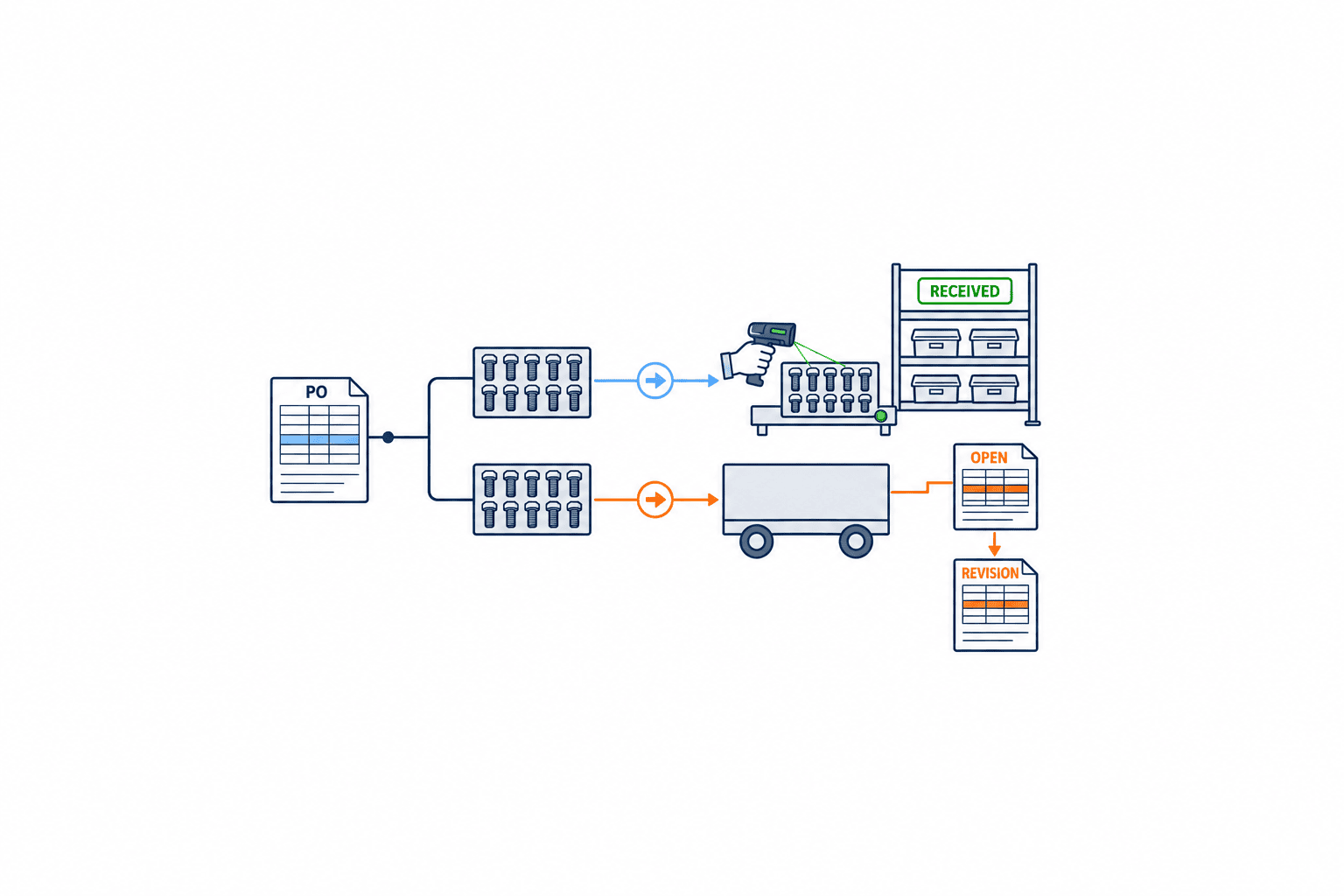
Of 100 units on a PO line, 40 may be received, 20 in transit, and 40 not yet shipped. Even if the PO shows a single unit price, commercially you may not be able to treat all units the same. If you want to keep the original price for received units and apply the new price only to unshipped units, you’ll need to split the PO line or issue a change order. The method of splitting depends on the product and accounting integration, so test it as a business scenario.
Oracle Procurement’s change order documentation explains that proposed changes to approved purchasing documents are reflected in a new document version only after approval, acceptance, and verification. This is a reminder not to assume that “updating the master automatically makes all issued POs agreed to the new price.” Check your own supplier contract terms separately. Oracle Procurement Change Orders
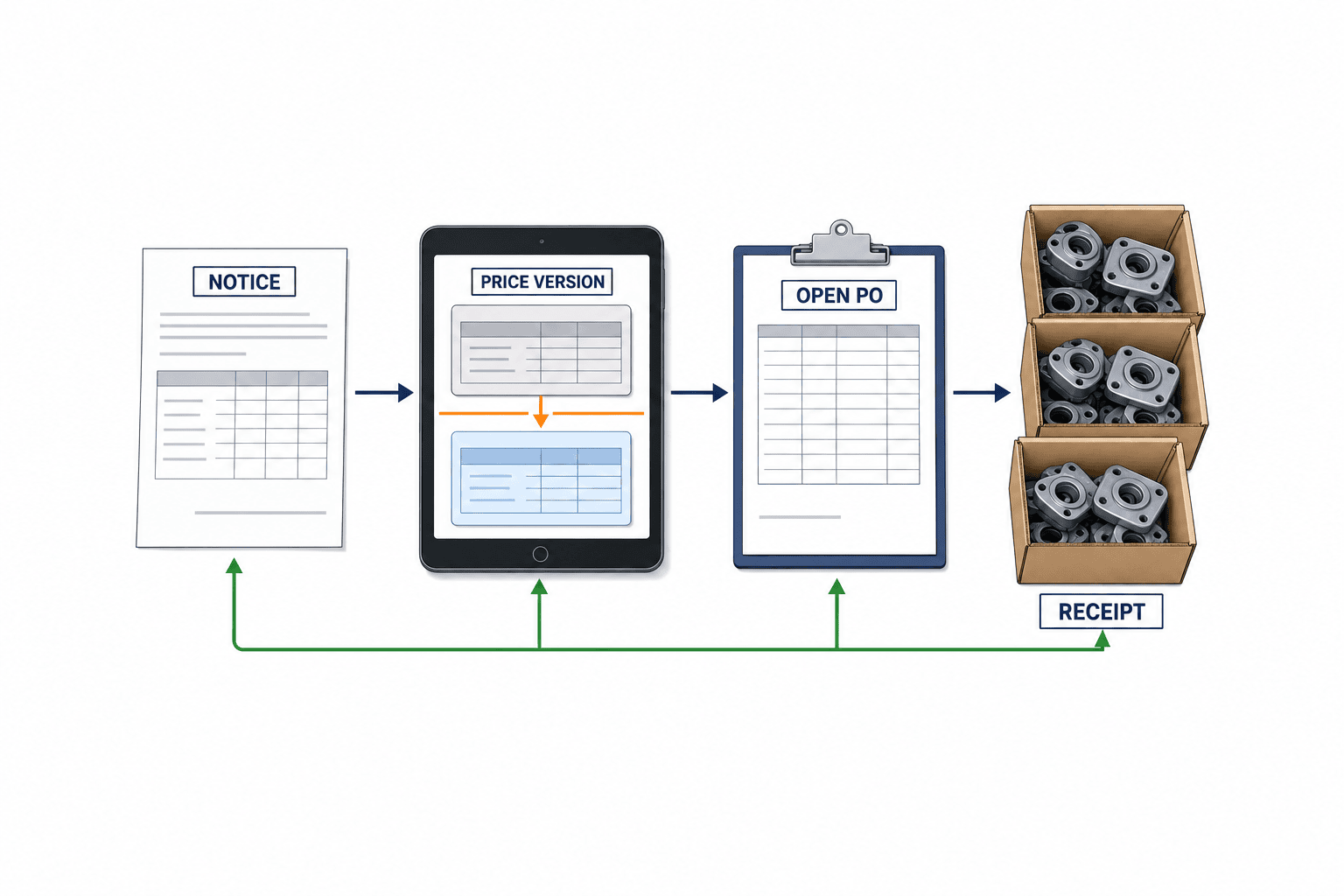
Eight Key States in the Price Revision Workflow
If you start defining system requirements from screen names, you may miss important transitions. First, define the states of a price revision case. The recommended basic flow is: “Notification received → Content review → Impact simulation → Internal approval → Supplier agreement → Price version registration → PO change → Receipt/invoice reconciliation.” You’ll also need paths for rejection, rework, or hold. Especially, do not lump together “approved but waiting for supplier agreement” and “price version registered but waiting for PO change” as a single “completed” state.
| State | Main Responsible | Condition to Proceed | Records to Keep |
|---|---|---|---|
| Notification Received | Purchasing | Identify supplier and items | Original notice, receipt date/time, sender |
| Content Review | Purchasing/Engineering | Confirm unit, currency, scope | Old/new prices, basis, pending issues |
| Impact Simulation | Purchasing/Production | Calculate PO and cost impact | Target POs, undelivered qty, assumptions |
| Internal Approval | Approver | Approve amount and exceptions | Approver, date/time, comments |
| Supplier Agreement | Purchasing | Mutual agreement on conditions/POs | Agreement doc, email, confirmation date |
| Price Version Registration | Master Data Admin | Check for overlapping periods/units | Version no., start/end date |
| PO Change | Purchasing | Approve and notify supplier | Old/new version, transmission record |
| Reconciliation Complete | Warehouse/Accounting | Process receipt/invoice variances | Receipt, invoice, variance reason |
If the same person handles notification, price registration, and approval, it’s hard to trace causes later. Even with limited staff, separate at least “inputter” and “approver,” and for urgent changes, require post-approval with deadline and reason. Attach PDF notifications, but also index by revision ID, supplier, item, price, and application conditions for later searchability.
Purchase Price Data Model: Use Versions, Not Overwrites
At a minimum, each price record should have an identifier for “Supplier × Item × Effective Condition × Price Version.” Even if the part number is the same, prices differ by supplier. Even with the same supplier, differences in plant, currency, unit, quantity tier, or shipping terms mean a single price field won’t suffice. On the other hand, using all attributes as keys makes operations heavy. Extract from your current PO/invoice data which conditions actually change the price, and adopt only the necessary combinations.
Recommended fields include: supplier, item, supplier part number, applicable plant, currency, purchasing unit, conversion rate to base unit, quantity tier, old price, new price, effective start date, effective end date, reference event for application, revision reason, references to negotiation/approval documents, applicant/approver, version number, registration date/time, and reason for deactivation. Additionally, identify whether freight, duties, taxes, or rebates are included in the price. If the cost elements included in the apparent unit price differ, you may misreport price variances.
If validity periods overlap for the same supplier, item, currency, unit, and quantity tier, either block registration or specify priority. Define period endpoints clearly (e.g., “start date inclusive / end date exclusive”). If you process orders at the start of the month with ambiguous date boundaries, two prices may be candidates. Microsoft Business Central’s purchase price list uses effective dates and determines application based on transaction conditions. In system demos, ask to see how the system chooses between two candidate prices. Microsoft Purchase Price Lists
Avoid deleting existing versions. If corrections are needed, add a new version, close the old version’s validity, and record which POs were finalized under the old version. However, this is not always the standard structure of every ERP. What’s important is being able to reproduce “what was approved for a given date/document.” Apply the same validation and audit log to CSV imports and API integrations. If only screen input is controlled but external integrations can overwrite prices directly, you lose control.
Four Test Cases for Changing Prices on Outstanding POs
Effective date management only becomes practical once you’ve decided how to handle outstanding POs. Test the following four cases with sample POs:
Case A: PO placed before the effective date, all items received before the effective date. In principle, keep the agreed price on the existing PO, receipts, and invoices. If the supplier later proposes different terms, handle it as a separate correction/additional invoice, not as a standard master revision. Do not silently update receipt history to the new price.
Case B: PO placed before the effective date, all items not yet received. If the revision contract is “delivery date-based,” these may be subject to change. If “order date-based,” they may remain at the old price. Decide based on contract wording and supplier confirmation. If issuing a change order, save both old and new versions. If you verbally agree but leave the PO at the old price, the cause of future invoice variances shifts to this step.
Case C: Partial receipt, partial outstanding. Fix the received and outstanding quantities, and express the applicable quantity at the line or split-line level. For example, if 40 out of 100 units are received and 60 outstanding, the price revision applies to up to 60 units depending on conditions. If there are quantities in transit or on inspection hold, further subdivide. If your system cannot handle multiple prices on a single PO line, compare splitting the line, canceling the remainder and reordering, or issuing a change order to see which fits your audit and supplier processes.
Case D: New POs after the effective date. Display the approved price version as the automatic candidate. However, if currency, unit, quantity tier, or plant don’t match, do not auto-apply; purchasing must check the basis. For provisional or urgent orders, attach an exception code and a deadline for post-processing.
Save these four cases as a test matrix of “PO date × receipt status × contract basis.” Don’t just listen to screen explanations—register sample POs, submit revision requests, approve, issue change orders, receive goods, and process invoices in a continuous flow. Oracle explains how change orders create new versions of approved documents. When selecting a product, check the timing of supplier notification, handling of outstanding quantities, and accounting integration. Oracle Change Orders
Approval History: “Who Clicked Approve” Is Not Enough
Approval records for purchase price revisions must include the reason for the request and alternatives considered. The reason for a price increase—raw materials, exchange rates, freight, spec changes, quantity changes—affects both the decision-maker and negotiation leeway. Don’t just accept the supplier’s stated reason as fact; save it as their claim, and separately record your own confirmed basis. When simulating cost impact, specify the affected quantity, period, conversion rate, and exchange assumptions, and don’t mix scenario values with actuals.
Don’t base approval routes solely on the revision rate. Even small unit price changes can have a large total impact for high-volume items. Conversely, a large rate change for a rarely ordered spare part may not warrant extra approval layers. At a minimum, consider “price difference × expected quantity” for period impact, annual purchase value, ability to pass on costs to customers, and alternative risk if production stops. Set monetary thresholds per your company’s policy; do not use this article’s examples as standards.
If you modify price or effective conditions after approval, determine if re-approval is needed. Avoid directly editing approved values so that past approval screens show new values. Record before/after differences, who changed them, when, and why; require re-approval for changes exceeding thresholds. Link supplier emails, signed agreements, revised quotes, and PO change confirmations by revision ID, not just in staff mailboxes.
Invoice Reconciliation: Handling Price Variances by Cause
When the unit price on an invoice received by accounting differs from the PO, don’t just “fix the old price master.” Causes include: ① approved revision not yet reflected in the PO, ② supplier invoicing at new price without agreement, ③ mismatch in unit/currency/quantity tier, ④ differences in freight/tax/discount treatment, ⑤ input errors, ⑥ differing interpretations of receipt date and effective condition. Use variance codes and assign responsibility and deadlines to purchasing, warehouse, or accounting.
Microsoft Dynamics 365 Finance explains how to compare prices and quantities between invoices, POs, and receipts, and identify discrepancies exceeding tolerances. Two-way matching compares PO and invoice; three-way matching includes receipt quantity. Which method is appropriate depends on item and business process. When implementing, test not just tolerance percentages but also monetary limits, currency conversion, partial invoices, additional charges, and rounding. Changing PO prices after the fact just to fit variances erases the record of the problem. Microsoft Invoice Matching Overview / Invoice Matching Setup
If you hold an invoice, make the reason and responsible person visible. Variances that can be resolved by purchasing updating the PO differ from those requiring the supplier to reissue the invoice. Leaving variances unresolved leads to payment delays, so monitor the number of outstanding cases, elapsed days, amounts, and supplier trends weekly. Use variance occurrences to review where the price revision flow broke down.

Operational Boundaries to Watch in Thai Factories
In Thai factories, you often have a mix of local supplier transactions in THB, foreign currency transactions from Japan or other countries, and reporting to Japanese headquarters. However, you don’t need to convert all prices to a single currency before registration. Distinguish between the contract currency’s original price and the accounting/management conversion, and record the exchange rate and valuation date. For invoice reconciliation, first compare in contract currency and purchasing unit; don’t mix exchange rate or accounting conversion differences with purchase price differences.
Item names may differ between English quotations and Thai invoices. Use internal item codes, supplier part numbers, PO numbers, and line numbers as the basis for comparison, not translated item names. If the supplier part number changes, link it to the revision request and keep the mapping to the old number. When summarizing price notifications from Japanese emails, keep both the original text and translation for effective conditions. More important than multilingual display is ensuring the original, agreement document, and system input all match.
Accounting, tax, and import treatment varies by transaction condition. Don’t set PO prices based on general rules for duties or tax rates; check your own contracts, Incoterms, invoices, and accounting policies. The system must be able to correctly record the price itself, additional charges, currency, effective conditions, and the basis for approval/changes. For legal compliance, consult your specialist.
Twelve Key Questions for RFPs
Don’t just ask vendors, “Does your system support price revisions?” In a demo, have them walk through these twelve items as a single scenario. For each, ask whether it’s handled by standard function, configuration, customization, or operational workaround, so you can compare costs and responsibilities across proposals.
- Can you version-control old and new prices by supplier, item, currency, unit, and quantity tier?
- What happens if you register overlapping validity periods—warning, rejection, or priority?
- Can you select the effective condition (PO date, delivery date, etc.) and record it on documents?
- Can you link price notifications, quotes, and agreement emails to a revision ID for search?
- Can you simulate the monetary impact of revisions on outstanding POs?
- Can you change only the outstanding portion of a partially received PO line?
- How do you manage approval, supplier notification, and receipt confirmation for change orders by version?
- How do re-approvals and audit logs work if you revise after approval?
- Can you reconcile receipt and invoice price differences in contract currency and purchasing unit?
- Can you classify variances by cause code and assign responsible person and deadline?
- Can you apply the same validation to updates from CSV, API, or external ERP integration?
- Can you reproduce the relationship between approved prices, PO versions, receipts, and invoices as of any past date?
Items 6 and 7 are especially easy to overlook. Most demos show new PO creation, but real problems appear in outstanding portions of already-issued POs. Include sample data with different currencies/units, partial receipts, in-transit, invoiced, and pending approvals. Don’t accept a vendor’s “yes” answer until you see the actual screens and output documents for those states.
Implementation Sequence for a Small Start
You don’t need to migrate all suppliers and items at once. Start with items that have frequent revisions, high purchase value, or long outstanding POs. List candidates by these three criteria and select a manageable scope of suppliers and POs. Even with a narrow initial scope, design the price version and outstanding PO relationship as you would for full-scale operation. Reconstructing history later is much harder.
In the first phase, establish revision requests, approvals, supporting documents, and version management. In the second phase, connect outstanding PO impact extraction and change orders. In the third phase, connect receipt/invoice variance classification. Define phase completion not by feature implementation, but by traceability of test cases. For example, confirm you can trace from a notification to revision ID, approval version, affected PO, receipt, and invoice variance.
If your pre-migration spreadsheet has multiple prices for the same item/supplier, don’t just take the latest row as correct. Check for differences in currency, unit, quantity tier, or whether old POs still have agreed prices. Mark undecided records as “provisional” or “pending” and exclude them from automatic application to new POs. If you skip data and approval authority cleanup and just implement the system, old ambiguities will be replicated at high speed.
After go-live, measure not how many price increases you registered, but whether exceptions have decreased. Specifically, track days from notification to approval, number of approved revisions with POs not yet changed, number and value of invoice price variances, days to resolve variances, and number of changes without supporting documents. Don’t set zero as a forced target, as that encourages hiding variances. Initially, aim for visibility by cause and shorter resolution times.
Test Cases and Acceptance Criteria for Implementation
Don’t judge implementation tests just by whether the operation completes. Include what evidence remains on screens and reports as acceptance criteria. The first test should use an order that spans the effective date: order 100 units in September, receive 40 in September, and 60 in October. The revision notice arrives in late September, with application condition clearly stated as “for October deliveries.” Purchasing registers the notice, extracts the affected PO, reviews the 60 outstanding units, and submits for approval. After approval, the change order is sent to the supplier, and receipt confirmation is logged. In accounting, invoices for 40 units at the old price and 60 at the new price are reconciled. If this flow can be reproduced, the system is more than just a price list—it’s usable for real operations.
The next test uses the same September PO for 100 units, but changes the application condition to “for new orders from October onward.” In this case, the 60 units delivered in October may remain at the old price. Even with the same effective date entered, the result differs; see how the system expresses this. If users must manually re-enter prices each time, the effective condition management is not functional. Conversely, if the system automatically applies the new price regardless of contract, it creates unauthorized changes. The ideal is a mechanism that records both the basis for automatic candidates and exception decisions.
The third test is “correction of an already approved price.” After approving old price 120 and new price 130, the supplier admits a calculation error and corrects to 128. Confirm that the approval record for 130 is not erased, that the correction notice is attached, and that affected POs and pending invoices can be re-extracted. If approved revisions can be silently edited, you can’t reconstruct past decisions. Whether re-approval is needed depends on internal thresholds, but always record before/after values and reasons.
The fourth test is for invoice price differences unrelated to price revisions. For example, the PO is in box units, the invoice in pieces, and the conversion rate was entered incorrectly. See if you can correct this as a unit issue in the purchasing master or invoice input, not as a “price revision.” This is why you need variance cause codes. Misclassification wastes time on cases that don’t need price negotiation and buries real missed revisions.
The fifth test is for urgent orders before approval. Even if you must place an order early to avoid production stoppage, you need to record who authorized the exception, how the provisional price was set, and by when formal approval must be completed. If you leave provisional POs without confirming the final price, variances will recur at receipt and invoice. Exceptions should be displayed as incomplete tasks with responsible person, deadline, and release conditions—not just as “someone will fix it later.”
For each case, record “operation possible,” “required customization,” “supplier-facing documents,” “audit-traceable evidence,” and “post-accounting integration amounts” in your evaluation sheet. Even if the standard function works on screen, if new versions don’t appear on reports or APIs, operations will break down. Don’t pass just the purchasing demo; have warehouse and accounting staff review the same sample documents. This is the most concrete way to reduce the risk of interdepartmental price discrepancies after go-live.
Relation to Standard Costing and Overall Procurement Management
Purchase price revision is not the same as standard cost revision. Even if you update the purchasing contract price, when and how to update the accounting standard cost or valuation method is a separate decision. How to reflect the difference in cost depends on your costing method and accounting policy. For the purpose, frequency, and variance treatment of standard costing, see Standard Costing System for Manufacturing in Thailand. This article covers, prior to that, how the price agreed between purchasing and the supplier is applied to which orders, receipts, and invoices.
For overall procurement system features and cost considerations, refer to How to Select a Purchasing Management System. For long-lead items, where advance orders or design changes may occur during a price revision, see Early Procurement Design for Long-Lead Materials in Thailand for clarifying when to finalize outstanding orders. These are separate topics; define the individual conditions for purchase price revisions using the steps in this article.
Three Boundary Cases Where Operations Break Down After Price Revisions
The first case occurs when part of an outstanding purchase order is transferred to a different factory. For example, the original PO contracted 100 units for the Bangkok factory at the old price, but if 50 units are redirected for direct shipment to another factory, the applicable price list or freight terms may change. If only the quantity is transferred and the unit price is carried over, the receiving party may not be able to locate the relevant agreement. It is essential to retain the set of information linking the pre- and post-transfer factories, price terms, receiving locations, and supplier confirmations, and to ensure that the relationship between the original PO and the destination PO can be traced. Even if the transfer does not constitute a price revision, a rationale for maintaining the old price must be documented.
The second case arises when multiple price revisions occur in quick succession. Suppose the first revision is on October 1 and the next on November 1, but the supplier has not yet invoiced for October deliveries. If only the latest price is retained, there is a risk of incorrectly matching October deliveries to the November price. The price version must be referenceable as of the transaction date, and it must be possible to reconstruct the applicable version based on the delivery date and agreed terms. When registering the November revision, the end date of the October version should be explicitly specified, and any overlaps or gaps in the periods must be checked. If approval is delayed and dates are backdated, a list of all affected finalized documents should be presented to the approver.
The third case involves the supplier changing part numbers or packaging units simultaneously with a price revision. During the transition period, when inventory of the old part number remains and orders for the new part number have begun, it is necessary to distinguish whether price differences are due to specification changes or unit changes. Rushing to consolidate items can lead to errors such as valuing old lots at the new unit price. The correspondence between old and new part numbers, conversion rates, switchover dates, substitution approvals, and inventory depletion policies should be linked to the price revision case and verified by both purchasing and production control. The criteria for closing a price revision case should also include checking for any outstanding invoices for the old part number, not just undelivered POs.
In these boundary cases, it is not necessary for the system to automatically select the correct answer. The requirement is to comprehensively display all related orders and inventory, and to record the basis for decisions and the responsible personnel. If exceptions are handled solely through free-form descriptions, the information cannot be reused when similar cases arise in the future. The criteria event, affected quantity, approver, supplier agreement, and post-processing document version should be structured and retained. The final check should be whether it is possible to explain, from a single revision ID, why a particular price was applied at that point in time.
Frequently Asked Questions
If I update the price master, will issued POs automatically change?
It depends on the product and settings, but don’t design your process assuming automatic changes. Issued POs are agreement documents with the supplier; you must specify which lines are affected and issue change orders as needed, based on contract rules.
Should the effective date be based on order date or delivery date?
There is no universal answer. Follow the conditions in your contract, quote, or agreement email. If the reference event is unclear, confirm the application scope with the supplier, including outstanding orders. In your system, keep “effective date” and “reference event” as separate fields for later clarification.
What if only the invoice shows the new price?
First, reconcile the PO version, receipt date, price revision ID, and agreement document. If an approved change is not yet reflected in the PO, purchasing should process the change. If the invoice is at an unagreed price, request correction from the supplier. If it’s a unit or currency error, correct the conversion or input. Accounting should not overwrite the PO just to eliminate the variance.
Do small factories need a dedicated system?
It depends on revision frequency, outstanding PO volume, number of suppliers, and audit requirements. First, set up operations where you can trace notification, approval, PO, and invoice by the same revision ID, and check if your existing ERP can handle it. Choose a dedicated system only if your current setup requires ongoing manual work for PO splitting or evidence tracking.
Summary: Use a Single Revision ID to Reconstruct “Why This Price?”
Success in purchase price revision management is not measured by how quickly you can overwrite a price. The key is whether you can trace, under a single revision ID, the effective condition, partially received outstanding orders, supplier agreement, approval version, receipts, and invoice variances. Before implementation, test at least the four outstanding PO cases with your own documents, and have vendors demonstrate through to change orders and invoice reconciliation. If you confirm this, you can move beyond relying on “the buyer’s email and memory.”
At TOMAS TECH, we help clarify the boundaries between purchasing, production control, and accounting for Thai factories, and jointly consider the scope for system additions, ERP integration, or new development. If you bring examples of your current revision notifications, outstanding POs, and invoice variances, we can help organize requirements starting from application boundaries and necessary records. Contact us here.
References
- Microsoft Learn: Record special purchase prices and discounts — Purchase prices by item, quantity, unit, currency, and date.
- Microsoft Learn: Purchase Price Lists — Purchase price lists and effective dates.
- SAP Help Portal: Time-Dependent Conditions — Validity periods for purchasing conditions.
- SAP Help Portal: Conditions in Info Records — Changing conditions in purchasing info records.
- Oracle Fusion Cloud Procurement: Change Orders — Change versions of approved purchasing documents.
- Microsoft Learn: Accounts payable invoice matching overview — Matching POs, receipts, and invoices and handling price variances.
- Microsoft Learn: Set up Accounts payable invoice matching validation — Tolerance settings and two-way/three-way matching configuration.


