


When evaluating a production order split and consolidation system, look beyond the presence of Split and Merge buttons. The real test is whether quantities, work in process (WIP), materials, quality results, due dates and original demand remain connected after a change. A machine stops and the remaining quantity moves to another line; partial material availability permits an early run; several small orders might share one setup. Each case changes more than an order number. This guide explains the rules, data model, vendor questions and acceptance tests to settle before implementation at a manufacturing site in Thailand.
What changes when a production order is split or consolidated?
A production order groups the item, planned quantity, date, materials and routing. Microsoft describes those elements in its production order lifecycle documentation. Splitting therefore is more than editing a quantity field. Material reservations, process progress, WIP, quality genealogy and cost attribution may all need attention. Consolidation is more than displaying two numbers as one: item revision, process, inspection, customer requirements and due dates must be compatible.
This article uses split for assigning the unexecuted quantity of a parent order to separate child orders or execution units; consolidation for linking multiple demand or order lines to a common execution unit; and reallocation for changing a remaining quantity, resource or date after work has started. In practice, a “split” might create a new ERP production order, separate a MES job or create several runs below one order. Define the level first.
The OPC Foundation’s ISA-95 job management model describes a hierarchy of Work Schedule, Work Request and Job Order, including an example where a quantity is allocated among multiple Work Requests. A Job Order defines work for a work center; a Job Response reports what was done. The hierarchy helps connect ERP demand and shop floor execution through explicit relationships. It does not guarantee a generic consolidation function or prescribe accounting treatment in a particular product.
Four reasons to split production orders
Partial material availability. If a subset of required material is confirmed, a plant may release only the executable quantity. Check kit completeness, minimum batches and materials that cannot be allocated proportionally. Partial material availability is a business case to test. SAP S/4HANA Cloud lists quality reasons, capacity bottlenecks and a changed required date for a partial quantity as examples; its product-specific restrictions still need checking.
Equipment or process constraints. A failed machine, capacity shortage or subcontracting decision may require the unstarted balance to move. Keep that balance distinct from units already processed. If physical WIP moves to a child order, preserve container IDs, previous operation results and consumed material lots. Creating the child order and then reentering all parent results would double count production.
Due-date changes. A customer may request a partial early delivery. The child quantities need their own requested date, confirmed date and expected completion while retaining their link to the original demand. If the schedule is recalculated, retain the approved change and the difference from the earlier plan.
Quality isolation. Some units may be on hold, under rework or rejected. Do not roll all of them back into one “finished” quantity. Preserve good, rejected, rework and held quantities, together with the materials, equipment and conditions that produced them.
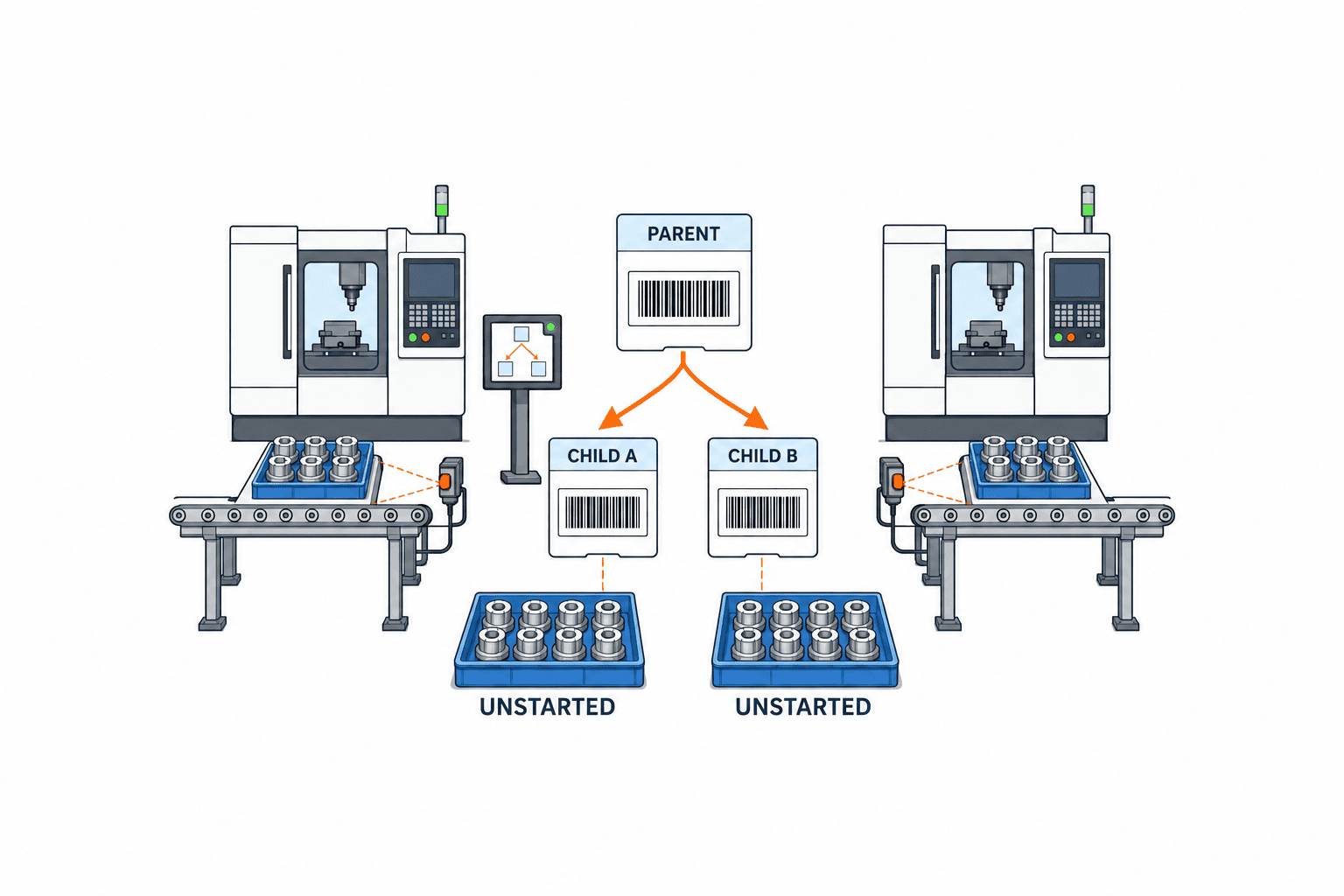
When consolidation helps, and when it should be blocked
Consolidation can reduce setup work when small demands share the same item, revision, routing and process conditions. “Make together” does not mean “erase original demand.” Keep customer, ship-to location, due date and priority on the demand lines. An allocation relationship must specify how completed units return to each line.
Microsoft Dynamics 365 consolidated batch orders are a product example for viewing related bulk and packed-item batch orders together. They do not establish a universal rule for merging any two discrete manufacturing orders. Where multiple work orders run together, examine ERP inventory and cost units, MES execution units and physical container IDs separately.
Block automatic consolidation if revisions, approved routings, inspection rules, customer-specified materials or traceability constraints differ. Cost attribution can also require separation. A matching part number alone is insufficient. Build an eligibility matrix that includes manufacturing, customer and accounting conditions.
Define the responsibilities of ERP, MES and shop floor terminals
An ERP system may own orders, planning, material requirements and accounting, while MES owns dispatch, operation results, equipment and physical WIP. A change to parent demand or planned quantity is not necessarily the same transaction as reallocating a shop floor job. Identify which changes must return to ERP and which MES may manage within the already approved order scope.
The OPC Foundation ISA-95 job model treats higher-level work plans separately from shop-floor Job Orders and Job Responses. That distinction is a useful reason to assign responsibility to change request, approval, dispatch, execution and response events, rather than choosing an owner solely from the screen where someone clicked a button. Rejections and retries belong in the design too.
The revision of a work instruction is related, but separate. Our guide to work instruction systems explains how to retire an obsolete version. Here the integration question is which valid instruction revision each new execution unit will display. Our WIP management guide covers the physical quantity and location of material between operations. Correct parent-child links alone cannot reveal WIP if containers are not counted.
Store parent-child relationships and provenance separately
The minimum record includes parent order ID, child order or run ID, original demand-line ID, item and revision, planned quantity and unit, operation, work center, dates, state, change reason, approver and timestamp. Link material lots, container IDs, inspection decisions and operation results to the execution unit. A parent-child link explains where the new order came from; provenance explains its original demand, material, physical units and quality decision. Both matter.
The basic conservation rule is that the quantity being split equals the sum of the allocated quantities. With partial execution, specify whether the object is the unexecuted balance or an actual WIP transfer. Define separate equations for planned, issued, operation-complete, good, rejected, held and scrapped quantities. If units change between pieces, boxes and weight, record conversion and rounding rather than silently dropping a remainder.
Consider an illustrative parent order for 1,000 units. Operation A has processed 600 and 400 remain unstarted. Moving the latter to another line gives 600 remaining under the parent and 400 under the child in the plan; it does not move the 600 operation results. If 200 of those processed units must also change route, transfer their container IDs, operation A results, material lots and quality state in a separate event. The numbers illustrate logic only; they are not typical batch sizes or performance claims.
Repeated changes need more than a single parent field. A may split into B and C, part of C may move to D, and B and D may later run together. Append events with source ID, destination ID, quantity, operation position, reason, approval and time. Do not overwrite earlier events. A current hierarchy view can be derived from the event history, while the original audit trail stays available.

Keep demand and cost attribution after execution is combined
Before two customer orders share a line, decide how the output will be allocated. They may use the same specification yet have different shipping priority and invoice destination. Maintain an execution-batch-to-demand-line relationship with allocated quantities. Do not automatically attach all completed units to one customer. First-in-first-out rules, designated lots and dedicated material requirements may constrain allocation.
Agree how shared setup time, common material and rework cost will be assigned. This is partly an accounting decision and partly a data-design decision. Test whether the ERP can aggregate variances to the parent, report them by child or follows another standard treatment. Retrospective changes after financial close require particular care because inventory valuation and audit records may already be final.
Decide which actions are allowed at each order state
An application claiming “split anytime” should be tested against order state. Before release, after release but before start, partially complete, quality hold, reported as finished and financially closed are different situations. SAP documents status and operation conditions for Order Split. Oracle’s Execution Runs feature tracks production, materials, quality and genealogy at run level, but also states restrictions such as serial-tracked orders and parallel operations. Recreate your own frequent change point in the product demonstration.
| State | Typical action | Required check |
|---|---|---|
| Before release | Split plan or group compatible demand | Recalculate BOM, route, reservation and dates |
| Released, not started | Change work center or create a child for the balance | Retire old dispatch, update terminals and reservations |
| Partly executed | Move unexecuted balance or physical WIP | Avoid duplicated results; preserve container and lot history |
| Quality hold | Separate accepted, held and rework units | Approval, quarantine location and shipping status |
| Finished or closed | Correction or reversal | Cost, inventory and audit impact with approval |
Apply prohibitions to APIs as well as screens. Where a direct change is disallowed, document cancellation, reissue or correction procedures. Separate the person who proposes a split, the approver and the shop floor executor. Define delegation for urgent night-shift changes.
A practical approval workflow for split and consolidation
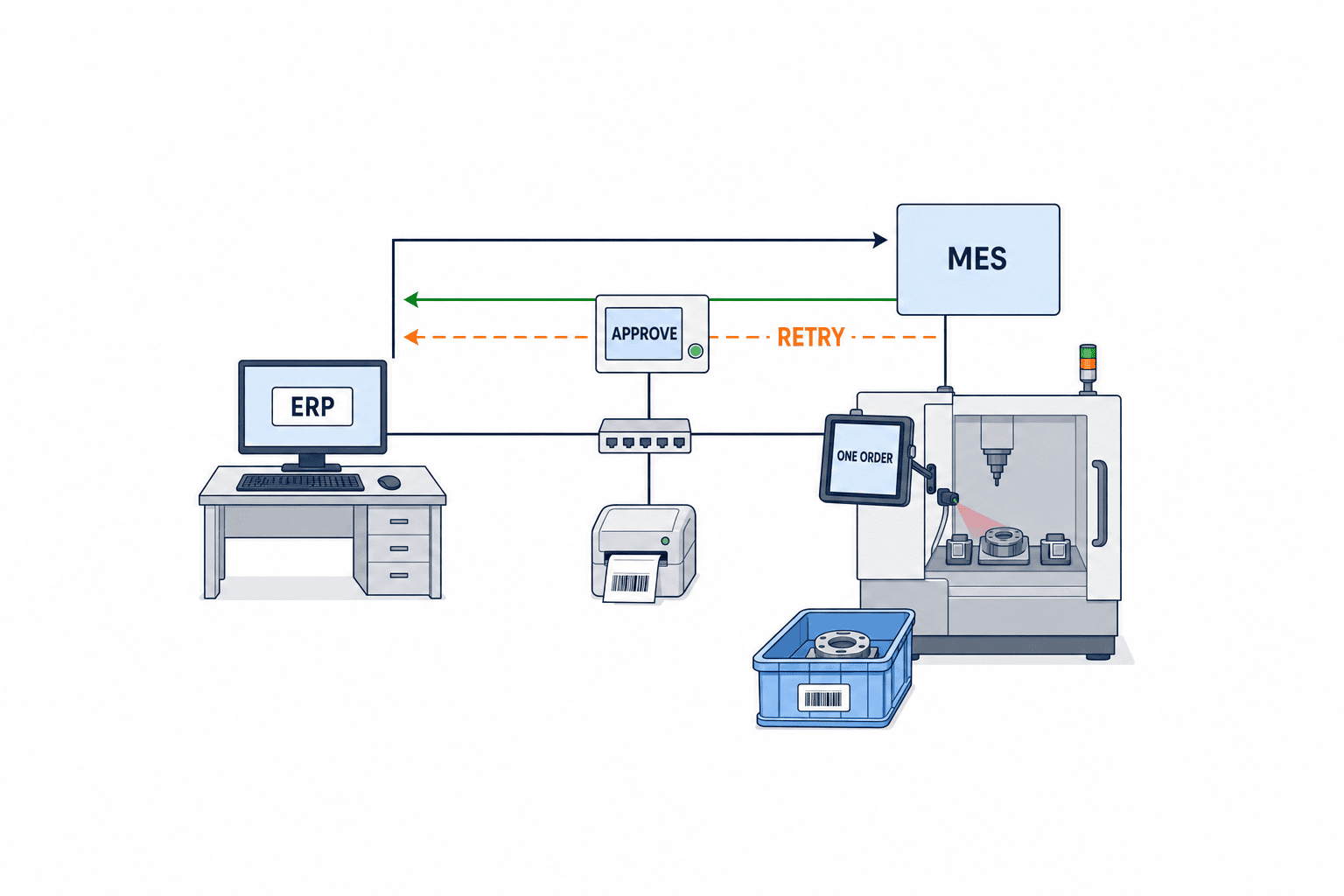
Before drawing screens, trace one change request end to end. The requester identifies the order and reason, then enters before-and-after quantities, the affected operation, material and WIP, and the due-date impact. The system checks quantity conservation and consolidation eligibility, then shows an explicit difference to the approver. Approval issues the new execution unit and retires the relevant part of the old dispatch. A terminal warns when an operator scans a superseded barcode. Later results flow back to ERP. Rejection leaves the original state intact.
Include retries and conflicts. If ERP commits a split while MES is offline, retransmission must not create a second child. Give each approved change an idempotent request ID. If a job has started in MES while ERP proposes another change, hold the conflict for review rather than overwriting by latest timestamp. Use a version or approved event sequence. These are implementation recommendations to avoid duplicate instructions and broken history, not a claim that every standard requires one exact mechanism.
Map what a result message contains: source order, child order, run, operation, good/rejected/held quantities and material consumption. The OPC Foundation Job Response model provides a framework for associating performed work with actual materials and equipment. Real ERP–MES connections still need code mapping, processing order, retry and reconciliation. Our ERP–MES interface error monitoring guide addresses that connection in more detail.
Compare ERP standard functions, MES extensions and custom development
Score the level, state and retained records rather than a yes/no feature label. ERP order splitting can align with planning and accounting but may need an extension for containers mid-operation. A MES job split is close to execution but must distinguish local dispatch changes from ERP planning changes. Custom software can represent plant-specific exceptions, while upgrade, audit and maintenance become part of the buyer’s responsibility. The right choice depends on the installed ERP, exception frequency and cost-accounting granularity.
| Evaluation | Ask the vendor | Evidence to request |
|---|---|---|
| Quantity | Can the remaining quantity be split after partial execution? | Before/after reconciliation screen |
| Provenance | Can users trace repeated splits and consolidation to original demand? | Live drill-down demonstration |
| WIP | Can containers move mid-process? | Barcode scan and transfer record |
| Quality | Are hold and rework kept separate? | Inspection and quarantine history |
| Integration | Does a repeated message duplicate a child? | Retry with the same request ID |
| Permissions | Do rules depend on state and role? | Allowed and rejected action logs |
| Cost | Can the post-change cost be explained? | ERP vouchers and variance reconciliation |
Do not award full marks after a simple pre-release split. Ask the vendor to demonstrate a parent with 1,000 planned units: of the 600 past operation A, 200 move to an alternate machine, 200 go on quality hold and 200 continue on the original line; the 400 not yet started remain with the parent. Then test retransmission, cancellation and a post-close correction. Where standard functions cannot perform a step, request a documented operating alternative. Finding that limit before go-live prevents a return to uncontrolled spreadsheets.
Distinguish order split, operation split and execution-run split
The word “split” does not name one universal object. SAP S/4HANA Cloud Order Split describes creating a separate child production order from part of a parent quantity. A job split divides work within an operation into several execution units; a route change alters which operations are performed or their sequence. Neither necessarily adds an ERP order. Oracle Execution Runs divide one Work Order into run-level records; certain reservations and costing activities remain at the work-order level. Microsoft Consolidated batch orders provide a view of related bulk and packed orders, rather than a generic mechanism to merge any two orders and all their histories.
These distinctions change the purchasing decision. An ERP order split, a shop floor job split and a run split can all appear as “supported” on a feature checklist, yet attach materials and results to different IDs. Ask for a diagram showing IDs before and after the action, with every result and inventory movement attached to an ID. For consolidation, establish whether the system merely groups a planning view, runs a shared batch on equipment or combines accounting and inventory documents. These are separate outcomes.
In a live demo, open both parent and child immediately after the split and reconcile planned and remaining quantities. Scan the child barcode at a terminal and check materials and the active instruction revision. Register an operation result and trace its ERP response, container label and inspection ID. For consolidation, retain two separate demand lines and due dates while showing one shared execution unit. That is more informative than a screenshot of a button.
Put real cases and acceptance criteria in the RFP
Reconcile quantity, WIP and cost in three passes
Do not accept the displayed grand total alone. First, capture a baseline snapshot of the parent order immediately before the change: planned quantity; input and completed counts by operation; good, rejected and held quantities; reserved and issued materials; and the list of physical containers. Capture these at a consistent event sequence. If another operator reports output during the comparison, the numbers no longer describe one state. Keep planned and actual quantities in separate columns.
Second, test the change event. If two children are created, their allocated quantities must add up to the balance being split. If processed WIP is transferred, compare each container ID’s order, operation, location and quality status before and after. One container must not simultaneously belong to two active orders. A held container cannot become eligible for shipping allocation until authorized quality release. A correct screen is insufficient when a label or warehouse transaction still carries the old order ID.
Third, reconcile downstream transactions to physical units. Identify whether issued material stays on the parent or transfers to a child, then compare ERP inventory movements with MES consumption records. If good/rejected classification changes after operation reporting, a correction event must point to the original record. Compare estimated and actual costs separately by cost category and reconcile child/parent allocations with ERP variances. After a financial close, changes must be explainable through approved adjustment documents rather than deletion of original vouchers.
Reproduce outages and concurrent actions in FAT/SAT
The difficult failure is often a mismatch in when systems commit, rather than a failed button. In FAT, approve a change in ERP, deliberately block transmission to MES, and send the same request twice. Expect one child order and a second response referring to that same request. Then start work in MES and send an outdated ERP change version. Expect a rejection or held conflict, with a screen and log showing what the operator must compare; do not accept an automatic overwrite.
In SAT, disconnect a real terminal and test scans of an old label and a new child-order label, followed by recovery and retransmission. If work may continue offline, specify what can be recorded provisionally and when a supervisor must confirm it. Try moving one container from two terminals at once; exactly one transfer should commit and the other should receive an explanatory error. Keep test records with input, time, connection state, expected result, actual result and a named owner for any gap.
These cases measure whether the proposed configuration preserves business invariants; they are not assertions about standard features in every product. If a standard function cannot meet a case, a controlled manual alternative may work, but document who performs it, when, against which reconciliation report and under whose approval. Include training and audit effort in the estimate. Unspecified manual work is not a free integration feature.
Provide the current workflow, trend in order volumes, actual change reasons, lot or serial traceability level, and ERP/MES responsibility boundary. Enter volumes and exception rates from your own records. Include sample cases for a pre-start split, a partially completed balance transfer, rework isolation, grouping small demand, cancellation, duplicate message, network outage and a correction after monthly close. Define input, expected genealogy, attribution of materials and WIP, and ERP response for each.
Acceptance testing must follow terminals, barcodes, labels, interfaces and inventory/accounting documents as well as screens. Where paper instructions remain, test withdrawing the old sheet and issuing the new one. In a multilingual Thailand plant, check that every child uses the same approved instruction revision across languages and that shop floor terms match the user interface.
FAT should verify configured business rules and exception handling. SAT should exercise actual equipment, terminals, labels, network conditions and night-shift approvals. A successful test is not merely a working button: select one physical unit after a split or consolidation and trace its original demand, order, material lot, operation result, inspection decision, current location and shipping allocation. Any broken link points back to the data model or event design.
Estimate value from the cost of order changes
Sample several weeks of actual changes. For each, measure planning-sheet edits, ERP reentry, reprinting, reservation repair, WIP searches, quality reconciliation and revised delivery answers. Keep staff time separate from the cost of errors and duplicate transactions. Do not present a vendor’s generic saving percentage as a result at your plant.
Include licenses, ERP–MES integration, master-data cleanup, label and terminal changes, permissions, training, testing and support in implementation cost. Measure a first pilot before extending the system. Consolidation might reduce setups while increasing customer allocation work; a split might protect a due date while adding material transfer or inspection delay. Track local measures such as change-processing time, container-search time, unreconciled quantity and time to update a promised delivery date.
A three-stage implementation path
Define the current state. Select recent changes and map the reason, approver, edited data and shop floor difficulty in time order. Check especially whether unexecuted balance and physical WIP are being kept in one field. Find missing units, container IDs and demand-line IDs.
Design rules and connections. Decide allowed actions by state, consolidation conditions, conservation equations, approval roles and cancellation methods. Identify the system of record for ERP, MES, quality and warehouse events. Turn request IDs, retry, rejection and reconciliation into test data. Start with a product family or operation with frequent exceptions and traceable containers.
Test and expand. Use FAT for genealogy, conserved quantities, permissions and retries. Use SAT for labels, terminals, outages and night-shift practice. After go-live, count manual corrections, order-to-container mismatches and time from approval to shop floor visibility. Measure a baseline first. If data goes missing, inspect ID assignment, events and display logic before asking operators for more duplicate entry.
FAQ: Production order split and consolidation systems
Is splitting a production order the same as splitting a job?
Not necessarily. An ERP may create independent production orders; MES may split operation jobs; another product may create runs below one order. Choose by the level at which materials, dates, costs and results must be managed. Verify product restrictions.
Can a started production order be split?
It depends on the product and state. Splitting only the unexecuted balance requires different handling from transferring processed WIP. Demonstrate the plant’s frequent started-order case and verify that containers and results are not double counted.
Does consolidation automatically merge costs?
No universal rule applies. Execution can be shared while original demand and cost attribution remain separate. Decide how shared setup, material and rework costs are allocated within accounting policy and ERP capabilities.
What drives implementation cost?
Existing ERP/MES standard functions, mid-process container tracking, connections to quality, warehouse and accounting, exception handling, labels and terminals all matter. Supply real change scenarios and acceptance tests so vendors quote on the same basis.
How does this differ from production order closeout?
Split and consolidation rearrange who makes which quantity during execution. Closeout reconciles operation, quality, inventory and cost results before closing the order. See our production order closeout guide for that later stage.
Summary
Production order split and consolidation control depends on conserving quantities, retaining physical and transaction provenance, and preserving original demand attribution. Define whether the change is at ERP order, MES job or execution-run level. Set allowed states, eligibility, material/quality/cost treatment and permissions before comparing products. Test partial execution, quality hold, retry, cancellation and closeout exceptions in vendor demonstrations and FAT/SAT.
If a Thailand plant has real change cases but has not yet assigned ERP and MES ownership, TOMAS TECH can help trace one case through materials, WIP, quality and due dates and turn it into requirements and acceptance tests. You can discuss a case at the contact page while still evaluating whether software changes are needed.
References
- OPC Foundation, OPC UA for ISA-95 Part 4: Job Control.
- OPC Foundation, OPC UA for ISA-95 Part 4: Job Control, full specification.
- Microsoft Learn, Production order lifecycle overview.
- Microsoft Learn, Consolidated batch orders.
- SAP Help Portal, Order Split.
- Oracle Cloud SCM, Split a Work Order into Execution Runs.


