



Digitizing the task of collecting parts into a box will not, by itself, prevent shortages or wrong-part use. A manufacturing kitting control system must connect the revision of the production order, the resulting kit list, the actual location, lot and quantity picked, approval of substitutes, kit verification, and receipt at the line. This guide is for production control, warehouse, quality and IT teams in Thai factories preparing a system purchase. It addresses transaction design, exceptions, an RFP and FAT/SAT acceptance. Its focus is the completeness of each production-order kit, rather than general outbound picking or the vehicle that moves the kit.
Define exactly what “kit complete” means
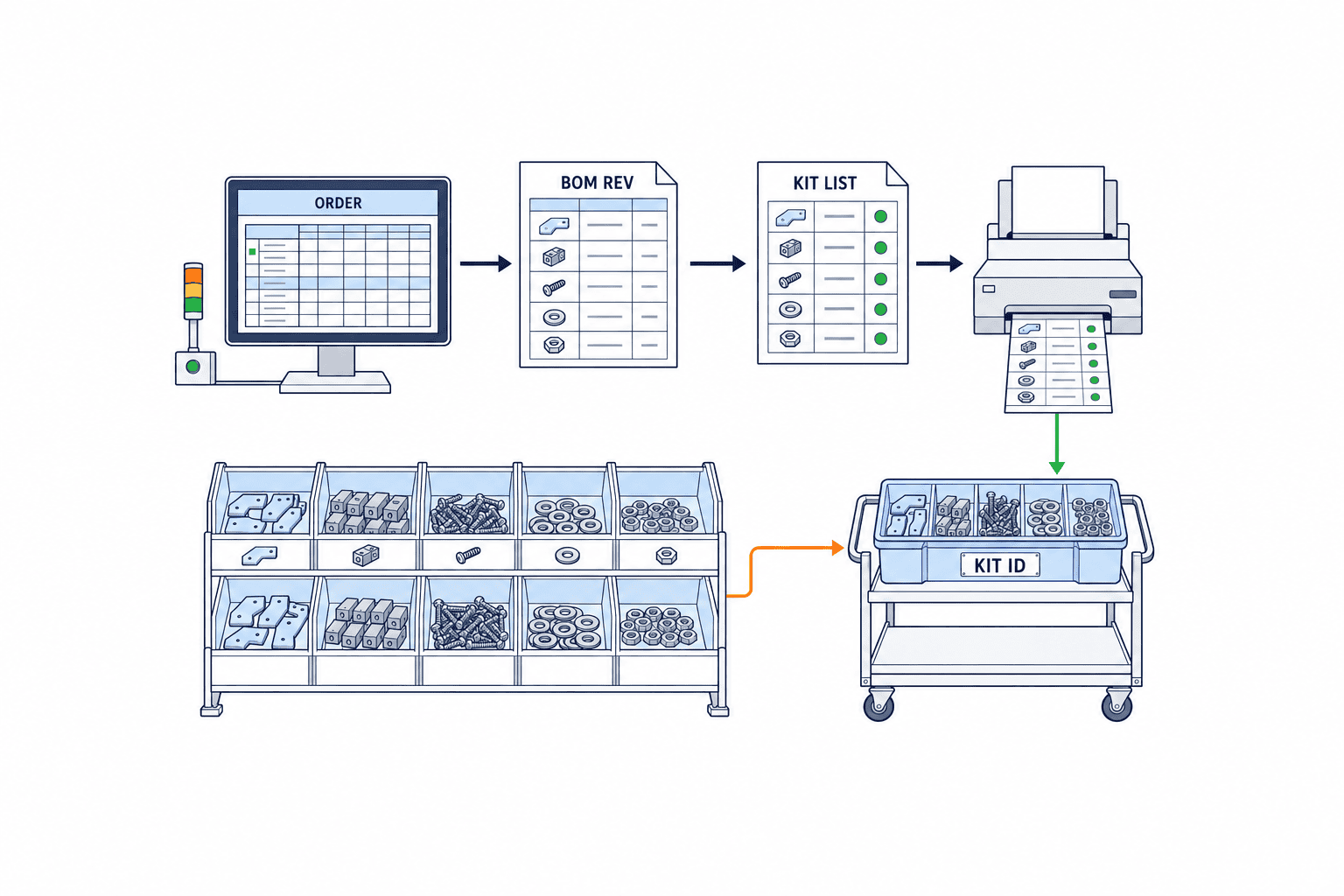
A kit is a physical unit ready for a specified order and operation, with the required parts, revisions, quantities and permitted lots. The unit may be a box, tray, cart or shelf section, but it needs a unique kit ID. That ID should retrieve the production order and its revision, product, operation, planned quantity, BOM revision, pick lines, physical child containers and receiving destination. If a kit spans two boxes, define either child-container IDs under one parent ID or a controlled split rule.
Microsoft describes a released production order as available for both shop-floor execution and warehouse processes. Raw-material picking work can be generated for materials physically reserved before release. Oracle likewise describes picking for released work orders to move materials to production supply. These product descriptions illustrate the boundary between authorization, material requirements and warehouse execution; confirm the specific configuration in your own ERP rather than assuming identical buttons or states. See Microsoft’s production-order release guidance and Oracle’s work-order material picking guidance.
Before building a green “complete” indicator, agree on five decisions. Does any missing item block completion? Does an approved substitute count as satisfying the original line? What happens to a quality-held or expired lot inside a container? Is a verified kit still “in transit” until the line acknowledges it? How will a change to the order or BOM invalidate an existing kit? “Pick completed,” “kit verified,” “line received,” and “material consumed” represent different facts and must be recorded separately.
Separate kit control from picking, allocation and delivery
Ordinary picking verifies an item and quantity against an order or movement request. Kitting adds the production-order BOM revision, operation sequence, simultaneous completeness of many lines, physical-container verification, shortage handling and line handoff. Every individual pick may be correct while the kit is still incomplete. Measure pick accuracy and kit completeness separately.
Inventory allocation is a logical promise of stock to an order. During the physical pick, workers may find a missing bin, a different lot, mixed packaging or a quality hold. An allocation screen alone cannot prove that the physical kit is complete. Conversely, a physically collected kit cannot automatically be reassigned to another order without checking that order’s revision, lot restrictions and approval. Allocation, physical confirmation and use at an operation need distinct evidence.
Line-supply automation decides when and how a container travels to the workstation. Kit control decides whether the contents match the target order and whether handoff was acknowledged. For routes, replenishment signals and transport options, see our line-side parts supply guide. If you are choosing projection-assisted picking or devices, our projection picking system guide covers the physical guidance layer. The present guide connects picking evidence to the status of a complete production kit.
Freeze the order and BOM revision before generating the kit list
The input to kit generation is more than an order number. Capture the order revision, product number and revision, build quantity, operation, planned start, destination line, material-list revision and effective date, approved-substitution rules and lot restrictions. If the application regenerates the list from the current master BOM whenever it opens the screen, an engineering change after release may silently alter an existing kit. Freeze the applicable structure at the release event; treat a later change as a new event with an approver, reason, old-to-new difference and affected kits.
Each kit-list line should carry order, operation, component revision, required quantity and unit, lot or shelf-life rule, substitution eligibility, rounding rule, supply location and priority. A BOM quantity in pieces is not automatically the same as a bag, reel or weighed container. Define conversion factors and rounding explicitly. When an opened pack is split between kits, record its remaining actual quantity and both kit IDs. Separate the required quantity from any spare quantity or later replenishment request. Do not turn an informal “pick a little extra” rule into invisible work-in-process inventory.
Cancellation, quantity changes, line changes and revised operation sequences need their own handling. Do not reset a picked kit to “not started” while it is physically on a cart. Put affected kits on hold and choose controlled re-verification, return, reassignment or additional pick. Preserve the old and new IDs, difference, worker and time. Microsoft’s MES integration documentation distinguishes production-order release events, reference information such as BOM and route, and material-consumption messages. If the release event arrives but reference data does not, queue the exception rather than creating an empty kit. See Microsoft’s MES integration interface.
Verify location, lot and quantity against physical goods
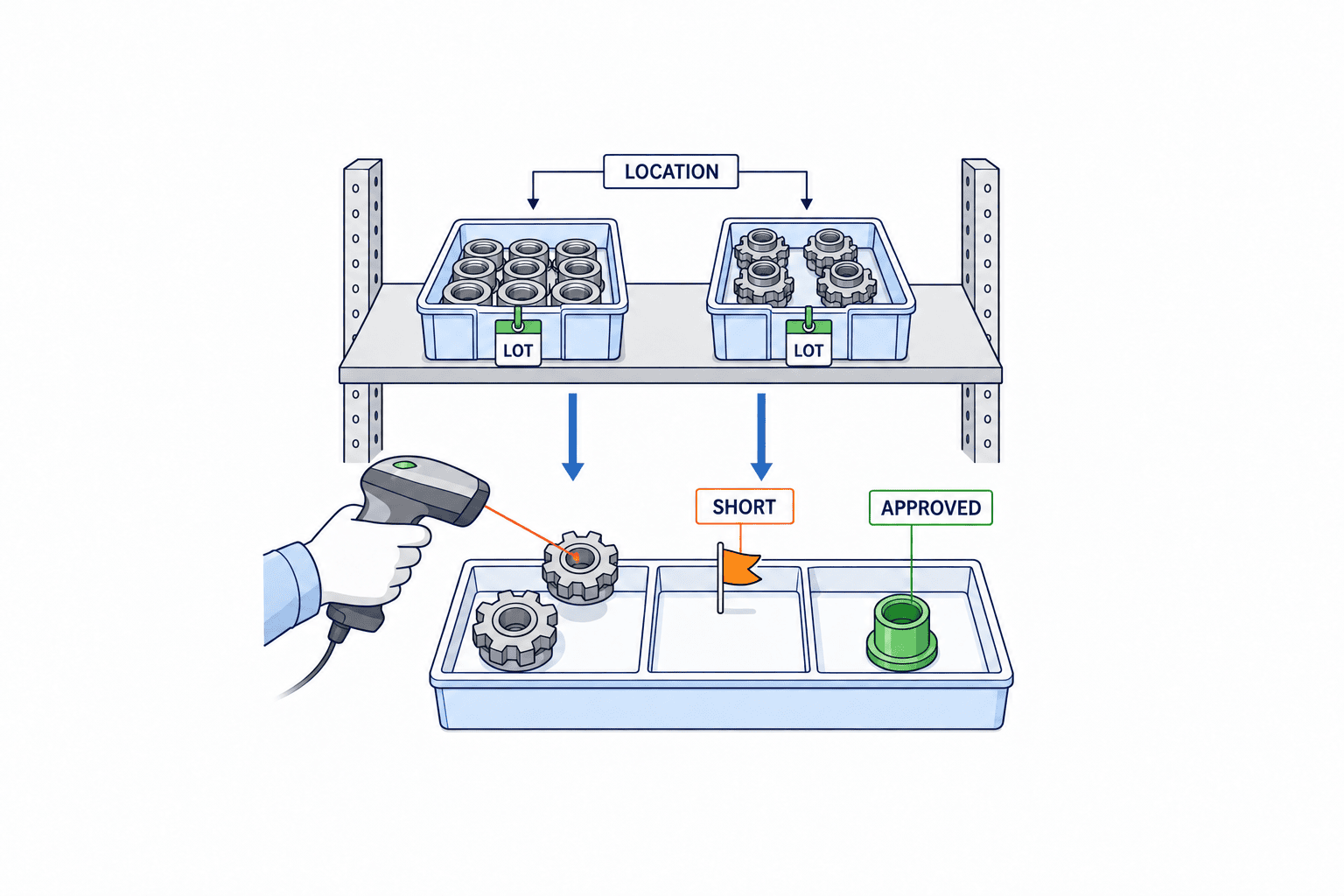
A pick task needs the proposed location, rules for alternate locations, physical container, component, revision, lot, quantity, unit and quality status. Scanning only the shelf and typing the item leaves similar-part errors open. Scanning only the item without location makes stock discrepancies difficult to investigate. For risk-sensitive lines, confirm shelf and physical item separately; capture lot or serial from the actual label where required.
Microsoft documents configurable confirmation of batch, serial, license plate and location on warehouse mobile devices. It also notes behavior where some confirmations are skipped, such as certain full-quantity picks. A configuration checkbox is not proof that every transaction asks for the same confirmation. Test partial and full picks, mixed containers, remnants and location changes in FAT. See Microsoft’s warehouse confirmation guidance.
“FIFO” or “FEFO” is not a complete lot policy. Include quality holds, minimum remaining life, customer restriction, supplier, revision compatibility, opened packs and whether a kit may mix lots. If the scanned lot differs from the proposal, capture a reason and require supervisor approval only where policy calls for it. An alternate-location proposal must exclude blocked stock. A matching part number and quantity do not make a prohibited lot acceptable.
The capture method depends on the component. One-by-one scans suit some parts; weighing suits bulk material; residual reel count may govern electronics. Define decimals, unit conversion, scale input, tare, opened-pack balance and the meaning of each scan by item group. When there is a difference, keep required, actual, variance and resolution as separate fields rather than overwriting the plan. Retain the variance and correction even if the final quantity is correct.
Workers also need safe resume after a battery or network failure. Give tasks, lines and scan events stable IDs. Retransmitting a confirmed event should not create a second movement or consumption. If offline operation is allowed, specify how two workers are prevented from taking the same stock, how later quality holds are applied, and whether an offline “verified” indication is clearly provisional until the server accepts it.
Manage shortages as decisions waiting for an owner
“Short by one” hides different causes: book stock genuinely unavailable; book stock at the wrong physical shelf; only the permitted lot missing; available stock under quality hold; additional demand after an order revision; or goods received but not inspected. Record a cause code, where it was discovered, the verifying worker, responsible team and next decision time for every affected kit line. Feed the impact on the kit-ready date back to production planning.
Decide explicitly whether a partial kit may go to the line. If allowed, attach the missing lines, remaining quantities, expected replenishment, receiver and operations prohibited from starting to the kit ID. A red paper slip attached to a container while the application displays “complete” is not enough. If partial handoff is prohibited, block the verification gate but keep the already picked materials located and accountable. Material substitution, reduced build quantity and reassignment to another line each need different authorization.
Never resolve a shortage by deleting the original required line. That destroys the difference between the designed material and the material actually issued. An approved substitute must reference the original line and carry the candidate part, product revision and scope, customer-approval requirement if any, approver, validity period and consumed lot. A warehouse operator should not be able to select a supposedly equivalent part that engineering or quality has not authorized. On approval, recalculate the affected kit lines and create any additional picks or returns.
Scanning proves physical identity; it does not prove design permission to use a substitute. Electrical ratings, material grade, revision and customer restrictions may matter even where stock-master groups appear equivalent. Link to the approval record and check that it is valid for this order, lot and date. If an approval expires while an unissued kit waits in the warehouse, recheck it before handoff.
Use separate gates for kit verification and line receipt
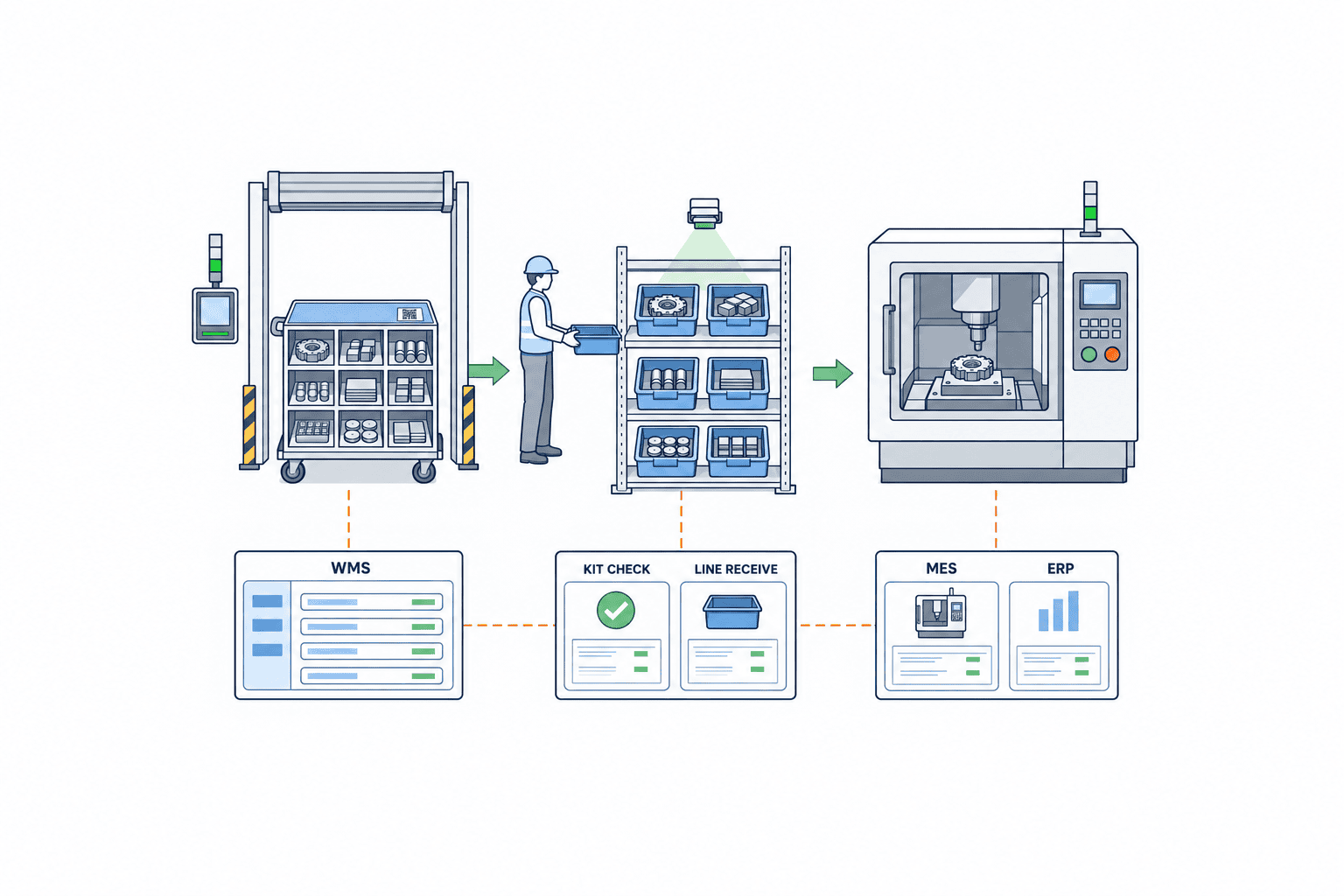
At the warehouse verification gate, check every line against required quantity, part and revision, lot, quality status and substitution approval. Check that all child containers are present. Distinguish the worker who performed the picks from any second verifier who seals or audits the kit. If seals are used, record the seal number and each break and reseal.
At line receipt, distinguish “warehouse handed over” from “line accepted.” The receiver checks kit ID, number of containers, visible damage, target order and operation. Damage, loss and a mismatched label become receipt variances with an owner. Record the in-transit status and the line-side holding location. For two similar orders running together, a further order or machine check at point of use may be appropriate. Receipt never means every component has already been consumed.
Microsoft’s material-consumption example moves stock from bulk storage to a production input location before an operator records the actual batch and quantity consumed. It explains why exact consumption time matters for strict traceability and why automatic posting may be unsuitable for some materials. Thus a single scan that simultaneously verifies the kit, acknowledges line receipt and posts consumption needs careful justification against the physical event. See Microsoft’s handheld material-consumption workflow.
If only some of the kit is used, track partial consumption, remainder, return location, quality recheck and reassignment separately. An unused part brought to the line may have a different reuse condition after opening or environmental exposure. Let quality set reuse permission, WMS record its location and ERP record the relevant inventory transaction.
Put ERP, WMS and MES transaction boundaries in one table
Determine the system of record for each event before buying another application. ERP commonly owns orders, BOM, purchasing, inventory valuation and financial material issue. WMS often owns bins, containers, lots, picks and warehouse movement. MES may own shop-floor start, operation result, actual consumption and machine/operator evidence. A dedicated kitting application can own the kit ID, completeness gate, exceptions and handoff between them. If existing ERP or WMS functions cover those needs, a new application may add little value. Decide by who approves and may correct each event, not by product name.
| Event | Physical meaning | Candidate record owner | Acceptance question |
|---|---|---|---|
| Order release | Work and specification authorized | ERP | Is the BOM revision frozen? |
| Allocation | Stock logically reserved | ERP/WMS | Are lot and quality restrictions applied? |
| Pick confirmation | Goods moved from shelf to container | WMS | Are location, lot, quantity and container retained? |
| Kit verification | All lines meet use rules | Kit control/WMS | Are substitutes and multiple containers checked? |
| Line receipt | Operation accepted containers | MES/kit control | Are receiver, time, damage and holding location saved? |
| Consumption | Material actually used | MES/ERP | Do batch and quantity reconcile with inventory? |
| Return | Unused material re-enters controlled stock | WMS/ERP | Is quality recheck linked to the original kit? |
Oracle describes integration of work-order picking with WMS, and the option to move stock to a supply subinventory or issue it directly to the order. “Pick” can therefore create different inventory outcomes. Specify which transaction applies at your site and when location and cost change. Oracle also describes operators reporting material quantities and lot/serial data during operation execution. See Oracle’s picking guidance and material-reporting guidance.
An interface contract should include event ID, physical event time, transmission time, order and revision, kit and child container, item and revision, lot, quantity and unit, from/to location, approver and correction reference. Test retries, out-of-order messages, duplicate receipt and a stale message arriving after cancellation. Microsoft’s MES interface explicitly covers material-consumption messages and monitoring of failed processing. The architecture diagram must specify the recipient’s commit acknowledgment and who fixes a failed message, not just arrows between boxes.
Edge cases when several orders use the same component
When two orders use the same item, the warehouse may pick a combined quantity and allocate it to kits later. This can be valid, but shelf removal and allocation to each kit are separate events. If work stops before parts enter kit A, the software must not already call them allocated to A. An intermediate container needs an ID, responsible worker, location and permitted dwell time. A second worker must be able to resume and reconstruct which lot entered which kit.
If order A is cancelled and its unconsumed kit is offered to order B, a matching part number alone is insufficient. BOM revision, customer restriction, operation, lot, quantity and line setup may differ. Reassignment should recheck every physical line against B, send surplus back and trigger any additional picks. Retain the link between old and new order, approval reason and verification result. A quality hold can also arrive after picking: an apparently complete kit in transit or at the line may need to stop before consumption. Already consumed material moves into quality containment and impact assessment, not a simple kit edit.
For a shortage resolved by a later delivery, give the extra container its own ID and link it to the original kit and missing line. Completion follows receipt of that extra container by the line, not a message saying it “must have arrived.” Keep the worker-facing state list understandable while retaining detailed event reasons and approvals behind it.
Write the RFP as workflows with exceptions
“Kitting system, complete” produces incomparable bids. Provide plants, lines and operations; measured distribution of orders per day and BOM lines; component and lot/serial types; containers and labels; existing ERP/WMS/MES; wireless conditions; user languages and terminals; shift operation; and master-data owners. Insert the factory’s own measured volumes and performance targets. State whether migration includes items, locations, substitute approvals, quality status, open orders and opened packs.
The normal scenario should run from order release to list generation, shelf and item scans, kit verification, seal, line receipt, actual consumption and return. At each stage specify screen result, authority, receiving system, saved IDs and acceptance evidence. Include workers handling several kits, bulk picking followed by allocation among kits, and kits split across containers. Bulk picking may save warehouse motion, but it cannot weaken evidence that each kit received its required parts.
Exception scenarios must include shelf variance, wrong-part scan, wrong lot, quality hold, expired lot, partial pick, shortage, approved substitute, order change, damaged or missing kit, rejected line receipt, returns, network loss, duplicate event and ERP interface failure. For each, say who blocks and releases the flow, where the physical item goes, whether the inventory posting is reversed, and how the original and correction remain auditable. Ask each bidder to classify the response as standard function, configuration, custom development or manual procedure and demonstrate it.
Compare more than licenses and terminals. Price the ERP/WMS/MES connections, master-data cleanup, printers and labels, wireless work, migration, local training, Thai and Japanese screens, FAT/SAT, support and change requests separately. A bid that quietly assigns shortages, substitutes and returns to “manual operation” may omit the very controls the project needs.
FAT/SAT must prove that the system stops correctly
FAT should use sample orders, revisions, BOMs, shelves, lots, quality states and containers. Beyond a successful kit, scan a wrong revision, held lot or unauthorized substitute; leave a required line short; try to complete; send the same event twice. Expected results need to include the kit state, physical holding location, inventory quantity, audit log and restart procedure—not merely an error pop-up.
SAT uses actual shelving, containers, labels, lighting, network, gloves and operator posture. In a bilingual Thai/Japanese plant, validate units, lot IDs, approval names and warnings with operators, not only translated headings. Include an order-change day, simultaneous requests from several lines and a shift handover between warehouse and line. A scanner demo in an office is not evidence that stacked bins on the real shelf can be read.
Keep test ID, starting data, steps, expected and actual results, screen and log evidence, deviation, retest date and approver together. Set latency and read-success acceptance values from the plant’s measured requirement before issuing the RFP. Test the expected concurrent workload, network disconnection and recovery, duplicate rejection, failed-message alert and reprocessing. After go-live, track not just wrong picks but time to shortage decision, aging of incomplete kits, pending substitute approvals, rechecks after order change, receipt variances, unresolved returns, interface failures and manual corrections. Segment them by operation and cause so master-data and software problems can be distinguished.
A practical rollout sequence for Thai factories
First observe one line and limited item family from order through BOM revision, allocation, pick, shortage, receipt and consumption. Include a day with exceptions, paper forms, informal approvals and returns. Reconcile why apparently identical inventory differs among systems: timing, units, quality status and line-side holding stock often explain the mismatch.
Next define kit ID, line states, rights, exception codes and revision handling. A small PoC must reproduce a shortage, approved substitute, order change and refused line receipt, as well as the normal flow. Observe work time and scan behavior. Excessive scanning across every low-risk component can invite proxy entry; decide the verification level by risk with quality and production. Then freeze the RFP and FAT/SAT, compare bidders on the same scenarios, and plan parallel run, fallback rules and migration of kits already in progress. Train workers on the physical holding location and contact person for each exception, not just screen order.
Manufacturing parts kitting FAQ
How is kitting different from picking verification?
Picking verification checks a removal from a shelf. Kit completion checks all lines for a specified order and operation, including revision, quantity, permitted lot, quality status and substitute approval. Correct individual picks do not complete a kit while another required item is still missing.
When should production-order material leave inventory?
There is no universal point. Moving material to a production supply location and consuming it at the operation can be separate transactions. Map the physical events to your ERP issue rule, WMS movement, MES consumption and traceability needs. If they are posted together, test that this matches the physical process.
May a partial kit go to the line?
It can if the process can safely proceed without the missing item and the exception is approved. Track the missing line, quantity, replenishment deadline, prohibited operation and receiver by kit ID. Do not call it complete until the additional container is actually received. Where quality or customer rules demand a whole kit, block partial release.
Is a separate application needed when ERP and WMS exist?
If existing functions can manage order revision, all-line verification, shortage and substitute approval, container traceability, receipt and an audit trail, a new application may be unnecessary. Where those functions are fragmented, compare configuration, an integration layer and a dedicated system against the same scenarios.
Before signing, require evidence for these questions:
| Question | Evidence to request |
|---|---|
| Which order revision drives the kit? | Release event, BOM snapshot and change example |
| What confirms a pick? | Shelf, item, lot and quantity screen/label samples |
| Who approves shortages and substitutes? | State diagram, permissions and due times |
| Are verification and receipt separate? | Handoff and receipt-variance test |
| When does stock move or get consumed? | ERP/WMS/MES transaction map |
| Can failures avoid double posting? | Retry, ordering and recovery FAT results |
| Can unused material be traced? | Original kit link and quality recheck procedure |
A manufacturing kitting control system is a way to hand the line only parts that fit the production order, with evidence. Evaluate it by whether shortage and substitution decisions progress clearly and warehouse, line and inventory records describe the same physical event. If your Thai factory is preparing an RFP and acceptance tests from its current orders, BOMs, shelf labels and shortage cases, contact TOMAS TECH with the target line and existing-system map.
Primary references
- Microsoft: Release production orders — release state and raw-material picking conditions.
- Microsoft: Integrate with third-party MES — order events, reference data, consumption messages and failures.
- Microsoft: Register material consumption using a mobile device — distinction between supply movement and actual consumption.
- Microsoft: Batch, serial, license plate, and location confirmation — mobile confirmation rules and exceptions.
- Oracle: How You Pick Materials for Work Orders — work-order picking and WMS integration.
- Oracle: Report Materials — operation material reporting and lot/serial entry.


