



A projection picking project is not simply a projector purchase. It is the design of a complete work cell: WMS or ERP issues a task, an interface translates it into a visible instruction, the projector marks the correct physical location, the operator picks, a scanner or sensor confirms the action, and a transaction is returned. In a high-mix operation in Thailand, language, lighting, rack movement, local service and recovery from exceptions must be decided before rollout. This guide connects those decisions to a practical comparison with DPS, WMS integration, projection calibration, error prevention, RFP requirements and FAT/SAT evidence.
What is projection picking, and what does it not guarantee?
Projection picking displays a location, quantity, image, symbol or work sequence directly on a shelf, rack, floor or wall. AIOI Systems’ product documentation describes projecting images, text, numbers and QR codes, with optional image- or sensor-based poka-yoke. It also describes multiple layout patterns and operation without wiring a display to every shelf slot. These product characteristics explain why the method can be considered for dense small-parts racks, frequently reconfigured cells and locations where fixed modules are difficult to mount.
Projection remains a guidance layer. A correctly illuminated bin does not prove that the operator took the right part or quantity. An operator can reach into an adjacent bin, miscount, skip the instruction or place the part in the wrong destination. A risk-appropriate confirmation layer is therefore required: barcode or lot scanning, weighing or counting, a confirmation button, image recognition, LiDAR, or downstream verification.
This distinction belongs at the top of the RFP. “Can display the instruction” and “can detect a wrong action and retain auditable evidence” are different requirements. Define whether the objective is less searching, easier training, lower mispick risk, better traceability, or a combination. Then define the evidence required for each objective instead of assuming that one device delivers all outcomes.
Best-fit and poor-fit conditions
SKU count alone does not determine suitability. Inspect surface material, external light, operator sight lines, obstructions, rack rigidity and layout-change frequency during the actual operating shifts.
| Operating condition | Why it may fit | What to verify before purchase |
|---|---|---|
| Dense small-parts locations | Guidance can be placed on the physical surface without a module at every slot | Whether adjacent slots remain unambiguous |
| High mix and frequent relayout | Coordinates and master data can be changed without rewiring every slot | Change approval, version control and recalibration |
| Kitting and line-side supply | Pictures, sequence and part regions can supplement quantity | Item verification and completion logic |
| Integration with AMR or automation | Guidance can change with the arriving rack or workpiece | Repeatable stopping position and safety interlocks |
| Strong daylight or reflective surfaces | Contrast can deteriorate | Day/night, open-door and protective-film conditions |
| Boxes or hands obscure the beam | Instructions may disappear temporarily | Projection angle, redisplay and secondary guidance |
| Racks move, flex or are replaced | Coordinate drift can become wrong guidance | Fiducials, relocation detection and calibration authority |
| Dust, heat or vibration | Optics and mountings may degrade | Protection, cleaning, cooling and service access |
A poor-fit condition does not automatically reject the method. Shading, a different projection surface, several projectors or scanner confirmation may control the risk. But if visibility or coordinate repeatability still cannot be demonstrated in acceptance testing, fixed DPS or handheld guidance may be the safer choice.
A concrete projection picking architecture
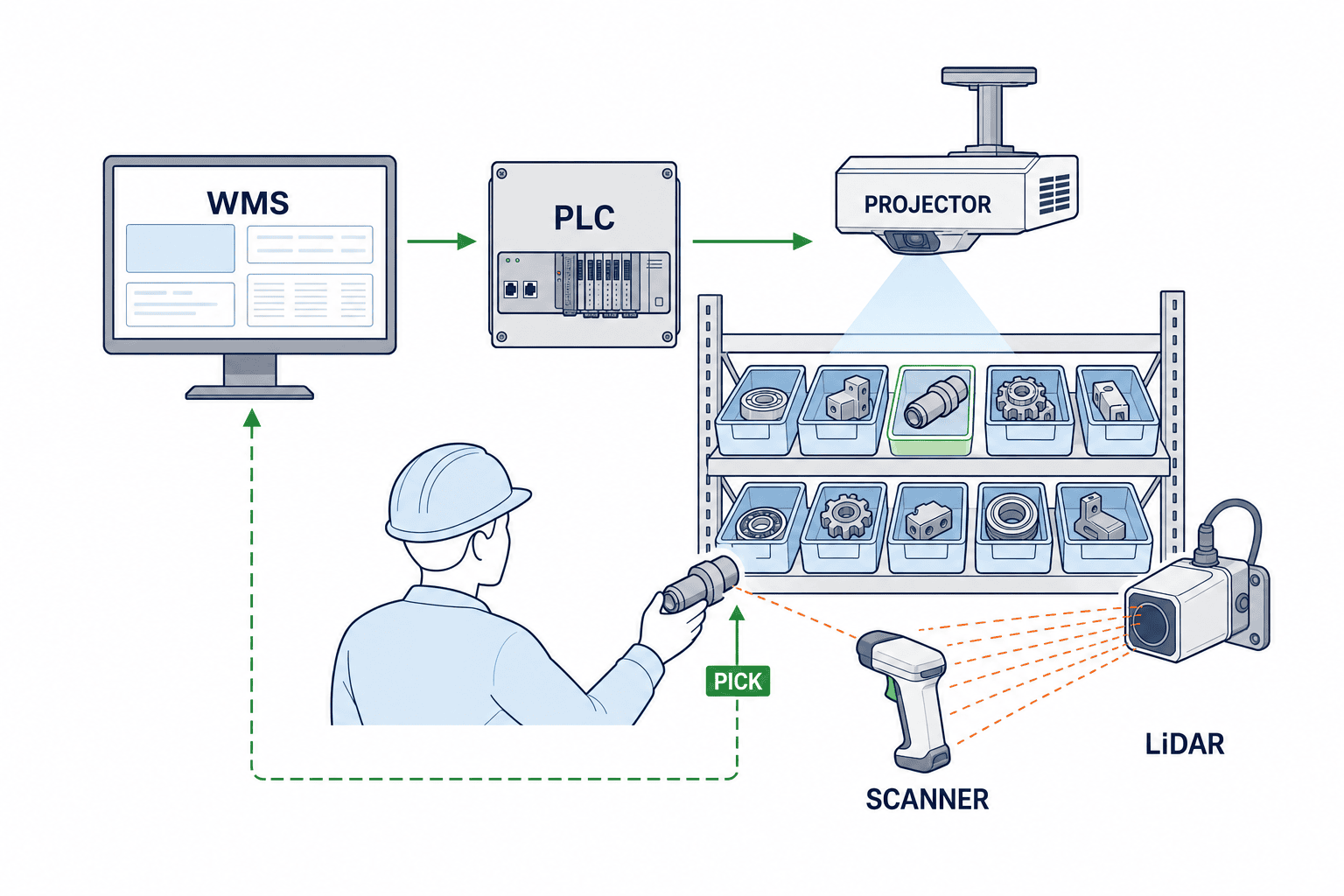
A practical flow is WMS/ERP task → middleware or PLC → projector → operator → scanner or confirmation sensor → transaction log and WMS completion. Carter Laser’s logistics and assembly documentation says that projection geometry and position data can be supplied by WMS control software or decentralized PLC control. This is a useful interface pattern, not a universal mandate.
Assign responsibility by layer. The WMS remains the source for orders, inventory, locations and priorities. Middleware converts a business task into coordinates, display content, language and confirmation rules. A PLC, when used, handles machine state, physical sensors, permission and interlocks. The projector displays guidance; scanners and LiDAR collect evidence. The execution record should associate task, item, location, operator or device, timestamps, confirmation result and exception reason.
The Identify, Capture and Share model in the GS1 standards overview provides a sound data backbone. Decide what is identified, where it is captured and with whom it is shared. GS1 General Specifications Release 26.0 is an authoritative reference for identifiers, check digits and automatic capture, as well as event records that connect an identifier with a type of movement.
| Interface element | Required definition | Exception question |
|---|---|---|
| Task identity | Unique task and line IDs, treatment of a resend | How is duplicate execution prevented? |
| Item and location | Item, lot, serial, location and substitution rules | What happens with missing or duplicate master data? |
| Display command | Coordinates, shape, colour, quantity, language and priority | What is the fallback when projection is unavailable? |
| Confirmation event | Scan, weight, button, image or LiDAR result | How are mismatch, no response and override handled? |
| Completion | Complete, partial, shortage, hold and actual quantity | What happens when WMS acknowledgement is missing? |
| Audit | Issue, display, confirm and complete times; actor | How are clock drift, resend and correction retained? |
Loss of communication is a business decision, not merely a network setting. A high-risk process may need to stop. A process with expensive downtime may continue only already-authorised tasks in a local queue, then resend them in order after recovery. Warehouse, quality, production and audit owners should approve the rule.
Projection vs fixed DPS vs handheld or voice
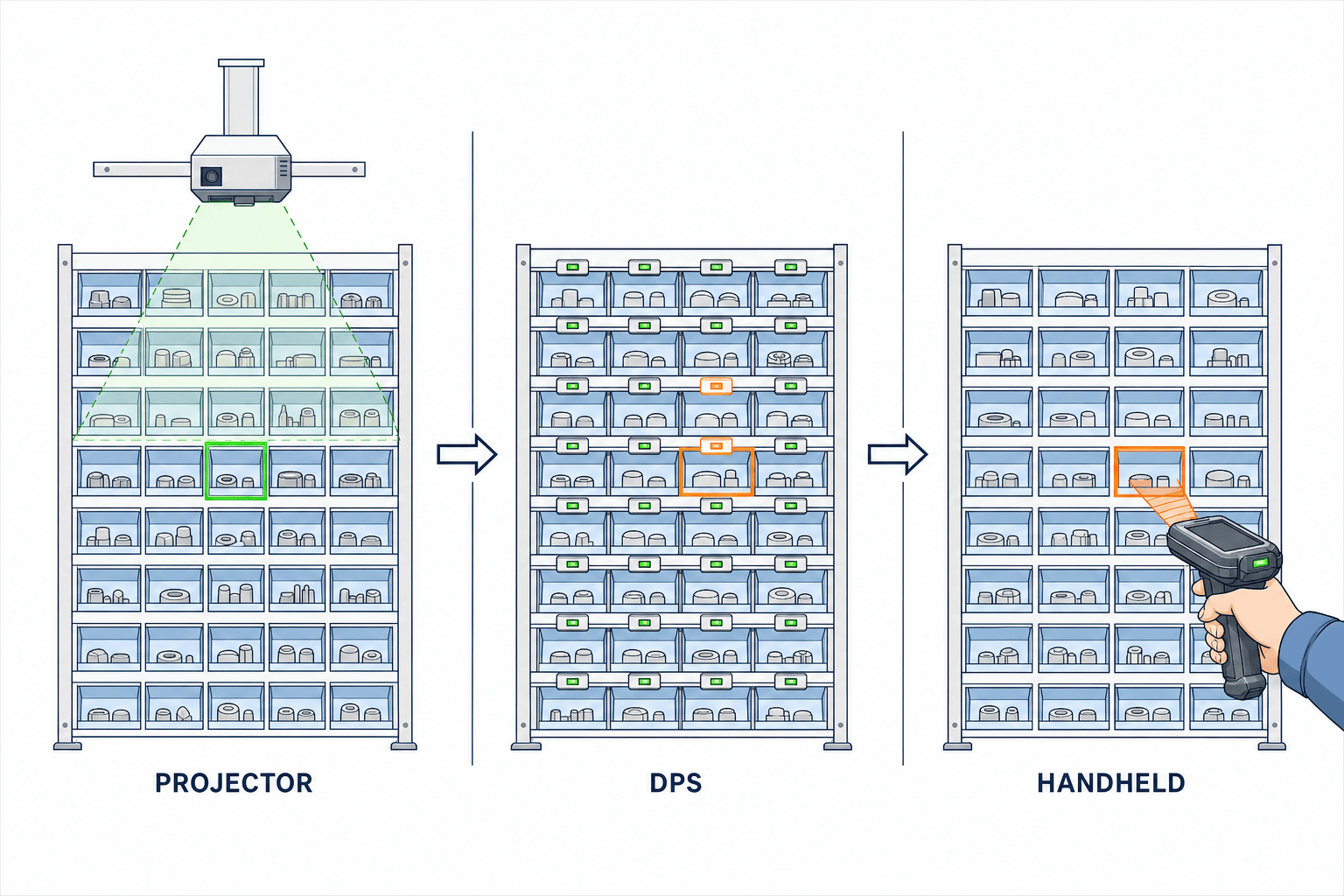
A fixed digital picking system typically mounts a lamp and display at a shelf location. The lamp points to the slot and the display presents quantity; Sharp’s DPS/DAS explanation provides this useful comparison baseline. Projection can overlay a shape or image and can serve dense locations where a module is difficult to mount. Lightning Pick’s product page describes photos or video in the instruction, LiDAR-assisted wrong-operation alarms and combinations with put walls and AMRs. Treat performance statements as vendor claims until verified under your site conditions.
| Decision variable | Projection | Fixed DPS | Handheld / voice |
|---|---|---|---|
| Dense slots | No module required at every face | Requires room and wiring for modules | Little shelf modification |
| Relayout | Coordinate, master and calibration change | Physical relocation and possible rewiring | Mainly location-master change |
| Information richness | Shapes, pictures, region and sequence | Strong for repeatable lamp and quantity cues | Flexible screen or spoken instruction |
| Visibility | Sensitive to light, reflection, obstruction and colour use | Depends on lamp placement and recognition | Depends on screen, noise and wearability |
| Confirmation | Must be designed with scan, vision or sensor | Button and scan are common companions | Scanning or spoken response can be integrated |
| Maintenance | Optics, mount, focus and calibration | Many displays, cables and buttons | Devices, batteries, chargers and loss |
| Fault domain | Projector coverage and redundancy design | Module and controller domains | Device plus wireless and server dependencies |
One site does not need one technology everywhere. Projection may suit dense racks, fixed DPS may suit repeatable high-speed sorting, handhelds may suit distributed storage, and voice may suit work requiring both hands. Select by work cell and order profile. For the broader options, see our DPS and DAS comparison for Thailand.
Seven design decisions for a reliable system
1. Identifiers: separate item, location, lot and task
Do not integrate on a displayed description alone. Names change by language and revision. Keep WMS task ID, line ID, item ID, location ID and, where required, lot or serial as separate fields. For barcodes, define which identifier is read, which master validates it and what the operator sees on a mismatch. Our QR-code inventory guide for Thailand provides additional context for inventory identification.
2. Coordinates and projection calibration
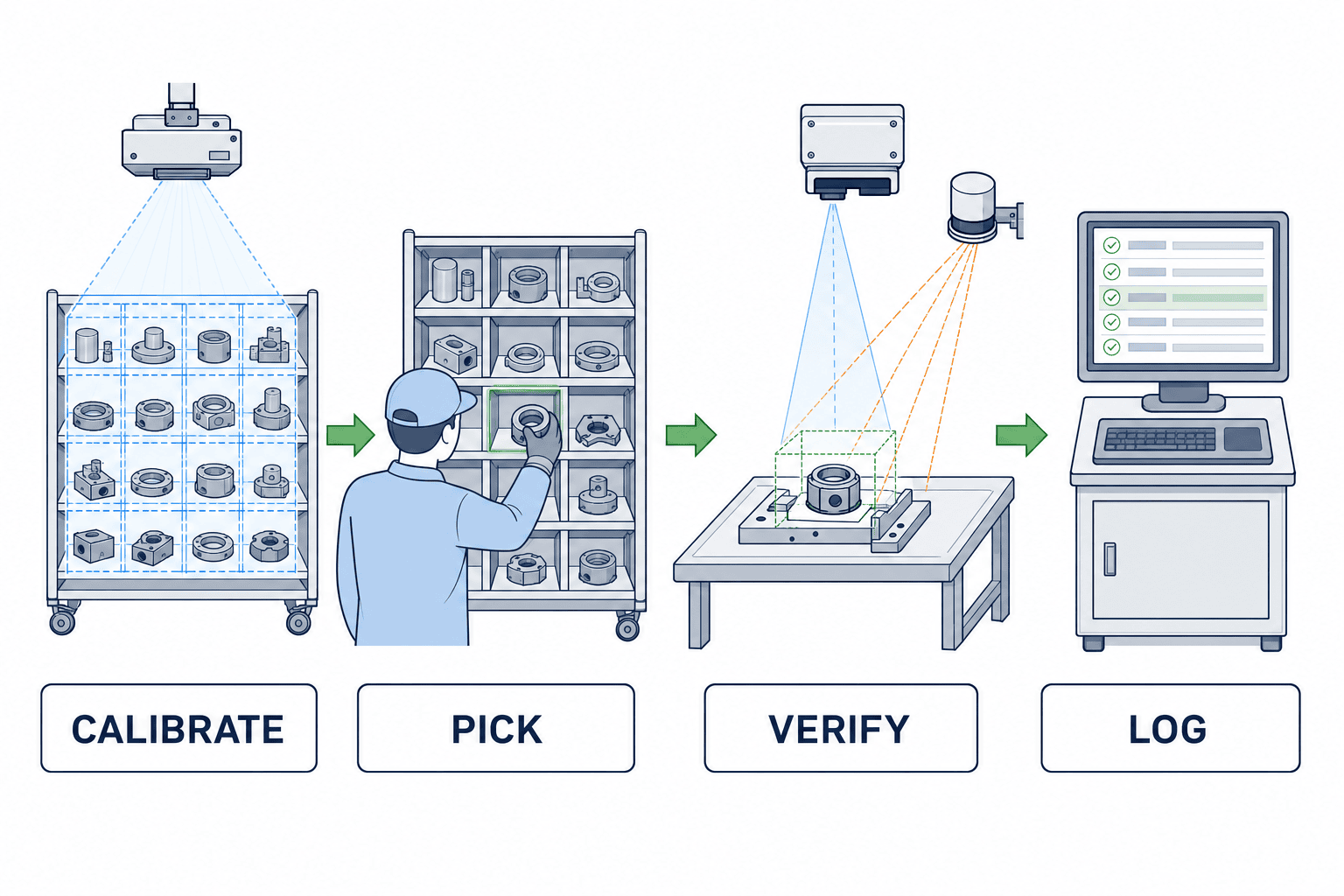
Coordinates do not remain correct forever. Rack movement, shelf replacement, loose anchors, projector contact, vibration and post-cleaning reinstallation can all cause drift. Define fiducials or a jig, calibration authority, history, approval of changes and a stop rule when drift is suspected.
A calendar interval alone is insufficient. Start with vendor guidance and site testing, then add event-driven recalibration after relocation, impact, component replacement or a visibility complaint. Any numerical tolerance should be labelled a buyer-and-vendor acceptance target based on slot size, part similarity, projected shape and confirmation layer—not an unsupported industry standard.
3. Content and language
Displaying long Thai, English and Japanese sentences together can overload the shelf. For routine work, combine a frame, arrow, part picture, short quantity and pictogram without relying on colour alone. Put detailed exception instructions on a terminal when appropriate. Maintain the translation dictionary separately from the WMS item description, version it and review terms with operators.
4. Confirmation and mispick prevention
Match evidence to the error. Scan item and lot for a high-risk component; use weight or counting where quantity matters; retain downstream verification when the current cell cannot prove the result. LiDAR or image detection may detect a hand in the wrong bin without proving quantity. Weight may detect quantity difference without identifying a wrong part of similar mass. State both capability and limitation.
5. Exception and override
List shortage, damage, unreadable label, wrong replenishment, urgent order, unavailable projection, sensor false alarm and WMS outage. If an override is permitted, define the role, reason code, approval and before/after log. “Continue on paper” is incomplete unless responsibility for handover and later reconciliation is defined.
6. Connectivity and recovery
Specify stop-or-continue behaviour, local buffering, resend, deduplication, timeout and expiry of stale tasks. Test a disconnect immediately before completion, physical movement with the WMS still showing open, and duplicated or reordered responses after recovery. A response-time target, if needed, should be a project-specific acceptance criterion supported by site observation.
7. Maintainability and local support
Break the solution into projector, mount, cable, sensors, scanner, terminal, fan, filter and software. Contract for response paths in Thailand, spare storage, recalibration after replacement, remote-access controls and software-version compatibility. For overhead equipment, safe service access and required production stop are part of the design. A spare projector has value only when settings can be restored and the cell can be recalibrated.
Implementation details for Thai factories and warehouses
Headquarters may work in Japanese, supervisors in English and operators in Thai. Establish a language policy per screen: operator guidance in the operator language, maintenance screens with English support, and language-independent item IDs. At shift handover, transfer held tasks, calibration state, overrides and the use of spare equipment.
Survey heat, dust and lighting on site during day and night, door opening, cleaning and busy stacking conditions. The OSHA Grocery Warehousing eTool is general ergonomic guidance showing that conventional order picking can involve repetitive motion and frequent handling. It does not establish Thai legal requirements, but it offers useful questions about reach, posture, line of sight and repeated handling.
Local support needs more than a contact address. Verify service language, coverage hours, first-line diagnosis, site attendance, local spare inventory, manufacturer escalation and support for older revisions. In a multi-site rollout, separate local configuration from centrally governed identifiers, logs, software versions and change approval.
What to put in the RFP and interface contract
Write the RFP around operating scenarios and acceptance evidence, not a shopping list. Give vendors the same conditions and require them to state assumptions and exclusions.
| RFP section | Required content | Evidence requested |
|---|---|---|
| Scope | Order types, SKU profile, racks, shifts, languages, peak conditions | Explicit in-scope and out-of-scope list |
| Site | Drawings, distance, lighting, reflection, dust, heat, vibration | Survey result and assumptions |
| WMS/ERP | API/file/PLC signal, IDs, resend and idempotency | Interface specification and test plan |
| Projection | Coordinate setup, change, fiducials, access and history | Calibration procedure and sample log |
| Poka-yoke | Detection method and limitation for each error | Error-scenario demonstration and log |
| Recovery | Fault domain, backup, spare, network loss | Recovery procedure and responsibility matrix |
| Support | Thailand coverage, parts, updates and remote access | Service proposal, parts list and version policy |
| Acceptance | FAT/SAT cases, conditions, logs and retest | Pass/fail sheet and evidence format |
Compare total scope: mounting, shading, network, panel, sensors, WMS changes, master-data cleanup, translation, training, FAT/SAT, spares, support and recalibration. Avoid promising a fixed payback. Build the case from measurable current-state search time, rework, training effort and layout-change work. Keep vendor reference values separate from your verified data.
FAT/SAT acceptance evidence
FAT verifies specification in a controlled or simulated environment. SAT verifies the real racks, light, network, operators and WMS. Do not infer site fitness from FAT alone.
| Scenario | FAT focus | SAT focus | Evidence retained |
|---|---|---|---|
| Normal pick | Instruction-to-completion sequence | Real rack, item and language | Event log linked to task ID |
| Wrong item/bin | Scan or sensor mismatch | Similar item and adjacent bin | Alarm, override and incomplete state |
| Wrong quantity | Limits of the chosen confirmation | Real pack and weight variation | Decision data and operator response |
| Calibration drift | Shift reference and recalibrate | Move rack and recover | Before/after calibration history |
| Lighting change | Simulated brightness and reflection | Day/night, doors and task lighting | Condition, image and visibility decision |
| Occlusion | Hand or box blocks the projection | Actual operator posture | Redisplay or secondary cue result |
| Network loss | Buffer, resend and deduplication | Recovery on the site network | Order and duplicate reconciliation |
| WMS error | Timeout and stop stale instruction | Error display on live interface | Screen, audit trail and recovery time |
| Manual override | Role, reason and approval | Shift supervisor performs it | Actor, reason and change history |
| Replacement | Restore configuration to spare | Local staff replace and recalibrate | Procedure, work steps and result |
If a numerical pass value is required, label it an illustrative project acceptance target unless a cited standard supports it. Agree it from slot dimensions and operational risk. Define measurement conditions, instrument, repetitions, correction and retest as well as the threshold.
A phased pilot and Go/No-Go criteria
Choose a representative difficult cell, not the best-looking demo rack. Include density, similar parts, shift handover, light variation and at least one exception. Keep the first pilot bounded by explicit hypotheses.
Observe the current process and record available evidence for searching, travel, mispicks, rework, training and stoppage. Build a minimum cell with the WMS interface and confirmation layer. Test wrong-bin action, network loss and rack relocation before celebrating the normal flow. Run across shifts, gathering operator, supervisor, maintenance and IT observations. Compare benefits with calibration work, master updates, exceptions and support effort.
Go requires representative acceptance cases to pass, owners and deadlines for residual risks, a support and spare-parts plan, and repeatable reconciliation between physical movement and WMS records. No-Go or conditional continuation is appropriate when visibility is unstable, confirmation cannot distinguish the required errors, every rack change creates excessive setup, or recovery cannot be audited.
Evaluate investment with continuing cost: calibration, cleaning, replacement, translation, master maintenance, software updates and local support. Use your pilot evidence to create a range rather than inserting an unverified productivity percentage or fixed payback period.
Do not collapse all evidence into one average. Segment it by item family, rack zone, shift, operator experience and exception state. A faster average can still hide a reflective surface that repeatedly loses the cue, a night shift that detects drift late, or temporary operators who rely on overrides. Record the condition and reproducibility so that one isolated event does not wrongly approve or reject the design.
Measure the baseline under conditions comparable with the pilot. Results from an experienced operator on a normal day cannot be compared fairly with a new operator during a peak. Align order mix, volume, shelf layout, breaks and replenishment waits, and record every change besides projection. This prevents layout cleanup or master-data correction from being credited entirely to the device.
Pilot governance and evidence records
A pilot owned only by IT can miss a cell that works technically but fails audit requirements or forces an unsafe posture. Assign roles across warehouse or production, quality, IT, maintenance, safety and local management. State who freezes test conditions, judges a defect and approves a change. When the vendor adjusts a setting on site, retain the before state, the change, reason, applied version and retest result.
Operator interviews should ask for specific moments: when the cue was lost, which display caused hesitation, how reflection or obstruction affected the task, whether confirmation added burden and whom the operator contacted during an exception. Compare those observations with logs. A task recorded as complete may have depended on oral confirmation or rework. Conversely, record training dates and learning stages so that initial unfamiliarity is not mistaken for permanent equipment weakness.
At pilot close, distinguish pass, fail, not tested, conditional pass and retest after design change. Each open item needs an impact scope, temporary control, owner, deadline and a condition that blocks wider rollout. The rollout decision should review benefit, quality risk, maintenance load, training load, cybersecurity and contract gaps in one list, and specify which acceptance conditions can be reused at the next cell and which must be measured again.
Change control and daily checks after go-live
After go-live, do not let a shelf change end with the facilities team. Link the location master, projection coordinates, confirmation sensor, work instruction, training material and backup in one change record. Even moving a shelf level changes slot boundaries, hand obstruction and scanner reach. Identify the impact before the change, then run calibration, wrong-bin, normal-pick and event-log regression checks afterward.
Daily checks should cover reference-marker alignment, focus, cue recognition, lens contamination, mounting, cabling, sensor detection, clock synchronization and unsent events—not only whether the projector turns on. Record device ID, time, result, action and owner in the maintenance history. A recorded normal state is also evidence for identifying when deterioration began.
Track when item and location master changes reach each layer. ERP, local WMS, middleware and projection control can switch at different times and create a mismatch between the physical shelf and cue. Keep a version, effective time, destinations, receipt confirmation and rollback procedure. Decide whether a change affects tasks already in progress or only new tasks.
Operational KPIs should include manual overrides, recalibration, unavailable cues, sensor false alarms, communication retries, rejected stale tasks, support calls and spare-unit swaps as well as speed and mispicks. Rising counts may indicate a shelf, optical, master-data, network or training change. Do not classify them automatically as operator carelessness.
For multisite rollout, reuse identifier rules, log formats, change approval and minimum abnormal scenarios, but do not copy all settings. Shelf dimensions, lighting, packaging, language, network and maintenance staffing differ. Determine coordinates, display, confirmation and spares from each site’s survey and acceptance evidence.
Conclusion: accept guidance, confirmation and transaction as one cell
Projection picking can provide flexible guidance for dense locations and changing layouts, but projection alone does not guarantee the correct item or quantity. A reliable solution joins WMS/ERP identifiers, coordinates and calibration, language, confirmation sensors, exceptions, connectivity and maintenance, then proves the result on the real rack through FAT and SAT. Compare projection, DPS, handheld and voice by operating conditions, change frequency, error risk and support—not novelty.
TOMAS TECH can help at an early evaluation stage, before a projection picking method or vendor has been selected. If you want to define a target cell in a Thai factory or warehouse and structure the site survey, WMS interface, confirmation method, RFP and FAT/SAT, please use our contact page.
FAQ: What is projection picking?
It projects location, quantity, image or sequence directly on a physical shelf or bin. It is often considered for dense slots and layouts that change frequently. A separate scan, sensor or downstream check is still required when the business must prove the item or quantity.
FAQ: What drives projection picking system cost?
Cost includes coverage, mounting, shading, sensors, scanners, control panels, network, WMS/ERP changes, coordinate setup, translation, training, FAT/SAT, spares and support—not only projector quantity. Compare vendors using the same scope and separate initial from ongoing cost.
FAQ: What is the difference in a projection picking vs DPS comparison?
Fixed DPS usually uses a lamp and display mounted at each location. Projection overlays shapes or images and may suit dense or changing layouts, but is more sensitive to lighting, occlusion and calibration. Handheld and voice should remain in the comparison; select by work cell.
FAQ: How does WMS integration work?
Define task, line, item, location and lot IDs; issue, cancel, complete, shortage and hold states; confirmation events; resend, deduplication, timeout and audit logs. Also define stop-or-continue behaviour during an outage and reconciliation after recovery.
FAQ: Can projection alone prevent picking errors?
No. It makes the target easier to see but does not alone prove item or quantity. Combine item or lot scans, weighing, buttons, vision, LiDAR or downstream verification according to the errors and risk. Document what each method cannot detect.
FAQ: How often is projection calibration required?
There is no universal interval. It depends on equipment, mounting, rack stability, vibration, change frequency and slot size. Start with vendor guidance and site tests, then recalibrate after events such as rack movement, impact, component replacement or visibility complaints, retaining the history.


