


An industrial label printer should be selected as part of a physical identification process. A machine may meet its catalog speed yet produce a code that cannot be read after application. A label may scan at the printer but fail after washing or transport. An MES may release the correct serial number while the applicator puts the previous label on the next workpiece. Printer, media, ribbon, artwork, verification, applicator and PLC/MES handoff therefore need one acceptance plan.
This guide is for purchasing, production engineering, quality and OT teams comparing factory label printers in Thailand. It turns the choice between desktop and industrial equipment, direct thermal and thermal transfer, and 203/305/609 dpi into testable requirements. The manufacturer’s figures are examples; acceptance must use your actual label, workpiece, line speed and environment.
Start with the label’s duty, not the printer model
For each product, tote or shipping carton, define the content, code type, smallest character, label size, adhesive surface, curvature, temperature, exposure to oil, chemicals and water, handling abrasion, storage duration and last point of scanning. A short-lived work instruction and a long-lived product nameplate have different requirements. Define life in operational terms: until shipping, until customer receipt, or throughout product use.
Measure peak label demand, not only the hourly average. A line that releases several labels at the end of a cycle creates a short, intense load even if its average volume is modest. Time printing, peeling, application, verification, reject handling, reprint and restart. The slowest operation determines the practical throughput. State how long an unplanned printer stop can last and how quickly an operator must change a roll or ribbon.
Specify actual label width, printable area, margin, feed direction, winding, core, gap or black mark, roll diameter, liner and ribbon orientation. A vendor demonstration with its standard stock does not prove compatibility with your adhesive, laminate and converter. Preserve an approved sample and the exact print settings. Include a second media supplier in testing if procurement expects substitutions.
The useful output of procurement is a label specification and acceptance matrix, not merely a model shortlist. Record what may be printed, who owns the data, how durability is measured and what constitutes a reject. Serial-number allocation and label template approval are covered in our factory label printing system guide. This article concentrates on turning that approved data into a reliable physical label.
Choose direct thermal or thermal transfer with the media
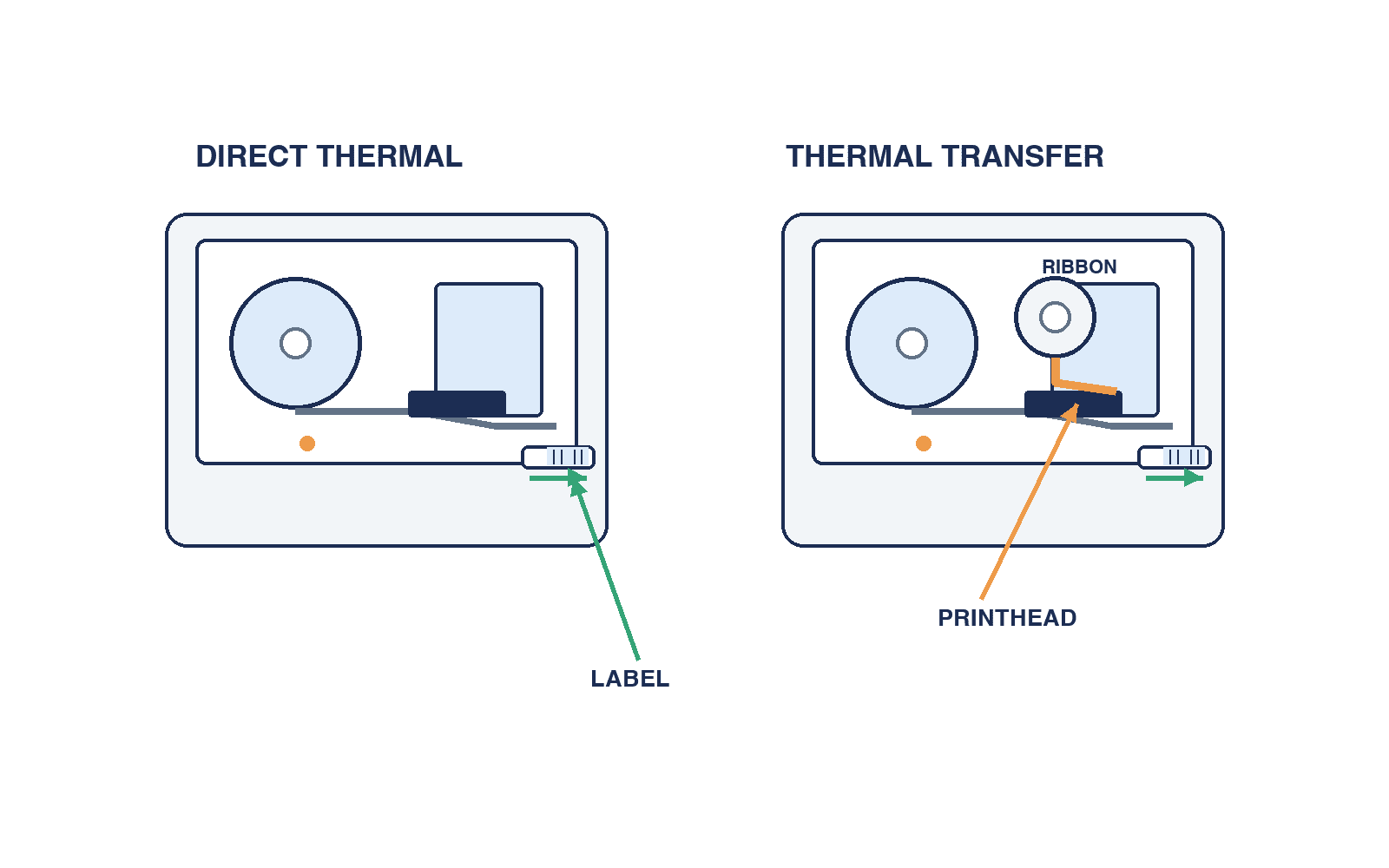
Direct thermal printing uses heat-sensitive stock and no ink ribbon. It reduces one consumable and can work well for short-use paper labels. Heat, light and abrasion can affect the image, however. Zebra’s explanation of the two methods distinguishes applications by required life and exposure. “No ribbon” does not automatically mean lowest total cost once reprints, read failures, scrap and downtime are included.
For an internal label collected after a short period, test direct thermal stock under real storage, rubbing and scanning conditions. For a customer-facing part label, a long storage period, a cleaning process or hot operation, prove that the stock survives; if it does not, consider thermal transfer or another marking method. Do not promise a lifetime merely because the process is thermal transfer.
Thermal transfer moves ink from a ribbon to paper, synthetic stock or film. Wax, mixed and resin ribbon categories are useful screening labels, but adhesion and chemical resistance depend on the actual stock coating, ribbon, heat, print speed, head pressure and later exposure. Ask bidders to qualify a media–ribbon–setting combination. A change in any component should trigger documented reassessment.
Use exposure tests drawn from the real process: refrigeration, humidity, oil, cleaning solution, alcohol, condensation, packaging friction or transport vibration where applicable. Requiring every imaginable resistance can waste money and constrain supply; accepting “durable” as an unsupported marketing phrase creates the opposite risk. Retain test pieces, settings, method and acceptance decisions.
Consumables also determine uptime. Roll and ribbon length, winding, gap or black-mark detection, remaining-media warning and the physical changeover path affect line stops. SATO’s CL4NX Plus specification, for example, lists gap, I-mark, paper-end and ribbon-end sensors. Verify which sensors and options the exact offered machine includes. State when low-supply warnings must occur and whether an alarm goes to the printer display, PLC or MES. Qualify substitute stocks for liner tension, mark position, adhesive bleed, ribbon friction and feed errors rather than approving them by dimensions alone.
Compare desktop and industrial printers at the required workload
A desktop unit may suit a small, manual issue station. An industrial unit may offer larger rolls, easier service, longer continuous operation and applicator options. These are selection hypotheses, not guarantees created by a product category. Compare a concrete configuration and site conditions. Zebra’s ZD400 desktop specification and its industrial range illustrate the different classes, but the configured model and accessories are what must pass the test.
Record the speed at which the required label passes verification, rather than the advertised maximum speed. Extra darkness may make a code look stronger while widening its bars and reducing quality. If a printer passes only after slowing, that lower speed is the capacity to put in the business case. Measure annual volume, continuous run, roll and ribbon change time, cleaning and head or platen replacement. A cheaper printer can become costly through line stops or a forced redesign of label dimensions.
| Comparison point | Measure with real materials | Purchasing decision |
|---|---|---|
| Print area | Width, unprintable margins, direction | Does artwork fit? |
| Effective speed | Grade/read result at production speed | Does cycle time pass? |
| Replenishment | Roll and ribbon changeover | Can operators meet recovery time? |
| Maintenance | Head, platen, cleaning and spares | Is local service sufficient? |
| Integration | Ethernet, I/O, logs, protocol | Are PLC/MES responsibilities clear? |
| Application | Peeler, cutter, applicator | Is position repeatable on the workpiece? |
SATO’s published CL4NX Plus specification lists 203, 305 and 609 dpi configurations, with different speed limits. It does not imply that every model can print at 609 dpi at its highest advertised speed. Obtain the print width, resolution, speed and optional-equipment combination for each quoted model.
Determine dpi from the code and artwork
Dots per inch describes the density of the printhead. One SATO specification gives approximately 8, 12 and 24 dots/mm for 203, 305 and 609 dpi. More dots can support smaller details, but model-specific speed, width, cost and head maintenance must be checked. First establish the smallest bar or DataMatrix module, text height, reader, distance and label size. Then calculate the number of actual printer dots per module at each candidate resolution.
For GS1 DataMatrix, define the data before drawing the symbol: the relevant GS1 Application Identifiers, variable-length separators and complete encoded string. A visually plausible square does not make an incorrect lot, expiry or serial payload valid. Use the GS1 AI list and GS1 DataMatrix guideline together with the customer’s sector specification. Neither GS1 use nor a particular printer resolution creates one universal grade or symbol size for every application.
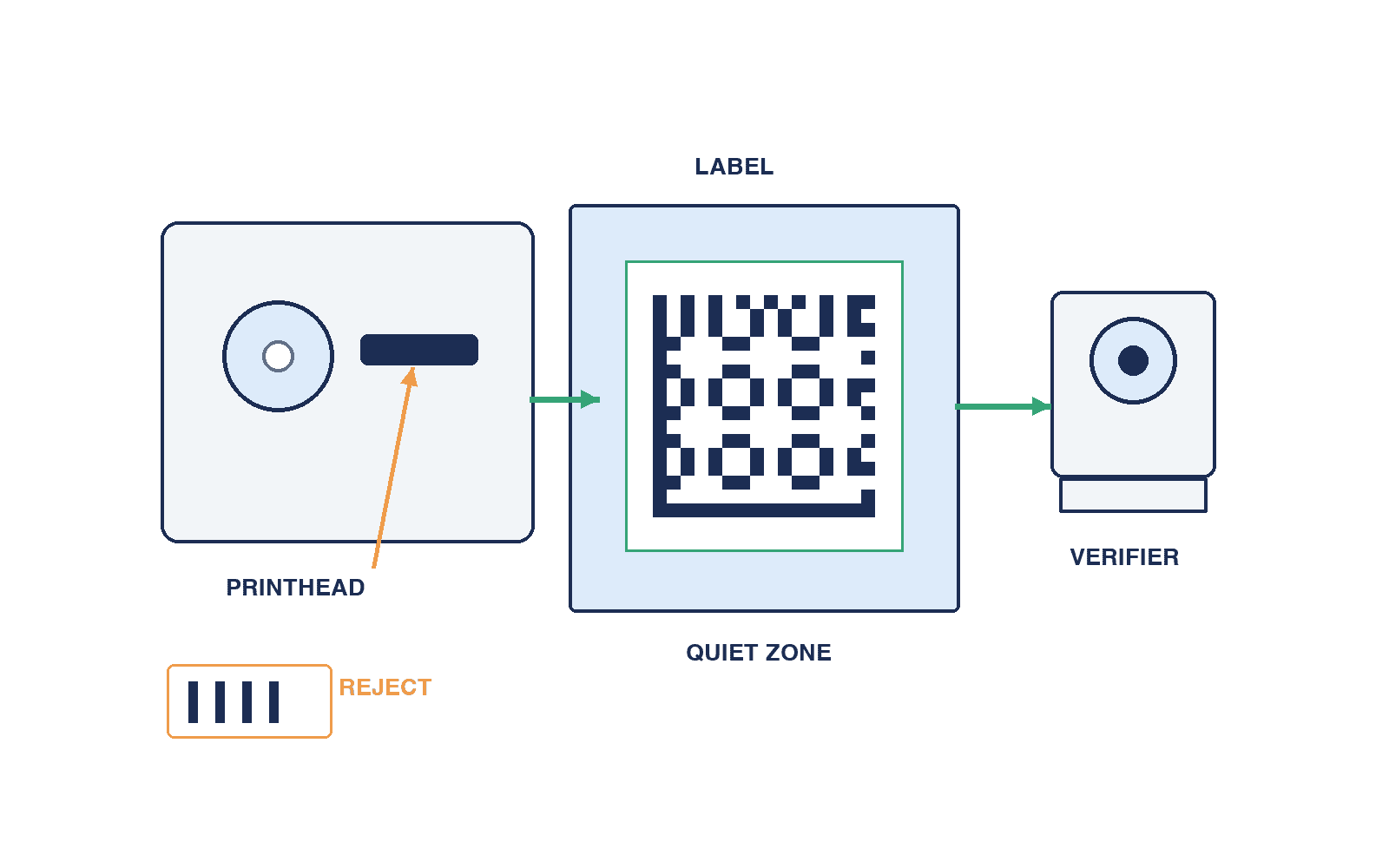
Avoid fractional module widths that a rasterizer rounds inconsistently. Test the actual barcode rendering route, orientation, magnification and font. An image-based code can acquire blurred edges when resized or antialiased. Preserve the required quiet zone. A border, logo, label edge, curved surface or longest possible variable data may consume that zone. Test the label after application and after the relevant process, not only flat on the print bench.
Verify quality separately from routine scanning
One successful scan proves only that one scanner read one sample under one condition. It does not measure print margin. Excess darkness can widen elements; damaged head dots cause white lines; ribbon slip distorts edges; static or dust can change the feed. Zebra’s print-quality guidance covers speed and darkness adjustment and test labels. Save the passing settings and repeat at production conditions rather than stopping after a single scan.
Where a barcode verifier is required, state the applicable standard, lighting, aperture, measurement position, grade and sampling frequency in the RFP according to customer and sector requirements. ISO/IEC 15415:2024 is a published 2D print-quality test standard; GS1 also explains the difference between verification and ordinary scanning. Do not invent a universal pass grade. 1D and 2D symbols have different assessment methods. Record the verifier configuration and calibration so a customer and supplier can reproduce a disputed result.
Sample immediately after startup, after continuous operation, near roll end, after media change, after power loss, and with the smallest symbol and longest payload. Let the number of labels and sample interval represent the plant’s peak run. Record where samples were taken, how they were stored and who judged them. Distinguish print quality from application and reader problems: glossy film, curved parts, skewed labels, vibration, glare and reader working distance also matter. Run a printer-only test and an integrated read-after-application test. Our fixed-mount code reader selection guide discusses reader placement, but the actual position must be proven during SAT.
Treat print-and-apply as one machine cycle
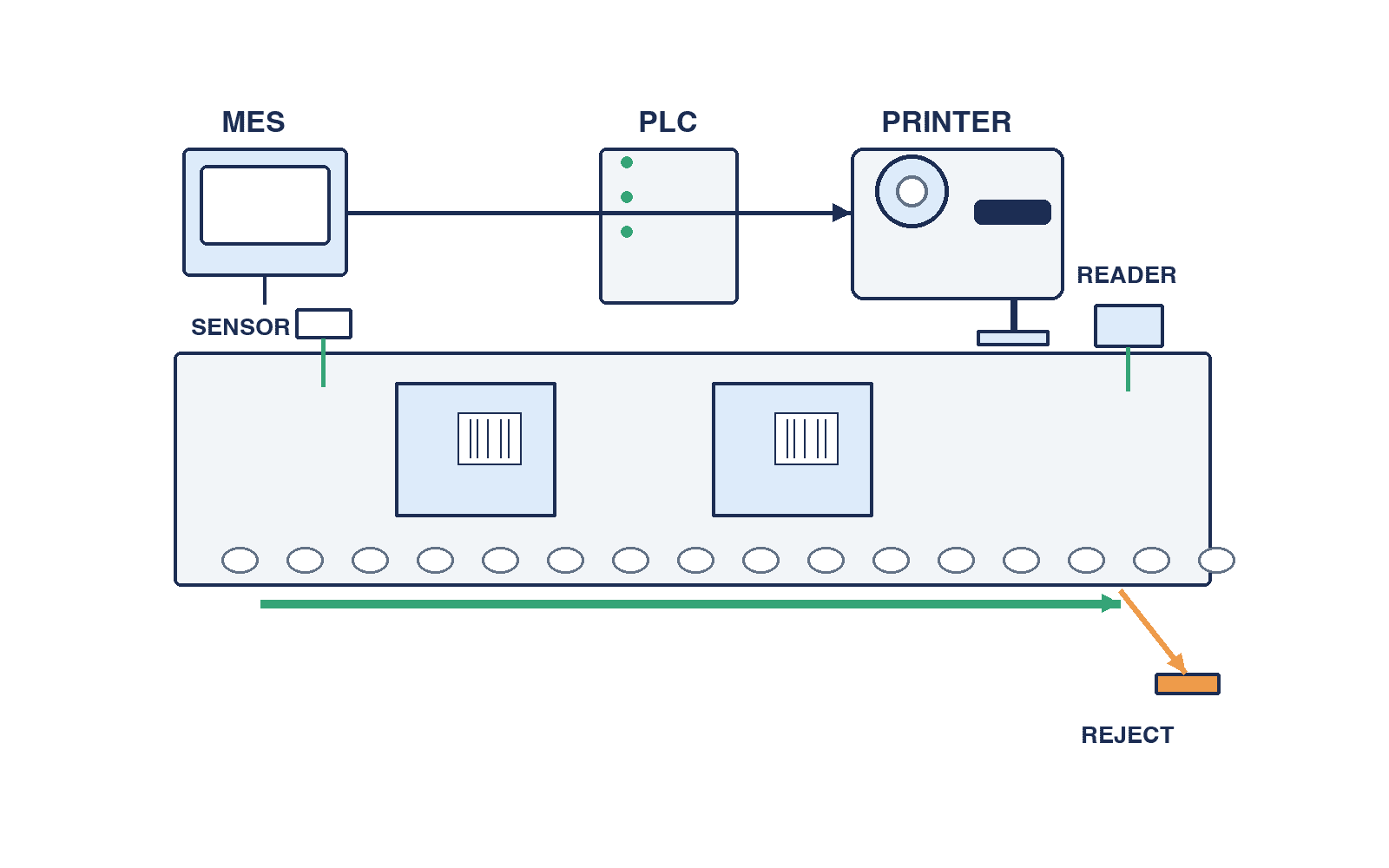
Manual application creates a risk of attaching a correct label to the wrong product. Automatic application adds peel control, a tamp or wipe action, workpiece detection, conveyor tracking, post-apply reading and reject routing. Even a fast print engine fails the cycle if applicator return time is too long. Put workpiece flow, datum, sensors, label orientation, positional tolerance and reject point on one drawing.
For changing heights, soft boxes, wavy film or lifting label corners, test force and dwell time on real workpieces. Base placement tolerance on the downstream reader’s field of view and customer identification needs. Define detection of a missing label, double feed and application without a label. Include liner take-up and waste handling in maintenance and safety design.
An automatic retry can shift the label intended for one workpiece onto the next. Track instruction ID, workpiece ID, actual encoded content, application result and read result as one transaction. If a label is reprinted, destroy the obsolete physical label, record the reason and identify the operator. Limit retries; otherwise duplicate labels can escape into production.
Define PLC, MES and printer handoffs
One workable division gives MES ownership of part number, lot, serial and approved artwork; PLC ownership of workpiece arrival and line interlocks; and the printer ownership of execution and device faults. Plants may use other architectures, so explicitly define who can edit the print data or template at the printer. A local screen that permits unapproved changes can defeat MES controls.
Candidate interface fields include job ID, workpiece ID, template revision, variable values, request time, printer ID, result code and retry count. Define where numbering occurs and which acknowledgment means “printed.” A protocol name alone does not resolve timeouts, retransmission, duplicate jobs, power recovery or output while the PLC is stopped. Save the final code confirmed by readback and its workpiece association, not just the string that was sent.
On a network failure, decide whether to reprint the queued job or scan the existing label first. If offline printing is allowed, define the permitted data, serial collision controls, authorization and reconciliation after reconnection. A provisional label must be distinguishable from a customer-approved label and blocked at shipping where necessary. Request a sequence diagram, state transition table, error-code list, sample messages and log-retention design. Name the supplier responsible for each failure boundary.
Write an RFP that suppliers can answer and a factory can test
Replace “industrial, high speed, high quality” with paired requirements and evidence. Ask vendors to mark each row as standard, optional, external modification, unsupported or to be tested, with price and lead time. A replacement model must show its differences.
| RFP area | Specify | Acceptance evidence |
|---|---|---|
| Duty | Workpiece, peak demand, shifts, downtime | Continuous run log |
| Media | Size, material, adhesive, winding | Approved stock and sample |
| Ribbon | Type, width, winding, substitute | Compatibility and durability result |
| Codes, text, minimum feature, margin | Worst-case actual output | |
| Quality | Standard, grade, method, sampling | Calibrated verifier record |
| Application | Variation, position, sensing, reject | Placement and post-apply read |
| Handoff | Job, ack, retries, recovery | Sequence and fault tests |
| Service | Cleaning, parts, training, SLA | Procedures and spare list |
Compare total cost using the printer, media, ribbon, head, platen, maintenance and plant-specific downtime. Calculate cost per accepted label, but do not assign an invented universal loss per stopped hour. Decide on spares or a standby machine from the required recovery time. A catalog demonstration should remain an unresolved RFP item until the real stock, data and cycle pass.
FAT, SAT and handover
At FAT, assemble printer, chosen media and ribbon, applicator, and simulated PLC/MES. First test data correctness, dimensions, speed, print quality and durability samples. Then force roll-out, ribbon end, head-open, jams, network loss, power loss and restart. Check that recovery does not drop or duplicate jobs and that printed content remains linked to the right workpiece. Receive a settings backup and software versions.
At SAT, repeat essential tests on the installed line with actual vibration, dust, temperature, lighting, workpiece variation and operator movement. Run normal and peak speed, include stops and restarts, shift changes and media swaps, and read labels at the next process and shipping gate. Use matching condition sheets at FAT and SAT so a failure can be traced to material, installation, lighting, transport or configuration.
Set the remedy for failure in advance: adjustment, media change or redesign, with a defined retest and cost owner. A printer that meets quality only after slowing below the required takt has not met the requirement. Requalify quality and durability after a material or setting change. Handover should include approved equipment and consumable part numbers, successful settings, artwork version, interface sequence, fault list, spares, cleaning and replacement instructions, training and FAT/SAT records.
Pilot production and records after acceptance
Even after FAT and SAT pass, the first production shifts can expose variation. Media replacement, a reversed ribbon, restart after a line stop and product changeovers occur more often than in a controlled test. Define what “stable” means, who samples labels and who may stop the line. Practical checks may include the first and last code of a shift, a verifier measurement after a changeover, and print plus readback after ribbon replacement. Set the actual frequency from customer requirements and plant risk.
Count first-attempt failures, read failures, placement defects, reprints, material changes, jams, head cleaning and communication timeouts, not only labels printed. Name the denominator of any yield figure: print requests and physical labels are different. If an automatic retry succeeds, retain the initial failure as well as the final result. Record where each defect first appeared: at the printhead, after application or downstream. Link the job, workpiece, verification and transport history with an ID and time so affected products can be traced.
Assign responsibilities after acceptance. Production may replenish and clean; quality may verify samples and authorize shipment; maintenance may replace heads and platens; OT may own network, time and logs; the systems team may control MES content and artwork revision. When an external technician changes a setting, define who approves it and repeats sample verification. Log pilot issues with conditions, containment, owner, target date and stop rule.
Common selection mistakes
“More dpi is always better” ignores the required smallest element and cycle time; print the actual code at the required speed. “One scanner read it” does not measure quality margin; combine verification and downstream readback. “Thermal transfer never fades” ignores the media–ribbon pair; test real exposure. Buying the printer before defining PLC/MES handoffs leaves acknowledgments and duplicate control unresolved. FAT cannot replace SAT on the actual moving line.
Summary: choose the configuration that passes
Define label life and read points, qualify media and ribbon together, size artwork and resolution from the data, then test printing, application, verification and PLC/MES recovery on real workpieces. Ask finalists to print the same label and payload at the same speed and verifier conditions. Compare the passing setup together with local spares, changeover time and total cost.
Control later changes. A longer serial can change DataMatrix size and quiet-zone clearance; a new converter can affect gap sensing and peeling; firmware can alter fonts or rendering. Link label revision, media and ribbon part numbers, settings, firmware and verifier conditions in a change record and retest affected performance. Repeat essential SAT checks on each line because head condition, vibration, workpiece surface, lighting and reader distance vary. Daily checks should cover print sample, scan result, head cleanliness, feed, ribbon wrinkles and liner take-up before operators increase darkness to mask a fault.
The correct choice is the system that prints the right data on the right workpiece at the required speed and stays readable for the required life. TOMAS TECH can help combine printer, media, readback and PLC/MES requirements into a test plan. Share your candidate comparison or defect examples through our contact page.
Primary sources and checks
Check current product specifications and applicable customer requirements before ordering. Proposed tests and handoffs are engineering guidance, not universal values for all equipment or sectors.


