


Replacing your label printers with faster models will not reduce mixed-up item tags. A label printing system project fails not because printing is slow or the software lacks features, but because nobody decided who assigns which number, and how the original number gets invalidated when a label is reprinted. This article uses a model calculation for an auto parts plant in Thailand to show, formula by formula, why the same investment pays back in 3.7 years or 9.0 years depending on nothing more than the scope you choose.
What a label printing system actually automates — number assignment, not printing
As long as you think of a label as a printed item, the investment will not pay back. When a factory outputs one label, what actually happens is not printing. It is a numbering event that brings one identifier into existence. The manufacturing lot number or serial number written on that label is bound one-to-one with a physical object the moment it is applied, and from then on inspection, inventory allocation, shipment records and defect traceability all run on the assumption that this one number is unique.
That is why everything downstream breaks silently the instant two labels carry the same number. The difficult part is the word “silently”. A duplicated identifier scans normally on the inspection terminal and raises no error in the inventory system. It surfaces at period-end stocktaking when the numbers do not reconcile, or when the customer calls to say two boxes arrived with the same lot number. The effort required to trace the cause backwards from there is dozens of times the effort of deciding the numbering rules up front.
In other words, the central function demanded of a label printing system is not faster printing but centralized number assignment. When the buyer and the vendor carry different understandings of this into a project, what gets delivered is a high-performance printer and a friendly layout editor, and the duplicate numbering stays exactly where it was.
Factory labels come in three streams (item tags, shipping labels, receiving labels)
Start by splitting the labels you issue today into three streams. If you write requirements that say “we want to automate labels” while these three are still mixed together, the quotation will cover scope you do not need.
| Stream | Who the label is for | Typical application point | Source of the number | Where mistakes are noticed |
|---|---|---|---|---|
| Item tag | Your own processes | WIP boxes, carts, pallets | Work order, process result | Next process or stocktaking |
| Shipping label | The customer | Shipping cartons, pallets | Shipping instruction, sales order number | Customer incoming inspection |
| Receiving label | Your receiving dock and warehouse | Materials arriving from suppliers | Purchase order, goods receipt | Shortages or wrong issues at allocation |
The three streams behave very differently. Item tags are closed inside your own plant, so you can define the format to suit yourself. Shipping labels follow the customer specification, so the decision rights are not yours. Receiving labels require a prior design decision — do you accept the supplier’s label as it arrives, or relabel it yourself? And of the three, the largest return sits with shipping labels. Mistakes on internal labels are absorbed internally. Mistakes on external labels generate freight cost and reputational cost the moment they happen.
Four symptoms that show Excel and Word label printing has run out of road
Most plants either push a part number master maintained in Excel through a Word mail merge, or apply a barcode font to Excel cells and print. Whether that practice has reached its limit is judged not by print speed but by the following four symptoms.
- The same number has been printed on two labels. The classic case is that the Excel file used for numbering was copied, and a different person on a different PC is advancing the sequence independently. Once file names start carrying dates or owner names, you are already there.
- Nobody can tell who printed what, when, and how many. Printing is an operation that leaves no history. If you cannot account for extra copies printed, you also cannot confirm whether labels that were supposed to be scrapped are still lying on the shop floor.
- Every customer specification change means editing all templates by hand. With ten customers, the layout files have already branched into more than ten variants. When one customer issues a revision, the work of identifying the affected files itself depends on one person’s memory.
- Item tags and shipping labels use part numbers of different lengths. You use an eight-digit internal part number in-house and a twelve-digit customer part number externally. When that conversion table lives on a separate Excel sheet, conversion misses are guaranteed.
If even one of these applies, the case for a system is open. Conversely, if none of the four applies, your current practice is fine even if printing is somewhat slow. The risk is not “because it is Excel”. The risk is because numbering is not centralized.
How this differs from a barcode management system
The term “barcode management system” is used in two different senses in practice. One is the reading side — the mechanism that scans with handheld terminals and registers results. The other is the issuing side, which is what this article covers. The two tend to be discussed inside a single project, but their design concerns are different.
The reading side cares about which identification method to choose (linear codes, 2D codes, direct part marking, RFID), which device to scan with, and where to verify. How to choose the identification method itself is covered separately in traceability barcode selection, and the selection and cost of scanning devices in handheld terminal deployment. What this article covers is how you issue the method you have already chosen.
The other frequent confusion is with electronic forms. Electronic forms systems deal with digitizing records such as inspection results and daily production reports. Labels deal with issuing identifiers. Records can be appended to and corrected afterwards. An identifier, once assigned, cannot be corrected. That difference is what separates the two designs.
In 2026, Thai factories are rebuilding their labels all at once
A label is not a static deliverable you create once. It is an asset that receives revisions on a regular cycle. When that understanding is missing from the capital request, the effort of maintaining templates lands in no department’s budget and ends up absorbed as shop floor overtime. In Thailand in 2026, these revisions are landing across industries at almost the same time.
Food — the MOPH Notification No. 450 transition period ended on 19 July 2026
Thailand’s Ministry of Public Health Notification No. 450 B.E. 2567 on food labeling was published in the Government Gazette on 18 July 2024 and came into force the following day, 19 July 2024. The notification included a transition provision under which products labeled before 19 July 2024 could be sold until 19 July 2026. That date has already passed as of writing, which means stock carrying the old label can no longer be sold.
What makes this class of notification important is that it directly renders your inventory of pre-printed labels worthless. The more a plant relies on bulk outsourced label printing, the larger the loss at each revision, and eliminating that inventory risk is one of the standing motives for moving to on-demand issuing.
Medical devices — in force 20 June 2026, UDI marking for SaMD
In the medical device field, a notification requiring UDI marking for Software as a Medical Device (SaMD) was published in the Government Gazette on 22 December 2025 and came into force on 20 June 2026. The transition period runs until June 2028.
What matters operationally is that UDI is not a story about sticking a barcode on something. It is a story about defining an identifier scheme and holding a mechanism that can assign numbers within it. The fact that regulation now reaches unique device identification even for software products shows that identifier management can no longer be treated as an accessory to the printing task.
Automotive — AIAG B-10, B-16 (GTL) and VDA 4902 differ by customer revision
Plants supplying automotive parts receive a label specification from each customer. The commonly referenced ones are AIAG B-10 from North America and the Global Transport Label (GTL), AIAG B-16. The GTL was developed jointly by Odette, AIAG, JAMA and JAPIA, and builds on standards including ISO 15394. European customers will specify the VDA 4902 transport label.
The problem is not that these standards exist. It is that each customer references a different revision. Two customers can both claim GTL compliance while one makes a particular data element mandatory and the other adds a different element of its own. For a real example, the publicly available standard logistic label requirement specification from an automotive supplier group shows dimensions, placement, font sizes and the mandatory or optional status of each data element specified in fine detail.
So ten customers mean ten specifications, each on its own revision cycle. Unless template maintenance is budgeted as an annual cost, every one of those revisions arrives as unplanned manual work.
Retail supply — GS1 Sunrise 2027 is a target year, not a supplier mandate
Proposals have been circulating that say all labels must be converted to QR codes by 2027. That is a misreading of GS1 Sunrise 2027.
GS1 US states explicitly that there is no requirement to implement the full capabilities of 2D barcodes by 2027. The year 2027 is a target year by which retail point of sale should be able to read 2D barcodes. It is not an implementation date imposed on suppliers. Therefore what a factory should hurry toward in the run-up to 2027 is not a wholesale swap of existing barcodes to QR.
What deserves urgency is building the issuing side so it can output data carrying Application Identifiers. In the logistics label world, GS1-128 is the symbology and SSCC is the 18-digit serial shipping container code, and data is structured in the form AI (00) SSCC, (01) GTIN, (10) batch or lot number, (11) production date, (17) expiration date. If the issuing side already holds this structured data, then whether the output symbol is linear or 2D becomes a matter of swapping the template. A plant that holds the data only as print strings, by contrast, has to rebuild its numbering logic every time the symbol changes.
The reason “QR by 2027” proposals turn into over-investment is that they reverse this order.
Breaking a label printing system into four components
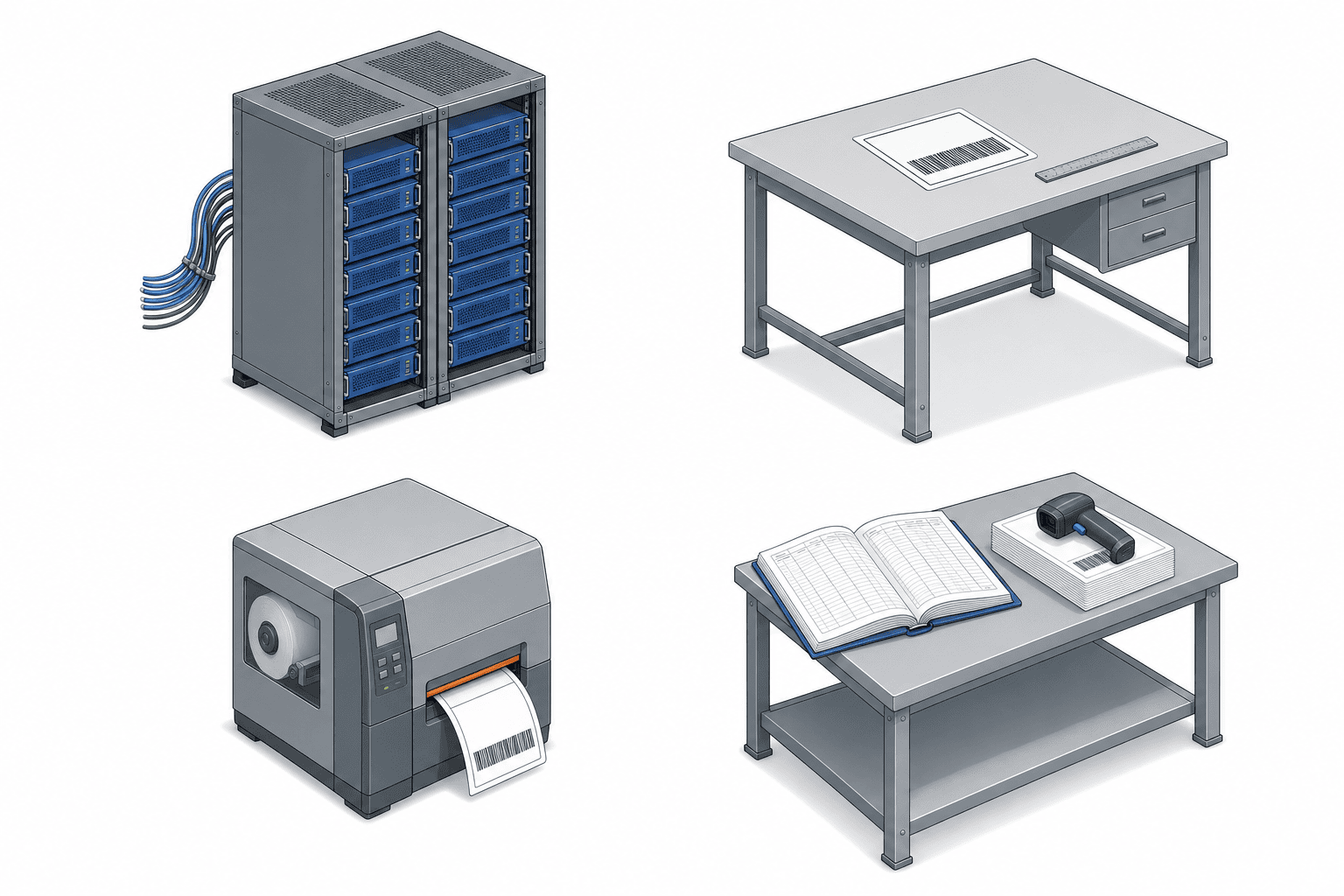
To get quotations into a state where they can be compared, break the label printing system into four components. Vendor proposals are written in product names, but reading them against the four components — which parts does this cover? — makes the reason for the price gap visible.
Component 1 Data source (production control, ERP, WMS)
This is where the printed content originates. Part number, description, quantity, lot number, production date, customer code, purchase order number and similar elements live in one of the production control system, the ERP or the WMS.
The first thing to confirm here is whether every element you want to print already exists in an existing system. In practice it is common for some customer-required elements — the customer’s own part number, delivery location code, route or trip number — to be absent from existing systems and maintained in a separate spreadsheet. In that case, a prerequisite task appears: deciding which master will own that element. Miss this task and you will still be running a “some fields are typed in by hand” practice after go-live, which halves the return on the investment.
Component 2 Layout definition (templates)
This is the definition of what gets printed at what position, in which font, at which size. It is normally built in dedicated label design software, placing variables in each template into which values passed from the data source are merged.
The number of templates ends up far higher than anyone expects, because it multiplies out as number of customers times label type (product label, pallet label, mixed-load label) times media size. The model calculation later in this article assumes 140 templates for the all-streams-at-once scenario and 35 for the shipping-label-first scenario. If this count is estimated optimistically, the migration effort estimate is wrong by the same factor.
Component 3 Print engine (printer languages and drivers)
This is the part that receives the template and the data and actually outputs to the printer. There are two approaches. One routes through a Windows printer driver. The other sends printer language commands such as ZPL or SBPL directly to the printer.
This difference affects more than print speed. It divides the system architecture itself, which the next chapter covers in detail.
Component 4 Issue log (when, who, what, how many)
This is the part that records, for every single label issued, the timestamp, the operator, the printed content, the quantity, and — if it was a reprint — the reason.
Whether this log exists determines whether you can answer questions like these. How many labels were issued for this lot number? Who reprinted this number, and when? Of the shipping labels issued on line 2 yesterday, how many were scrapped? Whether you are responding to an audit or investigating the root cause of a customer complaint, this is the first information anyone asks for.
The component that always gets missed is component 4
When a request for proposal is being written, components 1 through 3 get described naturally. Where does the data come from, how are layouts built, how many printers are connected. These are visible functions, so they can be written down as requirements.
The one that gets left out is component 4. Nobody looks at an issue log in normal times. The need to look at it arises only when something has gone wrong. So its priority drops in the requirements meeting, it gets written down as “a future phase”, and it falls out of the budget.
But a system without component 4 is also a system with no means of detecting duplicate numbering, because reconciling issue records is the only way to confirm whether a number has been duplicated. A label printing system with no log duplicates numbers faster than the Excel practice, and with exactly the same accuracy.
Three ways to integrate label printers — where quotes diverge by more than 2x
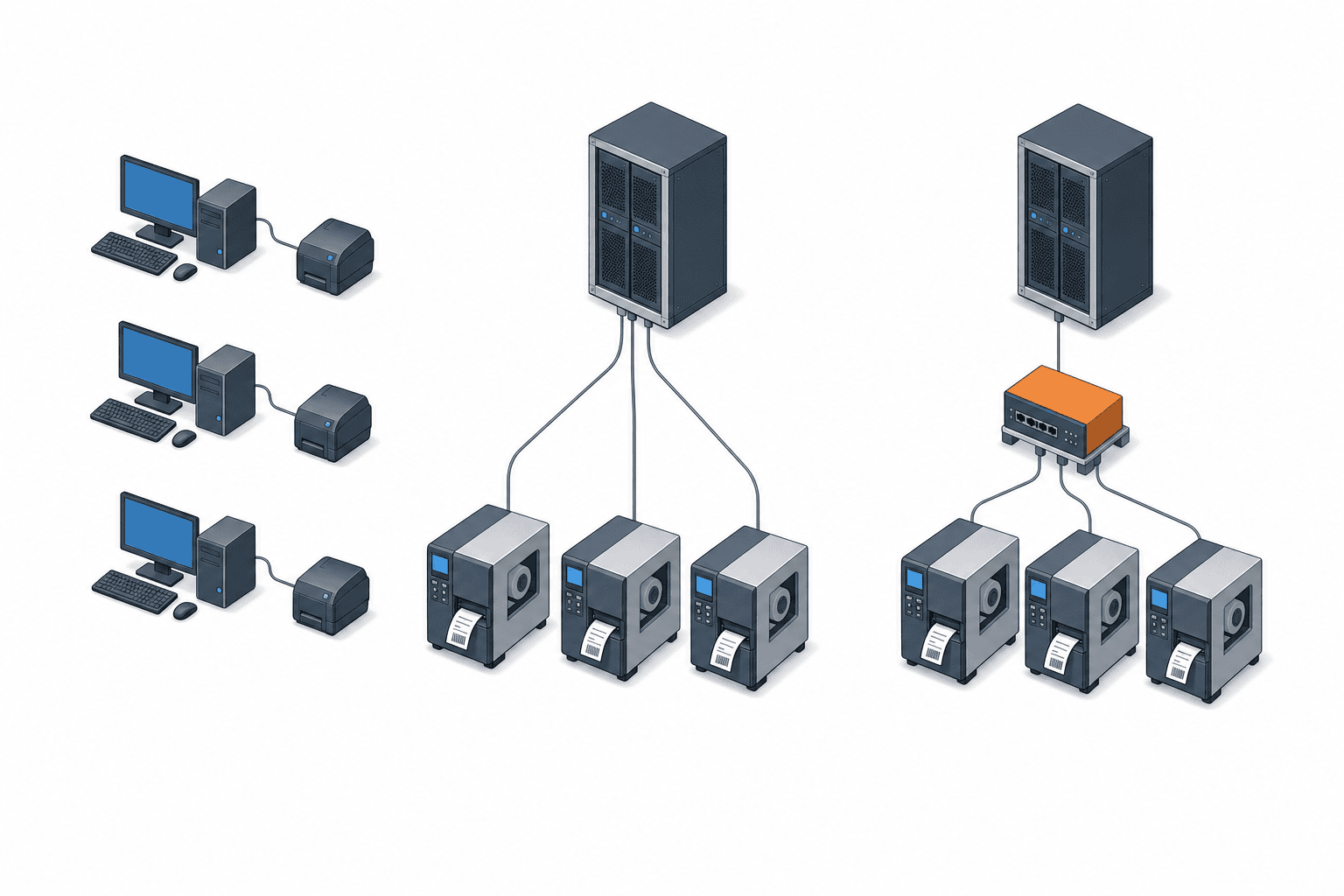
In practice there are only three ways to integrate label printers. Which one you choose changes both the initial cost and how much control you get, and it is the reason quotations for the same printer count and the same volume can differ by more than a factor of two.
Method A Client-side driver printing
Install label design software and a printer driver on each PC, keep the templates locally on that PC, and print. This is the cheapest and the fastest to start. For a small operation with one or two issuing points and ten or fewer templates, it is entirely adequate.
This method breaks down when issuing points multiply. Because templates live locally on each PC, reflecting a customer specification revision has to be done once per PC. Any PC that somebody forgets to update keeps printing the old revision. Worse, the fact that an old revision is being printed goes unnoticed until the customer points it out.
Sites that choose Method A land, almost without exception, on the “every PC has a different template” problem. The accurate way to describe it is not that it is cheap, but that it defers the cost of control into the future.
Method B Centralized server printing (direct printer language)
Consolidate templates and data on the server, have the server generate printer language commands (ZPL, SBPL and similar) and send them directly to printers over the network. Because no printer driver is involved, printing is fast, and because templates exist in exactly one place, revision drift cannot occur. The issue log is captured naturally on the server side.
The drawbacks are that up-front build work is required, and that if the server stops, issuing stops everywhere. The latter is addressed either by server redundancy or by a mechanism that keeps minimum issuing alive from templates held in printer memory while the network is down.
Method C Label issuing middleware
Deploy commercial middleware dedicated to label issuing and use template management, print instructions, approval workflow, reprint management and log capture as packaged functions. It amounts to buying a product instead of building Method B yourself.
Where specification differences between customers are large, where multiple sites need to share the same template assets, and where reprints need to require approval, this method satisfies the requirements fastest. License fees apply, but this is an area where the licenses often cost less than developing an approval workflow and reprint reason capture in-house.
Comparison of the three methods
| Criterion | Method A Client driver | Method B Centralized server | Method C Middleware |
|---|---|---|---|
| Initial cost | Low | Moderate | High |
| Where templates live | Local on each PC | One place on the server | One place on the server |
| Risk of revision drift | High | Low | Low |
| Issue log | Effectively unobtainable | Obtainable | Obtainable, including approval and reprint reason |
| Print speed | Slow via driver | Fast via direct printer language | Fast |
| Effort to apply a customer revision | Once per PC | Once | Once |
| Blast radius of a failure | That PC only | Everything, mitigated by redundancy | Everything, mitigated by redundancy |
| Suitable scale | 1 to 2 issuing points, ten or fewer templates | 3 or more issuing points, across streams | Large customer specification differences, multiple sites |
What every method needs regardless
Three things are required whichever method you choose. Many vendors leave them out of the quotation, so check for them explicitly when you receive a proposal.
- Cleaning up the part number master and customer codes. If the elements you need to print are not present in existing masters, that cleanup effort arises under every method.
- Initial template creation and verification. This means comparing each new template against the existing paper label one by one, checking dimensions, positions and barcode read rates.
- An annual allowance for template revisions. Customer revisions arrive every year. A plant that has not budgeted for them annually treats every revision as an emergency.
How to control numbering and reprinting — the four rules to decide first

This is the core of the article. Before selecting a product, decide the following four rules internally. If you place an order without them settled, the vendor will design to a generic specification, and the rework cost when that assumption does not match your operation lands on you, the buyer.
Rule 1 There must be exactly one source of sequential numbers
Whether it is a lot number, a serial number or an SSCC, restrict the authority to assign numbers to a single system. With two sources, you have to build a separate synchronization mechanism between them, and there will be periods where synchronization has stopped and nobody has noticed.
The common way this breaks in practice is the arrangement where “normally the system assigns the number, but when the system is down we use handwritten backup tags”. Those backup numbers then flow through the shop floor without ever being returned to the system. Having a fallback procedure is correct in itself, but unless you design the procedure for registering fallback numbers back into the system, that is exactly where duplicate numbering enters.
Rule 2 Reprinting is only ever built together with invalidation
Reprints will happen. Print comes out faint, the label tears, the label goes on the wrong box. You cannot drive these to zero. So the question to settle is not whether to allow reprinting but how the original label gets invalidated when a reprint occurs.
There are three ways to invalidate. One is to physically peel the label off and scrap it. One is to flag the original number as void in the system so the inspection terminal raises an error when it is scanned. The third is to attach a suffix at reprint time, treat it as a separate number, and mark the original as consumed. Any of these is acceptable, but not choosing is not one of the options.
A system with no invalidation mechanism creates a duplicate identifier the instant the reprint button is pressed. And because that duplicate is, from the system’s point of view, a legitimately issued number, it will not be caught by any check.
Rule 3 Recovery of scrapped labels belongs to the process, not to IT
Even with invalidation implemented in software, if the peeled label is still on the shop floor, somebody will apply it to a different box. This does not happen out of malice. It happens out of good intent, when someone replaces a peeling label with the one that was lying on the desk.
So make scrapped label recovery a process responsibility with same-day disposal. Concretely, place a collection box for scrapped labels beside each issuing station and reconcile the recovered count against the reprint count in the issue log. A day where that reconciliation does not balance is a signal that labels are still loose in the plant.
This part cannot be closed by software alone, and unless it is written into the process work standard, Rule 2 does not function.
Rule 4 Do not mix the granularity of item tags and shipping labels
Item tags are numbered per unit of work in progress. Shipping labels are numbered per shipping package. These two units do not coincide. WIP that was split into three boxes inside the process may be consolidated onto one pallet at shipping, and conversely one manufacturing lot may be split across several trucks.
Despite this, designs that reuse the item tag number directly as the shipping label number are common. From the production side the object looks the same, so the number should be the same. But do this and one number ends up designating both “one box of WIP” and “one shipping package”, and quantity reconciliation stops working.
The correct design is to keep item tag numbers and shipping label numbers in separate schemes and hold the relationship in a link table. With that link in place, when the customer inquires using the shipping label number, you can trace back to which WIP from which manufacturing lot it came. In a design with mixed granularity, that trace depends on someone’s memory.
Note that shipping label accuracy is inseparable from the verification step. Where to verify what is covered in shipping and receiving inspection systems. This article deals with the step before that — who assigns the numbers on the labels that feed the verification, and how.
Cost model — 100 part numbers and 2,000 labels a day in a Thai plant
From here the discussion uses concrete figures. Everything below is a model calculation, and a real quotation will vary with your plant’s conditions. The structure of the calculation, however, is common to all cases.
Model plant assumptions
- An auto parts plant in Thailand, single site, operating 250 days per year
- 100 part numbers
- Daily label volume of 300 item tags plus 800 shipping labels plus 900 receiving labels, for 2,000 labels per day
- 80 shipments per day
- Labor cost of 180 THB per hour
Label media cost (label stock and ribbon) is incurred to the same degree under the paper-based practice, so it is counted as zero incremental cost. Assuming that systemization reduces media cost makes the calculation optimistic.
Two scenarios are compared. Scenario A converts all three streams — item tags, shipping and receiving — at once. Scenario B converts only shipping labels first.
Five cost layers
| Layer | Content | Scenario A all streams | Scenario B shipping first |
|---|---|---|---|
| Layer 1 | Issuing software and licenses | 450,000 | 280,000 |
| Layer 2 | Industrial thermal printers at 85,000 each | 680,000 for 8 units | 255,000 for 3 units |
| Layer 3 | Data integration development | 620,000 | 240,000 |
| Layer 4 | Internal effort, template migration of 140 for A and 35 for B | 380,000 | 150,000 |
| Layer 5 | Training and parallel running | 160,000 | 60,000 |
| Initial total | 2,290,000 | 985,000 |
Figures are in THB. Layer 2 is calculated as 85,000 times 8 units equals 680,000 for A, and 85,000 times 3 units equals 255,000 for B. The difference in template count in Layer 4, 140 against 35, translates directly into the difference in migration effort.
Annual running cost is as follows.
| Content | Scenario A | Scenario B |
|---|---|---|
| Software maintenance at 18 percent of initial software cost | 81,000 | 50,400 |
| Printer service and printhead replacement at 12,000 each, one per unit per year | 96,000 | 36,000 |
| Template revisions | 60,000 | 24,000 |
| Annual running total | 237,000 | 110,400 |
Software maintenance is 450,000 times 18 percent equals 81,000 for A, and 280,000 times 18 percent equals 50,400 for B. Printer service is 12,000 times 8 units equals 96,000 for A, and 12,000 times 3 units equals 36,000 for B. The point of this calculation is that template revision cost is stated explicitly as an annual line item. As the previous chapter set out, customer specification revisions arrive every year.
Scenario A all streams at once
Initial 2,290,000 THB, annual running 237,000 THB. Because all three streams switch simultaneously, printers are distributed across the process area, the shipping dock and receiving for a total of 8 units, and 140 templates have to be migrated. The lead time to go-live is longer, and the load of parallel running falls on every department at the same time.
Scenario B shipping labels first
Initial 985,000 THB, annual running 110,400 THB. Because the scope is limited to shipping labels, 3 printers at the shipping dock and 35 templates for customer specifications are sufficient. Item tags and receiving labels continue under the current practice for the time being.
The difference in initial cost is 2,290,000 minus 985,000, or 1,305,000 THB. Whether that difference is matched by a difference in benefit is what we check next.
Annual benefit breakdown
Benefit 1, reduced effort in producing shipping labels. Label preparation per shipment goes from 4.5 minutes to 1.2 minutes, a difference of 3.3 minutes. 80 shipments per day times 3.3 minutes equals 264 minutes per day, or 4.4 hours per day. Over a year that is 4.4 times 250, or 1,100 hours per year. In money, 1,100 times 180 equals 198,000 THB per year.
Benefit 2, fewer shipment rejections caused by wrong labels. These fall from 24 per year to 6, a difference of 18. Putting the corrective cost per incident at 8,500 THB (reshipment freight, ad hoc inspection, preparation of the corrective action report), 18 times 8,500 equals 153,000 THB per year.
Benefit 3, reduced effort responding to customer label specification changes. The 12 revisions handled per year go from 16 hours each to 3 hours each. 12 times 13 equals 156 hours per year. In money, 156 times 180 equals 28,080 THB per year.
Those three are the shipping-side benefits, totaling 198,000 plus 153,000 plus 28,080, or 379,080 THB per year. That is the annual benefit of Scenario B.
Benefit 4, reduced handwriting on item tags, Scenario A only. 30 seconds per tag times 300 tags equals 150 minutes per day, or 2.5 hours per day. Over a year that is 2.5 times 250, or 625 hours per year. In money, 625 times 180 equals 112,500 THB per year.
The annual benefit of Scenario A is 379,080 plus 112,500, or 491,580 THB per year.
The ratio is what deserves attention. Scenario A spends 2.3 times the initial cost of Scenario B, but the benefit is only 491,580 divided by 379,080, roughly 1.3 times. That is because close to 80 percent of the benefit is concentrated in labels that leave the building. Moving item tags to electronic issuing removes the handwriting time, but it does not remove the time to apply the label or the time to check the physical object. The same applies to receiving labels, where the work of checking materials that arrive from suppliers remains regardless.
Payback and five-year totals
| Metric | Scenario A | Scenario B |
|---|---|---|
| Initial cost | 2,290,000 | 985,000 |
| Annual benefit | 491,580 | 379,080 |
| Annual running cost | 237,000 | 110,400 |
| Annual net benefit | 254,580 | 268,680 |
| Simple payback | 9.0 years | 3.7 years |
| Five-year TCO | 3,475,000 | 1,537,000 |
| Five-year cumulative net | −1,017,100 | +358,400 |
The calculation runs as follows. Scenario A’s annual net benefit is 491,580 minus 237,000, or 254,580 THB. Payback is 2,290,000 divided by 254,580, or 9.0 years. Scenario B’s annual net benefit is 379,080 minus 110,400, or 268,680 THB, and payback is 985,000 divided by 268,680, or 3.7 years.
Five-year TCO is 2,290,000 plus 237,000 times 5, or 3,475,000 for A, and 985,000 plus 110,400 times 5, or 1,537,000 for B. Five-year cumulative net is 491,580 times 5 minus 3,475,000, that is 2,457,900 minus 3,475,000, or −1,017,100 for A, and 379,080 times 5 minus 1,537,000, that is 1,895,400 minus 1,537,000, or +358,400 for B.
Converting all streams at once does not pay back within five years. The annual net benefit is 254,580 for A against 268,680 for B, so B is in fact the larger of the two, because A’s running cost is more than double. Same company, same shop floor, and changing nothing but the scope produces a result this different.
Sensitivity when the assumptions move
The most fragile figure in this calculation is the 8,500 THB corrective cost used in Benefit 2, which depends heavily on each plant’s actual record.
Restate the corrective cost at 4,200 THB instead of 8,500 and the difference becomes 4,300 THB. Benefit falls by 18 incidents times 4,300, or 77,400 THB, and Scenario B’s annual benefit becomes 379,080 minus 77,400, or 301,680 THB. Annual net benefit is 301,680 minus 110,400, or 191,280 THB, and payback is 985,000 divided by 191,280, or 5.1 years.
In short, a single assumption about corrective cost moves payback from 3.7 years to 5.1 years. Present that range in the capital request rather than a single figure. A capital request submitted as one number loses credibility the moment one of its assumptions is challenged. Presented as a range, the approver can confirm on the spot whether the investment case still holds in the worst case.
Note also that if your plant has no internal record of shipment rejections over the past year, Benefit 2 has no evidential basis. In that case set Benefit 2 to zero and decide on Benefits 1 and 3 alone. 198,000 plus 28,080 equals 226,080 THB, and subtracting the 110,400 THB running cost leaves 115,680 THB per year, which puts payback beyond 8.5 years. The conclusion is that a plant not recording its rejection history should start with that record first.
How to roll it out — one stream in 90 days
Given the conclusion of the previous chapter, the realistic approach is to convert one stream, shipping labels, in 90 days. A plan that moves all streams simultaneously is hard to sustain not only on cost but because the load of parallel running falls on every department at once.
Days 1 to 15, physical stocktake of labels. Collect the labels you currently issue as physical samples. Lay them out by customer and by type and count how many distinct kinds exist. This is the stage at which the template count estimate is fixed, and with it the Layer 4 cost. In almost every case the count is higher than assumed.
Days 16 to 30, mapping print elements to data sources. List every element printed on the collected labels and map each one to the table in an existing system where it lives. Where an element does not exist in any existing system, decide at this stage which master will own it. Skip this and manual entry will still be there after go-live.
Days 31 to 45, deciding the four rules. Centralization of the numbering source, the reprint and invalidation method, the scrapped label recovery practice, and the separation of item tag and shipping label granularity. Document these four points and secure agreement from production control, quality assurance, shipping and IT. A project that cannot secure these 15 days should not be started.
Days 46 to 70, template creation and read verification. Build the layouts, print actual labels, and confirm read rates using the scanning devices in use on the floor. Where the customer specification states dimensions, measure with calipers and verify. Barcode print quality varies with the combination of printer resolution, ribbon type and print speed, so it cannot be judged on paper.
Days 71 to 85, parallel running. Issue both old and new labels and reconcile their content daily. Most of the discrepancies found during this period are master data inconsistencies. Projects that skip parallel running stop shipments on cutover day.
Days 86 to 90, cutover and shutting down the old practice. Freeze the old template files and recover the inventory of old labels. If you start the new practice while leaving the old one available, both will be used. Shutdown is part of the cutover.
Issues specific to sites in Thailand and Vietnam
Carrying a specification decided at overseas headquarters straight into a Thai or Vietnamese site will run into trouble on the following four points every time.
Thai script and fonts — the first thing that breaks in print
Thai has vowel and tone marks that attach above and below consonants. Because these stack vertically, leaving line spacing and character size at settings intended for English cuts off the upper marks in print. To a Thai operator, a truncated character either reads as a different word or reads as meaningless.
The more troublesome issue is printer resident fonts. Some industrial thermal printers have no Thai in their resident fonts, or have Thai but do not compose the stacked marks correctly. In that case you switch to generating the label as an image and sending that, which slows printing. If you have a requirement to print Thai, run test prints on the actual machine before you select the model. The font support table in the catalog is not sufficient to judge. Vietnamese also carries tone marks above and below vowels, so the same verification is required.
Heat, humidity and label media selection
In Thai plants, particularly in unconditioned warehouses and outdoor yards, label adhesive softens in the heat and labels fall off. Conversely, on products entering cold storage, adhesion drops at low temperature. On pallets stored outdoors, rain and direct sunlight erase print on thermal stock.
The countermeasure is media selection. Direct thermal stock is inexpensive but its print fades with heat and light, so it is unsuited to outdoor or long-term storage. Thermal transfer with a ribbon raises durability, but chemical and abrasion resistance vary by ribbon type (wax, wax-resin, resin), so first establish what the label will be exposed to after application, then select. Note that this switch can be carried out independently of the system project. Media cost was counted as zero incremental in the model calculation precisely because this decision is a separate matter.
Local printer service and printhead replacement
The printhead on an industrial thermal printer is a consumable. The model calculation books one head per printer per year at 12,000 THB each. Confirm before purchase where you will have that replacement done.
A manufacturer with a service presence in Thailand holds head stock locally and can replace within a few days. A model with no local presence means ordering from overseas, and that printer is unavailable in the meantime. At a plant with only one printer at the shipping dock, that translates directly into stopped shipments. Always hold one spare unit, or arrange the fleet so that one unit going down can be covered by another. This buys more practical availability than purchasing exactly the required number of cheaper units.
Customer label specifications arrive in English only
Label specifications from automotive customers are almost always written in English. As with the standard logistic label specification cited earlier, they set out dimensions, placement, font sizes and the mandatory or optional status of each data element in fine detail.
The problem is that the person who reads the specification, the person who builds the template and the person who operates the issuing station are different people, and their first languages differ. On a path where an expatriate manager reads the English specification, issues instructions in their own language, and a Thai staff member builds the template, interpretation drifts.
As a countermeasure, we recommend reducing the specification’s requirements to a single comparison sheet held in English, Thai and the working language of your management team. Four columns are enough — element name, mandatory or optional, source of the data, and field length. With that sheet in hand, when the customer sends a revision you only need to check the differences. Under a practice of rereading the specification itself each time, every revision costs the same effort again.
Five common failures
Failure 1, starting from printer selection. This is the most common entry point. See a printer at a trade show, compare on speed and price, place the order. In this sequence, component 1 (data source) and component 4 (issue log) fall out of the requirements while the discussion moves ahead. Printers can be decided last and still be in time.
Failure 2, deferring the reprint function. Go live without it in the initial requirements and the shop floor will build a workaround, guaranteed. The classic one is keeping the old Excel template on a single PC and using it only when a reprint is needed. At that moment centralized numbering is broken, and numbers that appear in no system log are circulating on the floor.
Failure 3, underestimating the template count. Estimate “ten customers, so ten templates” and reality branches into product labels, pallet labels, mixed-load labels and sample shipment labels, giving three to five times that number. This happens in every project that skipped the physical stocktake of days 1 to 15.
Failure 4, leaving template revision cost out of the annual budget. Customer specification revisions arrive every year. Without an annual line, each revision requires either a new capital request or absorption through overtime. The model calculation books 24,000 THB per year for Scenario B. The amount is not large, but the absence of a budget line is the problem.
Failure 5, trying to convert all streams at once. As the model calculation shows, all streams at once gives 9.0-year payback and a five-year cumulative of −1,017,100 THB. Shipping labels first gives 3.7 years and +358,400 THB. Narrowing the scope is not a compromise. It is the correct investment decision.
Summary
A label printing system is not an investment in faster printing. It is an investment in consolidating identifier assignment into one place and in reliably invalidating the original number when a label is reprinted. The instant two labels carry the same number, inspection, inventory and traceability all break silently, and the breakage does not surface until an audit or a customer complaint.
So four things need to be decided before product selection. Put the numbering source in one place. Never build reprinting without invalidation. Make scrapped label recovery a process responsibility. And do not mix the granularity of item tags and shipping labels. Place an order without these four settled and you will receive a capable product with the duplicate numbering intact.
On scope, the model calculation gives a clear answer. All streams at once is 2,290,000 THB initial, 9.0-year payback, −1,017,100 THB over five years. Shipping labels first is 985,000 THB initial, 3.7-year payback, +358,400 THB over five years. Most of the benefit is concentrated in labels that leave the building, and digitizing item tags removes only the handwriting time. That said, the corrective cost assumption moves payback anywhere from 3.7 to 5.1 years, so always present the range in the capital request.
In Thailand in 2026, the food labeling transition period closed on 19 July, UDI marking for software as a medical device came into force on 20 June, and automotive customer label specifications continue to be revised on each company’s own cycle. A label is not a deliverable you produce once. It is an asset that receives revisions on a regular cycle. Reading GS1 Sunrise 2027 as a mandate to convert everything to QR by 2027 is a mistake. What a factory should prepare is an issuing side structured to output data carrying Application Identifiers.
Where to take the question when you are evaluating
Whether your current labeling practice justifies a system is judged not by label volume but by which of the four symptoms in this article apply to you. Whether you are still organizing your own situation, taking stock of how many templates you actually have, or weighing whether shipping-labels-first is the right scope, you are welcome to raise it with us through our contact page at any stage. It is entirely fine to come before you have shortlisted any product, or while you are still unsure where your data sits in existing systems. For plants in Thailand we support the whole path, from the physical stocktake through numbering rule design to printer integration.
Frequently asked questions
How much does a label printing system cost?
It varies greatly with scope. In this article’s model calculation (100 part numbers, 2,000 labels per day, a single site in Thailand), the scenario converting item tags, shipping and receiving all at once came to 2,290,000 THB initial and 237,000 THB annual running cost. The scenario converting shipping labels first came to 985,000 THB initial and 110,400 THB annual running cost. Break the cost into five layers when comparing — issuing software, printers, data integration development, internal template migration effort, and training with parallel running. The layer where vendor quotations differ most is data integration development.
Is there any point in automating item tag issuing alone?
As a reduction in effort, it is thin. In the model calculation, reducing handwriting on item tags is worth 112,500 THB per year, under 30 percent of the 379,080 THB total of the three shipping-side benefits. The handwriting time disappears, but the time to apply the label and check the physical object does not. That said, separate from return on investment, if you have a quality reason — handwritten item tags that cannot be read are causing misreads at the next process — use that as the basis for the decision instead. In that case we recommend recording the misread incidence first.
Which label printer integration method should we choose?
With one or two issuing points and ten or fewer templates, Method A (client-side driver printing) works. With three or more issuing points, or spanning multiple label streams, choose Method B (centralized server printing). Where specification differences between customers are large and you want an approval workflow on reprints, Method C (middleware) is the fastest route. The deciding criterion is not cost but how many places your templates will end up existing in. Method A is not cheap so much as deferring the cost of control into the future.
Do we need to move to QR codes before GS1 Sunrise 2027?
No. GS1 US states explicitly that there is no requirement to implement the full capabilities of 2D barcodes by 2027. The year 2027 is a target year by which retail point of sale should be able to read 2D barcodes, and it is not an implementation date imposed on suppliers. What a factory should prepare is not a wholesale barcode swap but an issuing side built to output structured data carrying Application Identifiers. Once the data is structured, whether the output symbol is linear or 2D is handled by swapping the template.
Does allowing reprints weaken control?
Prohibiting reprints does not stop faint printing or torn labels, so the shop floor will build a workaround regardless. The classic one is keeping the legacy Excel template on a single PC. At that point centralized numbering is already broken. So allow reprints, and decide how the original label gets invalidated. There are three ways to invalidate — physically peel and scrap, raise a void flag in the system so the inspection terminal errors, or attach a suffix and mark the original as consumed. On top of that, unless scrapped label recovery is written into the process work standard as a process responsibility, invalidation in software alone will not function.
Are a barcode management system and a label printing system the same thing?
No. A barcode management system mainly refers to the reading side, the mechanism that scans with a device and registers results. A label printing system is the issuing side, the mechanism that assigns identifiers and prints them. They are often discussed in the same project, but their design concerns differ. The reading side is about choosing the identification method and designing verification points. The issuing side is about centralizing number assignment and controlling reprints. Combining both into one request for proposal tends to drop the issuing-side requirements, and the issue log in particular.
How long does deployment take?
Limited to the single shipping label stream, 90 days is the guide. The breakdown is 15 days for the physical stocktake, 15 days for mapping print elements to data sources, 15 days for deciding the numbering rules, 25 days for template creation and read verification, 15 days for parallel running, and 5 days for cutover and shutting down the old practice. The two stages that must not be compressed are the numbering rule decision and parallel running. Skip the rule decision and the vendor designs to a generic specification. Skip parallel running and shipments stop on cutover day.
References
- Thailand Updates Food Labeling Requirements — Tilleke & Gibbins. MOPH Notification No. 450 B.E. 2567 was published in the Government Gazette on 18 July 2024 and came into force on 19 July 2024. Products labeled before 19 July 2024 could be sold until 19 July 2026
- Thailand Introduces UDI Labeling Requirements for Software as a Medical Device — Tilleke & Gibbins. Published in the Government Gazette on 22 December 2025, in force 20 June 2026, with a transition period until June 2028
- Sunrise 2027 — GS1 US. States explicitly that 2027 is a target year and not a date by which full 2D capability must be implemented
- Barcode Guide – Automotive — Seagull Scientific. AIAG B-10 and the AIAG B-16 Global Transport Label, jointly developed by Odette, AIAG, JAMA and JAPIA and building on ISO 15394 among others. VDA 4902 is the European transport label standard
- Labeling for New Suppliers – GS1-128, SSCC, and Where Labels Have to Go — SPS Commerce. GS1-128 is the symbology and SSCC is the 18-digit serial shipping container code. Application Identifiers (00), (01), (10), (11) and (17)
- Standard Logistic Label Requirement Specification — OPmobility and HBPO. A real example of a label specification issued to automotive suppliers


