


Industrial fiber media converter selection requires more than assuming that “fiber reaches farther” or that matching connector shapes will create a link. The existing fiber type, wavelengths and connectors at both ends, transmit and receive power, Ethernet speeds, power supply, fault indication, and installation environment must be evaluated as one link. This guide helps OT and equipment teams at Thai plants specify a connection among PLCs, industrial switches, remote I/O, and cameras, from product selection through RFQ, FAT, and SAT.
What an industrial fiber media converter does—and does not do
This article covers industrial devices that convert between copper Ethernet and fiber Ethernet. A typical device has a 10/100BASE-TX or 1000BASE-T RJ45 port and a 100BASE-FX or Gigabit optical port. It extends a connection where copper cabling is impractical because of route length or electrical interference. Moxa’s IMC-101 family and Phoenix Contact’s MC 1000T-MM ST show concrete port and industrial-environment specifications.
A media converter is not normally a router or firewall. Changing the medium does not segment OT from IT or add access control. The broader zone and traffic design belongs to the industrial network design guide. Nor should an ordinary converter be assumed to supply a camera or access point over PoE. If the copper-side device needs PoE, specify an output-capable model, its standard, power budget, and supply. Moxa’s PoE model illustrates that PoE is an explicit product feature.
Draw both endpoint devices, ports, cables, supplies, and owners before selecting a model. For example, a control-panel switch connects over copper to converter A, two fiber cores run to converter B, and B connects over copper to a remote-I/O switch. In a duplex link, A’s transmit fiber must reach B’s receive port and vice versa. A single-fiber WDM design instead needs a matched A/B pair of opposite transmit and receive wavelengths. Mixing duplex and single-fiber products by name may produce a physically connected but nonfunctional link.
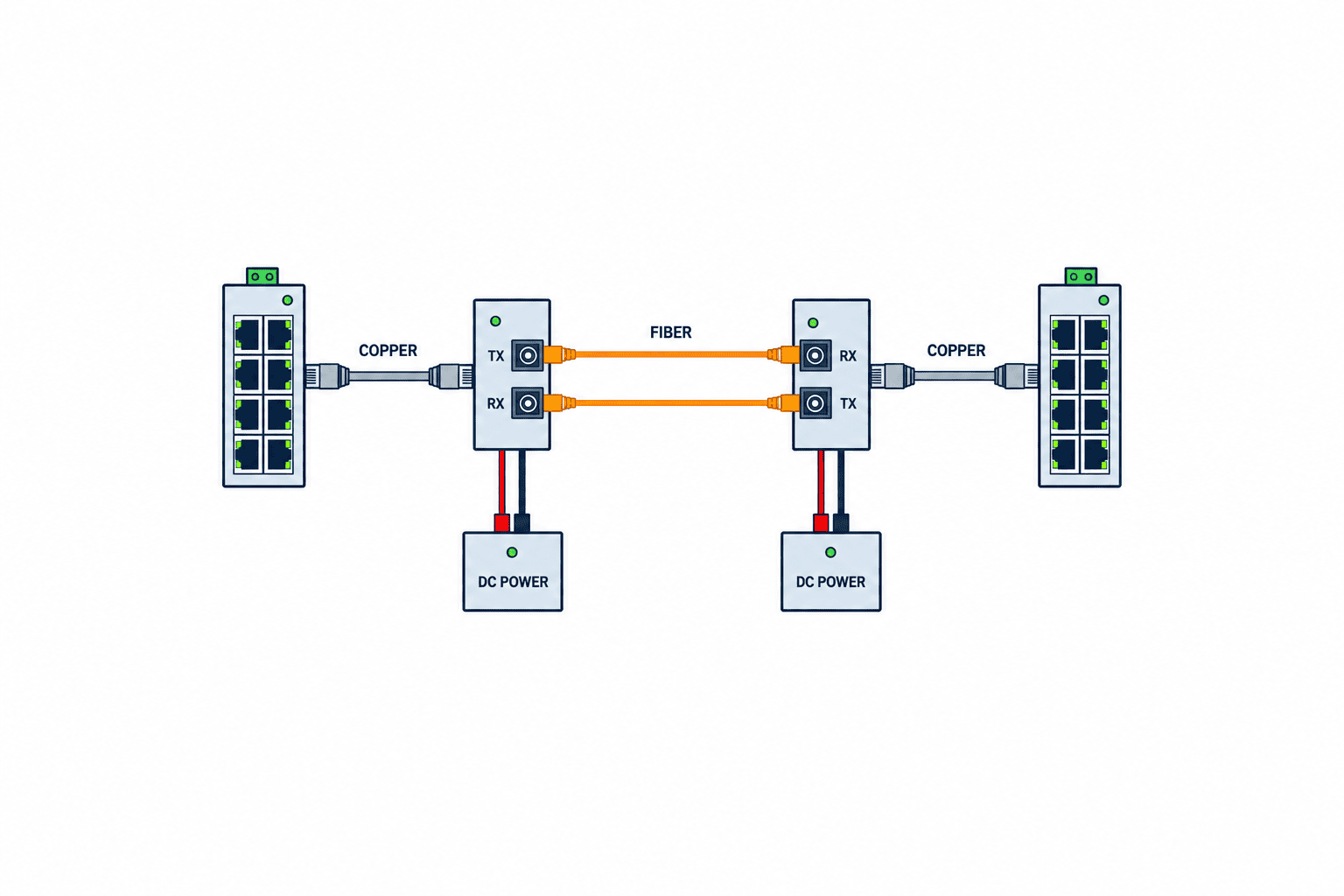
Survey the installed fiber and endpoints before procurement
Record start and end locations, cabinet IDs, route, core numbers, spare cores, termination panels, patch leads, connectors, installation history, and test reports. Do not identify single-mode or multimode solely by jacket color; reconcile cable markings, drawings, and measurements. Even if a cable exists, its route length alone cannot prove performance when splices, patch panels, outdoor segments, slack loops, and bend conditions are unknown.
Check both Ethernet endpoints at the same time. Whether a 10/100-only PLC can use a converter with a Gigabit-only optical port depends on the exact device’s conversion function. Match RJ45 speed, auto-negotiation, duplex mode, optical speed, SFP compatibility, and the industrial protocol. Advantech’s EKI-2741F is an example with Gigabit RJ45 and SFP. Its specification does not imply that a 100BASE-FX-only converter upgrades traffic to Gigabit.
For an operating plant, establish the shutdown window and cutover plan. If the link carries PLC-to-remote-I/O traffic, confirm with the machine builder what happens when communication is lost, how devices reconnect, and which alarms remain. Restoring the optical link alone does not prove that the process can safely resume. Machine interlocks and safety functions remain separate requirements.
| Site input | How to obtain it | Risk if unknown |
|---|---|---|
| Fiber type and core count | Cable marking, installation record, test | Transceiver and path do not match |
| Connectors at both ends | Photos of panels and ports | SC/ST/LC mismatch |
| Copper speed and power | Endpoint data sheet, settings | Speed or PoE mismatch |
| Optical connection points and length | Route record, site walk | Underestimated loss budget |
| Environment and supply | Panel measurements, power drawing | Temperature or voltage mismatch |
Match single-mode or multimode to the optical path
For existing fiber, choose an optical interface compatible with that fiber. OM and OS labels are useful, but verify the actual core specification against both cable and module data sheets. Moxa’s IMC-101 specifications list separate multimode and single-mode models with different wavelength, power, and link budgets. “Long distance means single-mode” is too crude: distance, existing assets, future speed, installation, and maintenance matter together.
For new fiber, design cable, modules, connectors, splices, and testing as a package. “Provide spare cores” is not operational unless the core numbers, terminations, compatible speed/wavelength, test records, and owner are documented. That prevents the cabling contractor and OT vendor from each assuming the other has finished the optical path.
Matching fiber types alone is not enough. With duplex fiber, route A TX to B RX and B TX to A RX, and test each direction. A single-fiber WDM link needs complementary A and B models with paired wavelengths. For SFPs, check the host converter’s approved module range, speed, monitoring data, and temperature class. An LC receptacle does not imply universal module compatibility.
Lock down connectors, wavelengths, and speeds at both ends
SC, ST, and LC describe connector formats. 100BASE-FX, 1000BASE-SX, and 1000BASE-LX identify different optical operating conditions. Mating plugs alone does not guarantee a link when speed, wavelength, fiber type, or power differs. The Phoenix Contact MC 1000T-MM ST explicitly converts RJ45 to multimode ST fiber. Write the exact models and interfaces at both ends, not merely “one optical port.”
A patch lead can adapt connector shape without changing the optical technology. An SC-to-LC lead does not make a single-mode transmitter suitable for a multimode cable. Include connector polish, end-face cleaning, jacket type, and cabinet fastening in the installation specification. Patch panels add mated connections and therefore affect loss.
Check copper and optical speeds separately. A link containing 100 Mbps-only devices will not carry a future Gigabit camera stream at Gigabit rate. Some converters change speed while others only change medium; check the actual product. Size for endpoint additions, protocol requirements, monitoring traffic, and restoration behavior, using realistic traffic direction and peaks rather than just summing nominal port speeds.
Decide by optical loss budget, not a headline reach figure
A catalog reach such as “several kilometres” applies to specified fiber and optical conditions. Put minimum transmit power, receiver sensitivity, cable loss, splice loss, connector and patch loss, and design margin in a common dB calculation. The principle is: available link budget must exceed total path loss plus the project’s margin. Use the manufacturer’s data and project test criteria for the values. Moxa’s IMC-P101 data relates link budget, dispersion penalty, and total loss.
Choosing an excessively powerful “long-range” optic is not automatically safer. Receiver input can also be too high. Moxa notes that a single-mode transceiver may require an attenuator to prevent damage from excessive optical power. Verify maximum receiver input as well as minimum sensitivity, especially on short links using long-range optics, and ask the maker about any attenuator.
Calculation supports product selection before construction; measurement supports acceptance afterward. A green link LED does not show adequate loss margin or clean end faces. Fluke Networks’ OLTS documentation discusses reference setting, connector-based limits, length, and polarity records. Keep instrument identity, wavelength, reference method, test leads, and results for both directions. If an OTDR is used, separate fault-location work from total insertion-loss acceptance.
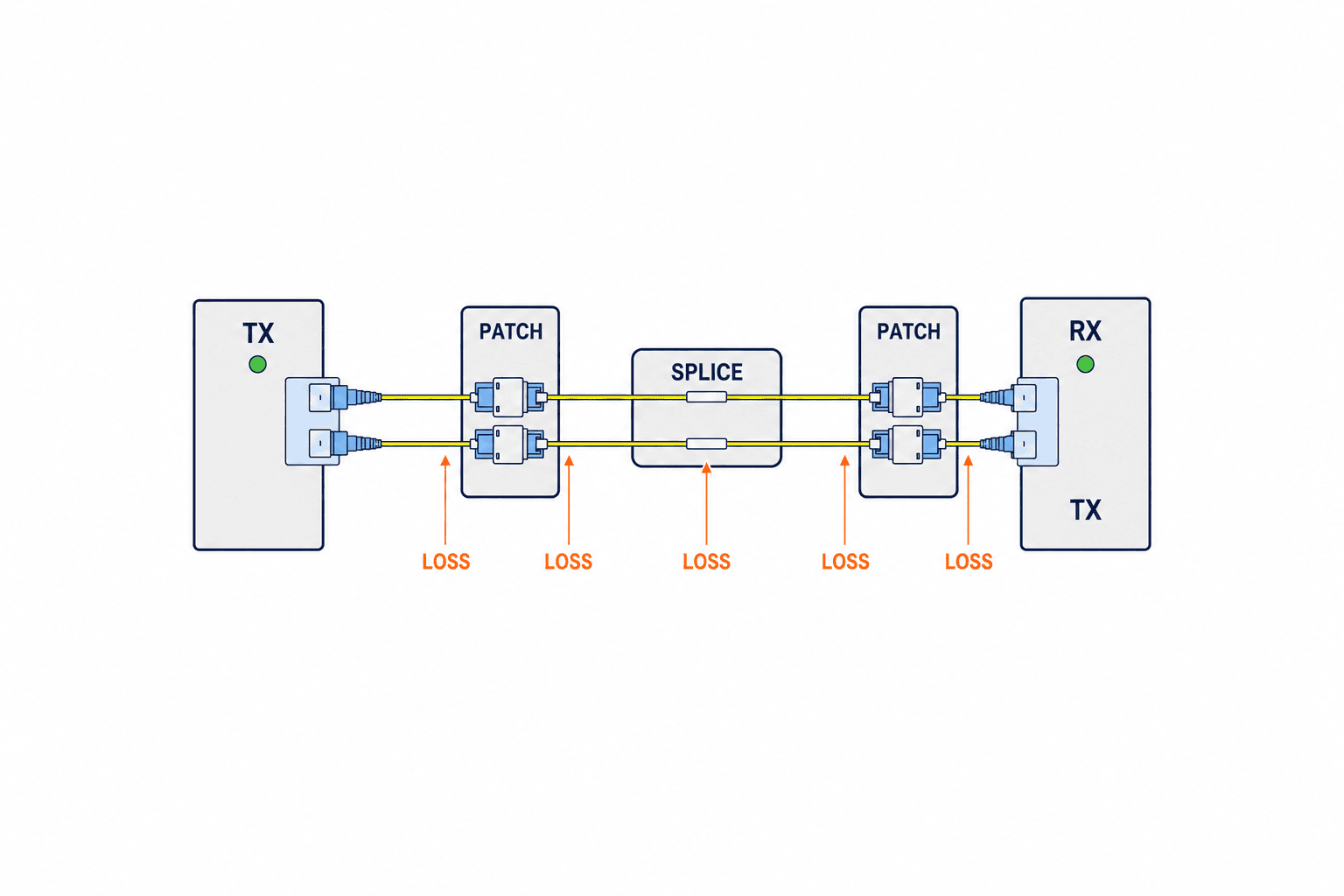
Check PoE and supply redundancy as separate requirements
Fiber does not carry electrical power, so the remote converter needs a local supply. A copper-side camera needing PoE requires a converter explicitly capable of PoE output. Do not confuse a device powered *by* PoE with one that *provides* PoE. Put endpoint power, start-up peak, PoE standard, supply capacity, temperature, and UPS hold-up in one power drawing.
Moxa’s IMC-P21GA-G2 identifies PoE+ support. Advantech’s EKI-2741F specifies dual DC inputs, but that page does not establish PoE output. These are different features. Two inputs fed from the same power unit do not protect against failure of that unit. Draw supplies, fuses, UPS paths, and alarm contacts.
Set a failure-notification requirement as well. A remote power loss may appear as optical link down nearby, but its exact indication depends on the devices. Decide who must know, the notification route, and night-shift recovery. If converter power comes from panel auxiliary supply, check whether a machine stop or emergency-stop action unintentionally removes network power too.
Choose LFPT, alarm contacts, and monitoring from fault scenarios
Link Fault Pass Through (LFPT) propagates a link failure from one side to the other. Phoenix Contact’s MC 1000T-MM ST lists LFPT, redundant power, and alarm output. Test how the feature is enabled, which port goes down for each fault, and what the upstream switch detects. Working traffic without LFPT is not the same as timely failure detection.
Consider three separate actions: unplug the fiber, remove remote power, and unplug copper. Record the affected LED, alarm contact, switch port, and SCADA alarm for each. If an alarm contact enters a PLC input, specify terminals, power, normal/fault state, and broken-wire behavior. If monitoring is through the network, distinguish a managed converter from inference based on the switch port.
Test behavior after reconnection. A PLC and remote I/O may reconnect while the process still requires operator review before restart. Identify data gaps, clock synchronization, alarm history, and any buffered resend as application requirements. A media converter maintains a physical transport path; it does not guarantee application-level data integrity.
Do not confuse fiber conversion with a redundant ring
One pair of converters joined by fiber still provides only one path. A cable cut stops communication. A redundant ring needs multiple physical paths, managed industrial switches, an appropriate redundancy protocol, and a tested acceptable outage. Moxa’s industrial networking guide warns against looping an unmanaged network and discusses Layer 2 mechanisms such as RSTP and industrial ring protocols.
Dual supplies and dual communication routes are also different kinds of redundancy. Two supplies do not prevent a fiber cut; two fibers in the same duct may fail in one construction incident. In the RFQ, identify the fault to survive, acceptable traffic interruption, control functions that must persist, and restoration process. Draw exactly which supplies, converters, routes, switches, and monitors are duplicated rather than writing only “redundant.”
Verify Thai factory temperature, EMC, and cabinet installation
The word “industrial” does not guarantee every factory condition. Assess internal and ambient temperatures, humidity, condensation, dust, vibration, voltage variation, surge, grounding, and interference from welders and drives at the actual mounting point. Phoenix Contact’s product data lists model-specific temperature, housing, and supply conditions. Belden’s converter range shows that extended-temperature and mounting options vary by product. Confirm the full model suffix.
Fiber removes a metallic data path between endpoints, but the converter still has DC power and a copper RJ45 side. Optical conversion does not replace grounding or surge design. Follow the equipment requirements for supply, shielding, panel earth, and protection. Check LED visibility, DIN-rail fixation, connector access, bend radius, patch-lead restraint, and terminal labels. Base the closed-panel maximum temperature on measurements or thermal design, not a country-wide assumption.
Plants in Thailand can have quite different conditions. An air-conditioned indoor panel and a cabinet near an outdoor route may need different models. For common spares, decide whether one part meets the harshest site or whether installation classes require different parts. Include local stock, lead time, and SFP-substitution approval in the maintenance design.
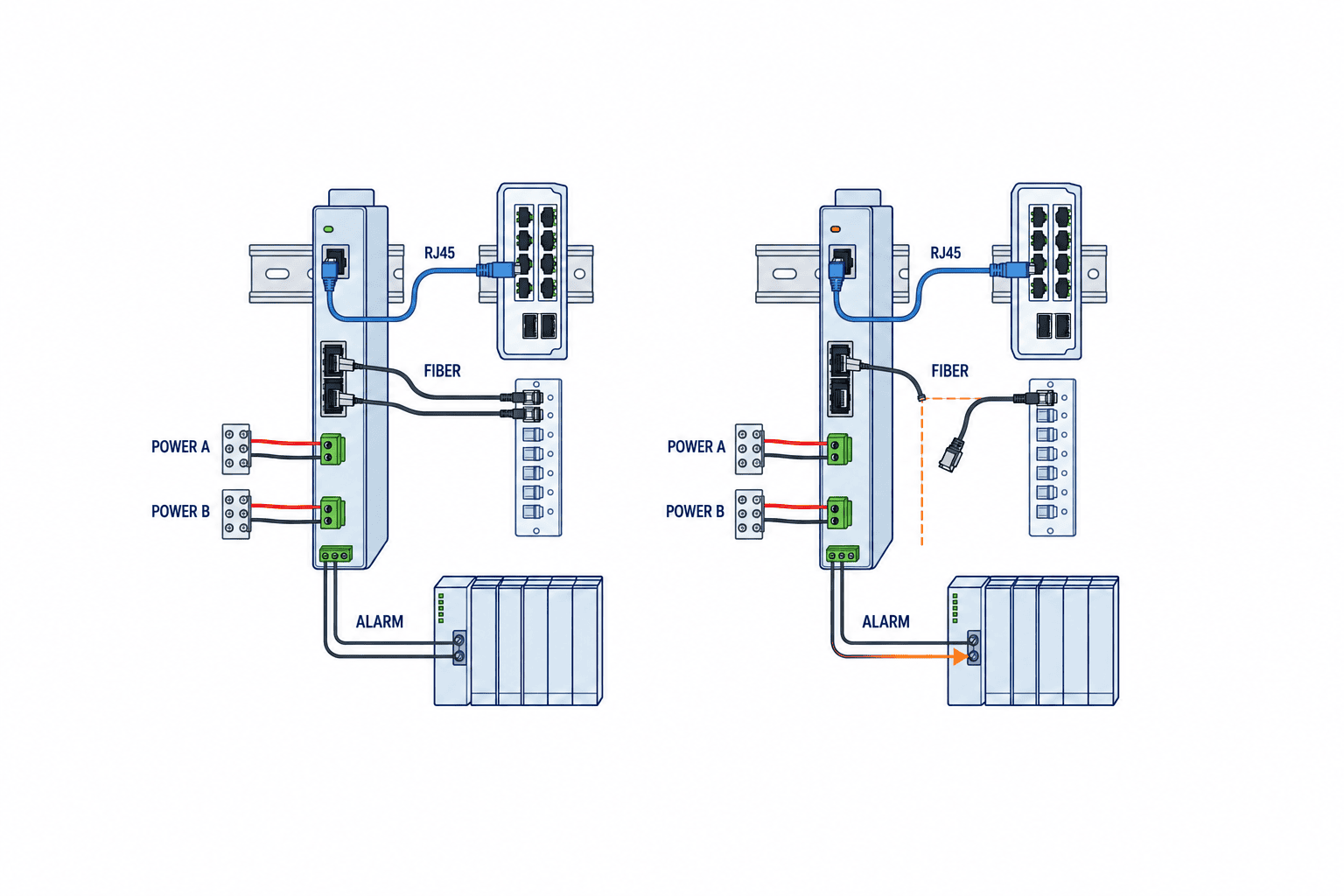
Compare a complete link in the RFQ, not just converter prices
“Two fiber converters” lets bidders assume different fiber, connectors, speed, power, monitoring, and work scope. Supply the installed conditions and required service; require the bidder to identify both endpoint models, optical calculation, construction, and test method. An unknown value should have an owner, method, and due date, not a blank cell.
| Area | Buyer supplies | Supplier submits |
|---|---|---|
| Endpoints and traffic | Devices, port speeds, protocol, PoE need | Copper/optical fit at both ends |
| Optical path | Fiber, cores, route, termination, existing tests | Models, wavelengths, connectors, loss budget |
| Power and environment | DC, UPS, panel temperature, location | Consumption, temperature, EMC, mounting assumptions |
| Fault and monitoring | Permitted outage, recipient, recovery | LFPT, contacts, monitoring design and tests |
| Work and acceptance | Shutdown window, drawings, criteria | Cutover plan, FAT/SAT, test records, as-built |
Compare converter, SFP, optical patch leads, termination, supply, cabinet work, optical tests, commissioning, spares, and support on separate lines. A low hardware price may hide an excluded loss test or alarm test. Confirm Thailand stock, replacement tools or settings, and spare-part ownership.
Worked example: an existing duplex link between factory buildings
Assume a control-panel switch in building A must connect to a remote-I/O switch in building B over existing two-core fiber. This describes the decision sequence, not a product recommendation. Check RJ45 speeds, required traffic, and PoE. Identify single-mode or multimode from cable marking and drawings; record core IDs and SC/ST/LC connectors at both panels. Obtain route length, connection points, and measured loss.
Then shortlist paired converters or SFPs with matching optical technology, wavelengths, transmit and receive powers, connectors, and temperature rating. Draw A TX to B RX and B TX to A RX. Calculate loss in each direction and check both receiver sensitivity and maximum input. Verify separate building DC/UPS supplies and decide which alarms must reveal fiber, power, or copper loss.
If fiber type or loss is unknown, measure before fixing a model. A cable ending near the cabinets does not prove that two cores reach the same destination. State “model to be finalized after site survey” in the quotation and separate conditional price from any extra installation work. This makes responsibility for measurement and change clear if the existing cable is unsuitable.
Distinguish FAT from SAT and test through recovery
OLTS testing of the optical path is separate from checking RJ45 cabling. See our industrial Ethernet cable tester selection guide for the copper-side test scope.
At FAT, compare endpoint models, SFPs, supplies, RJ45 and optical interfaces, DIP settings, alarm contacts, and LFPT configuration with drawings, bill of materials, and RFQ. Use test fiber to verify traffic and indications for fiber, copper, and power disconnection. Plan extended energization and power recovery if required. A short factory-test patch lead cannot prove that the final site cable and its splices will pass SAT.
At SAT, inspect and clean end faces; test polarity, length, insertion loss, necessary wavelengths and directions, received optical power, and stable communications. Record instrument reference and test-cord conditions, then compare measured values with the designed loss budget. Fluke Networks explains why a wrong reference corrupts loss measurements. Put measured and allowed values in the same acceptance table instead of recording only a green LED. Update the record if a patch lead is changed.
Use the real PLC, remote I/O, or other endpoint to test normal operation, fiber cut, converter power loss, copper loss, power return, and reconnection. Deliberate interruptions to a control system require the machine maker’s and safety team’s plan and authorization. Confirm alarm time stamps, operator messages, data gaps, and restart conditions. Test failover and reversion separately if there is a redundant ring.
Include troubleshooting and change control in the handover
If fault diagnosis requires passive observation of traffic, plan the tap location and shutdown window before modifying the live path; see our industrial network TAP selection guide.
When a link becomes unstable, compare timestamps for LEDs, received optical power, switch error counters, supply voltage, and cabinet temperature. Dirty end faces, bent patch leads, loose termination, wrong SFP, weak DC supply, and copper speed-negotiation faults are different diagnoses. One successful link-up does not prove that the optical path is healthy. Record existing models, settings, optical powers, and alarms before replacing parts, and repeat the same tests afterward.
Changing converter families, adding a camera or PLC, or replacing only an SFP can change speed, bandwidth, PoE, optical budget, and monitoring. Recheck wavelength, fiber, power, temperature, and host compatibility for an SFP change. The change approval should list old/new models, affected link, route drawing, power drawing, loss calculation, tests, and residual constraints. Update labels and the route register together to prevent maintenance from unplugging the wrong core using an old drawing.
Hand over endpoint photos, terminal and core IDs, port settings, baseline insertion loss and received power, approved spares, cleaning/replacement steps, and contacts. Decide whether local maintenance can make the first response or always needs the machine vendor. At a multilingual Thai plant, keep cabinet and core IDs consistent while localizing explanatory alarm text. That makes the optical infrastructure supportable.
Verify communication timing and industrial-protocol fit
Converters differ in forwarding method and delay. General monitoring data and tightly cycled control traffic must not share one unexamined acceptance criterion. List the application, update cycle, tolerated interruption, and failure state for PLC, remote I/O, servo, camera, and SCADA traffic. For an industrial Ethernet protocol, confirm required transparency, multicast, time synchronization, priority, and diagnostics with the machine maker. “Industrial” on a product label does not certify every protocol feature.
If a device offers cut-through and store-and-forward modes, specify which mode will be tested. In a path with two switches and two converters, observe not only nominal component delay but also renegotiation and upstream failover. When cyclic traffic is unstable, inspect copper speed and duplex, switch congestion, endpoint load, and clock synchronization along with the fiber span. This is why a bench test on a short lead cannot replace SAT with real traffic.
Define timing limits from the system requirement and manufacturer evidence; do not assume a universal delay value. The RFQ should name traffic tested concurrently, measurement points, permitted outage, and what constitutes a healthy reconnection. Assign testing responsibility across the machine maker and network contractor.
Put fiber safety and maintainability into installation specifications
Fiber resists electrical interference but depends on workmanship. Dirty or damaged end faces, bending, pulling, and mispatched leads can make a link intermittent. Specify cable and connector makers’ bend and pulling limits, route, tray and duct separation, patch-panel administration, cleaning, and inspection. Physically verify that a closing cabinet door will not crush a lead and that adjacent cores cannot easily be unplugged by mistake.
Follow product and site optical-safety instructions; do not look into a transmitting fiber. Inspect and clean end faces before mating and use protective caps as required. Loss testing depends on test leads and reference setting, as the Fluke material explains. Store before-and-after loss measurements under the same link ID after cleaning or replacement.
A route register must be more precise than “building A to building B.” Record device and port, patch-panel rack and position, core, intermediate enclosure, far-end port, patch-lead type, and owner. Show TX/RX direction for duplex pairs and paired wavelengths/models for single-fiber WDM. Ask maintenance to use the register to locate where an instrument would be connected during a simulated fault.
Track the same link ID from bid comparison to acceptance
For multiple links, assign one ID across drawings, quotations, labels, and tests. Its row should contain both devices and ports, fiber and cores, optical-module models, supply, alarm destination, calculated and measured loss, spares, and owner. This reveals which links the quoted converters serve and whether acceptance records are missing. It also confines later change analysis to the affected links.
At receipt, check the full model suffix. One family may have single- and multimode, SC and ST, standard- and extended-temperature, or PoE and non-PoE versions. The carton, physical label, bill of materials, specification, and loss calculation must agree. Do not install an unmatched local substitute by field judgment. Recalculate paired compatibility and loss, then update drawings and tests if substitution is needed.
Retain the final measured loss as a baseline. Years later, measured degradation can be compared with installation results rather than only the design estimate. Even patch-lead replacement changes the path; record date, part, technician, and new measurements. Define which electronic or cabinet copy is authoritative. Share the link register with OT, maintenance, and production so an evening shift can report whether power, fiber, or copper indication failed using the same physical link ID.
Frequently asked questions about industrial fiber media converter selection
Can single-mode and multimode be selected by distance alone?
No. Match installed fiber, transceiver, wavelength, connector, loss, speed, and expansion needs. If records are missing, inspect and measure the cable first. A connector adapter does not ensure optical compatibility.
Can SC, ST, or LC adapters connect any two models?
No. They address connector shape, not wavelength, fiber type, speed, or optical power. Check polish and end-face quality. Draw the exact devices and patch leads, then calculate and test optical power.
Can a fiber media converter power a PoE camera?
Only a model explicitly specified to provide PoE output under the required conditions. Ordinary conversion does not provide remote power. Match camera demand and startup peak, PoE class, supply, and UPS.
Do two converters over fiber make a redundant ring?
No. One converter pair is a single optical path. A ring requires multiple routes, managed switching or a suitable redundancy protocol, and fault detection and failover tests. Do not create an unmanaged loop.
Is a green link LED enough for SAT acceptance?
No. It does not establish optical margin, end-face condition, speed, alarms, or recovery. Measure length, polarity, and insertion loss under the chosen method and test actual endpoint traffic and fault behavior.
Summary: procure both endpoints and the optical route as one system
Do not select an industrial fiber media converter by its price or advertised maximum reach alone. Match installed fiber and core arrangement, connectors and wavelength, copper and optical speeds, loss budget, remote supply and PoE, fault indication, ring design, environment, and FAT/SAT evidence as a complete link. Measure unknowns before purchase and establish responsibility for construction and maintenance.
If your Thai plant is planning a building-to-building connection or OT-network retrofit while fiber records are incomplete, contact TOMAS TECH with endpoint models, patch-panel photos, drawings, and any fault symptoms. We can help prioritize the survey and RFQ. For the wireless boundary, also see our factory wireless LAN design guide.


