


When an organization distributes generative AI accounts and runs an all-employee seminar, activity often rises briefly and then concentrates in a small group. Effective AI adoption support is not another lesson in prompting. It connects workflow selection, data boundaries, role-based learning, quality evaluation, manager approval, user support and monthly decisions so employees can repeat useful work safely. This guide explains how a multilingual organization in Thailand or ASEAN can build that operating foundation in 90 days.
Why generative AI is not adopted across the organization
Low use is frequently blamed on employee resistance. That diagnosis is incomplete. Employees may not know which task is approved, which data may be entered, how to verify an answer, whether their manager will accept an AI-assisted output, or where to report a failure. Each point adds friction.
A practical model is:
Adoption = clear workflow × safe environment × practical skill × managerial acceptance × continuous improvement
If any factor approaches zero, training attendance will not produce sustained work. A capable user cannot use real customer material without an approved environment and masking rule. A secure tool will not improve a process if nobody owns approval and exception handling.
OpenAI’s August 2026 analysis of its enterprise customer data defines “frontier firms” as the top 10% by monthly use. Those firms generated 8.3 times more output tokens per active user than typical firms. This is a usage-depth observation inside OpenAI’s customer base—not 8.3× productivity, ROI, or a causal promise. It nevertheless illustrates the distance between access and deep, workflow-connected use.
Five common stopping points
| Stopping point | What employees experience | What support must redesign |
|---|---|---|
| Unclear work | “Use AI freely” produces scattered trials | Start, input, action and completion conditions |
| Unclear data boundary | People avoid real work or expose restricted data | Classification, masking and approved environment |
| No quality standard | Every reviewer judges output differently | Evaluation set, rubric and human review |
| No manager ownership | Individual use never changes the process | Business owner, approver and KPI |
| No improvement route | One failure ends adoption | Office hours, FAQ, change log and re-evaluation |
The first response to “generative AI is not being adopted” should therefore be a workflow diagnosis, not an additional seminar.
Start AI adoption support with a five-part readiness baseline
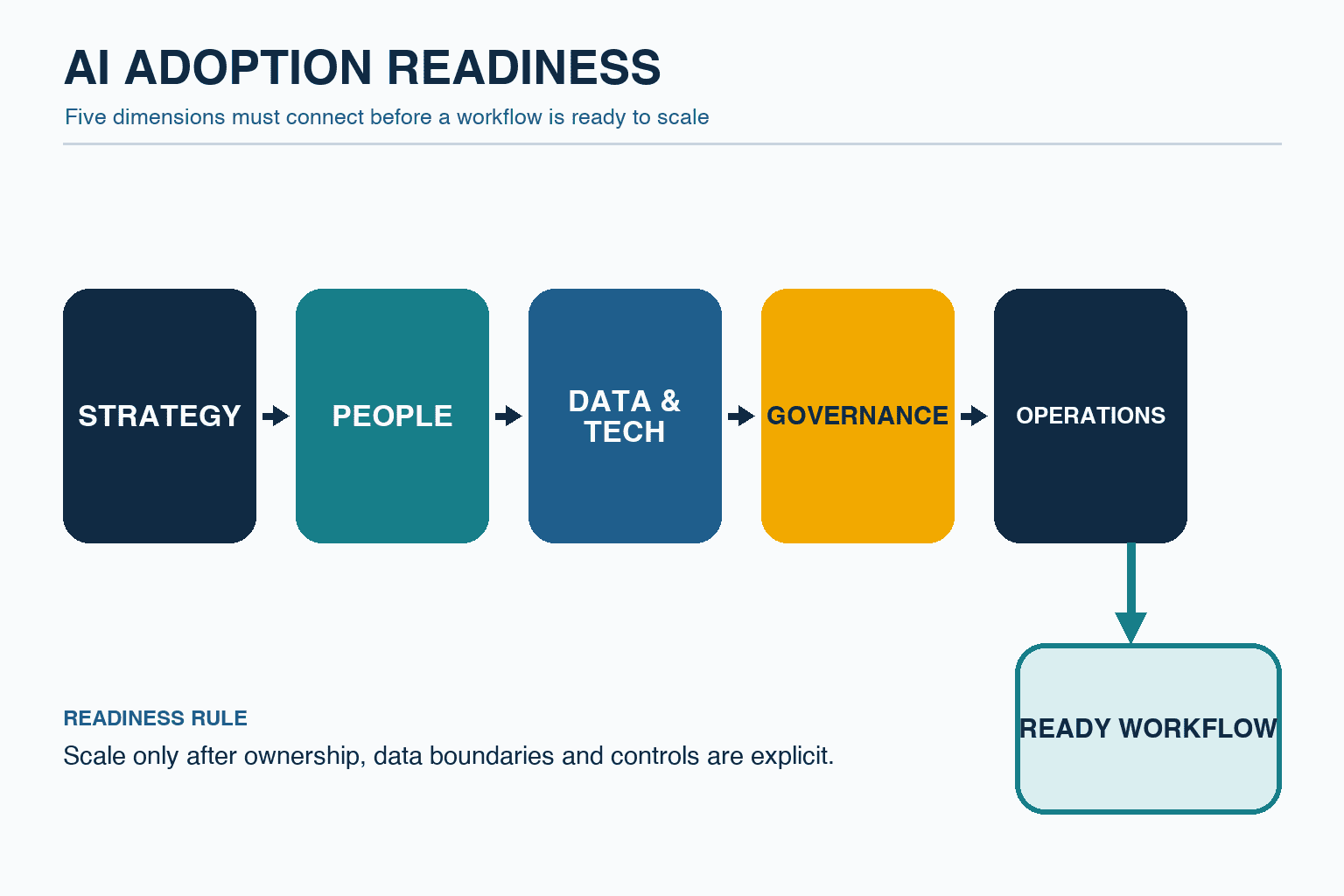
ETDA’s AI Readiness approach is useful because it treats readiness as more than owning a tool. Its public scan/tool uses 12 questions across five dimensions. It is a discussion instrument, not a certification or legal test. For implementation, assess these areas:
- Strategy and value: Is the workflow linked to a business objective?
- People and roles: Are the business owner, user, approver, IT, security and legal responsibilities named?
- Data and technology: Are data, permissions, identity, logs and integrations understood?
- Governance: Are prohibited uses, review, incident response and change control defined?
- Operations and learning: Is there protected time for education, support, evaluation and improvement?
A simple 0–3 score makes bottlenecks visible: 0 undefined, 1 understood by individuals, 2 operable in a pilot, and 3 repeatable across teams. Do not rely on an average. If the data boundary is zero, a strong training score does not justify live-data use.
Questions that reveal operational readiness
- Which time, quality, delay or risk should improve?
- How often does the task occur, and who inputs, reviews and approves it?
- Are accepted and failed examples available? Who can score quality?
- How are personal data, customer secrets, drawings and contracts classified?
- Do Japanese, Thai and English terms preserve the same operational meaning?
- Can the process continue manually when the AI service is unavailable?
- Who answers a user question, and within what service expectation?
Begin with work, evidence, responsibility and exceptions—not with “What can AI do?” This separates suitable AI assistance from decisions that must remain with people.
Manage enterprise generative AI rollout as a use-case portfolio
An enterprise rollout should not mean giving the same tool to everyone at once. Select a small portfolio, create evidence, then replicate what works.
Compare candidates on three axes:
- Value: frequency, current time, quality loss, waiting time and customer impact.
- Feasibility: input availability, accepted examples, owner, integration and language complexity.
- Risk: impact of error, personal/confidential data, legal, labor, safety and external publication.
For the first 90 days, favor frequent work that a qualified person can check and that has a safe fallback. Drafting internal documents, extracting actions from meeting notes, searching approved manuals, summarizing standard reports, and classifying records are common shapes. Safety shutdown decisions, final employment decisions, legal conclusions and unapproved customer messages should not become early autonomous workflows.
One-page use-case card
| Field | Required content |
|---|---|
| Work | Trigger, input, actions and definition of done |
| People | Primary user, backup and approver |
| Value | Baseline time, volume, quality issue and expected change |
| Data | Class, location, permission and masking |
| AI role | A bounded verb: draft, retrieve, classify or extract |
| Human role | Verify, correct, approve and handle exceptions |
| Evaluation | Test examples, scorer and acceptance condition |
| Failure | Manual fallback, reporting route and record |
If a team cannot describe the work on this card, it may be a useful training exercise but is not ready for operation.
The five-layer operating system behind sustained use
1. Approved environment and access
Define identity, SSO, groups, logs, retention and offboarding. Avoid mixing unmanaged personal accounts with company-controlled work. Data-use terms, retention, location and connectors vary by contract and configuration; IT and legal teams should review current conditions before launch.
2. Data boundaries and safe patterns
“Do not enter confidential information” is not enough. For each class—public, internal, confidential and highly restricted—show the allowed environment, masking, approval, storage and sharing rule. Practical patterns include replacing customer names with codes, removing personal data and searching only approved excerpts.
Thailand’s PDPA, customer contracts, industry duties and cross-border processing require case-specific review. This article is not legal advice. Map the data path and obtain qualified advice where needed.
3. Reusable workflows
Manage more than prompt snippets. Bundle the input template, source material, expected output, review checklist and approval steps. A managed workflow has a purpose, exclusions, data condition, evaluation examples, version and owner. Treat it as a shared operational asset.
4. Role-based learning and support
Separate common literacy, workflow practice, manager decision training, champion improvement training and administrator/risk training. Our guides to AI training for managers and evaluating generative AI training cost provide complementary planning detail.
5. Measurement and decision meetings
Review quality, corrections, incidents, time, value and support demand—not only usage logs. For every workflow, make an explicit continue, revise, stop or scale decision and record why.
Turn employee AI training into demonstrated work capability
Attendance is not an acceptance criterion. A learner should be able to execute an approved workflow, evaluate the result and explain a correction.
| Audience | Learning focus | Evidence of capability |
|---|---|---|
| All employees | Limits, data classes, source checking and reporting | Permission test and error detection |
| Workflow users | Input, evaluation and exception handling | Complete an anonymized realistic exercise |
| Managers | Selection, approval, KPIs and risk acceptance | Approve a use-case card and monthly gate |
| Champions | Templates, evaluations and office hours | Test, version and publish an improvement |
| IT/risk | Identity, logs, integration and incidents | Trace access and complete an incident drill |
AI literacy education must go beyond asking better questions. It includes checking numbers against primary material, handling citations and copyright, recognizing unsupported certainty or bias, classifying personal data, disclosing AI assistance when required and escalating incidents. OECD’s 2026 work on AI and skills likewise frames readiness as a combination of technical, cognitive, social and managerial capabilities supported by continued learning.
Multilingual operations require equivalent judgment, not literal translation
Fix product codes, department names, process terms, quality vocabulary, dates and units in a controlled glossary. Create the same allowed and prohibited scenarios in Japanese, Thai and English. Safety, quality, HR and customer-facing exercises need review by a native-language reviewer or accountable process owner.
Support channels also need cultural fit. When people hesitate to speak in a large seminar, small office hours, anonymous questions and a local champion offer safer routes. A champion is not an internal promoter; the role is to collect obstacles, improve assets and route questions to IT, risk or the vendor.
A 90-day roadmap for sustained AI use
Ninety days is not a guaranteed transformation period. It is a manageable window for a limited portfolio to complete two or three learning cycles and reach a scale/revise/stop gate.

Days 0–30: define and baseline
Name the sponsor, business owners, IT, risk, HR/L&D and local champions. Diagnose readiness, select two to four candidate workflows, and measure current time, volume, correction, delay and escalation. The number is a planning range, not a universal optimum.
Establish the approved environment, data classification, prohibited uses, incident route and manual fallback. Collect approximately 10–30 representative examples for each workflow and let a qualified process owner define acceptable results. This is a practical starting range, not a claim that ten examples are always sufficient; increase it when the work has more variation or higher impact. At the day-30 gate, confirm that data use is permitted, quality is measurable and accountable people have time to participate. Delaying a pilot is a valid decision.
Days 31–60: create evidence in limited practice
Limit each workflow to approximately 5–15 users and run it alongside the current method. This is a manageable planning range, not a universally optimal group size. Users record result, correction, time, exception and support need. Champions hold weekly office hours and convert recurring questions into workflow improvements.
Evaluate required fields, consistency with primary material, traceability, glossary compliance and safe refusal/escalation. At day 60, decide to continue, revise or stop. If use is low, distinguish low task frequency, login friction, manager delay and output-format mismatch from employee resistance.
Days 61–90: operate and transfer ownership
Move only accepted workflows into limited production. Include owner, version, change request, monitoring, monthly review, incident contact and access changes in the operating procedure. New users complete common literacy and a workflow practical before receiving access.
Day 90 is a replication decision, not an “all-company launch” ceremony. Scale only when the evaluation set, learning, glossary, permission model, KPI and support load can be reused. If internal owners cannot handle first-line support and the monthly gate without the provider, adoption has not yet been transferred.
Connect adoption, quality, value and risk KPIs

| Layer | Example KPI | Decision question |
|---|---|---|
| Access and skill | Activation among eligible users; practical pass rate | Can people use it correctly? |
| Repeat use | Weekly use on eligible work; repeat weeks; reused workflows | Is it part of work? |
| Quality and value | Acceptance, correction time, lead time, throughput and rework | Did work improve? |
| Risk and operations | Restricted data, serious errors, unapproved release, response time and support load | Can we sustain it safely? |
Avoid a target such as “70% weekly active” without context. Use employees who actually had eligible work that week as the denominator. A low-frequency, high-impact workflow may be valuable with low general activity.
A hypothetical value calculation
The following inputs demonstrate a calculation; they are not market rates or TOMAS TECH results:
- 40 users
- 12 eligible tasks per user per week
- 6 minutes saved per task
- 4.33 weeks per month
- internal planning value of 350 THB per hour
Gross capacity is 40 × 12 × 6 × 4.33 ÷ 60 = 207.84 hours/month. Gross time value is 207.84 × 350 = 72,744 THB/month. If licenses, learning, review and support hypothetically cost 42,000 THB/month, the illustrative difference is 30,744 THB/month.
Saved time is not cash unless capacity is reassigned, overtime or outsourcing falls, or throughput increases. Never use the calculation to hide worse quality or risk.
Governance as a guardrail for confident adoption
NIST’s voluntary AI RMF Core organizes work into GOVERN, MAP, MEASURE and MANAGE. It is not Thai law, but it is a useful operating structure.
- GOVERN: Define policies, roles, risk tolerance, learning, third-party control, records and stop authority.
- MAP: Describe users, affected parties, data, integrations, language, context and consequences of error.
- MEASURE: Test representative, missing, ambiguous, multilingual, adversarial and outdated inputs using repeatable rubrics.
- MANAGE: Prioritize mitigations and choose to continue, revise, stop or scale based on evidence.
ETDA’s 2026 trust and governance direction similarly emphasizes making governance usable through impact/risk assessment, learning, testing and practical tools. A policy document becomes useful only when employees can apply it to real scenarios.
Scope and acceptance criteria for an adoption-support provider
| Scope | Deliverable | Acceptance evidence |
|---|---|---|
| Readiness | Findings, evidence, priorities and dependencies | Functions confirm facts and next decisions |
| Use-case design | Cards, baselines and evaluation sets | Business owner can score and stop |
| Governance | Data classes, RACI, incident and change procedures | Accountable people complete a scenario drill |
| Learning | Role paths, practicals and glossary | Capability is demonstrated, not attended |
| Adoption operations | Office hours, FAQ, KPI and gate meeting | Questions and improvements are recorded |
| Handover | Admin procedure, asset list and exit plan | Internal team handles first-line work |
Before contracting, clarify data destinations, subprocessors, ownership of assets/configuration, access to logs, model-change re-evaluation, staff replacement, data return/deletion and export format after termination.
Define graduation criteria: internal champions can run office hours; owners can make monthly gate decisions; IT can manage permissions and logs; evaluation sets can be maintained internally; and the incident drill is complete. The goal is not permanent dependence on support, but retained decision capability.
Common failure patterns and recovery
One identical course for everyone
Keep basic literacy, then add role-specific practice, manager approval and a 30-day follow-up. If a seminar is part of the program, our corporate generative AI seminar planning guide explains how to connect the event to work.
Unfunded champion work
Give champions a formal role, time allocation, manager recognition and escalation route. Define what they can answer and what must go to IT, legal or the provider.
Sharing only successes
Publish failed tests, reasons for non-use and stopped workflows alongside wins. Psychological safety is a risk-discovery mechanism.
Linking performance review to usage volume
This encourages unnecessary use. Recognize appropriate workflow choice, verification, improvement and knowledge sharing—including the judgment not to use AI.
Ending support at the pilot boundary
Production brings access changes, new data, model changes and more users. Complete at least one production monthly review and verify ownership transfer.
FAQ about AI adoption support
What should we check first when generative AI is not adopted?
Check the target workflow, data boundary, quality standard, manager approval and support route. Use eligible work—not the whole workforce—as the denominator and observe actual tasks before blaming motivation.
How long should employee AI training be?
There is no universal number of hours. Accept a learner when they can complete an approved workflow, find errors and escalate safely. A short common lesson may be enough for literacy, while high-impact workflows require deeper practice.
What belongs in AI literacy education?
Limits, data classification, personal/confidential information, source and citation checks, copyright, bias, unsupported output, accountability, incident reporting and manual fallback. Adjust depth by role and impact.
How many departments should an internal rollout begin with?
Choose workflows, not department count. Begin with a small portfolio that is frequent, verifiable, bounded and reversible, with an accountable owner.
Can sustained adoption be judged in 90 days?
Ninety days can establish foundations and initial evidence. Seasonal and low-frequency work needs longer observation. Treat day 90 as a decision gate, not completion.
When should external adoption support end?
When internal owners, champions and IT/risk staff can run first-line support, update evaluations, make monthly decisions, manage access and respond to incidents. Put these graduation conditions in the contract.
Summary: the unit of adoption is repeatable, safe work
Sustained AI use does not mean every employee uses AI every day. It means selected work uses approved data, meets a defined quality level, receives accountable human review and can stop and improve when problems occur. In 90 days, diagnose readiness, select a small portfolio, build role-based capability, collect limited-practice evidence and transfer governance, KPIs and support into operations. Linking use to quality, value and risk turns “make people use AI” into responsible work redesign.
TOMAS TECH can support the evaluation stage before workflows, role paths, data boundaries, KPIs or the 90-day pilot scope are final. If you want to define a practical starting unit for a multilingual Thailand or ASEAN operation, please contact us.
Sources
- OpenAI: From assistance to execution — How enterprises put AI to work
- OpenAI: How AI is expanding what people do at work
- OpenAI: The state of enterprise AI 2025 report
- Microsoft WorkLab: Agents, human agency, and the opportunity for every organization
- OECD: AI and skills
- OECD: Skills in the AI age
- ETDA: AI Readiness Scan
- ETDA: AI 2026 — Driving Trust AI Governance
- NIST: AI RMF Core
*The 90-day design, score ranges, user ranges, KPI examples and calculation are implementation recommendations or hypothetical inputs, not outcome guarantees, market rates or legal advice.*


