


Introducing AI verification for manufacturing equipment inspection photos means more than collecting images. Each image needs an equipment identity, inspection point, time and operating context. AI can flag missing evidence, the wrong subject, poor image quality and changes from a reference image. A technician and an authorized reviewer still decide whether the equipment is safe and whether the work order can close. This guide explains a practical path for factories in Thailand, from photo standards and CMMS integration to the RFP and FAT/SAT.
What equipment inspection photo AI verification actually checks
An equipment inspection photo differs from an inline product inspection image. Typical subjects are a pump seal, a control-panel door, a pipe joint, a filter gauge and a conveyor guard. Attaching a photo to a checklist item marked “normal” does not guarantee that a different technician can compare the same location next month. The camera distance may have changed; the machine number may be missing; glare may hide the part; or nobody may know whether the photo was taken before or after repair.
The first useful function is completeness: does the work order include every required overview, close-up and post-work image? The second is photo quality: is the part visible at a comparable angle? The third is subject matching: does the image belong to the specified asset and inspection point? The fourth is change review: what differs from a reference or previous image? These functions can be deployed in stages. They do not require the system to claim that every photographed machine is “safe” or “unsafe.”
Consider a record saying that pump P-204 has no seal leakage. A photograph alone may not establish that conclusion. Operating state, temperature, vibration and whether the area was just cleaned can matter. The photo is one piece of evidence. If a change suggests leakage, a technician inspects the equipment and follows the appropriate isolation and maintenance procedure. AI helps direct attention; it does not replace that procedure.
Set “reviewable later” as the acceptance criterion
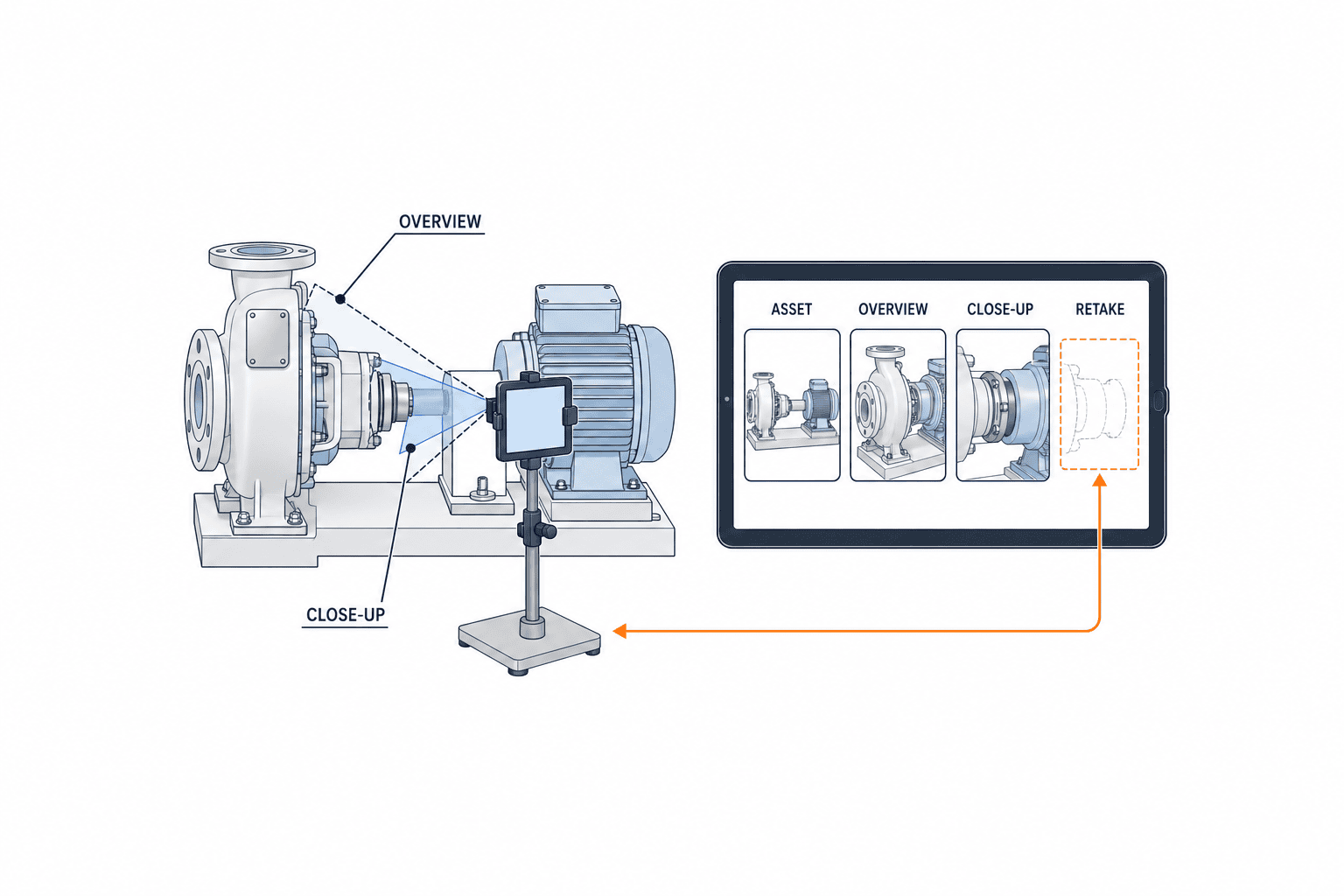
Define evidence requirements for each inspection item before buying a model. An overview should identify the machine and its surroundings. A close-up should show the target component and its condition. An as-left photo should show the relevant restoration or installation state. Some locations need two images rather than one. The checklist should explain where to stand, camera height, approximate distance, orientation, lighting and the portion of the frame the component should occupy.
Separate locations that can use fixed cameras from those visited with a mobile device. Never require a worker to remove a guard or approach energized parts merely to improve an AI score. Safety procedures determine the permissible view. A technically sharp photo of the wrong machine is still unusable evidence. Assess equipment ID, component visibility, capture context, angle and obstruction separately, and tell the worker why retaking is necessary. “The lower seal is outside the frame” is more actionable than a red quality icon.
Link as-found and as-left images to one asset history
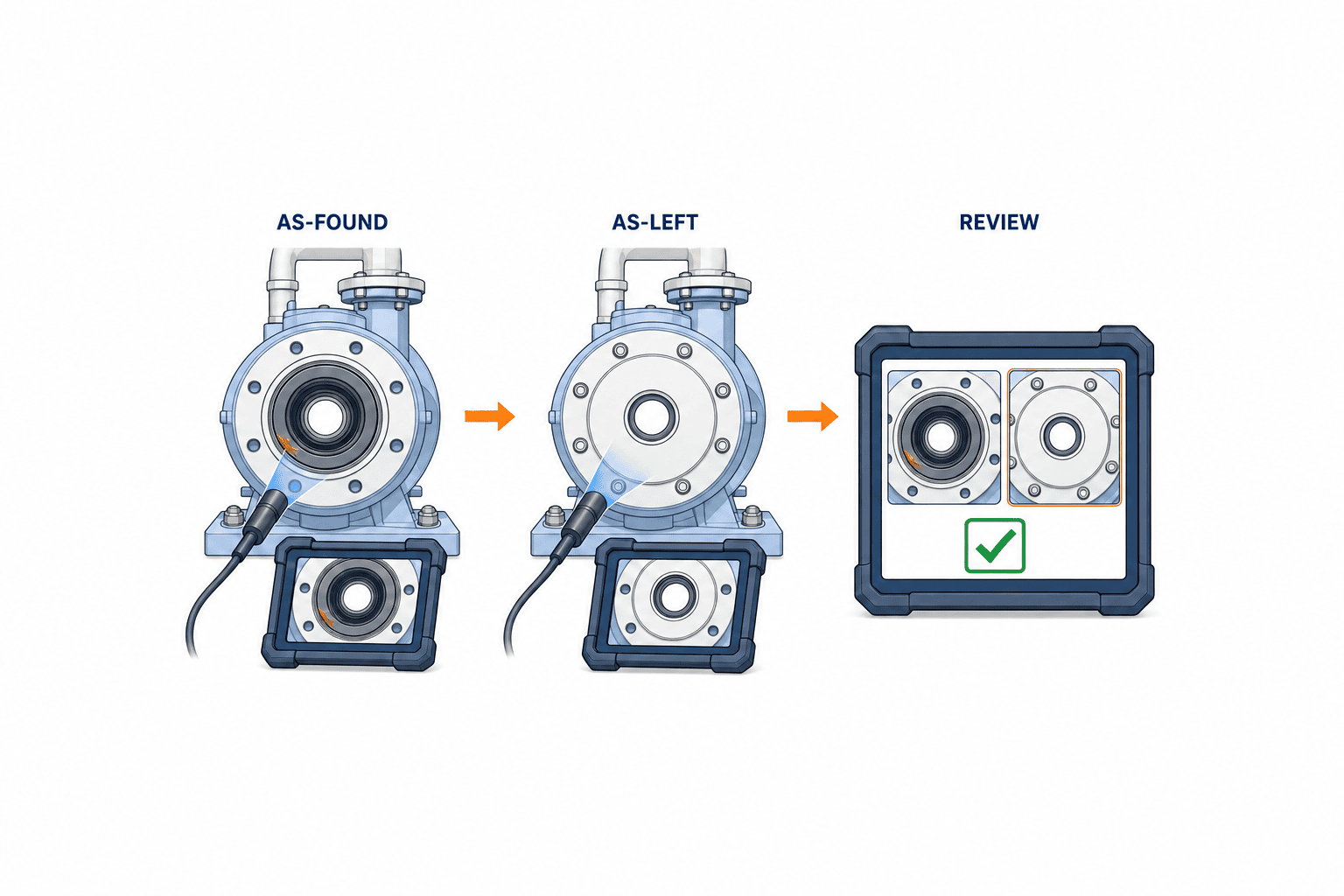
Maintenance work needs a clear distinction between the as-found state before intervention and the as-left state after intervention. A chronological photo gallery does not prove that two pictures represent the same component or work order. At minimum, use asset ID, inspection-point ID, work-order ID, capture stage, capture timestamp, photographer and file ID. Keep an internal asset key with a change history because physical tags and display names can change.
Take an overview as well as a close-up before repair. After repair, capture the installed part and relevant restored condition. Do not use a photograph to substitute for torque, insulation resistance or another measurement invisible in the image. Keep measured values, instrument details and the responsible person’s record as separate fields linked to the photos. Pixel differences alone are not defects: lighting and angle can change. Match asset and location first, align images where appropriate, and present differences for human interpretation. A removed oil stain, rerouted hose or closed guard may be visible; whether the result is acceptable requires review.
Preserve equipment ID, time and operating conditions
Do not treat EXIF time as the only authoritative timestamp. Device clocks can drift, images can be stored offline and upload can occur later. Store both device capture time and server receipt time, along with the device’s clock-sync state. Preserve the original capture time after delayed synchronization. A stable file ID or hash can make retries idempotent.
QR codes, barcodes, NFC tags or a preselected work order can provide asset identity. Reading a tag still does not prove that the right component is in the frame. Compare the visible tag and surroundings with the task, and ask for confirmation when an identical machine may have been photographed. For rows of similar equipment, combine plant ID, asset ID and work-order ID; GPS alone is too coarse.
Record whether the equipment was running or stopped, before or after cleaning, guard open or closed, loaded or unloaded. A stopped pipe-joint photo cannot rule out a leak under operating pressure. Specify the required condition in the inspection procedure and capture it from a trustworthy signal where possible. Otherwise allow “unverified” rather than inventing a value. Auditors should be able to understand the limits of each photograph.
Design four distinct AI checks
Completeness checks whether required photos are present. A simple image count fails when the same picture is uploaded three times. Combine file identity, stage and target component. Decide by asset criticality whether missing evidence blocks closure or requires a documented exception.
Image quality checks blur, exposure, reflection, obstruction and resolution. A single global threshold is unlikely to work for a glass-covered gauge, dark cabinet and outdoor pump. Measure acceptable ranges by equipment class. Return a specific retake reason, and send uncertain results to a person.
Subject matching checks that the photographed machine and part correspond to the task. Visually similar machines may be impossible to distinguish from image features alone. Cross-check the asset tag against the work order; if the tag cannot be read, retain manual identification and reviewer approval.
Condition change compares a reference or previous image to the new image and points to possible stains, discoloration, damage, missing fasteners, foreign objects or an unrestored cover. No detected change is not proof of no defect. The failure mode may be outside the field of view or the model’s scope. Show the original, reference, candidate region, capture context and model version together so a technician can make a traceable judgment.
What to do when the AI says “no anomaly”
False negatives and false alerts have different costs. For a safety-critical leak or open guard, a negative AI result must not close the work order on its own. For minor cosmetic variation, escalating every difference can overwhelm reviewers. Define the permitted action by failure mode and asset criticality: suggest a review, demand a retake, escalate to a supervisor or block closure.
Evaluate more than overall accuracy. Measure wrong-asset detection, missing-photo detection, retake rate, review time, missed critical changes and unnecessary escalations separately. Include day and night shifts, different device models, dirt, post-cleaning appearance, identical machines and offline resends in the test set. A high score on many normal images does not prove reliable detection of rare but important failures.
When a model changes, keep the earlier prediction, model version, time and human decision in the audit record. Validate the new version against a fixed test set before release. The NIST AI Risk Management Framework discusses human oversight, testing under deployment-like conditions and monitoring in operation. It is a useful design reference, not a certification of any product discussed here.
Draw the human approval flow before automating it
Imagine a night-shift worker finding a faint oil trace below pump P-204. The mobile task requests an asset-tag scan, overview, seal close-up and floor photo. AI flags that the lower edge of the seal is cut off; the worker retakes the photo and records “stopped, before cleaning, trace observed.” AI has checked evidence quality and highlighted a possible change. It has not identified the cause of a leak.
Maintenance compares the image with history, measures the condition on site and, if needed, creates a repair work order under the plant’s safety procedure. The replacement has as-found and as-left photographs, a part number and test values. The approver reviews the trial run and measurements before closure. Define who may require a retake, grant an exception and close work. Show the asset, inspection point, work order, stage, operator note, measurement, AI candidate and history in one review context.
Keep real exceptions visible. Weather, active equipment, a broken device or unreadable tag may prevent a photograph. Record the reason, alternative verification, due date and approver. Never fill a gap with a photo from another day. That would make the evidence untrustworthy.
Decide whether the CMMS stores the photo or a reference
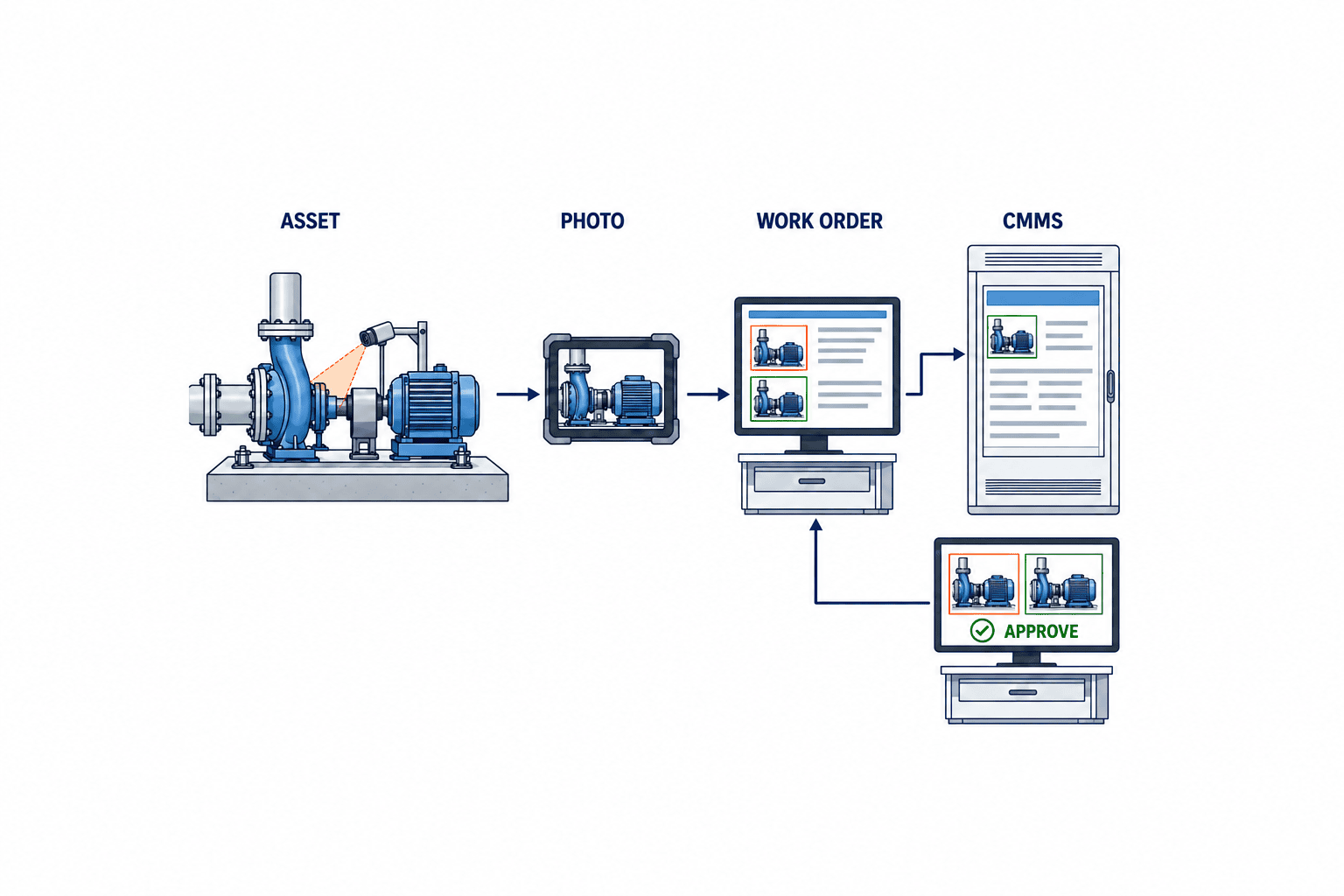
First map the keys connecting the CMMS asset register, work order, inspection item and image. Storing files as CMMS attachments simplifies viewing, but check capacity, permissions, retention and API limits. Storing originals in a protected repository and passing references to the CMMS can scale better, but broken links and permission mismatches need monitoring. Preserve the original separately from annotated or compressed derivatives, with the processing step recorded.
Microsoft documents inspection forms associated with work orders and assets, image and attachment fields, and offline mobile entry that later synchronizes. Its work-order interface also includes asset and media context. These are examples of documented product features. They do not establish that the full as-found/as-left AI workflow in this article is a ready-made standard feature. Check configuration, extensions, APIs and permissions for each implementation. SAP documents attachments in Asset Manager, while IBM documents photo analysis using Maximo Visual Inspection in the Maximo Civil Infrastructure Defects application; this should not be read as a claim about every standard Maximo Mobile configuration. Verify extraction of originals, asset mapping, approvals and offline behavior in a demo rather than inferring interoperability from product names. ISO 14224 is about reliability and maintenance data exchange for petroleum, petrochemical and gas equipment; its data classifications can inform a schema but are not a general legal requirement for every factory.
Plan for normal integration failures: a renamed asset, cancelled work order, replaced image, delayed upload and duplicate retry. A photo synchronized after its work order was cancelled must not become valid closure evidence automatically. Compare task versions and route conflicts to a reviewer. If plants reuse machine numbers, use plant ID plus asset ID. Preventing a photo from entering the wrong asset history matters more than making every image searchable.
Start with a focused PoC
Choose an equipment family whose changes can be seen in photographs and whose IDs and work orders are reasonably clean: a group of similar pumps, replaceable filters or pipe connections with visible leakage traces. Start by reducing missing and unusable evidence, without assigning safety decisions to images. Limit the first test to one plant, one asset family and a few inspection points while involving both technicians and approvers.
Reconcile the existing checklist, asset register, work orders and photos first. If historical images lack trustworthy asset IDs, fix the register and tags before training a model. Define capture rules and select reference images. Collect examples of poor yet otherwise normal photos and genuinely actionable changes. If abnormal examples are scarce, disclose that limit and initially assess quality, completeness and subject matching. Synthetic leak images do not prove performance on real leaks.
Run the existing workflow in parallel. Compare retakes, time to approval, wrong-asset discoveries and missing attachments. If alerts are excessive, examine lighting, capture position and the inspection item before merely shifting a model threshold. If extra clicks lower completion, redesign the UI and required image count. Set targets from local baseline and risk before the pilot.
Version reference images. After a planned component replacement, the old image may no longer be a valid baseline. Record the reason, effective date, asset and approver for each reference change. Preserve the baseline that was active when an earlier inspection occurred. Divide responsibilities among maintenance for failure modes, supervisors for capture practice, IT for IDs and access, quality or safety for exceptions, and the vendor for model scope and support. If cloud inference is used, ask where images go, whether they are reused for training and how deletion works. Provide a manual procedure for network outages.
Put the scope and responsibilities into the RFP
“Check photos with AI” is too vague for an RFP. Specify supported devices, offline capture, original preservation, asset identification, capture stage and required metadata. List each requested decision separately: quality, missing evidence, wrong subject and before/after change. Identify equipment and conditions outside scope.
Require an exportable warning reason, source and comparison images, decision time, model version and human action. Separate worker, reviewer, approver and administrator privileges. Keep correction and deletion history. Document storage region, encryption, access logs, backup, retention and plant boundaries. Since photos may include people, drawings or customer information, define forbidden areas and masking practice.
Specify CMMS reads of assets and work orders, writes of inspection results and photo references, retry behavior and error handling. Can a device keep capturing when an API is unavailable? Does recovery create duplicate records? Can a renamed asset retain its old evidence? Ask vendors for a field map and failure flow, not just a screen demo.
Test the whole evidence chain in FAT and SAT
For factory acceptance testing (FAT), prepare test images and a mock asset register. Include normal, wrong-asset, missing, dark, reflective, blurred, duplicate, reversed before/after and offline-resend cases. Verify the message, notification, routing and retained record for each case. A model score alone cannot establish that the business workflow works. If critical anomaly samples are few, state the tested scope rather than claiming broad fault detection.
At site acceptance testing (SAT), repeat the flow with real factory lighting, network, layout and procedures. For a Thai plant, ensure worker warnings and approver terms are understandable in their operating languages. Test glove use, night lighting, weak-signal areas, reflections after cleaning and rows of identical machines. A high retake rate at SAT may require capture-standard changes as well as model work.
Define acceptance in business terms: can a work order missing required images close; can an exception be traced; are as-found and as-left shown in one case; can an authorized user reach the original from CMMS history; is a wrong-machine photo flagged? Agree model thresholds together with failure modes and sample sizes. Save the test images and results for future model-version comparisons.
Include capture, review and storage in the cost case
Budget for devices, lighting or mounts, asset tags, image storage, network, CMMS integration, data cleanup, training and recurring evaluation as well as AI licensing. Worker capture time and reviewer time are real costs. Requiring images for every checklist row can lower inspection completion. Select items by risk instead.
Measure retakes avoided, missing inspections found earlier, work-order search time and audit retrieval time separately. Less downtime and better safety matter, but a short PoC rarely isolates AI’s contribution to those outcomes. Record baseline, measurement period, asset scope and changed procedures. Avoid savings percentages without a traceable source.
Manage the workflow after go-live
Accumulating photographs does not automatically improve an AI model. Review where retakes cluster, whether workers can follow the capture standard and how approvers handle alerts. If only night shifts produce “too dark” warnings, inspect lighting and standing position before retraining. If cleaning causes false alarms, revise reference conditions and task descriptions. Classify causes, not just alert counts.
A machine retrofit, replacement part, camera change, device OS update or capture-app release can alter images or metadata. Assign an owner to update reference photos and test cases before each planned change. Afterward, use representative images to check quality, subject matching and before/after comparison, with a rollback path if needed. Keep equipment and software changes in one searchable history so the start of a new error pattern can be traced.
Review why humans override AI warnings. Repeatedly ignored warnings may indicate a poorly tuned rule; a missed fault found during physical inspection calls for reviewing the failure mode, camera location and evaluation set. Treat both as process-improvement input rather than blame. For critical machines, document temporary extra human checks while the model or capture procedure is corrected.
Retention must cover not just the original image but also the asset master, work order, model version and approval record needed to interpret it. A decade-old image without equipment context is weak audit evidence. Unlimited retention also increases storage and access burden. Set periods by customer obligations, company rules and applicable law, and detect broken references when deletion occurs. Include these responsibilities in the support contract.
Frequently asked questions
Can inspection-photo anomaly detection complete a safety check?
No. A photograph covers only its field of view and conditions. Electrical state, internal wear, torque, insulation and vibration still need the applicable tests and safety procedures. AI can help find missing evidence and possible visual changes; an authorized person records the final judgment.
Can historical photos be used unchanged as AI evidence?
Sort them first. An image without a reliable asset ID, location, time or before/after stage may mislead comparisons. Keep it as context, then build evaluation data under a defined capture standard and metadata scheme.
How much integration with CMMS is needed?
At minimum, asset, inspection item, work order, capture stage and original image reference should form one retrievable history. The degree to which closure and approval write back depends on existing controls. Test resends and exceptions on one asset family before scaling.
What matters in a Thai factory deployment?
Check operating language, night-shift lighting, offline operation, identical equipment and cross-plant approval rights on the actual route. A translated warning and reviewable history serve workers better than copying a Japanese paper form to a tablet.
Conclusion: invest in evidence that another person can review
Equipment inspection photo AI verification succeeds when asset IDs and capture conditions are reliable, as-found and as-left images connect to the work order, poor or mismatched photos are returned early, and people can review suspected changes. Design CMMS integration, permissions, exceptions and acceptance tests as one workflow. Start with a few inspection points and expand using observed retake and review data.
TOMAS TECH can help a Thai manufacturing site map its asset register, checklists and work orders before defining where photo evidence and AI review fit. Early-stage RFP or focused PoC discussions are welcome through our contact page.
Related articles
- Drafting maintenance work orders with AI
- Planning dimensional inspection automation
- Designing high-speed inline AI visual inspection


