


A customer sends revision B, yet a production instruction on the shop floor still refers to released revision A. The design engineer may know which dimension changed, but the inspection sheet, jig, machining program and supplier copy might still be on the old version. Implementing AI drawing revision comparison is useful only if it closes the path from finding a difference to assessing its impact, approving the change and activating the correct version. This guide is for procurement and engineering teams at Thai manufacturing sites preparing an RFP, proof of concept, FAT and SAT.
Compare released revision A with its intended successor B
Define the pair before choosing a model. A is the authoritative revision already released to the factory; B is the next candidate for the same drawing number and product. Confirm document identity, customer approval, effective date and affected plant or line. A draft from the design department is not necessarily the current production version. A drawing with the same title block but a different product is not a valid comparison partner.
This job has a clear boundary. Pre-release drawing inspection checks a candidate sheet for missing dimensions, conflicting notes or design-rule violations. Drawing search AI helps staff locate the right document. Here the two authoritative revisions have already been identified. The question is what changed between A and B, what manufacturing objects are affected, and when the new configuration may be used. Showing a red cloud around a difference is not approval to manufacture B.
Autodesk documents drawing comparison and the presentation of changes by colour and revision clouds. It is an example of detecting visible changes, not evidence that a CAD or PLM product automatically approves BOM and process changes. Capabilities vary by product and file type; in particular, do not assume that Autodesk Vault natively compares every drawing format. PTC describes product change as separate planning, approval, release and physical implementation steps. The buyer should evaluate the entire handoff.
Establish the authoritative input and effective version
The RFP should name the customer, product, drawing number, revision, document type, issue date, approval state, PLM/PDM document ID and file hash. State whether the source of truth is a PDF, scan or CAD file for each drawing family. If a customer PDF is converted internally, keep the received file and identify the conversion as a derivative. A file called “latest” is not a reliable identifier.
Also separate the newest revision from the effective revision. Some orders can continue on A until a specified lot or date, while later orders require B. The rule might depend on plant, product, serial number, lot, order or manufacturing start time. Deviations need their own approval reference, quantity and expiry. AI cannot prevent old-version use if the business cannot answer which revision applies to one order.
Translate image differences into manufacturing characteristics
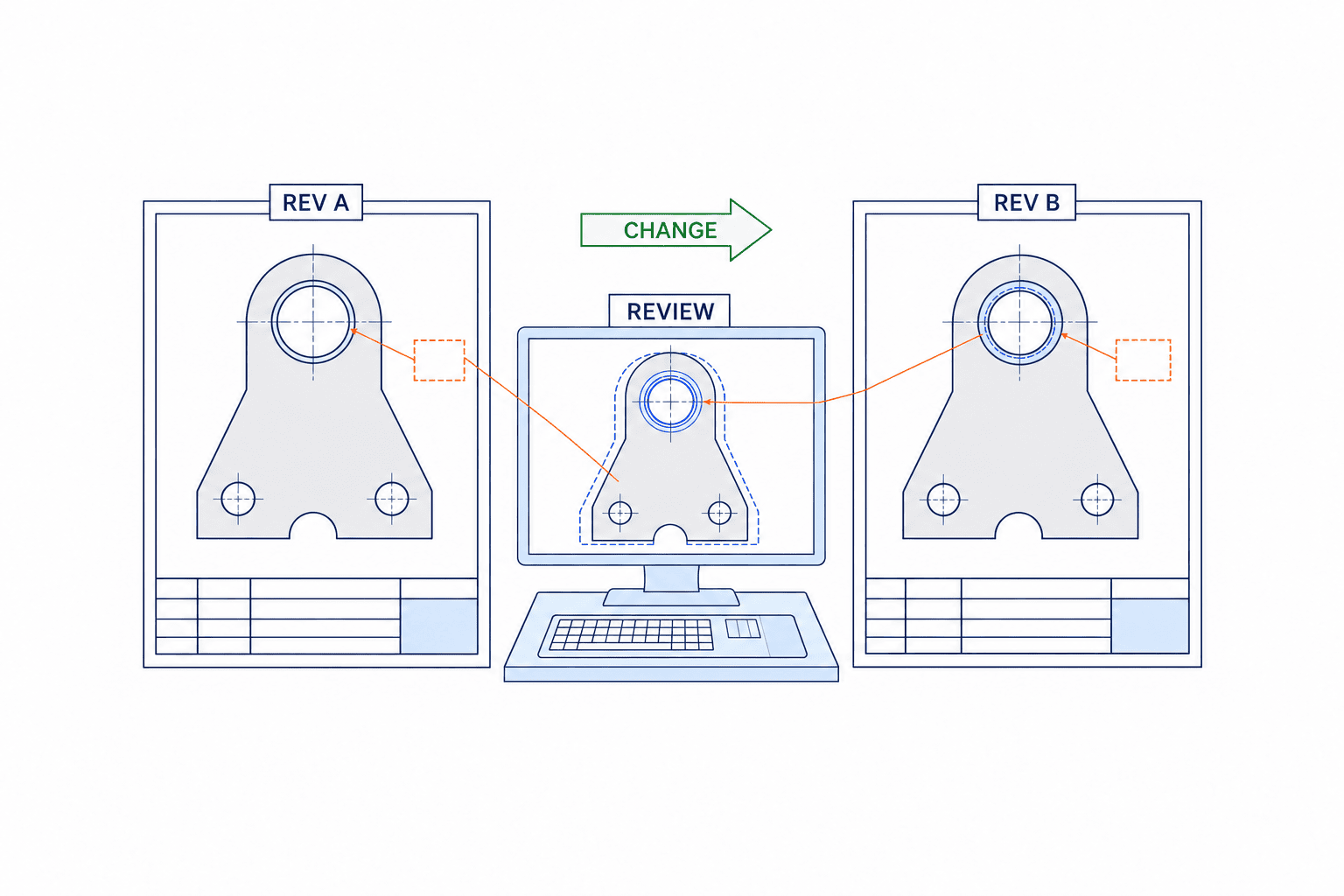
Overlaying sheets is the starting point. First normalise page size, orientation, scale, title block and scan alignment. Then classify candidates as geometry, dimensions, tolerances, GD&T, material, surface finish, heat treatment, notes, part identifiers, referenced drawings and inspection requirements. Keep every OCR result attached to its crop and position on the original sheet. A plain list of numbers is hard for an engineer to check.
A bore of 10.0 ±0.1 changed to 10.0 ±0.05 may barely alter the picture but can change the gauge, machining capability review, sampling plan or subcontractor specification. Conversely, a revision-table entry may have no impact on the manufactured characteristic. AI should show candidates and evidence; design, production engineering and quality decide their meaning. Datum references and unilateral tolerances must never be declared equivalent on the appearance of digits alone.
Keep change states distinct
Display “added”, “removed”, “modified” and “review needed” separately. A shifted view, font substitution, changed PDF export setting or tilted scan can create visual noise. Suppressing that noise must not hide a critical tolerance. For each candidate retain the old and new value, location, class, source crop, reviewer, disposition and reason. A confidence score is not approval authority. If the system cannot decide, it should hold the case for review rather than report “no difference”.
Link the change to BOM, process, inspection and instructions
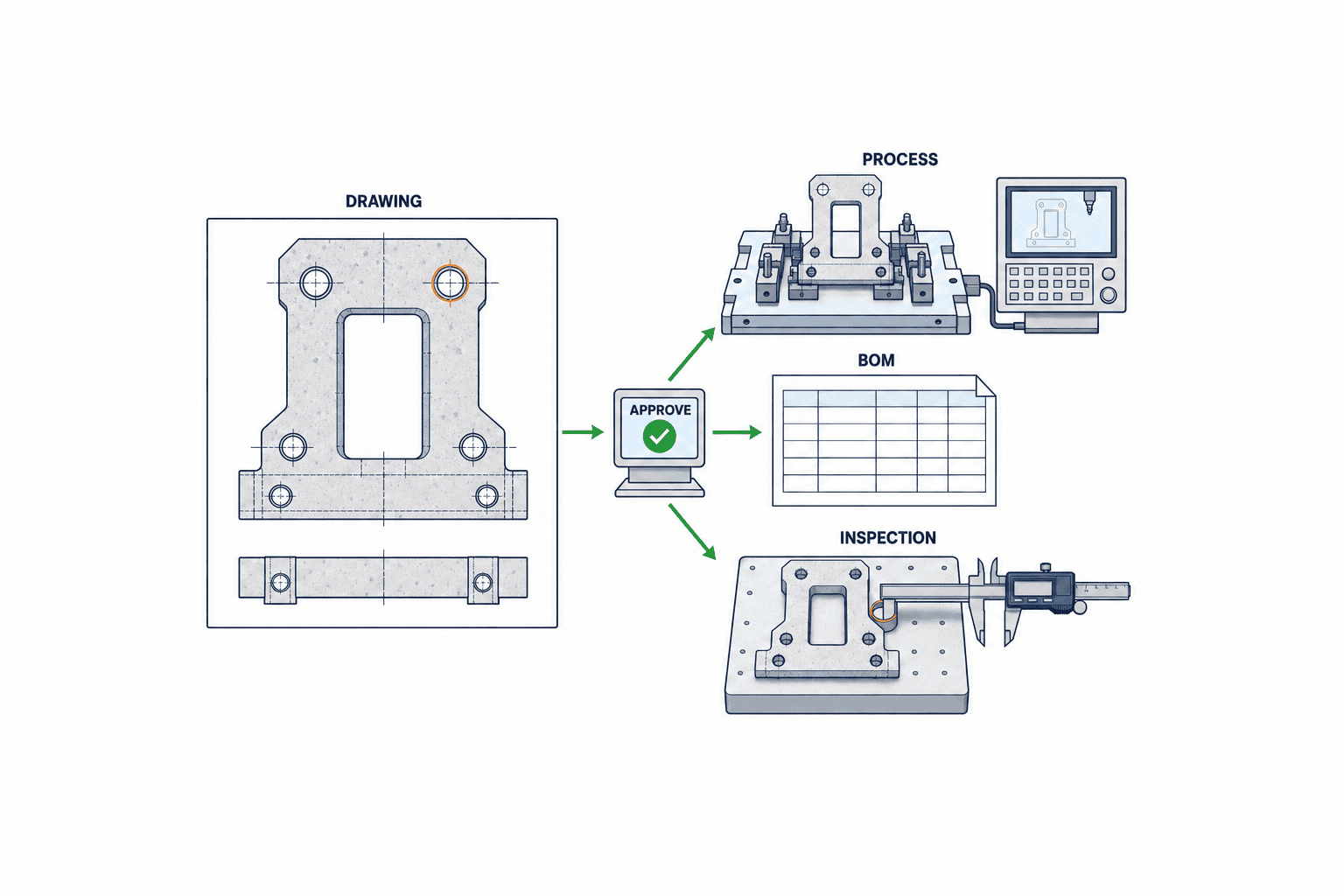
The valuable deliverable is an impact map. A changed hole can affect a purchased component, locating pin, assembly instruction, CNC program and inspection gauge. A material substitution may touch the purchasing specification, alternate-material approval, machining conditions and certificate requirements. A label-position change can alter packaging and vision inspection. AI can propose links, but owners accept or reject them and record why.
| Change | Examine | Typical owner |
|---|---|---|
| Dimension or tolerance | Control characteristic, measuring equipment, inspection form, jig | Design, quality, production engineering |
| Material or finish | eBOM/mBOM, supplier specification, external process | Design, purchasing, quality |
| Hole position or geometry | Program, fixture, setup, measurement program | Production engineering, manufacturing, quality |
| Note or applicability | Work instruction, customer approval, lot or order effectivity | Design, production control |
PTC’s manufacturing-process guidance connects eBOM, mBOM, process plans, control characteristics and shop-floor instructions. A simple one-to-one link between a PLM drawing and an MES screen therefore misses much of the impact. Map the changed characteristic to the part, BOM line, operation, inspection item, tool, instruction and affected orders. A missing link means “mapping not registered”, not “no impact”. Our guide to dimensional inspection automation explains why measurement method and tolerance must be specified together.
Define the PLM/PDM-to-MES contract
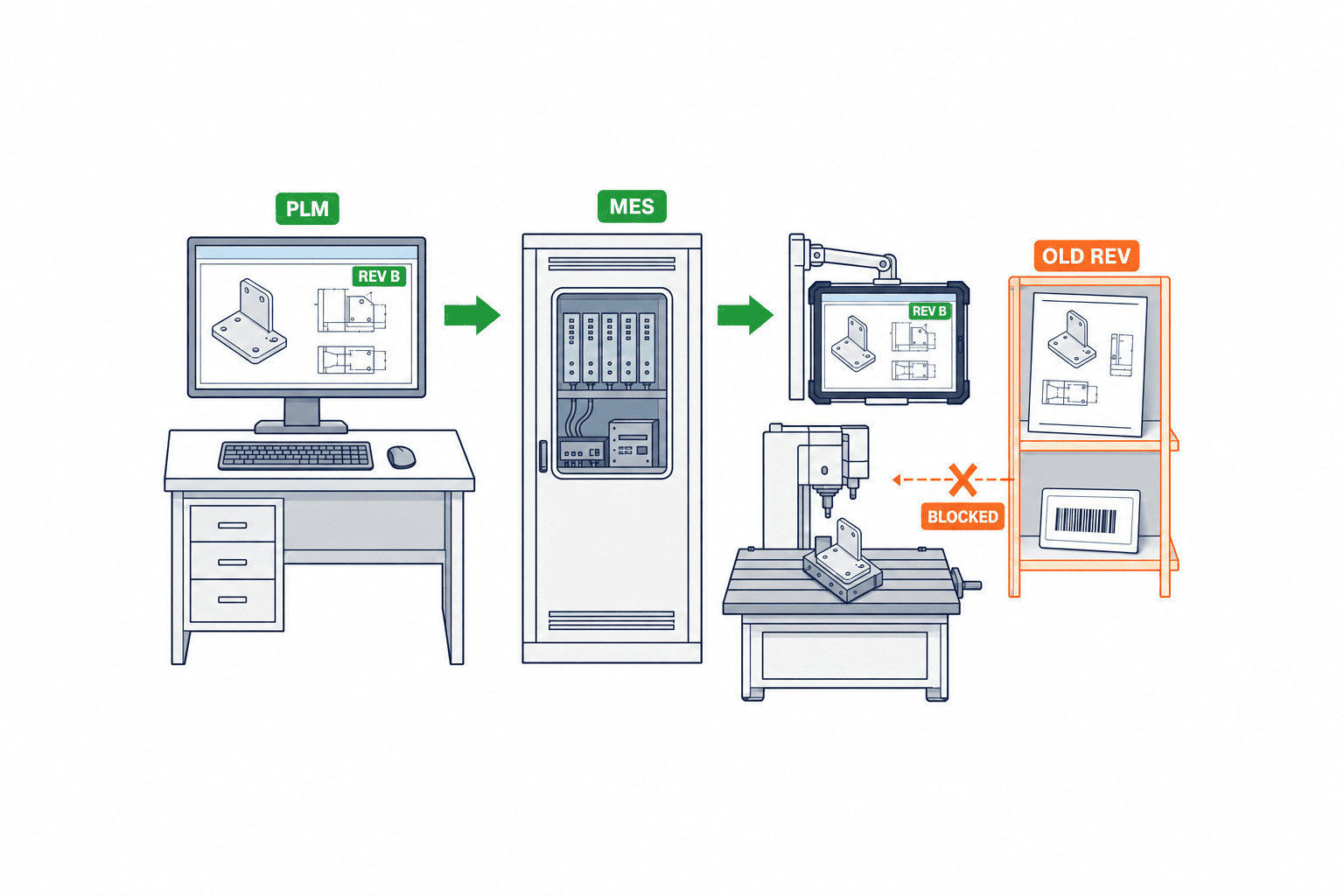
At minimum, exchange drawing number and revision, item ID, change-notice ID, effective condition, approval state, associated mBOM, process plan, work instruction, inspection-specification versions and obsolete-version disposition. A PDF attachment alone cannot tell MES which version an order should display. If drawing B is approved but the process plan or inspection sheet is unfinished, automatic publication to MES should remain blocked.
A successful send is not a successful rollout. MES must acknowledge receipt, resolve its references and display the approved configuration on the actual terminal. Design for retries, duplicate messages and out-of-order arrival using the change-notice ID and revision as idempotency keys. Monitor partial success, such as drawing B next to instruction A. If the shop-floor terminal works offline, specify cache revision, maximum staleness and behaviour after the limit is exceeded.
Prevent obsolete drawing use through quarantine and effectivity
Do not simply delete revision A: the history may be needed for traceability. Retain it as a controlled record while removing it from normal production, purchasing and inspection selections. Inventory shared links, downloads, printed sheets, posted copies, supplier attachments and spreadsheets that copied an old drawing. A “reference only” mark can help recognition but cannot replace access and effectivity controls.
For a Thai plant with design approval in Japan, production and procurement in Thailand, and an external processor elsewhere, one approval timestamp does not resolve work in process, goods in transit and stock awaiting inspection. Agree on affected lot, serial, order, manufacturing start date or other explicit condition. Record whether old stock is reworked, accepted under concession, scrapped or used through. PTC’s change-management process includes inventory disposition in change planning.
Test shop-floor displays before and after effectivity, for included and excluded orders, online and offline, and after scanning an old QR code. An old code may open A as a historical record, but the interface must not imply that A remains authorised for production. Record the drawing and instruction versions actually displayed or used against the production result.
Write an RFP around decision responsibility
“AI accuracy” without a defined unit of measurement is not a comparable specification. Separate input formats and drawing families, revision identification, normalisation, difference classes, evidence display, uncertain cases, business links, human approvals, shop-floor release, audit trail and security. Price a PDF comparison proposal separately from an implementation that includes PLM/MES integration.
| RFP line | Testable requirement |
|---|---|
| Data | Actual PDF, DWG and scan types; title-block variants; customer drawings |
| Identity | Drawing number, revision, approval, hash and cross-customer collision control |
| Candidate changes | Old/new values, coordinates, crops and classification for dimensions, tolerances, GD&T and notes |
| Approval | Role-based accept, reject, hold and return with rationale and audit trail |
| Impact | Links to eBOM/mBOM, operations, inspection, jigs, instructions and inventory |
| Release | Effectivity, quarantine, MES delivery, terminal cache and supplier notice |
| Information control | Storage region, access, model-training terms, retention, return and deletion |
Whether customer drawings can be processed by a particular AI service is a contract and information-governance question. Confirm customer terms, data classification, storage location, training-use conditions, subcontractors, log retention and exit process. If some drawings cannot leave the plant, ask about an on-premises or segregated deployment. Include the exact data sent to a service, not just its marketing description.
Build a hard-case PoC
Use real historical revisions: a tightened critical tolerance, material and note changes, a title-block-only change, scans with rotation and resolution differences, several pages, and mixed languages. Design and quality should label the true changes and expected impact. Keep separate material for vendor training and a withheld evaluation set. Measure missed important changes, nuisance detections, review time, evidence clarity and appropriate use of the “hold” state separately.
Set acceptance levels for the plant’s drawing families and critical characteristics. A practical requirement is often “do not miss designated critical-characteristic changes and let reviewers return to the original image in one action”, rather than “detect every changed pixel”. Keep failures from the PoC and assign causes: input quality, wrong revision pair, OCR, alignment, semantic classification or missing master-data links. Agree which causes the vendor must correct before deployment.
FAT and SAT must test the whole release route
In FAT, use a controlled data set and a scenario in which A-to-B tightens a tolerance and requires a revised inspection form and gauge. Demonstrate detection, human review, change-notice association, and the block on MES release until required approvals are complete. Add missing files, wrong revision, duplicate submission and cancellation. Check logs and recovery.
In SAT at the Thai site, use the real PLM/PDM, ERP, MES, terminals, printing and supplier notification path. Check revision selection by order, old-version access, cache behaviour, disconnected operation, Thai/Japanese/English display and time-zone interpretation. Demonstrate cancellation and replacement of B by a corrected version. Design, quality, production engineering, production control and IT should sign off their own outcomes.
For each test keep its ID, source-file hash, expected result, observed result, discrepancy, owner, correction and retest evidence. A missed critical characteristic and a terminal that still allows manufacturing against A are different serious failures; treat each as an independent rejection condition. Define when a new customer drawing format or layout triggers reevaluation after acceptance.
Common deployment failures and the order of implementation
The first failure is closing a notification when the designer has confirmed a difference, even though quality and manufacturing have not updated downstream documents. Separate design approval from production-effectivity approval. The second is treating one “latest” flag as the version for drawing, BOM, process and inspection: display the actual approved combination and block an inconsistent one. The third is ignoring paper and supplier copies once MES is updated. Maintain a distribution and recall record.
Start with one customer and product family. Fix the authoritative revision and effectivity rule, then implement A/B comparison and the review screen. Add the impact map, approval workflow, PLM/MES integration and old-version quarantine in stages. This order exposes whether a failure lies in AI detection or in missing business links. Design owns intent and drawing authority; production engineering owns mBOM, process and tools; quality owns characteristics and inspection; purchasing owns supplier changeover; production control owns WIP, inventory and order effectivity; IT owns integration and recovery. AI proposes and records evidence. Department owners approve.
The ISO/TC 176 guidance on documented information identifies records for design and development changes, review, authorisation and necessary action, and for changes in production or service provision. This does not prescribe an AI product. It supports retaining the decisions behind a released revision, rather than only an image of highlighted pixels.
Three common failures to design around
First, the person who detects a difference and the person who authorises production changeover are often different. If a notification closes when design confirms a dimension, quality may discover later that its inspection sheet was never updated. Keep design approval and production-effectivity approval as separate states. Hold shop-floor release until each affected department completes its mandatory review. When someone approves on behalf of another person, record delegation period and reason.
Second, a single “latest” flag hides combinations such as drawing B, mBOM A, operation A and inspection specification B. Show the actual configuration. If it is not an approved combination, warn or block release. A change with no BOM substitution may still change assembly direction, jig setup or inspection location. Do not restrict impact analysis to BOM lines.
Third, paper and external distribution remain after an MES update. A laminated A instruction, a supplier email attachment and a downloaded PDF can all survive. Print drawing number, revision, issue time and effectivity on controlled copies. Maintain a distribution and recall register and ask suppliers to acknowledge the precise version and effective orders. A watermark alone cannot prevent use.
Keep revision identity clear across languages
A plant may receive the design instruction in Japanese and issue the work instruction in Thai. Terms such as revision, issue, effective date, temporary deviation and concession can drift in translation. Embed the same drawing number, revision and change-notice ID in every translated instruction. Keep identifiers language-independent even when explanatory text changes. If a phrase such as “from B” could mean a drawing revision or a part code, rewrite it and validate with a shop-floor user. Define whether a worker should consult the source drawing, approved translation or change notice when the wording conflicts.
Separate AI costs from change-control preparation
Ask for separate prices for the comparison model, input clean-up, impact mapping, approval workflow and shop-floor changeover. A quick comparison demo does not mean the drawing register, process links and supplier records are ready. A plant with sound revision control may already have a CAD comparison feature and need investment primarily in workflow. Check functions by actual product and file type. Autodesk describes DWG comparison, but its support guidance states that the referenced Vault IDW comparison is not available out of the box; DWF export and Design Review can be used. Avoid a generic claim that every Vault or PLM installation supplies AI comparison.
Provide bidders with drawing-family count, title-block variants, customer formats, monthly revision volume, plants, role types, PLM/MES API availability, supplier count and retention requirements. These drive integration and review effort. Request a common scope matrix for included functions, exclusions, acceptance criteria, support and manual fallback. A licence price alone can hide separate charges for historical PDFs, MES integration or supplier notification.
Build a baseline rather than inserting hypothetical benefit percentages. Record how many people handle one notice, the time they spend, which systems they update and which tasks remain open. Candidate measures include missed critical-characteristic changes, approval lead time, related documents not updated, attempted obsolete-revision use and supplier acknowledgements. Set targets from actual baseline and PoC evidence. Faster AI output does not help if the approval queue grows.
Practical checklist for closing one change notice
On receipt of B, design confirms file authenticity, approval status and effectivity. A reviewer checks each AI candidate against the source sheet and marks it added, removed, modified or rendering noise. If the model reports no difference, keep the input hashes, result and human approval. A processing failure must not silently become “no difference”.
Next, record each change as a manufacturing characteristic. A bore change includes size, tolerance, location, affected part and measurement approach. Material change requires material specification, certificate, purchased item and substitute approval. Surface finish requires the external processor and inspection method. Even a title-block-only change needs a recorded “no production impact” judgement and reason.
Assign tasks to the owners: production engineering for process, equipment and tooling; quality for inspection and control plan; purchasing for material and subcontractors; production control for WIP, inventory and orders; IT for integration. Every task carries the target revision and due date. A department that has no change to make still returns a reasoned “not affected”. Only after these checks are complete should the notice be approved and its effectivity sent to production systems. Verify on an actual MES terminal that drawing, instruction, inspection and BOM refer to one approved configuration. Record the revision used for the first production lot and its inspection result.
Include exceptions in acceptance tests
If the customer cancels B after release, the system must show which orders received it and which units viewed B. Deleting the file is not enough. If B is replaced by corrected B2, decide whether to compare A-to-B2 or connect B-to-B2 with the earlier A-to-B record. Cancelling B does not automatically make A valid again; WIP and customer instructions need a new decision.
If two customers use the same drawing number, pair revisions using customer, product, document type, drawing number and revision. Stop automatic processing when several candidates remain. A title-block OCR error should trigger a mismatch against the authoritative register, not be repaired by guessing from a filename. If 2D drawing B changes a tolerance while its CAD model remains at A, place the case on hold. AI can flag the conflict; engineering must define which source governs manufacture.
Design the dashboard around unfinished work
Show pending difference review, missing impact links, mBOM not updated, process not updated, inspection form not updated, MES not acknowledged, obsolete copies not recovered and supplier acknowledgement outstanding. Assign owner and due date to each state. Block automatic release when required items remain open near the effective date. Even “zero differences” needs source hashes, processing logs and reviewer approval.
Keep the AI candidate, classification, human correction, disposition, reason and time as separate audit events. If the model is updated later, do not overwrite the decision made under the earlier model. Store new reprocessing as a new record. Monthly review should consider held candidates, corrected AI labels, attempts to open obsolete revisions, failed deliveries and retries. A slow review may call for a better evidence screen rather than a different model. Rerun a fixed evaluation set after changing rules so that reducing nuisance alerts does not conceal more missed critical changes.
Control drawings supplied to subcontractors
Updating internal PLM does not alter a supplier’s email inbox or shared folder. Record which supplier received each drawing number, revision, hash, time and effective condition. Require acknowledgement of B. If it is missing before effectivity, hold new purchase orders or document a purchasing exception. For critical parts, check first-article inspection or evidence that the supplier updated its program and jig; a clicked receipt button is insufficient.
Where the customer sends B directly to several sites, place received files in a quarantine area until registered and approved. If two files carry the same revision name but different hashes, stop and ask the customer which is authoritative. Do not assume identical content from matching revision labels. This source-authenticity check precedes AI comparison.
FAQ: AI drawing revision differences
Can AI difference detection alone prevent use of an obsolete drawing?
No. It only reports candidate changes. Authoritative version control, effectivity, approvals, MES and paper distribution, supplier notice, quarantine and production records close the remaining routes.
Where should PLM/MES revision integration begin?
Unify drawing number, revision, approval state and effectivity first. Map changed characteristics to mBOM, operations, inspection and instructions next. Only then specify the interface. Copying a PDF does not prove that the correct version is displayed for each order.
Can scans be compared?
Sometimes, but rotation, resolution, dirt, faint print and overlapping symbols strongly affect results. Include genuine poor-quality scans in the PoC. Require reviewers to return to the original location for numbers, GD&T and datum references.
How do RFP, PoC, FAT and SAT differ?
The RFP defines the contracted behaviour. The PoC tests feasibility on representative and difficult drawings. FAT proves functions and failure handling in a controlled setting. SAT proves that the installed plant, systems, orders, terminals, printouts and suppliers use the approved effective version.
Conclusion
AI comparison of released drawing revisions should carry the change from A/B evidence through characteristic review, BOM and process impact, human approval, PLM/MES release and quarantine of A. Specify and test that route in the RFP, PoC, FAT and SAT. Faster highlighting alone does not make the factory use the right revision.
If your revision register or PLM/MES links are still being organised, contact TOMAS TECH. We can start with one drawing family and identify where comparison, approval and shop-floor changeover currently require manual work.


