


“Even though we run MRP every night, we still hear about shortages through word of mouth.” “A buyer changed a purchase order based on an expedite proposal, but the production plan remained on the old date.” To solve such issues, when introducing an MRP exception message management system in manufacturing, the specification should focus not on the number of notifications on the screen, but on who makes decisions on proposals, how they are reflected in confirmed documents, and how they are rechecked in the next calculation. This article is a practical guide for purchasing, production control, warehouse, and IT departments at Thai factories to assemble RFPs and acceptance tests.
What is MRP Exception Message Management?
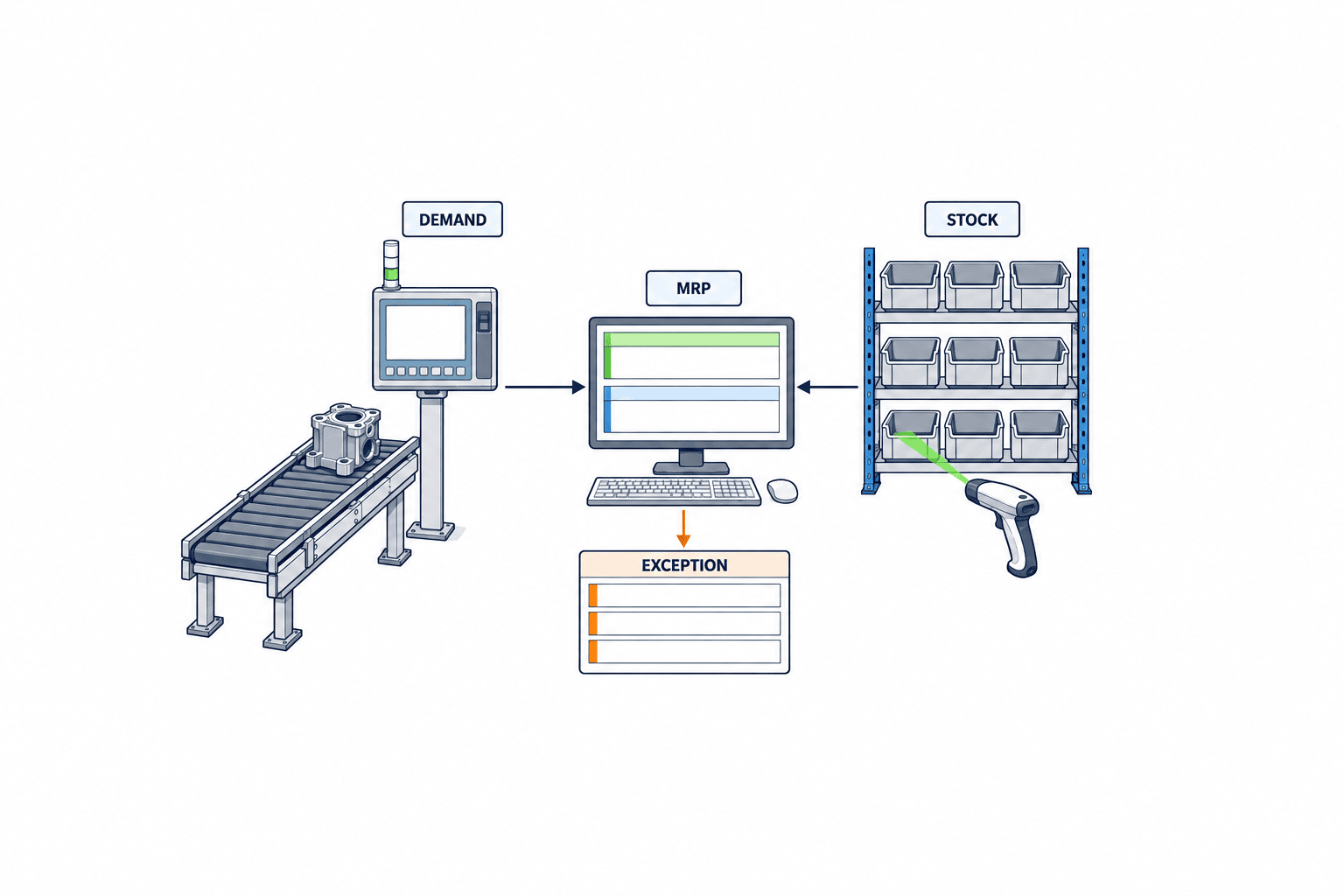
MRP (Material Requirements Planning) calculates the need for replenishment or date changes by matching demand, inventory, expected receipts, BOM, lead times, and more. The resulting exception messages indicate situations that deviate from the normal plan, or suggest that existing supply documents should be changed. However, the names, codes, target documents, and calculation scope differ by product. For example, SAP’s rescheduling may propose advancing or delaying confirmed receipts, while Microsoft Dynamics 365 describes action messages as proposals for advancing, postponing, or changing quantities. In both cases, these are not meant to be automatically applied to the shop floor without approval. Please refer to the product specifications as primary sources: SAP Rescheduling, Microsoft Action Messages.
In this article, “exception management system” does not mean replacing the MRP calculation engine itself. It refers to the operational layer that distributes proposals generated by existing ERP or APS to responsible staff, shows the rationale, records actions/holds/rejections, and checks consistency with confirmed documents. If your only goal is “visualizing material shortages,” the standard ERP material coverage screen may suffice. However, if exception handling is fragmented across multiple factories, suppliers, and procurement bases inside and outside Thailand—using email, Excel, or chat—then unifying the status and history of actions adds value. The key is to limit the implementation scope to the boundary between MRP proposal evaluation and reflection, not the entire purchasing system.
Notifications Are Not the Same as Business Exceptions
If every message displayed in the planning results is treated as “action required,” important cases will be overlooked. There are differences between orders already being expedited with suppliers, changes pending approval, schedules shifted by holiday calendars, warnings due to safety stock settings, and actual shortages that halt production. Business exceptions should be tied to conditions such as “when, which material, and which production order or customer order is affected” and “whether action is possible at this time.” Prioritization should be based on impact and deadline, not just screen colors or warning codes.
Proposals Are Not Confirmed Documents
Even if an expedite proposal is generated, the supplier may not have accepted the new delivery date. Even if a quantity increase is proposed, it may not have passed through MOQ, order multiples, price contracts, transport capacity, or warehouse space. For production order advances, equipment capacity, jigs, personnel, and material availability are also required. The system should have separate fields for “proposal,” “responsible person’s decision,” “agreement with counterpart,” and “confirmed value in ERP,” allowing tracking of progress. Microsoft’s official documentation also defines action messages as *proposals* for changes, with adoption left to the user’s discretion. Microsoft Action Messages.
Four Types of Messages to Target for Initial Implementation
You do not need to handle all codes at once in the initial phase. Start by targeting the four groups: expedite, postpone, quantity increase, and quantity decrease. Treat shortages and delays as separate impact displays for clarity. Microsoft Dynamics 365 action messages also use these four proposal types. Directly transplanting SAP codes to other products can cause confusion, so in the RFP, define the “business meaning” and “operation on documents,” and create a mapping table for product-specific codes.
| Type | Planning Question | First Evidence to Check | Example Actions |
|---|---|---|---|
| Expedite | Will current receipt/production date meet demand? | Required date, promised date, supplier reply, capacity | Expedite, substitute, plan change, customer response |
| Postpone | Will early receipt increase inventory? | Order change conditions, storage constraints, demand certainty | Change request, maintain, partial delivery |
| Qty Increase | Is additional procurement needed? | Net shortage, MOQ, order multiples, yield | Increase order, substitute material, adjust demand |
| Qty Decrease | Can excess procurement be reduced? | Cancellation deadline, contract, WIP progress | Decrease, reallocate, maintain |
This table is an example of practical classification. Actual calculation results and codes depend on the product settings. If you queue only “expedite” messages without affected customers or materials, staff cannot make decisions. At minimum, you need calculation time, plan version, item, site, demand/supply reference ID, old/proposed dates, old/proposed quantities, and whether activation is possible.
Why Exceptions Don’t Disappear: Check Data and Plan Versions First
Before discussing exception handling efficiency, confirm that you have reliable planning inputs. If there are BOM errors, outdated purchasing lead times, delayed receipt postings, unclear safety stock usage, or unapproved substitutes, the same warnings will be regenerated every time. Adding a “processed” button does not address the root cause of recurring warnings in nightly MRP runs. See Related Article on MRP Master Data Accuracy to organize input quality first, and distinguish between exception management cases and master data correction cases.
Plan versions are also important. For example, if you import calculation results at 8:00 AM, sales increases the quantity, and at 2:00 PM a staff member approves the morning’s expedite proposal, the morning’s premise may already be outdated. Records should include “MRP run ID,” “reference time,” “original demand/supply version,” and “re-evaluation deadline,” and check if the target document has changed before approval. Instead of overwriting new plans with old cases, invalidate the old version and link it to new proposals after recalculation.
Don’t Prioritize Solely by Shortage Quantity
A shortage of 100 units may have different implications: it could halt assembly tomorrow or simply fall below next month’s safety stock. Combine required date, next receipt, substitution possibility, customer priority, target production order, and time until actual shortage. SAP’s material coverage screen allows you to monitor shortages by definition and time to shortage. This is a good example of how “shortage” display depends on definition and timeline. SAP Monitor Material Coverage. When implementing, do not treat “shortage” as a single absolute value—show what is included in projected inventory.
Fix Calendars and Time Zones
If your Thai factory sources from Japan or other ASEAN sites, factory working days and supplier business days may differ. The meaning of “expedite by 3 days” changes depending on whether it’s calendar or business days. List the calendars used for factory, warehouse, supplier, and transport in ERP calculations, and decide the visible deadlines in Thai time and ERP’s internal time zone. Whether a case generated on Friday night counts as an SLA violation on Monday morning is an operational rule, not a data processing issue. In the RFP, specify tests for “lead time recalculation including holidays,” “cross-day/month/year boundaries,” and “date/time display conversion.”
Decide the Action Flow on a Single Page
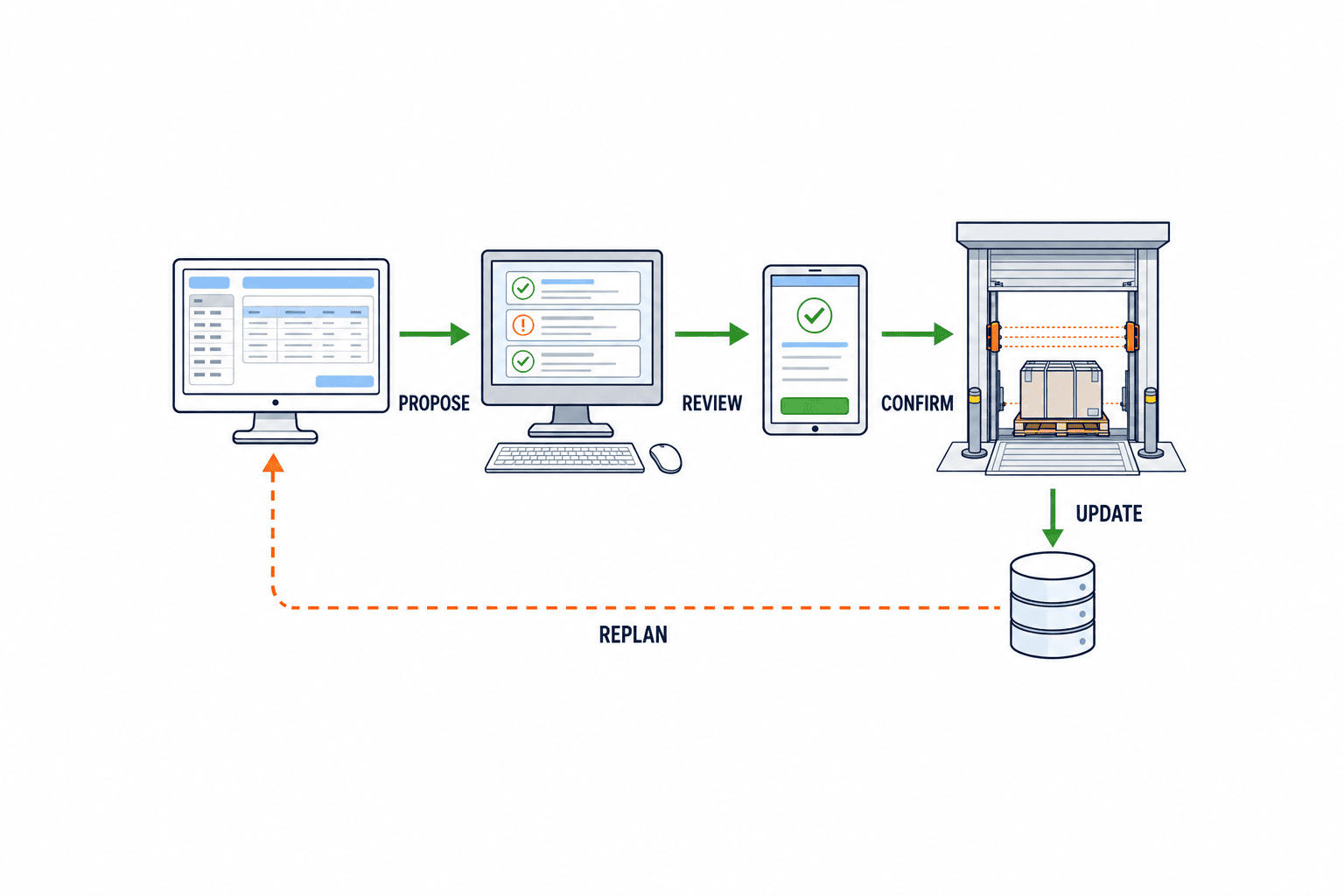
A good workflow does not increase notifications, but allows staff to track status. Standard statuses should be: “New,” “Investigating,” “Waiting for Supplier Response,” “Waiting for Approval,” “Waiting for Confirmed Reflection,” “Completed,” and “On Hold/Rejected,” with entry/exit conditions for each. For example, to move from “Waiting for Supplier Response” to “Waiting for Approval,” you need the changed delivery date, quantity, response date/time, and responder. To move to “Completed,” match the confirmed value in the ERP purchase order or production order, and check in the next MRP whether the shortage is resolved or has changed to another exception.
Staff decisions on site are not limited to accepting or rejecting proposals. Before contacting the supplier, they may check inventory allocation, switch transport methods, use approved substitutes, or renegotiate customer delivery dates. The system should have both reason codes and free-text fields, allowing aggregation by code while retaining context. The goal is to move from “staff noticed and called” to exception handling with records.
Don’t Decide Approval Authority by Amount Only
Quantity increases affect purchasing costs, but expediting dates can incur express shipping fees, and postponements can cause contract violations or damage supplier trust. The approval matrix should combine change type, amount, customer impact, use of substitutes, transport changes, and entry into frozen planning periods. Even if internally approved, do not update ERP’s promised delivery date until the supplier accepts. Separate records for “internal approval” and “external agreement” are necessary.
Clarify Handling of Frozen Periods
Within the frozen period of a production plan, changes may not be allowed with the same authority as regular replanning. Microsoft’s action message generation also depends on whether it’s inside or outside the frozen period and the approval status of planned orders. Understand product-specific behavior, and define factory rules such as “allow proposal display but require manager approval for changes,” or “only the planning manager can release urgent cases.” Related Article on Production Plan Freeze Window covers the design of plan changes in detail. This article’s role is to connect that boundary to MRP exception cases.
How to Connect ERP, APS, and Purchasing Systems
Integration has two directions. One is reading calculation results and creating cases awaiting decision. The other is reflecting approved actions in confirmed documents and importing the results. If only one direction is implemented, you may have “approved but not actually changed” or “already changed but case not processed.” In the RFP, focus less on API, file, or connector names, and more on how to track the same case by ID, and how to handle resends and duplicates.
Unique Key for Exception Cases
If you create a unique key using only item code and warning code, cases from different demands or plan runs may merge. Combine plan run ID, site, item, demand ID, supply ID, exception type, proposed date/quantity, and check if the product’s message ID is stable. If IDs change with each calculation, design rules for linking to old cases. You need to avoid duplicate registration of the same proposal and not overwrite different plan versions.
Update Conflicts and Idempotency
While a staff member has the screen open, a purchase order may be updated by another department. Before reflecting changes, match ERP’s update time or version, and if different, return to recheck. Even if a send times out, the ERP may already be updated, so blindly resending is dangerous. Save request ID, original version, and expected post-change value, and on retry, read the actual ERP state before acting. Even in the initial phase without automated ERP writing, you can standardize the procedure: “staff changes ERP, then matches document ID and old/new values in the case system.”
How to Roll Back on Errors
You may not be able to process inventory allocation, order changes, and production order changes as a single transaction. If only some succeed, show which parts succeeded and what needs manual correction. Unconditionally overwriting original document values in rollback may erase changes by other staff. In the RFP, separate “automatically restorable range” and “range requiring re-approval,” and keep audit trails. The most important thing is not to hide failures by marking cases as completed.
How to Design Exception Queue Prioritization
Simply displaying by warning code order is not useful for operations. Prioritization should combine impact on customers/production orders, action deadlines, alternative measures, and feasibility of changes. For example, “shortage that will halt production tomorrow and requires supplier response today” is top priority. “Will fall below next month’s safety stock, but already has confirmed receipts” should be in a separate lane. Do not fully automate classification; allow staff to override urgency and record the reason.
If there are many cases, bundling multiple proposals caused by the same root issue makes decisions easier. For example, if a supplier’s transport delay affects a dozen items, link the parent cause case and child impact cases. However, track approval and document reflection by item and order unit, and do not close child cases just because the parent is completed. Collapsing similar notifications is different from hiding missed actions.
Don’t Measure SLA by Apparent Elapsed Time
Even if you set “complete within 24 hours from new,” the meaning changes if waiting for supplier response, manager approval, or ERP integration failure. Track initial response time, decision time, external response wait, ERP reflection time, and replanning confirmation time as separate clocks to identify improvement points. For example, if initial response is fast but confirmed reflection is slow, increasing notifications will not help. Include business hours calendar and holiday handling in SLA definitions.
Don’t Use Only “Number of Cleared Warnings” as KPI
To avoid operations that reject cases just to reduce the number of unprocessed items on screen, also track outcome indicators: percentage of cases processed by deadline, recurrence of same root cause, percentage of cases invalidated by plan version changes, mismatches with confirmed documents, actual material shortages, number of emergency shipments, etc. Specify the denominator for each indicator, and consider differences in demand volume and material structure when comparing products or sites. Set numerical targets after measuring your own baseline before implementation; do not adopt other companies’ effectiveness rates without justification.
Responsibility Boundaries to Clarify in Thai Factories
When Japanese headquarters creates plans and the Thai factory executes orders and production, there may be discrepancies between “headquarters’ plan change proposals” and “local authority to confirm.” Assign case owners for planning, purchasing, production, quality approval, and customer contact, and clarify who can change dates independently. Even if screens are in English, Thai, and Japanese, approval will be ambiguous if business terms are not interpreted consistently. Fix translations for terms like “promised delivery date,” “requested date,” “planned receipt date,” “material required date,” and “response deadline” in a glossary.
Imported materials involve international transport and customs clearance times. Distinguish whether the “expected receipt date” in MRP is the port arrival date or the date available for use in the factory warehouse. Changing only the supplier’s response date is not enough; unless the material passes through transport, incoming inspection, and put-away, it cannot be used on the line. Instead of simply expediting dates, align delivery responses to “when and from which process the material is actually available for use.” Since customs rules and tax judgments differ by cargo and contract, the business system should only maintain required statuses and responsible persons.
What to Translate for Multilingual Operations
Translating only UI buttons is not enough for the shop floor. Unify the reasons for warnings, meaning of proposals, action reasons, approval comment templates, supplier request texts, and customer communication assumptions with a glossary. Keep the original text and do not finalize important conditions based only on translated text. For example, even if “advance” in English is translated as “expedite,” clarify on the screen whether it refers to advancing the order date or the delivery date. Display explanation texts for each language alongside unchanging document IDs, dates, and quantities to reduce misinterpretation.
Three-Stage Implementation Approach
Stage 1: Import calculation results in read-only mode and compare with legacy Excel or email. Observe message types, frequency, false warnings, case owners, and relationships with confirmed documents. If necessary items are missing, fix ERP extraction and master data before building screens. If nightly, recalculated, and manual calculations coexist, decide which run is the operational master.
Stage 2: Manage decision, approval, and supplier responses as cases. There is no need to rush ERP writing at this stage. After staff manually change confirmed documents, link document IDs and changes to cases, and check post-replanning status. Identify whether bottlenecks are due to data gaps, pending decisions, or waiting for external responses.
Stage 3: Integrate only standardized actions to ERP. Since the risk level of expedite and quantity increase varies, limit auto-reflection by change type, amount, and contract conditions. Leave manual approval for exceptional quantities and changes within frozen periods. Before expanding scope, test for duplicate sends, timeouts, parallel updates on ERP side, and rollback behavior.
RFP Requirements and Vendor Comparison
In the RFP, describe actual data and decision scenarios rather than just checking off function names. Instead of just “list of expedite proposals,” specify “display old delivery date, requested date, supplier response date, date available in factory, approver, and ERP reflected value for purchase orders.” Provide candidate vendors with the same sample data and have them demo how far they can process the same exception case. Authority, connection method, change history, resend control, language support, and support structure are requirements for live operation.
| Evaluation Item | What to Check in RFP | Evidence to See in Demo |
|---|---|---|
| Import | Can it retain plan run ID and original document ID? | Display of same/different cases after recalculation |
| Decision | Can it show demand impact and calculation rationale? | Traceability from item to customer order |
| Approval | Can it separate authority, delegation, and rejection? | Operations that change route by amount and frozen period |
| Reflection | Can it verify ERP update success? | Re-read and duplicate prevention after timeout |
| Multilingual | Can it retain meaning of terms and dates? | Compare same case on JA/EN/TH screens |
| Operation | Can it monitor, resend, and output history? | Records from incident to recovery |
For price comparison, estimate not only license fees but also ERP integration, item master maintenance, authority design, training, support, and additional site rollout under the same conditions. For “standard capability” answers, verify which product version, settings, and screens are used in the demo. Proposals to change the calculation engine and those adding only exception workflow have different scopes, so do not compare prices in a single table. Separate your own must-have and improvement requirements before the RFP.
Tests Not to Miss in FAT/SAT
In FAT (Factory Acceptance Test), use anonymized purchase, production, and demand data to check generation and case creation for each exception. In SAT (Site Acceptance Test), verify with the actual Thai factory calendar, authority, nightly calculation, network, and operational procedures. Do not pass tests just because the screen displays; check correct reflection to documents, prevention of incorrect reflection, and recoverability. The following are example test scenarios; set pass criteria and case numbers based on your own data.
- Two demands for the same material, with only one changing required date. Ensure exceptions are not wrongly linked to the other demand.
- Order quantity changes while waiting for supplier response. Old proposal is invalidated, and relationship between new plan version and old case is traceable.
- Another staff updates a confirmed purchase order before approval. Detect version conflict and prevent overwrite.
- ERP update succeeds but network response is lost. On resend, avoid double changes and recover from actual state.
- Expedite production order within frozen period. Staff without authority cannot confirm, and approval history is recorded.
- Supplier holiday and Thai factory working day differ. Requested date, response date, and available date are displayed correctly.
- Multilingual users open the same case. Date, quantity, and document ID match, and operation meaning is consistent.
- After rejecting a case, the same shortage remains in the next calculation. It is visible as recurrence, and action reason is traceable.
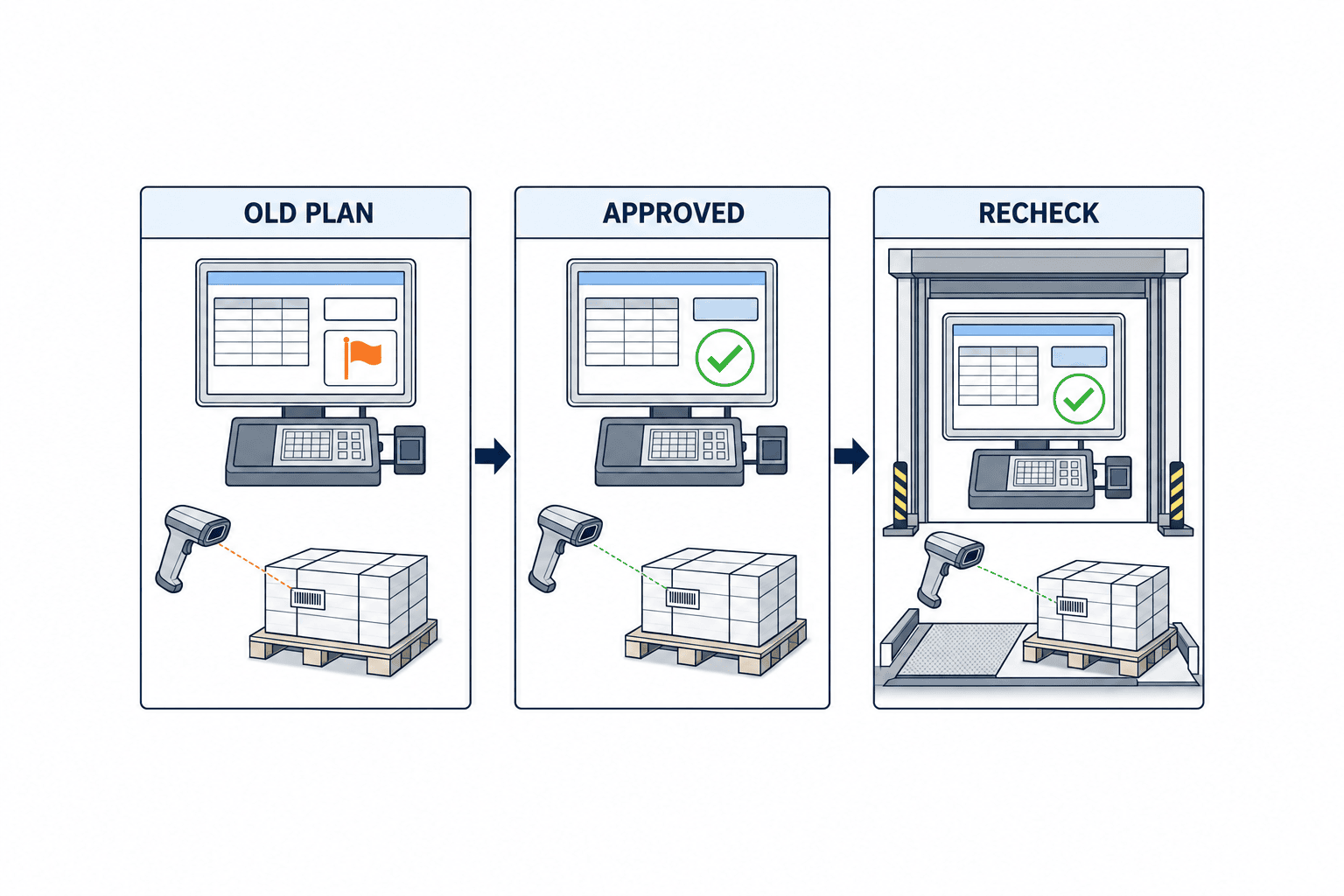
Record input data, expected results, actual screens and ERP documents, discrepancies, and history of corrections/retests in test results. If ERP settings are changed, record the configuration version as well. For PoC, it is easier to judge effectiveness and operational load by limiting the target to one line or one purchasing team and sampling actually processed cases, rather than importing all exceptions for the entire factory.
Common Pitfalls and How to Avoid Them
Focusing on clearing warnings as the goal. If you only evaluate by processed case count, rejections increase and actual shortages remain on the shop floor. Include ERP confirmed values and next calculation checks as case completion conditions.
Combining different proposals into one case. If you deduplicate only by item and code, you will overwrite different demands, sites, and plan versions. Validate unique keys using plan run ID and document references.
Hiding master data issues with workflow. Unupdated lead times or incorrect BOMs will generate the same warnings every night. Track “master correction” as a separate case, linking correction completion and recalculation.
Confusing approval and external agreement. Even if the purchasing manager approves, if the supplier does not accept, the expedite is not confirmed. Include both supplier response and ERP confirmed value as completion conditions.
Assuming resending is always safe. Resending the same update after a connection failure may cause double changes or overwrite updates by other staff. Match version and actual value before and after reflection, and route failures to human investigation.
FAQ: Deciding on MRP Exception Message Management Implementation
Is the standard ERP function sufficient for MRP exception message management?
If you have a single factory with clear staff and documents, and can track rationale and action results on standard screens, it is more rational to start with standard functions. Consider adding an operational layer only if you have scattered action histories across multiple systems and sites, cannot track approvals or supplier responses, or cannot verify reflection of changes. First, demo and verify actual data with your current standard functions.
Should all MRP exceptions be automated from the start?
No. Each proposal type has different contracts, amounts, capacities, quality, and customer impacts. In the initial phase, prioritize reading and decision history, and automate only clearly defined actions later. Be especially careful with quantity decreases and order cancellations, as they depend on supplier agreement.
What should be reduced first when there are many exception messages?
Do not simply hide items with many occurrences; extract cases that recur for the same reason. Check lead times, BOM, inventory records, plan versions, and calendars, and separate master corrections from actual supply adjustments. Hiding warnings is a last resort; record conditions for ignoring and re-evaluation dates.
How should implementation costs be compared?
Request estimates with aligned sites, ERP versions, plan run counts, document volumes, languages, and integration methods. Separate and compare license, integration development, master maintenance, monitoring, training, and support. “Market” figures without your own conditions are not useful for decision-making, so this article does not show uniform prices.
Conclusion
The key to MRP exception message management is not just a warning display screen, but building a single evidence trail from planning, decision, approval, external agreement, confirmed document, to replanning. First, define the meaning of expedite/postpone/quantity changes, plan version, document ID, responsible person, and completion conditions, and verify with actual data. Checking master data quality and frozen period rules at the same time will help avoid implementations that only increase processed case counts.
If your Thai factory’s MRP exception handling is scattered across email and Excel, you can start by organizing current ERP standard functions and a representative case to clarify required integration, approval, and acceptance conditions. Contact TOMAS TECH for consultation.


