



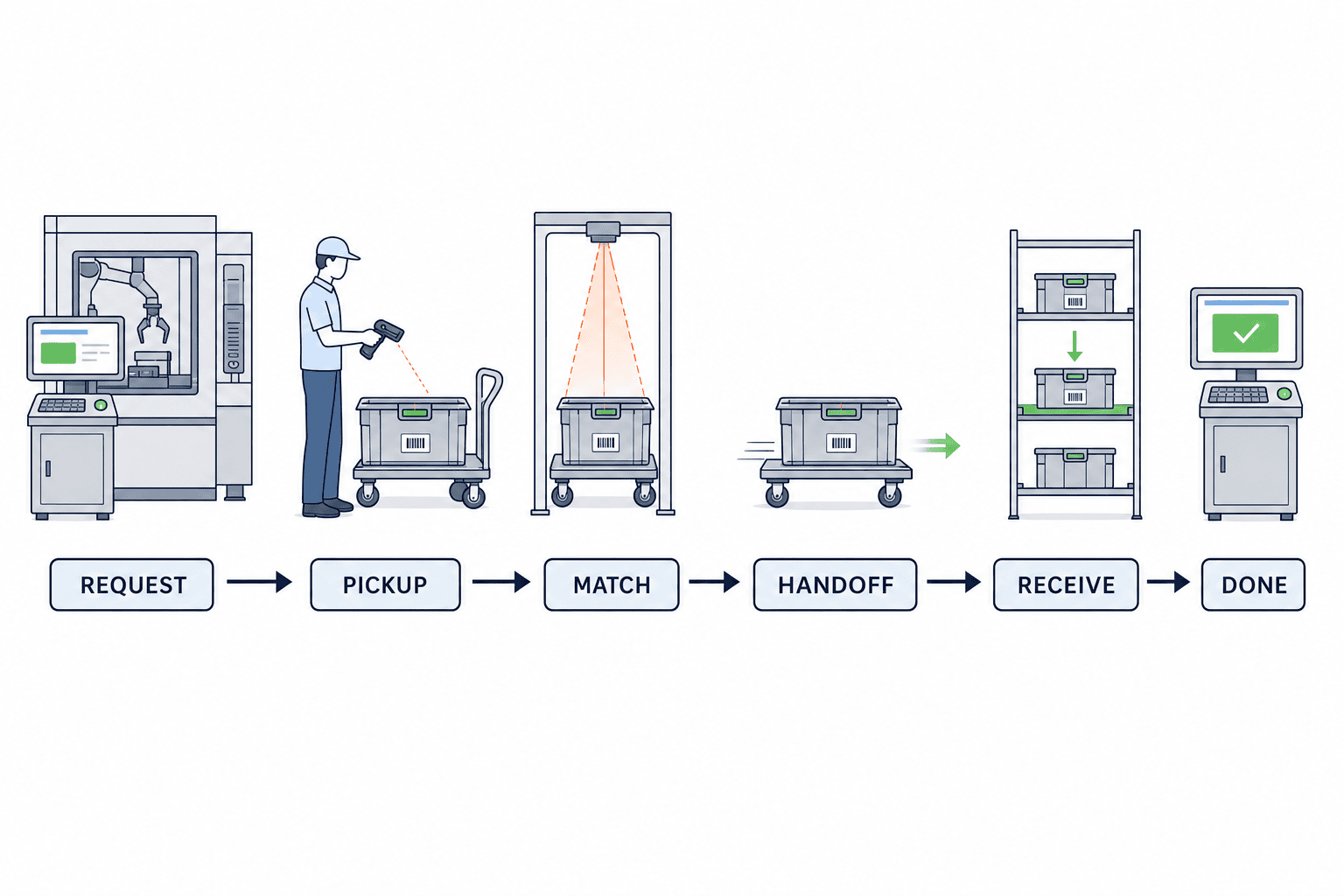
When implementing an inter-process transfer instruction system in manufacturing, it’s not enough to simply focus on having carts or AGVs run faster. Actual bottlenecks remain if the only concern is speed. For example, the upstream process says “I’ve delivered it”, while the downstream process says “I haven’t received it yet”. The disconnect arises because the location of work-in-process (WIP), responsible party, item/lot/quantity, and the next destination are not recorded as a single business transaction. This article focuses on factories where manual handling, carts, and AGVs are mixed, and places the state transitions of “Transfer Request → Pickup → Material Verification → Handover → Receipt → Completion” at the center of system design. We will organize practical methods for preventing mistaken transfers and missed receipts, clarify the boundaries among MES, ERP, and WMS, and detail what to verify in the RFP, FAT, and SAT stages.
Defining the Scope of Inter-Process Transfer Instruction Systems
A process route master defines through which processes a product passes. AGV control manages vehicle movement and stoppage. WIP lot split/merge manages genealogy and quantity consistency. The core function of an inter-process transfer instruction system is the business transaction of “delivering this material, in this quantity, from this location to that receipt point.” Regardless of the transfer method, it is vital to record unified traceability for request, pickup, verification, handover, receipt, and completion.
For example, when transferring a WIP container from press to assembly, the process is not complete just because the upstream task is marked as finished. Likewise, mere pickup by transportation staff does not mean the item is already stock of the next process. Only when the assembly side checks the material label and destination and acknowledges the receipt (and, if necessary, updates the MES as eligible for process input), is the business action closed. Without this “receipt verification,” there is a risk that materials remain physically staged while in the system they are “in transit,” or, conversely, the system shows them as received even though they have not arrived physically.
ISA-95 provides a reference framework for manufacturing operations management and enterprise business data exchange, while GS1 offers event standards for identification and visibility. However, neither standard mandates the six transfer states, screens, or approvers described herein. The following state model and checkpoints are a recommended implementation design based on these frameworks. For reference to the business handoff points, see our guides to Process Route Master Design and WIP Lot Split/Merge Control.
First, Decide on “Transfer Unit” and Identifier Structure
If you pick terminals or scanners without clearly defining the unit of transfer requests, you will be unable to explain subsequent quantity discrepancies. Are you making requests by item code only, by manufacturing order and lot, or will you trace containers uniquely? For high-risk or time-sensitive items, at least lot and container IDs are required. If product-level traceability is needed, serial numbers may be mandatory. However, individualizing all goods increases labeling, scanning, and verification workload—so balance the granularity to the risk and process needs.
We recommend assigning a transfer request ID that is immutable and distinct from ERP document numbers or AGV job numbers, always pointing to the same business action even after retries. The detail should include item, manufacturing order, lot, container ID, requested quantity/unit, origin, destination, planned time, priority, reason, and quality status. When containers are exchanged, always record an event linking the old and new container, rather than simply overwriting the ID. For partial transfers, separate request headers and multiple details/executions, and ensure the total quantity is preserved.
If you use GS1 identification keys or Application Identifiers, first confirm their consistency with existing labels. GS1 supports GTINs, lots, logistic units, etc., but you do not have to use GS1 keys for every internal factory container ID. The important point is that every scanned value maps uniquely to a single namespace and corresponding key in other systems. Also plan for label damage, reprinting, and empty container reuse in your data model.
Six States and Responsibility Transitions
Transfer states are not mere progress displays—they are contracts defining who, with what evidence, can proceed to the next state. Be sure to define practical flows including exceptions.
| State | Business Meaning | Main Input/Verification | Responsible Party |
|---|---|---|---|
| Transfer Request | Origin finalizes target & destination | Order, item, lot, container, qty, recipient | Origin |
| Pickup | Transport handler receives material | Request ID, container ID, location, handler/vehicle | From origin to transporter |
| Material Verification | Ensures picked item matches request | Label, qty, quality, route | Transport handler |
| Handover | Material physically staged at destination | Destination ID, time, container, qty | From transporter to ‘awaiting receipt’ |
| Receipt | Recipient confirms and accepts material | Container, qty, damage, quality, receiver | Receiver |
| Completion | Aligns business, stock, and process status | Receipt event and system linkage result | Defined system owner |
This sequence need not be rigid at every factory. Some sites may verify material at the origin before pickup. Tailor state transitions to your actual process, and always clarify who has physical responsibility at each stage. A crucial rule: do not bundle Handover and Receipt into a single action. For unmanned receipt, define alternative evidence and exception procedures such as sensors or location scans. Only treat AGV-run completion as ‘receipt done’ if it guarantees that the material is available at the specified location and usable by the downstream process.
Preventing Mistaken Transfers through State Transitions
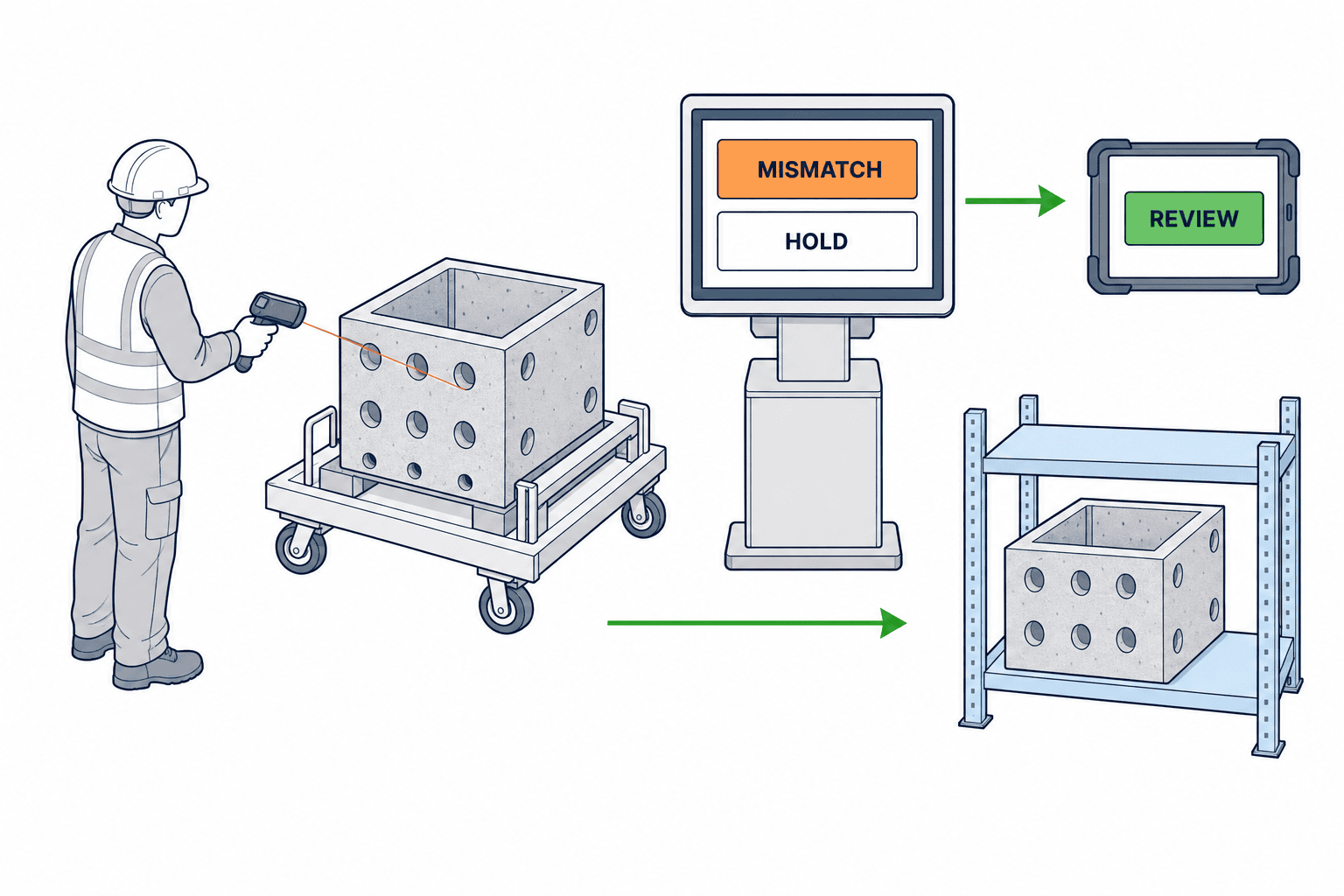
Most mistaken transfers occur when terminals display a “scan success” without actually verifying the relevant business combination. Container ID alone is insufficient. Always verify, for the request ID, the linked item/lot/quantity, current and target locations, quality status, and permitted process route. Decide with QA if materials on quality hold are to be stopped from being transferred, or permitted only to designated quarantine areas. Creating independent flags inconsistent with Quality Hold Management leads to double management at the time of release.
Recommended prevention rules:
- Prevent pickup for containers not on the schedule.
- Supervision required if departure location does not match.
- Prevent handover if receipt location differs.
- Require re-verification if quality status has changed.
- Quantity discrepancies must get reason code and approval.
- Do not issue new requests for containers with unfinished transfer jobs.
Scanning omissions should be justified not by speed, but by explicit reasons, with alternative verification stated. Record the authorizer, timestamp, and before/after values in the audit log.
The business transaction ID and goods ID must be shared across manual, cart, and AGV handling. AGV dispatch/job IDs and movement status are attached as ancillary data to the transfer execution. Switching to manual handling after AGV breakdown should not result in duplicate requests. When reallocating to a different AGV, only generate a new job after canceling the previous one, and ensure mutual exclusions so that both do not receive conflicting orders for the same container.
What Should Screens Show at Each Stage: Request, Pickup, Handover, Receipt
Origin screens must show “what, how many, to where, by when” on one screen. Designs allowing free-text destination entry cause naming confusion and selection errors. Filter destination choices based on route master; block or warn for halted lines or full shelves. However, a route master is “possible process steps,” while a transfer instruction is “the actual immediate destination”; don’t dual-edit the same data.
Pickup screens must be usable by gloved operators: show scan result, container image/shape, quantity, current/target location, and exception reasons in large format. Manual entry for unreadable barcodes should be permission-controlled and require confirmation. Define offline operation boundaries in advance for weak wireless zones. Do not display the state as completed on the terminal if only “received” locally but not yet confirmed on the server.
Receipt screens should show both “arrived” and “expected” items side-by-side to visualize discrepancies. Automatic receipt from just a container scan can miss quantity shortfalls and damage. Give the recipient choices to accept, accept partial, reject, or hold, sending notifications to the origin and inventory/quality staff as needed. Only allow process input after both receipt confirmation and quality clearance. Tailor authorities and screen fields to actual shop-floor accountability.
Visualizing Bottlenecks: Show “Location” and “Next Responsible Person”
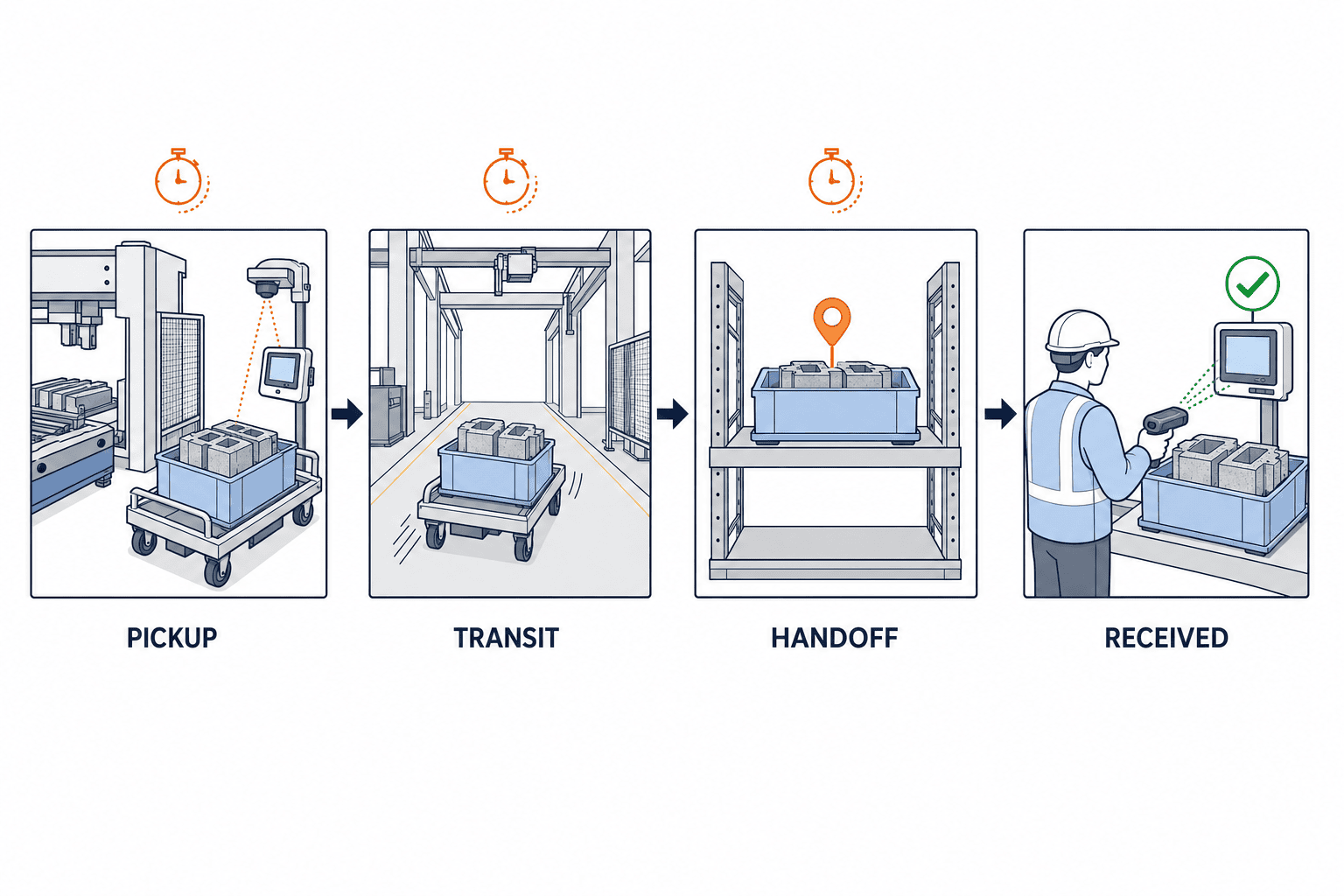
Simply counting in-transit cases does not drive improvement. Distinguish between reasons for bottlenecks: pending pickup after request, in-transit post-pickup, staged after handover awaiting receipt, and pending ERP/MES update post-receipt. Each stage should show the owner, last event timestamp, next action, and due date. Highlighting containers not received 30 minutes after handover is informative, but should be differentiated between night-shift lines with no one to receive and lines working but with overlooked items.
First, define acceptable time limits for each step, item, and shift with the shop floor. Timers should track not only “total time from request,” but residence time per status. Dashboards should show not only case counts but also median/upper quartile request-to-receipt times, partial receipt counts, number of destination rejections, label read failure rates, and exception approval rates. These can be used as effectiveness KPIs, but are not guaranteed benchmarks. Set improvement targets based on your initial measured baseline.
Event logs should record IDs, timestamps, locations, operator/equipment, state, quantity, exception reason, terminal and server times. The “what/when/where/why” concept from GS1 EPCIS is a good reference for log design. Claiming “EPCIS-compliant” requires validating not just using similar item fields, but matching the actual event structure and vocabulary.
ERP, MES, WMS, and Transfer Execution: Defining System Boundaries
System boundaries should be determined by “who owns which business fact,” not by product names. ERP holds manufacturing orders and book/plan inventory, MES manages process performance and on-site WIP, WMS handles warehouse locations and movements, and transfer execution specializes in dispatch/allocation for carts, humans, and AGVs. Existing functionalities vary by factory. Using ISA-95 Level 3/4 definitions for reference, map the source-of-truth and data update timing in a table:
| Data/Event | Recommended Owner | Points to Note |
|---|---|---|
| Manufacturing orders/req. qty | ERP or planning | Pass along revised values with effective times |
| Process status/WIP | MES | Use as precondition for transfers |
| Warehouse location & moves | WMS (if present) | Define boundaries vs. in-process staging |
| Transfer requests/history | Transfer instruction system or MES module | Use immutable IDs and retransmission logic |
| AGV movement/dispatch status | AGV fleet management | Separate arrival and business acknowledgment |
| Quality hold/release | QMS or MES quality module | Reflect change events during transfer |
Avoid writing “transfer complete” to all ERP, MES, and WMS systems at once—sync ambiguity arises during comms failures. The recommendation: finalize on the owner system, then broadcast the event with the event ID. Receiving systems should be idempotent (avoid double-counting on duplicate events). Unreliable receipts remain in resend queues with defined limits and manual recovery instructions. The accounting department should sign off when to confirm ERP inventory moves—before or after receipt, as per inventory/financial policy.
In the integration table, include not only system names but also keys, data types, required/optional marks, triggers, duplication handling, sequence inversion, cancellation, time-zone, and monitoring assignment. For multinational operations (Thailand/Japan/etc.), store timestamps in a universal standard (e.g., UTC) and display site-local times as needed. Test night-shift operation, server delays, and device time errors during FAT/SAT. When delayed events arrive after network outages, use state versioning to prevent already finished transactions reverting to “pickup”.
Using One Business Model for Manual, Cart, and AGV Transfer
Regardless of your stage of automation, using the same request model keeps tracking consistent when transfer methods change. Manual transfer: operator and terminal record pickups/handovers. Cart transfer: also record cart ID. AGV: issue jobs to fleet system and map arrival notifications to transfer system status. In all cases, receipt side confirmation is a separate event.
AGV route, obstacle avoidance, and safety controls are the responsibility of the fleet system—don’t duplicate this logic in the transfer instruction system, or you risk fragmentation of control. AGV systems may not understand manufacturing orders or quality holds; the transfer system should finalize the material and destination, and pass only the essential job to the AGV. For job cancellation, handover, and duplicate transfer prevention when switching between cart, AGV, and manual, test thoroughly together.
Optimization of transfer method comes after establishing the right business logic: closure from request to receipt; visibility on bottlenecks; and error prevention. Even if investing in AGVs first, always specify receipt confirmation and exception handling as non-negotiable requirements.
Centering Exception Handling in Your Specifications
In real operations, you will face request cancellations, urgent destination changes, label damage, quantity discrepancies, mixed loads, partial handovers, quality hold switching, and equipment failures. A demo covering only the standard flow cannot prove your system’s robustness. For each exception, create a table: possible states, who can approve, material’s physical location, system rollback method, and how to notify connected systems. Do not simply delete in-progress requests; always leave a cancellation event with reasons.
Pay particular attention to what happens when items handed over are rejected at receipt. Should they be sent back to the origin, quarantined, or pending quality decision? If sent back, don’t overwrite the original request as “not executed”—create a linked “return transfer” transaction for traceability. When quantity is short, separately record received and missing quantities, and allow routes for either re-transfer or confirmed shortage. If mixed loading is allowed, never skip container-level verification—save links from each composite unit to its components.
During network outages, distinguish between actions safe to record locally and those requiring server confirmation. If offline pickups are permitted, it is hard to guarantee that another terminal doesn’t claim the same container online. Depending on network reality, make offline mode read-only, or restrict to single terminals per area. After recovery, automatically detect duplicates, inversions, and time conflicts, and queue flagged cases for review. Minimize permissions for forced completion, requiring reasons and approvals for such cases.
What to Specify for RFP: Functional and Non-Functional Requirements
Agree on the Data Contract Before Screens
Before seeking UI quotes, prototype a data contract sample for transfer requests shared with other systems. Include request ID, event ID, request version, origin/destination, material ID, planned/actual quantity/unit, quality state, occurrence time, log time, reason, and linked original request ID in one example. For each key, clarify who creates it, which system can edit, digit length, null handling. For locations, exchange the immutable location ID (not a screen label); display names should be referenced from language-dependent masters, allowing differentiation for Thai and English users while mapping to the same location.
Another key point is handling requests covering multiple containers. If the request header is simply “Completed,” you may lose sight of undelivered details. Instead, aggregate overall status as “All Received,” “Partially Received,” “Discrepancy Processing,” and store state at the detail level. Calculate outstanding quantities not just by subtracting actuals from planned, but by incorporating approved corrections—disposals, returns, remeasurement, etc. To prevent confusion between gross and net, always distinguish between net quantity and container count.
When correcting events, never erase the original—flag the original event ID and reason in the cancellation. Audit screens should present both current and previous reports, corrections, approvals, and external system reflections in time order. Handle user ID access and retention per local HR policy. Listed fields are recommended examples, not regulatory guarantees.
RFPs stating only “we want visibility into transfer operations” cannot be meaningfully compared. Specify target processes, items, requests per day, concurrency peaks, container types, usage ratios by method, locations, languages, wireless coverage, current systems, and label standards. Require the vendor to answer with a state transition diagram, screen proposal, integration approach, exception handling, scope of deployment, data migration, and operations plan.
Functional requirements for comparison: (1) Request creation and duplication suppression, (2) Material verification, (3) Pickup/Handover/Receipt posting, (4) Partial qty/Mixed loads, (5) Integration with quality holds, (6) Bottleneck detection and notification, (7) Switching between manual/cart/AGV, (8) Audit history, (9) Role-based authority/approvals, (10) ERP/MES/WMS integrations as minimum axes. Ask whether each is “standard,” “configuration,” “custom development,” or “external product”—and see actual demos. Confirm multilingual support not just for screens, but for master data, exception reasons, messages, and procedures used on shop floor.
Non-functional requirements include: peak screen response, time from scan to state commit, availability, recovery time after resend, audit log retention, role separation, backup, vulnerability handling, and device loss revocation. Base performance targets on the plant’s allowable operational downtime and specify these in the RFP. “Real-time” and “high-availability” are not enough—define acceptance criteria. Cloud/on-premise architecture must weigh connectivity, support, and data residency. Total cost comparison must account for devices, labeling, wireless, integrations, training, and maintenance.
In FAT/SAT: Confirm Not Just “It Works,” but “It Closes the Business Loop”
In FAT (Factory Acceptance Test), test every planned state transition and prohibited transition. Besides the basic flow—right container delivered to right site—also trial scanning wrong lots, pickup under quality hold, duplicate pickups, shortages, re-routing, partial receipts, receipt refusals, AGV job failures, and resend of notifications. Use request ID, container ID, lot, quantity, location, expected state, and event in test data to check not just screens but data consistency.
SAT (Site Acceptance Test) uses actual operators, carts, scanners, wireless, shifts, and legacy systems. Simulate blind spots in racks, metal containers, night shifts, network dropouts, battery failures. Check physical location signs match master data. If only trained operators can succeed, test adoption among new staff using job aids and exception-handling scenarios.
Acceptance criteria should focus on business outcomes—not just “all screens load.” For example: “Cannot pick up wrong lot”; “No inventory increase after rejected receipt”; “Duplicate postings of same receipt event aren’t double-counted”; “Quality hold status changes mid-transfer are reflected”; etc. Note any items without a clear pass/fail as potential specification ambiguities; agree on expected results with both vendor and client before tests.
Implementation Sequence and Measuring Effectiveness
For initial rollout, start with a process-to-process segment prone to misdelivery or bottleneck, and with a limited set of receipt points for easier management. In current state analysis, track paper tickets, phone/voice requests, WIP racks, and ERP/MES/WMS update timing against actual materials. Measure baseline counts—requests, time to receipt, misrouted items, search time, unfinished tasks—for before/after comparison.
Next, define transfer units and location IDs, and test label readability. All transitions and exception cases should be agreed with shop floor/quality/warehouse/IT. Test first manual/cart flows and add AGV integration afterwards. If AGV is the main transfer method, always include job failure and manual switchover scenarios from the start. After deployment, review all unfinished business daily, classify discrepancy reasons, and update rules as needed.
Rather than promise “X% reduction in transfer times” sight-unseen, fix your baseline and measurement method first. Separate timings for request-to-pickup, pickup-to-handover, and handover-to-receipt. An initially rising rescan or exception rate could mean underlying discrepancies have become visible. Once records are stabilized, evaluate the real KPIs: dwell time, misdelivery, search effort, line stoppages, etc. Review dashboard metrics weekly and appoint accountability for operations changes.
Specific Situations to Confirm During On-Site Hearings
In meetings where specifications are decided, do not simply discuss while looking at system screens—instead, select a single work-in-process item and physically walk from the exit of the preceding process to the receiving shelf of the subsequent process to check the flow. Record details such as the completion time at the sending process, the position where the product label is affixed, the way containers are stacked, the waiting location for carts, who issues the transport requests, where the pickup staff finds the item, and what the receiver checks. If physical sticky notes or verbal “urgent” instructions are actually changing priority, also ask about the judgment criteria and approval actors involved. Confirm whether the process is followed in the same way during night shifts, breaks, or equipment downtime by having different staff carry out the steps.
After this, reproduce a recent discrepancy chronologically. For example, suppose a case where a container was on the assembly shelf, but the MES still showed it in the previous process; in that case, investigate at what point the physical state and the system status diverged. The required countermeasure will change depending on whether the previous process had merely finalized shipment, the transporter placed the item on a different shelf, or the receiving scan was held up due to communication loss. Do not simply categorize everything as “operator input error”; check whether the cause lies in the screen selection options, location IDs, device communication, or the design of responsibility transfer.
The hearing sheet should list, for each process, location, and shift, the standard workflow, the escape routes for exceptions, authorizers, the media used for recordkeeping, forms used later for reconciliation, and who closes pending items. During design reviews, convert cases from this sheet into test scenarios, such as “the requester has been confirmed but the product is not ready,” “a quality hold was applied after pick-up,” “the receiving staff was absent,” “the label could not be read and had to be entered manually,” or “the AGV arrived but the shelf was full.” By defining requirements starting from actual products and work tasks, it becomes easier to avoid implementation failures such as when system integration was completed but business transactions could not be closed.
Even in cost-benefit calculations, this on-site observation becomes the baseline. The time spent handwriting request slips or searching for items can be measured as work hours, but do not apply hypothetical reduction rates for misdeliveries if such events rarely occur. As a mechanism to prevent recurrence of discrepancies, qualitatively assess the potential to avoid process stoppage or quality quarantines, and distinguish these from observable metrics in your investment decisions. Also, track the possibility that problems may shift to processes outside the scope of implementation, to avoid improvements that only appear in the test area.
Frequently Asked Questions
Can MES Alone Manage Process-to-Process Transfer Instructions?
Yes, depending on MES functionality and scope. If the MES can handle transfer request IDs, material verification, pickup/handover/receipt, exceptions, audit logs, and external integration, you can implement entirely within the MES without adding extra systems. Where the dispatch or warehouse scope is wide, a separate system may be a better fit. Decide based on ownership of truth and responsibility, not the product name.
Is a Transfer Request the Same as a Stock Movement for WIP?
Not always. A transfer request is a physical movement and status event; a stock movement is an accounting or location change. Whether to move stock at pickup or upon receipt depends on accounting, inventory, and quality requirements. Also design for rollback/cancellation if the transfer fails.
Where Should Material Verification Happen to Confirm Transfer Completion?
Best practice is both at pickup (origin) and at receipt (dest). The first prevents removing the wrong container; the latter catches any staging in the wrong spot or missing quantities. For unmanned receipts, test sensor or location scan reliability and decide accordingly.
Is This System Necessary Even Without AGVs?
Necessity depends on frequency of misdeliveries, missed searches, bottlenecks, or lost receipts. Even with only manual or cart handling, the same problems occur if you lack records linking requests to items. Establishing a business model first makes AGV integration smoother later.
What’s Most Important in RFP and FAT/SAT?
Prioritize handling of duplicate records, quantity mismatches, quality holds, receipt rejections, comms outages, and resends over the basic flows. Your system must gracefully process these without blocking business or corrupting inventory/histories. Attach expected outcomes per request and event in the test cases.
Conclusion
When implementing inter-process transfer instruction systems, the priority is not transfer method, but accurate identification of goods and responsibility transfer from request to receipt. Always separate handover and acceptance; block erroneous lots/destinations/quality holds at state transitions; display not just location but the next responsible person and deadline for bottlenecks; clarify system owners and notification targets in ERP/MES/WMS/AGV; ensure robust recovery from duplicates, resends, and failures; and, during RFP/FAT/SAT, assess exceptions as well as standard flows.
If you are considering where to start with your current paper process, MES, WMS, or AGV setup, contact TOMAS TECH for a collaborative review of your inter-process material, state, and system boundaries—even at the conceptual planning stage.
Reference Information and Positioning for System Design
- ISA, ISA-95 Series of Standards: Reference framework for boundaries/exchanges between enterprise and manufacturing operations. Does not mandate the six states.
- ISA, Business-to-Manufacturing Transactions: Explains transaction models between Levels 3/4.
- GS1, EPCIS: Event-driven “what/when/where/why” approach to material tracking.
- GS1, Global Traceability Standard: For defining traceability granularity.
- GS1, Application Identifiers: Data elements and semantics for labeling.
- OMG, BPMN 2.0: Describes business processes spanning departments—does not specify transfer screens or thresholds.
The states, verification rules, KPIs, and RFP/testing items described here are design suggestions for implementation and are not binding requirements set by any standard, nor are they universally guaranteed improvement rates for every factory.


