


When introducing a management system for advance procurement of long lead-time parts in manufacturing, the first thing to decide is not a simple “order early” button. The key is to clarify the decision flow: who places the provisional demand based on what rationale while design and BOM are still unconfirmed, what commitments are made to suppliers at each stage, and who bears the costs of changes or cancellations. If this remains ambiguous and you simply connect MRP and purchasing, you may unintentionally cause double ordering or stagnant inventory, even though you intended to avoid shortages. This article organizes the practical steps from business process design, RFP, to FAT/SAT for those responsible for system selection and implementation at factories in Thailand and ASEAN.
Why Can’t We Wait for BOM Finalization for Only Long Lead-Time Parts?
For standard parts, the natural sequence is to finalize product specifications, approve the BOM, calculate requirements with MRP, and then issue purchase requests. However, for parts such as imported control devices, custom die materials, bespoke castings, or special electronic components—where the lead time from procurement to inspection is longer than the customer’s delivery deadline—following the same sequence means you will miss the delivery date from the outset. Therefore, advance procurement is not an exceptional “loophole,” but a management target that must be explicitly handled even when the design is unconfirmed.
What is crucial here is to separate “preparing in advance” from “issuing a binding order.” Initially, it may be sufficient to simply inquire about delivery dates, discuss capacity slots, or obtain quotations from suppliers. The next steps are to make cancellable reservations, secure materials, and finally place official orders. Each stage differs in terms of contractual binding force, cancellation deadlines, and cost limits. If the system interface displays all of these as simply “ordered,” approvers cannot accurately assess the actual risks.
At factories in Thailand, additional factors such as customs clearance for imports, local holidays, supplier production slots, and time differences or approval cycles with the Japanese headquarters (the design authority) come into play. If you simply round all of these into a uniform safety lead time, you will end up with some items being too short and others too long. What is needed is not only to review procurement lead times, but also to visualize design certainty and order binding force as separate axes. While the Thailand BOI highlights the formation of supply chains for electronics and machinery as targets for investment support, this does not guarantee shorter lead times for individual parts. Delivery lead times must be managed based on actual measured values for each item and supplier.
Dividing Advance Procurement into Four Stages: “Provisional Demand,” “Approval,” “External Commitment,” and “Formal Instruction”
To avoid forcing all operations into a single procurement flag, the process is divided into four distinct stages. The first stage is the provisional demand, initiated by design or sales. Here, the target project, candidate part number, required timing, estimated quantity, design version, and probability are recorded. The second stage is internal approval for advance procurement. This includes consideration of substitution possibilities and cancellation liabilities, with the budget holder setting an upper limit. The third stage is the external commitment with suppliers. Quotations, reservation of allocation, forecast notifications, and formal purchase orders (PO) are distinguished, and the content and date agreed upon by the supplier are recorded. The fourth stage is the conversion to a formal instruction after design finalization. The finalized BOM, MRP requirements, purchase requests, and PO lines are linked using the same reference key.
This classification is not a standard status name for a specific product, but rather an example of business process design to be determined during implementation. According to SAP documentation, when a planned order is converted to a purchase request, that request will not be automatically changed by subsequent planning runs. Microsoft Dynamics 365 documentation shows that approval and firming of planned orders, purchase requests, and PO approvals are each handled as separate operations. Actual behavior depends on the selected product and its configuration, so it is necessary to confirm in the RFP “which status is included in MRP supply calculations.”
The primary key for the advance procurement ledger requires more than just a part number. It should include the project ID, demand line ID, candidate part number or specification ID, design version, required date, supplier, quantity, and status. If the official part number has not yet been assigned, a provisional ID is issued, and even if it is later replaced with the official part number, the history is retained. If the demand line ID is deleted and a new line is created, it becomes impossible to detect duplication between the old forecast and the new MRP proposal.

How to Create Provisional Demand When Design Is Not Finalized
Provisional demand is not simply a copy of a confirmed order. It is necessary to record whether the basis is a customer project, prototype result, preliminary drawing, or forecast production, and to assign a probability. It is safer not to judge solely by a numerical probability such as “70%.” By separately recording which items in the drawing are not finalized, whether there are alternative candidates, and when decisions will be made, you can later explain the reasons for increasing the quantity. The designer evaluates the probability, sales indicates the likelihood of project success, and procurement shows the possible supply date. Inputs from all three should be compared on the same screen without mixing them.
At minimum, demand types should be divided into three categories: (1) Linked to a confirmed order but with only the part specification not finalized; (2) Based on customer forecast; (3) Based solely on internal sales forecast. (1) has a high priority for delivery assurance, while (3) carries a higher risk of inventory stagnation. However, if the same item is a general-purpose part that can be repurposed, the risk may be lower. Therefore, do not decide on procurement eligibility based solely on probability; combine the possibility of repurposing and cancellation conditions.
As an example, suppose the required quantity is 100 units, candidate A has a high probability of adoption but the design version is not approved, the supplier’s standard lead time is 16 weeks, and the remaining time to the customer is 12 weeks. This 4-week gap alone does not justify an immediate PO for 100 units. It is necessary to confirm whether a cancellable allocation for up to 50 units can be secured, whether switching to alternative B is possible, and whether the design decision will be made within 2 weeks. The numbers shown here are hypothetical for explanation purposes and are not general lead times or recommended inventory levels.
The minimum items to include in provisional demand are: project and demand identifiers, product and candidate parts, preliminary drawing or BOM version, required date, quantity range, basis for probability, planned design finalization date, alternatives, repurposing possibility, buy-back/cancellation conditions, and next review date. While it is possible to record this in Excel, if versions are overwritten, approvals are scattered via email, and double entry into the MRP system increases, it becomes impossible to track which numbers led to external commitments. When discussing implementation effectiveness, the focus should be on this traceability, not just the number of input screens.
Calculations to Show Approvers When Pre-ordering Long Lead-time Parts
On the approval screen, simply displaying a red warning such as “there may be a shortage” is not sufficient. What is necessary for decision-making is the ability to compare, in the same unit, the loss from delays if you wait versus the loss from cancellation or holding costs if you commit early. If the quoted price, reservation deposit, cancellation fee, and purchase obligation are all different, present them separately. For cases where it is difficult to accurately predict the loss amount, it is better to show the range of possible amounts and the basis for the estimate, leaving the unknowns as they are, which leads to better decisions.
For example, on the approval card, list the customer’s required date, the current earliest possible delivery date, the difference in days, the minimum and maximum required quantity, existing PO balance, available stock, reservable quantity, cancellation deadline, maximum loss amount, and whether alternatives are possible. Do not define the approval target as simply “allowed to order”; instead, specify “by when, up to how many units, from which supplier, and with what level of commitment.” The finance or business manager confirms the upper limit of the amount, engineering checks specification compatibility, and procurement verifies supply and contract conditions. If the quantity or specifications change beyond a threshold after approval, require re-approval.
Approval authority should be aligned with your organization’s regulations. Do not set the amounts or job titles mentioned in this article as universal standards. On the shop floor, rather than shortcuts such as “no department manager approval needed for small amounts,” it is more important to have a mechanism that accumulates the total amount that cannot be canceled. Even if each approval is small, the total amount reserved with multiple suppliers for the same project can exceed the budget. The system needs to aggregate committed amounts both by project and by item, and display the remaining budget before and after approval.
According to Microsoft Dynamics 365 public documentation, when PO change management is enabled, POs go through a draft and approval workflow, and changes to approved POs are handled by change requests or re-approval rules. There are also configuration exceptions for approval status of POs firmed from planned orders. Because of such product-specific behaviors, it is important not to assume requirements are met just because “approval is a standard feature.” For projects based on forecast demand, verify with sample data whether the desired approval route actually works.
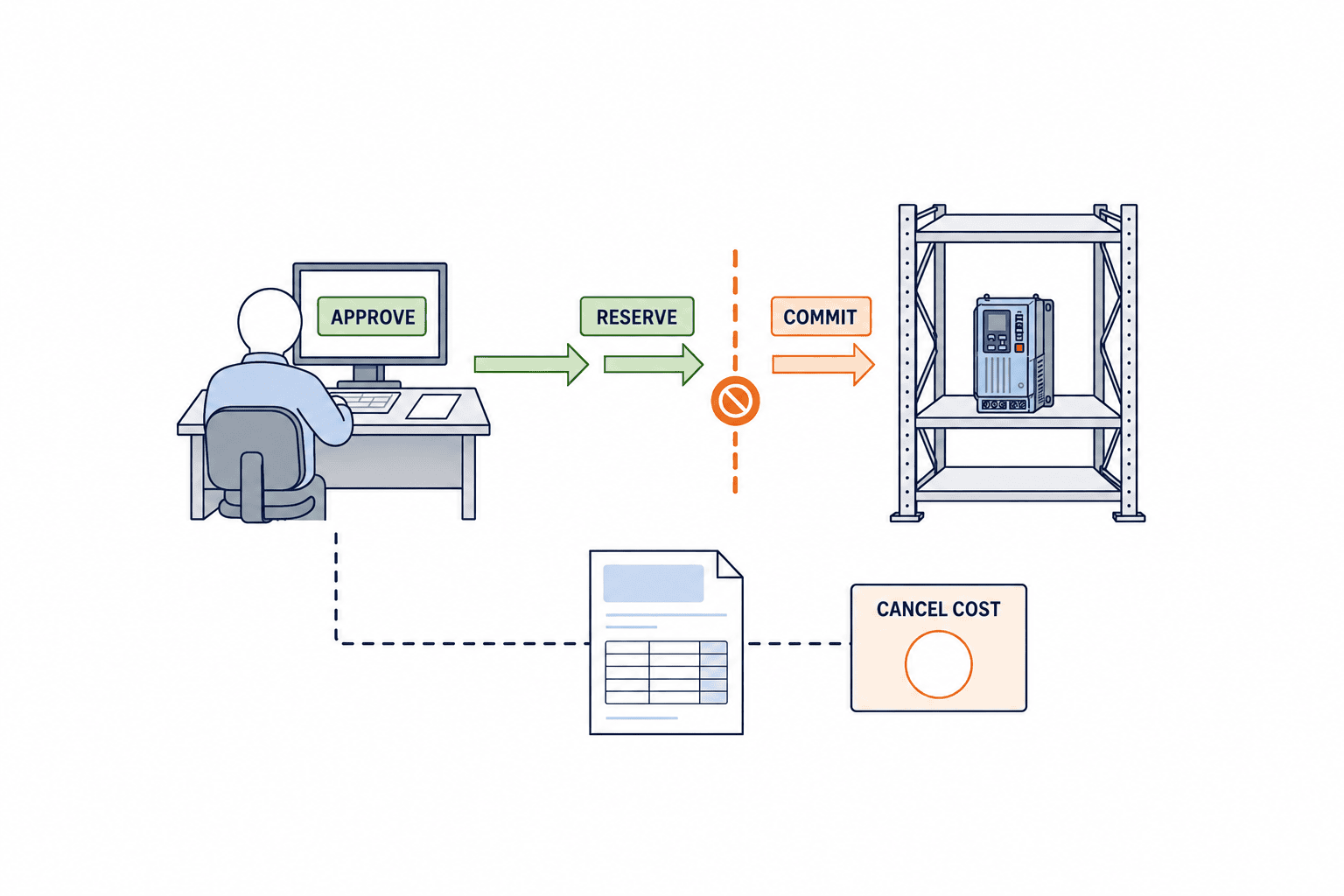
Decide on Cost Responsibility for Changes and Cancellations in Advance
Design changes are not exceptions to pre-ordering, but rather a normal branch to be anticipated from the start. For each item, define which changes—such as candidate part dimensions, material, certification requirements, quantity, or delivery date—require a new quotation. Change requests should include a comparison of the old and new versions, impact on existing orders, work-in-progress, and inventory, possibility of repurposing to alternatives, and whether costs can be charged to the customer. Microsoft’s engineering change management documentation also separates change requests and change orders, and covers checking the impact on existing transactions including purchase orders. Rather than applying this directly to your own design rules, use it as a reference for necessary evidence.
If cost responsibility is simply assigned to the “responsible department,” decision-making will be delayed. At the time of pre-order approval, set the business side’s acceptance limit, the cost-sharing terms with the customer, and the re-approval conditions in case of design changes. Once a change is confirmed, check with the supplier for the quantity that can be canceled and any fees, how to handle work-in-progress, and the outlook for repurposing. The accounting treatment of cost items and reserves depends on the company’s accounting policy, so do not let the procurement system decide automatically.
Before recording an order as “canceled,” keep a record of who notified the supplier and what the supplier has approved. Even if you set the remaining quantity to zero on the PO screen, this does not prove that the supplier’s production has stopped. According to Microsoft’s PO documentation, if there are already received or invoiced quantities, only the unprocessed remainder can be canceled, and when using change management, cancellations also go through a workflow. When selecting a system, check whether you can track external notifications, supplier receipt and agreement, and internal remaining amount calculations as a single history.
When the same part is used at multiple sites, repurposing may be more advantageous than cancellation. For this, check not only part number match but also version and effective date, quality and regulatory usage conditions, and transportation costs. Once repurposing is decided, reduce the committed amount for the original project and transfer the demand to the receiving project. If you can track both project IDs, you will not double-count the change costs. If system-based transfer is difficult, at minimum, set up a reference key linking the original and receiving order lines.
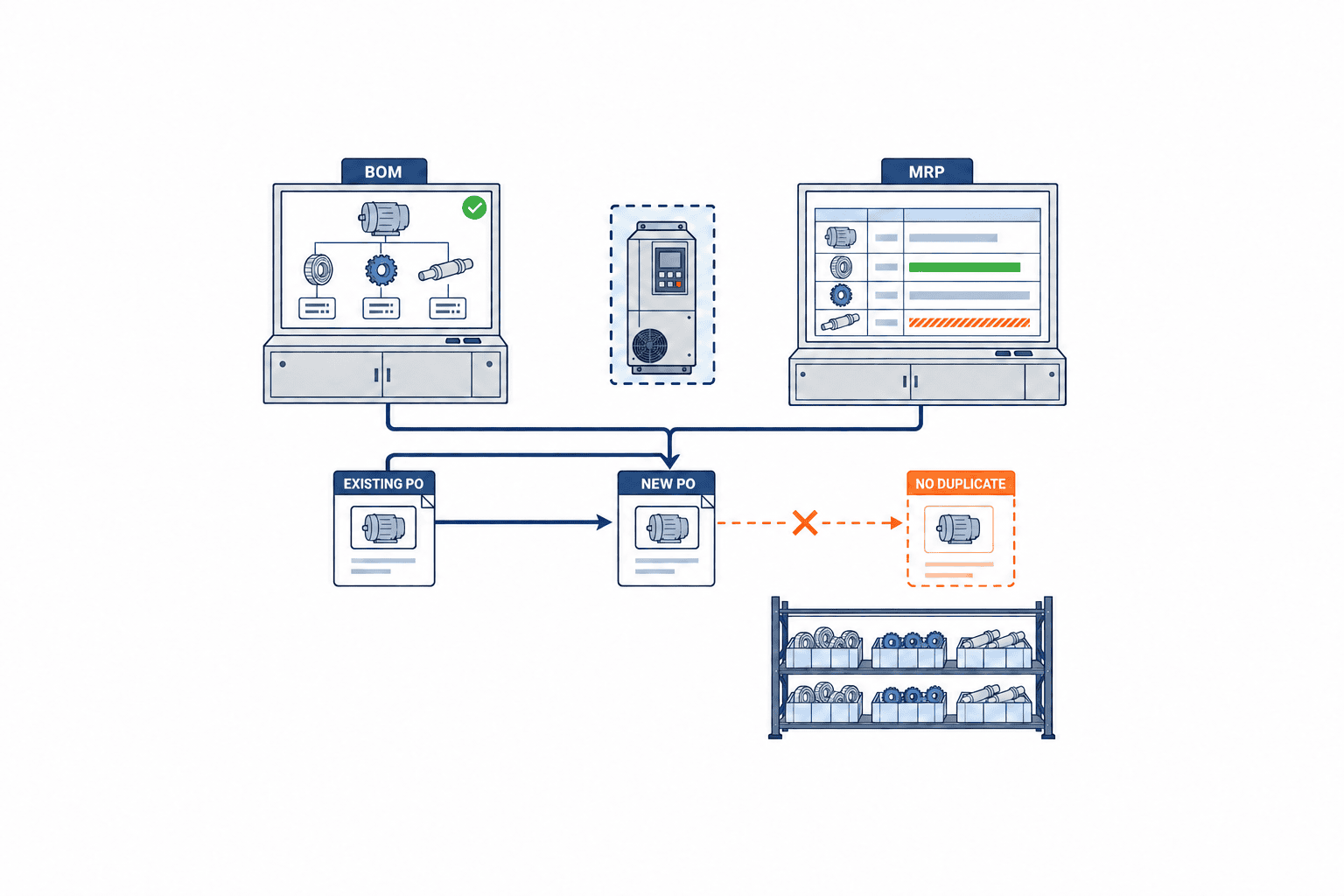
Preventing Double Ordering When Converting to Formal BOM and MRP Purchase Requests
Once the design is finalized and the BOM is approved, the MRP proposes the usual requirements. At this stage, if the system cannot reference advance purchase orders (POs) or reservations, a second purchase request may be generated for the same demand. Therefore, the prerequisite for conversion is to have an identifier that matches provisional demand lines with formal BOM lines, and to decide at which point in the requirements calculation or procurement review the existing supply commitments will be deducted.
The basic processing sequence is: ① Approval of the design version, ② Matching provisional demand with finalized BOM part numbers and quantities, ③ Matching reservations or remaining PO quantities with received quantities, ④ Passing only the difference to MRP and procurement, and ⑤ Closing the original provisional demand as “converted to formal instruction.” If partial conversion is necessary, split the quantities at the line level. For example, if out of 100 provisional demand units, 60 are finalized as item A and 40 remain as candidate B, you must not close all 100 units at once. Link only the finalized 60 units, and leave a decision deadline for the remaining 40 units.
The key for detecting double orders should not be limited to the part number. The same part number may be used in multiple projects, and conversely, a design change may result in a different part number fulfilling the same demand. Combine project ID, demand line ID, design version, item equivalence, required date, and supply line ID, and have exceptions checked by personnel. There are also cases where both a forecast and a PO remain due to delayed responses from suppliers, so issue warnings based on status and binding force. If one side is deleted mechanically, audit trails and contract histories may be lost.
SAP documentation shows examples where planned orders can be fully or partially converted to purchase requests, and Microsoft documentation explains approval and finalization histories for planned orders. However, the functions of each product do not mean that “advance orders for unfinalized designs can be fully managed as standard.” During implementation, confirm on the actual system—including settings and extensions—regarding the identity of provisional and formal demand, supply inclusion, partial conversion, and rollback in case of errors. The accuracy of MRP master data itself is a separate issue, and Organizing MRP Systems and Master Data Freshness is a useful reference.
What to Include in an RFP for System Implementation
Data Boundaries Between Advance Procurement Ledger and ERP
A common point of contention during implementation is where to place the authoritative source for provisional demand. If your ERP can handle unapproved BOMs (Bills of Materials) and provisional part numbers, you may choose to use the planning area within the ERP. If not, you will need to establish a separate advance procurement ledger, passing purchase requests and POs to the ERP only upon formal approval. In either case, the fundamental rule is to avoid manually entering the same demand in multiple locations. When integrating with other systems, always pass the original demand line ID and version, and receive back the purchase request number, PO number, and receiving number as references. If you design the system so that “because it’s in the ledger, the same demand is also added as a forecast in the ERP,” there is a risk that the MRP (Material Requirements Planning) will pick up the same demand twice.
Integration events should distinguish between creation, approval, modification, cancellation, and conversion, and must include idempotency keys to prevent duplicate documents even if the same message is resent. If an API call is interrupted due to a failure, check whether the message was sent or not before reprocessing. Simply “retrying” after a communication error can result in duplicates if, for example, the PO was successfully created but only the response was lost. It is also necessary for the purchasing staff to be able to view such statuses on the screen and for a history to be retained even if the issue is resolved manually.
You must also define ownership of the part number master. For example, engineering owns specifications and versions, purchasing owns suppliers and procurement conditions, warehouse owns receiving units and inventory, and accounting owns cost categories. List which changes require notification to other departments. If you synchronize only quantities while mixing units such as “pieces,” “sets,” and “units,” the meaning of 50 in advance procurement and 50 in the formal BOM may not be the same. Unit conversions, lot sizes, minimum order quantities, and packaging quantities should be displayed on the reconciliation screen.
Make Daily Exception Review an Operational Requirement
After implementation, daily exception review each morning becomes crucial. Rather than reading all long-lead-time parts every day, extract only those items such as provisional demands past their planned design finalization date, items awaiting supplier response, reservations nearing their cancellation deadline, lines where quantity changes have exceeded the approved amount, and lines remaining unconverted to the formal BOM. Assign a responsible person and next decision date to each exception, and record the reason once a decision is made. Simply looking at the number of items on a dashboard will not move cost accountability with deadlines.
The review should be a short joint decision-making session involving engineering, production control, purchasing, and sales. Engineering updates unresolved points and finalization dates, purchasing updates supply slots and cancellation conditions, production control shows changes in required dates, and sales shows customer confirmation status. As a result of the review, select one of the following: continue, reduce quantity, consider alternatives, formally convert, or cancel. In case of cancellation, stop the demand in the ERP, close external commitments with suppliers, and follow through to cost settlement. Avoid leaving “on hold” items indefinitely on the screen; always require a next decision date.
Key metrics for this operation include the number of overdue provisional demands, days of approval backlog, days of supplier response delay, lines past the cancellation deadline, and elapsed days until formal conversion. Since target values for these metrics depend on the nature of the parts, first analyze the current distribution. Investigating the causes of the top few backlogged items, rather than the overall average, is more likely to reveal defects in responsibility boundaries.
If your RFP is just a list of function names like “purchase request, approval, PO, receiving,” you will miss the difficult points. What you need to provide to vendors are state transitions and exception scenarios. For example: creating provisional demand from an unapproved BOM, approving reservations, receiving conditional responses from suppliers, design changes, partial cancellations, converting to a formal BOM, and re-running MRP. Ask the vendor to explain how quantities, committed amounts, supply inclusion, approval history, and external documents change before and after these events.
Minimum RFP items include: linking provisional IDs and formal part numbers, BOM version and effective date, quantity ranges by project, distinction between conditional reservations, forecasts, and POs, cancellation deadlines and cost limits, approval by authority level, change impact analysis, retrieval of PO balance, inventory, and work-in-process, supply inclusion in MRP, partial conversion, double order alerts, audit logs, evidence of supplier notifications, screens and notifications in Thai, English, and Japanese, and API or file integration with existing ERP. It is not necessary to implement all items at the initial rollout. Decide first where in the existing system decisions are finalized and where events are handed off.
Request vendors to distinguish between “standard support,” “customization support,” and “operational workaround.” For standard support, have them show the screens and data structures; for customization, the development cost and maintenance responsibility; for operational workaround, who records what. If the conditions for supply inclusion are unclear, there is a risk that MRP will treat reservations as equivalent to inventory, causing stockout warnings to disappear even though there is no physical stock. As a rule, provisional demand for unapproved designs is not formal inventory. Fix in your test cases which states are considered planned supply.
If you first clarify the scope of order management, purchasing, and MRP, it will be easier to write the responsibility boundaries in your RFP. What this article adds is the “conversion from advance procurement to formal instruction” and “cost responsibility at the time of change” that cross those boundaries.
Test Scenarios to Be Covered in FAT/SAT
In FAT (Factory Acceptance Test), it is important not only to check if screens can be saved, but also to verify that data does not become inconsistent in exceptional situations. Create a test case with sample values for explanation: provisional demand of 100 units, reservation of 60 units, required quantity after confirmation of 80 units, and already received 20 units. When MRP is recalculated here, compare the proposed difference with the expected value. The result will differ depending on whether reservations are considered as supply under the condition of “supplier confirmed” or “internal approval only,” so write down the expected value in advance.
Next, change the design version and test a case where only 30 out of the 60 units can be diverted to the new specification. Check whether the remaining PO for the old version, cancellation fees, quantity that can be diverted, and additional required quantity are each displayed separately. Even if MRP is re-executed during the process of cancellation approval, check that provisional demand does not revive and cause double PO issuance. Also test whether a person without authority can bypass approvals, whether proxy settings are recorded in the history when an approver is absent, and whether the numbers on the supplier correction document and the internal screen match.
SAT (Site Acceptance Test) is conducted using actual part numbers, supplier responses, holidays, currencies, approval flows, and networks of the Thai factory. Even if integration passes with only sample data, in the field, matching may fail due to differences in part number digits, revision notation, unit conversion, or variations in Thai part names. Confirm that the lists used daily by procurement display items such as design not finalized, awaiting response, approaching cancellation deadline, and unconverted official orders, and that daily reviews are functioning. FAT serves as evidence that the system works as designed, while SAT serves as evidence that the site can complete work using that design.
How to Measure Cost Effectiveness
The value of an early procurement system cannot be measured by “how many minutes faster ordering became” alone. What should be tracked are: the number of delivery delays caused by long lead-time parts, cancellation and holding costs after design changes, number of duplicate POs for the same demand, remaining unconverted provisional demands, time to approval, and time to supplier confirmation. If you can collect baseline values using the same definitions for 3–6 months before implementation, comparison becomes easier. If not, create a separate baseline during the test period and avoid estimating improvement rates without data.
There are limits to converting everything into monetary amounts. The customer impact of delivery delays varies depending on contracts or alternative production, and losses from excess inventory differ greatly depending on the possibility of diversion. In investment proposals, clearly separate reliably countable items such as cancellation fees, emergency shipping costs, and surplus from duplicate POs from estimated opportunity losses. If you specify the source of numbers, period, and target items, it becomes easier to verify after implementation.
Operational burden on the shop floor should also be included in effectiveness measurement. A system that requires the design department to update provisional demands daily will not take root. It is more practical to update only differences when changes occur and to automatically notify about approaching deadlines or delayed supplier responses. For procurement, it is easier to make decisions if the system prioritizes displaying rows with long lead times, uncertain specifications, and committed amounts, rather than monitoring all items.
If You Want to Implement in 90 Days
In the first 30 days, narrow down the target parts and measure the current situation. Investigate past cases of top long lead-time items, and list required date, design confirmation date, first supplier inquiry date, PO date, and receipt date. Select one case each where cancellation costs occurred due to design change and where double ordering happened, and examine where the responsibility boundaries broke down. If you try to completely correct the master for all part numbers at this stage, the project will stall, so limit test targets to the group of parts that actually require early procurement decisions.
From days 31 to 60, define the states and input items for provisional demand, approval, supplier commitment, and conversion, and check the data flow in existing ERP or MRP. Approval rules and cancellation limits are decided by the business owner, procurement, design, and accounting. Have the vendor demonstrate the earlier exception scenarios, and include additional work for master integration and authority settings in the estimate. Before filling out the software function list, it is important to align explanations using the same test data.
From days 61 to 90, operate with a small number of real cases. Do not fully automate PO issuance immediately; set a period where people check the consistency of approvals and external documents. Review unconverted rows, expired reservations, cancellation costs, and false duplicate warnings weekly, and revise rules as needed. The 90 days is not a guaranteed implementation period but a milestone for evaluation. If the scope of ERP modification or contract changes with suppliers is large, extend the phases accordingly.
Frequently Asked Questions
Do parts with undetermined designs always need to be procured in advance with a formal Purchase Order (PO)?
No. You can choose from various methods with different levels of commitment, such as lead time inquiry, quotation, allocation reservation, or conditional advance notice. Even when a formal PO is required, you should approve the quantity, specifications, cancellation deadline, and cost limit, and retain the supplier’s agreement. Which document constitutes a contractual commitment depends on the contract terms and legal jurisdiction, so do not judge solely by the standard screen names.
Is approval for MRP purchase requisition the same as approval for advance procurement?
Their purposes are different. An MRP purchase requisition is a procurement procedure based on confirmed plans and requirements derived from master data. Approval for advance procurement is a decision on how much risk to take when specifications or demand are not yet finalized. Even if the same workflow is used, design the process to separate the required justification, cost limits, and re-approval conditions. Since the behavior of plan order confirmation and PO approval varies by product, always verify with the actual system.
Can advance procurement reservations be counted as supply in MRP?
It depends on the binding force of the reservation and the status of supplier confirmation. If you treat unconfirmed inquiries or only internal approvals as confirmed supply, you may inadvertently clear shortage warnings. On the other hand, if you do not count confirmed POs, double ordering may occur. Clearly define the supply inclusion rules for each status, and test for double counting against the same demand line.
What should be prioritized in RFPs and FAT/SAT?
The top priority is ensuring that partial conversion from provisional demand to formal orders is possible, and that quantity, cost, and approval history remain linked even through design changes and cancellations. Rather than focusing on the number of screens or standard function names, verify this by testing the flow of a single case from start to finish. Especially important are double ordering after MRP reruns, supply inclusion before supplier response, and remaining balances during change approval.
Summary
Three Commonly Confusing Cases in Practice
The first case involves having two candidate parts, with only one having an extremely long lead time. In this situation, if you order the required quantity of both to ensure safety, one will inevitably be left over. Confirm with the design team “by when the candidate can be narrowed down to one” and “the range that can be decided in advance as a common specification.” With procurement, check each reservation slot, cancellation date, and production start date. Approvers should understand the maximum amount that will be double-committed, and if necessary, secure only a limited quantity in advance. Attach the reason for your decision to the demand line, and set a deadline and responsible person for closing out the part that was not adopted later.
The second case is when the same part is used in multiple customer projects. If the demand for Project A decreases and you want to transfer the excess to Project B, simple cancellation and reordering may not be necessary. However, if there are customer-specific tests, lot designations, certifications, or packaging requirements, even parts with the same part number may not be transferable. Check the warehouse inventory classification, supplier PO lines, and customer-facing traceability, and document the basis for your decision if transfer is deemed possible. If an accounting cost transfer is required, have the finance department confirm it. For advance allocation systems, it is easier to operate if there is a function to reallocate to the receiving project without deleting the original project’s commitment.
The third case is when the supplier’s lead time response changes, and the order decision deadline comes before the design is finalized. If the person in charge reads the email and proceeds with a “provisional PO,” the conditions at the time of approval may differ from the actual conditions. Record the response date, responder, whether it is a firm commitment, and changes from the previous response, and recalculate the difference from the required date. The responsible person should compare, using the same information, whether to choose expensive expedited shipping to meet the deadline, negotiate a delivery adjustment with the customer, or change the specification. After making a decision, notify the supplier of the latest order conditions and check that no outdated forecasts remain.
What these three cases have in common is not to have the system automatically select the correct answer. Instead, it is to link the decision deadline, rationale, external commitments, cost limits, and the next responsible person to a single demand line. By incorporating the assumption of design changes into the data structure, there is no need to overwrite numbers later. In pilot implementations, it is easier to quickly identify defects by running through these ambiguous real cases one by one, rather than only the simplest cases that are most likely to succeed.
When recording test results, do not rely solely on screenshots of the screen; include the version of the provisional demand entered, approver, supplier response, generated purchase request and PO, proposals after MRP re-execution, and remaining amount after cancellation as a set of evidence. Simply “no error occurred” is not sufficient for a success judgment. Check whether incorrect quantities were not proposed, whether the next responsible person could find exceptions, and whether the documents sent to the supplier match internal records. Only then can you achieve both quick decisions to meet deadlines and careful approvals to control costs.
Do not store the terms and conditions with suppliers in a separate file; make them accessible from the demand line. Even with the same term “reservation,” the cancellation cost differs depending on whether only a verbal supply slot was indicated, materials were actually secured, or production was started. The terms and conditions sheet should record the validity period, what is secured, whether the unit price is fixed, permissible range for quantity changes, cancellation method, and the responder. If important conditions remain unclear as the approval deadline approaches, display those uncertainties on the approval screen. Not treating blanks as conveniently zero cost or as firm commitments is fundamental to preventing future cost disputes.
Additionally, in multilingual factories, fix the status codes and definitions in advance so that the same status can be referred to in both Japanese explanations for headquarters and Thai instructions on the shop floor. Even if the translations for “forecast,” “reservation,” and “order” are aligned, their contractual meanings may not match. In the system, use common codes and map each language’s display and business explanation accordingly. Store supplier order documents in the language and version agreed upon with the supplier, and clearly indicate that internal translations are for reference only. These seemingly minor settings support reproducibility of decisions during personnel changes and audits.
Advance procurement of long lead-time parts is not simply about issuing POs earlier. It is a series of management steps: recording uncertain demand with versioning and justification, approving the company’s committed amount, distinguishing agreements with suppliers, retaining responsibility for design changes and cancellations, and converting to formal BOM, MRP, and purchase requisition only once. The implemented system must be able to link these statuses and histories. For RFP and FAT/SAT, use the most problematic exceptions as test data for evaluation.
If you are considering advance procurement of long lead-time parts at your Thailand or ASEAN site, you can consult us starting from organizing the connection points with your current ERP/MRP and the approval/conversion processes. Even if you only have a few target items at this stage, we can help you confirm the necessary management scope together. Contact us here.
Reference Information
- SAP Help Portal: Conversion from Planned Order to Purchase Requisition
- Microsoft Learn: Approval and Management of Planned Orders
- Microsoft Learn: Firming of Planned Orders
- Microsoft Learn: Purchase Requisitions and Planning
- Microsoft Learn: Purchase Order Approval, Modification, and Cancellation
- Microsoft Learn: Engineering Change Management
- Thailand BOI: Supply Chain Development Support
*The cases using quantities and days in this article are for illustrative purposes. Please confirm actual delivery dates, costs, and contractual responsibilities based on your company’s real data and contract terms.*


