


The motivation for introducing a “Quality Hold Management System” in manufacturing is not limited to slow entry of inspection results. Items placed on hold remain on the shelf, appearing available for allocation in the ERP, pickable in the WMS, and ready for process input in the MES. If this situation occurs even once, simply digitizing inspection forms will not solve the problem. What is needed is a mechanism that synchronizes the object, quantity, location, usability, and release authority at the same point in time.
This article organizes the practical aspects of quality hold management for incoming raw materials, work-in-process (WIP), and finished goods, with a focus on manufacturing sites in Thailand. Rather than introducing the features of commercial products, it provides a continuous overview of business requirements, the division of responsibility between ERP, MES, and WMS, partial release, prevention of shipping errors, and test conditions for RFP and FAT/SAT. For regulated industries, it is necessary to separately confirm applicable laws and customer requirements.
The First Decisions When Introducing a Quality Hold Management System
A quality hold is a business status in which the use, movement, or shipment of an item is temporarily restricted due to reasons such as awaiting inspection, suspected nonconformity, process deviation, or customer notification. It is not synonymous with “defective confirmed.” After investigation, items may be classified as passed, reworked, sorted, conditionally usable, returned, or scrapped. The release of a hold is only complete when it is reflected not just in the quality department’s judgment, but also in inventory transactions and shop floor operations.
In practice, do not lump everything under the term “hold”; instead, break it down into at least four questions. First, what is the target? Is it the entire item, lot, serial number, pallet, container, or WIP order? Second, what quantity is being held? Is it only the inspection sample or the entire lot? Third, what is being restricted? Order allocation, picking, shipping, process input, movement, repackaging, and inclusion in available inventory for planning are all separate considerations. Fourth, who can change how many units to which status, and based on what evidence? If you design only the screens without deciding these points, the meaning of “hold” will differ at each site.
Even in the official documentation for Microsoft Dynamics 365, inventory blocking for quality orders, manual blocking, and blocking by inventory status are treated as separate mechanisms. The inspection sample quantity and blocked quantity may not always match. While you should not apply the settings of a specific product directly to another company, these references illustrate the need to design “what to block and in which transaction” individually. Sources: Microsoft Quality orders, Microsoft Inventory blocking.
Distinguishing “Under Inspection,” “On Hold,” and “Nonconformity Confirmed”
“Under inspection” means the result is not yet determined, and usage is restricted according to rules. “On hold” means the item is temporarily removed from normal operations, pending investigation or judgment. “Nonconformity confirmed” means a mismatch with requirements has been identified, and a decision on disposition is needed. If you lump all of these under a single “NG” (No Good) field, the release conditions, responsible personnel, allocation rules, and lead time analysis become ambiguous. Design short status names for display on shop floor screens, and separate reason codes and judgment codes for internal system use.
How to Specify the Scope of Items to Be Held
If identification of the target is weak, no matter how strict your approval screens are, other containers may still move. The basic hold key consists of item, lot or serial number, storage location, packaging/container ID, quantity, unit, and quality status. For WIP, you may also need production order, process, work area, and process pass time. If you include items at subcontractors, separate ownership and physical location as distinct fields. Identification labels should display both human-readable text and machine-readable codes, and after scanning, the terminal should return the item, lot, status, and quantity.
Even when “holding a lot,” you must decide whether to target only some containers within the lot, or to hold the entire lot across all sites. The former may be too narrow and miss contamination; the latter may be too broad and halt supply. In initial investigations, it is possible to widen the scope for safety, then narrow it step by step based on process history and inspection evidence. However, avoid automatic narrowing; always record the basis, approval, and target IDs. If you split or merge WIP lots across production orders, you can confirm the handling of parent-child genealogy and quantities in WIP Lot Split & Merge Management in Thailand.
The GS1 Global Traceability Standard lists time, object identifier, location, process stage, status, and responsible person as key data for traceability events. GS1 EPCIS 2.0 also defines “disposition” to indicate post-event status, and “persistentDisposition” for statuses that continue until explicitly released. Not every factory needs to adopt EPCIS, but designing the system to record “hold start” and “hold release” as events rather than overwriting is a useful reference. Sources: GS1 Global Traceability Standard, GS1 EPCIS 2.0.

Clearly Indicate the Unit of Hold Scope
For example, suppose there are 100 boxes in raw material lot R, and one box is found with damaged packaging. First, do you hold only the damaged box, the 10 boxes in the same shipping unit, or all 100 boxes? The decision depends on the type of defect and the potential outflow route. The system should separately record the “logical unit of hold” and the “physical unit actually secured,” and issue a warning if there is a discrepancy. Even if all 100 boxes are logically on hold, if only 98 boxes are confirmed by terminal, the remaining 2 unlocated boxes should be displayed as unresolved.
Do not rely solely on barcodes for item verification; consider label peeling, repackaging, pallet transfer, and misreading during manual entry. When an inspector identifies an item using an alternative ID, record the original ID, alternative ID, reason, time, and approver. These points affect the design of item tags and are not just about matching inventory balances.
Define State Transitions First
The recommended minimum set of states is: “Available,” “Awaiting Inspection,” “Quality Hold,” “Awaiting Decision,” “Under Rework,” “Conditionally Available,” “Awaiting Disposal/Return,” and “Completed.” However, the goal is not to increase the number of states. It is crucial to specify, line by line, who can move an item to the next state, what evidence is required, and what happens to inventory and shop floor operations. Do not force a one-to-one correspondence between on-screen states, ERP inventory categories, WMS pickability, and MES production permissions; instead, use a mapping table.
| Business Event | Item State | Typical Prohibited Operations | Main Responsible Party | Required Evidence |
|---|---|---|---|---|
| Inspection Instruction | Awaiting Inspection | Allocation, production input, and shipping as per regulations | Quality/Receiving | Inspection instruction ID and target quantity |
| Abnormality Detected | Quality Hold | Picking, production input, shipping | Shop floor initiator, Quality confirmation | Location of issue, photos, target ID |
| Investigation Complete | Awaiting Decision | Hold continues | Quality | Inspection values, cause, scope of impact |
| Pass Decision | Available | Normal transactions after restrictions lifted | Authorized quality personnel | Decision maker, date/time, quantity released |
| Rework Decision | Under Rework | Automatic return to normal inventory | Quality/Production | Work order, results, re-inspection |
| Disposal/Return Decision | Awaiting Disposal/Return | Return to available inventory | Quality/Warehouse/Accounting | Approval, disposal transaction, balance reconciliation |
Separate “Decision Made” from “Released.” Even if quality inputs a pass, if the ERP inventory category change fails, the item must not be made available for shipment. Conversely, if the ERP category is changed manually, items not yet approved could be shipped. Even when displaying state transitions on a single screen, cross-check responses from each system and leave any unreflected changes as a separate error state.
Partial Release and Remaining Quantity
Consider an example where 100 units of the same lot are put on hold, and after sorting, 80 units pass, 15 require rework, and 5 are scrapped. This is a hypothetical scenario for explanation purposes and not actual data. Do not “release” all 100 units at once; instead, confirm the quantity for each action. The remaining hold quantity is 100−80−15−5=0. However, whether the 80 passed units were already allocated, the 15 rework units become WIP in another process, or the 5 scrapped units require accounting treatment—these are separate transactions. In addition to quantity conservation, clearly indicate the posting destination and responsible party for each state.
If there are fractions, conversions between weight and unit count, destructive testing of samples, lot splitting, or returns from subcontractors, the same formula cannot be simply applied. Add criteria for unit conversion, yield, sample consumption, and approval for discrepancies. Note that reaching a quantity of zero and completing all transactions are not the same. If there are pending disposal transactions awaiting approval or unprocessed WMS tasks, the case should remain open and be displayed as incomplete.
Which System Should Be the System of Record: ERP, MES, or WMS?
Typically, the ERP is the system of record for items, financial inventory, purchasing, and sales; the MES for process results and WIP; and the WMS for locations, containers, and warehouse operations. However, the actual scope of existing systems varies by company. When developing a new quality hold application, it is practical to design it so that it does not add another “inventory truth,” but is limited to being the system of record for quality decisions, approvals, and event integration. List which system owns each state, and prevent the same attribute from being freely modified on two different screens.
| Data/Operation | Candidate System of Record | Role of Quality Hold System | Boundaries to Confirm |
|---|---|---|---|
| Item/Lot/Inventory Quantity | ERP/WMS | Reference and fixing target ID | Update delays, units, locations |
| Process/WIP Quantity | MES | Abnormality initiation and input block instructions | Cross-process, split/merge |
| Decision/Reason/Approval | Quality System | Holds the system of record | Authority, re-decision, audit log |
| Picking/Movement | WMS | Linkage for work prohibition/permission | Offline terminals, pre-issued tasks |
| Inventory Category/Cost Processing | ERP | Transaction requests based on decision | Cancellation, resend, financial closing |
In Microsoft’s Quality Orders, inspections are linked to receiving, sales, and production references, and quantities under inspection are blocked. SAP’s official documentation explains that changing from quality inspection stock to available stock involves a QM usage decision and a posting change on the WMS side. These are product-specific features, but they show that “quality decision” and “warehouse-movable state” are separate processes. References: Microsoft Quality orders, SAP Effect of the Usage Decision. For finished goods, also see Management from Completion to Finished Goods Receipt.

Separate “Instruction Success” from “Reflection Confirmation” in Integration
When the quality system sends a hold instruction, it does not mean the hold is safely in effect. Only after confirming the ERP inventory block, WMS pick cancellation, and MES production input prohibition can it be considered “reflected.” Even if the API response times out, the process may have actually completed. Use the same event ID for resending, and prevent duplicate execution on the receiving side. If even one system fails to update, notify the responsible person and clearly indicate a temporary stop at the shipping site.
Conversely, for release instructions, do not simultaneously lift all permissions; instead, make it conditional on the completion of decisions and necessary inventory transactions. The order of allocation release, return to available inventory, WMS pick resumption, and MES input resumption should be determined according to the item’s use. Whether to automatically reallocate to existing orders is a separate business decision. Releasing a quality hold does not automatically mean assignment to a specific customer.
Offline Terminals and Pre-Issued Tasks
At Thai factories, there are often areas in warehouses or on the shop floor with unstable connectivity. If a terminal trusts the last “Available” display indefinitely while offline, there is a risk that items will be picked after being put on hold. Consider designing the terminal’s state cache with an expiration period, and halt critical transactions for the target lot if the cache expires or synchronization fails. If the item is already included in a pick task, handle cancellation differently depending on whether the task is unstarted, in progress, or completed. Physical movements that are already completed cannot be reversed by software cancellation alone, so issue location checks and isolation tasks.
Standard Operations from Quality Hold Initiation to Release
The first stage is detection of an abnormality and provisional isolation. The discoverer scans the item with a terminal and enters the type of abnormality, time of discovery, process/location, quantity, photos, and urgency. There is no need to grant the discoverer authority for “quality decision.” Immediately after initiation, transactions for the item are stopped according to preset rules, and the quality team is notified. For items that cannot be scanned, assign a provisional identifier and later match it to the official ID.
The second stage is defining the scope. The quality team checks for spread to the same lot, same equipment/time period, same raw materials, or same customer shipment destination. If the scope expands, record it as a new hold event, and do not overwrite the quantity of the existing hold to erase history. If there is a possibility that items have already been shipped, hold management alone is insufficient. Connect to separate procedures for customer notification, recall, and traceability.
The third stage is investigation and decision. Link inspection values, specification versions, measuring instruments, photos, process conditions, sample counts, and decision rules to the case. Approvers review any missing evidence and select pass, sorting, rework, special approval, return, or disposal. “Special approval” depends on customer contracts and internal authority, so do not allow automatic approval with a standard button. If a decision needs to be changed, do not erase the previous decision; record the reason for change and re-approval.
The fourth stage is system reflection and physical confirmation. Update inventory categories, locations, work tasks, and cost processing according to the decision. Check that the remaining hold quantity in the system matches the actual quantity on the isolation shelf. Close out the destination for passed items, new instructions for rework items, transport for returned items, and evidence for scrapped items individually. Finally, mark the case as complete and analyze the lead time from detection to reflection.
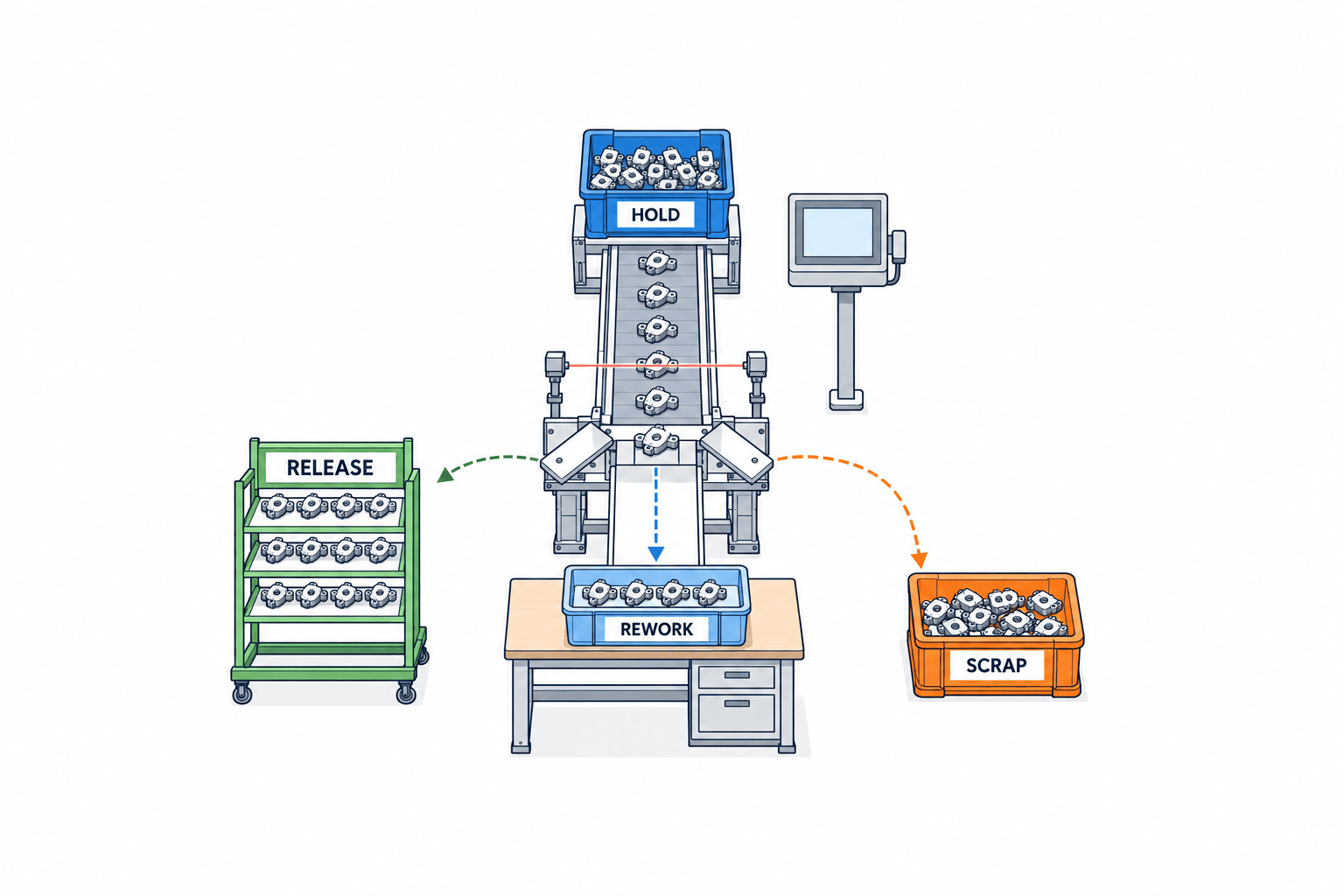
Preventing Double Blocking and Apparent Inventory Discrepancies
Within a single Microsoft Dynamics 365 environment, combining quality-order blocking with inventory-status blocking can generate additional blocking transactions and make available quantity harder to interpret. This is not an example of separate ERP and WMS systems deducting the same quantity twice. Test transaction details and planning calculations when combining blocking mechanisms within a product. For integration across systems, define separately what each system stops and which one is the authoritative inventory quantity record. Reference: Microsoft Inventory blocking.
By design, you should distinguish between the “primary authority to block,” the “primary record of inventory quantity,” and the “stopping of warehouse tasks.” Even if a single hold event sends instructions to each system, ensure that both systems do not deduct the same financial inventory quantity. Separate columns should be used for available-to-promise quantity, physical inventory, quality hold quantity, inspection sample quantity, and scrap-planned quantity, and diagrams should illustrate where the same quantity is added or subtracted. During pre-implementation data migration, cross-check unreleased blocks remaining in the legacy system with the actual item labels.
Additionally, quality holds should not be used as an “adjustment reason” for inventory discrepancies. There is a difference between items that exist but cannot be used, and items that cannot be found. If there is a quantity discrepancy in held items, handle the quality status determination and inventory discrepancy approval separately. This prevents errors where quantities are returned on the books only by releasing the hold.
Requirements and Selection Criteria to Include in the RFP
When comparing quality hold management systems, focus less on the number of checklist functions and more on whether physical items remain immobile in exception cases. The RFP should specify your company’s item identification units, existing ERP/MES/WMS systems, target processes, prohibited transactions by item, permissions, approvals, and recovery procedures. If you simply tell the vendor “supports quality management,” you may receive a proposal that includes inspection record screens but lacks controls for picking or issuing.
Essential requirements include scanning of target IDs, expanding/reducing the hold range, processing by quantity, attaching evidence, two-step approval, visibility of ERP/MES/WMS reflection status, idempotency of resends, offline control, audit logs, and language display. In workplaces using Thai, English, and Japanese together, ensure that the meaning of reason codes does not change in translation by standardizing the codes themselves and managing display names and descriptions by language. Vietnamese is added if there are users. Notifications should not rely solely on email; ensure that held items are clearly recognized on work screens.
| RFP Item | Questions to Ask Vendors | Evidence to Review at Acceptance |
|---|---|---|
| Item Identification | Can both containers and lots be blocked? | Scan results and target list |
| Transaction Control | Can allocation, picking, issuing, and shipping be blocked separately? | Rejection results on each terminal |
| Partial Processing | Can pass, rework, and scrap be separated within the same lot? | Saving and posting of quantities |
| Integration Failure | Can duplicate updates be prevented after API timeouts? | Resend logs for the same event |
| Permissions | Can the initiator not release their own case? | Permission-based operation tests |
| Audit | Can changes before and after judgment be tracked? | Old value, new value, reason, timestamp |
| Language | Is the meaning of codes consistent across languages? | JA/EN/TH/VI screen checks |
When comparing costs, estimate not only initial licenses and development fees, but also labels and terminals, ERP/MES/WMS integration, data cleansing, validation, training, troubleshooting, and ongoing operations separately. Designs that stop all held items make it easier to prevent unintended releases, but excessive stoppages can impact delivery schedules. Evaluate not just the price, but also how quickly evidence can be gathered to narrow down the scope of affected items. Avoid quoting numbers from product comparison tables as general market rates; instead, estimate based on your own case volumes and existing system configuration.
Test Exception Cases More Than Normal Cases in FAT/SAT
FAT (Factory Acceptance Test) checks if the system works as specified in the vendor’s environment, while SAT (Site Acceptance Test) verifies it with your own equipment, terminals, network, and operational permissions. Simply testing the normal “hold → inspection → pass → release” flow is not enough to judge the system’s ability to prevent incorrect shipments. At a minimum, test cases where the held item is already allocated to an existing order, is being picked in WMS, is about to be issued in MES, or when the terminal is offline.
Test data should include: entire lots, partial containers within a lot, serial units, multiple warehouses, destructive inspection samples, and re-inspection after rework. In a hypothetical example where 100 items are held, 80 pass, 15 are reworked, and 5 are scrapped, check whether the totals for each status, ERP inventory categories, WMS locations, MES work-in-process counts, and accounting transactions all match. These figures are for test scenarios and are not actual production results.
For API failure testing, create conditions where the request reaches the receiving side but only the response is lost. After resending, confirm that the event is still treated as a single hold event and that quantities are not moved twice. If, during release, only the ERP succeeds and the WMS fails, the screen should not display “complete,” and resumption of work should be prevented. Include in your acceptance criteria the permissions for recovery operations, the number of resend attempts, and the procedures for manual reconciliation.
Post-Implementation Metrics
Metrics to compare before and after implementation are not limited to “did the number of holds decrease?” Track the time from initiation to reflection in all systems, attempts at incorrect allocation or picking during hold, overdue cases, discrepancies between held quantity and physical items, unreflected cases after judgment, reprocessing of releases, and rate of missing reason codes. Even if the number of cases temporarily increases, it may be because cases previously buried in paper or verbal communication are now visible. Standardize denominators such as number of receipts, production lots, or inspection targets, and compare by process.
Also measure usability at the shop floor: operation time from scanning to temporary hold, number of re-entries on terminals, time without approvers during night shifts, and days items remain in quarantine racks. Since warehouse, planning, sales, maintenance, and accounting departments all view the same case from different perspectives—not just the quality department—a common case ID and update timestamp are important. Improvements in metrics may come not from adding features, but from revising approval conditions or notification recipients.
In a pilot, verify on the physical items that the hold really stops work
An initial pilot must do more than enter a hold record and check the screen. Prepare picking instructions and production orders that have already been issued for the target lot. After initiating the quality hold, scan the actual item labels to confirm that the warehouse and shop-floor terminals reject those items. A change in inventory quantity in the test environment is insufficient: if old instructions remain on operators’ terminals, incorrect shipment or material input is still possible. Test both the procedure for moving items to a quarantine rack and the procedure for tracking items that could not be moved as “location unconfirmed.”
Test partial release after disposition with, for example, 100 boxes: 80 accepted, 15 awaiting reinspection, and 5 scheduled for disposal. Confirm that only the 80 accepted boxes become eligible again for allocation, picking, and process input, while the restrictions and labels for the remaining 20 boxes stay in place. It is also important that resending the release instruction does not add the 80 boxes a second time. Matching totals are not enough if the system allows a box from another lot to be scanned among the 80 released boxes. Match item, lot, container ID, and location as well as quantity.
Before production cutover, set a reference time for transferring open quality-hold cases from the old system to the new one, and prevent the same physical items from being released in both interfaces. The migration list should include case ID, affected quantity, physically verified quantity, final disposition, and unprocessed transactions in the old system. Base any rollback decision on whether the physical items can continue to be safely held, not simply on whether the new system has stopped. After recovery, quality and warehouse staff should jointly approve a reconciliation of event histories from both systems by case ID, confirming that there are no duplicate releases or holds that were never applied.
When recording test results, do not pass a case solely because “the button could be pressed” or “the API returned success.” For each case, retain a photo of the physical items at initiation, scanned container IDs, the reason for blocking shown on the terminal, the event ID received by each system, and the physically verified quantity after release. If a warehouse operator attempts to pick an item without knowing it is on hold, check the time and terminal at which the attempt was rejected. Repeat the same tests on night shifts and at subcontractors, where quality staff may not be present, and confirm that a delegate cannot release items without the required authority. After fixing a failed acceptance test, repeat it with the same lot and sequence of operations, and retain evidence that the screen, inventory ledger, and physical labels agree.
Operational Design for Thai Factories
At Thai factories, Thai is used on the shop floor, English for customers and group companies, and Japanese for headquarters—all within the same case. Since mechanically translated free-text comments can lead to inconsistent judgments, assign common IDs to reason codes, judgment codes, and action codes, and manage explanations and application examples in each language. Always store the original free-text entry, and do not delete it even if a translation is added. Clearly define the authorized quality decision-makers and their night-time substitutes, and ensure that temporary holds can be placed on items even if approvers are absent.
For export products or BOI-related raw materials, separate recording and approval requirements may apply to hold releases, returns, disposal, and scrap processing. The quality hold system alone does not guarantee compliance with tax, customs, or BOI regulations. A specialist should confirm the registration conditions for the relevant business and actual regulatory practices, and link any required external document numbers to the case. If you need to consider processing up to disposal, see our separate article on Scrap Management Systems in Thailand.
Even if the same item codes are used across sites, warehouse, storage conditions, units, and lot numbering rules may differ. Select one initial site, and start with item groups that have many holds and processes with frequent item movements to make it easier to verify integration boundaries. However, even in a pilot implementation, be sure to define transfer boundaries in advance so that items that can be moved to other sites are not omitted from the hold scope. In operator training, cover not only “how to initiate a hold quickly” but also “what to check if a hold cannot be released.”
FAQ: Questions About Implementing a Quality Hold Management System
Are Quality Hold Management Systems and Inspection Certificate Systems the same?
No, they are different. Inspection Certificate Systems focus on recording and issuing measurement values and pass/fail results. Quality Hold Management, on the other hand, controls allocation, input, movement, and shipment of physical items before and after judgment, and determines the quantity to be processed and the inventory status. The two systems can be linked using inspection instruction IDs or lot IDs. Even if a certificate is completed, if the inventory status update fails, the hold case is not considered finished.
Should the entire lot be put on quality hold?
There is no universal rule. The scope is determined by the defect mechanism, the possibility of mixed quality within the same lot, the accuracy of process and timestamp records, and customer requirements. Sometimes, a broader hold is applied initially, and then narrowed down with evidence and approval. The number of inspection samples and the quantity on hold should be managed as separate items, and whether to stop the entire lot or only part of it should be clearly defined in the rules.
Is it sufficient to use only the inventory status in the ERP?
Even if allocation or shipment can be stopped in the ERP, it does not guarantee that tasks already issued to shop floor terminals, MES inputs, subcontractor stock, or offline operations will also be stopped. If your existing ERP can control all necessary transactions and manage judgment and audit logs, then an additional system may not be needed. The decision to implement should be based on testing the relevant transactions, not just the product name.
How should the cost of a Quality Hold Management System be estimated?
Costs vary significantly depending on the number of hold cases, identification units, target sites, required languages, ERP/MES/WMS APIs, terminals, labels, and approval/audit requirements. It is important not to confuse the price for a single-site screen with the total cost of physically stopping items across multiple sites. When preparing an RFP, include test scenarios for both normal and abnormal operations, and request separate quotes for initial and operational costs for each function.
Can paper red tags be eliminated?
Even with electronic blocking, it is necessary to have a display that workers can immediately understand when viewing the physical item. Whether to keep red tags, replace them with printed labels, or use terminal displays should be decided based on shop floor safety and communication environment. If paper is retained, ensure that a common ID and scan code are included so that handwritten numbers do not become disconnected from the system record.
Conclusion
The core of implementing a Quality Hold Management System is not just a screen to save inspection results, but to reliably stop the target items and, after a justified decision, return only the necessary quantity to the correct transaction. Decide in advance on the target IDs, state transitions, prohibited operations, master records in ERP/MES/WMS, partial releases, and actions in case of integration failures. In RFPs and FAT/SAT, in addition to normal cases, test already-issued picks, offline terminals, partial processing, and API retransmissions, and confirm that the remaining quantities in the physical stock and the system match.
If you are considering quality hold and integration with inventory/process management at your Thai plant, you can organize the scope of holds and test conditions based on your current workflow and systems. When consulting with TOMAS TECH, sharing information such as target items, lot identification methods, existing ERP/MES/WMS, and recent challenging hold cases will help clarify the discussion points.


