


A Microsoft Copilot implementation should not begin with a license count. Thailand operations often work across Japanese, Thai and English, while headquarters and the local entity may follow different information-governance practices. A sound decision therefore needs a sequence: confirm identity and mailbox prerequisites, clean up Microsoft 365 permissions and data, run a small role-based pilot, and measure business value. This guide uses current Microsoft primary sources and turns them into a practical framework for costs, security, a 90-day rollout, RFP requirements and acceptance criteria.
Four gates for a Microsoft Copilot implementation
Distributing Copilot to everyone and waiting for usage is not a reliable evaluation method. A go/no-go decision should pass four gates:
- Technical eligibility: Does each participant have an eligible Microsoft 365 plan, an Exchange Online mailbox, a Microsoft Entra ID account, supported clients and suitable network access?
- Permission and data readiness: Are SharePoint, Teams and OneDrive sharing scopes, site owners, sensitivity labels and audit settings aligned with actual business needs?
- Role-based value: Are the target task, baseline and quality owner defined for sales, procurement, administration, quality, engineering or another role?
- Evidence for expansion or exit: Can the organization compare task cycle time, rework, quality, support demand and permission incidents—not just login activity?
Microsoft’s rollout guidance similarly recommends a limited phased deployment with goals, use cases and success measures defined first. The 90-day phases, example scorecards and sample governance model below are TOMAS TECH planning recommendations, not Microsoft guarantees.
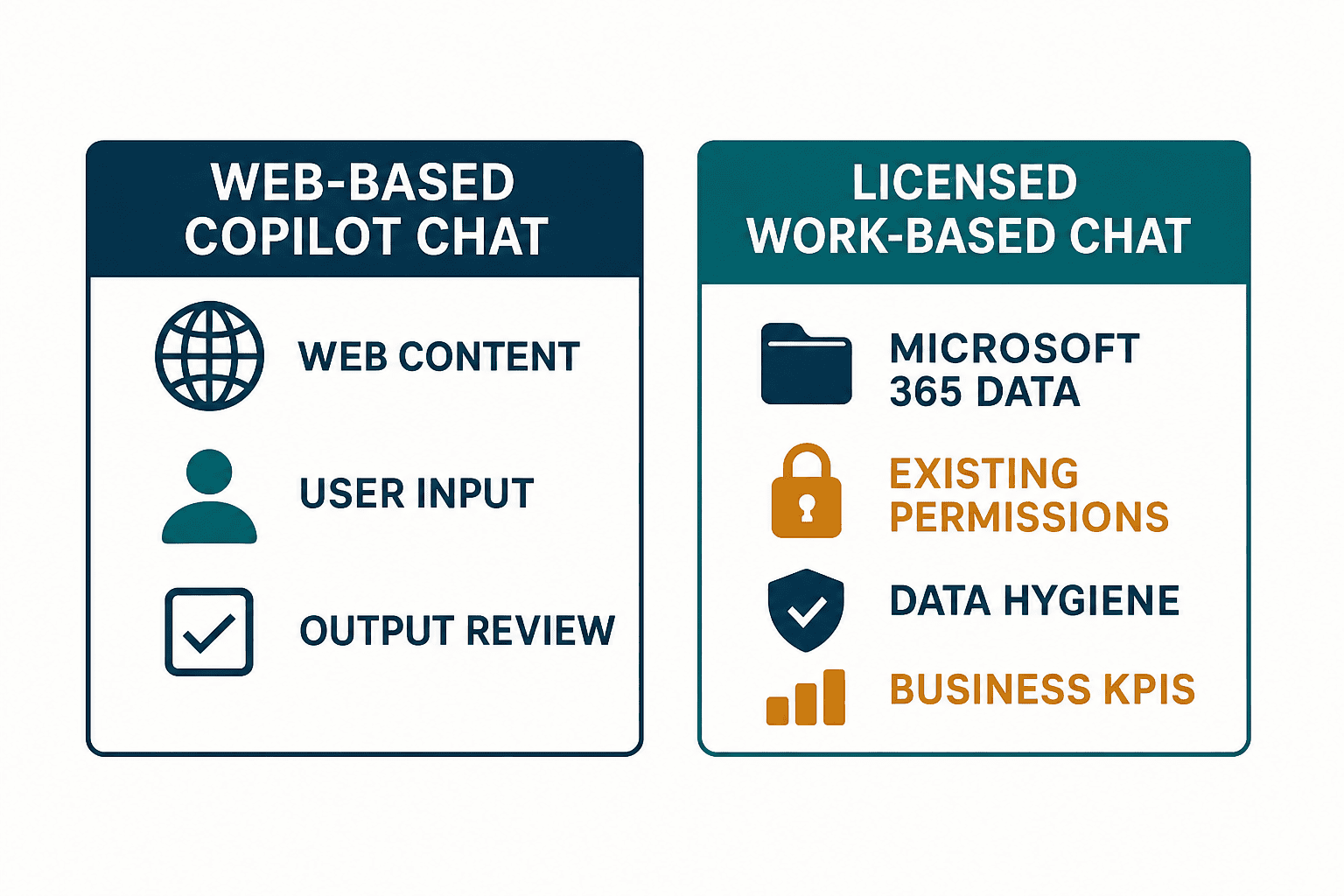
Web-based Copilot Chat versus licensed work-based chat and app integration
The word “Copilot” can hide materially different evaluation scopes. Microsoft’s licensing guidance distinguishes web-based chat from work-based chat. Web-based Copilot Chat and the work-based chat plus app-integrated capabilities available with a Microsoft Copilot license can use different information sources and therefore require different controls and success criteria.
| Decision area | Web-based Copilot Chat | Licensed work-based chat and app integration |
|---|---|---|
| Main information source | Web content and information the user explicitly supplies | Web plus Microsoft 365 work data within the user’s existing permissions |
| Typical use | Public-information summaries, ideation, general drafting | Preparation and drafting across meetings, email and documents |
| Readiness priority | Input rules, confidential-data handling, output review | All items at left, plus permission, sharing and data-owner remediation |
| Evaluation | Answer quality, reuse, compliance with prohibited-input rules | Task time, rework, business outcome and permission incidents as well |
| Cost review | Confirm what the current agreement includes | Confirm add-on eligibility and terms for the underlying plan |
Product names, packaging and prices can change. The latest official licensing documentation, Thailand pricing page and your Cloud Solution Provider’s written quotation should prevail over any static comparison.
Inventory the prerequisites: identity, mailbox, clients and network
Microsoft’s minimum requirements identify an eligible Microsoft 365 plan, the user’s Exchange Online mailbox, Entra ID, supported applications and network access. The practical unit of verification is not “the company has Microsoft 365”; it is each person selected for the pilot.
Thailand subsidiaries commonly include headquarters-tenant employees, local-tenant employees, contractors and shared accounts. A user-level readiness register helps prevent “the feature is missing” or “meeting context cannot be found” after launch.
| Register field | What to record | Action if not ready |
|---|---|---|
| Tenant | Headquarters, Thai entity or third party | Confirm data boundary and accountable administrator |
| Base license | SKU and commercial arrangement | Compare with the current eligible-plan list |
| Mailbox | Exchange Online status | Migrate, exclude or choose another use case |
| Identity | Entra ID, MFA and Conditional Access | Meet the security baseline before admission |
| Client | Web, desktop and mobile versions | Validate supported versions and update channel |
| Working language | JA, TH, EN and primary business language | Assign matching tests and training |
Also validate Microsoft 365 endpoints, proxy rules, TLS inspection, site bandwidth and client update policies. If the underlying Microsoft 365 experience is unreliable, the pilot will measure infrastructure friction as if it were an AI-product problem.
Copilot security starts with existing permissions
Microsoft explains that Copilot does not grant a user new access rights; it grounds responses in data that the user is already authorised to access. It is therefore inaccurate to describe the main risk as the AI bypassing permissions. The operational concern is that information already exposed through overly broad historical sharing can become easier to discover and summarise.
Before the pilot:
- Review company-wide links, broad groups, guest sharing and anonymous links.
- Assign an active owner to every relevant SharePoint site and document its business purpose.
- clean up unused sites and Teams workspaces, and reduce dependence on unmanaged personal OneDrive folders.
- Apply sensitivity and retention controls to HR, payroll, contracts, customer drawings, cost data and audit evidence.
- Design Microsoft Purview audit, data-loss prevention and information-protection controls where licensed and appropriate.
- Use test accounts to ask for information that should not be discoverable before inviting pilot users.
Microsoft states that prompts, responses and organisational data accessed through Microsoft Graph are not used to train foundation models. Do not turn that into the broader claim that prompts are never stored. Processing and storage are governed by Microsoft 365 contractual commitments, so legal and security teams still need to check the organisation’s agreement, data-location needs, retention, audit and eDiscovery requirements. For a wider control model, see Preventing generative-AI data leakage in Thailand operations.
Separate Thai governance obligations from product settings
Security features in a product do not by themselves establish organisational governance. Thailand’s ETDA Generative AI Governance Guideline is a useful local reference for accountability, risk management, privacy and organisational controls. It should not be presented as a product certification or an automatic guarantee of regulatory compliance.
Legal, security, HR and business owners should agree on:
- Who may approve use cases involving personal or confidential data.
- Whether AI-generated content may be shown to customers, authorities or employees without another review.
- Who detects and corrects mistranslation, incorrect summaries and unsupported statements.
- Why usage and interaction records are retained and for how long.
- How access and licenses are removed after resignation, transfer or the end of a contract.
- Who reviews product and model changes and updates the rules.
This governance work is not designed to slow adoption. It creates a short decision path during an incident and makes it safer to expand the permitted scope.
Understand Microsoft 365 Copilot pricing as total cost
When checked on 30 August 2026, Microsoft’s Thailand pricing page displayed Microsoft 365 Copilot Business from USD 18 per user per month with annual billing, excluding tax. Bundles, monthly billing, exchange rates and provider terms vary. Do not treat this as a universal price or convert it into a fixed Thai-baht amount; confirm the official page and a current CSP quotation immediately before purchase.
License price is only one component.
Illustrative 90-day cost formula
Total cost = add-on licenses + implementation support + permission/data remediation + training + operations/support + evaluation effort
Even if 50 people are potential users, it may not be sensible to buy all 50 add-ons on day one. Begin with roles that have a clear business task, legitimate access to the necessary data and a measurable baseline. Conversely, do not make the pilot so small that differences among roles cannot be evaluated. Derive participant numbers from the use cases, not from an arbitrary percentage of headcount.
Track separately:
- One-time permission remediation, register preparation and training-content costs.
- Recurring license, support and administration costs.
- User time spent learning, experimenting and checking outputs.
- Time spent correcting mistakes and verifying sources.
- Savings from tools or duplicate contracts that can genuinely be retired.
Select business use cases by frequency, effort and verifiability
A strong pilot is not the most impressive demonstration. It is a repeated task with a measurable current duration and an output that a qualified person can verify.
| Role in a Thailand operation | Candidate use case | Baseline | Completion criterion |
|---|---|---|---|
| Sales and sales support | Summarise recent email and documents before a meeting; draft minutes | Preparation time, missed information | Owner verifies sources and approves |
| Procurement | Build a quotation comparison; draft an English email | Comparison time, transcription errors | Key terms match original quotations |
| Quality | Structure defect-meeting issues; draft corrective-action reports | Preparation time, returned drafts | Quality owner checks the evidence |
| Administration | Draft notices in Japanese, Thai and English | Translation time, revisions | A reviewer for each language confirms meaning |
| Production engineering | Find existing documents; structure meeting actions | Search time, missed items | Source link, owner and due date are shown |
Do not let the initial pilot automatically determine machine control values, quality acceptance, legal outcomes or employment decisions. Treat outputs as drafts, record the source and name the human approver. If the selection includes other products, compare enterprise ChatGPT use cases in Thailand and an enterprise LLM implementation framework to distinguish data integration and operating accountability.
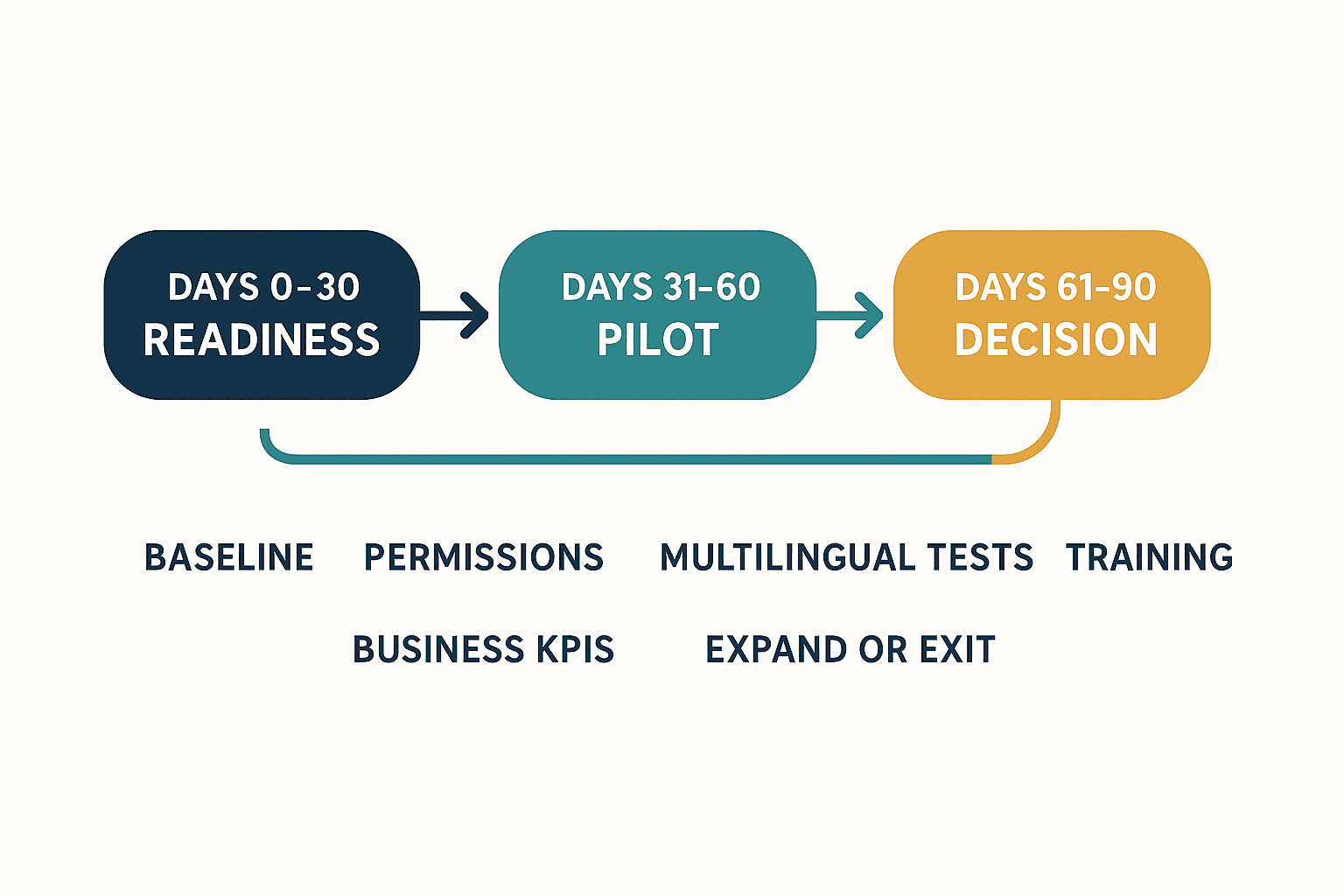
Days 0–30: readiness and baselines
The first 30 days are for creating an evaluable environment, not maximising license distribution.
Assign sponsors and accountable owners
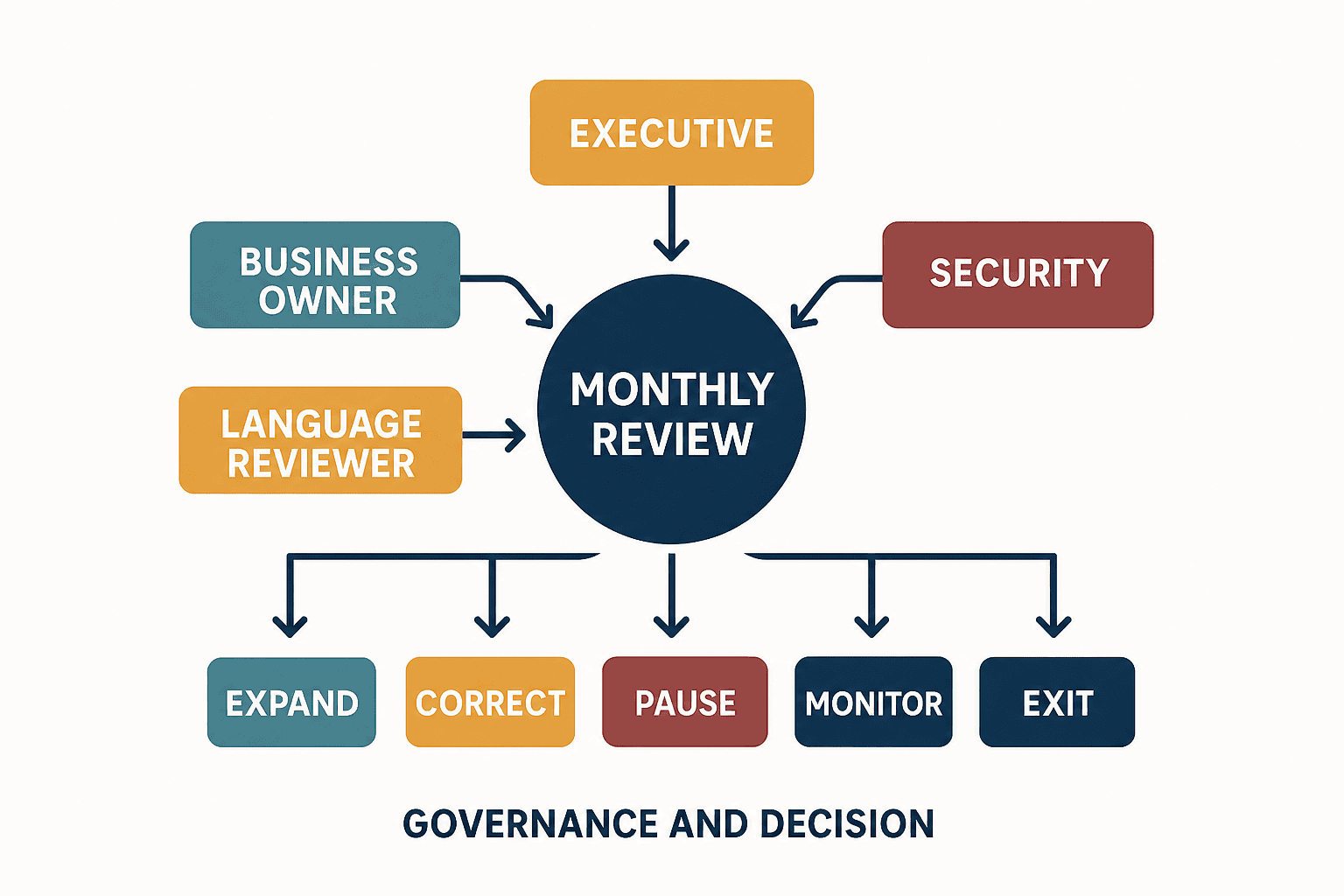
The executive sponsor owns budget and priority. IT owns tenant, identity and technical configuration. Security and legal own controls. Business owners define the task and quality threshold. Local language reviewers validate meaning. If IT is the only owner, nobody is accountable for the business outcome or the accuracy of work products.
Measure current time and quality
Post-deployment data alone cannot prove improvement. Record task volume, median or typical duration, rework, transcription errors, support questions and current tools for a representative period. Two to four weeks may work for frequent tasks; a monthly process needs a complete monthly cycle.
Inspect permissions and data
Reproduce the search scope of pilot users and test HR, contracts, prices, customer data and drawings that should be restricted. Correct faults in the source permissions in SharePoint, Teams or OneDrive, rather than trying to hide them only through a Copilot-specific setting.
Keep the user policy usable
Replace a long prohibition-only document with a one-page rule covering acceptable inputs, outputs requiring human review, approval before customer delivery and the incident contact. Train with realistic work examples.
Days 31–60: limited pilot and multilingual testing
Assign licenses only to roles that passed readiness checks. Review usage, quality and early risk indicators weekly. A login does not establish adoption; look for repeated use on the same well-defined task.
Japanese, Thai and English test cases
The same source may produce different emphasis or spellings depending on the language of the question. The following are TOMAS TECH recommended examples, not Microsoft test guarantees.
| Test | Input or action | Checks |
|---|---|---|
| Japanese meeting preparation | Ask in Japanese for a summary of recent email and meeting documents | Dates, people, decisions and source links |
| Thai internal notice | Draft Thai content from an English source | Register, legal terms, negation and date format |
| English customer email | Draft English from Japanese notes | Quantity, price, delivery and responsibility against source |
| Mixed-language meeting | Structure JA, TH and EN notes | Speaker, open issue, owner and due date are not merged incorrectly |
| Permission boundary | Ask for a document the account cannot access | No content is inferred or exposed outside permissions |
Do not judge translation by fluency alone. Check quantities, units, dates, negation, conditions, responsible party and product names. Thai honorifics and hierarchy, shall/may in English commercial text, and omitted subjects in Japanese all require human review.
Training and support
Teach more than a prompt formula. Users need to open sources, report an error, protect confidential data and decide not to use an output. In weekly clinics, share failed examples as deliberately as successful ones. A decline in question volume is not inherently good; support-ticket themes can reveal gaps in the policy or training.
Days 61–90: decide using business KPIs
Microsoft 365 admin usage reporting can show enabled users, active users and active-user rates over selectable periods. Data may lag, and activity alone cannot establish return. Use three layers:
- Readiness and adoption: eligible-to-licensed rate, active-user rate and repeated use by workload.
- Business impact: task cycle time, rework, quality, deadline performance and user-rated usefulness.
- Risk and operations: support tickets, permission incidents, prohibited inputs, incorrect external communication and administration effort.
An ROI formula without invented productivity percentages
Use measured values instead of assuming a productivity gain.
Monthly benefit = (pre-pilot median time - post-pilot median time) × monthly volume × defensible labour rate - extra checking and rework cost
Net investment effect = monthly benefit + retired existing cost - monthly license and operating cost
Time released is not automatically a cash benefit unless it is reassigned to valuable work or replaces an actual cost. Deduct quality loss and extra review. Because workflows differ, assess results per use case before looking at a company-wide average.
Example decision table
| Decision | Example condition | Next action |
|---|---|---|
| Expand | Repeated use, improved business KPI, no severe permission or quality issue | Roll out gradually to similar roles |
| Continue with correction | Useful activity but output quality or review effort is weak | Improve data, prompts, training or scope |
| Pause | Severe permission issue, external mis-send or inadequate auditability | Stop license/function/sharing and remediate |
| Exit | No defensible value after reasonable improvements | Recover licenses, retain deliverables and record lessons |
RACI and change control
Copilot changes continuously and features can roll out gradually. A one-time configuration record is not enough.
| Activity | Executive sponsor | IT administrator | Security/legal | Business owner | Local language reviewer |
|---|---|---|---|---|---|
| Budget and target department | A | C | C | R | I |
| License, identity and settings | I | A/R | C | C | I |
| Permission and data remediation | I | R | A | R | I |
| Use case and quality threshold | C | C | C | A/R | R |
| Monthly review and scale decision | A | C | C | R | C |
| Release-note review | I | A/R | C | C | I |
R means responsible, A accountable, C consulted and I informed. Review Microsoft 365 Copilot release notes monthly. Record the affected feature, users, test, policy change, communication date and reversal procedure in a change register.
Put governance and measurable acceptance into the RFP
When engaging an implementation partner or CSP, do not reduce the RFP to the number of licenses and an activation deadline.
RFP requirements
- Assess target tenants, user types, languages, sites and current subscriptions.
- Detect oversharing in SharePoint, Teams and OneDrive and prioritise remediation.
- Define prohibited and high-risk use cases with reasons.
- Include Japanese, Thai and English business tests and user training.
- Separate adoption reporting from business-KPI reporting.
- Hand over support, incident and product-change procedures.
- Define export and handover of data, settings, registers and training material at contract end.
Example acceptance criteria
- The prerequisite register for all target users is approved.
- Severe oversharing is remediated or listed with an approved exception, owner and deadline.
- Specified multilingual tests are complete with records allowing comparison to the source.
- Administrator and user procedures, prohibited actions and reporting routes are delivered.
- Pre-pilot baseline and 90-day results use the same definitions.
- Suspension, license recovery and permission-remediation procedures can be executed.
Claims such as “100% accuracy” or a guaranteed productivity percentage are not sound acceptance criteria without evidence. The contract should focus on detecting errors, identifying approvers and stopping the service when a material risk occurs.
Define rollback and exit conditions in advance
An AI deployment becomes manageable when its stopping method is designed alongside its expansion plan. Candidate triggers include:
- Sensitive data becomes discoverable to an inappropriate audience because source permissions were wrong.
- Unreviewed incorrect output is repeatedly sent to customers or employees.
- Audit logs, support response or accountability do not meet requirements.
- Measured business benefit remains below recurring license and operating cost.
- Testing and rules cannot keep pace with product changes.
Rollback is more than removing a license. Stop automations and integrations, correct sharing, retain generated work products appropriately, notify users and activate an alternative method for unfinished work. Prompt examples, failures and KPI records remain valuable selection evidence even if the pilot ends.
Implementation-owner checklist
Before contracting
- [ ] Verify the base plan, mailbox and Entra ID for each candidate.
- [ ] Confirm current official price, tax, payment term and CSP conditions.
- [ ] Separate web-based Copilot Chat from licensed work-based chat and app-integrated evaluation.
- [ ] Inventory owners and oversharing across SharePoint, Teams and OneDrive.
- [ ] Name legal, security, HR and business owners.
Before the pilot
- [ ] Record baseline time, quality and rework for target tasks.
- [ ] Prepare JA, TH and EN test data and expected checks.
- [ ] Name output reviewers and customer-delivery approvers.
- [ ] Explain support, incident and suspension procedures.
- [ ] Agree how usage and business KPIs will be collected.
At day 90
- [ ] Review activity and repeated use by workload.
- [ ] Compare rework, quality, incidents and review effort as well as time.
- [ ] Record a decision to expand, correct, pause or exit.
- [ ] Transfer release-note and change-control ownership.
- [ ] Confirm licenses can be recovered and work products retained.
Microsoft Copilot implementation FAQ
What is required for a Microsoft Copilot implementation?
Target users need an eligible Microsoft 365 plan, Exchange Online mailbox, Entra ID account, supported clients and network access. Work-data use also requires sound SharePoint and OneDrive permissions, ownership, sensitivity labels and auditing. Verify the latest official conditions user by user because licensing terms change.
What is the current Microsoft 365 Copilot price?
On 30 August 2026, Microsoft’s Thailand page displayed Copilot Business from USD 18 per user per month with annual billing, excluding tax. The base plan, bundle, payment period, tax, currency and CSP terms can change the total. Obtain a written quotation at purchase time rather than budgeting a fixed THB figure from this article.
Is Copilot business data used to train AI models?
Microsoft states that prompts, responses and Graph-accessed organisational data are not used to train foundation models. Processing and storage remain subject to Microsoft 365 contractual commitments. Review the contract, retention, auditing, data-location and access configuration for your organisation.
Can Copilot bypass permissions and see confidential files?
Copilot does not add permissions; it uses information the user is already allowed to access. However, historical oversharing may make confidential-looking material legitimately visible to too many people and easier to discover. Permission remediation is a readiness requirement.
Can usage rate alone prove value from Copilot for business?
No. Combine activity and repeated use with task cycle time, rework, quality, support demand, permission incidents and user-rated usefulness. Microsoft’s usage reporting may lag, so pair it with operational data.
When is Copilot a good choice in enterprise AI tool selection?
It merits evaluation where email, meetings and documents already live in Microsoft 365 and the company can govern identity and permissions. If the relevant data sits mainly elsewhere, permissions are immature, or the requirement is only public-web research, compare other options. Select on data connectivity, controls, business value and total cost—not brand name alone.
Conclusion: use 90 days to establish a reason to continue
A Microsoft Copilot implementation succeeds through evidence, not license volume. Verify prerequisites per user, remediate source permissions, test a small set of role-based use cases, and measure adoption, business impact and risk together. For Thailand operations, validate meaning, numbers and responsible parties across Japanese, Thai and English while connecting local governance to headquarters controls. At day 90, expansion, correction, suspension and exit are all legitimate outcomes if the evidence is documented.
You can begin with a permission inventory, use-case shortlist and 90-day scorecard even before the license count is fixed. If you would like to structure an evaluation for your Thailand operation, contact TOMAS TECH.
References
- Microsoft Learn, Microsoft 365 Copilot minimum requirements: https://learn.microsoft.com/en-us/microsoft-365/copilot/microsoft-365-copilot-minimum-requirements
- Microsoft Learn, Microsoft 365 Copilot licensing: https://learn.microsoft.com/en-us/microsoft-365/copilot/microsoft-365-copilot-licensing
- Microsoft Thailand, Microsoft 365 Copilot pricing: https://www.microsoft.com/th-th/microsoft-365-copilot/pricing
- Microsoft Learn, Data, privacy and security for Microsoft 365 Copilot: https://learn.microsoft.com/en-us/deployoffice/privacy/microsoft-365-copilot
- Microsoft Learn, Data and compliance readiness: https://learn.microsoft.com/en-us/microsoft-365/copilot/microsoft-365-copilot-minimum-requirements-data-compliance
- Microsoft Learn, Secure and governed data foundation: https://learn.microsoft.com/en-us/microsoft-365/copilot/secure-govern-copilot-foundational-deployment-guidance
- Microsoft Learn, Rollout guidance: https://learn.microsoft.com/en-us/microsoft-365/copilot/microsoft-365-copilot-minimum-requirements-rollout
- Microsoft Learn, Microsoft 365 Copilot usage report: https://learn.microsoft.com/en-us/microsoft-365/admin/activity-reports/microsoft-365-copilot-usage
- Microsoft Learn, Measurement and reporting: https://learn.microsoft.com/en-us/copilot/microsoft-365/copilot-control-system/measurement-reporting
- ETDA, Generative AI Governance Guideline: https://www.etda.or.th/getattachment/6050a4b7-defd-4dba-8cbc-ff6a444a3d08/20240910_GenerativeAIGovernanceGuideline_Vol1_AIGC.pdf.aspx
- Microsoft Learn, Microsoft 365 Copilot release notes: https://learn.microsoft.com/en-us/microsoft-365/copilot/release-notes


