


Introducing a reorder point (ROP) management system is a critical initiative for procurement, production management, and IT teams in manufacturing plants. By automating inventory replenishment and standardizing exception handling, plants can reduce delayed ordering, manage stockout risk, and improve operational efficiency.
This guide focuses on the execution process from ROP breach detection through to order recommendation, approval, purchasing, receiving, and exception management. It details concrete decision criteria, role assignments, audit trails, and countermeasures in case of failures.
1. What Is Actually Implemented in a ROP Management System? — System Decisions and Human Judgement
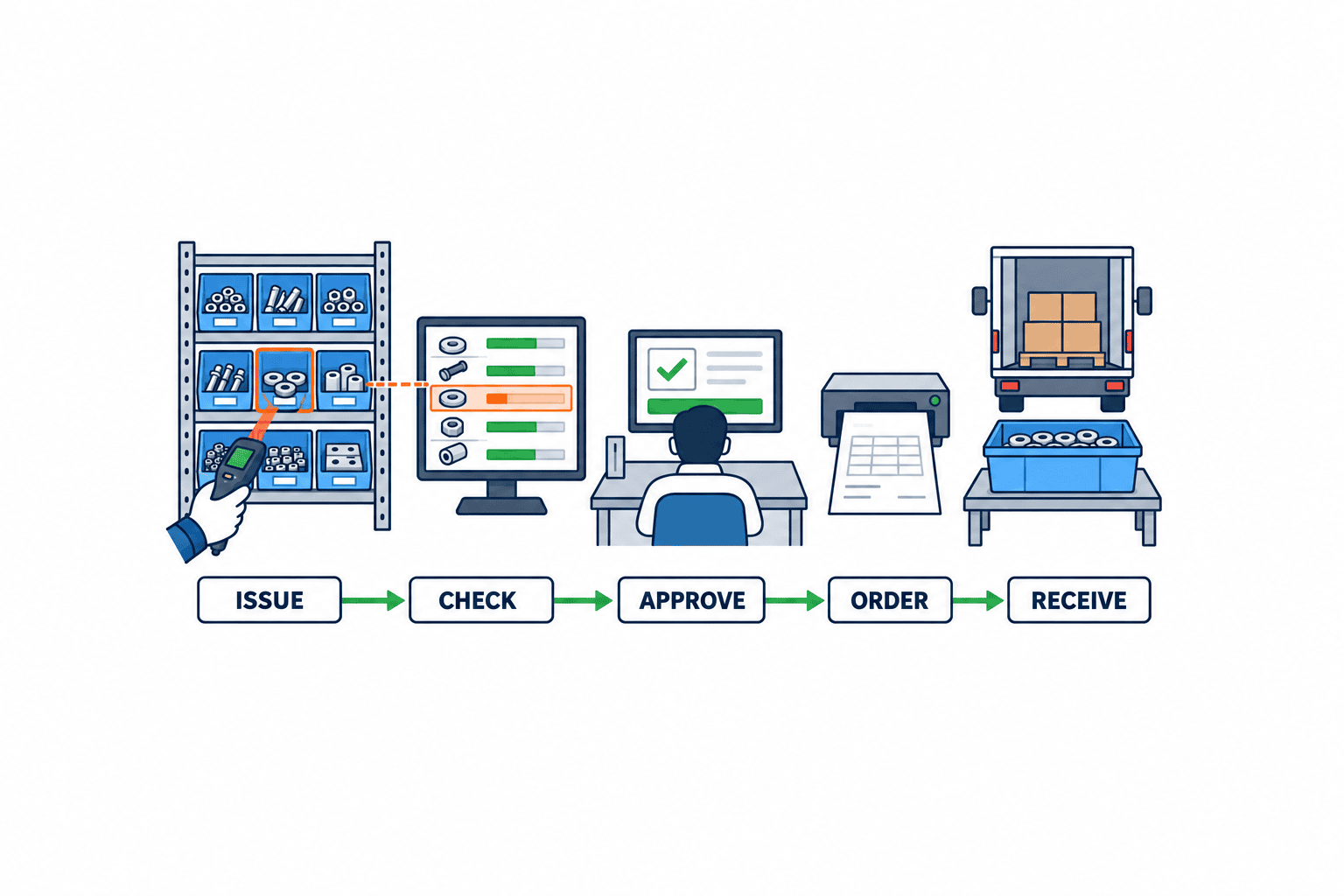
A ROP management system is designed to detect when inventory levels fall below a predefined reorder point (ROP) and to automatically generate order recommendations (proposals).
It is essential to clearly distinguish between “Trigger,” “Recommendation,” and “Order” stages, and to clarify decision-making and accountability at each.
| Stage | System Role | Human Role | Typical Audit Trail |
|---|---|---|---|
| Trigger | Auto-detects ROP breach | – | System log (timestamp, stock level) |
| Recommend | Auto-generates order proposal | Review & approve proposal | Proposal record, approval record |
| Order | Creates & sends order data (API/EDI) | Final order approval | Purchase order, transmission record |
- Trigger: The system automatically detects when inventory falls below the ROP. The ROP threshold reflects expected demand during replenishment lead time plus safety-stock policy. Compare it with inventory position: on-hand stock plus eligible firmed open-PO receipts minus allocated demand.
- Recommendation: Upon trigger, the system proposes “what, how much, and when to order.” This is not an automatic order; human review and approval are required.
- Order: Once approved, the system processes the official purchase (PO issuance and supplier transmission). The system also manages PO transmission and acknowledgment.
This ensures a stepwise decision process: “ROP breach → recommendation → approval → order” rather than “ROP breach = immediate order.”
For further reference, see Latest Trends in Order & Purchasing Management Systems for 2026.
2. [Explicit Example] ROP Management Decision-Making in a Numeric Scenario
Below is a sample numeric scenario illustrating how a ROP management system operates.
Example Scenario Settings
- Average daily demand: 20 units
- Procurement lead time: 10 days (calendar)
- Safety stock: 60 units
- Reorder point (ROP): 260 units (20 × 10 + 60)
- Current on-hand inventory: 180 units
- Approved but not yet received POs: 50 units (expected within lead time)
- Allocated quantity: 20 units (reserved for future shipments)
- Calculated inventory position: 180 (on-hand) + 50 (PO) − 20 (allocated) = 210 units
- ROP (260) > Inventory position (210) → ROP trigger occurs
Key Decision Points
- Exceptions: PO Due Dates & Quality Holds
Example: Even if 50 units are due to arrive within the lead time, if there are delivery delays or the goods have not passed quality inspection, these must be excluded from the inventory position.
This directly impacts the recommended order quantity and timing.
- Caveats in Auto-Calculating Order Quantity
Simply ordering the difference (260 − 210 = 50 units) is insufficient. Demand during lead time, batch sizes, and minimum order quantities (MOQ) must be considered to avoid over- or under-ordering.
Therefore, the system must factor in these additional conditions when recommending order quantities, rather than just “ROP breach = order 50 units.”
| Item | Value | Notes |
|---|---|---|
| Average daily demand | 20 units | |
| Lead time | 10 days | |
| Safety stock | 60 units | |
| Reorder point (ROP) | 260 units | 20 × 10 + 60 |
| On-hand inventory | 180 units | |
| Approved PO (not in yet) | 50 units | Expected within lead time |
| Allocated | 20 units | |
| Inventory position | 210 units | 180 + 50 − 20 |
| Gap to ROP | 50 units | 260 − 210 |
| Actual recommended qty | Varies | Considers batch/MOQ/exception handling |
3. Detailed Workflow: From Daily Events to PO Issuance, Receiving, and Exception Closure
The following is a practical workflow for implementing a ROP management system, covering daily events through PO issuance, receiving, and exception closure.
Workflow Overview
| Step | Timing | System Task | Responsible Person | Audit Trail/Log | Notes |
|---|---|---|---|---|---|
| 1. Data acquisition | Daily, scheduled | Import inventory, demand, PO, allocation | IT/Production Management | Data acquisition log | Data integrity check |
| 2. ROP breach check | After data import | Calculate inventory position, detect trigger | System | Trigger log | Logic subject to audit |
| 3. Generate recommendation | On trigger | Auto-calculate quantity, due date, supplier | System | Proposal record | Considers batch/MOQ |
| 4. Approval workflow | Post-proposal | Notify for approval, record approval/reject | Procurement/Production Mgr. | Approval history | Approver, timestamp, comments |
| 5. PO issuance & transmission | After approval | Create PO data, send to supplier | Procurement staff | PO issuance & transmission record | API/EDI/email, etc. |
| 6. Supplier confirmation | After PO sent | Record acknowledgment and delivery response | Supplier | Response record | Delivery changes, exceptions |
| 7. Receiving & GRN entry | On receipt | Inspection, receipt, GRN (goods receipt) | Warehouse/Quality Control | Receipt & inspection records | Defects/discrepancies to exception |
| 8. Exception closure | On discrepancy | Exception logging, root cause, action, close | Procurement/Quality/Production | Exception & action records | Audit trail required |
Timing, Idempotency, and Role Assignment
- Timing: Can be set as daily batch or real-time processing, depending on operational requirements.
- Idempotency: Each step must strictly manage inputs, outputs, and processing state so repeated runs on the same data do not change results.
- Role Assignment: The system handles auto-detection and logging; staff are responsible for approvals, exception handling, and audit verification.
Exception & Failure Handling
- Data inconsistencies: Auto-alerts, manual re-acquisition, and audit trail recording.
- Approval delays: Escalation notifications and approval history audits.
- Delivery delays or quality issues: Exception is logged, root cause analysis and response are recorded through to closure.
4. Managing Master Data and Calculation Inputs
In implementing a reorder point management system, the accuracy and currency of master data management directly impact the reliability of the entire process—from reorder triggers to order recommendations, approvals, purchasing, receipt, and exception handling. Below, we organize the key master data elements, calculation inputs, and their management points.
Items, Sites, Warehouses, and Units of Measure (UOM)
- Item (SKU/Product): The smallest unit for reorder point calculation. Uniquely manage item codes, names, and specifications.
- Site/Warehouse: Reorder point management must be independent for each inventory location. For example, the same item may have different reorder points and lead times at the Bangkok and Ayutthaya plants.
- Unit of Measure (UOM): When purchasing, inventory, and issue units differ, clearly manage the conversion factors.
Procurement Sources (Suppliers)
- Supplier Information: Manage supplier codes, names, transaction terms, and supplier calendars (holidays and working days).
- Priority: If multiple suppliers are set, specify their priority and backup suppliers.
Lead Time (Including Transportation & Inspection)
- Procurement Lead Time: Standard number of days from order to delivery, including transportation, customs clearance, and inspection/acceptance processes.
- Supplier Calendar: Calculate lead time based on business days, factoring in holidays and non-working days.
Definition of Open Purchase Orders (PO)
- Open PO: In SAP’s reorder point management documentation (e.g., SAP Help Portal), plant stock plus firmed receipts is compared with the separately defined reorder point. It is recommended to include only purchase orders with confirmed delivery dates as open POs.
Reservations and Allocations
- Reservation: Quantities allocated for existing outbound or production instructions must be deducted at the time of reorder point evaluation.
- Timing of Inventory Allocation: If allocation timing differs between ERP/MES, clearly define the integration points between systems.
Defective and Rejected Inventory
- Defective Inventory: Items failing inspection or damaged must be excluded from good inventory. It is essential to manage defective categories in WMS/ERP.
- Return of Rejected Inventory: When items are returned to good inventory after inspection, clarify the timing of inventory recognition.
Minimum Order Quantity (MOQ) and Order Multiples
- MOQ (Minimum Order Quantity): The minimum order lot specified by the supplier. Automatically reflected in order recommendations.
- Order Multiples: For cases or pallet units where fractional orders are not allowed, manage these constraints clearly.
Owner, Version, and Effective Date
- Data Owner: Assign a maintenance owner for each master item (e.g., Purchasing, Warehouse Management, IT).
- Version Control: Always record change history and effective start dates to prevent missed updates for future dates.
Example: Master Data Management RACI Table
| Master Data Item | Creation | Approval | Maintenance | Audit Trail |
|---|---|---|---|---|
| Item/Site/Warehouse | IT | Production Mgmt | IT | System Logs |
| Supplier | Purchasing | Purchasing | Purchasing | Supplier Ledger |
| Lead Time | Purchasing | Production Mgmt | Purchasing | Change History |
| MOQ/Order Multiple | Purchasing | Purchasing | Purchasing | Contract Terms |
| Defective Inventory Category | Warehouse | Quality Mgmt | Warehouse | WMS Records |
| Reservation/Allocation | Production Mgmt | Production Mgmt | Production Mgmt | MES/ERP Logs |
| Effective Date/Version | IT | IT | IT | System Logs |
5. Separate Safety-Stock Policy from Order Execution
Safety stock is an operating buffer for variation in demand and supply lead time. Setting that buffer and executing a purchase are separate decisions. In the illustrative scenario here, 20 units per day, ten days of replenishment lead time and 60 units of safety stock produce a 260-unit ROP. This example is not a universal safety-stock formula. Maintain the value using observed demand and delivery performance, a chosen service policy, an owner and an effective date.
In execution, distinguish the ROP threshold from the inventory position compared with it. Define which on-hand units, eligible firmed open-PO receipts and allocated demand enter the position. State how delayed receipts and quality-held units are treated, and retain the data snapshot used for each recommendation. SAP’s reorder point planning compares plant stock plus firmed receipts with the ROP; it does not calculate the ROP by adding those receipts. Oracle’s min/max planning illustrates on-hand/on-order supply and order-quantity modifiers.
Microsoft’s item coverage settings describe planning methods such as min/max. Its separate WMS replenishment guidance describes topping up picking locations inside a warehouse. Supplier purchasing and internal location replenishment have different destinations, documents and inventory events. Request separate demonstrations and acceptance cases for each.
6. Practical Exception Handling Operations
After introducing a reorder point management system, it is crucial to clearly define operations for exception (abnormal) events, ensuring clarity from occurrence to closure, assignment of responsibility, audit trail, and prioritization.
Main Exception Scenarios and Responses
| Exception Event | Status | Responsible Owner | Deadline | Decision/Action | Evidence/Audit Trail |
|---|---|---|---|---|---|
| Supplier Delivery Delay | Occurred/Investigating/Resolved | Purchasing | Event date + 1 business day | Alternative sourcing/Reschedule | Supplier communication records, reorder records |
| Partial Receipt | Occurred/Investigating/Resolved | Warehouse | Day of receipt | Reorder balance/Reschedule | Receipt records, order change history |
| Sudden Demand Surge | Occurred/Analyzing/Resolved | Production Mgmt | Event date + 2 business days | Emergency order/Review safety stock | Demand analysis report, order records |
| Inventory Discrepancy | Occurred/Investigating/Resolved | Warehouse | Event date + 1 business day | Stocktaking/Adjustment order | Stocktaking records, adjustment history |
| Approval Delay | Occurred/Chasing/Resolved | Purchasing/Approver | Order recommendation date + 1 business day | Proxy approval/Escalation | Approval history, chase records |
| Alternative Supplier | Occurred/Investigating/Resolved | Purchasing | Event date + 1 business day | Select alternative/Order | Supplier selection records, order history |
Detailed Exception Management Operations
- Status Management: Clearly indicate progress in at least three stages: Occurred → Investigating → Resolved (Closed).
- Owner Assignment: Assign a primary responsible party for each exception. Define roles for investigation, decision-making, and record-keeping using a RACI table.
- Deadline Management: Set standard response deadlines for each event, and implement automatic alerts or escalation rules for delays.
- Decision Criteria: Document concrete decision criteria for each exception, such as “reorder,” “reschedule,” “stocktaking,” or “review safety stock.”
- Evidence & Audit: Record the entire response history from occurrence to closure in the system, ensuring it can be submitted for audits.
Exception Prioritization
- Date Priority: Prioritize events with earlier occurrence dates or closer due dates.
- Business Impact: Adjust priority based on impact, such as production stoppage risk or items for key customers.
- Automation: Enable the system to automatically assess severity, display on dashboards, and send alert emails for immediate response.
[Example] Exception Response Flow (Image)
- The system detects a supplier delivery delay and notifies the purchasing staff via alert.
- The purchasing staff confirms and reschedules the delivery with the supplier.
- If necessary, request a quote or place an emergency order with an alternative supplier.
- Record all response history in the system and close the event.
7. Boundaries and Data Integration of ERP/WMS/MES
When implementing a reorder point management system, it is essential to clearly define the data boundaries and integration events among multiple systems such as ERP, WMS, and MES, and to specify the system of record (authoritative data source).
System Boundaries and Integration Events
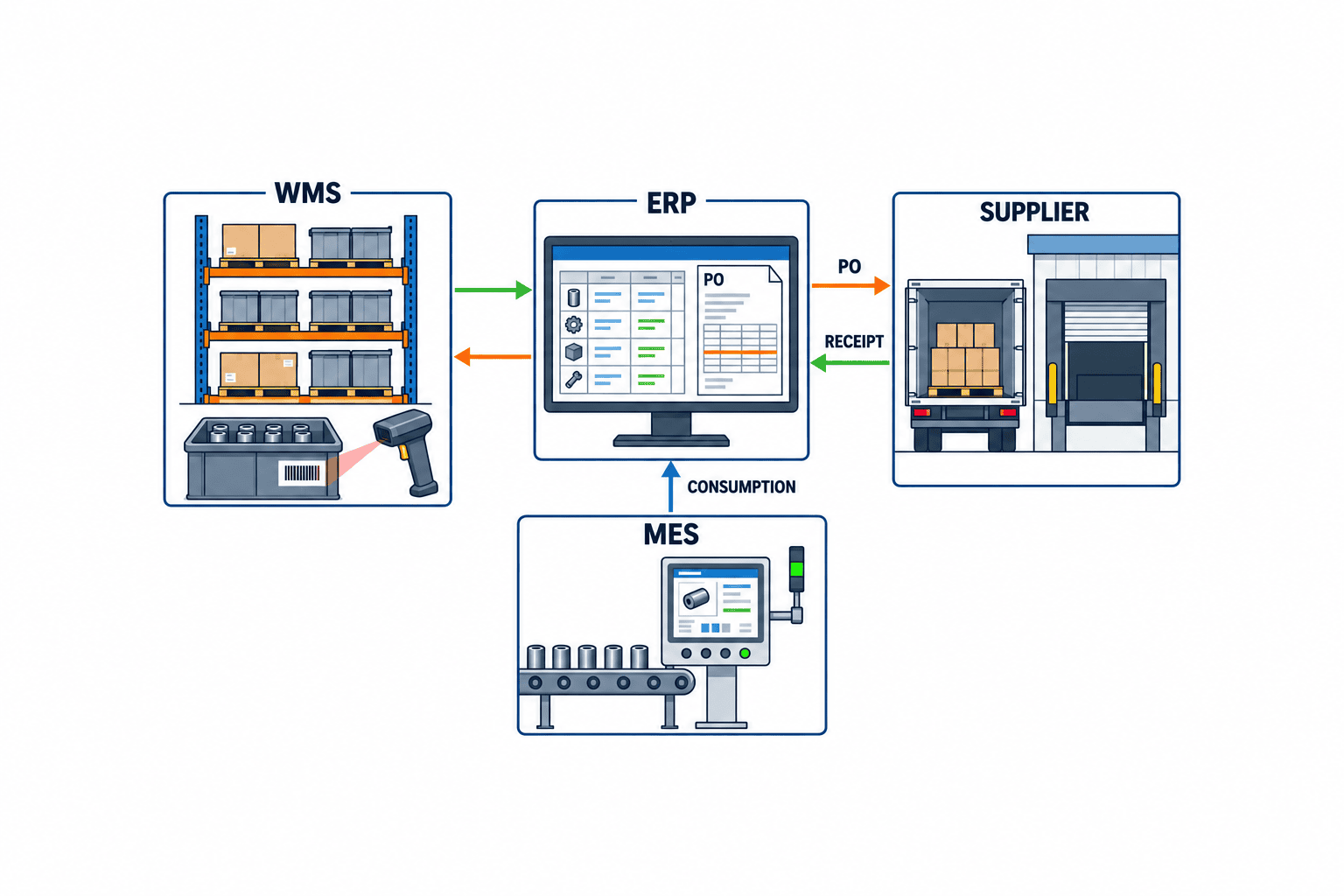
| System | Main Role | Authoritative Data | Integration Events | Measures for Duplicates, Reversals, and Stale Data |
|---|---|---|---|---|
| ERP | Reorder point evaluation, PO issuance, inventory & allocation management | Inventory, PO, allocation, order recommendations | Generate order recommendations, issue POs, complete receipts | Eliminate duplicates via integration IDs, manage reversals (cancellations), timestamps |
| WMS | Warehouse inventory management, picking replenishment | Location-based inventory, in/out records | Inbound/outbound, replenishment instructions | Sync inventory by location, separate replenishment from purchasing |
| MES | Production instructions, allocation, performance management | Production orders, allocation | Production start/completion, allocation info | Unique management by production order ID, manage time lag for performance reflection |
Differences Between ERP, WMS, and MES Replenishment & Ordering
- ERP Reorder Point Management: When inventory falls below the reorder point, the system generates a purchase order recommendation, which is then reviewed and ordered by Purchasing.
- WMS Picking Replenishment: When picking location inventory drops below the minimum, the system issues internal warehouse transfer instructions (e.g., bulk location → picking location). This is independent of purchasing orders.
– Reference: Microsoft Learn WMS min/max replenishment
- MES Allocation: Allocates required quantities from ERP/WMS based on the production plan. Pay attention to allocation timing and delays in inventory allocation reflection.
Practical Points for Data Integration
- Clarify System of Record: Define ERP as the system of record for inventory balances, WMS for location-based inventory, and MES for production performance.
- Duplicate Elimination: Assign unique keys to order recommendations and PO numbers to prevent double registration during integration.
- Reversal (Cancellation) Management: Immediately reflect receipt or order cancellations in connected systems, and retain audit trails for reversal events.
- Stale Data Measures: Maintain data freshness for inventory and order data through regular batch synchronizations or real-time APIs.
- Cutover Planning: During system transitions, always establish validation and approval processes for migration data such as inventory, POs, and allocations.
Reference Link
8. Architecture, System Configuration, and Vendor Selection: Requirements and Evaluation Criteria
When implementing a reorder point management system, decisions on architecture, system configuration, and vendor selection directly impact operational efficiency, scalability, and future maintainability. It is recommended to establish practical evaluation criteria based on the following perspectives.
Practical Considerations for Selecting Architecture and Configuration
- On-Premises vs. Cloud
– *On-Premises*: Effective when tight integration with existing factory networks or ERP systems is required. Suited for environments prioritizing security and customization.
– *Cloud*: Suitable when inter-site collaboration, remote management, or scalability is a priority. Advantageous for minimizing initial investment and from a BCP (Business Continuity Planning) perspective.
- API and Data Integration Flexibility
– Can the system support bidirectional data integration with ERP, MES, and WMS? Support for RESTful APIs and standard data contracts (JSON, XML, etc.) is essential.
– Evaluate both batch and real-time integration capabilities with existing systems.
- User and Role Management
– Can roles such as order entry, approver, and IT administrator be easily separated and configured?
– Is there automatic logging and access control for audit trails?
- Exception Handling and Notification Features
– Can the system automatically notify users and route issues to an exception queue when reorder points are breached or anomalies are detected?
Vendor Evaluation Criteria (Sample Weighting)
| Evaluation Item | Practical Checkpoints | Weight (Example) |
|---|---|---|
| Data Integration Flexibility | API specifications, track record with existing ERP | High |
| Support Structure | Local language support, incident response SLA | Medium |
| Customizability | Ability to modify reorder logic and approval flows | High |
| Implementation Track Record | Reference cases in the same industry/scale (*publicly available only*) | Medium |
| Cost Structure | Clarity of initial, monthly, and additional development costs | Medium |
| Security & Audit Trails | Log retention period, access control, authentication methods | High |
| UI/UX | Support for Thai, English, Japanese; operator learning curve | Medium |
Note: Adjust weightings according to your organization’s operational priorities. When evaluating vendors, do not rely solely on scoring; verify how each requirement is met and request concrete evidence (e.g., API documentation, live demonstrations).
9. RFP (Request for Proposal) Essential Checklist
Your RFP for a reorder point management system must include the following specific requirements. For each item, specify not only whether it is implemented but also how it will be validated during actual operations.
| Requirement Category | Example of Mandatory Requirement | Supplementary Notes |
|---|---|---|
| Data Contract | Definition of fields such as reorder point, inventory, open orders, lead time, MOQ, lot size | Specify details for API/file integration |
| Processing Cut-off Time | Setting daily/weekly batch cut-off times, time zone support | Compatibility with factory shift schedules |
| Approval Workflow | Stepwise workflow: order recommendation → approval → order confirmation; role separation | Ability to set approvers and delegate approval |
| Lead Time Management | Registration and reflection of standard and exception lead times per supplier | Automatic calculation considering holidays |
| MOQ/Lot Rounding | Automatic rounding to minimum order quantity and lot size | Clearly specify rounding rules |
| Exception Queue | Automatic routing of exceptions such as reorder breach without order, approval delay, delivery delay | Notification and escalation of exceptions |
| Logs & Audit Trails | Complete operation logs for recommendation generation, approval, order submission, receipt, exception handling | Record user, timestamp, and action details |
| Role Management | Design roles for order entry, approver, IT administrator, etc. | Screen and operation control by authority |
RFP Preparation Notes
- Categorize each requirement as “Mandatory,” “Recommended,” or “Optional,” and specify its priority.
- For data integration, make integration method (API/file), documentation submission, and test environment provision mandatory.
- Exception handling and audit trails are essential for internal controls and audit readiness.
10. FAT/SAT (Factory/Site Acceptance Test) Script Examples
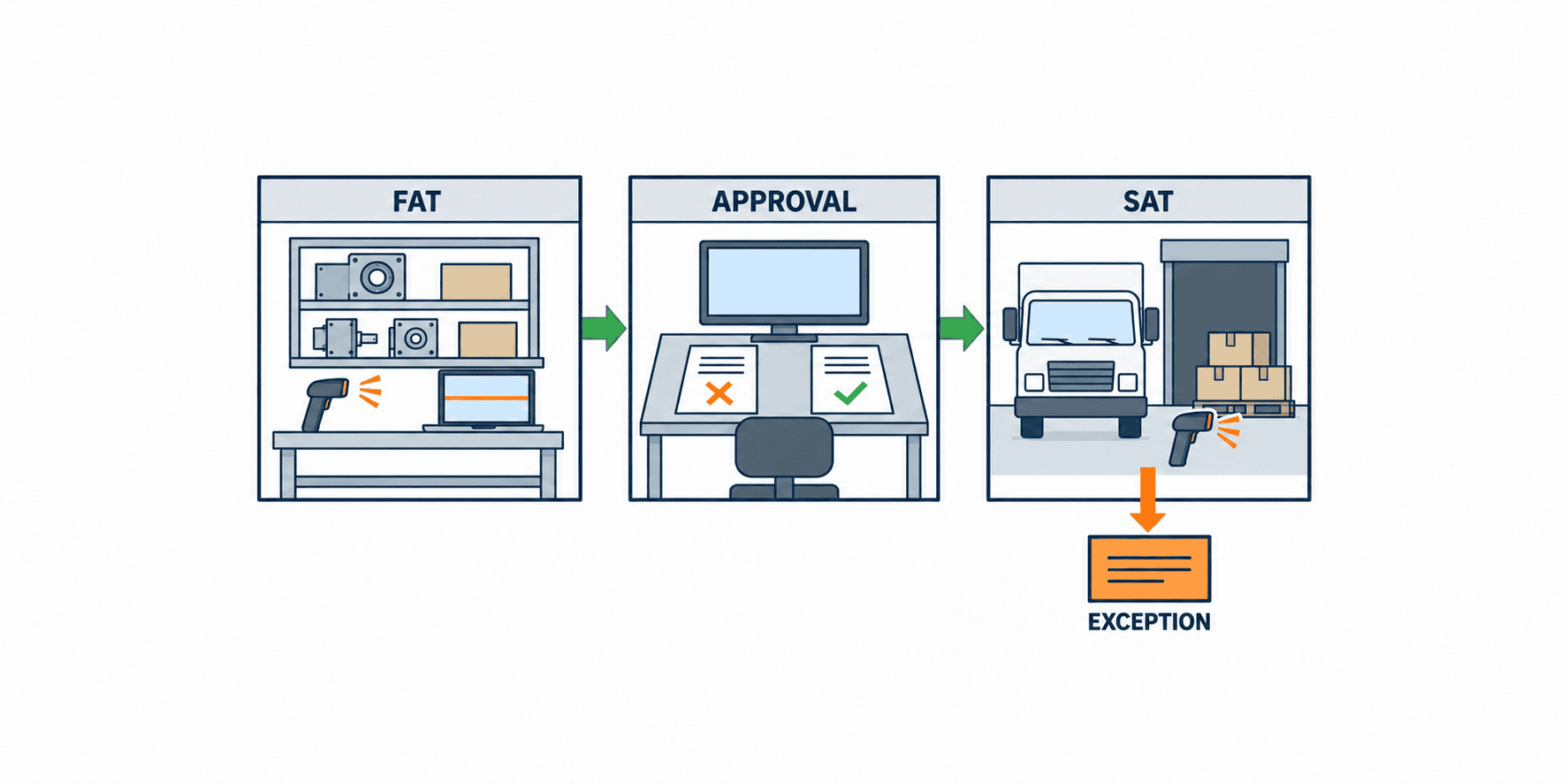
After system implementation, FAT (Factory Acceptance Test) and SAT (Site Acceptance Test) must be conducted using scenarios that simulate real-world operations. Below are practical test case examples.
FAT (Factory Acceptance Test) Cases
| No. | Test Description | Input Example | Expected Result | Evidence Example |
|---|---|---|---|---|
| 1 | Order recommendation below the reorder point | Calculated inventory position = ROP − 1; fix and log on-hand, eligible POs and allocations in the input snapshot | Exactly one recommendation is generated | Recommendation log and input snapshot |
| 2 | Approval workflow operation | Order recommendation → Approver approval | Proceeds to order confirmation process | Approval history/operation log |
| 3 | Order data transmission via API | Submit order data via API | Data reaches supplier system | API request/response log |
| 4 | MOQ/Lot rounding process | Recommended qty = 13, MOQ = 10, Lot = 5 | Order confirmed at qty = 15 | Order quantity log |
| 5 | Automatic routing to exception queue | Submit delayed delivery data | Automatically registered in exception queue | Exception list |
| 6 | Output of logs/audit trails | Execute a series of operations | All operations are logged | Log file |
| 7 | Operation rejection for unauthorized users | General user attempts approval | Error displayed, operation not allowed | Error log |
| 8 | Data entry not allowed after batch cut-off (negative test) | Submit order recommendation after cut-off | Error displayed, data not accepted | Error log |
SAT (Site Acceptance Test) Cases
| No. | Test Description | On-Site Condition Example | Expected Result | Evidence Example |
|---|---|---|---|---|
| 1 | Integration with actual inventory data | API integration with WMS real inventory | Order recommendation calculated correctly | Recommendation/inventory log |
| 2 | Cross-check with supplier order data | API integration with supplier order system | Order data correctly received/reflected | Supplier order record |
| 3 | Thai UI display | Operate screen in Thai language setting | UI displays and operates correctly | Screen capture |
| 4 | Exception closure from exception queue | Input delayed delivery data into exception queue | Responsible person can close exception | Closure history |
| 5 | Lead time calculation including holidays | Set Thai holiday calendar | Delivery date calculated correctly | Delivery calculation log |
| 6 | Quantity mismatch handling at receipt (negative test) | Register data with order and receipt quantities differing | Automatically registered in exception queue | Exception list |
| 7 | Approval delay alert notification | Leave approval pending for 24 hours | Alert notification sent to responsible person | Notification log |
| 8 | Recovery and cancellation after failure | Simulate lost connection just after PO transmission | Reconcile transmission status, avoid duplicate PO and record any cancellation | Reconciliation and cancellation log |
Key Points:
- Include negative tests and verify recovery and cancellation after failure. Do not blindly roll back a transmitted PO; retain supplier reconciliation evidence.
- Store evidence in formats suitable for audit submission (log files, screen captures, etc.).
- For SAT, require both on-site staff and IT administrators to participate, emphasizing practical operation validation.
11. 30/60/90-Day Staged Rollout (Sample Plan), KPI Definition, and Baseline Comparison
Below is a sample staged rollout plan for a reorder point management system implementation (*for reference only*).
| Period | Main Activities | Example KPIs | Baseline Comparison Method |
|---|---|---|---|
| 0-30 days | – Pilot operation with key items (Category A) – On-site staff training – Enhanced initial exception handling | – Order recommendation accuracy – Number of exceptions – Approval lead time | Compare with manual order records from previous month |
| 31-60 days | – Expand to Category B/C items – Approver/IT admin operation validation – Stabilize API integration | – Automated order rate – Average exception handling time – API error rate | System logs, on-site interviews |
| 61-90 days | – Full-scale operation for all items – Prepare for multi-site rollout – Audit trail review | – Exception closure rate – On-time delivery rate – Audit log coverage | Compare audit reports before/after implementation |
Sample KPI Definitions
- Order Recommendation Accuracy: Rate of match between actual and recommended order quantities
- Number of Exceptions: Occurrences of reorder breach, approval delay, delivery delay, etc.
- Approval Lead Time: Average time from order recommendation to approval
- Automated Order Rate: Proportion of automatically generated orders to total orders
- Exception Closure Rate: Proportion of exceptions closed within the specified period
- On-Time Delivery Rate: Proportion of orders delivered by the promised date
Baseline Comparison
- Quantitatively record manual order records, exception occurrences, and on-time delivery rates before implementation, and compare with post-implementation KPIs.
- Evaluate labor-saving and cost reduction effects objectively using on-site interviews and audit trails.
12. FAQ
What is the typical cost of implementing a reorder point management system?
Costs vary significantly depending on system configuration (on-premises/cloud), number of items, integration scope, customization requirements, and number of users. Clarify your requirements in the RFP and obtain detailed quotations from vendors.
How long does implementation take?
There is no universal implementation timeline. Item and site scope, ERP/WMS interfaces, master-data cleanup and approval design determine the work. Ask vendors for separate durations and exit criteria for requirements, migration, FAT, SAT and operator training, then check the schedule against your team’s availability.
Is an ERP system required?
ERP is not mandatory, but integration with ERP, WMS, MES, or other core systems is recommended for inventory and purchasing data linkage. Standalone operation is possible if API or file integration is supported.
Is automated ordering always possible?
Whether automated ordering can be fully implemented depends on system specifications and site operation rules. Most systems support automatic order recommendations, with final approval often performed manually. Adjust the scope of automation and approval workflows according to site requirements.
Can safety stock be managed?
Most reorder point management systems support safety stock settings. However, calculation logic and implementation methods differ by product, so clarify requirements in your RFP and verify implementation during testing.
Is multi-site operation possible?
Multi-site support is achievable, especially with cloud-based architectures. If you require site-specific inventory/order data management or cross-site exception queues, specify these needs during requirements definition and confirm feasibility with the vendor.
13. Conclusion
Implementing a reorder point management system is not just a system rollout—it is a critical project for standardizing and streamlining on-site business processes, strengthening internal controls, and enhancing audit readiness. From architecture and configuration selection to vendor evaluation, RFP preparation, acceptance testing, and staged rollout, it is essential to define requirements and validate them objectively at each phase. Use KPIs for effectiveness measurement, and ensure robust exception handling and audit trails for long-term operational stability.
If you are considering implementing a reorder point management system, TOMAS TECH’s expert consultants can support you from requirements gathering to RFP preparation. Please feel free to contact us for an initial consultation.


