


When choosing a system for electronic signoff at manufacturing process handoffs, first define what a completed handoff means. Finishing an operation, physically moving work in process (WIP), and having the next operation accept it are three different events. A single completion button hides quantity discrepancies and quality holds. This guide explains how a factory in Thailand or elsewhere can design two-party checks, exception handling, offline recovery, and ERP/MES integration without treating a shop-floor signoff as a claim of legal electronic-signature compliance.
Separate operation completion, physical movement, and acceptance
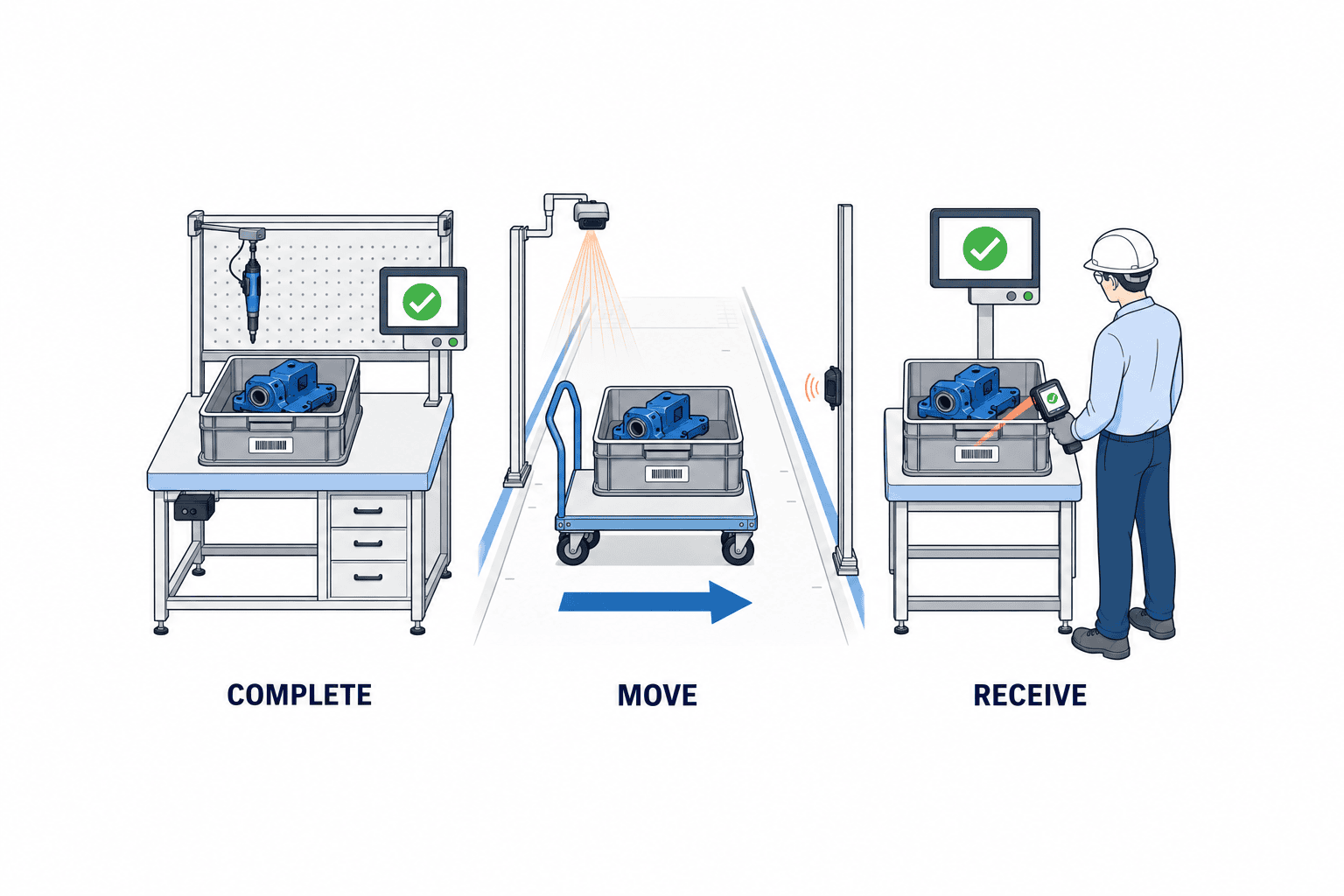
The time an upstream operator finishes processing is rarely the exact time a container reaches the next station. Arrival does not prove that the receiving operator checked the item, lot, container, quantity, and condition. A handoff record should expose that gap and the moment responsibility changes.
Oracle Fusion Cloud Manufacturing’s 26B feature description distinguishes completed quantity from an explicit WIP movement: under the described configuration, completion places quantity in a To-Move pool, and a Move Work in Process action transfers it to the next operation’s Ready pool. This is a product-specific example, not proof that Oracle provides the two-person signoff proposed here. We recommend treating receiving acceptance as a further, separately recorded event. Oracle: Track Work in Process Between Operations
| Event | What happened | Typical recorder | Can the next operation start? |
|---|---|---|---|
| Completion | Upstream operation confirms good, scrap, or other output | Upstream operator | Not yet determined |
| Dispatch or movement | An identified container leaves or changes staging location | Material handler or upstream operator | Not yet determined |
| Acceptance | Receiver compares the physical goods with the expected record | Downstream operator | Only if quality and other rules allow it |
The model does not always require three people. One employee may also move the container. Yet the sending and receiving checks should remain distinguishable, especially where a discrepancy must be investigated. The goal is a clear transfer of responsibility rather than the largest possible number of signatures.
Decide where two-party confirmation is justified
Applying a second confirmation to every move can create queues. Start with high-value WIP, product-change points with mix-up risk, release from a quality hold, or a boundary with a contractor. Within a tightly controlled production cell, a container-level or batch-level acceptance may be sufficient if the equipment already identifies each workpiece. The granularity is a plant policy, not a universal rule.
Two-party confirmation means more than storing two different user IDs. Both people need to see the same container or lot, operation, quantity, condition, and version of the data they confirm. A receiver should not approve fields that the screen never displayed. In multilingual plants, translate status and discrepancy reason codes consistently so that operators do not interpret one state differently in Thai, English, and Japanese.
What an interprocess handoff record must contain
A production order alone is too broad a traceability key. One order may be split among containers, moved in parts, or sent for rework. Choose the traceability unit—container, lot, or serial—and carry the same identifier through completion, movement, acceptance, and inspection. GS1 EPCIS offers a useful event lens: what, when, where, and which business step. We use it as a design reference, without asserting that the proposed plant system conforms to EPCIS. GS1 EPCIS and CBV Implementation Guideline GS1 EPCIS 2.0.1
At minimum, record an event ID, object ID, order, item, source and destination operations, intended and actual quantities with units, good/scrap/hold state, event time, server receipt time, actor ID, device ID, and current status. If quality holds or rework occur, add reason, authorized releaser, and references to the inspection or rework instruction. During a transition from paper, keep the paper document number as a cross-reference.
Bind signer, time, version, and correction history
An electronic signoff is more than a field in which someone types a name. The action should bind the authenticated user’s ID, time, object and event IDs, action meaning, and the exact data version reviewed. Shared accounts cannot identify the person who inspected the goods. Specify session timeout, reauthentication for sensitive actions, and role expiry. An image of a signature offers little evidence if the quantity can later be overwritten without a trace.
Correct errors with a new event that refers back to the original, rather than silently replacing it. If a receiver entered ten pieces and later found only eight, the history should retain the original ten-piece acceptance, the two-piece discrepancy, the correction, its reason, and the approver. If a plant needs legally recognized electronic signatures or compliance with a specific regulated industry, it must separately determine the jurisdiction, product, customer requirements, certification method, and retention rules. The shop-floor signoff described here does not by itself establish legal validity.
Keep event time separate from server receipt time
During a Wi-Fi outage, material may move before the device synchronizes. Store when the action occurred on the device and when the server received it. Check clock drift, store the time-zone offset, and record any authorized correction. Otherwise an analysis of waiting time can be misleading. GS1 EPCIS distinguishes eventTime and recordTime, a useful reference for this decision. GS1 EPCIS 2.0.1
Define WIP handoff states before designing screens
Agree on the state transitions before choosing button colors. A practical starting set is: in process, complete and awaiting dispatch, in transit, awaiting acceptance, accepted, discrepancy under investigation, quality hold, and rework. For each state, define who may change it, the required inputs, whether reversal is allowed, and who receives an alert. A factory can omit an in-transit state if movement is immediate; it should still preserve the distinction between completed and accepted.
| Current state | Action | New state | Required information | Control |
|---|---|---|---|---|
| Awaiting dispatch | Confirm dispatch | In transit or awaiting acceptance | Container, quantity, sender | Do not dispatch held goods as good goods |
| In transit | Register arrival | Awaiting acceptance | Location, handler | Do not relabel without an event |
| Awaiting acceptance | Confirm receipt | Accepted | Actual quantity, receiver | Do not autoapprove a mismatch |
| Awaiting acceptance | Report mismatch | Investigation | Difference, reason, evidence | Retain original dispatch record |
| Awaiting acceptance | Place on hold | Quality hold | Reason, decision maker | Block production start |
Oracle’s operation-transaction documentation distinguishes completion, scrap, and rejection, and discusses quantity and serial inputs. This is a reminder not to assume that the previous operation’s total completion equals the next operation’s accepted good quantity. Align good, scrap, rework, and held balances with the plant’s accounting model. Oracle: How You Report Operation Transactions
Allow partial acceptance without losing the discrepancy
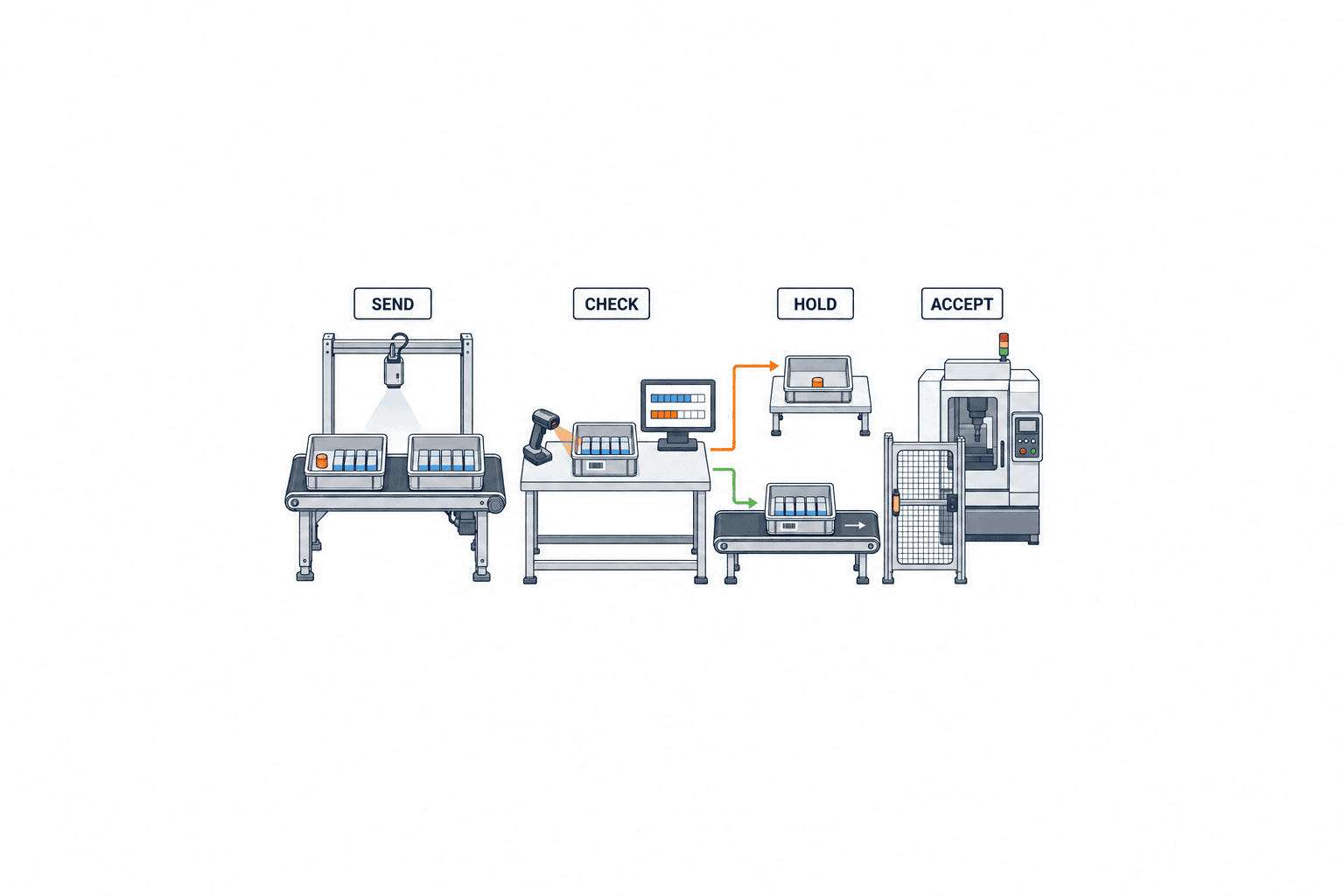
Suppose dispatch shows 100 pieces but only 98 are physically present. These numbers are an illustrative test case, not a measured error rate or benefit claim. Rejecting the entire handoff can hold up 98 good pieces; accepting all 100 hides two missing pieces. An appropriate workflow may record acceptance of 98 and a separate open investigation for two, while leaving the dispatch unsettled until the difference is resolved.
Calculate and retain sent, accepted, and disputed quantities with the reason and decision maker. Prevent a second acceptance of the same container and event. For weighed material, also check mass and units. If material is split, record the parent-to-child container relationship. Any tolerance should be approved for the actual item, operation, and measuring device rather than hard-coded across the factory.
Branch quality holds and rework away from the normal route
Physical custody is not permission to process. A next station may receive a container into a quarantine location while inspection is still pending. Keep “physically received” separate from “released for production.” Link release to the authorized quality role, affected lot, test result, and inspection record. Rework should point from the defect to the rework instruction and subsequent inspection; merely moving an item back to an earlier operation can obscure the history. Make held and reworked goods explicit in text as well as color on the receiving screen.
Make receiving confirmation usable on the factory floor
An overloaded form invites retrospective batch entry. A workable flow is scan, compare, choose, confirm. The scan brings up item, lot, sending operation, expected quantity, and condition. The receiver checks the physical label and quantity, then selects accept, discrepancy, or hold. Keep the target ID and quantity visible next to the confirmation button. Define when manual entry is allowed for damaged labels and whether a second person must verify it.
Microsoft describes production-floor sign-in with badge ID or worker information and a job screen with operation, product, completed, and scrapped quantities. These are useful examples of shop-floor information granularity; they are not a claim that the product provides the exact two-party workflow in this article. Microsoft Learn: How workers use the production floor execution interface
Use familiar reason codes in each operating language. Define who takes responsibility for material staged when the night shift has no receiver. On shared devices, enforce sign-out or a short lock interval between workers. Test scanners while wearing gloves, under actual lighting, and at the real transfer point where Wi-Fi may be weaker than in an office.
Design offline operation for duplicates and reversed delivery order
If physical movement continues during a network outage, the device may queue events and send them later. A simple queue is not enough: the same acceptance may be delivered twice, or the server may see acceptance before dispatch. Assign a unique event ID before transmission, reuse it on retry, and make the server idempotent. Compare object ID and data version when events arrive out of order; send contradictions for review instead of silently fixing them.
Do not treat two entries under a shared offline login as two independent confirmations. If reauthentication is impossible, mark receipt provisional and define how the named receiver confirms it after connectivity returns. Quality and production management must decide whether provisional material may be processed. Also document the paper fallback for power or device failures, including later entry, retention of the original paper, and duplicate reconciliation.
Divide MES movement and ERP posting responsibilities
ERP often supplies orders, items, plan quantities, inventory, and cost records; MES often captures operation execution, container state, handoff events, and exceptions. The actual boundary varies. ERP-related products may themselves manage WIP movement, as Oracle’s cited feature illustrates. Specify which system is authoritative for each state rather than assigning authority by product name. Oracle: Track Work in Process Between Operations
| Data | Ownership question | Interface check |
|---|---|---|
| Order and route | Where is a plan change approved? | When does MES receive its new version? |
| Completed quantity | Is PLC, operator, or inspection authoritative? | How are scrap and holds reconciled? |
| Container and location | Who owns in-transit and provisional states? | How are splits and relabeling recorded? |
| Acceptance | Who determines a valid receipt? | Is ERP updated only after confirmation? |
| Correction | How are versions reconciled? | Can retries double-post? |
If ERP automatically increments the next operation’s Ready quantity on completion, adding “awaiting acceptance” in MES alone can create conflicting balances. Explore whether ERP can hold a separate balance, whether final posting can wait for acceptance, or whether a supported configuration already separates the steps. Check inventory and costing implications with the implementation team.
Our article on automatic shop-floor production actual collection explains how machine, PLC, and operator signals become completion records. This article starts after that point: what physically moved and who accepted it. Our WIP management guide looks at location and waiting inventory across the plant. Here the focus is the transfer of responsibility at the operation boundary and its evidence.
Put exceptions into the RFP and proof of concept
Start with a map of the actual handoff: where completion is registered, where containers are staged, the route they travel, the receiving shift, and where quality decisions occur. Observe paper tickets and chat messages, including when they are used. Measure current waiting time and WIP with a defined period and sample; do not construct an ROI claim from a convenient day.
RFP requirements that make proposals comparable
State the target operations and traceability unit; the meanings of completion, movement, and acceptance; when two-party confirmation is required; authentication and roles; discrepancy, hold, and rework transitions; correction history; devices and labels; offline behavior; ERP/MES interfaces; log access and retention; languages; training; and failure procedures. Request explicit fields such as event ID, signer ID, time, version, quantity, and unit. Ask each supplier to mark every requirement as standard, configurable, or custom development.
Separate must-have controls from optional conveniences. Avoid double receipt, block held material, and retain before-and-after values may be must-haves for the target boundary. Photographs or voice input may be optional. If law or customer audit terms demand a particular electronic-signature scheme, document and verify those requirements separately before contracting.
Test exceptions before celebrating the happy path
A polished scan-and-accept demo proves little. Test partial receipt, mismatch, damaged labels, wrong lot, quality hold, rework, missing night-shift receiver, duplicate resend, Wi-Fi outage, device replacement, and ERP posting failure with real containers and users. Sending 100 and receiving 98 is an example test case, not an industry statistic.
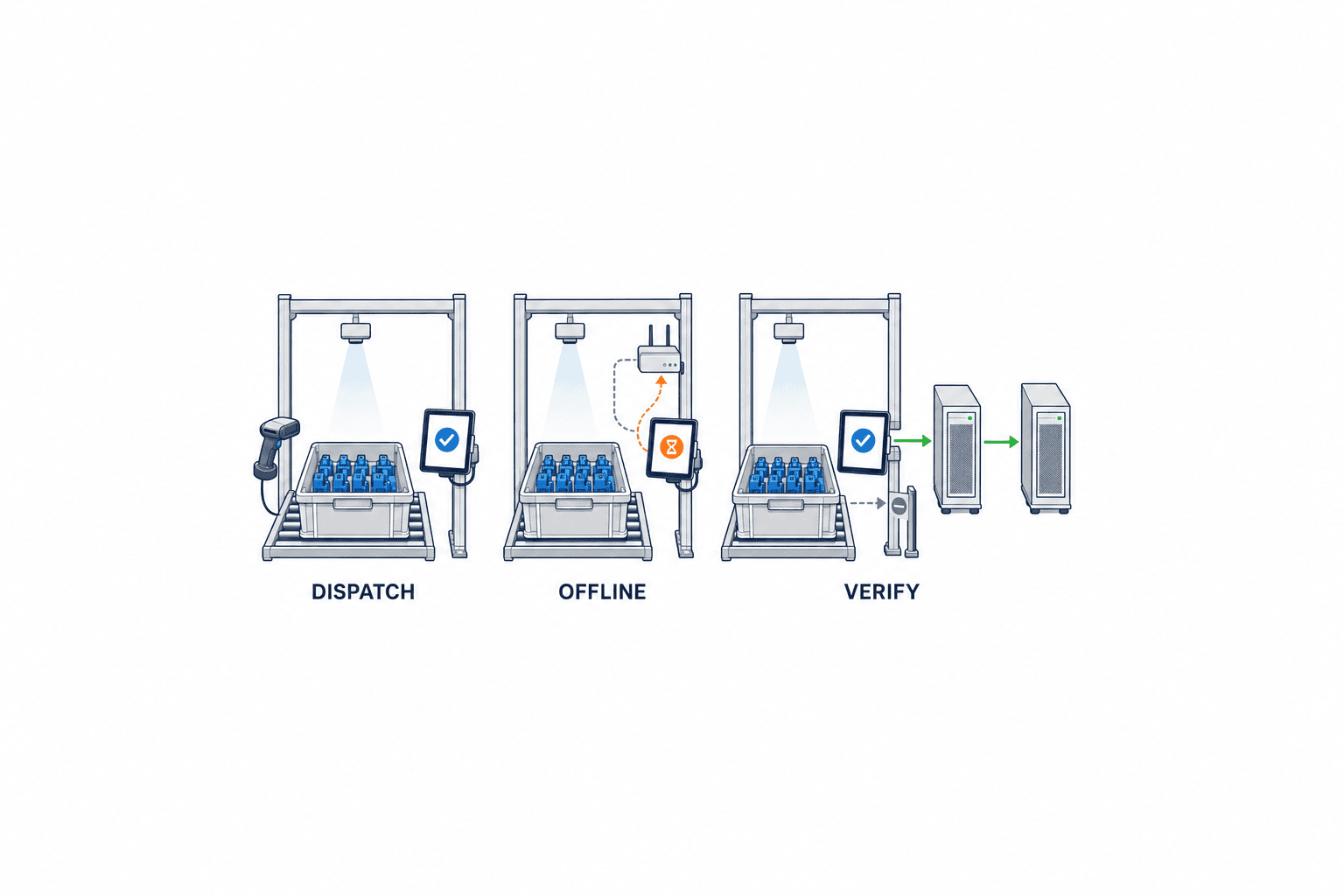
Acceptance criteria should require a third party to reconstruct dispatch, receipt, and discrepancy in time order. Verify the actual receiver ID, no duplicate after offline recovery, a production block for held goods, visible correction history, and ERP quantities that still reconcile after retries. Preserve event logs and expected business results, not only screen captures.
Write acceptance tests as input, expected state, and evidence
A test sheet should describe actions rather than only list features. For example: the sending operator dispatches container A, the receiver scans the same container, the displayed item, lot, and quantity match the physical label, and the named receiver confirms. The expected state is that only container A is accepted, the dispatch event remains visible, and ERP receives one posting. Save event IDs, timestamps, signer IDs, and integration messages as evidence. Press the receipt button twice and verify that the second action does not create another inventory movement and gives the operator an intelligible response.
For a mismatch, verify that automatic acceptance stops while a partial receipt and linked investigation can coexist. For a quality hold, verify that physical custody does not unlock the next operation and that only an authorized quality release does. For rework, trace the original lot through the instruction, reinspection, and later acceptance. During a network test, create dispatch and acceptance on a device, then deliver their messages to the server out of order. The system should surface a contradiction rather than conceal it. These scenarios test data integrity as well as the screen.
Teach operators when not to accept
Training must cover a wrong item or lot on the screen, a missing piece, a damaged container, an incomplete inspection, and a device showing another worker’s name. Show the hold action and the escalation contact. The sender and receiver should each demonstrate what they inspect and why they must not sign on the other’s behalf. On shift changes, define who has custody of an unmanned staging location and how the next shift records acceptance. Cleaning or moving the container while it waits may need a separate event. Check competence with practical exception cases rather than attendance alone.
Roll out with an owner for every open exception
Choose one boundary with clear pain and enough exception cases. Agree on states and identifiers, prepare labels and devices, exercise the proof of concept, train workers, and then expand. If paper and electronic records run in parallel, define when the paper process ends and which record is authoritative during the overlap.
After go-live, assign daily owners for overdue acceptance, unresolved discrepancies, unreleased holds, resend failures, and shared-account use. Production control, quality, and IT should know who closes each case. Extending the system to a warehouse or subcontractor requires additional decisions about identity, devices, custody, and ownership.
Review not only the number of pending receipts but also where discrepancies arise, time to establish a cause, manual entry, failed offline retries, and aging quality holds. Avoid using a higher number of reported discrepancies as automatic evidence of worse performance: accurate reporting may increase when operators finally have a clear way to declare exceptions. Check whether missing records decline and investigations become reproducible. Separate screen design issues, bad master data, and inadequate physical staging space before choosing a remedy.
Frequently asked questions
How is an interprocess handoff record different from WIP management?
WIP management gives an overall view of quantity, location, and waiting time. A handoff record captures dispatch, physical movement, acceptance, and the people who checked them at one boundary. Feeding handoff events into WIP management reveals whose confirmation is still pending.
Does every process transfer need two electronic signoffs?
No universal rule applies. Choose based on risk, traceability unit, automatic identification, and staffing. At important boundaries, retain separate sender and receiver actions. Ensure each confirms the same object, quantity, and condition; simply collecting two names is not enough.
Does an MES signoff automatically count as a legally valid electronic signature?
No such conclusion follows from this workflow. Legal signature, certification, and sector-specific compliance depend on the jurisdiction, product, contract, and customer requirements. Verify them separately. This guide addresses operational identity and approval history.
Can the system work with quantity differences and offline periods?
Yes, if those exceptions are designed first. Keep partial acceptance separate from investigation, deduplicate retries by event ID, and save both event and receipt times. Get quality and production approval for how far provisional offline receipts may proceed.
Conclusion
Begin by defining completion, physical movement, and receiving acceptance as distinct events. Set the scope of two-party checks, discrepancy and quality-hold handling, signer ID, version and correction history, and offline retries. Then decide the authoritative ERP/MES record and test real exceptions with actual containers and workers before rollout.
TOMAS TECH can help map your handoff points and turn receiving checks into requirements that fit your existing ERP and MES. If you are still comparing approaches, tell us about the target operations and current records through our contact page.
Primary references
- GS1 EPCIS and CBV Implementation Guideline 2.0: event and business-step model.
- GS1 EPCIS 2.0.1: event time, record time, location, and business-step fields.
- Oracle Fusion Cloud Manufacturing 26B: Track Work in Process Between Operations: completed quantity and explicit movement.
- Oracle Fusion Cloud Manufacturing: How You Report Operation Transactions: completion, scrap, rejection, and quantity.
- Microsoft Learn: How workers use the production floor execution interface: operator sign-in and floor data.
- Microsoft Learn: Configure the production floor execution interface: device configuration and registration-time options.
Sources checked on 27 October 2026. Confirm product version and configuration during procurement. Quantities and workflows used as examples here are design and test cases, not measured outcomes or universal performance claims.


