



When selecting a label printing system for a factory in Thailand, print speed is only a small part of the decision. The system must control obsolete artwork, unapproved printing, duplicate reprints, unreadable barcodes and wrong-shipment risk as one evidence chain. This guide explains how to specify, pilot and accept a closed loop covering label version control, approval, label printer integration, print verification and inbound/outbound inspection.
Select a label printing system as a control platform, not a print utility
A label transfers item, lot, quantity, expiry, destination and regulatory information between the physical product and digital records. If an obsolete template or the wrong master data is used, every later scan merely processes the error faster. A production-grade system should therefore answer:
- Who requested which approved version for which order, item and lot?
- Which ERP or MES values were frozen at what point?
- Which printer, settings, stock and ribbon produced how many labels?
- Who approved a reprint, for what reason and quantity?
- Did the print contain the intended data and remain readable?
- Did the label, physical unit and shipment instruction match at the shipping gate?
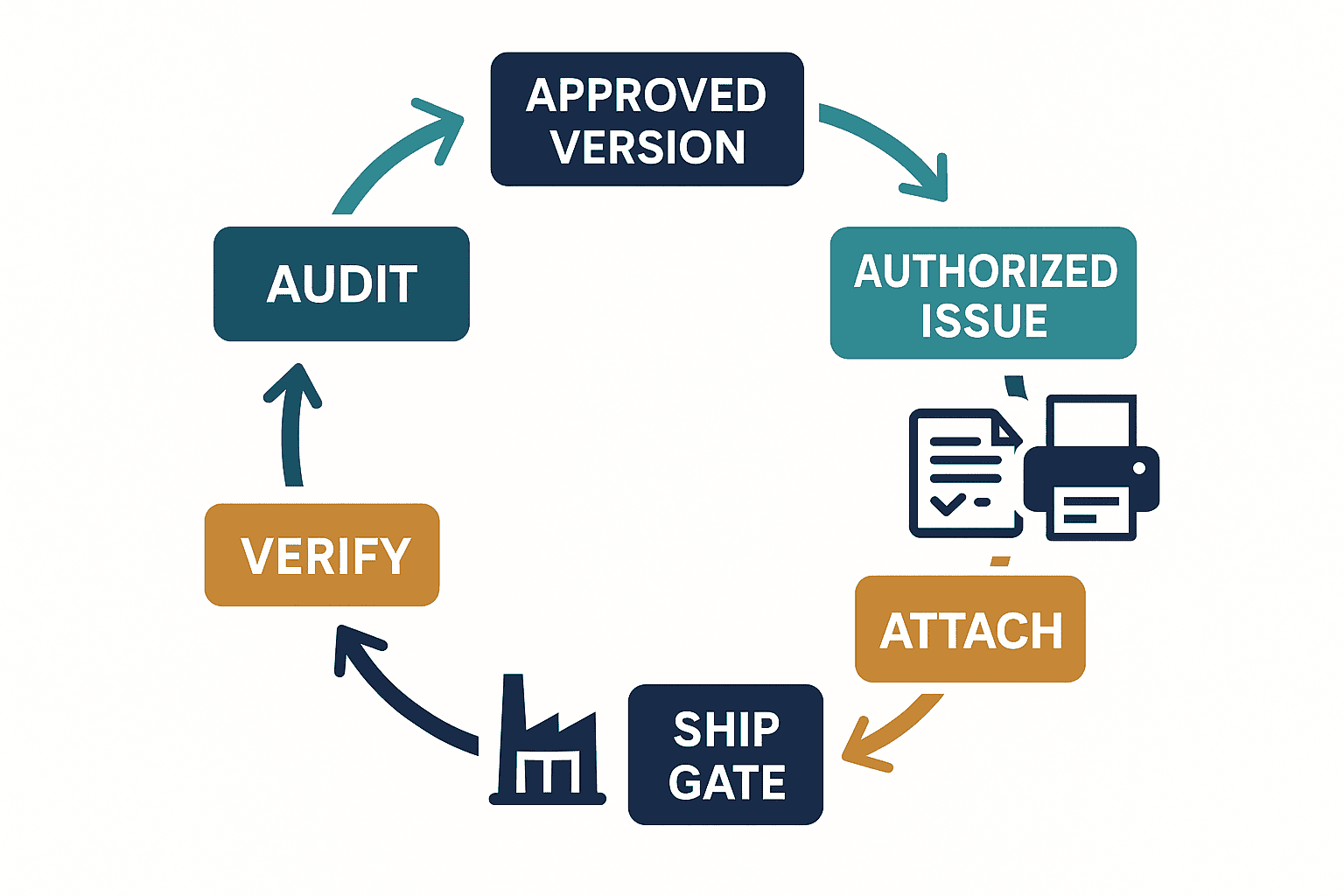
In this article, “closed loop” means approved version → authorized issue → print verification → physical-item match → shipping gate → exception handling → audit evidence. For identifier and inventory-tracking fundamentals, see our barcode management system guide. For mobile-device selection, see handheld terminal implementation in Thailand. Here the focus is the control layer above them.
Fix the scope and accountability before the RFP
Inventory the label types and process boundaries before inviting proposals. “Support all labels” is ambiguous: a vendor may demonstrate office forms while production expects product labels and logistics expects customer shipping labels.
| Scope | Typical data source | Main risk | Example accountable owner |
|---|---|---|---|
| Material/receiving label | Purchase order, ASN, receipt | Supplier lot confused with internal lot | Warehouse manager |
| Work-in-process label | MES, production order, result | Obsolete version after process change | Production manager |
| Product/regulatory label | Item master, BOM, quality documents | Unapproved claim, wrong language or market | Quality assurance |
| Case/pallet label | Packing result, shipment order | Wrong quantity, hierarchy or SSCC | Logistics manager |
| Customer-specific label | Sales order, EDI, customer specification | Wrong customer rule | Sales and logistics |
Separate process owner, artwork owner, master-data owner, system administrator, issuer, reprint approver and quality decision-maker. Even at a small site, one person should not be able to edit, approve and reprint without oversight. Where staffing is limited, prioritize separation between change and approval, and between routine issue and exceptional reprint; use time-limited delegation.
Requirements for label version control and approval workflow
Version control is not a filename ending in “v2.” Treat a template as an approved object with applicable market, item, customer, packaging level and effective period. Operators should not be able to choose an obsolete version at will.
Attributes each label version should carry
- Unique version ID, revision and state: draft, review, approved, retired.
- Applicable items, customers, countries, languages, package levels, sites and lines.
- Effective start/end and disposition of work in process and old packaging.
- Data source, format, length, mandatory rule and permitted characters for every variable.
- Barcode symbology, identifiers, data syntax and design constraints.
- Reviewers, approvers, timestamps, change reason and supporting documents.
- Comparable differences, test prints, verification results and rollback target.
The GS1 General Specifications are the primary reference for GS1 identification keys and data carriers. Version 26.0, published in January 2026, is the current reference point for applicable symbol and syntax requirements.GS1 General Specifications 26.0 GS1 Change Notifications include proposals and changes for the next Version 27.0, including 2D and Digital Product Passport topics. Treat them as preparation for future change—not proof that every announced item is already a current requirement.GS1 General Specifications Change Notifications
Changes that approval must control
Control fixed wording, translation, units, regulatory symbols, barcode data, sources, formulas, conditional logic, fonts, and settings that affect darkness or speed—not only object position. A risk-based workflow may distinguish minor and major changes, but “minor” should alter evidence and approval depth, not eliminate review.
Acceptance testing must show that an approved version cannot be edited in place, emergency changes expire and receive retrospective review, and relevant ERP master changes trigger impact assessment. Preserve what difference each approver actually reviewed, not just an approval timestamp.
Technical requirements for label printer integration
“It prints from Windows” is not enough. Factories face mixed vendors, different DPI, network interruptions, consumable changes, print-server outages and spare-printer switching.
| Area | Requirement to confirm | PoC evidence |
|---|---|---|
| Connectivity | LAN, USB, server/direct mode, retry behavior | Communication log, job ID, recovery timeline |
| Print language | ZPL/ZPL II or driver mode, encoding | Actual commands, settings and samples |
| Device variance | 203/300/600 dpi, width, cutter, peel mode | Same template across real devices |
| Status feedback | Media out, head open, ribbon out, pause | Alert matched to job status |
| Idempotency | Prevent duplicates after timeout | Retry test and issued-quantity log |
| Security | Authentication, management ports, network zones | Permission matrix and change log |
Zebra’s official documentation describes ZPL II and ZPL compatibility settings under ZPL Mode.Zebra ZPL Mode This is a vendor/device example, not evidence that every printer behaves identically with ZPL. Test firmware, resolution, fonts and connectivity on the intended models.
A successful send does not prove that correct paper emerged. Link the application job ID, printer response, verifier or scanner result and operator attachment confirmation through one business key such as packing ID or order number.
Print verification is more than “my scanner read it”
A barcode that one scanner read once is not necessarily of sufficient quality. GS1 Support recommends an ISO/IEC 15426-compliant verifier and evaluation against the relevant GS1 symbol specification table.GS1 Support on printed barcode quality GS1’s verification guideline positions verification as a managed quality process.GS1 Barcode Verification Process
Separate three layers in acceptance:
- Content validation: human-readable and encoded data match the target ERP/MES/WMS record.
- Operational readability: production scanners can read under intended distance, angle, speed, light and packaging conditions.
- Quality verification: where required, a calibrated and controlled verifier evaluates the applicable specification.
Results depend on printer, stock, ribbon, method, speed, darkness, head wear, dirt, static, curved application, films, lamination and temperature. Use production material, minimum/maximum data, actual line speed and aged samples—not only clean office samples.
For auxiliary mobile scanning, Google ML Kit Barcode Scanning supports common 1D/2D formats and on-device offline processing.Google ML Kit Barcode Scanning Limits described on that page, such as codes handled in a call, are ML Kit implementation conditions, not universal limits for industrial scanners, verifiers or label systems. A phone scan also does not replace standards-based quality verification.
Reprint control closes a major wrong-shipment gap
Reprinting is necessary but highly vulnerable to misuse. If “damaged” or “lost” allows unlimited copies, one product or pallet identifier can appear on multiple physical units.
Minimum reprint controls
- Relate the reprint to its original job and business object.
- Require reason code plus comments, old-label recovery or a photo according to risk.
- Set quantity limits, time windows and role-based approval.
- Track generations and invalidate superseded physical-label status.
- Distinguish a copy from a newly assigned identifier for non-reusable serials or SSCCs.
- Require two-person or quality approval for high-risk/customer-specific labels.
- Review rates by reason, user, device, item, line and time.
Making every reprint wait for a manager can stop a line and encourage shared accounts. Apply tiers: reason and limit for low risk, supervisor approval for medium risk, quality approval for high risk. The KPI should not reward hiding legitimate reprints; it should expose unusual concentration and unresolved causes.
Close the loop with an inbound/outbound inspection system
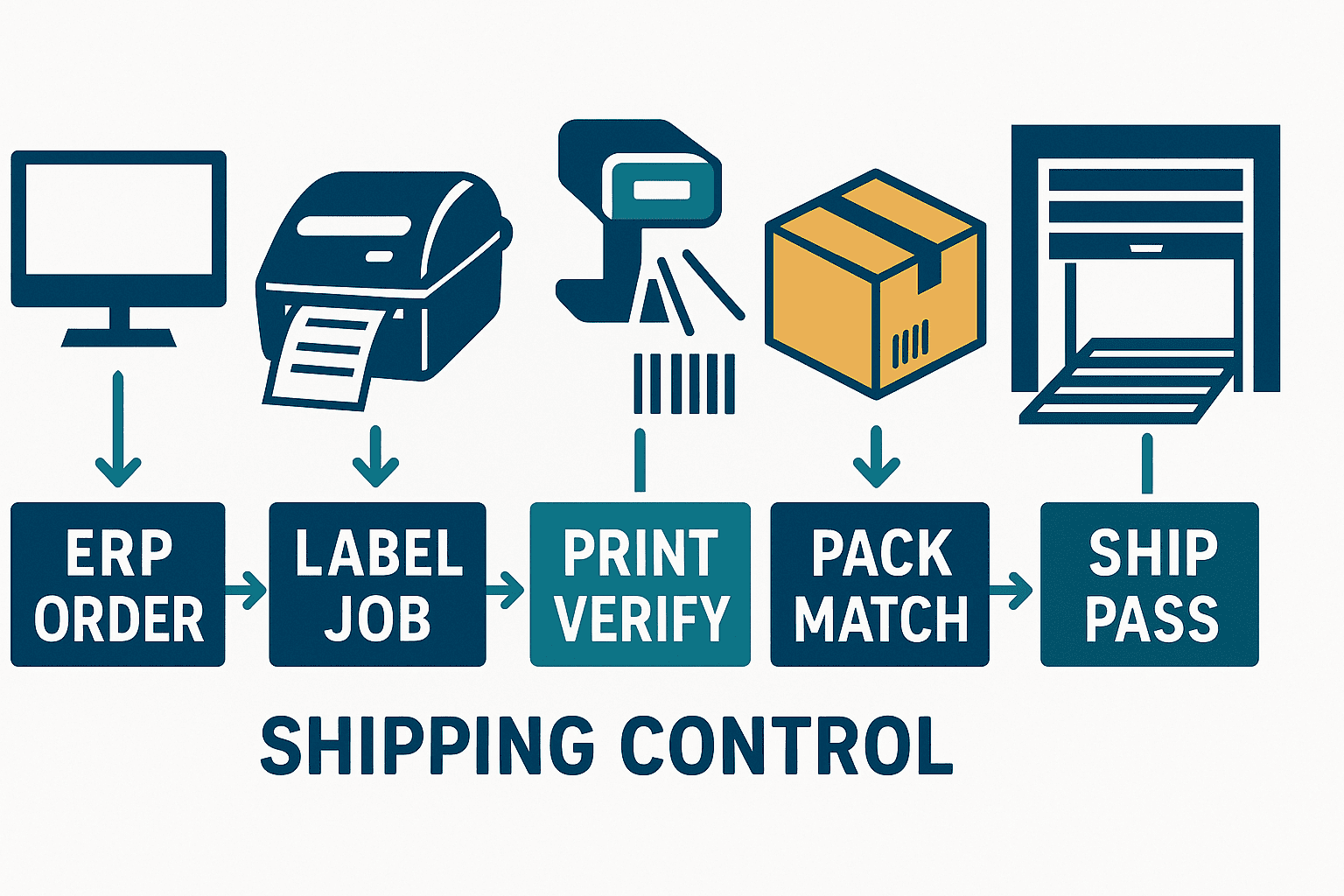
An isolated printing system cannot prevent a correct label being placed on the wrong case, contents being swapped, or an old label remaining after a shipment change. A closed loop controls events in order:
- Select allowed data and artwork from the sales, production or shipment instruction.
- Scan the packing unit or physical item before issuing only its label.
- Validate content/readability immediately and allow only passed jobs to attachment.
- Register item, inner case, outer case and pallet parent-child relationships.
- Recheck destination, item, lot, quantity and hierarchy at the shipping gate.
- On change, cancellation or repack, invalidate old relationships and re-inspect.
- Return evidence to WMS/ERP and block incomplete or duplicate confirmation.
| Gate | Pass condition | Block example | Evidence to retain |
|---|---|---|---|
| Before issue | Active order, approved version, target fixed | Obsolete version, hold, excess quantity | Order, version, operator |
| After print | Content match, readable, required quality pass | No-read, wrong digits, expired verification | Job, device, result |
| After attach | One-to-one physical match | Wrong lot, duplicate ID | Physical ID, time, terminal |
| After pack | Correct hierarchy and quantity | Prohibited mix, missing child | Package ID and members |
| At ship | Order, destination and status match | Cancelled, uninspected, wrong customer | Shipment, decision, override |
Effective wrong-shipment prevention blocks critical mismatches by default. Overrides require authority, reason, expiry and approval. If offline operation is necessary, limit which orders, versions, quantities and durations can be cached; test conflict reconciliation and duplicate-shipment prevention after reconnection.
Thailand-specific language, regulatory and operating conditions
Thai, English, Japanese and customer languages may coexist in one process. Test combining marks, font substitution, line breaks, units, date formats, Buddhist/Gregorian years and local input-to-ERP code mapping on actual devices. Do not confuse the user-interface language with the legally or contractually required product-label language.
Medical devices require product-specific handling. Thailand FDA’s IVD label guide distinguishes home-use and professional-use language expectations and asks for artwork from primary package through outer box, separate labels for multiple packaging/product numbers, and support for performance claims.Thai FDA IVD label guide This is an IVD medical-device example, not a universal rule for industrial parts, food or every product. Confirm the competent authority, customer contract and industry requirements with local quality/legal owners.
“Regulatory compliant” is not a sufficient system requirement. The system must assign each statement to the relevant product, market and packaging level, connect it to supporting documents and versions, control transition inventory and reproduce the label that was effective at the historical time.
What the RFP should evaluate
An RFP should demand demonstration of critical scenarios, not yes/no marketing answers. Require vendors to identify standard capability, configuration, custom development, third-party products and operational workarounds separately.
| Evaluation area | Required response | Main acceptance evidence |
|---|---|---|
| Version/approval | State flow, difference view, segregation, emergency change | Approval trail and obsolete-version block |
| Data integration | ERP/MES/WMS methods, retry, reconciliation | Interface log and record match |
| Printers | Models, configuration distribution, status | Samples and failure test by device |
| Verification | Content, readability, verifier integration | Results and calibration control |
| Reprint | Reason, limit, approval, old-label disposition | Pass, reject and override evidence |
| Inspection | Packaging hierarchy, ship gate, cancellation | End-to-end results |
| Security | SSO, RBAC, audit, encryption, support access | Permission test and logs |
| Availability | Redundancy, offline, recovery objectives, backup | Recovery exercise |
| Operations | Change, monitoring, training, SLA, upgrades | RACI, procedures and support terms |
| Migration | Templates, masters, history, parallel run | Reconciliation and cutover plan |
Compare total cost: template migration, interfaces, terminals, verifiers, networks, training, validation, consumable tests, support, future change and exit exports—not just licenses and printers. This article gives no market-price claim because cost varies materially by site count, volume, regulation, installed equipment and availability needs.
A PoC should test failure, not one beautiful print
A PoC should make critical hypotheses and interfaces falsifiable under production conditions. Cover normal operation, boundaries, failure, authorization, change, reprint and shipment cancellation.
Recommended PoC scenarios
- Select an approved version from an ERP order and print minimum/maximum variable data.
- Request obsolete, future, wrong-customer and wrong-package versions and confirm rejection.
- Compare content, dimensions, readability and quality on real 203/300 dpi devices.
- Cause media-out and network interruption; retry without unintended duplicate quantity.
- Test damaged-label reprint, quantity excess, missing authority and expired approval.
- Attach a valid label to the wrong case and block it after attachment or at shipping.
- Change/cancel a shipment and invalidate issued labels and packing relationships.
- Test Thai/customer characters, largest data, difficult stock and actual line speed.
- Trace one shipment backward to version, source data, printer, verification and approval.
- Restore from backup and reconcile versions, serials and incomplete jobs.
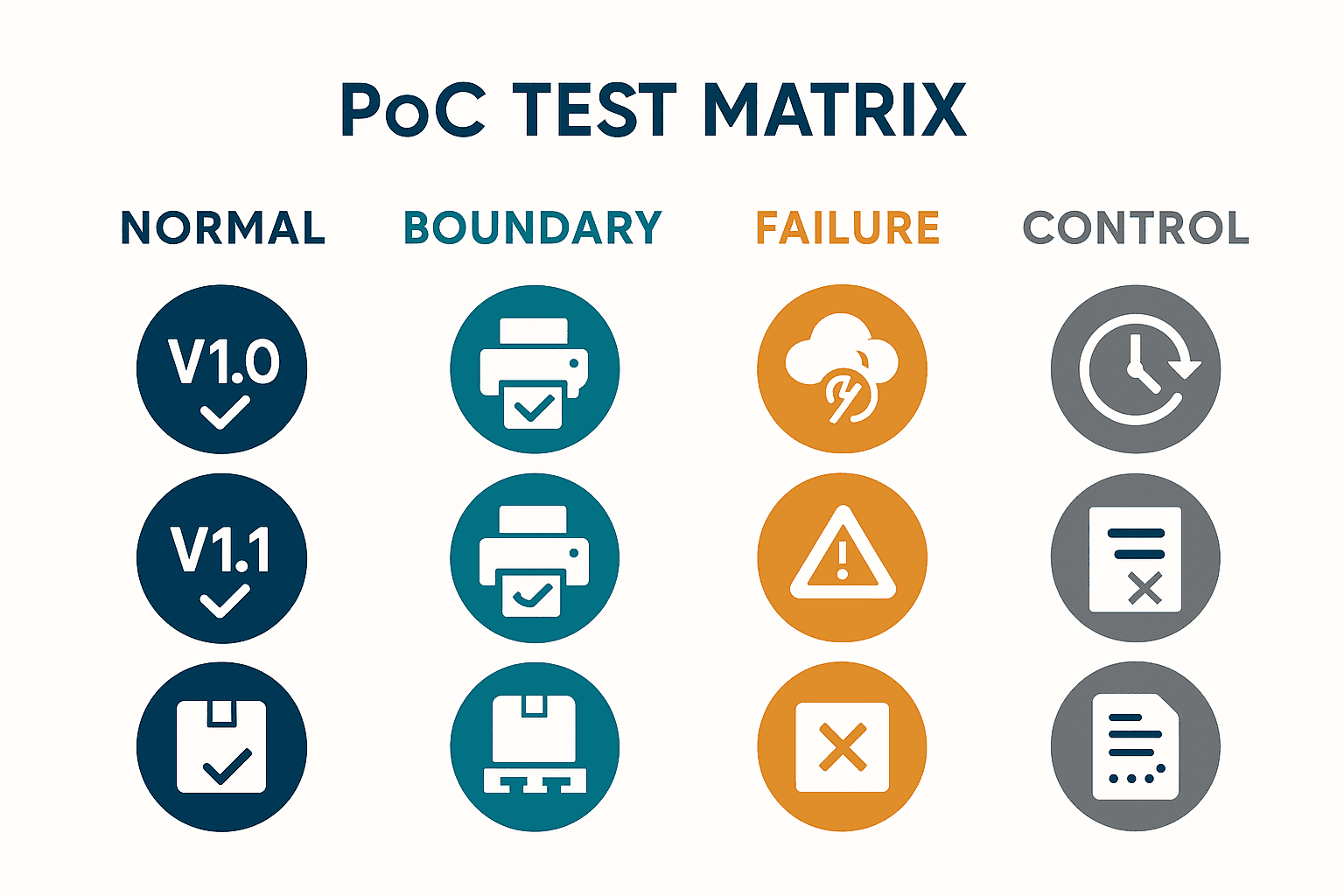
Set numeric criteria from your own conditions. For example, “all critical scenarios pass,” “100% of high-risk mismatches are blocked,” “zero unintended duplicates in retry tests,” and “zero missing mandatory audit fields” are illustrative acceptance targets, not industry benchmarks or performance promises. Define barcode grade and measurement conditions from the applicable use/specification.
Make UAT and acceptance evidence-based
Acceptance should combine critical workflows, non-functional behavior, operational readiness, migration and exceptions:
- Defect severity and the authority that may accept an unresolved issue.
- Counts and reconciliation for templates, masters, users and printer settings.
- Performance, concurrent issue, peak load, spool congestion and latency.
- Backup, restore, offline, failover and spare-device switch.
- Permissions, audit logs, clock synchronization, retention and admin action.
- Operator training, standard work, reprint, destruction and escalation.
- Hypercare KPIs, daily reviews and exit criteria.
Evidence should include test ID, input, expected/actual result, screenshots/logs, physical sample, verifier result, performer, time and defect ID. Because physical labels can change with time/environment, define sampling and storage conditions.
KPIs should show closed-loop health, not print volume
More prints are not inherently better; they may indicate overprinting or rework. Segment the following by item, line, shift, printer, version and reason:
- First-time-right issue rate.
- Obsolete/unauthorized version blocks.
- Content mismatch, no-read and quality failure.
- Reprint rate, leading reasons, unrecovered old labels and approval deviations.
- Attachment mismatch, hierarchy mismatch and shipping-gate block.
- Wrong shipment/near miss and detection point.
- Printer downtime, recovery, spare switch and duplicate print.
- Change lead time and emergency-change share.
If a site sets “reprint below 1% per month,” that is an example local target based on its history and risk, not a universal standard. One number across lines may encourage under-reporting; review legitimacy, concentration, recurrence and old-label disposition.
Implementation roadmap and roles
Start with one representative and observable product family or shipping lane rather than a simultaneous rollout.
- Discover: inventory labels, versions, sources, printers, exceptions and incident history.
- Design controls: define RACI, states, approvals, reprint, gates and evidence.
- RFP/select: specify mandatory scenarios and evidence; separate standard and custom work.
- PoC: run pass and fail cases on production materials, devices and data structures.
- Build/migrate: implement interfaces, templates, permissions, monitoring and procedures.
- UAT/train: production, quality, logistics and IT accept end to end and rehearse exceptions.
- Limited go-live: use KPIs and daily review to decide stability and expansion.
- Scale: manage differences and revalidate each plant/customer context.
IT owns connectivity/availability; quality owns artwork, regulation and verification; production owns process-to-physical truth; logistics owns packing/shipping; master-data teams own data; management owns risk appetite and investment. Vendors cannot assume the company’s approval and physical-conformance accountability.
Common failures and corrections
Calling a printer refresh a system implementation
Faster output leaves obsolete artwork, wrong data, reprint and misapplication untouched. Design the business key across version, source, verification and shipping.
Using spreadsheets or shared folders as the approved master
Copies and local files make effectiveness and differences ambiguous. Centralize the approved object and recheck its state at issue time.
Ending the PoC on an office demo printer
Materials, speed, lighting, networks, scripts and data volumes differ. Include the most difficult production conditions.
Allowing every mismatch as a warning
Warning fatigue makes critical events ignorable. Block critical conditions and record controlled overrides.
Trusting goodwill for reprints
Root-cause analysis and duplicate-ID prevention become impossible. Link original job, reason, quantity, approval and old-label disposition.
Treating one successful scan as quality approval
One scanner/condition is not verification. Apply the appropriate GS1 specification and verifier process where required.
Separating labels from inbound/outbound inspection
It misses a correct label placed on the wrong physical unit. Accept the full process through shipping.
Conclusion: connect label issue to shipment evidence
Select a label printing system for its ability to link approved version, correct business data, authorized issue, controlled reprint, print verification, physical matching and the outbound inspection gate. Make the RFP demand scenario evidence. In the PoC, test obsolete artwork, network failure, retries, misapplication, reprint and cancellation on real devices and materials. After go-live, measure prevented mismatches and removed causes—not raw print volume.
TOMAS TECH supports Thailand factories with current-state discovery, RFP design, label printer integration, ERP/MES/WMS interfaces, PoC/UAT and closed-loop inspection design. You can contact us while products and budgets are still undecided and the first need is to define the target process and requirements.
Label printing system FAQ
What is a label printing system?
It combines approved templates with ERP/MES/WMS data and issues labels under authorization and audit history. Factory selection should include version control, device state, reprint, verification, application and shipment matching.
What should be checked first in label printer integration?
Confirm target models, DPI, language/driver, communication, status feedback, retry idempotency, fonts and encoding. Test job and quantity behavior after failures—not merely whether printing starts.
Why integrate with an inbound/outbound inspection system?
It checks physical item, packaging hierarchy, order, destination, item, lot and quantity before dispatch. This addresses the risk of a valid label on the wrong case.
Should reprinting be prohibited to prevent wrong shipments?
No; it should be controlled. Record original job, reason, limit, approval and old-label recovery/invalidation. Tier approvals by risk so controls do not create unsafe workarounds.
Is print verification passed if the barcode scans?
Not necessarily. Content validity, operational readability and standards-based quality verification are distinct. Where applicable, use an ISO/IEC 15426-compliant verifier and the relevant GS1 table.
How many labels are enough for a PoC?
There is no universal count. Cover combinations of items, scripts, data lengths, printers, stocks, speed, environment and failures. Obsolete version, interruption, retry, wrong attachment and cancellation matter more than many clean samples.
Besides price, what should an RFP compare?
Compare version/approval, data integrity, printer status, verification, reprint, inspection loop, audit, availability, permissions, migration and support. Separate standard capability, custom development and future-change responsibility.
What needs attention for Thai labels?
Test combining marks, font substitution, wrapping, dates/units and ERP mapping on actual hardware. Product-language rules vary; do not generalize a Thai FDA medical-device example to unrelated products.
Which KPIs matter after go-live?
Monitor first-time-right issue, obsolete-version blocks, mismatches, no-reads, reprints, unrecovered labels, packing/shipping blocks, downtime and change lead time. Segment averages by line, shift, version and reason.


