


Search for the i-Reporter price and the first thing you hit is a table of three plans. Cloud, on-premise subscription, and on-premise perpetual package. Work out the five-year total from the published figures revised on 1 January 2026 and a clear ranking appears, but that ranking flips easily on three separate conditions. And there is one variable that bites before the ranking ever matters. It is the total amount of re-keying time that your paper forms are generating right now. This article walks from the published price list through to the payback calculation, showing the assumptions and the formulas at every step.
Conclusion. The i-Reporter price is set by three plans, but the go or no-go decision is set by re-keying time
Three lines first.
- At 5 users, with no external integration, ranked by five-year total, the cheapest to most expensive order is on-premise PA (JPY 1,865,500) < on-premise SU (JPY 2,137,500) < cloud (JPY 2,365,000).
- Add the external system integration API set and the ranking of on-premise SU and cloud flips. Without the API, SU is JPY 227,500 cheaper than cloud. With the API, SU becomes JPY 237,500 more expensive than cloud. That is a swing of JPY 465,000.
- Even so, the go or no-go decision is not made by this ranking. The annual licence fee for a 5-user configuration (JPY 427,500 on on-premise SU, or roughly 88,900 THB) eats up about 92% of the annual benefit from eliminating 4 hours a day of re-keying (roughly 96,600 THB). If the re-keying hours are not there, no plan pays back.
In other words, comparing the price table answers the question “which one should we pick,” but it does not answer “should we do this at all.” The second question is answered by a single number, which is how many hours a day your site currently spends transcribing paper into Excel.
This article keeps two things clearly separated. On one side, published primary information (prices published by the developer and its Japanese distributor, official press releases, and public information on Thai legislation). On the other, the model assumptions that we set for the purposes of this article. Every estimate states its assumptions first and shows the arithmetic as a formula.
What i-Reporter is, who develops it, and how far the Japanese information applies
The product and the developer
i-Reporter is an electronic forms system developed and supplied by CIMTOPS Corporation (株式会社シムトップス). TOMAS TECH handles the CIMTOPS product in Thailand, covering implementation support, form design, and local support in-country. Every price that appears in this article is an amount published by CIMTOPS or by its distributor in Japan. None of these are prices we set ourselves.
The basic character of the product is as follows.
- Excel layouts can be turned into electronic forms as they are. Sites can migrate without rebuilding the form templates they have used for years, and this is the biggest difference from other approaches.
- One user ID, unlimited devices. Licences are counted per user, not per device.
- Offline entry is supported. Staff can enter data where the network does not reach and sync later.
- Photo, voice, and barcode input are supported. A photo of an abnormality found during inspection, or a scan of a part barcode, can be captured straight into the form.
On track record, the official site states more than 4,500 companies and more than 220,000 users as of its publication date. On market share, the official figure is 46.5% for 2024 (an official statement based on a Fuji Chimera Research Institute report of February 2026).
Do not mix figures from different points in time
A word of caution here. At the time of the January 2026 price revision press release, the stated figures were more than 4,000 companies, more than 210,000 users, and a market share of 48.6% for 2023. Both the official site figures and the press release figures are published values, but they are anchored to different points in time.
| Source and point in time | Companies | Users | Market share (year covered) |
|---|---|---|---|
| As of the January 2026 price revision press release | 4,000+ | 210,000+ | 48.6% (2023) |
| As published on the official site | 4,500+ | 220,000+ | 46.5% (2024) |
When you quote these numbers in an internal document, always attach the point in time they refer to. Averaging the two, or pairing the newer company count with the older share figure, will cost your document its credibility. Note also that 48.6% (2023) and 46.5% (2024) cover different years and come from different publications. Avoid reading a simple upward or downward trend from these two data points alone, and check the survey definitions in each report before comparing them.
The Japanese price list does not necessarily apply as-is in Thailand
Every price handled in this article is a price published for the Japanese domestic market. There is an overseas site at ireporter-global.com, and Thai-language pages do exist. However, no overseas pricing is published.
So read the amounts in this article not as “a quotation for Thailand” but as reference values for understanding the cost structure. In an actual Thai deployment, the following may differ from Japan.
- Sales channel (through a local distributor, or through the Japanese entity)
- Contract currency (THB or JPY) and how foreign exchange is handled
- Support hours and support language
- Tax treatment (consumption tax, VAT, and withholding tax all depend on the contract form)
Japanese published prices do not necessarily apply as they stand. Always confirm the actual figures for Thailand through an individual quotation. What this article can do is hand you the checklist to run through when that quotation arrives.
For the selection process for electronic forms in general, including options other than i-Reporter, see our 2026 guide to electronic forms systems. This article stays on price and payback.
The published prices after the January 2026 revision, on one page
Before and after the revision
A price revision took effect on 1 January 2026. The figures below are published values on a 5-user basis. Tax treatment varies with the contract form, so confirm it in your quotation.
| Item | Before revision | After revision | Change |
|---|---|---|---|
| Cloud, initial fee | JPY 50,000 | JPY 55,000 | +JPY 5,000 |
| Cloud, monthly (5 users) | JPY 37,500 | JPY 42,000 | +12% |
| Cloud, annual (5 users) | — | JPY 462,000 | — |
| On-premise SU, monthly (5 users) | JPY 37,500 | JPY 37,500 | unchanged |
| On-premise SU, annual (5 users) | — | JPY 427,500 | — |
| On-premise PA, server software | JPY 600,000 | JPY 720,000 | +20% |
| On-premise PA, 5-user licence | JPY 300,000 | JPY 346,000 | approx. +15% |
| On-premise PA, initial total | JPY 900,000 | JPY 1,066,000 | +JPY 166,000 |
| On-premise PA, annual maintenance | JPY 135,000 | JPY 159,900 | 15.0% of initial |
Note. SU = subscription (monthly or annual). PA = package (perpetual purchase plus annual maintenance).
The maintenance ratio did not change across the revision. Before, 135,000 / 900,000 = 15.0%. After, 159,900 / 1,066,000 = 15.0%. The maintenance rate itself was held flat, and maintenance rose only because the initial fee rose. The increase in the on-premise PA initial total works out at 166,000 / 900,000 = approximately 18.4%.
The published reasons for the revision are rising server operating costs and data centre energy costs, plus higher costs for overseas software and cloud services due to the weak yen. The pattern of cloud at +12% while on-premise SU was held flat is consistent with that explanation. What went up is the part where the vendor carries the infrastructure cost.
Is the gap between monthly times 12 and the annual price one month or 0.6 months
This point is easy to miss. Because both the monthly and the annual price are published, the prepayment discount can be calculated.
| Plan | Monthly x 12 | Annual | Difference | Annual price expressed in months |
|---|---|---|---|---|
| Cloud | 42,000 x 12 = 504,000 | 462,000 | JPY 42,000 | 11.0 months |
| On-premise SU | 37,500 x 12 = 450,000 | 427,500 | JPY 22,500 | 11.4 months |
The cloud annual price has exactly one month taken off. On-premise SU has 0.6 months taken off. The annual prepayment discount is larger on cloud, and that is a fact readable straight from the published values.
Over five years the gap is not trivial. Staying on monthly billing for five years costs 55,000 + 504,000 x 5 = JPY 2,575,000 on cloud, and 450,000 x 5 = JPY 2,250,000 on on-premise SU. Switching to annual prepayment saves JPY 210,000 on cloud and JPY 112,500 on on-premise SU. If cash flow pushes you towards monthly billing, that is what the decision costs.
The external system integration API set
If you need two-way exchange of form data with a production control system, an ERP, or an MES, the optional “external system integration API set” is required. The published prices are as follows.
| Plan | Monthly | Annual | Annual price expressed in months |
|---|---|---|---|
| Cloud | JPY 33,000 | JPY 363,000 | 11.0 months |
| On-premise SU | JPY 40,000 | JPY 456,000 | 11.4 months |
| On-premise PA | — | JPY 840,000 (perpetual) plus annual maintenance JPY 126,000 | maintenance is 15.0% of the base |
The same discount structure as the main product applies (11 months on cloud, 11.4 months on on-premise SU). The API maintenance on on-premise PA is also 126,000 / 840,000 = 15.0%, identical to the maintenance rate on the main product.
This is the single most important published figure in this article. The annual API set price is JPY 363,000 on cloud and JPY 456,000 on on-premise SU. On-premise SU is JPY 93,000 a year more expensive. That JPY 93,000 is what overturns the ranking later.
Only the 5-user basis is published
All of the prices above are published values on a 5-user basis. Configurations of 10 users, 50 users and so on are quoted individually, and neither unit prices nor volume discount rates are published.
For that reason, this article makes no estimate whatsoever of amounts for configurations above 5 users. Reasoning such as “it is X per user, so 50 users costs ten times as much” means inventing an assumption that has not been published. The per-user figure at the 5-user point can be shown as a reference, but it must not be used as a multiplier.
| Plan | Unit price at the 5-user point (annual, or initial) |
|---|---|
| Cloud | 462,000 / 5 = JPY 92,400 per user per year |
| On-premise SU | 427,500 / 5 = JPY 85,500 per user per year |
| On-premise PA | 346,000 / 5 = JPY 69,200 per user (initial licence only) |
These unit prices are the result of a division at the 5-user point, and they do not carry over to other headcounts. An actual quotation is likely to include volume discounts, and “likely” is as far as it goes, because the amounts are unknown.
Ranking by five-year total (the 5-user case)
The assumptions, stated first
These are the assumptions behind the estimate below. Change them and the conclusion changes.
- 5-user configuration (the only configuration for which published prices exist)
- No external system integration API set (the case with the API is calculated separately later)
- Annual prepayment (not monthly billing)
- On-premise reuses an existing server, so no server hardware purchase is included
- Five-year period
- Exchange rate fixed at 1 THB = 4.81 JPY (as of 11 August 2026). The 2026 average was around 4.96, with a high of 5.10 and a low of 4.84. Every THB conversion in this article uses 4.81.
The calculation
| Plan | Formula | 5-year total (JPY) | THB equivalent (at 4.81) |
|---|---|---|---|
| On-premise PA | 1,066,000 + 159,900 x 5 | 1,865,500 | approx. 387,800 |
| On-premise SU | 427,500 x 5 | 2,137,500 | approx. 444,400 |
| Cloud | 55,000 + 462,000 x 5 | 2,365,000 | approx. 491,700 |
The ranking is on-premise PA < on-premise SU < cloud.
Divided back down to a monthly figure (five years = 60 months), it looks like this.
| Plan | 5-year total / 60 | THB equivalent |
|---|---|---|
| On-premise PA | approx. JPY 31,100 per month | approx. 6,460 THB per month |
| On-premise SU | JPY 35,625 per month | approx. 7,410 THB per month |
| Cloud | approx. JPY 39,400 per month | approx. 8,200 THB per month |
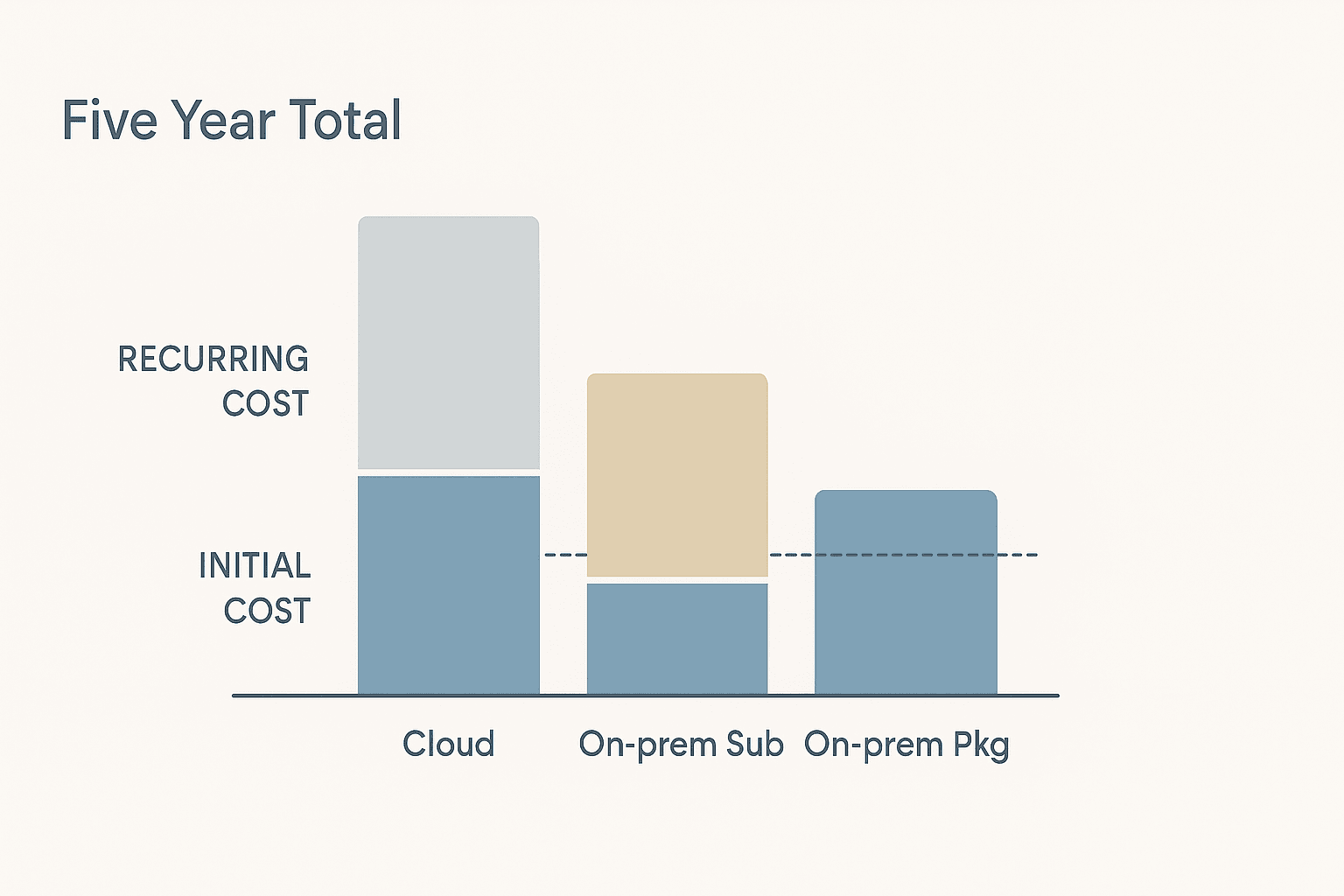
Convert the gap into an annual server operating cost
The gap between cloud and on-premise PA is 2,365,000 − 1,865,500 = JPY 499,500 (approximately 103,800 THB). Divided over five years, that is approximately 20,800 THB per year, or approximately 1,730 THB per month.
How you use that number matters. On-premise PA looks cheap because server procurement, operating cost, electricity, backup, and OS and middleware renewal costs are not counted. That is a consequence of the assumption we set, which was reuse of an existing server.
So if running your own server costs more than roughly 21,000 THB a year (about 1,730 THB a month), the price advantage of on-premise PA disappears. As the annual upkeep of a single server, that amount is by no means large. Buying a dedicated server, adding a UPS, arranging a backup destination, loading in an administrator’s labour hours. The moment any one of these arises, the five-year ranking can change.
At what year does the ranking change
On-premise PA, with its large initial fee, is at a disadvantage over short periods. Here is the number of years at which cumulative payments become equal.
- On-premise PA vs cloud. 1,066,000 + 159,900n = 55,000 + 462,000n → n = 1,011,000 / 302,100 = approximately 3.3 years
- On-premise PA vs on-premise SU. 1,066,000 + 159,900n = 427,500n → n = 1,066,000 / 267,600 = approximately 4.0 years
In other words, below roughly 3.3 years of use cloud is cheaper than on-premise PA, and below roughly 4.0 years on-premise SU is cheaper than on-premise PA. Note that on-premise PA is the point of comparison in both cases. In a configuration without the integration API, the consistently cheapest option within those periods is on-premise SU (the gap to cloud is JPY 227,500 over five years). On-premise PA becomes the cheapest only where you can commit to at least four years of continued use.
If the intent is a pilot on one line for one year, a perpetual purchase is not a rational choice. Conversely, for a form template that is stable and will be in use for a decade, the advantage of the perpetual purchase widens with every year.
Three conditions that flip the ranking (server cost, integration API, user count)
The ranking in the previous section flips if any one of three conditions changes.
Condition 1. The cost of running your own server
As calculated above. The break point is roughly 21,000 THB a year. In a factory with spare capacity on an existing server and an administrator already on staff, on-premise PA has the advantage. If you have to stand up a new server, add five years of that cost and recalculate.
What tends to be overlooked in a Thai factory is power outages and air conditioning. The environmental conditions of the room holding the server, whether a UPS is in place, the frequency of outages in the rainy season. None of these appear in a quotation drawn up to Japanese head office norms. If you choose on-premise, add these items to the quotation before you compare.
Condition 2. The external system integration API, where the ranking flips
Here is the five-year total when you integrate with a production control system or an ERP. The assumptions are the same as in the previous section (5 users, annual prepayment, existing server reused, five years).
| Plan | API cost over 5 years | 5-year total (JPY) | THB equivalent (at 4.81) |
|---|---|---|---|
| On-premise PA | 840,000 + 126,000 x 5 = 1,470,000 | 3,335,500 | approx. 693,500 |
| Cloud | 363,000 x 5 = 1,815,000 | 4,180,000 | approx. 869,000 |
| On-premise SU | 456,000 x 5 = 2,280,000 | 4,417,500 | approx. 918,400 |
The ranking has changed to on-premise PA < cloud < on-premise SU.
| Comparison | Without API | With API |
|---|---|---|
| On-premise SU − cloud | −JPY 227,500 (SU cheaper) | +JPY 237,500 (SU more expensive) |
| Size of the swing | JPY 465,000 |
Why this happens, broken down into formulas.
- Annual gap on the base product. Cloud 462,000 − on-premise SU 427,500 = JPY 34,500 a year in SU’s favour
- Annual gap on the API. On-premise SU 456,000 − cloud 363,000 = JPY 93,000 a year against SU
- Net. SU is JPY 58,500 a year more expensive
Because cloud carries an initial fee of JPY 55,000, the cumulative crossover point is 55,000 / 58,500 = approximately 0.94 years. In other words, the flip has already happened within year one (year one: on-premise SU JPY 883,500 vs cloud JPY 880,000, so SU is JPY 3,500 more expensive).
If you are working on the assumption that you will use the integration API, the general claim that “on-premise has the lower monthly cost” does not hold. The price gap on the API set cancels it out.
For completeness, here are the crossover points for on-premise PA with the API included.
- On-premise PA vs cloud (with API). Initial 1,906,000 + 285,900n per year = 55,000 + 825,000n per year → n = 1,851,000 / 539,100 = approximately 3.4 years
- On-premise PA vs on-premise SU (with API). n = 1,906,000 / 597,600 = approximately 3.2 years
Even with the API, the point at which PA becomes cheapest sits in the low three-year range, in almost the same place as the case without the API (3.3 years and 4.0 years). What the API changes is not the crossover point against PA. It changes the order between cloud and on-premise SU.
How far you take integration with the production control system changes the shape of the whole configuration. The design thinking for automatically collecting inspection data is covered in designing automated inspection data collection.
Condition 3. User count
This condition cannot be calculated from published information alone.
Only the 5-user basis is published, and anything above that is quoted individually. So this article puts no figures on it. We can, however, point out the direction in which the structure moves.
- The on-premise PA server software at JPY 720,000 is fixed regardless of user count. The more users you have, the lower the fixed-cost burden per user. PA is structurally more favourable at higher headcounts.
- Cloud and on-premise SU are charged on user count as the basic model. Add users and the cost rises proportionally (whether volume discounts apply depends on the quotation).
So do not carry the 5-user ranking over to 20 users or 50 users. If the headcount changes, the only correct answer is to obtain a fresh quotation.
And as the following sections explain, from a payback point of view, “adding forms” works better than “adding users”. Section 7 puts numbers on that.
Five costs that do not appear on the Japanese price list (real figures for a Thai factory)
No electronic forms system can be deployed on licence fees alone. From here on, these are model assumptions we have set from our position supporting deployments in Thailand. They are not primary information, and we state explicitly that they are assumed values for the purposes of this article.

Cost 1. Form design and implementation support
Model assumption in this article. 250,000 to 600,000 THB (midpoint 425,000 THB)
This is the expected range if the scope is “three form types (daily inspection checklist, production daily report, inspection record) at one factory.” The 2.4x spread exists because the following factors swing the number widely.
- The number of forms and the degree of variation between templates (how many slightly different versions exist across lines)
- The complexity of the entry rules (conditional branching, formulas, judgement logic, management of specification limits)
- Whether integration with existing systems is involved
- The number of trial runs on the shop floor, and the volume of template revisions that come out of them
This item varies far more between quotations than the licence fee does. When a quotation arrives, before you look at the amount, confirm “how many forms and how many templates are included” and “how many rounds of template revision are included.” Placing an order while this remains vague tends to produce additional charges after go-live.
Cost 2. Tablets and other entry devices
Model assumption in this article. 125,000 THB for 5 units (25,000 THB per unit)
Because i-Reporter allows unlimited devices per user ID, the number of licences does not have to match the number of devices. Deploying 10 devices on a 5-user licence is possible. This is an important difference when comparing against products licensed per device.
That said, handing out tablets in a Thai factory does not end at the hardware price. The items below are not assigned model amounts here, but do confirm them in your quotation.
- Dust-proof and splash-proof cases, and drop protection
- Charging stations and charging routines (who charges them, and when)
- Wi-Fi coverage on the floor (in metal-heavy plants this needs to be measured, not assumed)
- A device register, and spare units for loss or failure
- Operation in high-temperature areas (near paint booths or furnaces, the specification limits can be exceeded)
Cost 3. Servers and infrastructure (if you choose on-premise)
The break point calculated in the previous section is roughly 20,800 THB a year.
Above that, the price advantage of on-premise PA disappears. Server hardware, UPS, backup, OS and middleware licence renewals, and the operational labour. Where the Thai site has nobody who can run a server, this item shows up not as an “amount” but as the question of “who is going to do it.”
The actual amount varies greatly with the configuration, so this article makes no estimate. At quotation time, ask for five years of infrastructure cost presented on a single page.
Cost 4. Language and training in daily operation
In a Thai factory, the structure is almost always three-layered. The people entering the forms are Thai operators, the people designing and administering the forms are Japanese managers, and the reporting to head office is in Japanese.
That structure shows up as cost in the following places.
- The work of preparing field labels and entry guidance in Thai
- Operator training (not only at the start, but every time someone leaves or transfers)
- Who locally handles first-line response when something goes wrong
- Whether master data changes on the administrator side can be completed locally, or must be requested from Japan
If you cannot find this item in the quotation, that means nobody has been assigned to it. Work that is not booked as an amount usually turns up as someone’s overtime on the factory side.
Cost 5. Form revision and maintenance
The forms you build at deployment will change, without exception. Changed specification limits, added processes, findings from a customer audit, the launch of a new model. How many times a year, by whom, and in how much time a revision can be made is what determines whether the system stays in use.
What you need to confirm here is the operating model rather than the amount.
- Can your own team revise forms, or does every change go through the vendor
- If your own team does it, who holds the authority and the skill
- If the vendor does it, what is the cost and lead time per request
Choose a configuration your own team cannot revise, and the forms freeze the moment they go electronic. That is usually the pattern behind a verdict of “paper was more flexible.”
If you are also considering building in-house, including site-specific functions, see how to approach factory business app development as well.
How to calculate payback, measured on re-keying time alone (avoiding double counting)
This is the core of the article.
All assumptions disclosed
The following are model assumptions for this article. They are not results from a real project. Change the assumptions and the conclusion changes.
| Assumption | Value used | Reason |
|---|---|---|
| Target forms | Daily inspection checklist, production daily report, inspection record (3 types), 1 factory | The most common initial scope |
| Who re-keys | Administrative and QC staff | The job roles that actually do the re-keying |
| Monthly salary | 20,000 THB | Model assumption |
| Employment cost multiplier | 1.15x → 23,000 THB per month | Includes social security and similar |
| Working pattern | 22 days per month, 8 hours per day = 176 hours per month | Standard schedule |
| Hourly cost | 23,000 / 176 = approx. 131 THB per hour (calculated value 130.68) | Division from the above |
| Elimination rate for re-keying | 70% | Not set at 100%, because exception handling and some paper forms remain |
| Working days per year | 264 | 22 days x 12 months |
| Time spent on the entry itself | Treated as the same on paper and on tablet | Adding this to the benefit would be double counting |
There is only one counterfactual. We compare “write on paper, then re-key into Excel” against “enter on a tablet, no re-keying.” Nothing else.
Not building two or more comparison worlds is essential. The common accident is to derive a payback period from reduced re-keying time and then add shorter search time, reduced audit workload, and avoided defect escape cost into the same calculation. Those effects are real, but they cannot be fixed as amounts, and they may well be counting the same staff hours from a different angle. This article keeps them out of the payback calculation and records them separately as secondary benefits.
Calculating the benefit
The benefit per hour of re-keying is as follows.
130.68 THB per hour x elimination rate 0.7 = approx. 91.5 THB per hour
The annual benefit is “re-keying hours per day x 264 days x 91.5.”
| Re-keying hours per day | Re-keying hours per year | Annual benefit (THB) |
|---|---|---|
| 4 hours per day | 4 x 264 = 1,056 hours | 1,056 x 91.5 = approx. 96,600 |
| 8 hours per day | 8 x 264 = 2,112 hours | 2,112 x 91.5 = approx. 193,200 |
| 12 hours per day | 12 x 264 = 3,168 hours | 3,168 x 91.5 = approx. 289,800 |
“Eight hours of re-keying a day” does not mean one person re-keying all day. A reading closer to reality is likely to be three people spending two to three hours each across several forms, added together. Measure that total first. Deploy without measuring it and the payback discussion cannot even take place.
Calculating the cost
The plan chosen here is on-premise SU, 5 users, existing server reused, no external integration. The reason is that the initial fee is the lightest and the move from pilot to full operation is easiest (as noted above, on-premise PA becomes cheaper if you will use it for four years or more).
| Category | Amount (THB) | Breakdown |
|---|---|---|
| Initial | 550,000 | Form design and implementation support 425,000 (midpoint) + 5 tablets 125,000 |
| Running | approx. 88,900 per year | Annual licence JPY 427,500 / 4.81 |
Payback period
Payback period = initial cost / (annual benefit − annual running cost)
| Re-keying hours per day | Annual benefit | Annual running cost | Net benefit per year | Payback period |
|---|---|---|---|---|
| 4 hours per day | 96,600 | 88,900 | 7,700 | 550,000 / 7,700 = approx. 71 years |
| 8 hours per day | 193,200 | 88,900 | 104,300 | 550,000 / 104,300 = approx. 5.3 years |
| 12 hours per day | 289,800 | 88,900 | 200,900 | 550,000 / 200,900 = approx. 2.7 years |

Look at the row for 4 hours of re-keying per day. The payback period is about 71 years. In practical terms, it does not pay back.
The reason is plain. The annual licence of 88,900 THB eats 92.0% of the annual benefit of 96,600 THB (88,900 / 96,600 = 0.920). The net benefit left over is only 7,700 THB a year, and filling a 550,000 THB initial cost at that rate takes 71 years.
This row is the one line this article most wants to convey. However precisely you compare the five-year totals of the three plans, in a project that lands on this row the ranking is meaningless. Before you debate whether to pick JPY 1,865,500 or JPY 2,365,000, confirm whether the re-keying hours are there.
The break-even re-keying time
Set “payback within five years” as the condition and you can work backwards to the required re-keying time.
Required net benefit per year = initial cost / 5. Add the running cost of 88,900 to that and you have the required annual benefit. Divide by 91.5 for annual re-keying hours, and by 264 for hours per day.
| Initial cost assumption | Required net benefit per year | Required annual benefit | Required annual re-keying hours | Break-even re-keying time |
|---|---|---|---|---|
| Midpoint 550,000 THB | 110,000 | 198,900 | 2,174 hours | approx. 8.2 hours a day |
| Low end 375,000 THB (design 250,000 + devices 125,000) | 75,000 | 163,900 | 1,791 hours | approx. 6.8 hours a day |
Even trimming the initial cost to the low end, you still need 6.8 hours of re-keying a day. On the midpoint assumption it is 8.2 hours. That is consistent with the earlier table, where 8 hours a day gave a payback of 5.3 years, slightly over five.
Which means making the payback work through negotiating down the initial cost is difficult. Cutting 175,000 THB from midpoint to low end only moves the required re-keying time from 8.2 hours to 6.8 hours. The lever that works is somewhere else.
So the move is not “pick the cheapest plan” but “gather the re-keying time”
The practical conclusion that follows from the table above is this.
Increase the number of forms you digitise, and concentrate the re-keying time onto a single licence.
The reason lies in the cost structure.
- The licence fee (running cost) does not increase when you add forms. There is no additional licence charge for the number of form types a 5-user licence can handle.
- The form design cost (initial) does increase. But the initial cost is a one-off, and as the table above shows, growing the benefit is a bigger lever than trimming the initial cost.
- On the other hand, adding users increases the running cost on cloud and on-premise SU. And because pricing above 5 users is not published, the increment cannot be calculated in advance.
So adding forms works better for payback than adding users. Concretely, that means bringing multiple lines, multiple sites, and multiple form types into scope together. A pilot that digitises the inspection checklist of a single line is useful as a technical proof, but making the production decision within that same scope produces the result that it will not pay back, as long as the re-keying stays around 4 hours a day.
Secondary benefits left out of the payback calculation
The following are real effects, but none of them are included in the payback calculation above. We recommend writing them in a separate section of the investment proposal as well.
- Searchability of records (pulling up past inspection records instantly by date, equipment, or operator)
- Workload for customer audits and ISO audits
- Prevention of missing or incorrect entries through validation at the point of entry
- Suppression of defect escape through immediate alerts on out-of-range values
- Storage space for paper and management of retention periods
Monetising these and adding them to the payback calculation risks counting the same thing twice alongside the re-keying reduction. Stating explicitly that “the payback for this investment is calculated on reduced re-keying time alone, and the effects listed below are not included in the payback basis” is the formulation hardest to argue with.
In 2026, Thailand’s Electronic Transactions Act heads for a full overhaul, a topic that is settled before price
What is happening
The Electronic Transactions Development Agency (ETDA) of Thailand published a draft full amendment of the Electronic Transactions Act (ETA) and ran a public hearing from 12 May to 15 June 2026. This is not an amendment of selected provisions but a complete rewrite. It is expected to take up to about a further year before it reaches parliamentary deliberation.
The draft has three main points.
| Topic | Current | Draft amendment |
|---|---|---|
| Regulation of operators | Mandatory licensing | Moves to a voluntary certification regime |
| Burden of proof | Based on general principles | Data created by a “trusted electronic method” shifts the burden of proof and the cost of proving to the challenging party |
| Newly recognised mechanisms | — | Newly recognises electronic time stamps, electronic registered mail, electronic company seals, and electronic transferable records |
What it implies for manufacturing
The second item is decisive. Data created by a “trusted electronic method” puts the burden of proof and the cost of proving on the party challenging its validity.
Translated into factory language, it comes out like this. When someone later says “this record cannot be trusted” about a digitised inspection or checklist record, who has to prove the point changes.
Which means “designing for evidential weight” can become a topic that comes before price comparison in selecting an electronic forms system. Specifically, these are the things that need checking.
- Whether it is recorded who entered the data, when, and on which device
- Whether a revision history is retained after entry, and whether pre-revision values are preserved
- Whether the approval flow is recorded (who approved it)
- How the reliability of the time stamp is assured
- Where the data is stored, for how long, and what tamper detection exists
Note. The draft has completed its public hearing but has not been enacted. The provisions may still change. This article is an organisation of publicly available information and is not legal advice. Which requirements your own records need to satisfy should always be confirmed with legal counsel and specialists.
That said, the fact that the topics to check are already visible at this stage is usable. If you set up “audit trail requirements” as an explicit chapter in your system requirements definition, there will be less to rebuild once the legislation settles. Write that chapter before you build the price comparison table.
How to choose the first forms to digitise (four conditions)
These are practical selection criteria derived from the calculation in section 7. This is our view, not primary information.
Given that payback is determined by the total volume of re-keying time, the first forms to digitise are the ones generating the most re-keying time. Use the four conditions below to screen them.
Condition 1. After it is filled in, does somebody re-key it into Excel or a core system
This is the top priority. Digitising a form that is filled in, filed, and never looked at again produces a benefit of zero in the formula from section 7. Forms that are only being stored may be worth digitising for other reasons such as statutory retention or audit response, but they are not candidates for the payback calculation.
First confirm whether there is a downstream step where a person retypes the data. If yes, it is a candidate. If no, it goes to the back of the queue.
Condition 2. Does it occur daily, multiple times, in multiple copies
The annual benefit is determined by “re-keying hours per day x 264 days.” A low-frequency form does not accumulate volume, even if each sheet takes a long time to re-key.
A daily inspection checklist ranks higher than a monthly summary sheet. That is because the number of occurrences drives the result, not the effort per sheet.
Condition 3. Is the same template used across multiple lines and multiple sites
Form design cost is incurred per template, and it does not scale with the number of lines using that template. If the same inspection checklist is used on five lines, one design effort recovers the re-keying time of all five.
Conversely, forms whose templates differ slightly by line stack up design cost per template. In that case, standardising the templates comes before digitisation. If they cannot be standardised, check whether the differences are genuinely necessary.
Condition 4. Is exception handling rare and the template stable
This is the reason the elimination rate was set at 70% in section 7. Forms with many exceptions keep paper alive even after digitisation, and the elimination rate drops.
- Forms that always carry handwritten supplementary comments
- Forms whose template differs by customer
- Forms that physically require a witness signature
These are likely to fall below a 70% elimination rate, which breaks the assumption behind the benefit. Leave them out of the initial scope and revisit them once operation has stabilised.
Checklist for the four conditions
| Condition | What to confirm | If not satisfied |
|---|---|---|
| 1 Is re-keying occurring | Whether there is manual entry downstream | Outside the payback calculation. Evaluate separately if the purpose is retention |
| 2 Is frequency high | Occurrences and sheet counts per day | Volume does not accumulate. Lower the priority |
| 3 Can it be rolled out horizontally | Number of lines and sites on the same template | Design cost rises per template. Standardise first |
| 4 Is the template stable | Frequency of exceptions and handwritten additions | Falls below a 70% elimination rate. Keep out of the initial scope |
Combined with digitised work instructions, you can join instruction and actual-result recording into a single flow. That design is covered in implementing a work instruction system.
Comparison with other approaches (no-code, MES built-in, general OCR) and where the decision splits
Here is a summary of the alternatives to i-Reporter and where the judgement diverges. What follows compares the character of each approach, not the prices of specific products. Prices vary greatly by product, so amounts cannot be generalised.
| Approach | Good at | Weak at | Where the decision splits |
|---|---|---|---|
| i-Reporter (Excel template inheritance) | Digitising existing Excel templates as they are. Low retraining burden on the floor | Where you want to redesign the template itself, inheriting the existing one can become a constraint | Do you want to keep the existing form templates, or rebuild them at this opportunity |
| No-code business app | You can build screens in-house. Extends to work beyond forms | Layout fidelity as a form, and the presentation for printing or submission | Do you have someone in-house who can build. Is form presentation part of the requirement |
| Forms function built into an MES or production control system | Integration with production results is there from the start | Harder to match existing templates. Harder to change forms alone | Is an MES already installed. Do you want forms and results in the same system |
| General OCR (scan and read the paper) | Does not change the paper workflow. Shop floor procedures stay the same | Verification and correction effort for reading accuracy remains. The elimination rate in section 7 drops | Can you change the entry procedure on the floor. Do you have no choice but to keep writing on paper |
The decision splits at three points
First, whether you keep the existing templates. Being able to keep using the inspection checklist the floor has used for ten years significantly reduces resistance at deployment. i-Reporter’s design philosophy leans this way. Conversely, if the intent is “we want to rebuild the templates at this opportunity,” the benefit of template inheritance thins out.
Second, whether you can change the entry procedure. General OCR has the advantage of not changing the paper workflow, but the 70% elimination rate assumed in section 7 becomes harder to achieve, because checking and correcting the read results remains. The payback calculation would need to be redone.
Third, whether this is only about forms or about production management as a whole. If you are carving out forms digitisation on its own, a dedicated electronic forms system fits. If you are designing it together with results collection, the MES-side function fits. This branch is directly connected to the cost of the integration API (section 5).
Where you cannot decide, the order is fixed. First measure the re-keying time from section 7. Then confirm whether that volume can support an approach-selection discussion at all. If the re-keying time does not reach 6.8 hours a day, no approach delivers payback within five years. Rather than comparing approaches, hold the discussion about expanding the target forms first.
Frequently asked questions
How much does i-Reporter cost
The published prices for the Japanese domestic market after the revision of 1 January 2026 (on a 5-user basis) are as follows. Cloud is an initial JPY 55,000 plus JPY 462,000 a year. On-premise subscription (SU) is JPY 427,500 a year. On-premise package (PA) is an initial JPY 1,066,000 plus JPY 159,900 a year in maintenance.
Converted to five-year totals, on-premise PA JPY 1,865,500 < on-premise SU JPY 2,137,500 < cloud JPY 2,365,000 (assuming no integration API, an existing server reused, and annual prepayment).
However, only the 5-user basis is published, and anything above that is quoted individually. Also, tax treatment varies with the contract form, so always confirm it in your quotation.
Can i-Reporter be used in Thailand
There is an overseas site at ireporter-global.com, and Thai-language pages are provided. However, no overseas pricing is published. The amounts in this article are published prices for the Japanese domestic market, and they do not necessarily apply as they stand in Thailand.
Offline entry is also supported, so tablet entry works in areas of the factory the network does not reach. Because one user ID allows unlimited devices, deploying several tablets on a 5-user licence is a workable arrangement.
For the actual configuration, pricing, and support terms in Thailand, please check individually with a local point of contact, including ourselves. TOMAS TECH handles the CIMTOPS product in Thailand and is responsible for form design and local support.
Which is cheaper, cloud or on-premise
The ranking flips depending on the conditions.
Compared without the integration API, at 5 users over five years, on-premise SU is JPY 227,500 cheaper than cloud. But add the external system integration API set and on-premise SU becomes JPY 237,500 more expensive than cloud, reversing the ranking. That is because the annual API set price is JPY 363,000 on cloud against JPY 456,000 on on-premise SU, a gap of JPY 93,000 a year.
Also, the on-premise package (perpetual purchase) becomes the cheapest only if you keep using it for roughly 3.3 years or more against cloud, and roughly 4.0 years or more against on-premise SU. Below those periods the subscription is cheaper. On top of that, once your own server operating cost exceeds roughly 20,800 THB a year, the price advantage of on-premise PA disappears.
If we deploy electronic forms, will all the paper forms disappear
They will not. The estimates in this article set the elimination rate for re-keying work at 70%. The main reasons the remaining 30% stays are as follows.
- Forms whose template is specified by the customer
- Documents that physically require a witness, a stamp, or a signature
- Forms that carry handwritten supplements as exception handling
- Irregular records arising from temporary process changes
Calculating a payback period on the assumption that “paper disappears completely” means overstating the benefit by roughly 1.4x. Always set the elimination rate below 1.
Will digitised inspection checklists and inspection certificates be accepted as audit evidence
In Thailand, ETDA published a draft full amendment of the Electronic Transactions Act (ETA), and a public hearing ran from 12 May to 15 June 2026. The draft sets out a structure in which, for data created by a “trusted electronic method,” the burden of proof and the cost of proving shift to the party challenging its validity. The draft also includes new recognition of electronic time stamps, electronic registered mail, and electronic company seals, among others.
However, the draft has not been enacted. It is expected to take up to about a further year before parliamentary deliberation. What can be said with certainty at this point is that choosing a configuration that retains the identity of the person entering data, the date and time of entry, the revision history, and the approval record will not be wasted whichever requirements are eventually settled. Whether your own records satisfy the requirements should be confirmed individually with legal counsel and specialists.
Summary
Here is the content of this article organised as an order of decisions.
| Order | What to do | Where in this article |
|---|---|---|
| 1 | Measure how many hours of re-keying occur per day on the floor | Section 7 |
| 2 | Confirm whether you reach break-even (8.2 hours a day at 550,000 THB initial, 6.8 hours at 375,000 THB) | Section 7 |
| 3 | If you do not, add target forms to gather more re-keying time | Sections 7 and 9 |
| 4 | Decide whether you will use the integration API (this changes the ranking of the plans) | Section 5 |
| 5 | Decide the number of years of use (3 to 4 years is the split between perpetual and subscription) | Section 4 |
| 6 | Check whether your own server operating cost exceeds 20,800 THB a year | Sections 4 and 5 |
| 7 | Define the audit trail requirements (before the price comparison) | Section 8 |
| 8 | Confirm the actual figures for Thailand in a quotation (the Japanese price list does not necessarily apply) | Sections 2 and 6 |
To restate the core. The annual licence for a 5-user configuration, roughly 88,900 THB, eats 92% of the roughly 96,600 THB annual benefit from removing 4 hours a day of re-keying. As long as that structure holds, comparing the prices of the three plans does not answer the go or no-go question. What holds the answer is not the price list but the stopwatch on the shop floor.
And i-Reporter is a product of CIMTOPS Corporation (株式会社シムトップス). TOMAS TECH is the party responsible for deployment, form design, and local support in Thailand, and every price in this article is based on published primary information. We have stated repeatedly that the estimate sections are model assumptions made for this article.
Measure first. Once you know the re-keying hours per day, you can drop your own numbers into the tables in this article and find out in ten minutes whether it pays back or not.
If you would like to run this calculation on your own forms but want to start further back, from how to measure the re-keying time or how to choose the target forms, that is fine too. TOMAS TECH covers everything from a stocktake of your forms through design, deployment, and local support for Japanese-affiliated manufacturers in Thailand. We are happy to talk at the stage before any deployment decision has been made, so please get in touch through our contact page. We can start by going through the list of target forms and your current re-keying flow together.
Sources
- i-Reporter official site (CIMTOPS Corporation)
- Press release on the i-Reporter price revision (PR TIMES)
- i-Reporter pricing (Next Vision)
- CIMTOPS Corporation news releases
- Thailand Set to Overhaul Its E-Transactions Framework (Tilleke & Gibbins)
- THB/JPY exchange rate history 2026 (Exchange-Rates.org)
- i-Reporter Global (overseas site)


