


Handwriting OCR Accuracy 2026: Your Form Design Beats the Engine
Any conversation about eliminating handwritten paperwork in a Thai factory tends to open with an engine comparison. Which handwriting OCR reads the most characters? But what separates a deployment that survives contact with the shop floor from one that quietly dies is not the engine’s character recognition rate. It is how the boxes on the form are drawn, and how the low-confidence fields get routed to a human. This article lays out how to measure accuracy per field, why Thai handwriting breaks engines, seven design rules for the entry boxes themselves, and a payback calculation you can check on a calculator as you read.
Measure Handwriting OCR at the Field Level, Not the Character Level
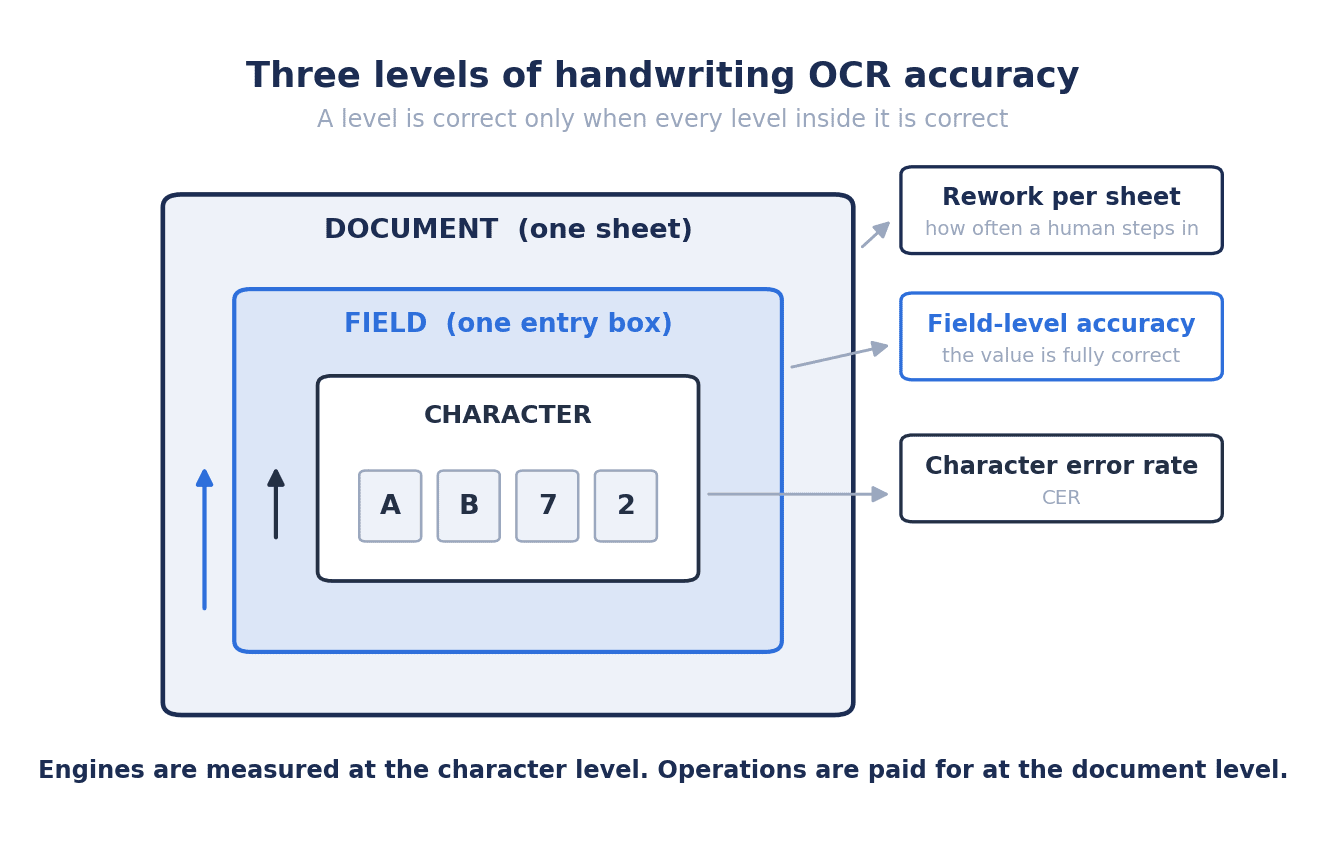
What decides your workload is not whether a single character was read. It is whether an entire field came out right. Choose a product without separating those two ideas and the catalogue figure will never match the volume of rework you actually see.
CER and field-level accuracy are two different metrics
The first accuracy metric anyone quotes is character error rate (CER). Benchmarks put CER below 1% for clean printed text and at 3-5% for handwriting. Read on its own, that number says “more than 95% of it is right.”
What the business actually needs is field-level accuracy. Is the lot number field, the date field, the quantity field each captured without a single wrong character? One wrong character and the value in that field is unusable. If one digit of lot number “TH-240615-A” is off, then for traceability purposes it is a different lot.
The same 2026 benchmark reports field-level accuracy by document type as follows.
| Document type | Field-level accuracy |
|---|---|
| Digital PDF (born-digital documents) | 97-99.5% |
| Bank statements | 95-99% |
| Invoices | 91-97% |
| Handwritten documents | 62-85% |
Handwriting is the outlier. Of the document types measured, it has by far the widest spread. The same benchmark also reports that handwriting lowers field extraction accuracy by 15-35 points compared with printed material. The two figures are consistent with each other. Subtract 15-35 points from the 97-99.5% of digital PDFs and you get 62-84.5%, which lines up almost exactly with the reported 62-85%.
For documents that are printed rather than written, such as invoices and statements, we cover the ground separately in Invoice Processing Automation 2026. The starting assumptions are quite different from the handwriting case, so keeping the two apart will save you from a bad decision.
How “CER 4%” turns into “72% field accuracy”
The gap between CER and field-level accuracy comes down to multiplication. CER is the error rate per character, and a field only counts as correct if every character inside it is correct. For a field of n characters, field accuracy is roughly (1 – CER) to the power of n.
Run that for CER 3-5% and field lengths of 4-12 characters and you get the following (an estimate, resting on the independence assumption just described).
| Field length | CER 3% | CER 4% | CER 5% |
|---|---|---|---|
| 4 characters (part of a date, a quantity) | 88.5% | 84.9% | 81.5% |
| 8 characters (docket number, employee number) | 78.4% | 72.1% | 66.3% |
| 12 characters (lot number, part number) | 69.4% | 61.3% | 54.0% |
The arithmetic is simple. At CER 4% over 8 characters, 0.96 to the power of 8 is 0.721, or 72.1%. You can confirm it on the calculator in front of you. The range in this table, from a low of 54.0% to a high of 88.5%, broadly overlaps the 62-85% measured in the field. In other words, the real explanation for handwriting field accuracy scattering across 62-85% is quite possibly the difference in field length rather than the luck of the engine.
One practical implication follows. With the same engine and the same writer, a form full of 12-character fields and a form split into 4-character fields can differ by more than 20 points in field accuracy. Before you swap engines, there is room to revisit how long your fields are.
The odds of a whole form passing clean are far lower than intuition suggests
Move up one more level, to the sheet of paper. Picture a production daily report with 25 entry fields on it. If field accuracy is, say, 75% (around the middle of 62-85%), then the probability that all 25 fields are correct is 0.75 to the power of 25, or about 0.08%. Fewer than one sheet in 1,000 goes through untouched.
What this calculation means is that “install handwriting OCR and the paper disappears” was never a workable premise. Deploying handwriting OCR is not about reducing human work to zero. It is about reducing how much a human has to look at. Without that framing, every engine you pick will disappoint you.
What Changed in 2026: Why Form Recognition AI Became Usable
What changed in 2026 is the ceiling of the engines, not the floor of the forms. The model sets the maximum accuracy; the paper you hand it sets the minimum.
From 46-70% with legacy OCR to roughly 95% with multimodal LLMs
Until a few years ago, legacy OCR scored somewhere around 46-70% on handwriting. No amount of operational design rescues that level. If you have to build a checking regime around the assumption that close to half the output is wrong, keying it in from scratch is faster.
The 2026 benchmarks report that multimodal LLMs (models such as GPT-5 that read images directly) have reached roughly 95% on handwriting. Among the specialists, Amazon Textract records a word error rate of 10.5% in the 2026 handwriting benchmark, which is a word accuracy of approximately 89.5%. Between 46-70% and 95% there is a discontinuity that no amount of process design could bridge. That is the substantive change 2026 brought.
For how the engines compare on their own terms, see AI-OCR Comparison 2026. This article leans away from “which one to pick” and toward “what to design once you have picked.”
Even at 95%, a whole form still does not pass
Translate that 95% back into sheets of paper, though, and the impression changes considerably. Even if we take 95% as a field-level figure, the probability that a 25-field form passes end to end without correction is 0.95 to the power of 25, or about 27.7%. Three sheets in four still carry an error somewhere. Textract’s 89.5% is a word-level accuracy and is not the same kind of metric as a field-level one, but if we raise it to the same power of 25 anyway we get about 6.2% (a rough cross-metric indication, not a statement about which product is better).
So what the jump from 46-70% to 95% changed is not *whether* a human looks, but *how much* a human looks at. An operation that reviewed every field becomes an operation that reviews some fields. That is the real substance of what 2026 delivered.
The gap between 95% and 99.9% will not be closed by the engine
There is one more benchmark worth holding on to. For financial fields and identity documents, the 2026 threshold for allowing straight through processing (STP) is reported as 99.9% at the field level. That is the level required to push data into a core system with no human ever looking at it.
Expressed as error rates, the distance between 95% and 99.9% is a move from 5% to 0.1%, which is a factor of 50. Closing that by swapping engines is not realistic. There is only one mechanism that closes it, and that is the confidence-based routing described next.
For fields where an error stops the line, such as monetary amounts or inspection verdicts, it is safer not to assume that “the engine got smart, so we can automate it.”
Four Reasons Handwritten Forms Break in Thai Factories
What matters on a Thai site is not whether the product has a Thai language option. It is how many languages and how many handwriting habits are mixed onto a single sheet. When an engine selected by head office in Japan underperforms at a plant outside Bangkok, the cause is usually one of these four.
1. Thai script stacks marks above and below the line
Thai puts tone marks and vowel marks above and below the consonant. Written by hand on a form with tight line spacing, the lower marks of one line touch the upper marks of the next. That contact confuses the engine at the character segmentation stage. Set your line spacing by the instincts you developed designing Japanese or English forms and this is where you fall over.
On top of that, many Thai characters are distinguished from one another by the presence and orientation of the หัว (the head loop). Written quickly, that loop closes up, and the distinction between visually similar characters disappears. It may be obvious to the writer from the surrounding context, but an image cropped to a single field has no context in it.
The fix sits on the form, not in the engine. Open up the line spacing beyond what looks normal, size the entry box to the full height including the marks above and below rather than to the height of one consonant, and keep the ruling lines away from the very top and bottom edges of the box.
2. Japanese, Thai, and English share one sheet
Forms at Japanese-owned plants in Thailand usually carry three languages at once. Product names and model numbers in alphanumerics, operator comments in Thai, approval and remarks columns in Japanese or English. That is awkward for an engine. Most handwriting OCR infers the language at the document or region level, so when the language switches within a single sheet the inference goes wrong.
Apply a Japanese dictionary to a Thai field and the output bears no resemblance to what was written. Point a Thai model at a Japanese field and the kanji come back as a run of symbols.
The fix is to fix and declare the language field by field. Choose a product that lets you specify “this field is Thai only” or “this field is alphanumeric only” when you define the form template, and then actually specify it. That small piece of setup work removes most of the damage caused by mixing.
3. Numbers and calendars carry local writing habits
Numbers are more troublesome than languages. On a Thai site, all of the following happen at once.
- Thai numerals (๐๑๒๓๔๕๖๗๘๙) mixed with Arabic numerals. They creep in from older staff and from copying out official documents.
- Telling 1 from 7, 0 from O, and 2 from Z. Some people cross the 7 in the European style and some do not, side by side.
- Inconsistent decimal points and thousands separators. Handwritten commas and periods become hard to tell apart once they smear at 150 DPI.
- Buddhist era and Gregorian year mixed together. Buddhist year 2569 is 2026. The date fields on one and the same form will contain “2569”, “2026”, and “26”.
The third and fourth are data problems as much as they are OCR problems. Even if the OCR reads “2569” correctly, if the core system expects a Gregorian year then that data is wrong.
The fix is to print the calendar and the units onto the form itself. Print “20__ (ค.ศ.)” instead of “พ.ศ. ____”. Where decimal places are required, print the decimal point as part of the box structure.
4. Free-text fields defeat every engine
Free-text fields such as “nature of the defect”, “observations”, or “special notes” have unpredictable vocabulary, unpredictable grammar, and unpredictable length. Dictionary and candidate-based correction has nothing to work with, and each writer’s habits pass straight through as errors. Recall from the earlier table that 12-character fields fell to 54.0-69.4%, and you can imagine what happens to several dozen characters of free text.
The fix is not to abolish free text but to stop depending on it. Replace the common defect descriptions with a set of options (checkboxes, or numbered mark-sense bubbles) and keep the free-text field as a supplement to them. Do your aggregation and searching on the option side, treat the free-text field as a bonus if it reads, and it is defensible to exclude it from human review entirely regardless of confidence score.
How far have Thai-specific models come?
Thai-specific models have moved in the past year too.
Typhoon OCR 1.5 is an open-source model released on November 14, 2025, with 2B parameters and based on Qwen3-VL 2B. In the published evaluation it improved on handwritten forms from BLEU 0.321 to 0.522 and from ROUGE-L 0.454 to 0.645 (roughly 1.63x and 1.42x respectively). On Thai government forms it is reported at BLEU 0.870 and ROUGE-L 0.967, ahead of Gemini 2.5 Pro and GPT-5. Inference is reported to be 2-3x faster than the previous version, cloud running costs 40-60% lower, and it runs on CPU and at the edge, which sits well with a configuration where the server stays inside the factory.
Thai-TrOCR is a model fine-tuned from TrOCR handwritten for Thai and English handwritten line images, and it is reported to outperform EasyOCR and Tesseract. It assumes line-level segmentation, so it is used in combination with a considered box design.
Note that BLEU and ROUGE-L are text similarity scores and are a different metric from field-level accuracy. “BLEU 0.870, therefore 87% correct” is not a valid reading. This is easy to conflate, so it is worth being careful about.
With that caveat in place, there is something instructive in the sequence of numbers. The same Typhoon OCR 1.5 scores BLEU 0.870 on government forms and 0.522 on handwritten forms. The difference is 0.348. The engine is identical; only the paper differs. The ROUGE-L figures show 0.967 against 0.645, a difference of 0.322. This is probably the clearest single piece of evidence for the argument that form design moves the result more than engine selection does.
The Boxes Decide Form OCR Accuracy: Seven Design Rules
Accuracy is set less by how much the engine was trained on and more by how well the boxes tell the machine where the characters are. This is the highest-return step in a handwriting OCR project, and also the one most often left until last.
The seven rules
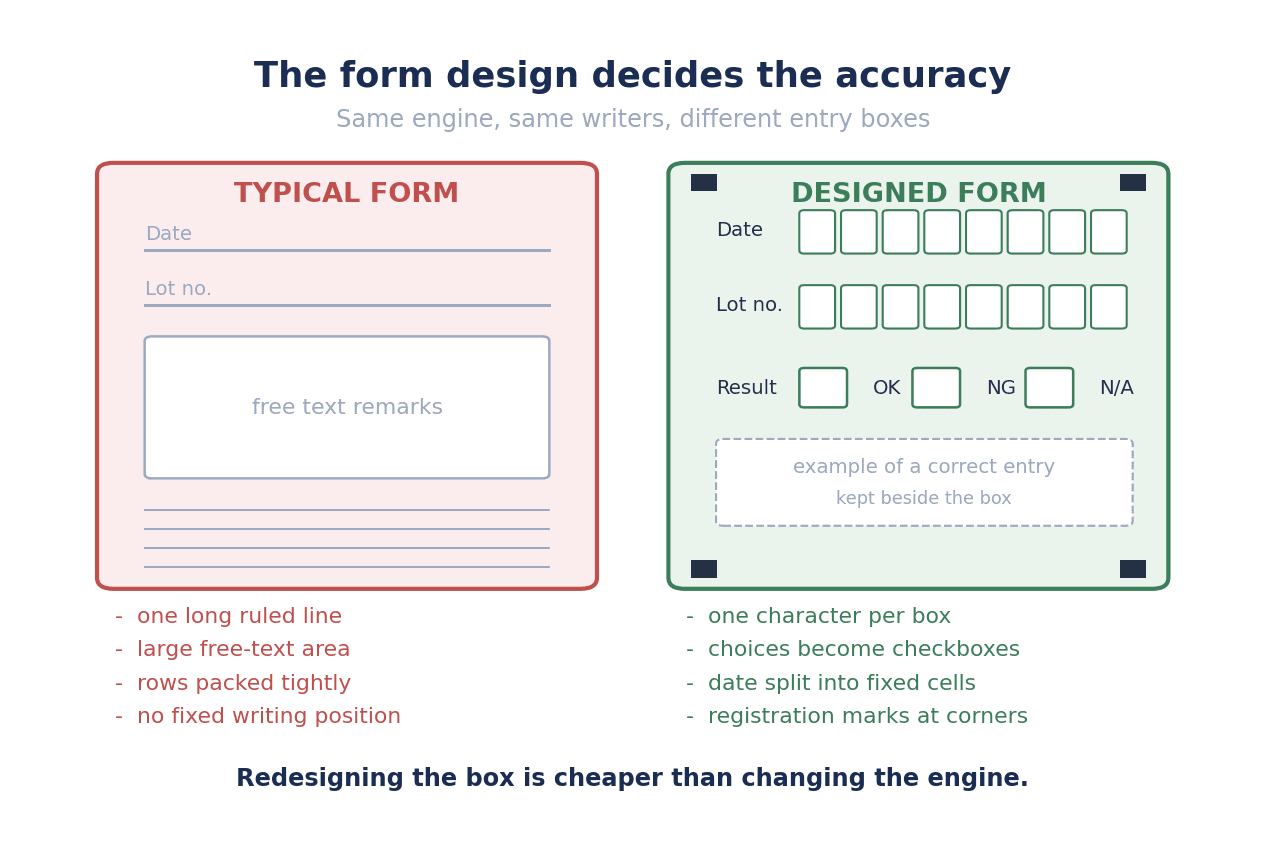
1. One box per character. Turn the entry field into a grid of cells and have people write one character per cell. That removes, in one move, the guessing step the engine gets wrong most often: character segmentation. As the earlier table showed, a swing in CER from 3% to 5% alone drops an 8-character field from 78.4% to 66.3%. Segmentation failures push CER up directly, so eliminating them pays well.
2. For verdicts and categories, let people choose rather than write. For items with a fixed set of options such as pass or fail, defect category, shift, or line, do not have anyone write characters. Detecting a checkbox or a filled bubble is incomparably more stable than recognising handwriting. If your form has people writing “good” or “defective” by hand, start there.
3. Split long fields into shorter ones. Separate the date into year, month, and day, and split the lot number at its meaningful boundaries. One caution here: splitting does not by itself improve the result of the multiplication. Turning a 6-character field into three 2-character fields does not change the probability that all 6 characters are correct. What helps are two side effects. First, the dividers stabilise segmentation and so lower CER itself. Second, errors become localised, so the area you have to fix during review is smaller. The first helps accuracy; the second helps effort.
4. Put the worked example right beside the box. Nobody reads the notes gathered at the top of the form. Print a faint sample of the characters directly below or to the right of the box. Show it in both Thai and Japanese, down to how the digits should be written (whether the 7 is crossed, whether the 1 carries a serif). The appeal of this method is that the training cost falls to effectively zero.
5. Specify a drop-out colour and a pen. Print the ruling lines of the entry boxes in a colour that disappears when scanned, such as a pale cyan (a drop-out colour). When the lines vanish from the image, only the characters remain, and the main cause of misrecognition, characters touching ruling lines, disappears with them. Standardise on a black ballpoint pen at the same time. Pencil and pale blue ink lose their strokes at the binarisation stage.
6. Scan at 150 DPI or better, and at 300 DPI greyscale in practice. The benchmark figures quoted here were measured on the assumption of a scan resolution of 150 DPI or higher. Feed in images that do not meet that assumption and even the 62-85% range is not assured. The common failure on site is going live with the MFP still on its factory default of 200 DPI monochrome binary. Binarisation erases strokes written with a light touch. Make 300 DPI greyscale the default.
7. Print a version number and an ID on the form. On the shop floor, copies of copies circulate, and forms with shifted field positions find their way into the stack. Templates crop fields by coordinates, so a positional shift translates directly into every field being wrong. Put the form ID and version number into a QR code in the corner of the sheet, and build a check that rejects old versions before processing. Print alignment markers (registration marks in the four corners) alongside it.
How much time the box design deserves
Of the seven rules, 1, 2, 3, and 7 are work on the form layout. Rules 4, 5, and 6 are printing and operating settings. None of them is an AI topic. They are paper and process topics.
The realistic way forward is not to redo every form at once. Pick one form first, produce a version with all seven rules applied, and have the site write on it for two weeks. Run both the old and the new version through the same engine and compare field-level accuracy and review rate. That comparison data is what gets the budget for redoing the remaining forms approved.
Stop Reviewing Everything: Designing Confidence Routing
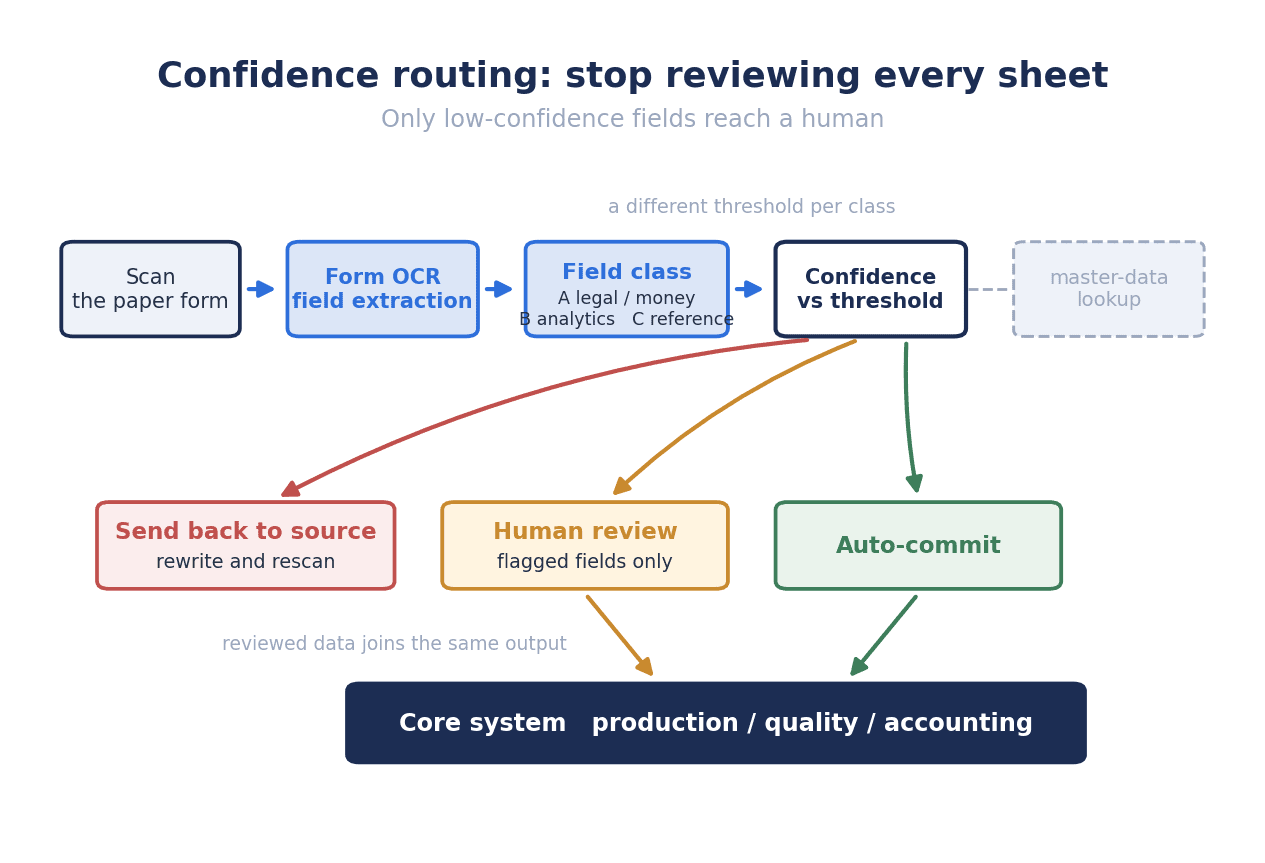
What decides whether a field can be confirmed automatically is not how high the confidence score is. It is whether the field has something to be checked against. Get that backwards and no amount of threshold tuning will stabilise the operation.
Routing 15-20% to people takes the whole to 99.2%
The most operationally important item in the benchmark quoted here is this one. When only the low-confidence fields are routed to human review, overall extraction accuracy reaches 99.2% even with only 15-20% of fields under review. The worked example given uses a slightly wider review rate of 22%, with roughly 78% passing without human eyes (STP). 78% and 22% add up to 100%. Do not count them as two separate populations.
The engine on its own is in the mid-90s; with the process wrapped around it, above 99%. What creates that difference is the routing design, not the model. Note also that these are two separate studies with two separate metrics (one is handwriting character recognition accuracy, the other is field extraction accuracy including confidence routing), so you cannot simply subtract one from the other and claim “an improvement of so many points.” Read them as two different levers doing two different jobs.
There is a caveat here as well. The 22% is a field-level figure, not a form-level one. On a 25-field form, if each field is independently flagged with probability 22%, then the share of forms with no flag at all is 0.78 to the power of 25, or about 0.2%. In practice errors cluster by writer and by field, so that 0.2% will be higher, but the order of magnitude does not change. Nearly every form still shows up on the review screen.
Which is why the design of the review screen becomes decisive. Build a screen that shows the human a whole sheet at a time and your effort barely falls even at 78% STP. Show only the flagged fields, stacked vertically, each with its cropped image and the OCR candidates beside it. Whether that screen exists changes the entire basis of the calculation below.
Split fields into three classes and vary the threshold
Applying one threshold to every field is too coarse a design. In practice, use three classes.
Class A (legal, monetary, traceability) covers lot number, inspection verdict, quantity, amount, date, and signature. Errors here lead to shipment holds, audit findings, or payment mistakes. As noted above, the bar for passing data through without a human is 99.9% at the field level. Until that is met, design the flow so a person sees the field even when confidence is high. Even if 99.9% were achieved, a form with five Class A fields gives 0.999 to the power of 5, which is 99.5%, meaning one sheet in 200 still carries an error.
Class B (analysis and trend) covers temperature, pressure, timestamps, working time, and cycle counts. If individual values are slightly off, a trend-watching use case can absorb it. Run these at the 99.2% level and back them up with range checks (upper and lower limits, continuity against neighbouring values).
Class C (reference information) covers remarks, observations, and free text. Full-text searchability is enough for these fields. Store them as they are without routing them to review even when confidence is low. Take these seriously as review targets and you inflate review effort without raising accuracy.
The 99.2% headline is an average and nothing more. If you demand 99.9% of Class A, you have to give up on Class C to make the effort budget work. Rather than setting one accuracy target for the whole, set a target per class. That is what the design work actually consists of.
Set thresholds by eyeballing the first 1,000 sheets
Confidence scores are computed differently by every product, and there is no general rule such as “0.85 and above is safe.” There is one way to decide, and that is to review all of the first 1,000 sheets by eye and build a mapping between confidence score and actual errors on your own forms.
The work is tedious and there is no substitute for it. Skip it and the threshold gets set on instinct, and you land on either losing trust to an incident where “an auto-confirmed field turned out to be wrong” or sending everything to review so that effort never falls. For a site doing 200 sheets a day, 1,000 sheets is one week.
Once the mapping exists, find the score band where the Class A error rate falls below 0.1% and set the threshold there. If no such band exists, take that Class A field out of scope for automatic confirmation.
Master data matching beats confidence
Finally, the point that matters most in implementation. There is a signal more trustworthy than the confidence score, and it is whether there is a master list to check against.
Part numbers, employee numbers, equipment numbers, supplier codes, line IDs. For these, only a value that exists in your own master data can be correct. Take the OCR output as a candidate, match it against the master, and if it narrows to a single record you can confirm that field automatically. A confidence of 0.6 that matches exactly one master record, with a large edit distance to the second-best candidate, is more reliable than a confidence of 0.99.
Conversely, a free-text field with no master behind it does not justify automatic confirmation even at 0.99 confidence. With nothing to check against, the confidence score is only the model’s own assessment of itself.
The same logic makes cross-checking within the form effective. Line-item quantities against the total, start time and end time against working time, good count and defect count against total count. These check each other. If they do not reconcile, route to review regardless of confidence. If they do, pass the field even at low confidence. Shift the centre of gravity of the design from the model’s score to the constraints of the business. That is the implementation core of getting away from reviewing everything.
Cost and Payback: Running the Numbers With Review Effort Left In
What decides the payback period is not the engine subscription. It is the review rate. What follows is a model calculation, not a quotation for any particular project. Change the assumptions and the conclusion changes with them.
Assumptions (all placeholders)
- Forms in scope: production daily reports and in-process inspection records
- Volume: 200 sheets a day, 250 operating days a year, giving 50,000 sheets a year
- Entry fields per sheet: 25, giving 1,250,000 fields a year
- Current transcription effort: 4.0 minutes per sheet, broken down as 2.5 minutes keying, 0.5 minutes chasing and waiting on illegible entries, and 1.0 minutes reconciling after entry
- Labour cost: a data entry operator at THB 30,000 a month including statutory benefits, THB 360,000 a year. Working hours of 2,000 a year (250 days times 8 hours) give an hourly rate of THB 180 (THB 3 per minute)
- Review effort after deployment: 8 seconds per flagged field (checking and correcting on a screen showing the cropped image next to the candidates), plus a fixed 20 seconds per sheet for opening, closing, and reconciling
We hold the comparison to a single counterfactual: not deploying, meaning the current paper process continues. A comparison against “moving entirely to tablet entry” is a different world line, so it does not get mixed into the benefit figure.
The calculation
Current state (baseline)
- 50,000 sheets x 4.0 minutes = 200,000 minutes = 3,333.3 hours a year
- 3,333.3 hours x THB 180 = THB 600,000 a year
- In headcount: 3,333.3 / 2,000 = 1.67 people
After deployment (review rate 22%, the benchmark’s worked example)
- Flagged fields per sheet: 25 fields x 22% = 5.5 fields
- Effort per sheet: 5.5 fields x 8 seconds + 20 seconds = 64 seconds (1.07 minutes)
- 50,000 sheets x 64 seconds = 3,200,000 seconds = 53,333 minutes = 888.9 hours a year
- 888.9 hours x THB 180 = THB 160,000 a year
- In headcount: 888.9 / 2,000 = 0.44 people
Reduction
- Time: 3,333.3 – 888.9 = 2,444.4 hours a year (1.22 people)
- Money: 600,000 – 160,000 = THB 440,000 a year (a 73.3% reduction)
Costs (estimated)
Initial costs:
| Item | Amount |
|---|---|
| Redesigning the form boxes, defining templates (10 forms), and on-site testing | THB 350,000 |
| Integration development with the production management system | THB 250,000 |
| Two additional scanners (existing MFPs reused) | THB 100,000 |
| Initial cost total | THB 700,000 |
Annual costs:
| Item | Amount |
|---|---|
| OCR engine usage (metered, roughly 50,000 pages a year) | THB 120,000/year |
| Maintenance and template revisions | THB 60,000/year |
| Annual cost total | THB 180,000/year |
Result
- Net annual benefit: 440,000 – 180,000 = THB 260,000 a year
- Simple payback: 700,000 / 260,000 = about 2.7 years
- Five-year total cost: 700,000 + 180,000 x 5 = THB 1,600,000
- Five-year benefit: 440,000 x 5 = THB 2,200,000
- Five-year net: 2,200,000 – 1,600,000 = THB 600,000
Break the five-year total of THB 1,600,000 down by share and you get engine usage at THB 600,000 (37.5%), form box redesign at THB 350,000 (21.9%), integration development at THB 250,000 (15.6%), maintenance at THB 300,000 (18.8%), and scanners at THB 100,000 (6.2%). What you pay the engine vendor is just under 40% of the total; the remaining 60% and more goes to form design, integration, maintenance, and hardware. The point that falls out of this breakdown is that the agenda time in your evaluation meetings should look something like the same ratio.
How the payback moves when the review rate moves
Vary only the review rate across 15%, 22%, and 35%, holding every other assumption fixed. 15% is the lower bound of the range the benchmark gives, 22% is that benchmark’s worked example, and 35% is a placeholder we set ourselves to represent weak box design (35% is not a reported figure).
| Review rate | Effort per sheet | Annual hours | Annual labour cost | Annual saving | Net annual benefit | Payback | Five-year net |
|---|---|---|---|---|---|---|---|
| 15% | 50 seconds | 694.4 hours | THB 125,000 | THB 475,000 (79.2%) | THB 295,000 | about 2.4 years | THB 775,000 |
| 22% | 64 seconds | 888.9 hours | THB 160,000 | THB 440,000 (73.3%) | THB 260,000 | about 2.7 years | THB 600,000 |
| 35% | 90 seconds | 1,250.0 hours | THB 225,000 | THB 375,000 (62.5%) | THB 195,000 | about 3.6 years | THB 275,000 |
Between 15% and 35%, the annual saving is THB 475,000 against THB 375,000, a difference of THB 100,000 a year. That is 83% of the THB 120,000 annual engine fee. Put another way, whether your box design is good or bad produces a difference of roughly the same size as paying the entire engine fee or not paying it at all. In payback terms it is 2.4 years against 3.6 years, a gap of 1.2 years.
Note here that a higher review rate does not mean lower accuracy. Route more to people and the final accuracy actually goes up. The only thing that deteriorates is effort. So what happens with a poorly designed form is not “we cannot get the accuracy” but “we get the accuracy, but the cost does not work.” That failure only becomes visible about six months after go-live, when the budget actuals come in, which is why it gets spotted late.
The benefit you must not add
This is the part that is easiest to get wrong. When explaining the benefit, it is tempting to add “no more chasing the writer about illegible handwriting” as a separate line on top of “reduced transcription time.” That is double counting.
Look again at the breakdown of the 4.0-minute baseline: 2.5 minutes keying, plus 0.5 minutes chasing and waiting on illegible entries, plus 1.0 minutes reconciling. The chase-back time is already inside the 4.0 minutes. Adding it separately means counting 0.5 minutes x 50,000 sheets = 25,000 minutes = 416.7 hours = THB 75,000 a year twice.
With the double count in, the annual saving inflates from THB 440,000 to THB 515,000 (+17.0%), the net annual benefit becomes THB 335,000, and payback appears to be 700,000 / 335,000 = about 2.1 years. That looks 0.6 years shorter than the real 2.7 years. As a number in a capital request, that is not a small difference.
Keep the counterfactual to one. The comparison is against the current paper process (4.0 minutes a sheet) and nothing else, and everything you subtract from it has to correspond to some part of the breakdown of those 4.0 minutes.
There are also benefits not included in this calculation: search time during audits and traceability enquiries, paper storage space and storage cost, analytical use of the accumulated data, and any change in the time it takes to fill the form in (which may shorten once fields become multiple choice). None of those are monetised here, so read the payback above as a conservative line.
Finally, the 1.22 people you free up only turn into money if that effort moves to other value-adding work or if overtime actually falls. If the person stays in the same seat, the hours saved remain a number on a spreadsheet. That is a conversation to settle with the manager before it goes into the capital request.
Where to Start: Sequencing Your Data Entry Automation
What determines the first form is not the volume. It is whether there is a decided downstream use for the data. Choose on volume alone and you accumulate digitised data that nobody uses.
Four selection criteria
- High volume, so there is enough of a base to measure the effect on
- Structured fields, meaning free text is not the main content
- A decided downstream use, meaning you can name the system and the screen that will receive the captured data
- Moderate consequences if it goes wrong, because a form with no impact will not sustain the motivation to improve, and a form with critical impact leaves no room for a first failure
The order to tackle them
Wave 1: production daily reports and output records. Highest volume, structured fields, and the downstream is the production management system. These often satisfy all four criteria. The design of the daily report itself is covered in Daily Report AI Automation 2026.
Wave 2: incoming inspection records and in-process inspection records. These tie directly to audits and traceability, so digitising them carries the highest value. They do carry a lot of Class A fields (verdicts, lot numbers), so start them only once the confidence routing design has settled.
Wave 3: inventory receipt and issue slips, and shipping confirmation sheets. These are dominated by quantity fields, where cross-checking against the inventory master works well. Because master matching is available, many fields can be confirmed automatically even at low confidence.
Leave for now: handwritten defect reports, handwritten faxes from customers, and handwritten payroll and attendance records. The first two are dominated by free text and will not return the cost. The third requires PDPA (Thailand’s Personal Data Protection Act) and labour-relations consideration, and there are questions to settle ahead of the technology.
A four-week procedure for making the call
- Week 1: Collect 100 sheets of the current form and count how each field gets filled in. Produce the blank rate, the illegible rate, and the frequency of unexpected entries (writing outside the box, multiple values in one field). No OCR is used at this stage.
- Week 2: Produce a new version with the seven design rules applied and have the site write on it for two weeks. Run it in parallel with the old version.
- Weeks 3-4: Run 500 sheets of each version through the engine and measure field-level accuracy and review rate. Building the ground truth means a human reviews everything, so this takes real effort, but skip it and every decision after this point becomes guesswork.
What you are measuring is not “the engine’s accuracy” but “the review rate on our own forms.” A vendor demo is a score on a sample the vendor chose. The only basis for a decision comes from your forms, filled in by your writers, imaged on your scanner.
Additional considerations for doing this in Thailand
Audit readiness. BOI privilege reporting, ISO 9001 and IATF 16949 records, presentation of books and documents during a tax audit. Whether digitised data will be accepted as the record of origin, or whether the paper original has to be retained in parallel, is a question to confirm with your auditors and the relevant authorities. This is not a technical question, so settle it before you freeze the system requirements. At a minimum, a design that lets you trace between the electronic data and the paper original in both directions (using the form’s QR ID as the key of the electronic record) will not be wasted whichever way the answer goes.
Multilingual sites. In processes where workers from Myanmar and Cambodia fill in forms alongside Thai staff, the language of the form and the writer’s mother tongue may not match. In that situation, written-answer fields barely function at all. Replacing them with multiple choice and pictograms is effective as a matter that precedes OCR entirely.
PDPA. Once a form carries the writer’s name or employee number, that is personal data. Sort out the retention period for OCR-extracted data, the access rights, and the contract with the processor if it is sent to the cloud, at the time of deployment. This consideration is exactly why a model that runs on CPU and at the edge, such as the Typhoon OCR 1.5 mentioned above, becomes a live option.
Frequently Asked Questions
What is handwriting OCR?
It is the technology that reads characters written by hand on paper from an image and converts them into text data. Both the techniques required and the accuracy achievable differ from ordinary OCR reading printed characters. In recent years the use case of extracting values field by field from a form is often called “form OCR” or “AI-OCR”, and it covers not just reading characters but mapping each value to the field it belongs to.
How accurate is handwriting OCR?
The answer changes with the metric you look at. By character error rate (CER), handwriting is 3-5%, meaning more than 95% of characters are read correctly. But by field-level accuracy, which asks whether a whole field is right, handwriting is 62-85%, which is 15-35 points below printed material. The latter is the one that means something operationally. Beyond that, if you build an operation that routes only the low-confidence fields to human review, it is reported that the whole reaches 99.2% even with only 15-20% of fields under review.
Can Thai handwriting be read?
It is harder than Japanese or English, and a dedicated model is worth using. Thai script places tone marks and vowel marks above and below the consonant, so on a form with tight line spacing they interfere with the lines above and below. For Thai there is the open-source Typhoon OCR 1.5 (released November 14, 2025, 2B parameters, based on Qwen3-VL), which reports improvement on handwritten forms from BLEU 0.321 to 0.522 and from ROUGE-L 0.454 to 0.645. Thai-TrOCR, which specialises in handwritten line images, is also reported to outperform EasyOCR and Tesseract. That said, as you can see from the same Typhoon OCR 1.5 reaching BLEU 0.870 on government forms while handwritten forms sit at 0.522, the state of the form influences the result far more than the model does.
How much does it cost?
It varies with the configuration, but the model calculation in this article uses THB 700,000 initial, THB 180,000 a year, and a five-year total of THB 1,600,000. In that breakdown the engine fee is 37.5% of the total, with the rest going to form box redesign (21.9%), integration development (15.6%), maintenance (18.8%), and hardware (6.2%). Compare on “the monthly price of the AI-OCR” alone and you overlook more than 60% of the total. Actual figures change with the number of form types, the scope of integration with existing systems, and the volume.
Will it connect to our existing production management system?
More important than whether it connects is deciding first who will look at the captured data, and on which screen. The integration method itself has options, from CSV handover to APIs to an intermediate database, and in most cases it is technically solvable. The hard part is how the core system handles the state of an OCR value: awaiting review, or confirmed. Do you design it so unconfirmed data never enters the core system, or do you let it in with a status flag? Build the integration before settling that and you end up rebuilding it later.
Would it be faster to drop handwriting and move to tablet entry?
For some sites that is the right call. In Japan’s market for paperless shop-floor form solutions, i-Reporter from Cimtops Corporation is reported to have held a 46.5% unit-based vendor share for FY2024 in a February 2026 survey by Fuji Chimera Research Institute. Digitise at the point of entry and the question of OCR accuracy disappears.
There are three things that decide it. Can the device be used in the environment, given gloves, dust, and explosion-proofing requirements? Can the writers become proficient with the device? And do forms arrive on paper from outside the company? The third matters most, because as long as subcontractor work reports and customer instructions arrive on paper, handwriting OCR stays. In practice the realistic landing point is often coexistence: tablet entry for newly generated forms, OCR for paper arriving from outside and for historical forms.
Should we go back and digitise our old paper?
As a general rule it is safer to treat this as low priority. Historical forms are in the old format with no box design behind them, and the review rate shoots up. It is the same structure as the 35% review rate case above landing at a 3.6-year payback, and retrospective digitisation of old forms works under worse conditions still. Limit the scope to the years you actually need to reference for audits or litigation, and consider first whether retaining the originals is sufficient for the rest.
Summary
What decides whether handwriting OCR works in practice is not the engine’s character recognition rate. It is the design of the boxes on the form and the design of the confidence-based routing.
Measure accuracy per field, not per character (CER). Handwriting field-level accuracy is 62-85%, which is 15-35 points below printed material. A field of 8 characters at CER 4% gives 0.96 to the power of 8, or 72.1%, and that multiplication explains the range. The longer the field the worse it gets, so before you swap engines there is room to revisit your fields.
What changed in 2026 is that multimodal LLMs reached roughly 95% on handwriting. It is a leap from the 46-70% of legacy engines, but even at 95%, only about 27.7% of 25-field forms pass end to end. The distance to the 99.9% field-level STP bar used for financial fields is a factor of 50 in error rate. The engine does not close that gap; confidence routing does. It is reported that the whole rises to 99.2% with only 15-20% of fields under review, and in the worked example 78% goes STP while 22% goes to review.
The four reasons things break on Thai sites are the marks stacked above and below Thai characters, the mixing of Japanese, Thai, and English, the writing habits around numbers including Thai numerals and the Buddhist calendar, and the free-text fields. Thai-oriented models such as Typhoon OCR 1.5 and Thai-TrOCR are genuine options, but the same Typhoon OCR 1.5 scores BLEU 0.870 on government forms against 0.522 on handwritten forms. The 0.348 difference comes from the paper, not the engine.
The money points to the same conclusion. In the model calculation, engine fees account for only 37.5% of the five-year total of THB 1,600,000, with more than 60% going to form design, integration, maintenance, and hardware. Payback is about 2.7 years at a 22% review rate, about 2.4 years at 15%, and about 3.6 years at 35%. The THB 100,000 a year that the swing in review rate produces is 83% of the THB 120,000 annual engine fee. And when you count the benefit, do not add the 0.5 minutes of chase-back separately when it is already inside the 4.0-minute baseline. Add it and payback looks like 2.1 years instead of 2.7.
The first thing to do is not to collect product brochures. It is to gather 100 of your own forms and count how each field gets filled in. That work takes a week, and its results underpin a decision worth millions of baht over five years.
You are welcome to talk to us while you are still at the exploratory stage. Bring in a few of your current forms and we can start by estimating together where your review rate is likely to land, based on field lengths, the proportion of free text, and how the languages are mixed. Even just re-entering your own volumes, field counts, and labour rates into the calculation in this article will change the terms of the internal discussion. Get in touch through our contact form.
References
- OCR Accuracy by Document Type (field-level accuracy by document type, 2026 benchmark)
- OCR Accuracy Benchmark (explanation of CER and other accuracy metrics)
- Best Handwriting OCR Tools 2026 (2026 handwriting OCR benchmark)
- Typhoon OCR Release (Typhoon OCR 1.5 release notes)
- OpenThaiGPT Thai-TrOCR (model for Thai handwritten line images)
- Thai OCR Evaluation Dataset (Thai OCR evaluation dataset)
- Digitising manufacturing daily reports and forms (i-Reporter, a product of Cimtops Corporation)
- AI-OCR product comparison (ITmedia)
Every monetary figure in this article is a model calculation based on assumptions we set ourselves, and is not a quotation for any particular project. Change the assumptions (200 sheets a day, 250 operating days a year, 25 fields per sheet, 4.0 minutes per sheet today, an hourly rate of THB 180, 8 seconds per reviewed field, 20 seconds fixed per form, THB 700,000 initial, THB 180,000 a year) and the conclusion changes with them. The statistics follow what each cited source has published, and results we derived from them by multiplication are labelled as estimates. i-Reporter is a product of Cimtops Corporation, Typhoon OCR is the work of SCB 10X and OpenTyphoon, and Thai-TrOCR is the work of OpenThaiGPT; none of them are developed by us.


