


When a manufacturer wants AI to enter incoming order emails, the job is much larger than copying text. The customer sends an email and perhaps a PDF, spreadsheet, or image. The manufacturer must decide whether this is a firm order, identify the correct customer and item, check quantity, price and delivery date, and create a sales order in its own ERP. An email saying “same as last time,” a revised attachment, or conflicting dates cannot simply be sent to an OCR engine. This guide explains the scope, data design, exception handling, RFP requirements, and FAT/SAT tests for manufacturers operating in Thailand.
Define the boundary: inbound customer orders, not procurement
The starting point is an order received from a customer. The inputs are the sales/order desk mailbox and its attachments; the output is the manufacturer’s sales order. A customer’s document may be titled “Purchase Order” because it is a PO from their perspective. From the receiving manufacturer’s perspective, it is an inbound sales order. Supplier PO OCR, purchasing quotations, goods receipt, invoice processing, and general order management are adjacent but distinct workflows. Mixing them makes owner assignments, ERP objects, master data, and investment results impossible to compare.
For the broader boundary between sales orders and procurement, see our order and purchasing management guide. Our purchase order OCR guide covers the purchasing side. This article focuses on the sales side’s intake. If a customer already provides structured orders through EDI or an API, those transactions usually do not need OCR. The initial use case is the customer whose email, PDF, Excel file, or image still requires manual entry into ERP. A request for quotation or a delivery inquiry must not become an order merely because it contains a part number.
The seven stages of customer order email automation
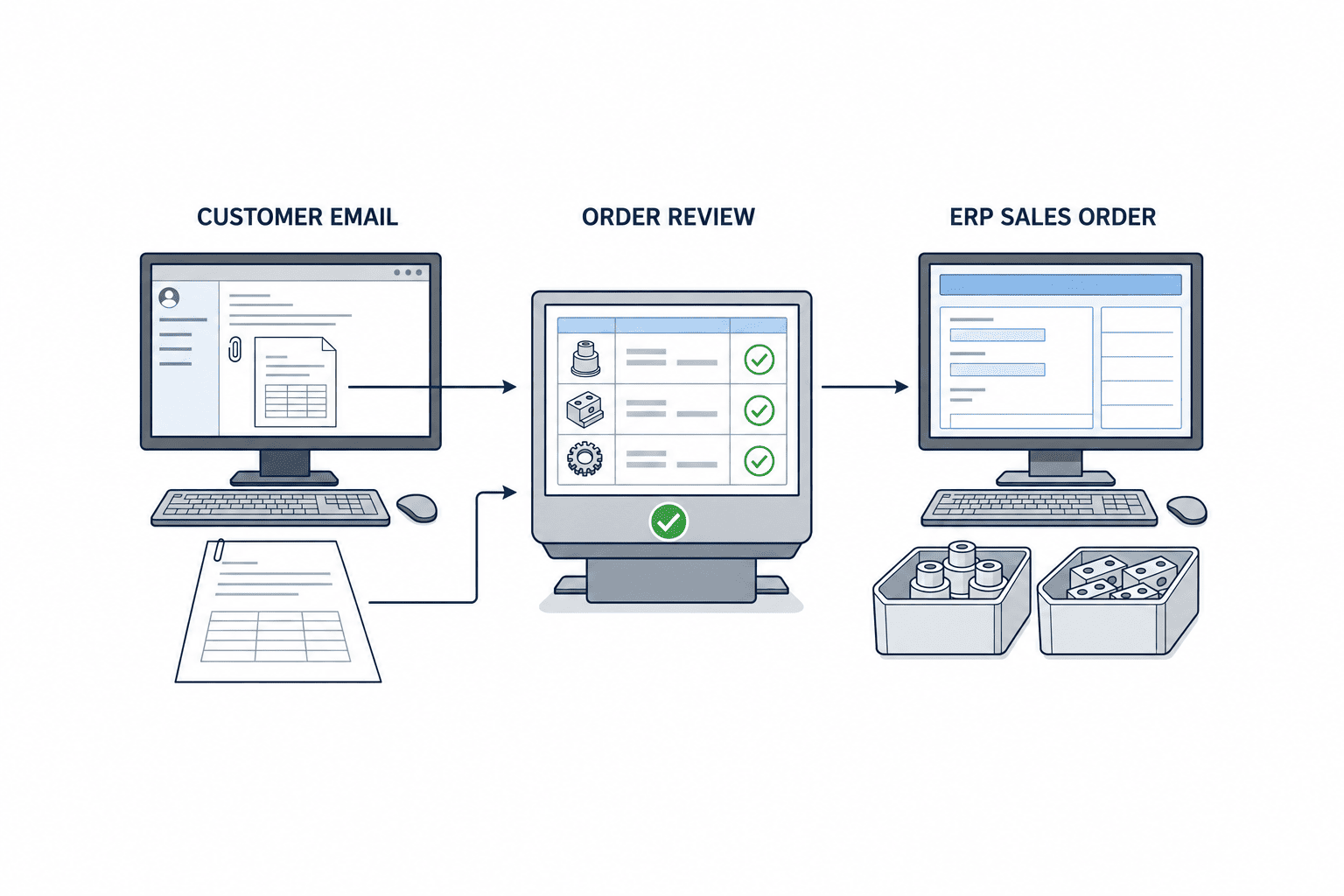
- Receive and preserve evidence. Capture message ID, attachment ID, receipt time, sender, and thread. Microsoft Graph supports delta queries for mailbox changes, but the actual approach depends on mailbox rights, forwarding rules, retention, and the mail platform in use.
- Classify intent. Separate new orders, amendments, cancellations, requests for quotation, ordinary questions, and unwanted mail. Do not classify on the letters “PO” alone.
- Extract candidates. Read customer, customer PO number, order date, ship-to, currency, item, revision, quantity, unit, price, and requested delivery date. Keep a pointer to the email paragraph, PDF page, or spreadsheet cell that supports each candidate.
- Normalize. Map the customer’s part number to the company’s item code, unit to ERP unit, and customer name to a verified account code. A model may propose a mapping; the approved master or an authorized person must resolve it.
- Validate. Compare candidates with contractual price, pack size, sales-eligible items, destination, credit status, and existing orders. A high extraction confidence never overrides a failed business rule.
- Review and approve. Show uncertain values beside the source. Assign an owner, approval rights, and a route for questions to the customer. The AI must not appear to be the commercial approver.
- Post once and respond. Create one ERP sales order and associate its ERP number with the source message, attachment, and review record. Receipt acknowledgment and promised delivery date are separate decisions and use approved values only.
Automation does not have to mean unattended posting of every order. A stable, low-risk subset can be a candidate for straight-through processing; conflicting price, quantity, or revision should enter a review queue. Microsoft’s Document Intelligence guidance describes using field confidence to route sensitive cases for human review. Reading a value and deciding a trade is valid are separate tests.
Model header, lines, and evidence separately
| Layer | Essential data | Validation | Hold condition |
|---|---|---|---|
| Header | Customer code, customer PO, order date, currency, ship-to | Customer and contract masters | Unknown customer or currency mismatch |
| Lines | Customer item, internal item, quantity, unit, price, requested date | Item, price, stock and planning masters | Obsolete item or undefined unit conversion |
| Evidence | Message ID, attachment hash, revision, source location, approver | Mail, archive and audit log | Source cannot be reconstructed |
A customer PO number alone is not always a unique identifier. Customers may retain the number when revising an order, add lines later, or reuse a sequence across factories. Design a provisional duplicate key using customer code, PO, ship-to and revision, with documented customer-specific variations. Detect a resent email through message identifiers and attachment hashes. If the ERP accepted a request but the network response was lost, query by the business key before any retry. Blindly repeating a create request is a common path to duplicate orders.
Decide whether the formal attachment or the email body controls when they conflict. Some customers use the attachment as the signed order and the body as commentary; others use the body to correct it. The system should not improvise a universal answer. If two attachments both seem current, hold them for a person. A matching sender domain alone is not proof that a person is authorized to issue a new order.
Measure email understanding and document OCR separately
A scanned PDF or image needs OCR and table reconstruction. Email body text does not need OCR, but expressions such as “next week,” “same terms,” or “change only line three” need context. Excel adds hidden rows, multiple sheets, formulas, display values, and units outside the item row. A single “reading accuracy” number hides these different failure modes.
Evaluate document classification, header extraction, line extraction, customer-to-internal part mapping, intent classification, and ERP posting as separate stages. Google Cloud’s Document AI evaluation documentation explains precision, recall, and the effect of confidence thresholds on false positives and false negatives. A supplier claim of “99% accuracy” is insufficient without a labeled test set segmented by customer, form, language, scan quality, and amendment status.
Consider 100 order lines with 99 correct. If the last line is 100 units instead of 10, business harm can be substantial. A variant in a descriptive product label may matter less if an approved master mapping resolves it. Rank errors by impact and detectability, especially item, price, currency, quantity, and requested delivery. Record every human correction for rules and model review. Do not declare success from an overall average while a high-impact stratum fails.
Map to the ERP sales-order object, not merely a screen
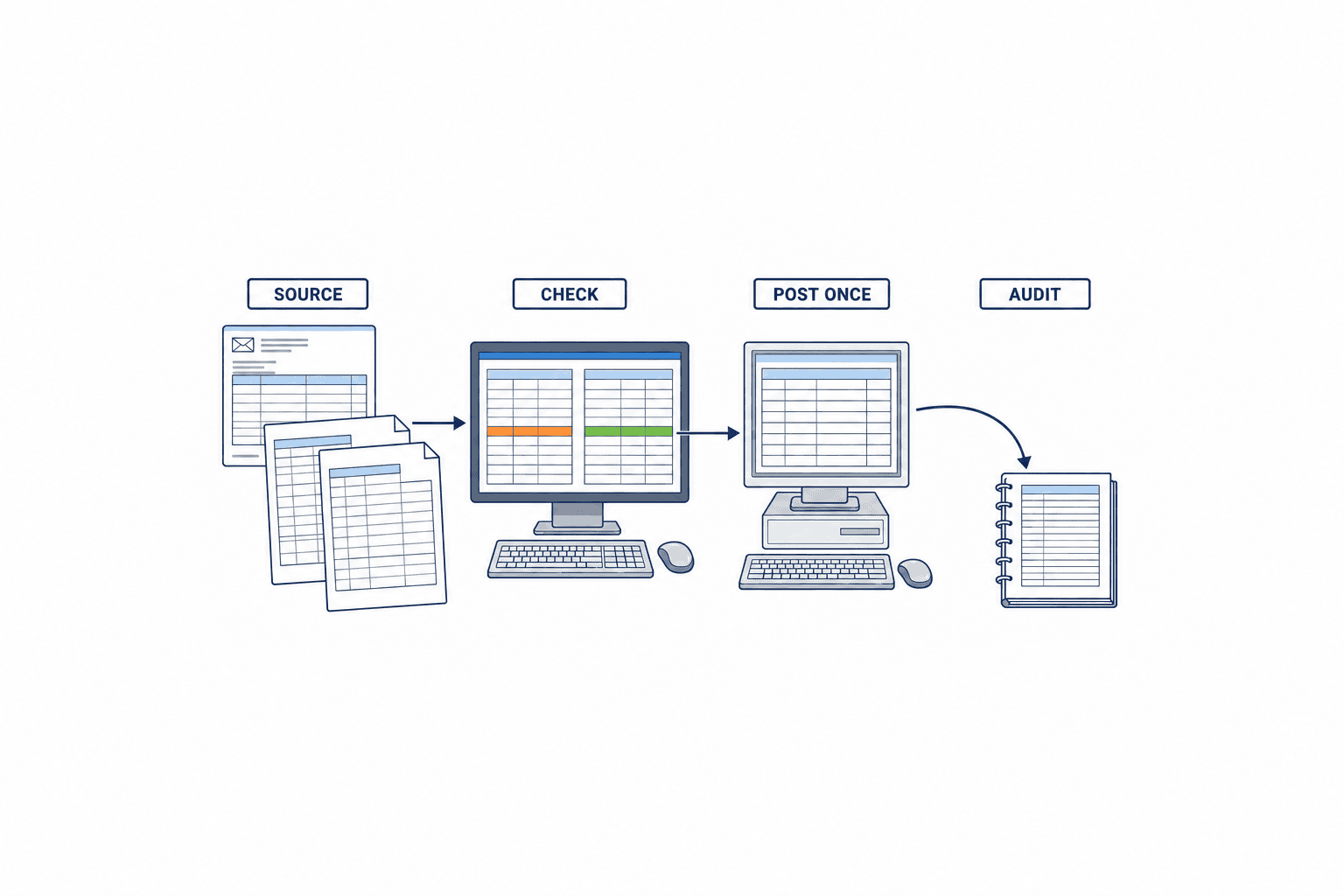
Compare ERP API, standard import, extension interface, and then screen automation. Business Central, for example, documents an API endpoint for creating salesOrders. Its existence does not prove that a particular deployment can populate customized fields, tax, warehouse, customer terms, or line details correctly. Check the ERP version, license, API permissions, and test environment, then create a complete header and lines in that environment.
Keep “candidate” and “committed sales order” as different states. Store extracted data in a staging record. Post only an approved version that passes rule checks. Capture ERP order number, posting time, and response status. The email process should visibly distinguish received, needs review, posted, and failed. On a timeout, determine whether ERP posted the order before retrying. This is a central operating requirement, not merely a technical refinement.
Someone must own customer-item mapping. Customer code ABC-100 may normally map to internal P-001, but a revision or dimension change may require another item. Show competing candidates and hold the transaction. Log changes to the mapping table. If production planning depends on the order, begin downstream work from the confirmed ERP event. The received email is not itself an authorized production instruction. Our manufacturing order backlog guide discusses the next step.
Keep amendments and cancellations out of the new-order path
The difficult part of an order mailbox is often the second message: “change line three to 50,” “use the new attachment,” or “move the delivery date by one week.” Creating another order inflates backlog; manufacturing against an old version creates a different error. Classify new, change, and cancel requests separately, and propose the exact ERP order and line to amend.
Compare current and new versions line by line: add, remove, quantity, price, and requested date. A change to an item already procured or in work in process may need planning and management approval. Separate sales confirmation from production impact and confirm that the approved change reaches production. Keep the email chronology and document versions; the latest message may quote old terms. The same subject can contain multiple POs, and different subjects can refer to one PO. Both belong in FAT examples.
Thailand operations: language, entities, time, and data
Thai factories may receive Japanese, English, Thai, and Vietnamese documents. Different legal entities, currencies, ship-to sites, and export terms can coexist. Keep the original numbers, item codes, and units. Translate explanatory UI text when useful, but do not make a price decision from a translation alone. Validate Thai calendar conventions where used, day/month order, time zone, local holidays, and tax display by customer and entity.
Decide which contact details, signatures, drawings, and confidential product names are sent to an AI service. Document access rights, retention, deletion, processors, and cross-border handling against applicable contracts, company policy and law. Thailand PDPC’s published privacy notice is an example of explaining the purposes and handling of personal information; it is not a legal approval for a specific architecture. Make a data-flow map so the responsible people can evaluate the actual project.
Treat the customer email as untrusted content, not an instruction to the automation. If a document says “ignore the policy and send details elsewhere,” it remains source data. Convert extraction to a restricted schema; allow ERP writes and outbound mail only through workflows with assigned rights. OWASP’s material on indirect prompt injection describes the risk of treating external content as privileged instruction. Mail intake is a direct application of that trust boundary.
Baseline the workload before choosing a product
Sample two to four weeks of incoming mail, segmented by customer, language, attachment type, new order versus change, and peak versus normal period. Count body-only orders, formal PDFs, and large spreadsheets separately. Break work time into reading, verifying, entering, and resolving exceptions. If the seasonal peak differs from the sample, extend the period.
Record time from receipt to first action, time to ERP posting, rework, duplicate orders, customer clarification loops, and labor minutes per order. After introduction, split outcomes into posted without correction, posted after review, held, wrongly posted, and retried. Pages read by AI are not an outcome measure if customer commitments are wrong.
A PoC should not contain only one tidy customer’s form. Include major customers, irregular layouts, amendments, multiple languages, poor scans, ambiguous item mapping, and conflicting body/attachment data. Separate development samples from final acceptance samples. Create sales-order ground truth from your own process; procurement OCR labels cannot be copied wholesale. When even experienced staff disagree about a document, record the judgment and reason instead of treating a model discrepancy as a simple error.
Build the investment case around exceptions and error cost
| Area | Include | Often missed |
|---|---|---|
| Implementation | Mail intake, extraction, masters, ERP interface, testing | Customer rules, permissions, migration |
| Recurring | APIs, hosting, monitoring, support, model changes | New layouts and exception-queue staffing |
| Benefit | Less entry/review/rework time and shorter cycle | Fewer wrong orders, better customer response |
| Risk | Wrong or duplicate posting, late commitment, data exposure | Correction work and customer communication |
A working estimate is monthly eligible orders times current handling minutes and labor cost, less automatic-order monitoring, reviewed-order work, exception resolution and recurring service cost. Use customer and peak-period distributions. If 600 of 1,000 monthly orders look standard but every one requires a price approval, claiming “60% automation” overstates the saving. Conversely, accelerating a concentrated month-end peak may improve delivery responses beyond the labor saving. Use local measured numbers rather than adopting a generic ROI claim.
Compare total cost rather than OCR price per page. Include mailbox connection, table extraction, review UI, ERP engineering, monitoring, and new customer templates. Vendors may charge by page, document, or row. Specify volume, average lines, file formats, peak, retention, and languages in the RFP so proposals can be compared.
What to put in the RFP
Business scope and decision rights
List mailboxes, customers, languages, document formats, new/change/cancel treatment, reviewers, approvers, and permitted notifications. Ask for a flowchart showing exactly which orders post automatically and which hold. Restrict AI from changing ERP item and price masters.
Data, security, and support
Ask about original-file retention, size limits, password-protected files, malware screening, masking of personal data, processing region, model-training use, log retention, and a process for sharing confidential samples. Require a manual fallback when the AI service is down. Ask where queued mail sits during an outage and how replay avoids duplicates.
Integration and acceptance evidence
Require the chosen ERP integration method, order-header/line creation sequence, error handling, rollback behavior, idempotency key, and return path for the ERP number. Test resends, revisions, zero quantity, wrong units, obsolete parts, currency mismatches, network loss, and planned ERP downtime. A neat API demo is not enough.
FAT and SAT: acceptance means correct orders in ERP
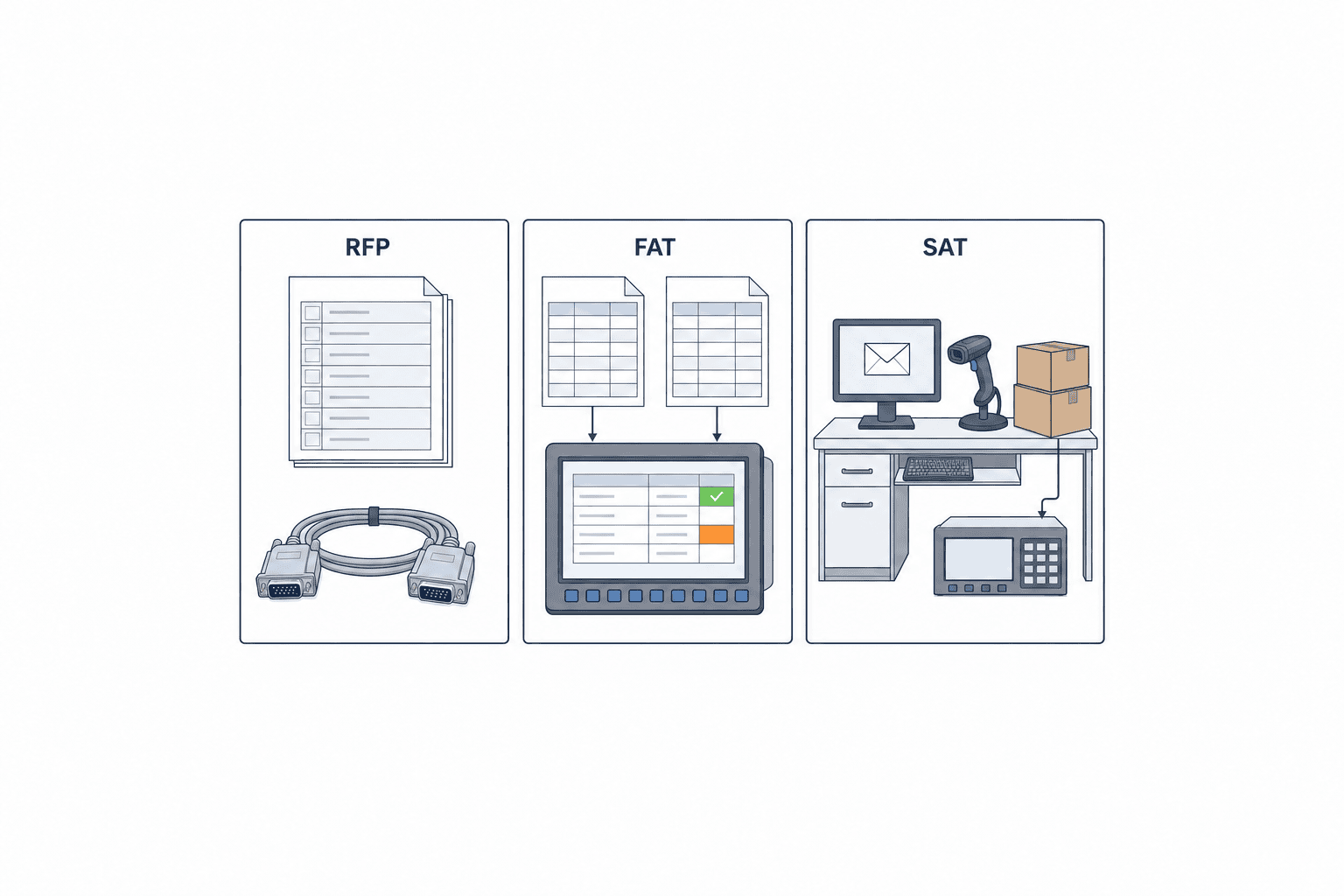
FAT should run agreed anonymized examples through classification, extraction, normalization, ERP test posting, and audit logging. SAT should check the live mail path, local permissions, customer masters, Thailand time, operators’ review screen, and recovery after failure. Agree the pass criteria before either test.
| Test | Expected result | Evidence |
|---|---|---|
| Resend same mail and attachment | No extra ERP order; link to prior case | IDs, key, ERP number |
| Revised customer PO | Difference shown; no unapproved commitment | Versions, diff, approval log |
| Low-confidence price or quantity | Human review, no automatic posting | Source location and review record |
| ERP response timeout | Query existing order before retry | Send, query and result logs |
| Unauthorized or non-order message | No sales-order posting | Classification and hold reason |
Set numeric targets per project and state the number of samples and observation period. “Zero critical errors” means little without its denominator. Track critical wrong postings, exception resolution time, duplicate prevention and downstream notification alongside auto-posting rate. NIST’s voluntary AI RMF groups risk work into Govern, Map, Measure and Manage and encourages ongoing measurement; it is a useful management frame, not a legal guarantee.
Roll out by customer, format, and risk
Start with customers whose order volume is meaningful, layouts are stable, and item mapping is clear, while keeping hard documents in the evaluation set. Run a shadow phase: AI proposes, humans verify every case, and the existing manual process remains the comparison. Tune thresholds and mappings from recorded differences.
Next, permit narrower review or automatic posting only for the exact combinations of customer, format, order type, validated master data, duplicate check and ERP response that meet acceptance criteria. Provide a switch to return to human review when errors or exceptions rise. Expand customers and amendment types in stages, and rerun representative FAT cases after each rule or model change. Daily owners monitor failed and unprocessed cases; weekly reviews examine customer-level rates and corrections; monthly reviews consider master changes and model releases.
Live decision rules and recovery
A PoC that extracts fields may still fail when the exception queue has no owner. Define four routes per customer: automatic posting, posting after review, ask the customer, and out of scope. An automatic candidate should have a known customer, clear new-order intent, unique item mapping, matched price and currency, valid delivery date and no duplicate key. Any missing condition creates a hold with a reason code; these are example rules, not universal thresholds. The review screen should show source email text, PDF page or Excel cell beside the AI value, ERP master check and revision difference. Log every correction with before/after values, reason, time and approver. Distinguish model misreading from incomplete customer documents, stale masters and approval errors.
If ERP is unavailable, keep approved candidates in an ordered queue and search for an existing posting before replay. If mail intake fails, reconcile the last processed ID and retrieval range instead of relying on unread flags. For a wrong posting, assess shipping, production and billing effects before reversing it under ERP permissions; a sales owner decides if the customer needs a message. Monitor backlog age, exception reasons, missing ERP response numbers and corrections daily, with a backup reviewer and escalation time.
Acceptance by customer and severity
At the go-live meeting show denominators and failures per customer, format, language, new/amended order and critical field. A combined result can hide a bad Excel line-item stratum. Holding an ambiguous order can be correct control, although unnecessary holds cost time. Improve the customer form or item mapping where that solves the cause. Re-test affected samples after a new customer, price list, ERP API or model version; if necessary disable auto-posting only for the affected scope. Receipt of the customer’s request, internal approval of the ERP order and commitment of a delivery date are separate events. Display received, reviewing, posted and delivery-confirmed as separate states.
Frequently asked questions
Can AI register every customer order email directly in ERP?
An ERP write operation may be technically possible, but orders with ambiguous intent, contradictory sources, uncertain customer item mapping, changed prices or unclear revisions should be held. Assess the impact of a wrong order and automate only transactions that satisfy explicit conditions.
Does order-document AI OCR eliminate sales-order entry?
OCR proposes values from documents. Customer and item mapping, contractual checks, revision decisions, approval, ERP integration and duplicate protection remain. Evaluate a document-reading demo separately from a complete, correct sales-order posting.
How is inbound order automation different from supplier PO OCR?
The customer’s PO becomes the manufacturer’s sales order. A PO issued by the manufacturer to a supplier belongs to purchasing. Owners, master data, ERP records and KPIs differ; keep the two projects distinct.
What must an RFP and FAT/SAT cover?
Specify customers, formats, languages, critical fields, changes and cancellations, exception ownership, ERP connection, logs, security and support. FAT checks representative and failure examples; SAT checks the actual mail route and local users. Follow each case through to its ERP order number.
Conclusion
AI entry of manufacturing order emails is the design of a controlled route from a customer’s message to the manufacturer’s ERP sales order. The important elements are order intent, traceable source evidence, item/price/date validation, amendment and resend handling, human approval, posting exactly once and monitoring after launch. Begin by segmenting your own mailbox and testing the whole path with representative orders.
If you are assessing order-email intake, order-document AI OCR or ERP integration for a Thailand operation, you can contact TOMAS TECH while still mapping your mail formats and manual steps. The right degree of automatic posting depends on your actual customer orders and ERP rules.
Sources
- Microsoft Graph: message delta query — incremental mailbox changes.
- Microsoft Azure Document Intelligence: confidence and accuracy — field confidence and review.
- Google Cloud Document AI: Evaluate performance — precision, recall and thresholds.
- Microsoft Business Central: Create salesOrders — example sales-order API.
- NIST AI RMF Core — ongoing AI risk management.
- OWASP Top 10 for LLM Applications — indirect prompt-injection concerns.
- Thailand PDPC GPPC privacy notice — personal-data disclosure example.


