


When a factory considers a system for inter-process WIP inventory, a practical opening question is: the upstream operation reported 100 pieces and the next operation received 92; where are the remaining eight? A progress screen cannot tell whether they sit in a buffer, travel on a cart, or wait under a quality hold. This guide is for procurement, production, quality, and IT teams at factories in Thailand. It explains how to define physical WIP by operation, buffer, location, and status, and how to specify and accept the system through an RFP, FAT, and SAT.
Start the WIP inventory system project with a counting rule
Agree what counts as one piece of inter-process WIP before choosing software. Does a piece enter the buffer when the machine finishes, when inspection approves it, or when the receiving operator checks the actual container? Those are different events. A single “complete” button can make a production report look correct while leaving location and usability unknown. A usable inventory view needs a physical buffer map, container rules, hold locations, and an agreed handoff of responsibility.
Suppose an operation produces 120 pieces, scraps three, and places two under review. The quantity available to the next operation cannot be inferred from a production total alone. A screen showing 117 good pieces might include the two held pieces or might exclude them. The requirement is to reconstruct, for each relevant order, item, and lot, the quantity at each location and in each operational status. The system must explain its number from recorded events and physical counts.
This article addresses the stock before and after a move, while the inter-process transport instruction guide addresses dispatch of the move itself. Lot split and merge genealogy, consignment ownership, and general production progress are related but separate design areas. For the broader relationship between WIP and lead time, see practical WIP management. Here the scope is implementation and acceptance of a physical quantity ledger.
Why a progress quantity is not a stock balance
Microsoft’s production floor documentation describes workers reporting good quantities against a job. Its finished-production documentation separately describes reporting finished goods into on-hand inventory. The distinction is an implementation reminder: do not treat every operation’s reported progress as an inventory transaction. Product settings and factory configuration matter, so define three fields separately: reported operation quantity, physical WIP quantity, and ERP-recognized stock quantity. The general system boundary is discussed in production management system basics.
Model WIP by operation, buffer, location, and status
The minimum data model generally includes item, production order, operation, lot where needed, location, status, quantity, unit, container ID, and event time. Decide which combination makes two balances distinct. Without that rule, one lot may appear simultaneously at an upstream exit, downstream entrance, and quarantine rack. Keep both the transaction history that produces a balance and the physical count used to check it. Overwriting a balance hides the point where a difference arose; recording transactions without checking the floor allows scanning mistakes to accumulate.
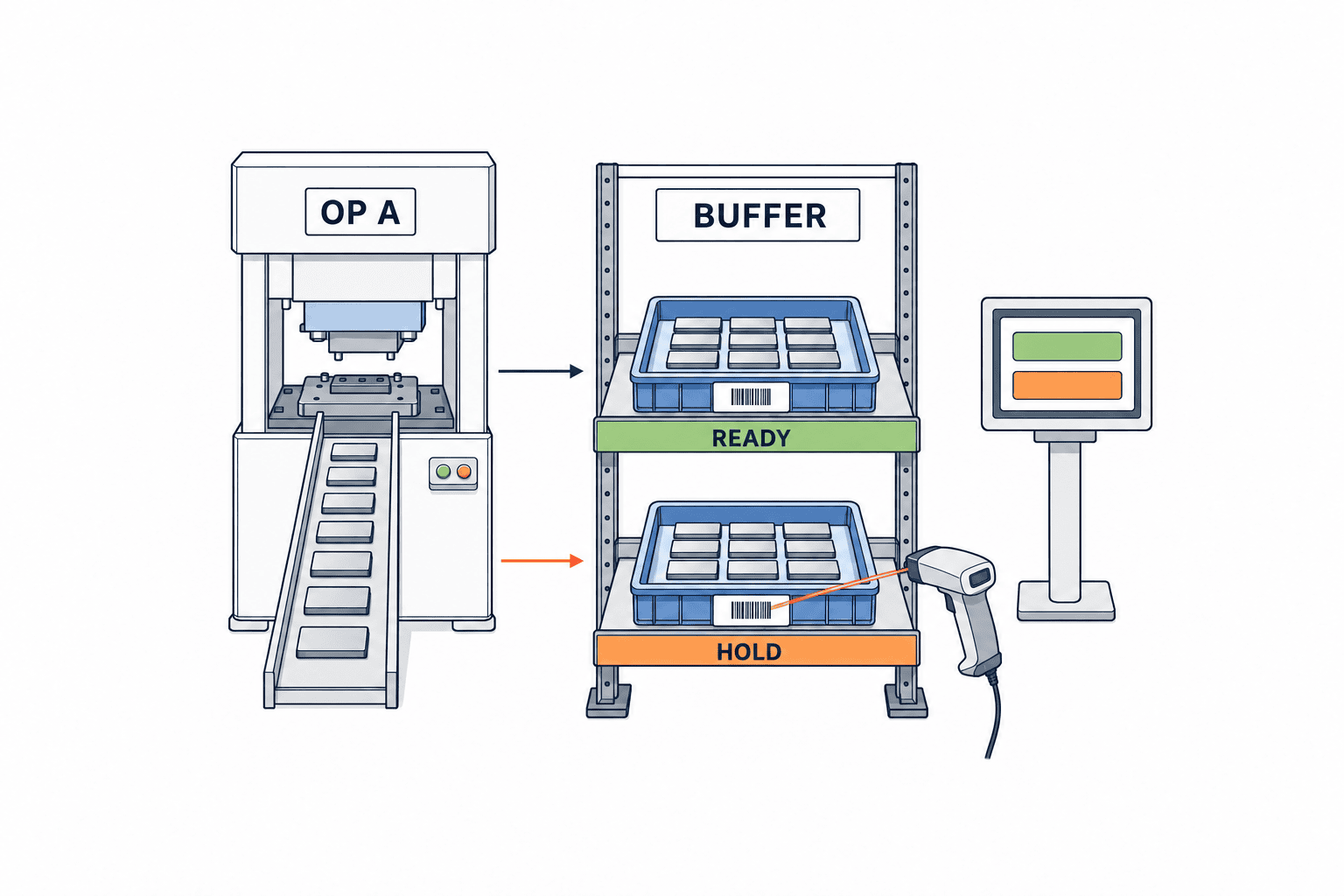
A buffer is more than a location code. Distinguish waiting at the upstream exit, in transit, waiting for downstream receipt, and waiting for downstream consumption. Otherwise nobody owns a missing container. Define the hierarchy of building, line, operation, buffer, and shelf or floor position to the level needed for actual retrieval. Match signs on the floor to names on the screen. If a mobile cart is treated as a temporary location, maintain its location and the relationship between it and its contents. If it is treated as a container, define how the containing location changes.
At a minimum, distinguish available, awaiting receipt, quality hold, awaiting rework, and confirmed scrap. A held tray might physically sit beside the next machine, but it must not inflate the quantity that may be consumed. Equally, a tray that passed inspection but remains marked held creates a false shortage. A status change should record permission, reason, quantity, old and new states, timestamp, and responsible person. Agree whether QMS or MES owns the release decision. Two independent release buttons in two systems are a control weakness.
Unit conversion is another source of differences. One operation may report pieces, another trays, and a third sets. Define a base unit and conversion rule, including rounding and partial containers. A container’s standard pack size is useful master data, but it does not prove that every scanned container holds that number. Specify when a sealed container can use the standard quantity and when opening it requires a new actual count.
Use a balance equation everyone can test
For one buffer, opening physical quantity plus receipts from the upstream operation plus returns, less issues to the downstream operation, scrap, and transfers out, equals closing physical quantity. A quality hold is a change of status, not a disappearance. A rework transfer subtracts from one location and adds to another. When the equation fails, preserve the difference and trace events from the last point of agreement instead of hiding it with an unexplained adjustment.
For orders crossing shifts or days, retain event time separately from business date. Local Thai time, headquarters reporting time, the night shift’s operating day, and month-end close can differ. A correction to business date must not silently rewrite the time the event occurred. Require approval when a correction affects a closed period. The ability to reconstruct yesterday’s end-of-shift stock at each buffer supports both operational investigation and reconciliation with finance.
Record the right starting point for WIP aging
“Aged three days” has little operational meaning until the clock’s start is defined. Measure separately from upstream completion to arrival, arrival to receipt confirmation, quality hold to decision, and availability to downstream use. A long first interval suggests a transport issue; a long second suggests a handoff issue; a long final interval may reflect planning or changeover. Mixing held stock with available stock sends teams toward the wrong remedy.
An aging list should show order due date, planned downstream input, status, quantity, location, last event, and responsible team, in addition to age. Choose thresholds with the operation cycle, required drying or cleaning time, and inspection lead time in mind. A flood of alerts is easy to ignore. Start with one line and one buffer, and make it possible for the next shift to find an abandoned container.
FIFO in a warehouse and release of inter-process WIP are related but different decisions. Do not insert a held or reworked batch into the next operation merely because it is oldest. Decide whether the priority uses original process time, time of release from hold, or a product-specific quality rule. The FIFO inventory system guide covers warehouse ordering; define operation receipt and usability as their own acceptance criteria.
Make an aging alert actionable
A container may remain because downstream capacity is short, material for assembly is missing, inspection is incomplete, the label is wrong, the operator reported completion early, or the move was physically made but not registered. Calling all of these “excess stock” cannot direct the right team. A dashboard total should drill down to the event history and the physical location. Daily review is more useful when it separates completed but unreceived, received but unused, held, and under discrepancy investigation, and records which cases were resolved since the previous shift.
Reconcile dispatch and receipt at the handoff
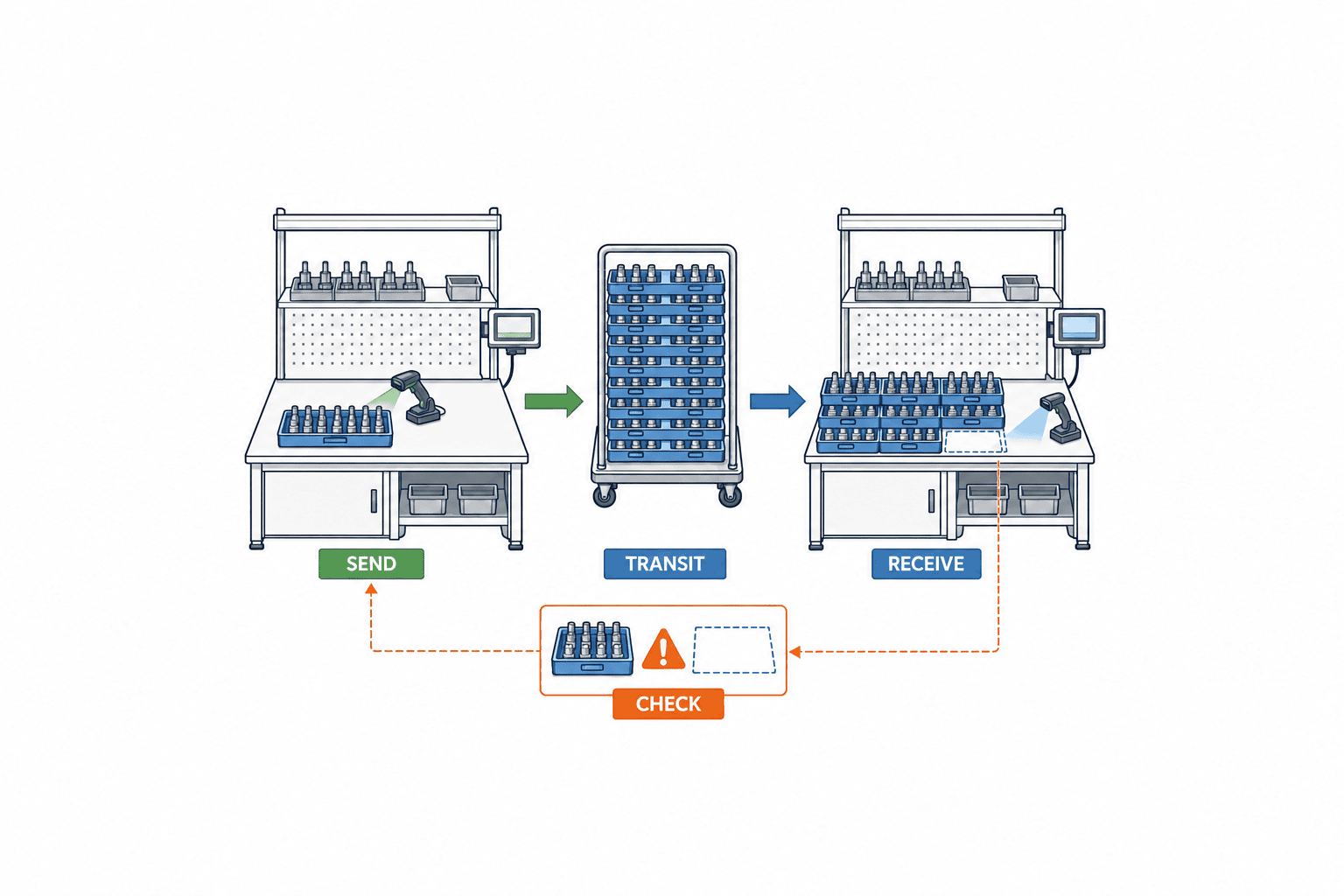
“Sent” and “received” are two observations, not one. Link dispatch time, container ID, item and lot, expected quantity, actual quantity, sender, and receiver at the handoff unit. Until both sides agree, hold the container in an in-transit or receipt-pending status rather than silently treating it as available at the destination. Define when custody transfers in the actual work instruction. Merely adding two screen buttons does not show that someone checked the physical tray.
If ten trays were dispatched but nine arrived, do not edit the dispatch to nine. Keep the one-tray discrepancy open, then search using locations, times, container IDs, and operators. Separate missing containers from short contents inside a container. Store both the recount result and the authorized correction. That record helps distinguish a true shortage, duplicate scan, and wrong placement. Assign correction authority according to the risk: a shift leader or dual approval may be appropriate.
Give each movement event a unique ID. Resending the same event after a terminal reconnects must not subtract the stock twice. Specify what happens when messages arrive out of order, including a receipt arriving before the dispatch message. A reversal should reference the original event and retain actor and reason rather than delete history. Keep event occurrence time and server receipt time separately when offline terminals are used.
Design exceptions before deployment
Dirty labels, partly filled boxes, temporary floor positions, and wireless outages are normal factory conditions. An RFP that says only “handle operationally” invites paper notes and uncontrolled later entry. Define manual-entry permissions, label reissue, temporary location creation, offline capture, resynchronization, and review. A later manual entry may need a different confidence indicator from a normal confirmed scan. Identify who saw the goods and who entered the record.
A reusable container ID is not automatically a product lot ID. Maintain the container lifecycle separately from its current contents. If one lot spans containers, or one container may hold multiple lots, state which combinations the target operation allows. Detailed split and merge genealogy can be designed separately; the inventory requirement still must say whether lot-level balances are needed. More detail adds scanning and master-data work, so choose the grain against product risk and the time it takes to locate a missing item.
Assign ownership across MES, ERP, and WMS
Avoid three independently editable “correct” quantities. As a starting pattern, ERP owns the order and financially relevant inventory, MES owns execution events and operation status, and WMS owns locations under warehouse control. The actual boundary depends on existing systems. Decide whether every production buffer is an ERP warehouse location or whether MES maintains a floor ledger and summarizes at defined ERP posting points. Naming a system in a diagram is insufficient; specify who can enter, reverse, and approve every quantity change.
A boundary table should cover order and routing master, operation completion, good and scrap feedback, buffer balance, containers and locations, quality hold and release, finished-goods receipt, and inventory valuation. For each row name the system of record, read-only copies, update authority, synchronization point, retry and reconciliation procedure, and owner of discrepancies. Physical WIP pieces and financial WIP valuation are distinct concepts. Agree with production and finance how and when physical events become ERP postings.
Microsoft documentation illustrates that a final-operation report can update on-hand finished stock according to configuration, while an earlier operation’s progress need not be stock. Ask suppliers to demonstrate your own process and show both screen and ledger changes. SAP’s production supply area documentation identifies plant, storage location, and supply area relationships. These vendor documents do not choose a product for you; they provide concrete prompts for checking the operation-location boundary. The ERP and production integration guide explores the data contract in more detail.
Use language-independent, stable IDs for items, operations, lines, locations, statuses, and containers even when labels display in Japanese, Thai, or English. Define who can add or change these masters and when a revision takes effect. Deleting an old operation code can make historical aging unintelligible. If temporary labels are allowed before master approval, specify how they are reconciled with the approved code later.
GS1’s traceability standard frames event data as who, what, where, when, and why, a useful checklist for handoff records. Adopting a standard does not by itself make an operation-level WIP balance accurate. The plant still needs explicit buffer definitions, quality statuses, quantity permissions, and physical-count procedures.
Specify a testable RFP and a comparable quotation
Replace “visualize WIP” with a representative scenario. For example, enter 120 units, report 117 good and three scrap, hold two of the good units, divide the output into ten containers, dispatch them, record one missing at receipt, and reconcile it the next day. Require the bidder to show screen balances, ledger events, messages to ERP and WMS, and the correction path after each step. Compare whether this uses standard functions, configuration, or custom development rather than comparing feature checkmarks.
Include terminals, scanners, printers, wireless coverage, physical location signs, master cleanup, ERP/WMS/QMS interfaces, migration, operator training, night-shift support, and maintenance in the commercial scope. A screen-only quote often excludes what makes the physical count reliable. Even when existing devices are reused, test dirty labels, gloved operation, intermittent connections, and charging arrangements on the floor. Avoid a generic price claim detached from this plant’s scope.
For operators, specify search by shelf, container, and lot; Thai-language needs; status words as well as colors; and permission-controlled correction actions. For supervisors, require a balance by operation, location, and status, aging lists with defined start times, open handoffs, daily differences, and audit logs. A CSV export alone does not demonstrate traceability. The vendor should explain how each column is derived and reproduce the same result under the same query conditions.
Contract for exportable data and history, additional-site pricing, recovery targets, support hours, and interface compatibility after upgrades. Distinguish master changes the plant can make from changes requiring supplier work. The buyer must also own physical baseline counting, normalization of item and operation codes, and assignment of receiving roles. Delivery of software cannot create an accurate opening balance by itself.
FAT and SAT: prove the balances against physical goods
Include opening count and migration in acceptance
The first balance in the new system cannot be established by copying a number from the old system. Set a cutover point and count physical goods by buffer, item, lot, status, location, and container. Before counting, separate boxes reported complete but still at the upstream operation, boxes in transit, and boxes delivered but not received. Registering the same box in both ledgers creates a duplicate on day one. Keep the counter, checker, time, physical label, migration key, and discrepancy reason on the count sheet. Bring unresolved boxes forward as pending reconciliation, not available stock.
Approve a mapping of old and new codes before migrating Excel or MES data. Match stable item IDs, orders, operations, lots, locations, and units rather than item names alone. When an obsolete location is mapped to a current one, preserve where the quantity came from. A free-text quality hold in the old system may require a physical check; never convert an unclear hold automatically to available. Migrate open dispatches and receipts, differences under investigation, held trays, and rework as well as balances. Run the migration procedure twice in rehearsal and check that it produces the same result. Decide which system owns new events during cutover. Record any day-one mismatch as a migration discrepancy with owner and deadline instead of quietly adjusting opening stock.
Put six fields in each interface contract
For MES, ERP, and WMS messages, specify a unique event ID and reference to an original event; stable item, order, operation, location, and status IDs; base unit and conversion; occurrence, send, receive, and business times; accepted, pending, retry, or rejected result with reason; and the method for reversing a posting. Give suppliers a sample message plus expected behavior when it arrives twice, out of order, or with an unknown item. When an interface is down, decide whether work can continue and which actions must pause. Queue offline events with explicit replay order, deduplication, count reconciliation, and operator feedback. An ERP rejection after period close must remain visible as a physical-to-posted difference, with a named owner in production, warehouse, quality, or finance.
After go-live, observe time to locate a physical container, age and count of unreceived containers, unresolved statuses, time to settle a discrepancy, correction reasons, and offline replays. These are checks that the control is working, not promised reduction figures. Establish the same definitions before deployment so a working screen that still cannot lead people to the goods is detected.
In FAT, use known test data and operate the screens to prove the balance equation. Cover normal and partial completion, quality hold and release, scrap, return from rework, erroneous scan reversal, duplicate submission, offline replay, and a shift or date boundary. For each test state the input, expected balance, ERP/WMS output, exception message, and audit evidence before running it. Matching the displayed number is insufficient if no one can later explain who changed it.
In SAT, use actual boxes, trays, carts, labels, shelves, terminals, and the plant network. At dispatch, in transit, and receipt, ask a person using the screen to locate the physical container. Test shift handover, mixed items on a shelf, damaged labels, partial boxes, and the quality isolation zone. Work does not always happen in the clean order of a vendor demonstration; test out-of-order actions explicitly.
Write acceptance criteria as reproducible conditions, not “100% accurate” without a definition. Examples include: the balance equation holds in every defined scenario; resending one event ID changes no balance; an unreceived container is not available for consumption; unauthorized users cannot release a hold; and both the creation and resolution of a discrepancy remain in the audit trail. Define peak scanning volume and acceptable response time using the plant’s actual workload. If an unresolved difference is deferred, record its impact and interim procedure with an accountable approver.
Make the first operating reviews part of acceptance
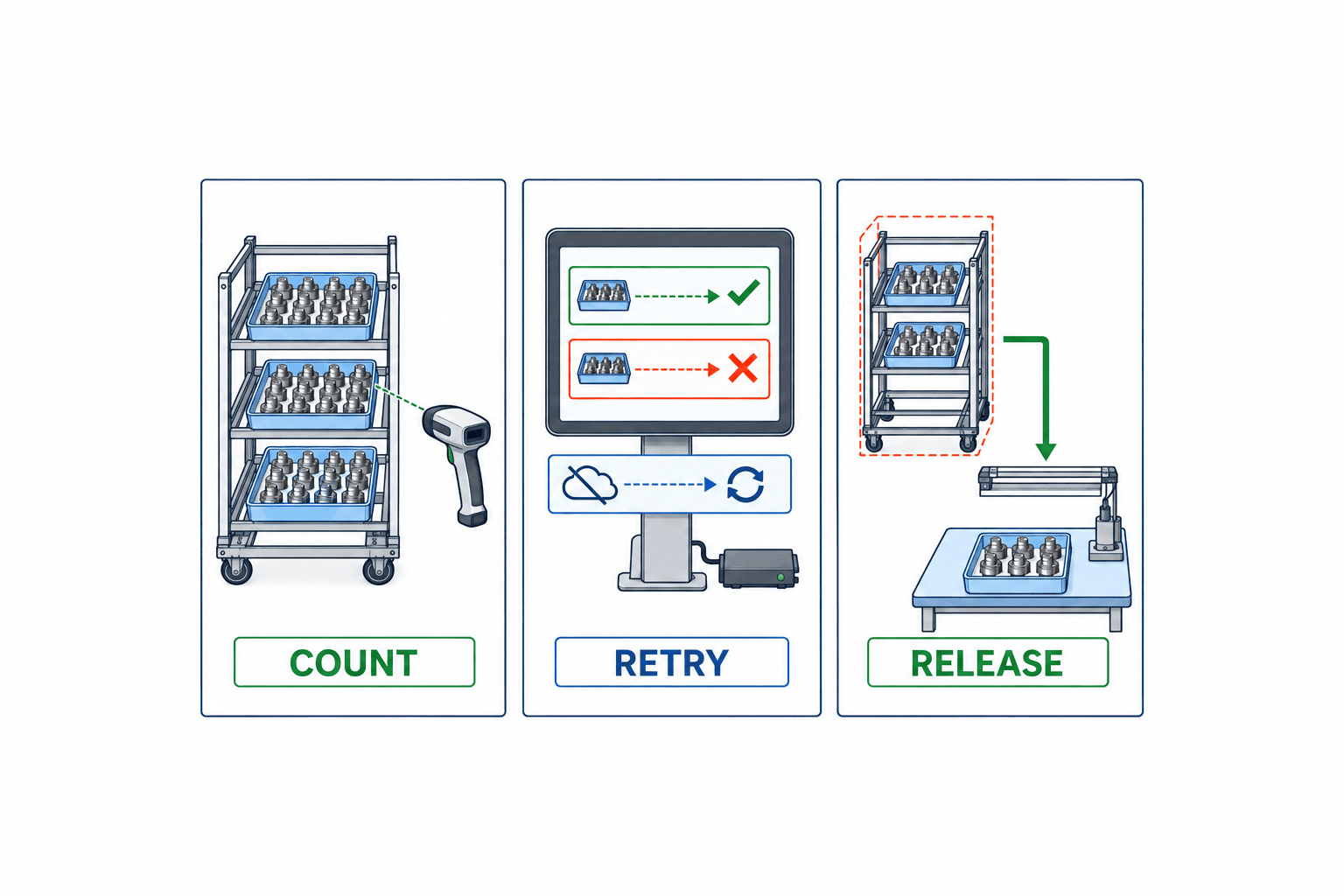
At the end of each initial shift, review unreceived containers, quantity differences, unresolved holds, and corrections. Separate goods absent from the floor but present in the system from goods present on the floor but absent in the system. Causes may include location signs, labels, device position, transport route, or ambiguous ownership, as well as data entry. Put each fix into the work instruction and training material instead of relying on verbal explanations.
If Excel and the new system run in parallel, define the condition that ends parallel entry: which line, how many consecutive shifts with resolved differences, and which report becomes authoritative. Keep unresolved items on an issue list with owner and deadline. Quiet daily balance adjustments destroy the evidence needed to improve the process. Record a mapping when a quantity definition changes after go-live so old and new reports remain interpretable.
Frequently asked questions
Can we visualize inter-process inventory in Excel?
For a single line with one daily count, Excel can be an adequate discovery tool. Multiple shifts, locations, handoffs, holds, corrections, and offline recovery increase the burden of simultaneous edits and history. You may start by defining locations and counting rules in a spreadsheet, then systemize the events that repeatedly cause differences. The recording responsibility matters more than the initial tool.
When should an aging alert fire?
There is no universal number of days. Define the clock’s start and account for the operation cycle, planned downstream input, and quality lead time. Set an initial threshold using your own history and the number of cases the team can investigate. Held and available goods should have separate queues and owners.
Should MES or WMS own WIP inventory?
MES may own execution and status while WMS owns controlled locations and containers, but the answer depends on the physical boundary and existing capability. For each boundary buffer, name one authoritative quantity and the event that synchronizes its copy. Keep ERP posting and valuation distinct from the floor count.
How should a discrepancy be corrected?
Recount the goods and trace dispatch, receipt, transfer, hold, and scrap from the last matching point. Preserve an unresolved difference rather than overwrite the balance without a reason. An authorized person records the correction and cause. Then change the work instruction for recurring causes such as double scanning, unreceived containers, or wrong pack quantities.
Must every operation go live together?
Start with one buffer where goods can be counted and discrepancies affect work. Close the loop for labels, handoff, hold, and daily reconciliation before expanding. Design stable IDs, authority, and interface rules for future operations from the outset.
Summary
An inter-process WIP inventory system starts with a rule for counting physical goods by operation, location, and status. Reconcile dispatch and receipt; separate aging from quality hold; name the authoritative system across MES, ERP, and WMS. Give bidders a real discrepancy scenario, then use FAT and SAT to test offline replay, duplicate events, partial containers, and hold release as well as the normal route. The outcome sought is a screen balance that leads a worker to the actual goods.
If goods in a Thai factory appear on a report but cannot be found at the buffer, an initial review of one buffer’s physical count, records, and responsibility boundary is a reasonable starting point. Contact TOMAS TECH to discuss the scope.
Sources
- Microsoft Learn: How workers use the production floor execution interface — reporting job progress.
- Microsoft Learn: Report production orders as finished — finished reporting and on-hand inventory.
- Microsoft Learn: Production feedback — time and quantity by job or operation.
- SAP Help Portal: Production Supply Area — plant, storage location, and supply area.
- SAP Help Portal: Calculate Physical Stock at Production Supply Area — physical stock at a supply area.
- GS1 Global Traceability Standard — event and data-element concepts.


