


When considering the implementation of a manufacturing picking shelf replenishment system, simply having a mechanism to notify when shelf inventory is low is not enough to prevent stockouts. You must define which lot from reserve stock, by whom, when, to which shelf, and what needs to be scanned to complete the process. This article, assuming a manufacturing site in Thailand, organizes the design from setting replenishment points, WMS work instructions, physical verification, exception handling, to RFP and FAT/SAT. All numerical examples are for explanatory purposes only and do not guarantee the performance or cost of any specific product.
First, Define: What Does Picking Shelf Replenishment Complete?
The picking shelf here refers to the storage location just before operators retrieve parts or secondary materials. Reserve stock is kept in a separate warehouse or on high racks. Replenishment is not complete just when items are taken out of the warehouse. It is only complete when the correct items are selected from the reserve shelf, transported, placed on the designated picking shelf, quantities/items/lots are verified, and the movement is confirmed in the system. The time when the items become available for picking must also be defined.
Oracle’s Warehouse Management Cloud defines replenishment as the movement of inventory from reserve storage to picking locations, distinguishing between triggers such as minimum quantity, maximum capacity ratio, on-site scanning, and order demand. Oracle Replenishment Specification shows that trigger conditions and completion conditions should be designed separately. Microsoft also distinguishes not only Min/Max but also demand-driven, wave-driven, and immediate replenishment, based on replenishment templates, location directives, and work templates to maintain picking locations. Microsoft Replenishment Overview.
Some factories use paper or electronic kanban to notify replenishment. Even in such cases, confirming that the correct items have arrived at the correct shelf from the reserve shelf is a separate task. Electronic Kanban System Implementation Design discusses the boundary between signals and upper-level systems. This article focuses on execution management after the signal, especially the movement from reserve shelf to picking face and receipt confirmation.
Six Facts to Measure On-Site Before Implementation
Before reviewing system features, measure actual items and shifts on-site. First, check the picking face consumption by item and time. Daily averages can hide peaks after shift start or during process changes. Second, break down the time from when the shelf drops below the replenishment point to replenishment completion into instruction waiting, searching at the reserve shelf, transport, and placement confirmation. Third, record the physical capacity of the picking shelf, box units, and stacking constraints. Fourth, break down available reserve stock by lot, quality hold, allocation, and location. Fifth, measure the number of stockouts, emergency transports, misplacements, and unconfirmed movements. Sixth, observe operations during night shifts, holidays, and communication outages.
For example, knowing “daily consumption is 120 units, replenishment takes 30 minutes” is not enough to set the replenishment point. Whether there is concentrated consumption due to process changes within those 30 minutes, whether workers handle both shelf replenishment and normal picking, and how many are available after excluding quality hold lots all affect the outcome. The pre-implementation measurement sheet should record item, shelf ID, time, starting inventory, consumption, actual replenishment quantity, request time, transport start time, shelf scan time, confirmation time, and exception reason. Do not fill missing data with averages; treat them as missing.
| Measurement Item | Minimum Unit | Reason for Use in Design |
|---|---|---|
| Picking Face Consumption | Item × Shelf × Time Slot | Review replenishment points and priorities |
| Replenishment Lead Time | From instruction to shelf confirmation | Judge if it arrives before stockout |
| Shelf Capacity | Box, unit, volume | Maximum value and safe placement |
| Eligible Reserve Stock | Item × Lot × Status | Judge if instruction is executable |
| Exceptions | Reason × Process | On-site screen and recovery rules |
Separate Inventory States for Reserve and Picking Shelves
At minimum, the replenishment design should depict three locations: reserve location, in transit, and picking location. If boxes not yet arrived at the picking shelf are counted as available for picking, the screen will show inventory even though the shelf is empty. Conversely, if in-transit items are not managed after being removed from the reserve shelf, their whereabouts are lost. When to change inventory ownership in WMS depends on product specs and operations, but it is essential to identify periods when logical state and physical location diverge.
Recommended events include “replenishment candidate generation,” “task confirmation,” “physical retrieval at reserve shelf,” “in transit,” “placement on picking shelf,” “quantity/lot confirmation,” and “available for picking.” Attach task ID, item, lot, quantity, unit, source shelf, destination shelf, operator, terminal, time, and result to each event. A unique identifier is needed to prevent double-counting if the same movement is resent. If the operator changes the quantity, do not overwrite the original instruction; record instruction quantity, actual quantity, and reason for discrepancy.
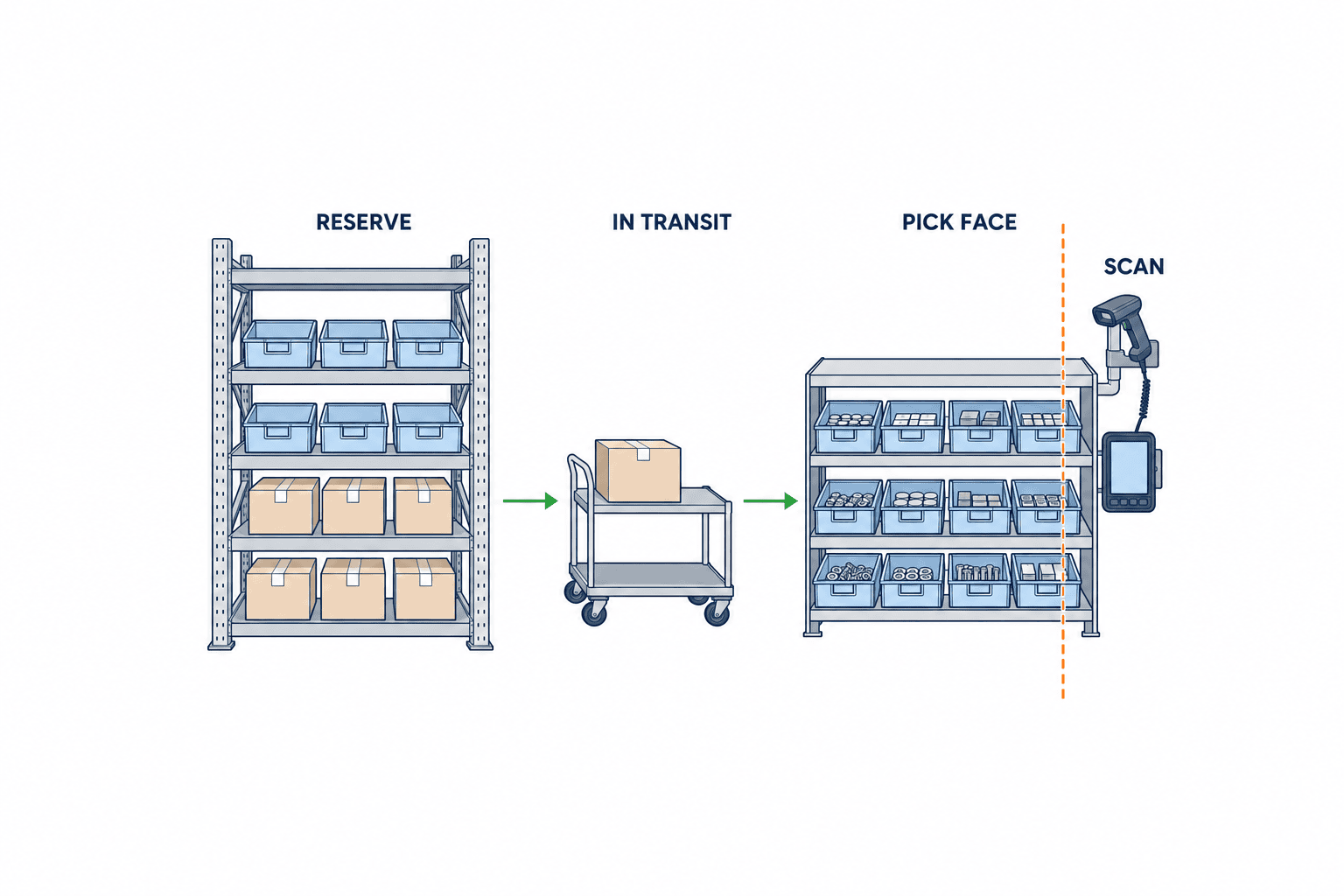
If this boundary is unclear when implementing WMS, even if discrepancies are found during stocktaking, you cannot tell whether it was “replenishment delay,” “reserve shelf shortage,” or “placed on shelf but unconfirmed.” When supplying to a process line, further boundaries such as “removal from picking shelf,” “arrival at line,” and “consumption at line” should be separated. Whether the replenishment system covers process consumption is determined by the division of roles with MES.
How to Use Min/Max, Reorder Point, and Demand-Driven Triggers
Minimum value is the trigger to consider replenishment, maximum value is the target shelf quantity after replenishment, and reorder point is the decision point for procurement/production planning—do not confuse them. Picking shelf Min/Max is a rule for internal movement. Purchasing reorder point is a separate rule including external procurement lead time and safety stock. Even with the same term “replenishment,” the decision target and time axis differ.
A typical design example is to generate a task candidate when available quantity on the picking shelf falls below Min, and calculate replenishment quantity based on the difference between Max and current quantity. However, to avoid over-instruction, you must deduct/adjust for incomplete replenishment tasks, existing allocations, box quantity, shelf capacity, lot constraints, and work time slots. SAP EWM sets minimum and maximum quantities per fixed shelf or storage type, distinguishing planned replenishment, order-related replenishment, automatic replenishment, and direct replenishment. Do not simply adopt product specs as your own rules; confirm candidate generation, rounding, and exceptions in the RFP. SAP EWM Replenishment Control.
Demand-driven triggers fill the gap in Min/Max cycles for plan changes or large orders. However, if both scheduled and demand replenishment are created for the same stockout, you need a rule to deduct incomplete quantities. Microsoft’s documentation also shows settings where demand replenishment uses existing unreserved work. Since implementation varies by product, check on actual systems in the RFP how simultaneous tasks for the same item/shelf are integrated.
Example Quantities: What to Instruct When Shelf Falls Below 20 Units
Let’s consider a hypothetical part A. Picking shelf Min is 20 units, Max is 80 units, box quantity is 10 units, current actual shelf quantity is 18 units, incomplete replenishment instruction is 10 units, and total recorded reserve stock is 90 units. The simple difference from Max is 62 units, but subtracting the incomplete 10 units, the new candidate is 52 units. If you round down to box units, you instruct 50 units, and if all replenishments arrive correctly, 18+10+50=78 units will be on the shelf. This calculation only holds if you clearly state the assumption that “incomplete tasks will be executed.” If you round up considering shelf capacity and box quantity, it may exceed 80 units, so check the rounding method against product standards and site rules.
| Condition | Quantity | Handling |
|---|---|---|
| Current Picking Shelf Actual Inventory | 18 | Candidate generated as below Min 20 |
| Target Max After Replenishment | 80 | Also check physical capacity |
| Existing Incomplete Replenishment | 10 | Deduct to avoid double instruction |
| New Theoretical Candidate | 52 | 80−18−10 |
| New Instruction in Box Units of 10 | 50 | Assuming rounding down |
| Shelf Quantity After Both Tasks Complete | 78 | 18+10+50 |
If 40 out of the 90 reserve stock units are on quality hold, only 50 units are available. Even if you can complete the new instruction for 50 units, if the existing task for 10 units is also relying on the same 90 units, you cannot secure a total of 60 units. Decide whether to reserve eligible reserve stock at instruction creation or allow competition until completion and treat shortages as exceptions. WMS may use “50 units that can be moved to shelf” and “50 units that can be allocated” with different meanings. Include quantity examples in the RFP and check on actual screens how calculations are performed.
WMS Tasks Must Be Operable as “Who Does What, Where”
A good replenishment task requires task ID, priority, source location, destination location, item, lot condition, quantity and unit, container/label, deadline, assignee or work pool, status, and exception code. Oracle WMS Cloud treats replenishment and picking as different task types, allowing assignment, hold, release, cancellation, and priority settings for tasks. Oracle Task Execution Explanation. However, not all products have the same statuses and permissions, so request demonstrations on candidate products.
If replenishment and normal picking use the same workers and aisles, priority becomes an operational conflict. If you prioritize “almost out of stock” and send everyone to emergency replenishment, you may miss other deadlines for shipping or line supply. Priority should be determined not just by remaining quantity, but also by next required time, replenishment lead time, affected orders, availability of alternative shelves, and eligible reserve stock. When supervisors manually change priorities, record the reason and change history.
Task statuses should at least distinguish unassigned, assigned, in retrieval, in transit, awaiting shelf placement, complete, on hold, and cancelled. If “start work” and “confirm inventory movement” are on the same button, it becomes difficult to verify physical items if the terminal fails mid-process. In case of communication loss, test whether the terminal can save unsent records, whether resending causes duplication, and whether another terminal can take over the same task. The terminal screen should clearly indicate the next item to scan, avoiding reliance on memory for shelf numbers.
Scan Confirmation Sequence: Reserve Shelf, Container, Destination Shelf, Quantity
To reduce physical errors, first scan the reserve shelf label and the physical container, and verify against the item, lot, and status specified in the task. After moving, scan the destination shelf label, recheck the container or item, and input/confirm the actual quantity placed. Not all items need to be scanned only once. Mistakes at the source shelf and at the destination shelf are different errors, so confirmation should be separated for both locations.
Barcode representation should match on-site label specifications. GS1 provides standards for identifying products, locations, lot numbers, dates, etc., via barcodes. GS1 Barcode Standards. However, do not assume GS1 codes for in-house labels that do not use the GS1 identification system. Check actual labels, terminal reading performance, dirt and wear, and changes in packaging units. If a box with multiple lots is represented by a single barcode, verify separately whether it meets the granularity required for lot tracking.
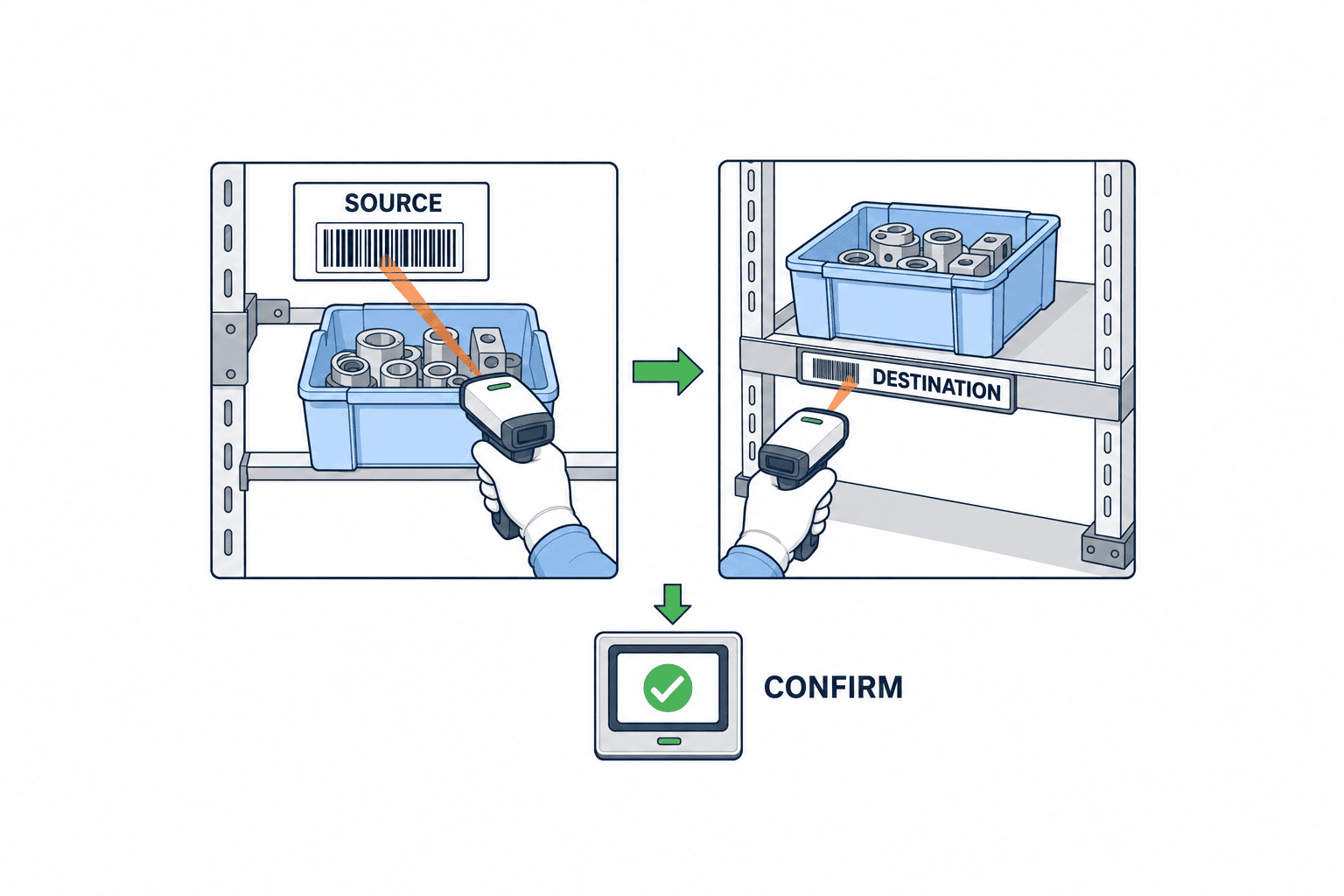
If partial replenishment is allowed, decide how to handle cases where only 40 out of 50 instructed units are placed. Will you complete 40 units and create a new task for the remaining 10, or continue the task and add another lot? If the latter is allowed, you need to record actuals by lot and mixed storage conditions for the destination shelf. If supervisors are allowed to complete tasks by manual entry without scanning, record the reason and approver in the audit log. Scanning is an “input method,” but what is verified and what is stopped as an exception is the essence of control.
Do Not Treat Stockouts and Replenishment Failures as the Same Exception
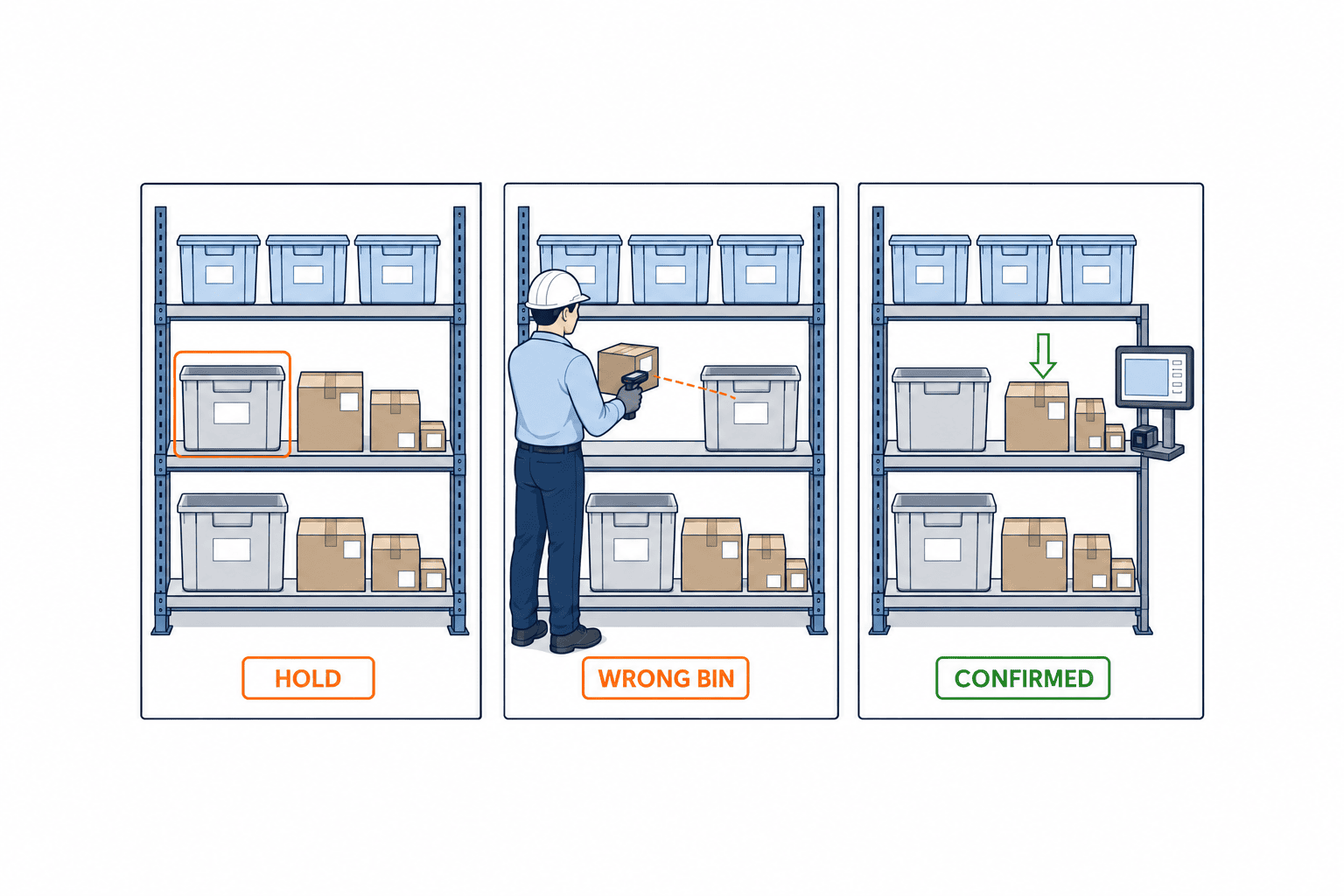
Even if the picking shelf is empty, if reserve stock exists, it is a replenishment delay. If reserve stock is on quality hold, it is a shortage of available stock. If the reserve shelf has inventory on the books but not physically, it is a shelf discrepancy. If another item is already in the destination shelf and you cannot place the box, it is a location anomaly. If you lump all these into a single “stockout” screen, operators cannot select the appropriate action. Separate exception codes, first responders, escalation contacts, temporary operations, and resolution criteria.
| Exception | On-Site Stop Condition | First Action | Proof of Resolution |
|---|---|---|---|
| Reserve Shelf Physical Shortage | Cannot retrieve specified quantity | Count actuals, record inventory discrepancy | Stocktake and discrepancy approval |
| Lot/Quality Ineligibility | Violation of hold, expiry, FIFO | Check alternative lot candidates | Approved lot and history |
| Destination Shelf Capacity Shortage | Cannot safely place specified box | Review Max and shelf layout | Shelf photo or on-site check |
| Wrong Shelf/Wrong Item | Label does not match task | Hold without placing | Rescan and correction record |
| Terminal/Network Failure | No confirmation returned | Identify item and temporarily store | Resend, verification, duplicate elimination log |
Oracle explains settings to hold picking tasks dependent on replenishment until replenishment is complete. Holding or Releasing Replenishment Dependent Picking Tasks. If you adopt such linkage, decide whether to release picking when “replenishment is physically complete but unconfirmed due to communication loss,” and define alternative procedures for physical verification. Careless auto-release can lead to mis-shipments, while indefinite holds can halt operations.
Enforce FIFO, Lot, and Quality Status at the Replenishment Stage
Replenishment determines “which lot is brought to the destination shelf,” which affects subsequent picking options. Even if FIFO is used in the warehouse, if new and old lots are stacked randomly on the picking shelf, operators may not be able to pick the oldest lot. For items with expiry, FEFO may be required. Design the order of lot selection, mixed storage rules, placement (front/back) within the shelf, and handling of remaining lots. Quality hold or recall lots must not only be excluded from candidates but also be able to isolate inventory already on the picking shelf.
GS1’s traceability standard provides a framework for recording and tracking relationships between item ID, lot ID, and logistics unit ID. GS1 Global Traceability Standard. If you link source container, lot, destination shelf, and quantity at the replenishment event, it becomes easier to explain the traceability range after shipping or line input. However, simply quoting GS1 does not prove your system’s traceability performance. Test with data for returns, refills, container splits, and mixed storage to verify if lots can be traced later.
Decide the Master Record and Synchronization Scope for ERP, WMS, and MES
One configuration example is to use ERP as the master for procurement, costing, accounting, and item master data; WMS as the master for shelf-level inventory and replenishment tasks; and MES as the master for production instructions and process consumption. In practice, ERP warehouse functions may play the role of WMS. Decide responsibilities by event, not by system name. Especially, create a table for “when to reduce inventory,” “who releases quality holds,” and “when quantities handed to the process become consumed.”
Replenishment tasks need a correlation ID between instruction and actuals. Confirm that duplicate movements do not occur if terminals resend actuals during communication loss, that delayed messages for cancelled tasks are not reflected, and that unit conversions between ERP and WMS are consistent. For example, if 10 units per box are displayed as “1 case,” do not round up the actual shelf quantity including 2 loose units to case units. Also monitor synchronization delays if lot attributes or quality status change in only one system. Existing picking system selection articles covering DPS/DAS and display devices guide operations, but the master record for shelf inventory and replenishment completion must be defined separately.
Include Scenarios, Not Just Features, in the RFP
Checkboxes like “Min/Max supported” or “Handheld supported” do not reveal product differences. Include scenarios in the RFP showing your shelf structure and quantities, and have each vendor demonstrate screens, calculations, and logs with the same input data. For example, with part A’s picking shelf at 18 units, Min 20, Max 80, box 10, existing task 10, and eligible reserve stock 50, ask how many new candidates are generated, who approves, and which lot is selected. Request answers distinguishing standard features, settings, customization, and manual work.
| RFP Scenario | Results to Show | Key Pass/Fail Points |
|---|---|---|
| Simultaneous Triggers | Scheduled and demand replenishment triggered together | Prevent double-counting of incomplete tasks |
| Quality Hold | Only hold lots exist in reserve shelf | No erroneous instructions, show reason |
| Partial Replenishment | Only 40 out of 50 instructed units placed | Track discrepancies and remaining tasks |
| Wrong Shelf Scan | Scan code of adjacent shelf | Block completion, show correction path |
| Offline Recovery | Communication loss immediately after placement, resend | Verify status without duplicate movement |
| Lot Recall | Change target lot to unusable | Extract remaining picking shelf quantity and history |
In product comparisons, separate estimates for license fees, shelf/item master preparation, labels, terminals, wireless, integration, training, maintenance, and site downtime. Ask vendors to clarify which settings can be changed in-house after implementation and which require vendor work. Also check screen languages (Thai, English, Japanese), local support hours, and alternative operations for terminal failures.
How to Prove “Replenishment Completed” in FAT and SAT
FAT tests rules and exceptions in the vendor environment, while SAT checks if actual shelves, terminals, wireless, and work shifts can operate as intended. Connect test data between both. Bring the same quantity examples that passed FAT to the SAT site shelves, and record any differences if conditions change due to shelf capacity or label reading. Tests should include not only normal round-trips but also the exceptions in the table above: wrong shelf, partial replenishment, lot hold, terminal resend, and task conflicts.
Passing criteria are not just “completion shown on screen.” Confirm that reserve shelf remaining, in-transit remaining, picking shelf physical inventory, WMS quantity, necessary ERP integration, and audit logs all match. Ensure that destination shelf inventory does not increase before placement, that reverse entries or exceptions can be explained if a scan is cancelled after placement, and that resending the same task ID does not double-count quantities. Decide FAT/SAT responsible persons, test evidence, retest conditions for failures, and operational transition decision-makers.
Phase Implementation by Exception Representativeness, Not Item Count
Switching all shelves at once will reveal many differences between replenishment point settings and actual operations. First, select representative groups with different behaviors: high-frequency box items, loose items, lot-controlled items, items with quality holds, and items with multiple picking shelves. Run through the entire replenishment task from trigger to confirmation in one area and shift, and measure exception handling time. Once stable, expand to night shifts or other processes. Covering exception types first reduces redesign more than simply increasing item count.
Compare before and after implementation using indicators such as picking shelf-driven stockouts, time from replenishment request to shelf confirmation, emergency replenishment rate, wrong shelf/lot rate, shelf discrepancies, and incomplete task backlog time. Also check if reduced stockouts have led to increased excess inventory. Improvement rates cannot be set as general article values. Align initial values, measurement periods, item composition, and shifts, and evaluate as your own change. Note any seasonality or production plan changes.
Make Replenishment Point Review a Daily Management Task
Min and Max are not values to be registered once at implementation and forgotten. If production plans, box quantities, shelf layout, transport routes, or worker assignments change, replenishment arrival times for the same shelf will also change. Weekly or when items change, compare the time replenishment instructions were issued, actual shelf remaining, arrival time, and stockout time. If the remaining time from reaching Min to stockout is less than the normal replenishment lead time, consider raising Min, changing scheduled replenishment times, or relocating reserve stock. Before raising Max, check shelf physical capacity, aisle safety, and the risk of old lots remaining at the back.
Responsibility for review should include not only item master staff but also warehouse, manufacturing, and quality. Change requests should record old/new values, reason, expected daily task count, shelf capacity check, approver, and effective time. Even if the same item code is used at multiple sites, picking shelf capacity and replenishment lead time differ by site. When distributing Min/Max values in bulk to all sites, distinguish between site-specific and common values that can be overwritten. For discontinued items, stop scheduled replenishment and handle remaining stock separately during the transition.
Management screens should show not only “number of candidates generated,” but also backlog until replenishment completion, candidates rejected due to insufficient reserve stock, tasks completed after stockout, wrong shelf scans, and completions by manual entry. There is no need to combine all indicators into a single improvement rate. If stockouts are few but emergency work is high, settings may be too tight; if tasks increase too much, picking time may be squeezed. Review numbers and on-site constraints together.
Prepare Masters, Labels, and Terminals Before Go-Live
Automation of replenishment depends on master data accuracy. Align item IDs and aliases, box quantities and minimum units, lot control requirements, quality status, allowed combinations of reserve and picking shelves, shelf capacity, replenishment units, and handling of substitutes. Shelf labels should have both large print for operators and codes readable by terminals. For similar shelf numbers or consecutive upper/lower tiers, check label position and code orientation on-site. If labels are placed too high to scan, manual entry will become the norm.
Do not select terminals based only on screen language and communication. Check for glove use, lighting, dust, vibration, charging, drops, and offline display. If operators scan two shelves while holding a box, test how to hold the terminal and where to safely place it temporarily. If login switching on shared terminals is slow, operator IDs may be recorded incorrectly. Include shift changes, terminal lending/return, isolation of faulty terminals, and rollback procedures for app updates in operational procedures. For shelves requiring network connection, measure signal strength with actual devices during operating hours.
Resolve Picking and Replenishment Interference with On-Site Layout
If picking operators and replenishment carts use the same aisle simultaneously, physical congestion will occur even if software priorities are set. Check if replenishment can be done from one side of the shelf and picking from the other, if replenishment can be scheduled before picking, or if one-way traffic is possible in short aisles. Ensure temporary box placement does not block evacuation routes and that forklift and pedestrian crossings do not increase. This cannot be solved by system screen settings alone.
If physical layout cannot be changed, at least define work windows and aisle assignments for tasks. Clarify who decides to stop picking for replenishment, and how to resume stopped orders. Assigning long transports to one person delays emergency tasks, so consider splitting processes from reserve shelf to relay point and from picking shelf to final confirmation. However, splitting processes increases identification of in-transit owners and containers, so design audit logs and physical storage together.
How to Proceed with Go-Live Transition and Initial Operations Reconciliation
On the day before go-live, confirm the “last reliable physical quantity” for the shelves subject to migration. List the quantities in the WMS for reserve shelves, in-transit, and pick shelves, and reconcile them with the physical inventory. If there are ongoing replenishments based on existing paper instructions or Excel, assign a migration management number equivalent to a task ID, and decide for each case whether to complete it before the cutover or carry it over to the new system. If in-transit boxes are counted in both reserve and pick shelves, unexplained discrepancies will arise from the very first day of operation. As a rule, stop any work that spans the cutover time, or manage it with a handover slip that clearly indicates the storage location of the box and the responsible person.
Master data migration should include not only the mapping of items to shelves, but also lot numbers, unit conversions, box quantities, quality status, shelf limits, replenishment Min/Max, and any unfinished tasks in the old system. If multiple item codes refer to the same physical item, or if old codes are used only in downstream processes, load them only after approving a conversion table. Matching the number of records loaded is not sufficient. Select representative items and cross-check the remaining quantity in the old system, the physical inventory, and the pickable quantity after migration. Also confirm that quality hold items have not been converted to regular inventory after migration, and that the FIFO order of lots has not been disrupted.
For the first replenishment on the day of cutover, have the operator generate the task, scan the source shelf, transport, scan the destination shelf, and confirm the quantity, while observing the process directly. Immediately verify that there is no difference between the “box shown as completed on the screen” and the “box physically present on the shelf.” Before generating a large batch of tasks, check for duplicate instructions on the same shelf, reserve inventory conflicts, terminal logins, and areas with weak wireless signals. If exceptions are handled on the spot by field judgment only on the first day, it will be impossible to trace the cause later. Even if exceptions are allowed, record the approver, reason, box ID, shelf ID, and the deadline for post-reconciliation.
For several days after go-live, reconcile three quantities at the end of each shift: first, the quantity withdrawn from reserve shelves; second, the quantity remaining as in-transit; and third, the quantity confirmed on pick shelves. If there is a discrepancy between the operator’s report and the system quantity, trace it using the day’s task history and scan timestamps, and set conditions for carrying over discrepancies to the next day. If available reserve inventory runs out, do not continue to create replenishment tasks by mistake; instead, notify the planning, purchasing, and manufacturing teams of the shortage. If the root cause of a stockout is a procurement delay, increasing the replenishment point will not increase the physical inventory.
Rollback conditions should also be determined in advance. For example, if a replenishment completed on a terminal is not reflected in the WMS, if the same box is double-counted in shelf inventory, or if a quality hold lot becomes pickable, these events hinder safe ongoing operations. Simply reverting to the old screen will erase the location of boxes moved after the cutover. Freeze post-cutover tasks, count the physical inventory, and after approving discrepancies, either return to the old operation or repair and resume. As part of SAT, test the decision-maker for stoppages, contact information, paper record formats used on site, and recovery acceptance criteria.
In the initial operations review, do not use “zero stockouts” as the sole success criterion. There is a risk that, in order to suppress stockouts, Max values are set excessively high, boxes are placed in aisles, and old lots accumulate at the back of shelves. Also review average inventory per shelf, emergency replenishment rate, replenishment lead time variability, manual confirmation rate, erroneous quality hold candidates, and unfinished tasks between shifts. After changing any settings, record the change date and confirm that the item mix and production plan are the same before and after the change. Treat improvement figures as customer-specific measured results, and do not use them externally as general effects.
Frequently Asked Questions
Are Picking Shelf Replenishment Systems and WMS the Same?
Replenishment is often a function included in WMS. However, even with WMS implemented, if replenishment points, tasks, scans, exceptions, and lots are not set to match the site, shelf stockouts will remain. Decide whether to add a dedicated system or adjust existing WMS settings based on where the master record is and the required scope of changes.
Can Stockouts Be Prevented with Min/Max Alone?
Scheduled Min/Max alone cannot handle sudden demand, replenishment delays, quality holds, or physical discrepancies in reserve shelves. Combine demand-driven triggers, priorities, eligible stock checks, deduction of incomplete tasks, and exception handling. Regularly review settings based on consumption records and lead times.
How Do Electronic Kanban and Replenishment Systems Divide Roles?
If electronic kanban detects consumption or empty containers and issues replenishment requests, WMS or similar systems can determine supply source and lot, create tasks, and confirm physical retrieval and placement. Decide which system holds the master for task ID, quantity, cancellation, and resend, and ensure two instructions are not created from the same request.
What Should Be Prepared Before Estimating Implementation Costs?
Prepare target shelves, items, box quantities, lot conditions, time-based consumption, on-site lead times, terminals/labels/wireless, ERP/MES integration, and exception scenarios. Include representative quantity examples and FAT/SAT pass criteria in the RFP, and compare each vendor’s standard features, settings, and development work separately. Clearly state any assumed items without actual measurements.
Conclusion
A manufacturing picking shelf replenishment system is not just a Min/Max notifier—it is a mechanism to select eligible reserve stock, assign work, verify physical items at source and destination shelves, record movements and lots, and recover from stockouts or communication failures. Implementation decisions should be based on actual measurements of representative items, RFPs using quantity examples, and FAT/SAT including exceptions. Defining the point when items have reliably arrived at the picking shelf is the first step to aligning inventory screens with physical stock.
If you are reviewing replenishment from reserve to picking shelves at your Thai factory, please bring your shelf structure and current replenishment records and contact us. We can help organize the scope of Min/Max, WMS tasks, scanning, lots, and FAT/SAT together.


