


Selecting a fanless industrial PC by assuming that “no fan means dustproof” or “a high ambient rating means it will work inside our cabinet” can lead to shutdowns or slowdowns after commissioning. Procurement needs to check the temperature at the installation point and the heat path, dust and oil exposure, actual application workload, interfaces, behavior after power loss, and the life of the OS and replacement parts. This guide gives factory teams in Thailand a practical basis for comparing candidates, writing an RFP, and planning FAT and SAT.
Define the job first: what happens if the industrial PC stops?
Industrial PCs that look similar may do very different jobs. An HMI terminal renders screens. A gateway collects data from PLCs. An edge PC processes camera images. A quality terminal stores inspection images. These applications need different CPUs, storage, networking, and recovery arrangements. Begin with a one-page role description: Does the machine stop when the PC stops? Can the PLC maintain a safe state independently? How many seconds of missing data are acceptable?
Do not casually move emergency stops or interlocks from the PLC and safety system to a general-purpose PC application. If the PC monitors or records, specify buffering, retries, and how gaps appear in reports. If the PC is indispensable to operation, recovery time, manual fallback, and the location of a configured spare become procurement requirements. Screen and alarm design are a related but distinct task; see our HMI screen design guide. Here the focus is the hardware and environment that keep that software available.
| Role | Representative load | What to check on failure | Selection priority |
|---|---|---|---|
| HMI terminal | Graphics and alarm history | Operator procedure when the screen is down | Display ports, touch compatibility, recovery time |
| Data gateway | Continuous communications | Missing records and retransmission | Segmented LANs, clock synchronization, storage |
| Vision edge PC | Image input and peak inference | Hold and reject logic | Sustained throughput, camera I/O, thermal margin |
| Machine support PC | Recipes, logs, upstream links | Whether the PLC can run alone | Watchdog, UPS, configured spare |
The “load” column means more than a CPU model in a quotation. Describe real peak frames per second, data points, simultaneous records, retention days, and screens. To divide responsibility across the applications on a machine, also see the five layers of machine software.
Thermal design: a fanless PC still needs a heat path
Fanless does not mean heat-free. Heat travels from processor and power components through the enclosure and heat sink to surrounding air. A rear surface pressed against a wall, wiring duct across the fins, or a mounting position above another hot device can change the outcome for the same model. Beckhoff’s C6515-0080 documentation, for example, specifies 20 cm of free air space around its heat sink and different temperature limits on its inner and outer sides. This is a model-specific example, not a universal clearance or rating. Read the current datasheet and mounting instructions for the exact candidate configuration.
Measure temperature at the proposed PC location, not merely the general room temperature. In a Thai plant, a sunlit cabinet, a conveyor near outdoors, or a weekend with air conditioning off may be the limiting case. Record temperatures during operation, cleaning, and air-conditioning shutdown. For cabinet installation, measure near the PC and at the warmer upper section as well as outside the cabinet. If measurement covers only a limited period, state that limitation and avoid a candidate without margin.
Separate “it boots” from “it sustains the required performance.” A processor may lower its clock as it heats, so a problem can appear only after hours of operation. Maximum ambient temperature on two product pages is not directly comparable when CPU, SSD, expansion module, orientation, and surrounding clearance differ. Run the real application at a representative high load and record processing times and temperature together.
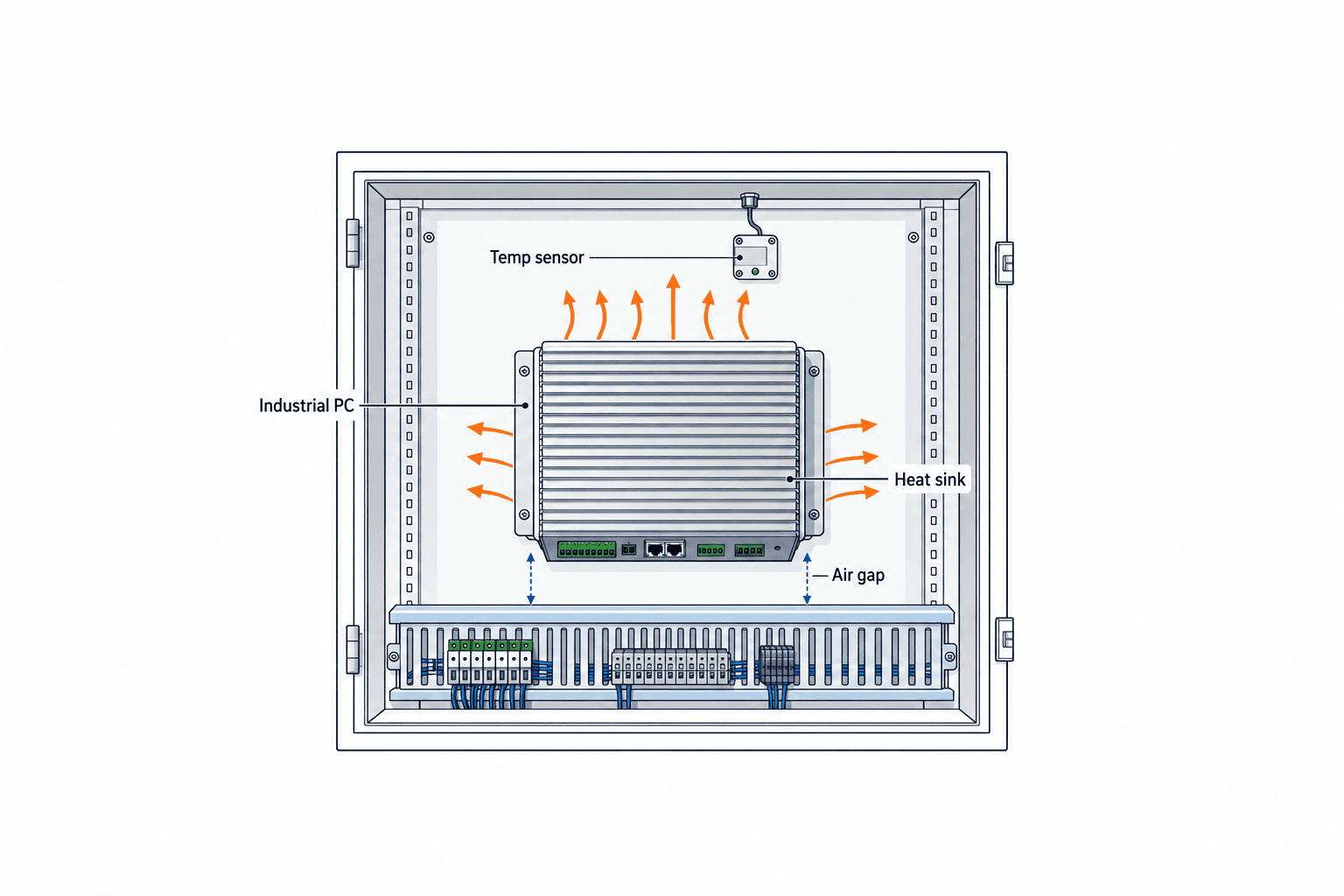
Ask suppliers to confirm at least five things for the offered bill of materials: permitted ambient temperature with the selected CPU, RAM, and SSD; permitted orientation; clearance and fin direction; temperature rating of the power supply; and conditions under which performance is limited. A marketing range such as “−20 to 60°C” need not apply to every option. An SSD or extension card may set a lower limit. Compare the complete configuration, not a bare chassis.
Dust, oil, and washdown: which surface carries the IP rating?
Even without a fan, contaminants may enter through connectors, service covers, cable glands, or the joint between a panel PC and its cabinet. IEC 60529 defines enclosure ingress protection, but “IP65” alone does not tell you whether the claim applies to the front face, the full unit, or only with specified connectors fitted. Siemens describes some panel PC models as having an IP65 front. Do not read front IP65 as whole-device IP65.
Where cutting oil, coolant, or food-plant cleaning chemicals can contact the PC, check the enclosure material, seal material, connector protection, and chemical compatibility as well as the IP code. Dust on heat-sink fins reduces heat transfer, so cleaning method and frequency belong in the design. An IP-rated enclosure tested with caps fitted may not retain that protection if unused ports are left open on site. Mounting the PC inside a cleaner cabinet may be sensible, provided cabinet temperature and access are checked at the same time.
For washdown, describe the direction of spray, nozzle distance, pressure, detergent, and whether power remains on during cleaning. A request for a “waterproof PC” without these conditions makes bids difficult to compare. Corrosive atmosphere, condensation, vibration, and impact are separate requirements. Do not assume an IP code certifies these properties; request the specific test conditions and supplier response.
Size the CPU and memory from the application workload
Do not choose only by CPU generation or core count. For an HMI, test screen switching, trends, and multiple displays together. For a gateway, receive data from PLCs and sensors at the actual cycle rate and see whether queues accumulate. For vision, combine continuous rejects, image storage, inference, and result transmission to reproduce the peak. If the result misses the process deadline, a CPU reading below 100% does not make the solution acceptable.
Measure memory after long operation and log accumulation, not just after startup. If modest future features are expected, describe them explicitly in the bid. “Future-proof” has no testable meaning by itself. For GPUs and AI accelerators, verify inference library version, drivers, power draw, heat, and model compatibility together. The Siemens SIMATIC IPC BX-35A manual illustrates how a Jetson Orin NX machine offers specific LAN, PoE, CAN, DI/DQ, and other interfaces. Assess the set of interfaces and software for your job; an “AI-ready” label is insufficient.
Define pass criteria as time for normal and worst-case transactions, tolerable missing data, and observed CPU, RAM, and SSD figures. The numerical limits must come from the line takt and inspection deadline. There is no useful universal threshold. The buyer should provide sample data, camera settings, and communication point counts so suppliers test under comparable conditions.
I/O and wiring: count real connections, not just ports
Before deciding that two LAN sockets are enough, define the reason for each network. Machine-side and factory-IT segmentation, dedicated camera bandwidth, and redundancy lead to different designs. Ports may still fall short because of chipset, speed, driver, OS setting, or administrative constraints. For PoE cameras, check the power budget while all intended ports are active.
For USB, check specification, power, retention, and fixing under vibration. For serial links, match RS-232, RS-422, or RS-485, isolation, termination, and cable distance. For digital I/O, check voltage, current, source/sink logic, isolation, and the state on failure. Displays need a test with the required resolution, number of screens, long cables, and touch panel. Unused ports are not automatically free value; they add protection and spare-cable considerations.

An I/O schedule should list required port, device model, electrical or protocol standard, simultaneous count, cable length, mounting position, and acceptance method. Inspect old equipment physically: it may depend on serial devices, proprietary cards, or a particular driver. Where an adapter is proposed, test continuous operation including power loss and restoration. If the adapter falls outside the agreed scope, maintenance responsibility becomes unclear.
Power loss and recovery: define the machine state after reboot
For outages and dips, design the recovery sequence before buying a UPS. Verify input voltage, acceptable variation, 24 V DC quality, inrush, and the power supply’s own temperature rating. Then test whether the PC starts automatically, the OS boots normally, the application restarts, and the sequence aligns with the PLC, cameras, and network equipment.
Data preservation during short loss is a separate requirement. If open files must close safely, specify the UPS signal, shutdown procedure, hold-up period, and battery replacement plan. If only brief dips need to be bridged, compare the power supply’s hold-up characteristics or a DC UPS. Beckhoff lists UPS-related options for some 24 V PCs, illustrating that power protection should be evaluated alongside the PC. That does not mean any one option covers every outage profile.
FAT should go beyond unplugging and reconnecting an idle PC. Simulate loss while communication, image saving, and logging are active. Check data consistency, visible gaps, and duplicate transmission after recovery. The PLC and machine designers must define safety and motor-restart conditions so a PC’s automatic boot cannot cause an unexpected line restart. Record when an operator must authorize a restart.
Plan OS and SSD life alongside hardware life
The hardware supply period and operating system support period differ. Microsoft says each Windows IoT Enterprise LTSC release receives 10 years of servicing, while moving to a newer LTSC release requires a new license. CPU, driver, and peripheral compatibility with a newer OS require separate checks. “Ten-year support” does not mean a device can run untouched for ten years.
For Linux, manage the distribution release, kernel, GPU and communications drivers, and application dependencies by version. Network segregation is not a substitute for a security update policy. Acceptance documentation should cover restoration of the OS image, licenses, configuration, and certificates after reinstallation.
For SSDs, check rated writes, operating temperature, power-loss protection, and replaceability as well as capacity. In image or logging applications, estimate or measure daily writes and calculate retention separately. If the chosen SSD becomes unavailable, an approved substitute should be tested for image deployment and boot. A durable SSD and a system backup solve different problems.
Write an RFP with comparable conditions, not merely a preferred model
Fixing one model in an RFP can prevent suppliers from offering a maintainable substitute. Writing only “equivalent accepted” allows a lower-spec device into the comparison. Divide requirements into mandatory limits, scored merits, and permitted alternatives. If a model is nominated, state why and which tests must be repeated after substitution.
| RFP field | State explicitly | Evidence requested |
|---|---|---|
| Role and failure effect | HMI, collection, inspection; fallback | System diagram and responsibility boundary |
| Environment | Temperature at PC, dust, oil, washdown, vibration | Model-specific datasheet and mounting conditions |
| Compute load | Samples, peak process, time limit | Test logs and exact configuration |
| I/O | Device models, simultaneous use, cable runs | Port map and compatibility response |
| Power and recovery | Input, dips, outages, boot sequence | Wiring diagram and recovery test |
| OS and maintenance | OS release, updates, spares, supply | Lifecycle answer and restore procedure |
Compare total supplied scope: PC, power supply, brackets, SSD, OS license, spare unit, UPS, connector protection, application installation, FAT, site SAT, and replacement service. A low purchase price can be costly if the plant cannot restore the same working configuration during a failure. Prices become comparable only after each supplier receives the same test and service boundary. A generic payback claim cannot be made without the line’s downtime cost and maintenance arrangement.
Separate pass/fail gates from scored advantages
An existing camera’s required port, maximum local temperature, and required behavior after power restoration may be hard gates. A candidate that fails one is unsuitable even if its price is attractive. Spare-part lead time, scope of OS images, replacement service, and I/O expansion can be scored among passing candidates. If price is scored before technical eligibility, a cheap noncompliant bid can distort the decision.
Tie a supplier’s “supported” response to a model-specific document or test. A thermal answer must identify the chosen CPU, SSD, expansion card, orientation, and whether the cited temperature is inside or outside the cabinet. A substitute should have a difference sheet covering I/O, BIOS, OS, drivers, power connector, mounting holes, and image restoration to a spare. Without it, an apparently working installation may expose compatibility failures only when a unit is replaced.
What to log on a sample unit
Record model, serial number, firmware/BIOS, OS build, application version, and CPU/RAM/SSD configuration. On a shared timeline, log ambient, CPU and SSD temperatures, processing time, network errors, storage writes, and restart events. The goal is to see whether processing slows as temperatures rise. Application errors alone often cannot distinguish heat, power, and network causes.
These logs identify a configuration suitable for the installation; they are not a claim that one manufacturer is universally better. If the real cycle cannot be reproduced in the factory test, document that limitation and extend monitoring after SAT. Reporting both measured and unmeasured conditions prevents an unwarranted guarantee when the next line is equipped.
FAT and SAT: turn catalogue claims into acceptance evidence
FAT should reproduce workload and failure conditions before shipment. SAT should repeat key checks in the actual cabinet, wiring, ambient, and network. Merely confirming power-on and a visible screen leaves the critical thermal, outage, and long-run risks open. Each test sheet needs prerequisites, method, observations, acceptance limits, evidence, and unresolved items.
A practical FAT sequence is to record exact hardware and BIOS/OS builds; run normal and peak workloads; log clock speed, temperatures, and application times; exercise all required I/O simultaneously; remove power during communication and writes; and restore the system image to a spare. Set duration from the process cycle and expected thermal equilibrium, rather than calling a short arbitrary run sufficient.
SAT checks mounting orientation and clearance, cabinet temperature, actual cables, site power and grounding, and communication with PLCs, cameras, and upper systems. A daytime trial may not cover the hottest shift or air-conditioning shutdown. If so, set a monitoring period and distinguish provisional from final acceptance. Plan power-cut testing around machine safety and production, with the required witnesses agreed in advance.
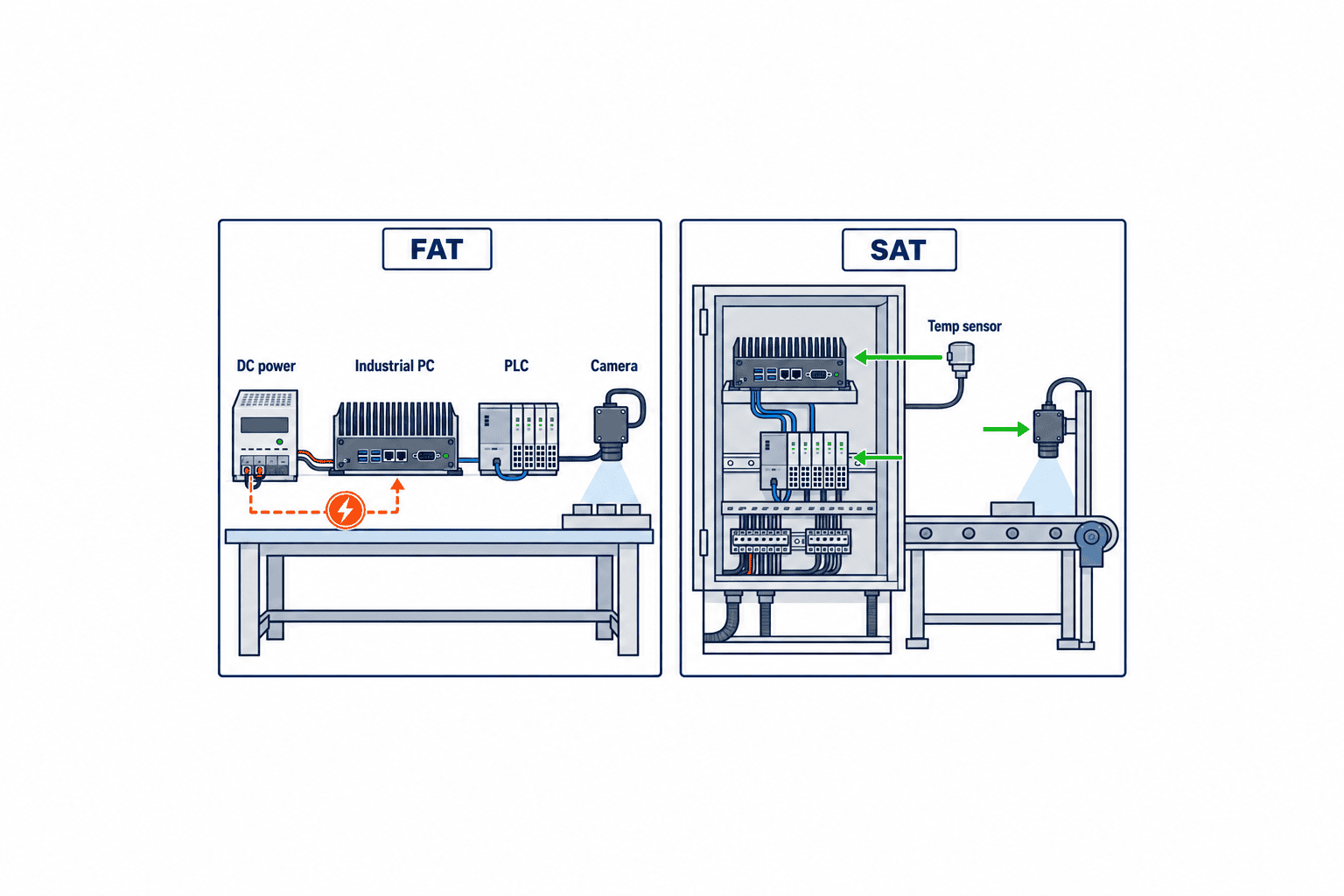
Define retest triggers after a failure. A CPU or SSD change, altered mounting direction, modified enclosure, or firmware update can change thermal behavior and compatibility. Specify which tests recur. The handover pack should include installation photos, wiring schedule, OS image, licenses, administrator access, BIOS settings, and spare-part numbers. A verbal statement that a replacement is “equivalent” is not acceptance evidence.
A rollout sequence for factories in Thailand
First document the proposed site with photos, dimensions, temperatures, contamination source, power, and connected devices. Second, obtain the real application and data so workload and stop impact are clear. Third, send the same RFP schedule to candidate suppliers and collect evidence for each exact model. Fourth, take the configuration that passed FAT to the site for SAT.
For multiple lines, feed lessons on temperature, wiring, reboot, and operation from the first unit into the revised specification. If local maintenance staff cannot restore a PC from Japanese-only documents, provide a port diagram and restoration and spare-switch procedures in English or Thai. A spare on a shelf is not ready until the correct BIOS, OS, drivers, application, certificates, and license boot and connect to the equipment. Assign responsibility for periodic boot checks and image updates.
When installation conditions vary between lines, forcing a single model onto every line may leave no margin at the hardest location. Too many models, however, complicate spares. Group lines by comparable environment and workload, then define a standard configuration per group. The essential management items are fixed configurations, availability, recoverability, and repeatable test evidence.
Ten answers to check when quotations arrive
Even after a detailed specification, a supplier’s short reply of “supported” or “standard” is not comparable evidence. First, confirm that the proposed model and bill of materials match: prices for different CPUs, SSDs, or operating systems should not be lined up as if they were the same configuration. Put the same configuration number on the quotation and datasheet. Second, ask for the thermal rating of that complete configuration. Third, verify mounting direction and required heat-sink clearance in a drawing. Fourth, identify exactly which surfaces and connector states carry the IP rating. Fifth, request a material compatibility answer for oil and cleaning agents.
Sixth, map each PLC, camera, and serial device to a real port. Seventh, verify power capacity and the PoE budget under simultaneous use. Eighth, get the shutdown and automatic restart behavior after power returns in writing. Ninth, record versions and update responsibility for OS, drivers, and applications. Tenth, confirm the supply period for the same configuration, substitution approval process, and replacement service. These are not questions reserved for an expensive system. On an inexpensive PC, unanswered procurement questions can still become difficult failures during a repair.
Do not score a blank answer as compliant. Mark it “unverified” and request a document or practical test. If one supplier gives detailed evidence and another gives only a verbal assurance, the comparison basis is not yet aligned. The same response form and deadline for all suppliers makes the purchasing decision fairer and more defensible.
Failure clues and evidence worth retaining
A thermal fault does not always cause an immediate shutdown. Image inspection may slow only in the afternoon, communications may fail after air conditioning stops, or opening the cabinet door may temporarily improve behavior. Do not label this an application bug from software logs alone. Align local ambient temperature, CPU temperature and clock, SSD temperature, and cabinet-door events on the same timeline. A hot-to-touch chassis is not a reliable pass/fail measure: a fanless housing is supposed to transfer heat outward, and its surface temperature alone does not reveal internal margin.
For power-related incidents, determine whether only the PC rebooted or the PLC and switches also lost power. Combine the OS event log, UPS history, DC power alarm, and network-switch link history. For communications, check cable, connector, switch, partner device, IP settings, and duplicate addresses before assuming the PC LAN controller has failed. A symptom disappearing after a PC swap may result from touching or replacing the cable; it is not automatically proof of a defective PC.
SSD problems may appear as delayed writes, sudden read-only mode, a failed OS boot, or gaps in logs. Where storage-health data are available, record remaining life and errors periodically. No one metric guarantees a failure prediction. Pair monitoring with a tested backup restoration, versioned images, and a boot test of replacement SSDs. The operational goal is recovery after a fault. Set log-retention duration for investigation separately from the capacity used by the running application.
Include operating ownership and change control in handover
Problems after delivery often stem from uncertainty about who changed a setting. Maintenance may own mounting and power, IT may own network and security, production engineering may own the application, and the supplier may own hardware warranty, but these boundaries overlap on a real plant floor. Record who backs up the system, who tests OS updates, who restores the spare, and who makes a decision during a night-shift stop. Clear first-response ownership reduces downtime.
The configuration record must be broader than a model number. Keep BIOS settings, OS build, drivers, application version, destination IP addresses, camera settings, PLC communication settings, and SSD image together. Before a change, make a backup. Record the reason, person, date, rollback method, and which tests were repeated. Rather than defer security updates indefinitely, test them on an equivalent test unit or representative line and deploy during an agreed stop window.
A spare that was booted once at purchase is not meaningful insurance. If production applications or certificates change, the shelf spare may no longer work. Specify the cadence for image updates and test connections, then have local staff demonstrate a switch using the written procedure. If license transfer or supplier activation is needed, establish how it works while the line is healthy. These operating conditions often reveal differences that are invisible on the initial price sheet.
Put the pre-purchase site survey on one sheet
Before requesting a quote, assemble a one-sheet site survey. Photograph not only the proposed PC position but the whole cabinet, neighboring heat sources, cable ducts, door clearance, and the direction in which oil or wash water can splash. Photos alone do not establish dimensions or temperature. Record cabinet inner dimensions, clearance from the mounting surface to obstructions, and the time and operating state for each temperature measured near the PC. Keep the thermometer location and measurement period so another season or line can be compared on the same basis.
Next, count connected devices in the existing machine. Record PLC and camera models, protocols, cable lengths, switch ports, display resolution, and power ratings. If the new PC must inherit an old configuration, identify OS and application versions, license type, drivers, BIOS settings, and existing backups. If poor performance of the current PC triggered replacement, write down when and under what conditions it occurs. If cabinet heat or power is the cause, a new PC alone may reproduce the same failure.
Mark each field as “measured,” “awaiting manufacturer confirmation,” or “not yet checked on site.” Filling blanks with guesses can lead suppliers to propose on a false basis. Holiday air-conditioning shutdown, washdown splash, and peak camera count may not be visible on an ordinary daytime visit. For each unknown, decide whether FAT will simulate it or monitoring after SAT will resolve it. This keeps uncertainty visible and identifies exactly what must be checked before final acceptance.
FAQ: fanless industrial PC selection
Does fanless mean no cooling measures are needed in a cabinet?
No. The enclosure must still transfer heat to its surroundings. Compare cabinet temperature, orientation, heat-sink clearance, and neighboring equipment with the model’s installation requirements. Verify sustained performance under the real load.
Does IP65 guarantee resistance to cutting oil or washdown chemicals?
Check which surface is rated and under what test conditions. Some panel PCs have an IP65 front only. The IP code alone does not establish chemical compatibility. Request answers covering connectors, cables, unused ports, and cleaning conditions.
Can an office PC be used instead?
Possibly, if testing shows it meets the particular requirements for temperature, contamination, vibration, power recovery, I/O, supply, and OS maintenance. Buying solely on unit price without that evidence can make replacement and restoration difficult.
Does Windows IoT Enterprise LTSC remove updates for ten years?
No. Microsoft supports each release for ten years, but security servicing and operations remain necessary. A move to the next LTSC release requires a new license and separate hardware and driver compatibility checks.
Are RFP and FAT/SAT worthwhile for a small machine?
The paperwork can be scaled to the impact of failure. Still, keep pass/fail records for local temperature, required I/O, representative load, power recovery, and restoration to a spare. A low-cost PC can still stop a valuable line.
Summary
A fanless industrial PC cannot be selected by enclosure style alone. Define role and stop impact, then compare actual installation temperature and contaminants, peak workload, I/O, power recovery, and OS and SSD lifecycle on the same schedule. Read manufacturer data for the exact model and configuration. Reproduce load and failure at FAT, confirm site conditions at SAT, and preserve the approved build and restore procedure for rollout and maintenance.
If you are narrowing hardware candidates for existing equipment in a Thai factory or preparing an RFP and FAT/SAT checklist, contact TOMAS TECH. Site photos, a device list, and application workload details help make the discussion concrete even at an early stage.
Sources
- Beckhoff C6515-0080 specifications: model-specific mounting, thermal, and protection example.
- Siemens SIMATIC IPC BX-35A operating instructions: example of industrial edge-PC I/O and intended applications.
- Siemens Embedded Panel PC specifications: model example for enclosure, temperature, and IP protection.
- IEC 60529: standard for ingress protection of enclosures.
- Microsoft: What is Windows IoT Enterprise?: LTSC support and upgrade licensing.
- Microsoft Windows IoT Enterprise FAQ: maintenance, upgrades, and licensing detail.
*Product specifications and licensing can change. Confirm the latest documents and supplier response for the exact model, configuration, and country before ordering.*


