


Selecting SPDs for Control Panels: A Practical Guide for Thai Factories
Surge Protective Device (SPD) selection for control panels is a critical process to ensure equipment protection and stable operation in Thai industrial sites. This guide provides detailed, step-by-step procedures and key points for selecting, installing, and operating SPDs for AC power supplies and PLC I/O signal lines in control panels, tailored for on-site engineers and procurement professionals.
1. Clarifying the Scope: Transient Overvoltages vs. Other Risks
What is an SPD (Surge Protective Device)?
An SPD (Surge Protective Device) is a device designed to protect equipment from “transient overvoltages” such as lightning surges and switching surges. Under normal operation, SPDs conduct minimal current, but when a transient overvoltage occurs, they switch to a protective mode, forming a current path to limit voltage. The protection path differs between line-to-line and line-to-earth protection, requiring system design that includes grounding and equipotential bonding.
Differences from Other Protective Devices
| Protection Target | Main Risk | Applicable Device | Examples/Notes |
|---|---|---|---|
| Transient Overvoltage | Lightning, Switching | SPD | Main topic of this guide |
| Sustained Overcurrent | Short-circuit, Overload | MCCB, MCB | See MCCB Selection for Control Panels |
| Sustained Overvoltage | Power system anomaly | Overvoltage relay etc. | Not handled by SPD |
| Power Interruption/Sags | Outage, Voltage dips | UPS, DC Power Supply | See 24 V DC Power Supply Selection |
| Panel Overheating | Thermal runaway, Fire | Temp sensor, Vent | Not handled by SPD |
Protection Zones (LPZ) and Surge Entry Paths
- PE (Protective Earth): The discharge path for SPD operation. Must be reliably connected to the panel’s metal frame or earth bar.
- Protection Zones (LPZ): A concept in lightning protection design. As you move from outside (LPZ0) to inside (LPZ1, 2, etc.), surge energy is attenuated.
- Surge Entry Paths (4 main types):
1. AC Power Supply (main/branch)
2. 24 V DC Power Supply (control)
3. Analog/Digital I/O signals (4–20 mA, contacts, etc.)
4. Ethernet/Fieldbus (communications)
Common Mode / Differential Mode
- Common Mode: Surge between line and earth (e.g., L-PE, N-PE).
- Differential Mode: Surge between lines (e.g., L-N, +24V-0V).
- The required protection mode depends on the power system and equipment connection. Not all SPDs support both modes, and SPDs alone cannot eliminate all risks.
2. Field Survey, Single-Line Diagrams, and Route Mapping
Example: Packaging Plant Control Panel in Thailand
(Conceptual example: not actual measured values)
- Receiving Point: High-voltage main switchboard → Low-voltage distribution panel
- Main Circuit Breaker (MCCB): At control panel entry
- AC SPD: Downstream of MCCB, at panel entry
- Power Supply: AC to DC 24V power supply unit
- PLC: Operates on DC 24V
- Outdoor Sensors: Connected to the control panel via long cables
- Ethernet: For inter-panel communication
Required Surveys and Documentation
- Single-Line Diagram (SLD): Clearly shows all power and signal routes
- Panel Layout Drawing: Confirms SPD installation space
- Earth System Diagram: PE, earth resistance values, earth bar configuration
- Load List: Model numbers and withstand voltages for PLCs, sensors, communication devices
- Cable Route Diagram: Indoor/outdoor, lengths, shield presence
- Site Photos: Panel exterior/interior, earth connections
- Existing SPD Presence/Model: For upgrades or new installations
- Unknowns: Existence of Lightning Protection System (LPS), local regulations, surge incident history, etc.
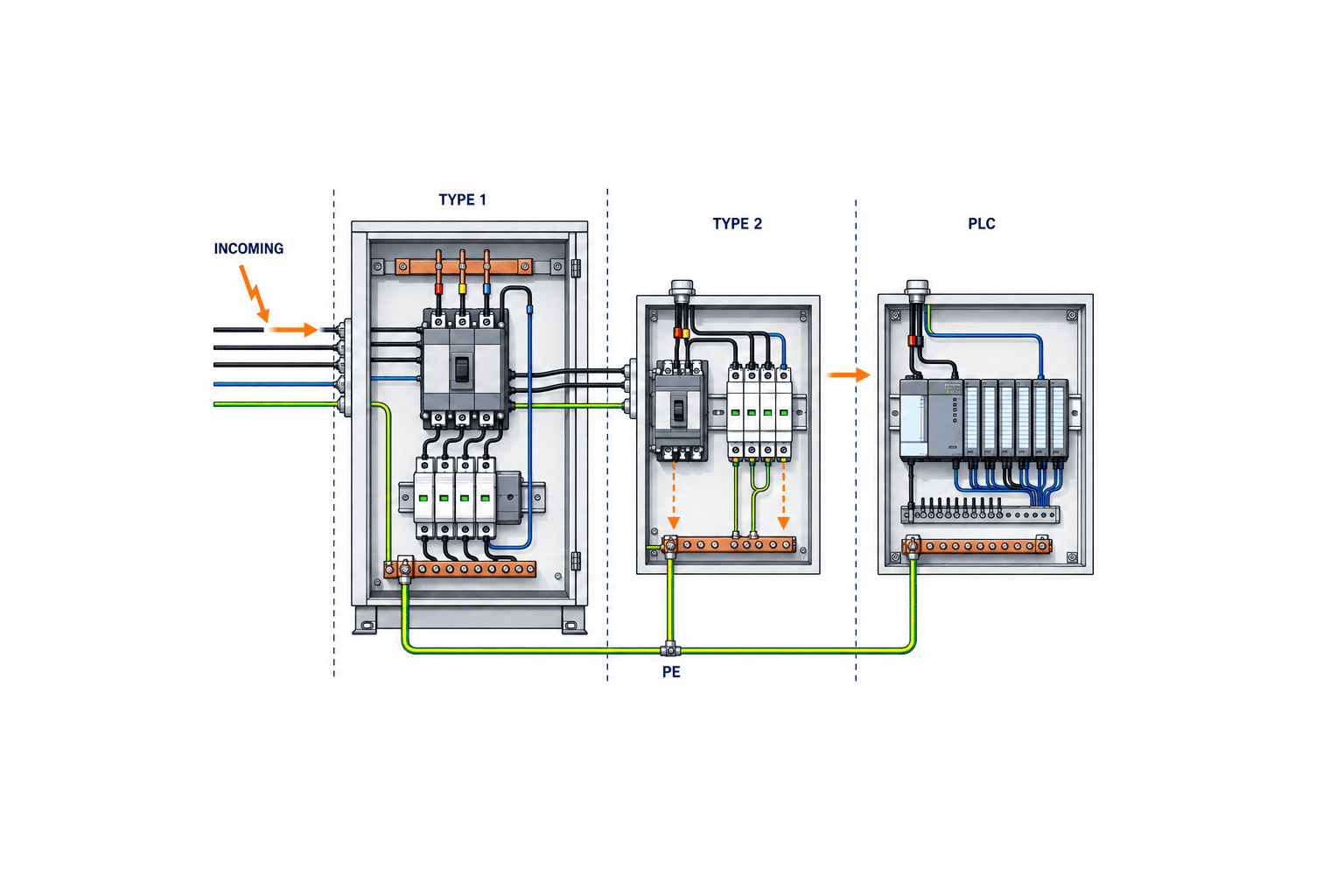
3. Differences Between IEC Type 1/2/3 and Selection Flow
SPD Classification per IEC 61643-11:2025
| Type | Main Application/Location | Main Characteristics/Role |
|---|---|---|
| Type 1 | Interface with external LPS, locations designed for lightning current diversion | Evaluated by specified impulse current test. Does not mean universal protection against direct lightning strikes. |
| Type 2 | Distribution/control panels, locations requiring coordination with upstream protection | Evaluated by specified discharge current test. Type is not determined by location alone. |
| Type 3 | Near equipment, coordinated with upstream SPD | Additional close-range protection. Standalone use depends on product and design conditions. |
Selection Decision Tree
| Installation Location/Use | External LPS | Surge Risk | Recommended SPD Type | Notes |
|---|---|---|---|---|
| Building Entrance | Yes | To be evaluated | Consider Type 1 | Designer to confirm LPS, entry paths, equipotential bonding |
| Distribution/Control Panel | Depends | To be evaluated | Consider Type 2 etc. | Confirm coordination with upstream SPD and system conditions |
| Near Equipment | Depends | To be evaluated | Consider Type 3 etc. | Confirm upstream protection and equipment withstand voltage |
| Type1+2 Combined | – | – | Type1+2 | Product-dependent |
- Do not select by type alone; installation location, risk, and coordination design are critical.
- Combined Type1+2 SPDs exist; always follow design and manufacturer instructions.
4. SPD Selection Datasheet: Required Parameters and Evidence
| Parameter | Input Evidence/Design Basis | Approval/Test Method |
|---|---|---|
| Power System (TN/TT/IT) | SLD, designer confirmation | Design review |
| Rated Voltage Uc | Power spec, panel voltage measurement | Manufacturer datasheet |
| Mode/Poles | Wiring diagram, load list | Terminal configuration check |
| Voltage Protection Level Up | SPD datasheet, protected device withstand voltage Uw | Design review |
| Discharge Current Iimp/In/Imax | Lightning risk assessment, manufacturer specs | Datasheet, test report |
| Short-Circuit Capacity (SCCR) | Panel short-circuit current calculation, design value | Manufacturer coordination evidence |
| Backup OCPD | MCCB/MCB specs, manufacturer coordination | Datasheet, design drawing |
| TOV Withstand | Max voltage during power anomaly | Manufacturer datasheet |
| Remote Status Contact | Control requirements, PLC input specs | Circuit diagram, functional test |
| Replaceable Module | Maintenance requirements, manufacturer specs | Datasheet, physical check |
| Environmental Conditions | Panel location, temperature/humidity, IP rating | Datasheet, site check |
| Panel Space | Layout drawing, actual measurement | Panel design review |
| Wiring Length/Route | Wiring diagram, site survey | Construction drawing, site check |
| Earth Connection | Earth system diagram, resistance measurement | Construction drawing, site check |
- Up (Voltage Protection Level) is specified at the SPD terminals; actual protection at the device terminals will be affected by voltage drop over wiring length. Allow sufficient margin.
- SCCR and Backup OCPD must be verified with manufacturer coordination documents and must match the site’s short-circuit current.
- Design and selection must always follow qualified electrical designer, manufacturer instructions, and local regulations.
5. Selection of SPDs for Signal and Data Lines
Scope of IEC 61643-21:2025
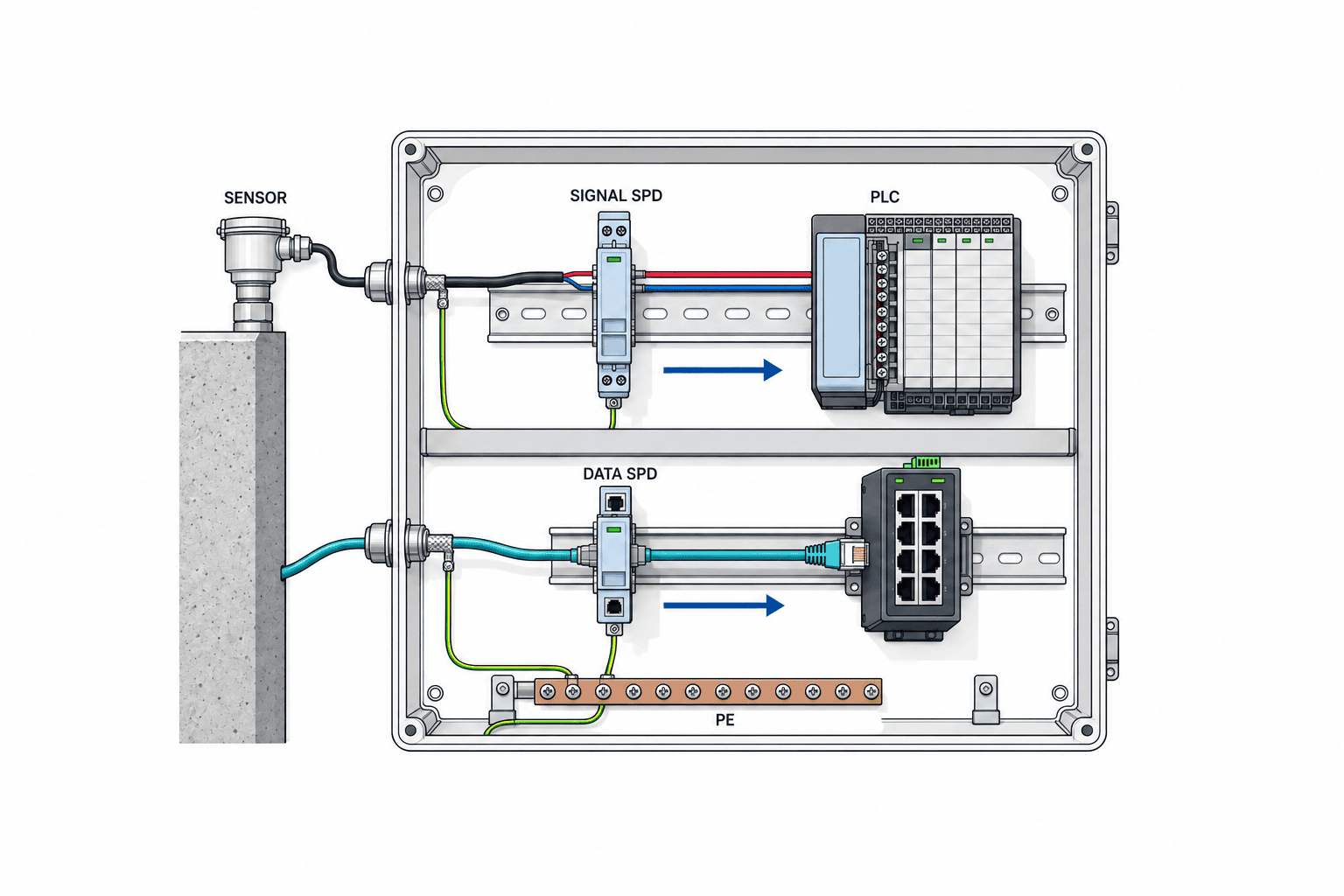
- A separate standard from AC power SPDs. Specifies requirements and test methods for SPDs connected to communication and signal lines. For 4–20 mA and communication lines, confirm compatibility with each interface.
- Do not use AC power SPDs for 24 V DC circuits based on model alone; select products suitable for the continuous voltage and fault conditions of DC circuits.
Selection Points by Signal Type
| Signal Type | Main Specs/Selection Points | Notes |
|---|---|---|
| 4–20 mA | Operating voltage, signal level, loop impedance | Support for both terminal-to-terminal and terminal-to-PE |
| Digital I/O | Signal voltage, response speed, insulation requirements | Confirm PLC specs |
| Ethernet/PoE | Category (Cat5e, etc.), data rate, PoE support | Shielding and earth design critical |
| Outdoor Lines | Need for SPD at both ends, shield grounding, lightning risk assessment | Design decision required |
| Intrinsically Safe Circuits | SPD not applicable or requires special type | Misapplication strictly prohibited |
Wiring and Grounding Examples
- Select signal SPD protection mode to match signal reference point, insulation, and shield design.
- For shielded cables, choose single-end or both-end grounding as per design.
- For long outdoor cables, installing SPD at the panel entry is often recommended.
6. Key Points in Layout, Grounding, and Wiring Design
- Keep SPD connection conductors as short and straight as possible within manufacturer guidelines.
Longer conductors add voltage drop due to surge current, reducing effective protection at the device terminals. V-shaped wiring may be an option if permitted by product/circuit. Always check manufacturer instructions and local regulations.
- Separate PE (earth) and line wiring.
Clearly separate clean side (control/signal) and dirty side (power/earth) within the panel.
- Ensure continuity of the panel’s metal backplate and earth bar.
Avoid breaks due to paint or insulation.
- Do not confuse signal 0V and PE.
Signal reference (0V) and protective earth (PE) are different; follow design intent.
- Ensure accessibility and labeling for maintenance and inspection.
- Up (Voltage Protection Level) is specified at the SPD terminal. Consider voltage drop due to wiring length and compare with the protected device’s withstand voltage (Uw).
7. Preparing the RFP (Request for Proposal): Essential Items and Comparison Table
Essential Questions and Evidence List (Example)
- Proposed SPD model and manufacturer
- Latest datasheet (specifying applicable IEC 61643-11 or -21 edition and test scope)
- Test report (specifying relevant standard and edition)
- Compatibility with design network (TN/TT/IT)
- Rated voltage Uc, voltage protection level Up, number of poles
- Discharge current Iimp/In/Imax
- Short-circuit capacity (SCCR) and backup OCPD coordination evidence
- TOV withstand
- Presence/specs of remote status contact
- Presence of replaceable module
- Environmental conditions (temperature, humidity, IP rating)
- Panel installation space and layout proposal
- Earth connection and lead wiring proposal
- Maintenance parts, local stock, warranty period
- Installation/connection manual
- FAT/SAT test protocol proposal
- Panel SLD and installation location proposal
- Compatibility/upgradeability with existing panels
Comparison Table (Example: No Prices Listed)
| Item | Supplier A | Supplier B | Supplier C |
|---|---|---|---|
| Model/Standard Compliance | |||
| Latest Datasheet | |||
| Test Report | |||
| SCCR/Backup Coordination | |||
| Remote Contact | |||
| Replaceable Module | |||
| Maintenance Parts/Warranty | |||
| Installation Space | |||
| Wiring/Earth Proposal | |||
| FAT/SAT Protocol | |||
| Lifecycle Cost |
- In addition to price, comprehensively evaluate design, maintenance, and local support capabilities.
- Manufacturer coordination documents, local regulations, and designer approval are mandatory.
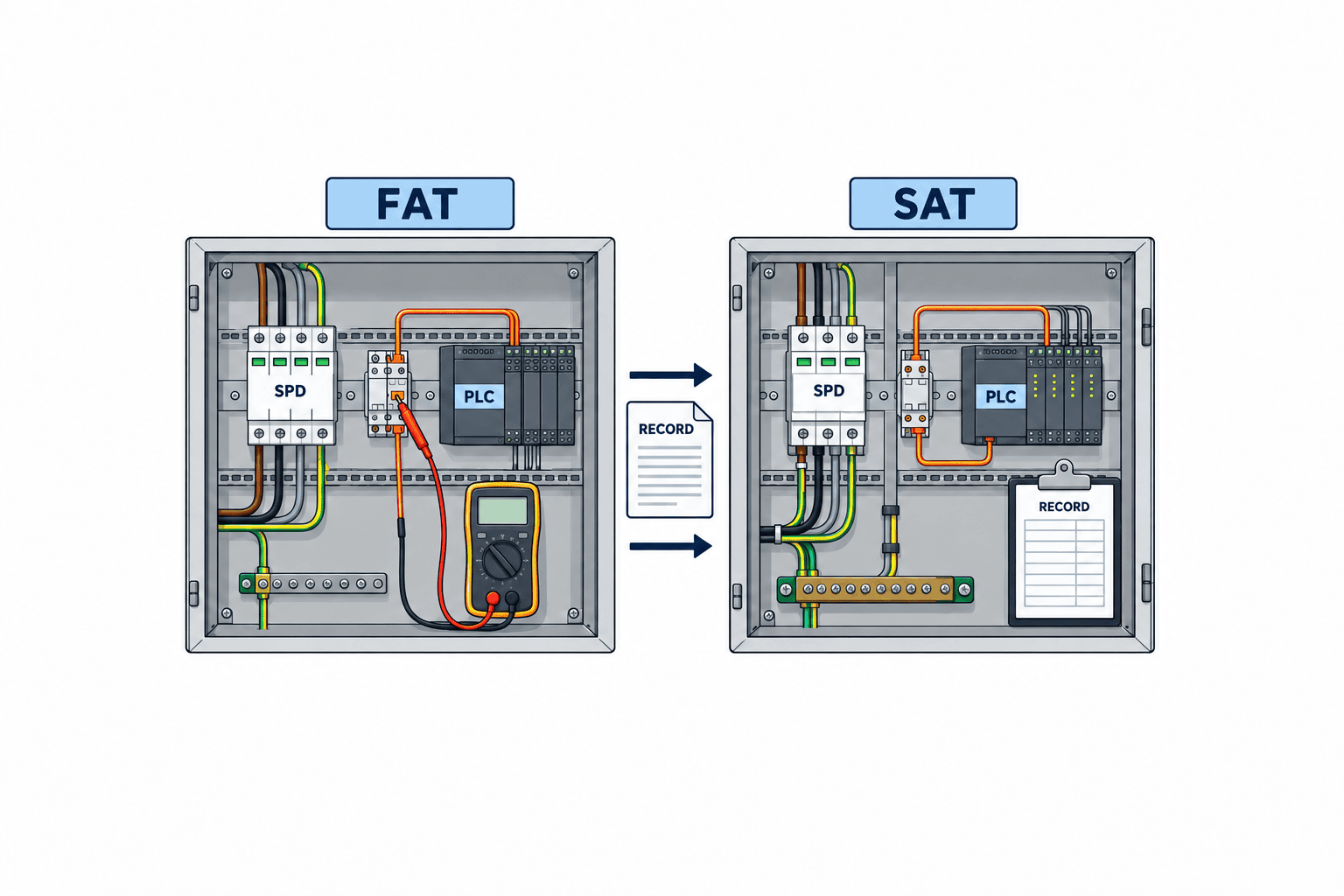
8. FAT/SAT (Factory/Site Acceptance Testing)
FAT (Factory Acceptance Test)
- Check wiring, circuits, and labeling on mock-up or actual panel
- Verify torque management and terminal tightening (per manufacturer specs)
- Simulate operation of remote status contacts and indicator lights
- Confirm continuity and insulation of signal/DC loops
- Check procedures for removing/replacing modules
- Prepare test records, photos, and evidence packs
SAT (Site Acceptance Test)
- Confirm installation, wiring, and earth connection on site panel
- Check consistency with labels and circuit diagrams
- Verify linkage to PLC alarm history
- Confirm local replacement procedure for modules
- Handover maintenance and distribute manuals
- Do not perform artificial lightning pulses or destructive surge injection.
- Follow manufacturer/designer acceptance criteria; do not set independent standards.
Test Record/Evidence Pack Example
| Item | Pass/Fail | Evidence (Photo/Record) | Comments |
|---|---|---|---|
| Model/Installation Check | Pass | Photo No.1 | |
| Wiring/Earth Check | Pass | Photo No.2 | |
| Torque Management | Pass | Torque wrench record | |
| Label/Diagram Consistency | Pass | Drawing, Photo No.3 | |
| Remote Contact Operation | Pass | PLC log No.4 | |
| Replaceable Module Test | Pass | Photo No.5 | |
| Maintenance Handover | Pass | Signed record |
9. Operation, Diagnostics, and Maintenance Points
- Status indication and remote alarm: Regularly monitor SPD status (normal/replacement required). Record in PLC alarm history.
- Inspection after surge events: Follow manufacturer instructions for inspection and replacement after abnormal events.
- When abnormal indication occurs, follow manufacturer’s judgment procedure: Replace modules as specified; do not treat as normal by simply resetting.
- Failure history and log management: For repeated alarms or failures, record and analyze root causes (lightning, wiring, design).
- Spare parts management and periodic inspection: Inspect and replace at manufacturer-recommended intervals. Maintain local stock.
- Operation Decision Table
| Status | Action |
|---|---|
| SPD Normal | Regular inspection and record-keeping |
| SPD Replacement Needed | Replace promptly, record history |
| Repeated Alarms | Re-evaluate wiring, design, lightning risk |
| Unknown Record/History | Inspect all panels, wiring, and SPDs |
10. 30/60/90-Day Rollout Example, Procurement Failure Cases, and FAQ
Rollout Example
- 30 Days: Site survey, SLD, load list, finalize SPD specs, issue RFP
- 60 Days: Select manufacturer, conduct FAT, prepare for site installation, training
- 90 Days: Conduct SAT, start operation, establish history management and periodic inspection system
Common Procurement Failures (5 Examples)
- Standard/Edition Mismatch: Incorrect adoption due to failure to confirm applicable standard, test edition, or certification scope
- Insufficient SCCR/OCPD Coordination: Selecting SPDs that cannot withstand site short-circuit current
- Excessive Lead Length: Wiring too long, insufficient protection at protected device
- No Signal SPD Installed: Omission of surge protection for outdoor sensors or communication lines
- Inadequate Maintenance/Replacement System: No spare modules or local stock secured
FAQ (Related Search Intents)
- How to select a surge protective device for control panels?
→ Evaluate protection target (power/signal), standard (IEC 61643-11/21), installation location, short-circuit capacity, voltage protection level, and manufacturer coordination documents.
- What is the difference between SPD Type 1 and Type 2?
→ Type 1 is for high-energy lightning surges (e.g., building entrance); Type 2 is for distribution/control panels. Select based on installation location and risk, and ensure coordination design.
- Key points for surge protection of factory PLCs?
→ In addition to AC power SPDs, assess risks for PLC I/O and communication lines, and design signal SPDs suitable for required circuits. Pay special attention to outdoor sensors and long cables.
- What should be checked in an SPD RFP?
→ Clearly state model, standard compliance, short-circuit capacity, backup OCPD coordination, remote contact, replaceable module, installation space, and maintenance system.
- Is surge testing required in FAT/SAT?
→ Artificial surge injection is not performed in standard FAT/SAT. Focus on wiring, status indication, replacement procedures, and record management.
Final Decision Checklist
- [ ] Obtain SLD, earth system diagram, and load list
- [ ] Discuss SPD installation location and type (1/2/3) with designer
- [ ] Confirm manufacturer coordination documents and local regulations
- [ ] Specify all requirements in RFP and request supporting evidence
- [ ] Confirm installation, wiring, status indication, and replacement procedures in FAT/SAT
- [ ] Establish operation, inspection, and history management system
Comparison: Existing AC-Side SPD Only vs. Enhanced Signal/Communication Protection (Thailand Factory Case Study)
Using a hypothetical packaging plant in suburban Thailand, we compare a control panel with only an AC-side SPD (Type 2, IEC 61643-11 compliant) to a configuration where protection is extended to outdoor sensors (4–20 mA) and Ethernet communication lines.
Existing Configuration: AC SPD Only
- Type 2 SPD installed downstream of MCCB at panel entry. Provides some bypass for AC overvoltage in the main circuit.
- Outdoor temperature sensor (4–20 mA) connected directly to panel PLC analog input via ~30 m shielded cable.
- Inter-panel Ethernet (Cat5e, shielded) routed indoors, partially via outdoor tray.
Surge Entry Paths and Risks in This Case:
- Lightning surges can enter not only via AC power but also through outdoor sensor wiring and Ethernet cables.
- The protection range of the AC-side SPD depends on its protection mode and connection. It does not automatically handle surges on signal/communication lines.
- If outdoor sensors or communication devices have low insulation withstand voltage, PLCs or switching hubs may be damaged by surges on unprotected signal lines.
Improvement: Adding Signal/Communication SPDs
- Maintain AC SPD at panel entry, and add IEC 61643-21 compliant signal SPD (supporting both common and differential modes) just before the panel-side terminal of the outdoor sensor line (4–20 mA, 2-wire).
- Install communication SPD at panel entry for Ethernet lines, matching category and PoE requirements. Review shield grounding design.
- Connect each SPD’s PE to the panel earth bar via the shortest, straightest route to minimize wiring length.
Changes in Surge Path:
- Adding SPDs for outdoor sensor lines and Ethernet can limit overvoltage reaching terminals for the designed transient waveform. Actual effectiveness must be confirmed by checking wiring, grounding, and equipment withstand voltage.
- Design AC and signal side protection under a unified equipotential bonding plan, and independently verify protection conditions for each path. Note that SPDs on different circuits do not automatically share energy.
Design Rationale and Alternatives:
- Outdoor wiring and long cables are potential paths for lightning surges, so adding signal/communication SPDs is effective in practice.
- However, installing SPDs on all lines is not always optimal; evaluate equipment insulation withstand voltage, installation environment, cost, panel space, and feasibility of retrofitting existing wiring.
- Alternatives include installing SPDs at both ends of outdoor sensor lines, converting communication lines to fiber optic to block surge paths, etc.
- In all cases, installing IEC-compliant SPDs is “proof of product performance,” but must be considered together with site design and maintenance systems.
Interpreting SPD Specifications and Test Certificates vs. On-Site Panel Conditions
When comparing datasheets and IEC test certificates from various manufacturers, evaluate not just the numbers but also the on-site implementation and coordination design.
Key Evaluation Parameters and Their On-Site Implications:
- Up (Voltage Protection Level): Value under specified test conditions. Should be well below the protected device’s withstand voltage (Uw), but actual Up at the device increases with wiring length and connection method.
- Uc (Maximum Continuous Operating Voltage): Maximum voltage at which the SPD operates normally. Must match site power/signal specs.
- In (Nominal Discharge Current)/Imax/Iimp: Each has different test purposes and waveforms; do not compare as equivalent. First define installation location and expected transients, then check against product specs.
- SCCR (Short-Circuit Capacity): Can the SPD withstand the panel’s short-circuit current? Always check against site calculations and confirm coordination with backup OCPD (breaker).
- Wiring/Installation Conditions: Datasheet values are based on specified wiring length and earth conditions. Longer panel wiring increases Up and reduces protection.
- Replaceable Module/Maintainability: On-site replaceability, status indication, and remote contact presence directly affect operation.
Selection Priorities and Cautions:
- Standard Compliance (IEC 61643-11/21) and Network Compatibility
→ Does the product match the site’s power system and signal specs?
- Compare Up and Protected Device Withstand Voltage
→ Lower Up is better, but consider wiring length and installation.
- Appropriate In/Imax/Iimp Values
→ Higher numbers are not always better; judge together with installation location and risk assessment.
- SCCR and OCPD Coordination
→ Can withstand site short-circuit current and coordinate with breaker.
- Wiring/Installation Conditions
→ Can datasheet performance be replicated on site? Check panel space and wiring routes.
Common Misunderstandings:
- “Higher kA value (Imax, etc.) = absolutely superior” is incorrect. Without proper installation location, protection target, and coordination design, this can lead to over- or under-protection.
- Datasheets and test certificates prove “product performance alone”; actual performance varies greatly with on-site wiring, earthing, and panel environment.
- Maintainability, replaceability, and remote monitoring are also important for practical operation.
Change Management Workflow for Panel Modifications (Safety, Wiring, Labeling)
When retrofitting SPDs or adding signal/communication protection to existing control panels, a change management process is essential for electrical safety and quality.
1. Preparation and Safety Management
- Qualified personnel identify and isolate relevant power sources per site procedures, plan lockout/tagout (LOTO), and verify de-energization.
- Obtain on-site electrical supervisor approval as needed.
- Clarify work and impact scope, inform all stakeholders in advance.
2. Documentation and Current State Recording
- Obtain latest SLD, panel layout, and earth system diagrams.
- Take photos of existing wiring, terminals, and equipment for before/after comparison.
- Clearly indicate added SPD locations and wiring routes on drawings.
3. Wiring and Installation (General Precautions)
- Securely mount SPD in designated panel location; connect PE (earth) to earth bar via shortest, straightest route.
- For signal/communication lines, separate or connect shield/0V to PE at one/both ends as per design.
- Route wiring to avoid interference with existing circuits; organize with wiring ducts, cable ties, etc.
- Reconfirm continuity between panel metal parts and PE; check for breaks due to paint or insulation.
4. Labeling, Status Indication, and I/O Management
- Label added SPDs and wiring with model, installation date, circuit number, etc.
- For remote status contacts connected to PLC, update I/O assignment tables and programs.
- Record changes as “panel modification record” and provide training/hand-over as needed.
5. Post-Modification Checks and Rollback Procedures
- After work, check all terminal tightening, wiring errors, and earth continuity.
- Take photos of panel state and confirm consistency with drawings.
- In case of problems, keep original wiring/materials for restoration and document rollback procedures.
Note:
- This is a general safety/quality management flow; always prioritize site-specific rules, qualifications, and manufacturer instructions.
- Whether live work is permitted and under what conditions is determined by site safety management; do not use this article as a substitute for work procedures.
Practical Document and Lifecycle Cost Management
Smooth operation and maintenance after SPD introduction requires accurate record-keeping and lifecycle cost visibility. Below are practical record items and cost management points.
1. Example Record/Document Management Items
- SPD model, installation date, location, circuit number
- Design drawings (SLD, panel layout, earth system)
- Manufacturer name, datasheet, test certificate (specifying standard/edition)
- Status indication and remote contact connection (PLC I/O number, etc.)
- Replacement history, failure date, response details
- Spare parts inventory, replacement module compatibility info
- Maintenance/inspection records, periodic inspection dates, responsible signatures
2. Sign-off and Responsibility Assignment
- Design/selection: Approved by electrical designer or site supervisor
- Installation: Recorded and signed by contractor or in-house electrical technician
- Maintenance/inspection: Recorded and approved by responsible person at each periodic inspection
3. Spare Parts and Compatibility Management
- Clearly indicate model, lot, and standard for replacement modules and spare SPDs; link with site inventory.
- Prepare compatibility lists for each panel to prevent misapplication or stock-outs.
4. Vendor Contact and Periodic Re-evaluation Triggers
- Record manufacturer/distributor contact history (inquiries, response dates, contacts).
- Define triggers for re-evaluation, such as standard revisions, panel expansion, failures, or periodic inspections.
5. Lifecycle Cost Comparison Approach
- Initial costs (device, installation, design)
- Periodic inspection/replacement costs (labor, spare replenishment)
- Recovery costs after failure (downtime, equipment replacement)
- Document management, training, operational support costs
- Compare not just price, but all cost categories against site requirements, evaluating overall operational burden and risk reduction.
Practical Points:
- Records can be electronic or paper, but ensure immediate on-site access.
- Regularly review and update documents/vendor info, and reflect changes during panel expansion or equipment updates.
- Judge cost not just by “cheapness,” but also maintainability, replaceability, ease of recovery after failure, and overall site operation.
11. Conclusion and Consultation Contact
Selecting SPDs for control panels is not just a matter of catalog spec comparison; it requires comprehensive design, procurement, and operation considering site power/signal routes, earth system, protected device withstand voltage, installation environment, and maintenance system. IEC 61643-11/21:2025 are product test standards; always confirm local design requirements, manufacturer coordination documents, and on-site earth/wiring conditions. SPDs complement MCCBs and DC power supplies but do not guarantee protection against all lightning risks or equipment stoppages. Gather your SLD, earth info, panel photos, PLC/sensor list, and failure history, and consult from the early design stage for optimal surge protection.
For consultation on SPD selection and implementation for control panels in Thai factories, please contact us here. If you provide your SLD, earth info, panel photos, PLC/sensor list, and failure history, we can offer concrete advice from the concept stage (immediate provision of specific stock or certification services is not guaranteed). Please feel free to reach out.
12. References and Sources
→ Basis for SPD type classification, test methods, and product performance requirements
→ Scope and test methods for SPDs for signal/data lines
→ Importance of SPD installation location, wiring length, and design considerations
→ Examples of SPD placement across industrial distribution, power, and signal lines
→ SPD application examples in factory control panels, protection zone design, operation, and maintenance points
*The workflows and selection procedures in this guide are comprehensively organized and implemented by our company based on the above official materials and various manufacturer technical documents for practical site use. Always follow site-specific design, regulations, and manufacturer instructions.*


