


When organizing HMI screen development on the premise of migrating from conventional all-in-one touch panels to industrial PCs, the key issues are not the visual appearance of the screens. They are the implementation method, PLC tag integration, alarms and logs, runtime, OS maintenance, backup, responsibility boundaries, and FAT/SAT. Especially for manufacturing engineering and procurement teams at factories in Thailand, leaving these points vague at the RFP stage often leads to vendor-dependent maintenance burdens after startup.
This article focuses on how to define specifications for implementation, maintenance, and acceptance testing, while comparing whether you should adopt an industrial PC-based HMI/SCADA approach, continue using integrated panel HMIs, or use a thin-client plus central-server architecture for equipment renewals and new production lines.
This article does not cover screen design theory such as screen transitions, color schemes, icons, operator visibility, or cost tiers. For those topics, please refer to our separate article on HMI touch panel screen design. This article is strictly about implementation architecture and operational maintenance.
Intent and Boundaries
Purpose of This Article
The purpose of this article is to organize the subject at a level that manufacturing engineering and procurement personnel in Thai factories can directly apply to internal reviews and RFPs when considering migration of HMI systems to industrial PCs.
- Clarify comparison criteria for selecting an implementation approach
- Break down the scope of responsibility that should be assigned to vendors
- Make visible what should be verified during FAT/SAT
- Define maintenance, backup, and update procedures including change control
- Create a structure that is less likely to fail under future modifications or multilingual expansion
Scope Covered in This Article
This article covers the following areas:
- Implementation of HMI runtime on industrial PCs
- PLC tag mapping
- Alarms, events, history, and logs
- User permissions, language switching, and audit-style operation records
- OS, license, and runtime version control
- Backup / restore
- Behavior during power recovery and PLC offline conditions
- FAT/SAT testing viewpoints
- Procurement specifications, RFPs, and responsibility boundaries
Scope Not Covered in This Article
- General UI/UX theory for screen design
- Abstract DX discussions
- Designs that treat the HMI itself as a safety function
One especially important point is that the HMI is not itself a safety function. Safety-related stops, interlocks, and functions related to SIL/PL must be established on the safety PLC side or within the safety circuit. The HMI may serve as a status display or operator interface, but it is not the basis on which the safety function itself is established.
Also, ISA-101 is a lifecycle reference framework for HMI design, implementation, and management; it is not a product certification. ISA-101
Likewise, IEC 62443-2-1 addresses the asset owner’s security program and does not mean a guaranteed certification for a particular product. IEC 62443-2-1
3 Runtime Architectures
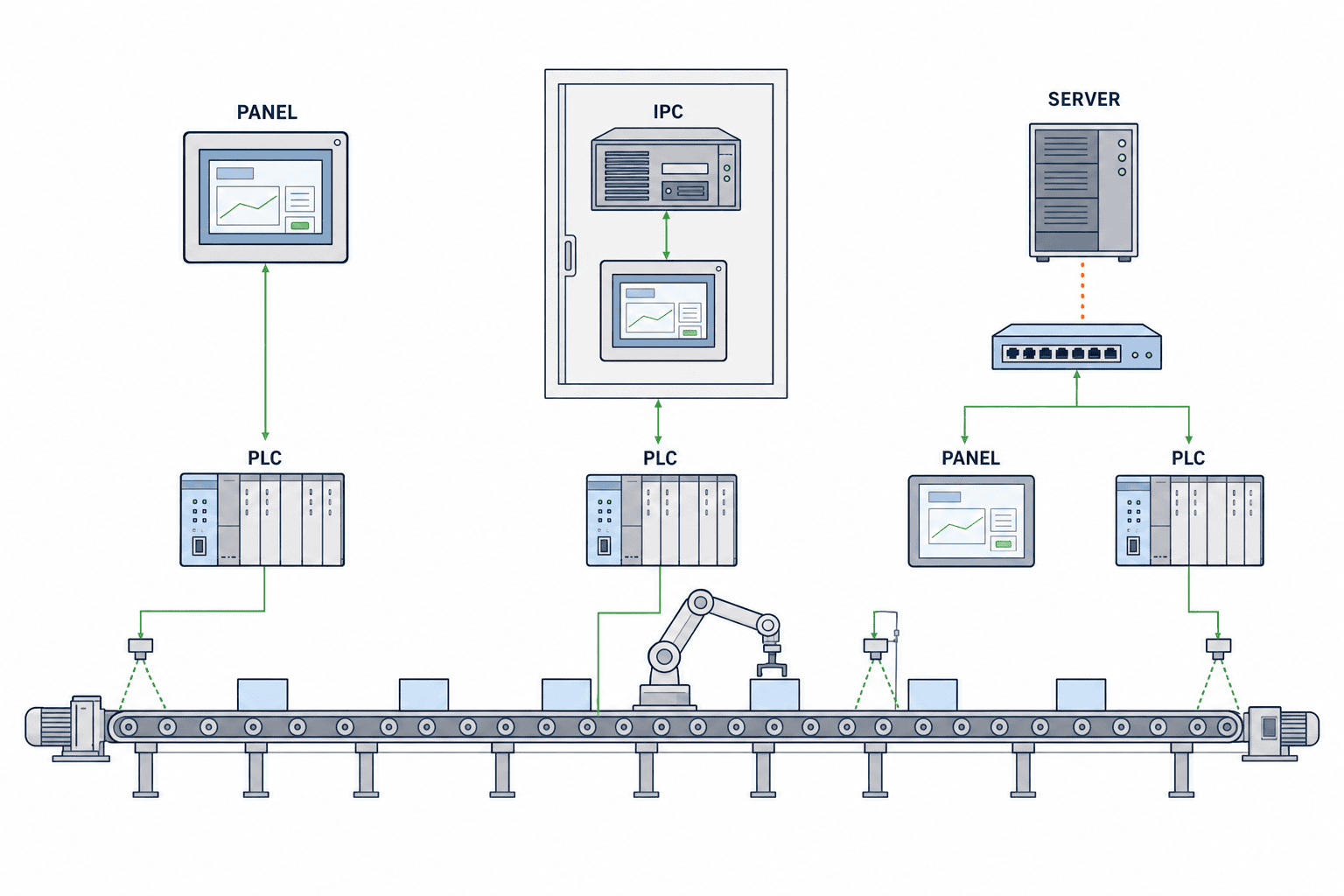
HMI implementation methods should be considered in terms of where operational responsibility sits and where failure points are placed. Here, we organize three common architectures seen in manufacturing sites.
1. Integrated Panel PC / Panel HMI
This is a configuration in which the touch panel and runtime are integrated into the field terminal.
Suitable Situations
- Standalone machines with self-contained control
- Equipment intended to operate independently by machine
- Cases where clear network separation is desired
- Standardized vendor packages that use integrated panels throughout
Advantages
- Easy-to-understand configuration
- Clear separation of responsibility by machine
- Less dependence on networks and servers
Points to Watch
- Backup and version management are required for each terminal
- Configuration management becomes complicated as the number of screens and data retention requirements increase
- Replaceability during model changes tends to depend on the specific device model
2. Local Execution on an Industrial PC
In this approach, the HMI runtime runs on an industrial PC installed near the machine or production line, with local monitors or touch displays connected to it.
Suitable Situations
- Monitoring across multiple PLCs and peripheral devices
- Relatively large numbers of screens, logs, recipes, and reports
- Cases where Windows-based runtimes or expandability are beneficial
- Standardizing spare parts and storage operations
Advantages
- Easier integration of screens, logs, and communication targets
- Easier design of backups, disk replacement, and image deployment
- Better support for future functional expansion
Points to Watch
- Requires OS maintenance, license management, and patch decisions
- Requires careful selection of hardware suitable for the plant environment
- If responsibility boundaries are unclear during commissioning, it becomes difficult to distinguish PLC-side problems from HMI-side problems
3. Thin Client / Central Server
In this architecture, the field side uses thin terminals or browser-based clients, while the HMI runtime or visualization platform is centralized on the server side. For example, workstation/client implementations and centralized deployment concepts vary depending on the product. Ignition Perspective Workstation
Suitable Situations
- Managing multiple lines on a common platform
- Standardizing centralized backup and user permission management
- Planning for IT/OT integration or multi-site deployment
Advantages
- Easier centralized management
- Terminal replacement and recovery are relatively simple
- Well suited to deployment across many terminals
Points to Watch
- Increased dependence on network and server availability
- Responsibility boundaries between OT and IT tend to become more difficult
- If local-operation continuity requirements are not defined in advance, on-site operation during server outages becomes unclear
The Best Choice Depends on Where Equipment Responsibility Is Placed
An industrial PC is not always the superior choice. For procurement decisions, you should select an approach that can answer the following questions:
- Who restores operation on site when the line stops?
- Can the PLC run autonomously without the HMI?
- Must operation continue even during a network interruption?
- Will future modifications be done machine by machine, or across the whole factory?
- Will backup ownership sit with the maintenance/equipment department or the IT department?
Site Survey
Before choosing an implementation architecture, there is information that must be captured in the site survey. What is often overlooked in desk-based planning is not performance, but the actual connection conditions and maintenance workflow.
Minimum Items to Confirm During the Site Survey
Control Configuration
- PLC manufacturer, CPU model, and firmware
- Communication protocol
- Existing tag count and room for future additions
- Where existing alarm definitions reside, such as PLC side, HMI side, or paper-only specifications
- Where recipes and product setup data are stored
HMI Operations
- Installation locations of operator terminals
- Languages required on the shop floor
- Permission levels and approval workflows
- Alarm review procedures by shift
- Whether daily reports or CSV exports are required
Infrastructure
- Power quality and whether momentary power interruptions occur
- Whether a UPS is required
- Network topology, VLANs, and ownership of network management
- Whether remote maintenance connectivity is allowed
- Ambient temperature, dust, vibration, and heat accumulation inside enclosures
Maintenance Structure
- Which department in the Thailand factory will perform first-line support
- The scope of head-office IT involvement
- The scope of the vendor’s on-site support
- Policy for storing spare parts
- Who approves software modifications
Points Commonly Overlooked in Thai Factories
- Whether alarm messages are consistent across Thai, English, and Japanese
- Whether night-shift personnel are expected to handle OS logins or service restarts
- Whether systems should auto-recover after a power outage or stop at a confirmation screen
- Whether local maintenance teams should be able to restore backups on their own
- Whether the factory network administrator will manage OT terminals as standard PC assets
Requirements Table
When expressing specifications, it is effective to avoid vague request language and instead organize requirements into a table of requirement item, purpose, verification method, and responsible party.
Example Requirements Table
| Item | Requirement | Purpose | Verification Method | Primary Responsibility |
|---|---|---|---|---|
| Runtime architecture | Clearly specify whether the system is integrated panel, industrial PC, or central server | Clarify future maintenance model | Proposal document, system diagram | Vendor |
| PLC connection | Specify supported PLCs, communication method, and tag update policy | Prevent connection mismatches | Communication test, tag list review | Vendor + PLC team |
| Alarm handling | Define trigger condition, reset condition, priority, and ACK authority | Prevent misunderstanding during operation | FAT scenario testing | Vendor + equipment owner |
| Logging | Define what is stored, storage location, retention period, and export method | Ensure traceability | Test log review | Vendor |
| User permissions | Define role-based viewing, operation, and ACK permissions | Prevent operator error | Login testing | Vendor + user side |
| Language | Define text master management method and translation approver | Ensure multilingual quality | Text review | Client + vendor |
| OS / license | Define OS edition, license custodian, and update procedure | Ensure recoverability in the future | Document review | Vendor + client |
| Backup | Separate handling for image, project, recipe, and logs | Reduce recovery time | Restore test | Vendor |
| Power recovery | Define startup sequence after power returns and whether runtime auto-start is allowed | Prevent confusion during restart | Power interruption test | Vendor + equipment owner |
| Security | Define accounts, removable media policy, and change control | Prevent uncontrolled updates | Procedure review | Client-led |
Ambiguous Expressions to Avoid in Specifications
- “Use the latest OS”
- “Implement appropriate security measures”
- “Provide sufficient backup”
- “High-speed display”
- “Support future expansion”
These may be convenient during ordering, but they create disputes over interpretation during FAT/SAT and maintenance. Instead, you need to specify what will be checked, by whom, and how.
PLC Tag and Alarming
In industrial PC-based HMI systems, the most common problems arise not from the screens themselves, but from misalignment in tag meaning and ambiguity in alarm operations.
What Must Be Defined in PLC Tag Design
Source of Responsibility for Tags
First, clearly define who establishes the meaning of each value.
- Tags whose primary definition resides on the PLC side
- Tags derived and displayed on the HMI side
- Tags for calculated values, string conversion, or unit conversion held on the HMI side
- Tags coming from plant-wide common master data
If this remains vague, PLC changes can leave the HMI with outdated meanings.
Naming and Mapping
At minimum, the tag mapping table should include the following:
| Item | Description |
|---|---|
| HMI tag name | Identifier used on the screen side |
| PLC address / variable | Actual PLC-side source |
| Data type | BOOL, INT, REAL, STRING, etc. |
| Unit | °C, bar, pcs, etc. |
| Scaling | Whether raw-to-engineering value conversion is applied |
| Read/write classification | Read Only / Writable |
| Update condition | Cyclic, event-based, only when screen is displayed, etc. |
| Abnormal value handling | Display rule for communication loss, old values, out-of-range values |
Handling Malformed and Stale Tags
In real operation, problems are not limited to simple communication loss. Malformed data and retained stale values are also major issues.
1. Malformed Tag
- Type mismatch
- Unexpected null-equivalent value
- String length overflow
- Corrupted date format
2. Stale Tag
- The last value remains displayed after the PLC has stopped
- A pre-reconnection value appears to be current
- The operator misjudges the current condition because the update time is not visible
For this reason, the RFP should include the following:
- How communication quality bits are displayed
- How the last update time is handled
- Display rules when a value is old
- Conditions that block writes during abnormal conditions
- Screen behavior when the PLC is offline
Implementation Requirements When the PLC Is Offline
Even when the PLC is offline, it is desirable for the HMI application itself to remain running and indicate the following:
- That communication is lost
- The last successful update time
- That write operations are disabled
- That ACK is prohibited or restricted
- Whether local logging continues or stops
You should avoid a design where “PLC not visible = HMI frozen.” General runtime concepts and visualization architecture are also described by vendor materials as the lifecycle of tags and displays. Siemens Engineering Guideline Siemens WinCC Unified Visualizing Processes
What Must Be Defined in Alarm Design
This article addresses alarms from the perspective of implementation and operation, not screen design.
Source of Alarm Definition
- Conditions determined in the PLC, with status sent to the HMI
- Threshold judgments made on the HMI side
- Aggregated judgments made on a higher-level server
The point is not that any method is acceptable, but that you must decide which location is the source of truth for the judgment. For critical alarms related to equipment stoppage, PLC-side judgment usually makes responsibility clearer. On the other hand, auxiliary display alarms or maintenance-analysis events may reasonably be implemented on the HMI side.
Responsibility for ACK
At minimum, alarm acknowledgment should define:
- Who can acknowledge alarms
- Whether ACK is local to one terminal or shared across all terminals
- Whether ACK is allowed before the cause is resolved
- Whether alarms clear automatically after recovery or remain in history
- Which operation logs are retained
Permissions and Auditability
- Operators may have view-only rights
- Shift leaders may be allowed to ACK
- Engineers may be allowed to suppress or disable alarms
- Only administrators may change settings
Define this role separation not by how the screen looks, but by operation authority and recordkeeping.
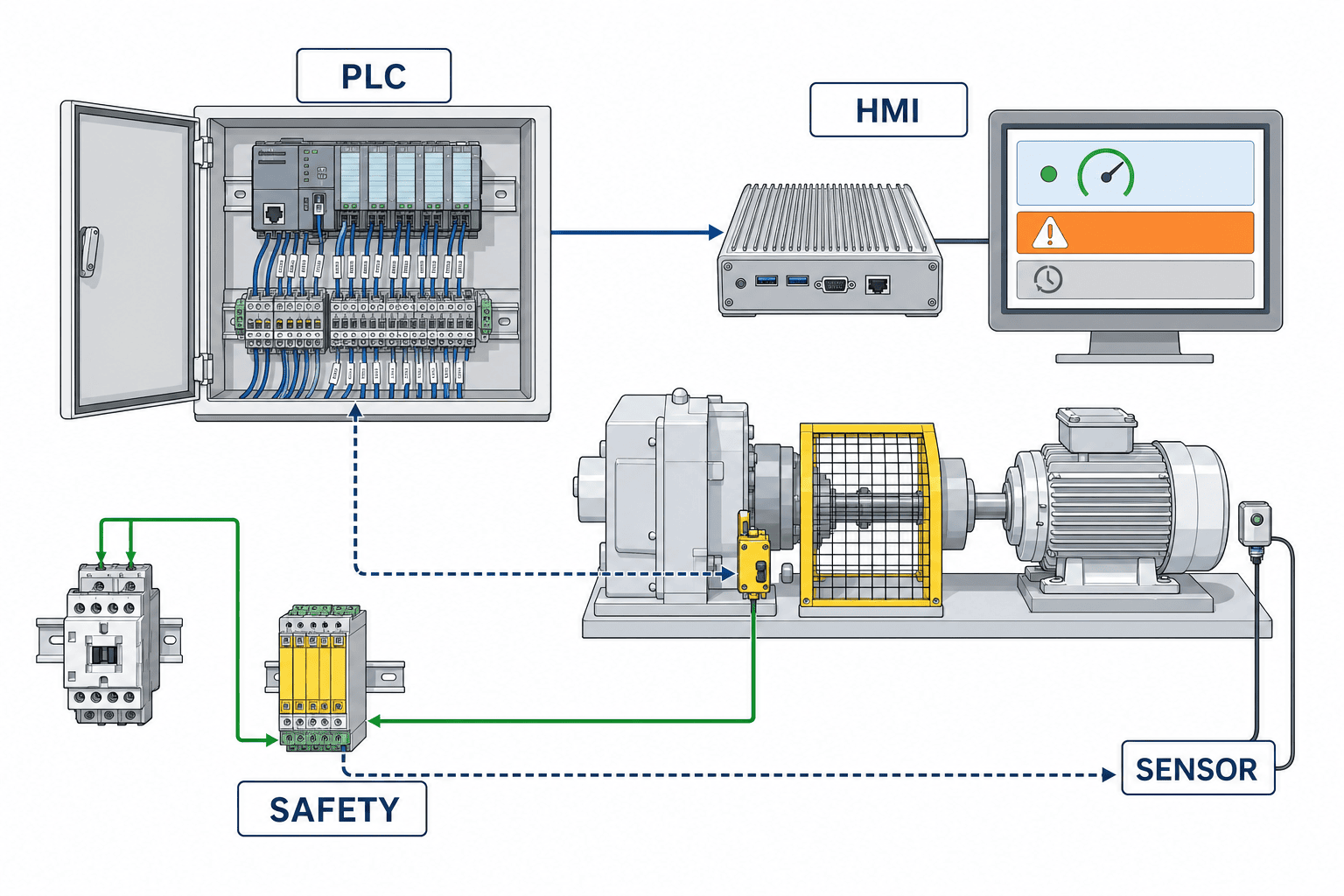
PC Hardware and OS Selection
In industrial PC migration, what matters is not “choosing a high-performance PC,” but selecting a system that matches the site conditions and recovery method.
How to Think About Hardware Selection
Inside-Panel / Outside-Panel Conditions
- Mounting location
- Ventilation inside the panel
- Distance from heat sources
- Whether filter maintenance is feasible
- Cable routing
- Proximity to vibration sources
Storage
- Whether SSDs are used
- Image backup method
- Replacement procedure
- Compatibility with spare units
SSDs are commonly used in industrial applications, but it is still necessary to confirm the effects of heat, continuous writing, and panel thermal conditions. Therefore, the specification should state not only whether an SSD will be used, but also how operation will be verified under heat accumulation conditions.
UPS
Whether a UPS is required should not be treated simply as a power-failure countermeasure. It should be separated into the following purposes:
- Protect the OS from corruption during momentary outages
- Ensure logs are closed correctly
- Keep control running on the PLC while protecting only the HMI
- Clarify the relationship with the safety stop sequence
In other words, UPS selection is not just “install or do not install”; it should be based on what must be protected when power is lost.
What Must Be Decided for the OS
- OS edition
- Who holds local administrator rights
- Whether automatic login is permitted
- What applications or services auto-start
- Time synchronization method
- USB usage restrictions
- Event log handling
- Who decides on patch application
OS updates are not automatically safer simply because they are always kept current. In OT environments, the basic premise is to evaluate changes under change control and then decide whether to apply them. The asset-owner security management approach can be usefully organized in line with IEC 62443-2-1. IEC 62443-2-1
Handling Model-Specific Information
If manufacturer model numbers need to be specified, clearly state that they are model-specific.
For example, the specifications and installation conditions of fanless industrial PCs differ by model. Information such as that for the Beckhoff C6525-0060 applies only to that specific model. Beckhoff C6525-0060
The takeaway is not that “fanless is fine for every site,” but that environmental suitability should be verified for each candidate model.
Environmental, Thermal, and Power Items to Confirm
For practical use, the following should be explicitly stated in the RFP and test plan:
- Measurement location for internal panel temperature
- How CPU and storage temperatures are checked under load
- Runtime behavior during UPS transfer
- Screen response confirmation after long continuous operation
- Recovery sequence from power loss through power restoration
- Restore procedure after SSD replacement
Security and Lifecycle
HMI security is not determined solely by whether a product has some certification. What matters on site is who can make changes, when updates are performed, and how recovery is done.
Define Security Through Operations
IEC 62443-2-1 addresses the asset owner’s security program. IEC 62443-2-1
Likewise, CISA’s recommendations for ICS emphasize operational controls such as asset visibility, network segmentation, change control, backup, and recovery readiness. CISA ICS Recommended Practices
Operational Items That Should Be Defined for HMI / Industrial PCs
Account Management
- How shared accounts are handled
- Who stores administrator passwords
- Expiration period for vendor maintenance accounts
- Procedure for revoking access after resignation or job transfer
Change Control
- Who requests OS patch application
- Test environment for runtime updates
- Who approves emergency fixes
- Rollback procedure
Backup
- System image
- HMI project files
- Recipe / configuration files
- License information
- Log / history data
These are not the same type of backup. In practice, they should be separated by recovery purpose.
Avoid Arbitrary Updates
A common failure on site is that maintenance or IT personnel apply updates in good faith, only to break runtime or driver compatibility as a result.
For that reason, specifications should not merely say “arbitrary updates prohibited,” but rather “only updates carried out in accordance with change control are permitted.”
Lifecycle Management
- Migration policy at OS end of support
- Runtime version freeze period
- Conditions for license reissuance
- Image deployment procedure for replacement hardware
- Replacement procedure for successor models
Lifecycle management does not end at equipment delivery. In industrial PC-based HMI systems, hardware replacement, OS updates, runtime updates, and PLC changes occur at different times, so you must define who decides on modifications and based on what trigger.
Migration Plan
When migrating from an integrated panel to an industrial PC, the work does not end with simply transferring screens. The migration plan should be considered in four layers: connectivity, functionality, maintenance, and continuity of operation.
Step-by-Step Migration Approach
1. Inventory of Current Assets
- Current screen list
- List of used tags
- Alarm list
- Recipe and configuration items
- User permissions
- Language assets
- Backup method
2. Identify Incompatibilities
- Communication driver differences
- Tag type differences
- Alarm history specification differences
- Font and multilingual display differences
- Recipe file format differences
- License model differences
3. Parallel Verification
- Verify PLC connection first
- Verify major alarms first
- Verify power recovery first
- Verify log storage destination first
4. Decide the Cutover Method
- Full cutover at once
- Machine-by-machine cutover
- Cutover during planned line shutdown
- Cutover with a coexistence period for the old HMI
Common Points of Failure in Migration
Bringing Existing Tags Across Unchanged
Tags that made sense in the old HMI may conflict or duplicate when consolidated into a PC-based system. During migration, it is generally better to normalize the tag dictionary once before moving forward.
Translating Only the Alarm Messages
For multilingual support, you must review not only display text, but also permission-related explanations, recovery messages, and the context of error codes.
Leaving Backup Testing Until the End
The issue most often postponed, despite being one of the most important, is whether the system can actually be restored when it breaks. In the migration plan, the recovery strategy should be fixed before functional verification.
Related Thinking for Software Implementation
It is often easier to organize the work if you view the HMI not as a standalone topic, but as part of the overall equipment software including PLC integration, PC implementation, data handling, and maintainability. For related considerations, see our article on machine software development.
Supplier Responsibility
In procurement, the most important point is not vendor selection itself, but how responsibility boundaries are written. If this remains unclear, commissioning turns into finger-pointing over whether the issue belongs to the PLC, HMI, or network.
Recommended Responsibility Boundary Structure
HMI Vendor
- Build the HMI runtime
- Implement screens
- Perform tag mapping
- Configure alarms and history
- Implement user permissions
- Prepare backup / restore procedures
- Prepare FAT documents
PLC Vendor or Controls Team
- Define PLC variables
- Implement alarm judgment logic
- Define write-enable conditions
- Confirm communication connectivity
- Ensure safety remains valid when the PLC stops
Equipment Owner
- Approve permission structure
- Approve multilingual text
- Decide required log retention
- Decide patch application policy
- Witness SAT and make acceptance decisions
IT/OT Infrastructure Team
- IP design
- Whether domain joining is allowed
- Time synchronization
- Remote connection policy
- Server / storage maintenance
Items That Should Be Explicitly Documented in the Responsibility Boundary
- Responsibility for HMI display when the PLC is offline
- Scope of responsibility during network interruption
- Who performs first-level troubleshooting during OS failures
- Responsibility for reconstruction if licenses are lost
- Approval responsibility for translation errors
- Contact window for corrections to defects found during FAT
Required Documentation Deliverables
The acceptance conditions should include at least the following:
- System configuration diagram
- Tag mapping table
- Alarm list
- User role list
- Backup procedure
- Restore procedure
- Version list
- License storage information
- FAT records
- SAT records
- Conditions for delivery of source / project files
RFP Template
Below is an example set of RFP items that procurement teams can use directly. These can also be distributed in table format as needed.
1. Project Overview
- Target equipment name
- New installation / renewal / relocation
- Operating conditions
- Allowed shutdown period for cutover
- Languages used
2. Scope of Proposal
- HMI runtime
- Industrial PC or panel
- Communication settings
- Screen implementation
- Alarms / logs
- User management
- FAT/SAT
- Training
- Maintenance
3. Mandatory Proposal Information
- Execution architecture
- Hardware configuration
- OS configuration
- Runtime product name / version
- License format
- PLC connection method
- Backup method
- Recovery method
- Network assumptions
- Responsibility boundaries
4. Functional Requirements
- Number of screens and classification
- Method for estimating tag count
- Alarm definition method
- History retention method
- Need for CSV/PDF or similar output
- Multilingual switching
- User permissions
- Behavior when PLC is offline
- Recovery after power loss
- Display rules for malformed/stale tags
5. Security and Operational Requirements
- Account method
- Local administrator rights
- USB usage policy
- Patch application flow
- Change control
- Need for audit logs
- Backup frequency and procedure ownership
6. Deliverables
- System diagram
- I/O and tag list
- Alarm table
- Screen list
- Permission definitions
- Version table
- Backup / restore procedures
- FAT/SAT procedures and records
- Training materials
7. Vendor Response Format
To make comparison easier, use a standardized response format instead of free writing.
| Item | Response Field |
|---|---|
| Availability | Available / Alternative proposal / Not available |
| Preconditions | State dependent conditions |
| Additional equipment | Specify if required |
| Constraints | State conditions under which it cannot be done |
| Test method | Proposed FAT/SAT verification method |
| Responsible party | Vendor / Client / Third party |
FAT/SAT Test Matrix
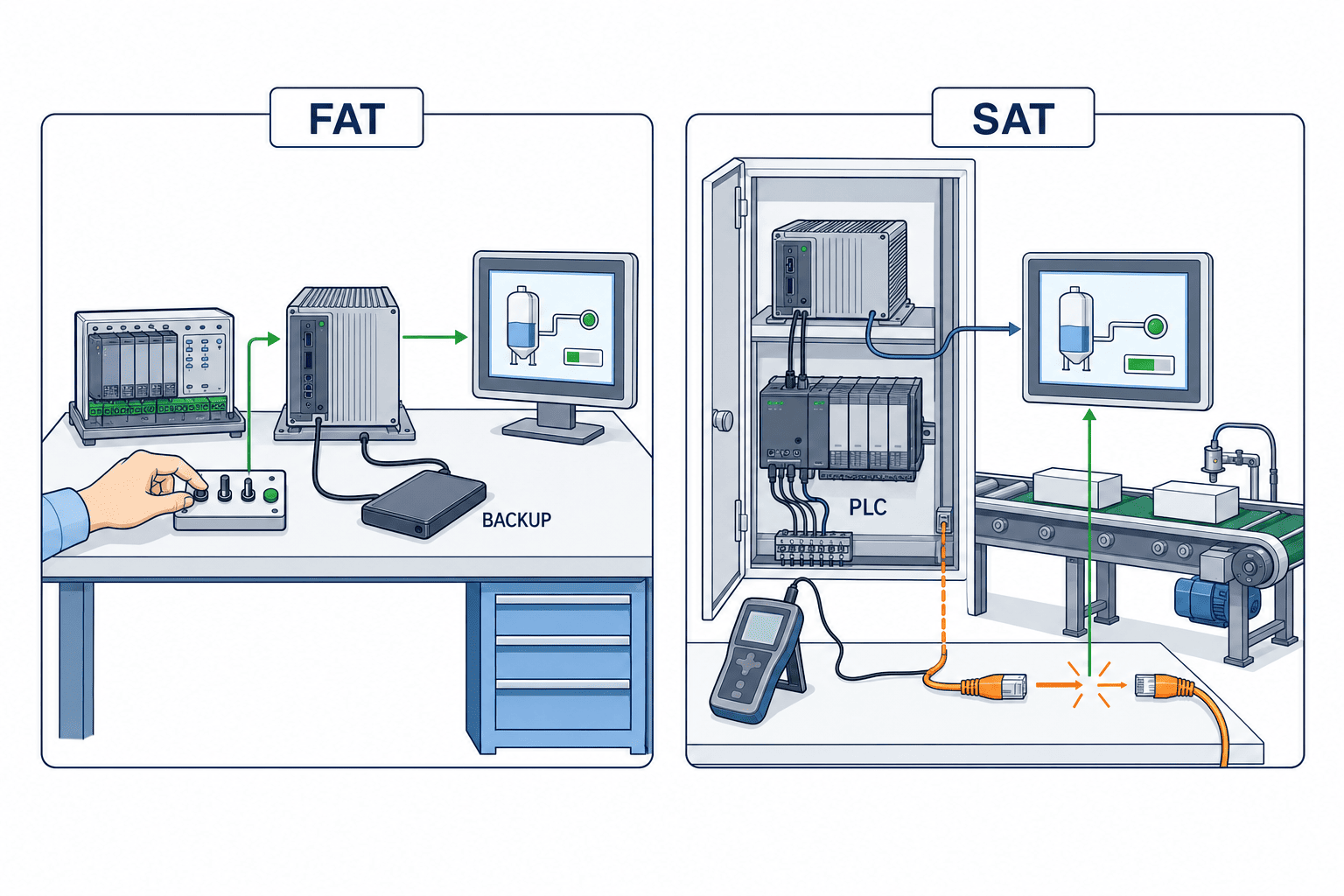
For FAT/SAT, it is not enough just to confirm that screens appear. You need to verify operation, abnormal conditions, recovery, permissions, and maintenance using measurable methods.
Viewpoints to Confirm in FAT
FAT is performed before shipment in the vendor’s environment or a temporary test environment. If possible, use the actual PLC. If that is difficult, reproduce conditions using a simulator or forced values.
Viewpoints to Confirm in SAT
SAT is performed after installation on site, using actual wiring, the real network, and live operational permissions. It should also cover items that may not be visible during FAT, such as time synchronization, UPS transfer, language display, and actual operator workflow.
Example FAT/SAT Test Matrix
| Test Item | Test Method | Expected Result | Evidence | FAT/SAT |
|---|---|---|---|---|
| Startup | Confirm runtime auto-start after OS boot | Starts as defined | Video, checklist | FAT/SAT |
| PLC connection | Switch between connected/disconnected communication states | Connection status displayed as specified | Screen capture, logs | FAT/SAT |
| Tag update | Change test tag values | Value, unit, and conversion match | Tag list review | FAT |
| Stale tag | Stop PLC updates and check last update time | Old value is distinguishable | Screen record | FAT/SAT |
| Malformed tag | Inject type mismatch or invalid values | Abnormal display or fail-safe display | Test record | FAT |
| Alarm generation | Trigger alarm condition | Message, time, and priority match | Alarm history | FAT/SAT |
| Alarm ACK | Perform ACK using users with different roles | Behaves according to permissions and leaves operation history | Logs | FAT/SAT |
| ACK before resolution | Check whether ACK is allowed before cause is resolved | Controlled according to specification | Logs, screen | FAT |
| User roles | Log in using multiple roles | Allowed screens and prohibited operations match | Operation records | FAT/SAT |
| Language switching | Confirm main screens and alarms in each language | No mistranslation, missing characters, or overflow | Review record | FAT/SAT |
| Log retention | Confirm storage destination after event generation | Stored items and format match specification | File check | FAT |
| Backup | Perform backup according to procedure | Required data can be obtained | Backup media, records | FAT |
| Restore | Restore to replacement unit or alternate environment | Runtime starts and settings are reproduced | Restore record | FAT |
| Power recovery | Simulate power loss then restore power | Restarts and recovers according to specification | Video, logs | FAT/SAT |
| UPS behavior | Switch to UPS power supply | No abnormal shutdown; transition as defined | Power test record | SAT |
| SSD replacement assumption | Execute recovery procedure after replacement | Recoverable by procedure | Work record | FAT |
| PLC offline | Check HMI behavior with PLC stopped | No freeze; status clearly indicated | Video | FAT/SAT |
| Time synchronization | Check time source switching or re-sync | Log timestamps remain manageable | System log | SAT |
| Thermal confirmation | Monitor temperature under expected load | Stable within design conditions | Temperature record | SAT |
How to Write Acceptance Criteria
There is no need to hard-code fixed numeric thresholds into the main article. Instead, acceptance criteria for each test can be written as follows:
- Must match the specification stated in the RFP
- Must not conflict with the tag list, alarm list, or permission definitions
- Abnormal-condition displays must follow user-approved rules
- Backup / restore procedures must be repeatable
- Must not interfere with continuous operation in the actual site environment
Cost and Change Control
For industrial PC migration, you cannot judge suitability from the initial quotation alone. The difference often appears more in change cost and maintenance cost than in initial implementation cost.
How to View the Cost Structure
Because actual amounts vary by project, this section organizes cost items only.
Initial Implementation Cost
- Industrial PC hardware
- Monitor / touch display
- HMI runtime license
- Communication drivers and options
- Design and implementation labor
- FAT/SAT labor
- On-site startup labor
Maintenance-Related Cost
- Spare units
- License reissuance handling
- Backup media / storage
- On-site maintenance contract
- Re-testing after modifications
- OS update evaluation
- Translation updates
Future Change Cost
- Additional PLC tags
- Additional screens
- Permission role changes
- Changes to log retention method
- Server integration
- Migration to successor PCs
Practical Change Control
Change control is not a system only for large corporations. At minimum, site stability improves if the following is maintained as an operational table.
| Change Target | Requester | Approver | Pre-check | Post-check | Rollback |
|---|---|---|---|---|---|
| HMI screen modification | Equipment engineer | Production manager | Verify in test environment | FAT-equivalent check | Restore previous version |
| PLC tag change | Controls engineer | Equipment manager | Confirm mapping | Communication test | Revert to previous PLC version |
| OS patch | IT/OT team | System owner | Impact assessment | Startup and communication check | Restore image |
| Runtime update | Vendor | Client | Compatibility review | FAT/SAT-equivalent check | Restore previous version |
Questions to Ask When Comparing Quotations
- Are the project files included in the delivery scope?
- What are the license transfer conditions?
- Who performs restoration to replacement hardware?
- How many minor changes after SAT are included?
- What is the unit pricing model for adding tags?
FAQ (5 Precise Questions)
Q1. If we migrate from an integrated panel to an industrial PC, will maintenance always become easier?
Not always. A PC-based approach can make backup and expandability easier to organize, but it also adds OS, licensing, and update management. Maintainability only improves once you define how far local maintenance will go and how IT/OT will be involved.
Q2. Is it acceptable to implement emergency stop buttons or safety release status on the HMI side?
It may be used as a display or input interface, but the HMI should not be the entity that establishes the safety function itself. Independent implementation on the safety PLC side or within the safety circuit is the prerequisite. The HMI is not a safety function.
Q3. Is it safer to keep OS patches on regular automatic updates without stopping them?
In OT, that cannot be said uniformly. Patch application should be decided only after defining impact assessment, testing, implementation procedure, and rollback under change control. IEC 62443-2-1 CISA ICS Recommended Practices
Q4. What should FAT cover so that SAT becomes easier?
At minimum, FAT should eliminate basic issues involving tag mapping, alarm generation and ACK, permissions, backup / restore, power recovery, and behavior when the PLC is offline. If you try to confirm these only during SAT, you will end up using valuable on-site shutdown time to find basic defects.
Q5. For Thai, English, and Japanese support, is delivery of a translation table alone sufficient?
No. In addition to alarm messages, QA should include button text, confirmation dialogs, units, date formats, missing characters, wrapping, searchability, and how items appear in operation logs. Language switching tests are safer when performed not only during FAT but also during SAT.
Summary and CTA
What truly matters in migration of HMI systems to industrial PCs is not the visual polish of the screens, but the architecture, management of PLC tag meaning, alarm operation, OS/licenses, backup/restore, change control, responsibility boundaries, and the testability of FAT/SAT. Integrated panels, industrial PCs, and thin-client/central-server approaches each have suitable use cases; no single option is always correct. From the perspective of procurement and manufacturing engineering, success depends less on comparing architectures in the abstract and more on whether you can translate into specifications who restores what, and how, when trouble occurs. Especially in Thai factories, it is easier to reduce post-startup person-dependence by settling multilingual requirements, local maintenance structure, power-recovery behavior, network ownership, and vendor boundary conditions in advance.
If you are planning equipment renewal or a new installation and want support from the requirements-drafting stage onward for HMI/industrial PC RFP preparation, vendor selection, responsibility boundary definition, and FAT/SAT planning, please contact us here: https://tomastc.com/en/contact/


