


Before introducing an equipment downtime reason code management system in manufacturing, make two decisions separately: how a stop is detected and who confirms its reason. A PLC stop signal can establish when a machine stopped and for how long, but it cannot necessarily determine whether the business reason was a material shortage, changeover, quality check, or breakdown. This article sets out implementation specifications, operating practices, and acceptance tests for a reason code taxonomy that operators confirm in an MES and reconcile with ERP plans. It goes beyond explaining how to calculate OEE.
Define the boundaries of an equipment downtime reason code management system
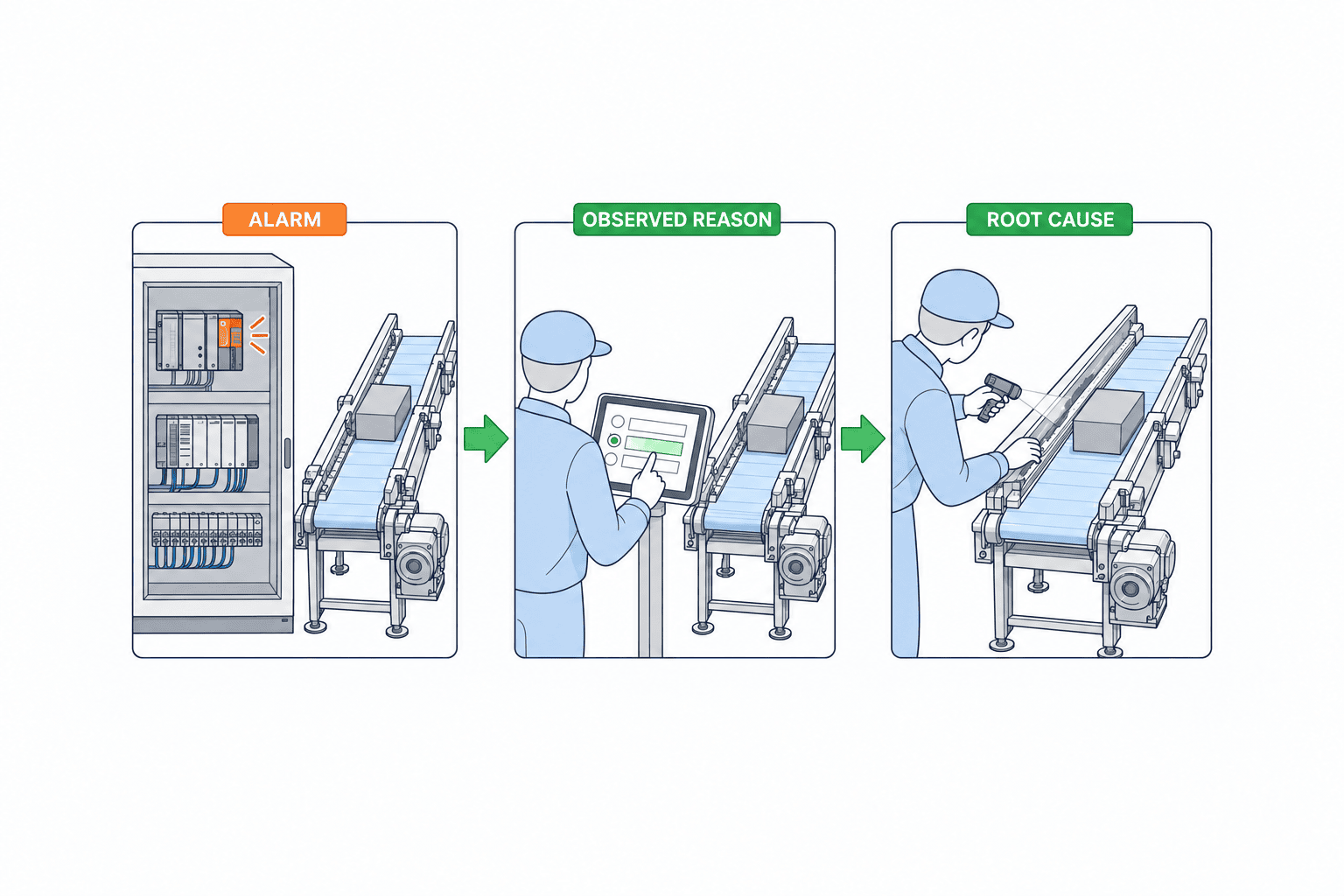
A red indicator on a machine monitoring screen does not tell the whole story of why the machine stopped. At the start of a stop, the equipment state is known. A simultaneous alarm may also reveal what the machine reported. But shop floor context needs further confirmation: a delayed material replenishment may have preceded an alarm, or an operator may have stopped the machine intentionally for a quality check. Store the stop event, machine alarm, operator-confirmed downtime reason, root cause, and corrective action as separate data. If they are compressed into one “cause code” field, a later correction can overwrite facts originally reported by the machine.
ISA-95 describes boundaries among control and monitoring, manufacturing operations, and business planning. In an implementation, the PLC and equipment connectivity layer can capture state changes; the MES can link events to production orders, shifts, and operator confirmation; and the ERP can provide planning and cost context. ISA-95 does not prescribe particular products. It provides a reference for assigning responsibilities. ISA’s official overview places monitoring and control such as PLCs at Level 2, manufacturing operations at Level 3, and business planning such as ERP at Level 4.
Automatic equipment state capture, downtime reason classification, and downtime loss analysis are related but distinct jobs. Our article on improving OEE covers improvement through availability, performance, and quality. Our article on minor stoppages and OEE examines short stops in more detail. Here, the focus is the authoritative reason code, the confirmation action, the correction history, and system acceptance criteria that come before those calculations.
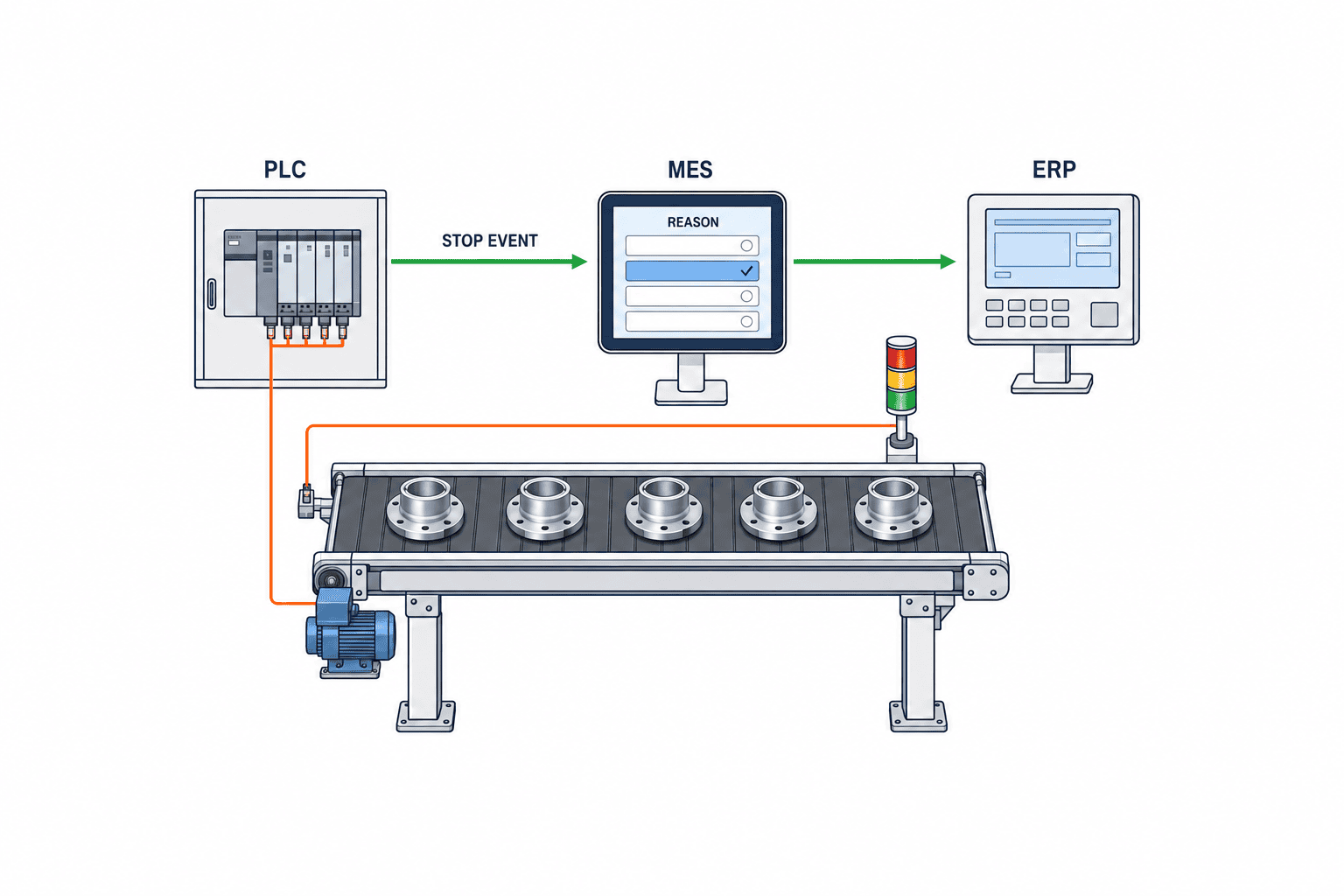
Do not derive “equipment stopped” and “reason for stop” from the same signal
Possible inputs for stop detection include a PLC run bit, cycle-complete pulse, equipment alarm, mode signal, or product passage sensor. A single “producing” bit cannot represent every machine. A machine may wait for a workpiece while in automatic mode, an operation may include manual work, or a continuous process may allow reduced-speed running. Define state transitions for “running,” “stopped,” “changeover,” “maintenance,” “communication loss,” and “indeterminate” by equipment, and decide who approves them.
The minimum event record includes equipment ID, start time, end time, source, original signal, acquisition quality, state, and event ID. If a start has been captured but no end has arrived, mark the event “in progress”; do not close it automatically at shift end. Show communication loss as a separate data quality event instead of counting it as equipment downtime. Store both PLC time and server receipt time, along with the clock synchronization status. When a shop floor terminal synchronizes after being offline, keep input time distinct from the time the stop actually occurred.
The OPC Foundation’s Machine Tools specification distinguishes machine state, operating mode, and events that represent interruptions, with condition classes for interruptions. A machine may therefore provide some classification data. Still, a machine alarm code cannot simply replace the company’s downtime reason code. “Conveyor motor overload,” for example, is a symptom reported by the equipment. Whether the operational reason was a jammed workpiece, worn part, or incorrect loading requires confirmation. Some machines also report too little information to infer a reason.
Test the rules for detecting both the start and end of a stop on each machine. If a stop is inferred when no cycle-complete pulse arrives for a set period, the threshold must avoid false detections for long-cycle products and changeovers. Validate thresholds by product, process, and mode instead of imposing a universal “30 seconds.” A longer threshold reduces false positives but hides short stops. Therefore, retain both the raw event and the event selected for reporting, so history can be recalculated when the threshold changes.
Start with a two-level downtime reason taxonomy
When a taxonomy is too detailed, operators struggle to choose the right code and “Other” becomes common. At launch, limit top-level categories to distinctions the shop floor can reliably make: equipment failure, material or parts shortage, changeover or mold change, quality check, planned stop, upstream or downstream impact, external factor, and reason unconfirmed. Add subcategories when they lead to different improvement actions. If “waiting for material” is split into “delivery delay,” “loading preparation,” and “wrong item,” confirm that the responsible teams and countermeasures really differ. Subcategories added only to make a report look more detailed increase maintenance work.
For each code, store a code ID, display names in Japanese, Thai, English, and other needed languages, a description, inclusion and exclusion examples, parent category, applicable equipment and processes, effective start and end dates, responsible department, and approver. Posting only Japanese category names in a Thai factory forces operators to guess the translation. Have local team leaders and operators validate the Thai wording they actually use; use English labels for cross-site analysis. When extending to a Vietnamese site, retaining the same code ID and localizing the display name can aid comparison. Do not force a shared code where processes give it different meanings.
Keep “Reason unconfirmed” as a valid code. If a screen forbids an empty selection, it is better to measure unresolved events and their age than to make an operator choose an unsupported reason. Give each unresolved event an owner and deadline, and hand it over at shift change. An initial “provisional reason” may later become a “confirmed reason” after maintenance diagnosis. Preserve the provisional value and record who changed it, when, and on what evidence. The ability to count missing classifications is the starting point for improving taxonomy quality.
A reason category is not the same as a responsible department. For “waiting for material,” investigation may be needed to determine whether procurement, the warehouse, an upstream process, or a supplier caused the delay. Requiring an operator to assign departmental responsibility immediately can distort code selection through blame avoidance. The first screen should capture observable events and actions; an owner can add cause and remedy later. If a line stops because of a quality abnormality, the initial downtime reason may be “quality check,” while separate defect analysis identifies the root cause. This separation also reduces operator input effort.
Decide who approves changes to the reason code master
The taxonomy will not be complete on day one. Once in use, stops that fit no code and near-duplicate codes will emerge. Collect change requests from the floor monthly. Representatives from production, maintenance, quality, and IT can decide whether to clarify an existing code, add a code, merge codes, or retire one. Name one person or department as the owner. Keep the approval date separate from the effective date, and do not rewrite historical entries recorded under an older code.
Three tests help control new code requests. First, the existing codes must be insufficient to assign improvement ownership. Second, operators must be able to select the new code consistently at the machine. Third, the frequency or impact must justify separate reporting. There are exceptions: an event occurring only once a month may still warrant a distinct code if it has safety implications. Align safety-related categories with equipment safety procedures; the reason code screen must not be mistaken for a safety device.
Keep code IDs independent of translated display names and organizational changes. Retire codes through logical deletion so historical records remain readable, with effective dates governing when a code can be selected. If a parent category changes, show whether a historical report uses the taxonomy that applied at the time or reclassifies history under the current taxonomy. Mixing the two in a year-on-year comparison can make a taxonomy change look like an operational improvement. Display code revision history and the reporting version on dashboards.
How operators confirm reasons in the MES
Requiring an input at the instant a machine stops can interfere with safety checks and recovery. First, let the machine generate a stop event and put it in an unconfirmed queue on an HMI or shop floor tablet. Operators secure the area and prioritize recovery, then confirm the reason within an agreed time. Show equipment, time window, production order, machine alarms, immediately preceding state, and suggested reasons. Suggestions are useful, but do not confirm them automatically. Record the person who pressed Confirm, the time, selected code, free-text note, and evidence.
For a stop close to shift change, distinguish the shift in which it occurred from the shift that confirmed it. If three events remain unconfirmed at the end of a night shift, the team leader should hand over the owner, initial evidence, and deadline for each, rather than assigning three convenient reasons in bulk. A handover report should show unconfirmed event ID, equipment, whether the stop is ongoing or complete, provisional reason, reviewer, and deadline. If one stop crosses a shift boundary, retain the parent event ID even if reporting splits it by shift, so actual elapsed time is not counted twice.
Consider a filling line that stops at 10:12 while the PLC reports conveyor overload. An operator clears a workpiece jam at a guide and restarts the line at 10:20. The MES automatically records an eight-minute stop, and the operator selects “workpiece jam.” Maintenance later identifies guide wear as the root cause and links a replacement task. The “overload” alarm, “workpiece jam” shop floor reason, and “guide wear” root cause are different. Keeping them separate supports both shop floor downtime analysis and maintenance failure analysis. The times and values are fictional examples; they do not imply a standard stop duration.
Do not impose one confirmation deadline on every machine. For equipment with high downtime cost, confirmation within the shift may be a useful target; minor stops may be reviewed in batches. Classification accuracy declines as staff rely on memory later, however. Identify the person responsible for recording significant stops soon after the event, and label unresolved events “Unconfirmed” when they enter statistics. Track the shares of late entries, changed entries, “Other,” and “Unconfirmed” as classification quality KPIs.
Separate the authoritative records and responsibilities of PLC, MES, and ERP
From the PLC or equipment gateway, collect machine state, time, equipment ID, alarm ID, operating mode, and cycle information. The MES assigns a stop event ID and links it to production order, product, lot, operator, shift, and reason code. The ERP supplies reference data such as manufacturing order, planned operating time, item, and cost center. It need not hold every minute-level stop event. Confirmed aggregates may be sufficient for management accounting or plan adjustments. Choose the integration detail based on the ERP’s processing capacity and the intended use.
An interface specification should state direction, frequency, primary keys, time zone, deduplication on retransmission, treatment of missing data, and correction handling. When the same PLC event is resent, update or append to the same event ID instead of creating a second stop. If a reason changes in the MES, decide whether ERP receives only the latest version or a reversal and reposting. Events may also arrive out of chronological order after communication recovers. Store arrival order and occurrence order in separate fields.
ISO 22400-2 defines KPIs and time elements for manufacturing operations management. Use those definitions as a reference, then fix the denominators for “planned operating time,” “actual operating time,” and “downtime” in the contract specification. Whether lunch breaks, planned maintenance, changeovers, or material shortages count in each category depends on factory rules. Matching reason code tables alone does not make downtime rates comparable across sites if their time models differ. Show the planned-stop classification and calculation version in the configuration screen.
The NIST recommendations on manufacturing data traceability describe preserving provenance and trustworthiness for manufacturing-related data. Their scope is limited; they do not make the taxonomy proposed here a NIST standard. They do, however, inform the choice to retain the original machine signal and a record of who corrected a stop event and when. Beyond keeping an audit log, make “automatically detected,” “operator confirmed,” and “maintenance confirmed” visibly distinct on the shop floor screen.
Handle minor stoppages and duplicate events without distorting losses
Asking operators to classify every few-second minor stop can itself disrupt production. Deleting these stops, however, removes improvement opportunities. Preserve raw events and use a threshold to limit which ones require on-screen input. Short stops close together on the same machine and state may be grouped for shift review and assigned a representative reason. Do not claim that every individual stop truly shared that reason. Distinguish an “aggregate reason” from an “individually confirmed reason.” Keep the dates when input and grouping thresholds changed, and recalculate year-on-year comparisons under consistent rules.
When one machine stops and downstream machines also stop, simply adding all equipment downtime cannot represent line loss. Give every equipment event its own ID, and calculate the line-wide stopped interval without double-counting overlapping time. Register a parent-child relationship when the initiating machine is known; label it as an inference when it is estimated. “Waiting for upstream process” can be the correct shop floor reason for a downstream machine, but counting it again as the same loss caused by the upstream failure is a different calculation. Keep equipment-level and line-level time distinct on management screens.
Some machines emit multiple alarms in a second. Link multiple alarms to one stop and distinguish the first alarm, alarms during the stop, and alarms just before recovery. The first alarm is not necessarily the root cause. Label suggested reasons as “reference signals,” leaving the confirmed reason to an operator or approver. Even if AI is used to suggest causes, measure suggestion acceptance and correction rates so erroneous automatic classifications do not contaminate improvement meeting figures.
What to collect during a shop floor survey before implementation
Inspect one real line before writing an RFP. Gather the equipment list, PLC models and connectivity, existing signal list, alarm list, range of cycle times, product changeover method, shift calendar, production order practice, paper daily reports, maintenance records, and current OEE calculations. Select roughly five to ten typical stops and trace what the machine reported, what the operator saw, what the current form says, and who took action. That count is a practical survey guide, not a statistical sample size.
If signals are insufficient, retrofit sensors may help, but sensors alone cannot fill gaps in the reason code taxonomy. They add state-change data yet may not distinguish material shortages from changeovers. Conversely, when staff estimate stop times from paper reports, asking for second-level accuracy is meaningless. Document the differences between connectable and unconnectable equipment, and explicitly identify “manual entry” as the source for machines that require it.
Check the words used by each shift. If “waiting for material” means waiting for setup on the night shift but waiting for warehouse delivery on the day shift, align descriptions and examples before standardizing the code list. Use short Thai terms familiar to operators, and review how they map to the English used by management. Watch operators use the interface: count the taps needed after a stop, check whether it works with gloves, and confirm that the input screen does not obstruct restart.
Functional and nonfunctional requirements to put in an RFP
An RFP needs acceptance-ready behavior from stop event to reason confirmation, not only a request for “an OEE dashboard.” At minimum, require automatic equipment state capture, manual event registration, an unconfirmed queue, effective-date control for reason codes, role-based confirmation and correction, machine alarms shown alongside reasons, shift handover, audit history, and separate equipment-level and line-level reports. If a multilingual UI is required, specify how code display names, descriptions, and free-text entries work. A multilingual screen with Japanese-only code descriptions will not support shop floor operations.
Nonfunctional requirements go beyond screen speed. Test PLC communication loss and recovery, offline terminals, event retransmission, clock drift, expired access rights, backup restoration, log retention, security boundaries, and configuration when equipment is added. Set acceptable event-to-screen latency according to shop floor decisions. Safety functions that cannot tolerate a delay of seconds should not be moved into the MES. A reason confirmation screen serves production management and must remain independent of safety stop circuits and machine interlocks.
Create a responsibility matrix with the customer and vendor. Name who verifies PLC tag meanings, approves machine modifications, maintains the code master, supplies ERP manufacturing order IDs, and reconciles migrated data with historical reports. A system can meet its technical specification yet fail in daily use when screen design is assigned to the vendor while no one owns operating definitions. Include sample stop cases in the RFP and ask candidate products to reproduce the same cases in a hands-on demo.
| Requirement | Question to settle before ordering | Evidence at acceptance |
|---|---|---|
| Stop detection | Which signals and modes are in scope? | Reconciliation of signal traces with event timestamps |
| Reason confirmation | Who enters provisional and confirmed reasons, and when? | Operation logs and change history |
| Code management | Who approves additions, retirement, and translations? | Reproduction of versions and effective dates |
| Reporting | What denominators apply by equipment, line, and shift? | Reconciliation with manual calculations |
| Integration | What keys and correction method connect ERP and MES? | Retransmission and reversal test logs |
| Exceptions | How are communication loss and unconfirmed reasons shown? | Screens and exports for abnormal cases |
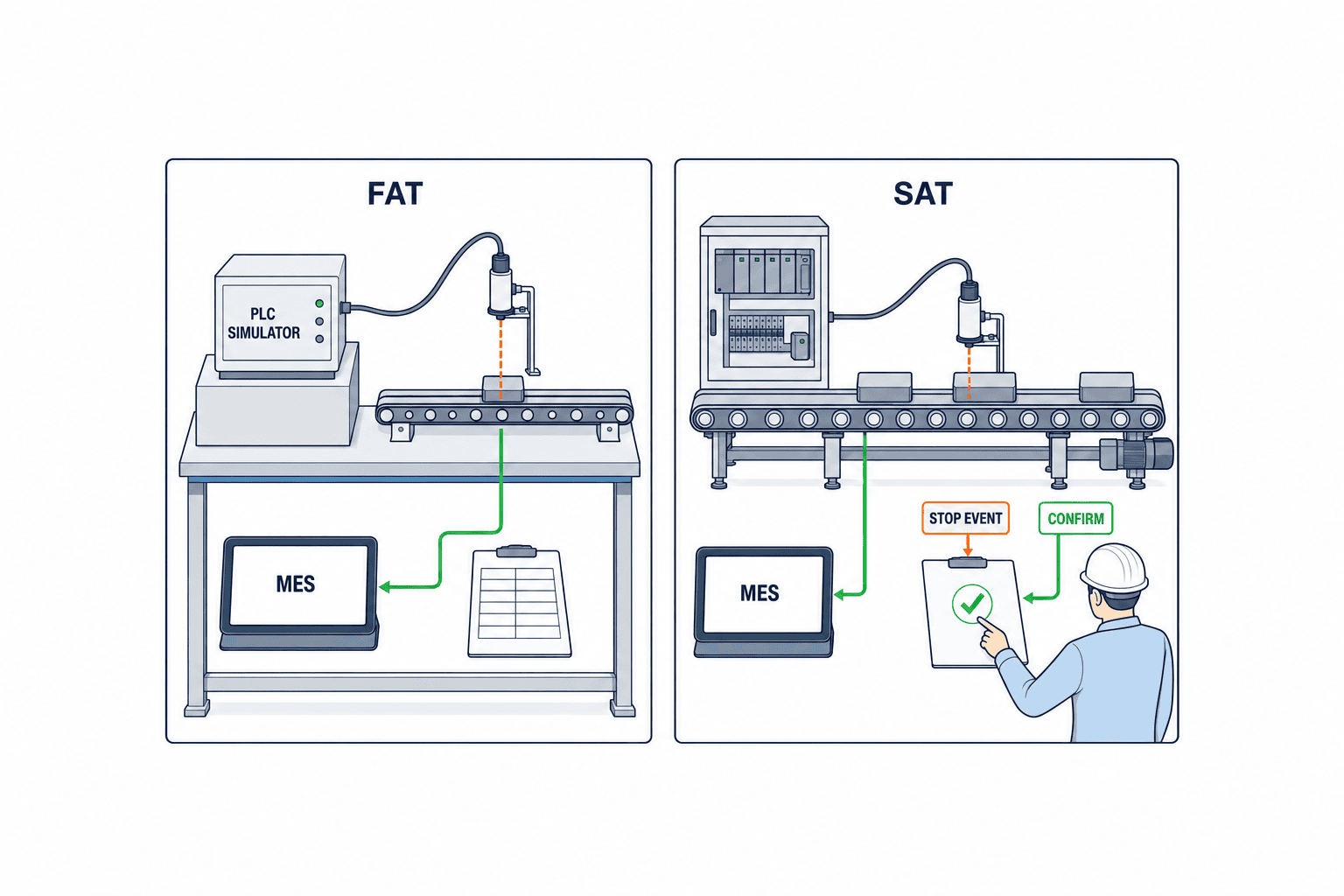
Test exception cases first in FAT and SAT
In a factory acceptance test (FAT), use simulated PLC events and sample production orders to verify stop start and end, alarm links, reason selection, correction history, and reports against the specification. In a site acceptance test (SAT), use real equipment and shifts to verify clocks, networks, terminal placement, and operator actions. ISA’s ISA-105 overview introduces a framework for FAT, SAT, and SIT in industrial automation. It does not define completion criteria for MES downtime reason classification; treat the test cases here as implementation recommendations.
Exception tests should include, at a minimum, retransmission of the same event, delayed arrival after communication loss, a shift change during a stop, a production order change during a stop, alarm bursts, an unconfirmed reason, blocking selection of a retired code, reason correction, overlap between manual and automatic events, and server clock drift. The tester should record reproduction steps, input, expected result, and actual result for each case. “The screen opened” is not a sufficient pass criterion.
Set numerical acceptance criteria for each site. For example, reconcile a line’s equipment stop log with system records and require no missed significant stop events, a count of unconfirmed reasons matching the daily report, and timestamp differences within an agreed tolerance. The “zero” in this example is a possible contractual target, not a general standard requirement. Needed accuracy depends on process cycle time and the level of detail used in improvement meetings. If you measure reason classification accuracy, agree in advance which observed record is the reference truth.
Begin production rollout with one line and one shift, running paper daily reports in parallel for a period. Do not assume that every difference means the system is wrong. Examine rounding in the daily report, shift boundaries, planned-stop exclusions, and late entries. Review a difference list daily, separating taxonomy corrections, signal-rule changes, and operator training improvements. Combine the age of unconfirmed events, missed major stops, explainability of totals, and team leader approval into the criteria for ending the parallel run.
Do not estimate ROI on the assumption that downtime will fall
Implementation costs include equipment connectivity, MES configuration, shop floor terminals, networks, taxonomy preparation, ERP integration, testing, training, and maintenance. Operating costs include code revisions, terminal replacement, equipment additions, support, and data quality review. Existing monitoring infrastructure can change initial cost, so equipment count alone cannot establish a market price. Have RFP bidders price licenses, connection points, terminals, shifts, retention years, and the unit cost of adding equipment separately.
Assess benefits based on downtime that has been classified, acted upon, and demonstrably reduced. Installing reason codes does not repair machines. Suppose a fictional line records 100 hours of downtime in a month, 30 hours remain unconfirmed, 20 hours are judged actionable, and actual countermeasures cut five hours. The benefit estimate should use the verified five hours, not 100 or 20. These figures are illustrative, not observed results. Economic value then depends on line capacity, downstream constraints, demand, and contribution margin per hour. If less downtime does not increase shipments, reduced overtime or outsourcing expense may be more relevant benefits.
After rollout, track monthly reason confirmation rate, age of unresolved events, share coded “Other,” number of code changes, agreement between event records and daily reports, and completion rate of improvement actions, alongside downtime. A high confirmation rate is meaningless if everyone selects “equipment failure” indiscriminately. Review classification detail together with shop floor workload; adjust the taxonomy and UI when needed. Detailed codes unused in improvement meetings may be removed.
Validate reason code assignment rules with real cases
When reviewing a taxonomy, do not agree on names alone. Read actual stop cases and test whether different team leaders would choose the same code. One person may want to classify every “conveyor stopped” event as a machine stop, while another needs to distinguish a transport jam, upstream wait, no product, and quality hold. Code descriptions should say what an operator must observe to select each one. Select “equipment failure” only when a fault or abnormality has been confirmed, not merely because the machine was motionless. Choosing “Reason unconfirmed” or an observable symptom before diagnosis is less likely to inflate later breakdown counts.
Prepare about five boundary cases: material fails to arrive and the machine idles; material is available but processing waits for a quality decision; an abnormal alarm stops a cycle but the machine restarts after a reset; a machine could run but is stopped because the downstream process is full; and a planned mold change takes longer than expected. Score stop detection and reason selection separately. The goal is consistent decisions among people. Adding categories while reducing agreement makes the resulting reports less trustworthy.
A reason can change during a long stop. If the stop begins with a material shortage and a machine fault is discovered after material arrives, decide whether to split it into two intervals or manage a primary and secondary reason. If an operator later picks the more convenient single code, either the material waiting time or failure time disappears. However, splitting too finely also removes the evidentiary basis for timestamps. Split only where records such as material receipt or a maintenance call support the boundary, and leave unknown intervals unconfirmed. Reports should distinguish estimated durations from confirmed ones.
“Planned stop” versus “failure” cannot be decided from the code hierarchy alone. Treatment depends on whether the stop was registered in the production plan, began earlier than planned, or extended beyond its planned end. If planned maintenance runs two hours over schedule, define how to classify the planned portion and the overrun. Time excluded from OEE availability may also differ from downtime reviewed by management. In that case, label reports and denominators clearly; do not display unlike numbers under the same “downtime loss” name.
Equipment makers may change alarm numbers with a firmware update. If MES reasons are mapped one-to-one to alarm numbers, store machine model, firmware version, applicable equipment, and effective start date in the mapping table. Provide a way for new alarms to fall into an unclassified queue. When a shop floor user confirms a reason, record which suggestion was chosen and review suggestion accuracy periodically. If suggestions frequently miss, investigate whether alarms and operational reasons are inherently different or the mapping is outdated.
Pitfalls in reporting across shifts, factories, and languages
Even with an event timestamp, shift assignment may not be unique. Night shifts span dates, and there may be holiday work, temporary shifts, or early machine starts. The ERP calendar, MES actual shift, and HR attendance shift serve different purposes. Assign the actual shift from when the stop occurred, and decide whether historical reports are recalculated after a shift roster is corrected. Display reporting time and calendar version. When converting for an overseas headquarters to UTC, retain the Thai factory’s local date by storing both the event time and factory time zone.
Across factories, even a shared parent code can cover different shop floor activities. If one site includes cleaning under “changeover” while another includes it under planned downtime, different shares of downtime do not necessarily reflect different improvement performance. Separate comparable common codes from site-specific codes, and standardize the calculation of shared metrics. Map site-specific codes to common parent categories without erasing local operating realities. Manage effective periods for the mapping and notify the reporting team when a site changes its definitions.
Translation is more than substituting words. A literal Thai or Vietnamese rendering of the Japanese term “choco-tei” (minor stoppage) may not make sense to operators. Put a short label and concrete examples in the UI, and make photos of common machine stops or standard operating procedures available as training references. If requiring all free text in English lowers input quality, accept the local language and use common code IDs for analysis. Have local team leaders validate candidate translations against actual stop examples. IT approval alone may yield a neat screen with categories nobody chooses.
When a team leader corrects a reason, retain the operator’s original entry. Use a three-stage workflow—operator entry, team leader approval, and maintenance root cause—only for equipment that needs it. Requiring three approvals for every short stop creates a backlog. Vary approval levels by severity, stop duration, and customer impact. If a category is frequently corrected, investigate ambiguous labels, poor suggestions, or missing information on the confirmation screen rather than blaming operators.
Screens and decisions needed for post-rollout improvement meetings
A dashboard showing only the “top ten downtime reasons” will not drive improvement. Users need to trace each event to its machine, product, order, shift, occurrence time, reason confirmation state, alarms, and actions. Review frequent short stops separately from rare long ones. Showing total duration, frequency, and average duration together helps distinguish lengthy failures needing part replacement from recurrent short jams needing adjustment. In monthly meetings, examine how targeted stops changed after the previous month’s action, not just the rank of reason codes.
Link each improvement action to an owner, deadline, metric to verify, target equipment, change made, and implementation date. For example, track whether the frequency and duration of workpiece jams decrease after adjusting a guide. Because product mix and operating time can change, compare equivalent operating shifts or stops per unit of production time as well as raw downtime. If stops fall after an action but simply move to another reason code, do not count that as an improvement. Review code revisions, process changes, and equipment maintenance history together.
Design shop floor screens separately from large charts for meetings. Operators need “stops to confirm now,” “evidence behind suggestions,” and “handover from the previous shift.” Team leaders need unresolved counts and reasons for delay; maintenance needs alarms and recurrence history; managers need action progress. Show each role its next action instead of crowding every detail onto one screen. If operators stop entering reasons after rollout, check whether the UI sequence fits the recovery workflow before attributing it to their attitude.
Checklist for the implementation decision
- Have the target machines and definition of “stopped” been agreed, including operating modes, products, and shifts?
- Can the system store machine state, alarms, operator reasons, root causes, and actions separately?
- Can it show unconfirmed reasons, assign an owner and deadline, and hand them over?
- Are the code owner, change approver, effective dates, and translation reviewers defined?
- Are equipment ID, manufacturing order ID, shift ID, and event ID defined as integration keys?
- Are there reporting rules for short stops, duplicate signals, communication loss, and stops crossing shifts?
- Can FAT and SAT reproduce abnormal shop floor cases and retain evidence?
- Are owners and meeting routines set for moving from classification to improvement action?
Conclusion
An equipment downtime reason code management system needs more than stop signals. Separate the state reported by a PLC, the reason confirmed by an operator, and the root cause investigated by maintenance. Govern code changes and make unresolved events visible. The MES provides the place for confirmation and handover, while the ERP contributes planning and business context. Put exception cases and acceptance criteria in the RFP. Expand beyond one line after the differences from daily reports can be explained; that is how downtime data becomes usable for loss analysis.
TOMAS TECH can help review equipment signals, design a downtime reason taxonomy and shop floor input flow, specify MES/ERP integration, and prepare FAT and SAT test cases. Even at the concept or RFP stage, contact us with details of the target line and your current daily reporting practice.
Frequently asked questions
How many equipment downtime reason codes should we start with?
There is no universal number for every factory. Start with a manageable set of top-level categories that operators can distinguish reliably. Add subcategories when ownership and improvement actions differ. After launch, measure how often “Other” and “Unconfirmed” are used, and revisit descriptions and training before adding more codes.
Can we use PLC alarm codes directly as downtime reasons?
They can be suggested reasons when you have verified that the machine’s symptom matches the operational reason. An alarm may instead be a consequence of the stop, and it may not describe a material shortage or quality check. Preserve the original alarm and manage the confirmed reason in a separate field.
Should the count of unconfirmed downtime reason codes be zero?
Avoid guesses made just to reach zero. Show “Unconfirmed” as a valid state with an owner and deadline. Distinguishing a provisional reason entered soon after a stop from a reason confirmed after investigation also separates missing facts from work still under review.
Is OEE downtime loss the same as downtime by reason?
Not necessarily. OEE uses definitions for planned operating time and excluded time. Downtime by reason classifies the duration of source events. The two are comparable only after rules for planned stops, minor stops, and overlapping line events are aligned.
Can we manage downtime reasons without an MES?
A small operation may start with existing daily reports or a machine monitoring system. But operator confirmation, change history, shift handover, and links to ERP manufacturing orders require MES-like functions as needs grow. Decide based on business functions rather than the product label.
What should FAT and SAT test first?
Go beyond one normal event. Test retransmission, communication loss, shift change, reason correction, retired codes, and overlap between manual and automatic entries. Agree actual acceptance thresholds based on the target equipment and cycle, and record inputs and expected results.
References
- ISA, ISA-95 Standard: https://www.isa.org/standards-and-publications/isa-standards/isa-95-standard
- ISA, ISA-95 operations event overview: https://www.isa.org/intech-home/2017/november-december/features/isa-95-to-support-smart-manufacturing-iiot
- OPC Foundation, OPC UA for Machine Tools Part 1: https://reference.opcfoundation.org/specs/OPC-40501-1/full
- OPC Foundation, InterruptionConditionType: https://reference.opcfoundation.org/MachineTool/v101/docs/9.2
- ISO, ISO 22400-2 KPI definitions: https://www.iso.org/obp/ui/?_escaped_fragment_=iso%253Astd%253A54497%253Aen
- NIST, Recommendations on Ensuring Traceability and Trustworthiness of Manufacturing-Related Data: https://www.nist.gov/publications/recommendations-ensuring-traceability-and-trustworthiness-manufacturing-related-data
- ISA, ISA-105 FAT/SAT/SIT overview: https://www.isa.org/standards-and-publications/isa-standards/isa-105-standards


