



In many factories, a stock count variance still travels through a spreadsheet, an approval email and a separate ERP adjustment. If you are implementing an inventory discrepancy approval system at a manufacturing site, the critical question is what happens between recount and a confirmed ERP posting. This guide turns that sequence into requirements and FAT/SAT tests. For the underlying causes of variances, see our inventory discrepancy guide. For count frequency and methods, see our stocktaking efficiency guide.
Define a variance case, not just an approval screen
Finding a difference does not authorize an immediate balance correction. The original count may be wrong, a goods movement may be unposted, and the valuation used for routing may differ from the amount finally posted. A case should travel through discovery, recount decision, independent recount, reason classification, adjustment request, approval, ERP posting, reconciliation and closure. A corrective action for a recurring cause can stay open after the accounting adjustment is complete.
Carry the variance case ID through to closure
The case ID should connect the first count, recount, photos, movement records, approval trail, ERP request, material or accounting documents, and reversal. Item alone is not a sufficient key: location, lot or serial, stock status, unit of measure, site and count cut-off matter. Preserve the original values and append corrections rather than silently overwriting a count.
Microsoft documents that its Dynamics 365 Supply Chain Management inventory journal workflow allows posting after approval. It also states that this workflow applies to Inventory Management transactions, not journals triggered by Warehouse Management. That is a product-specific boundary, not a universal ERP capability. Test which system originates a variance and where approval can actually block posting. Microsoft Learn: Inventory journal approval workflows. SAP likewise separates entering a physical count, initiating a recount where necessary, and posting differences. SAP Help: Physical Inventory Process.
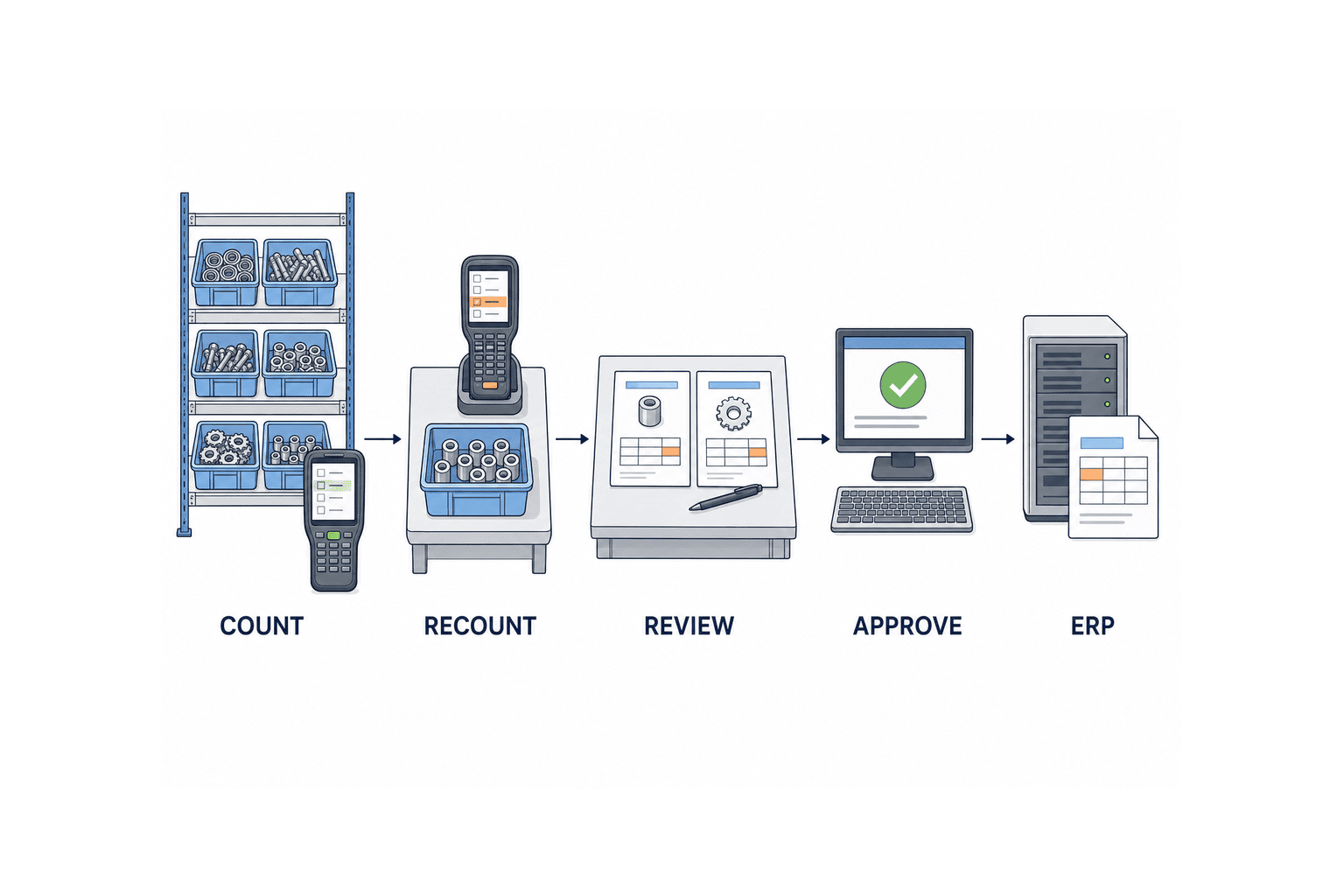
Inventory discrepancy approval workflow: states and owners
Write state, entry condition, allowed action, owner and exception for every transition in the RFP. “Has approval workflow” is too vague to compare vendors. The following is a proposed operating design, not a claim about a particular product.
| State | Entry condition | Required control |
|---|---|---|
| First count recorded | Device submits item, location, time and quantity | Keep raw result; show unsent offline records separately |
| Awaiting recount | Rule or reviewer flags a variance | Assign a different counter; do not replace the first result |
| Investigation | Recount confirms a difference | Inspect movements and choose a reason or “undetermined” |
| Requested | Evidence and exposure are available | Route by authority; block self-approval |
| Approved, pending posting | All required decisions recorded | Send a uniquely identified ERP request |
| Posting failed or uncertain | ERP rejects or response is lost | Query ERP before retry; do not claim completion |
| Posted, pending reconciliation | ERP document number received | Match document lines and resulting balances |
| Closed | Reconciliation and evidence complete | Retain read-only history and open improvement work separately |
If recount eliminates the variance, close the case with “no adjustment”, but retain both counts and their operators. If the investigation finds a missing issue or receipt, process the source transaction through its normal route rather than making an unexplained stock adjustment.
Recount is an independent observation
Having the same operator re-enter a number while looking at the book balance is weak verification. Assign another person where practical, use a blind count, check UOM and packaging, and examine the bin from a different direction. Define the permitted number of recounts and the escalation point in company policy. Oracle’s documented cycle count process can request automatic recounts outside approval tolerances and hold a count for approval after the configured maximum. Treat this as an implementation example, not a recommended universal limit. Oracle: Count Adjustments and Approvals.
For an offline handheld, preserve the physical observation time separately from server receipt time. Movements between first and second counts must be reviewed against one cut-off. A late upload must not silently alter an already approved case. Hold it as a conflict for review.
Use reason codes to select the right remedy
Reason codes should route work, not serve as a blame label. Options might distinguish missing receipt, missing issue, location transfer, UOM conversion, lot or status mismatch, duplicate count, unrecorded scrap, master-data error and cause still unknown. Record the supporting transaction, photo or production order. A code should determine whether the next action is source-document correction, another count, a quality review or a true inventory adjustment.
SAP’s physical inventory review example includes selecting a reason for each variance line before posting. Map any standard codes to the site’s own taxonomy, and name the owner who can change that mapping. SAP Help: Physical Inventory Document Reviews.
Some sites must close a period while the cause remains under investigation. Specify an exception route with a provisional reason, evidence, investigation owner and due date. Do not mark root-cause work complete just because the ERP balance was corrected. Review unresolved cases and repeated causes monthly.
Approval thresholds and segregation of duties
Quantity alone misses expensive small parts. Value alone misses a critical serialized part or quality-held stock. Consider quantity, estimated monetary exposure, lot or serial importance, stock status, repeated variance and reason. The actual thresholds and tolerances are company policy decisions informed by finance, audit and operations; this guide does not present an industry-standard amount.
Show the valuation method and price date used for the approval estimate. A standard-cost or moving-average ERP may post an amount that differs from the estimate. Decide whether the case must be held or approved again when the actual posting amount crosses a higher authority band.
Include exceptions in the authority matrix
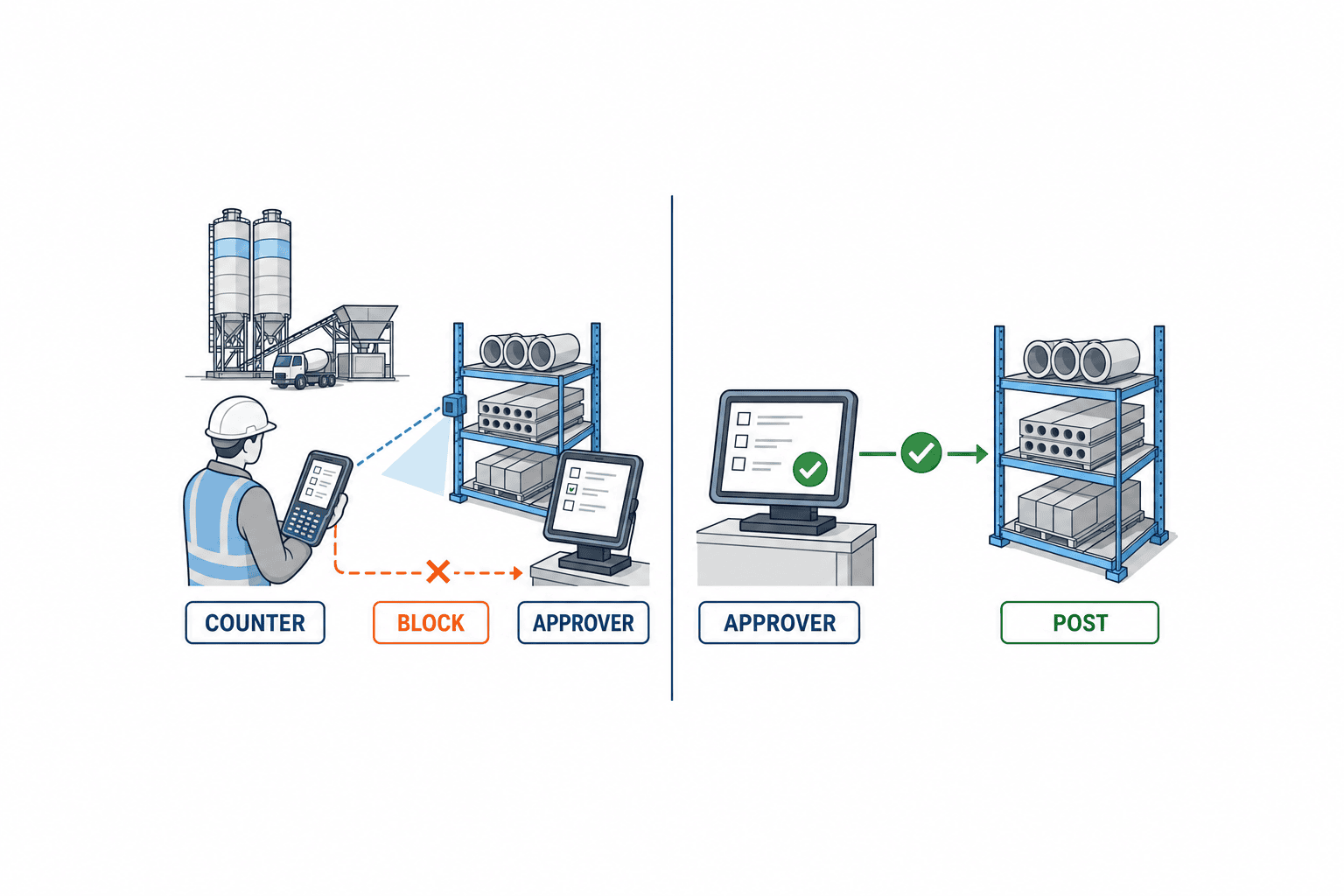
Separate the roles of first counter, independent recounter, investigator, requester, approver and posting operator as far as staffing permits. At a smaller site, record compensating checks for necessary overlaps. Block self-approval, log delegation, and independently review emergency administrator overrides. NIST SP 800-53 AC-5 describes identifying duties requiring separation and assigning access rights to support that separation. It is a security-control reference, not Thai tax or accounting law. NIST SP 800-53 Rev. 5.1.
| Action | Counter | Warehouse supervisor | Finance | Administrator |
|---|---|---|---|---|
| Enter first count | Allowed | Allowed | Normally read-only | No routine use |
| Perform independent recount | Only if not first counter | Allowed | Normally read-only | No routine use |
| Submit evidence | Allowed | Allowed | Review | Configure access only |
| Approve | Never own case | Within delegated band | For designated high-risk cases | No routine approval |
| Post ERP adjustment | Normally blocked | Only after approval, if authorized | As company policy requires | Maintenance rights not routine business rights |
| Change thresholds | No | Request | Joint approval | Implement and log |
Add deputies, night shifts, holidays, outsourced warehouses and quality-held material to the final matrix. Preserve the version of the authority matrix in force at the time of each decision.
Link ERP posting and the audit trail
Approval is not posting. SAP documentation states that posting a physical inventory difference creates a material document for adjusted stock and an accounting document for the related account activity. Verify the specific document and integration behavior of your ERP; this is a description of SAP’s process. SAP Help: Posting Inventory Differences.
One case may produce several ERP document lines for different lots, locations or stock categories. Retain the mapping between case ID, case line, request ID, ERP material document and accounting document. A reversal must point to the original document. Never replace history with only the current balance.
Do not leave posting failures in the “approved” state
Use a stable posting request ID. If the ERP call times out, distinguish an explicit rejection from an unknown outcome. Query ERP by that ID before retrying. A retry with a new ID can duplicate the adjustment. Record approval time separately from actual posting time, especially for overnight batches and period cut-off.
An audit event should explain what occurred, when, where, by whom and with what result. Preserve old and new values, role, device, timestamp and timezone, reason, attachment version, approval-route version, ERP response and export. NIST AU-3 provides a useful audit-record content reference, but does not determine your document retention period. Confirm retention with local finance, legal and audit owners. NIST SP 800-53 Rev. 5.1.
If a backdated movement changes the difference before approval, recalculate and reroute. If it changes after approval, hold, reverse or resubmit according to an approved procedure. Do not silently modify an approved amount. The handling of closed periods requires the site’s accounting policy.
RFP checklist: ask for proof, not “supported”
For each requirement ask the vendor to mark standard, configurable, custom development, external integration or unavailable, and show the screen, API, constraint and priced scope.
- Case key and cut-off: distinct cases for item, lot, location, stock status, UOM and time.
- Recount: independent assignment, blind display, attempt limit, zero-difference closure and offline reconciliation.
- Reason: maintained codes, evidence, unresolved exception and source-document repair branch.
- Authority: quantity, estimated value and risk rules with version history.
- Approval: self-approval block, delegation, rejection, change invalidation and shift cover.
- ERP: idempotent request, success/unknown/failure distinction, document return and reversal reference.
- Audit: before/after data, rule versions, access changes, attachments, ERP reply and export.
- Operations: overdue queue, owner, notification, site access and master-data maintenance.
Also supply real peak case volume, device count, offline duration, acceptable wait time, authentication, retention, backup and recovery expectations. Ask for multilingual screens, reason codes, notices, exports and procedures, not just a translated home screen.
Demonstrate the full sequence
In the demonstration, create a variance, have a different operator recount it, find an unposted issue and correct the source transaction without an adjustment. Then create a confirmed variance crossing two authority bands, return it to the requester, change the quantity and require renewed approval. Finally disconnect ERP after posting but before its response and prove the retry cannot post twice.
Give every bidder the same sample data
There is no need to disclose the full production database. Give each bidder the same anonymized set so their answers can be compared. Part A might be counted in pieces across two locations; Part B might require carton-to-piece conversion; Part C might have a lot and a quality-hold status; Part D might have a small quantity variance but high unit value. For each, include first count, recount, book quantity at the cut-off, surrounding receipts and issues, reference unit price and the expected investigation path. Ask vendors to load those cases and show which need recount, which should correct a source transaction, who approves, and how many ERP document lines result.
Compare costs beyond the implementation fee. Break out additional reason codes, authority-route changes, ERP API changes, expansion to another plant, multilingual documents, storage and support. A vendor may call the approval screen “standard” while pricing the integration to your ERP separately. Map every priced line and exclusion to an RFP requirement ID. An empty estimate field should not conceal a scope gap that appears only after contracting.
Test changes to approval routes
Organizations and people change. Require versioned thresholds and approver lists, effective dates, authorization to change the rules, and a policy for in-flight cases. Does a request submitted before the effective time follow the old route or move to the new route? If an approver leaves and the account is disabled, does the case move to the next manager, or must an administrator reassign it? Who approves that reassignment? These cases are easy to miss in a normal demo and can create a large backlog after go-live.
Also test missing reference costs, undefined UOM conversion, a lot absent from ERP, and a closed posting period. A request can look complete in the approval UI but still be impossible for ERP to accept. Specify which validations run at data entry, submission and immediately before posting, and what error the requester sees at each point. This reduces rework on the shop floor.
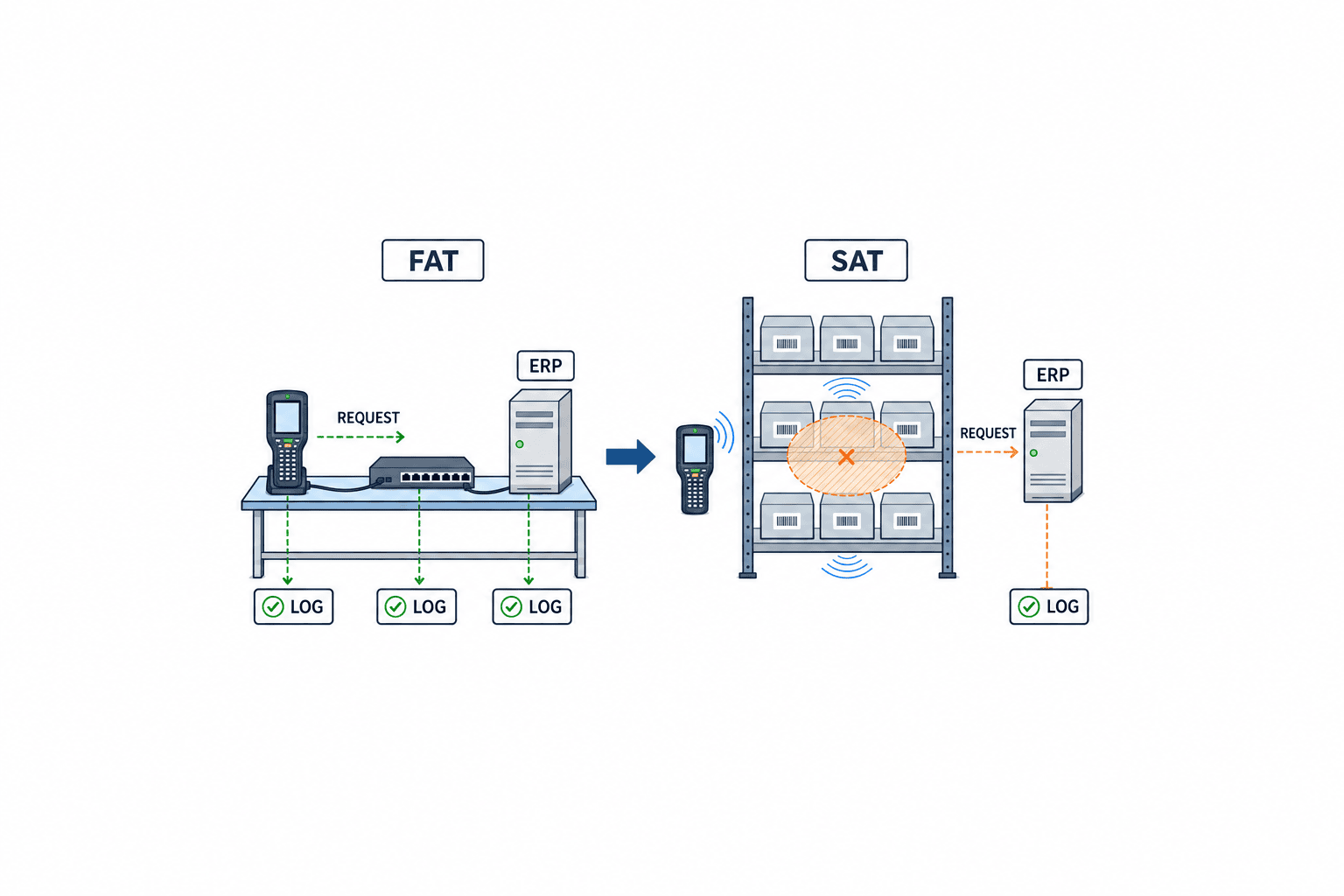
FAT and SAT: acceptance evidence
FAT tests configured logic and integration in a controlled environment. SAT repeats the critical scenarios with actual site devices, network, roles and ERP connection. Every test needs input, expected result, retained evidence, pass owner and retest condition.
| ID | Scenario | Pass evidence |
|---|---|---|
| F01 | Register matching and differing counts | No adjustment for match; original differing count retained |
| F02 | First counter tries recount and self-approval | Denial according to matrix; denial event logged |
| F03 | Independent recount resolves difference | Both counts retained; no ERP adjustment |
| F04 | Cause remains unknown | Normal route blocked or defined exception with owner and due date |
| F05 | Value at, below and above authority boundary | Correct approver and price-date evidence |
| F06 | Change quantity or reason after submission | Earlier approval invalidated; before/after and resubmission recorded |
| F07 | ERP explicitly rejects a posting | Case remains incomplete, owner notified |
| F08 | ERP posts but response is lost | Document found by inquiry; no second adjustment |
| F09 | Send same request ID twice | One ERP posting and one case result |
| F10 | Reverse and resubmit | Original and reversal references retained |
| F11 | Multiple lots, locations and units | Line-level ERP results reconcile to balances |
| F12 | Compare audit export and screen | Operators, times, decisions, changes and ERP IDs match |
| S01 | Disconnect handheld in real aisle | Observation time retained, unsent work visible, no duplicate |
| S02 | Shift handover | Owner, deputy and notifications follow site rule |
| S03 | Movement across cut-off | Recalculation or hold follows approved process |
For F09, compare the ERP balance, document count, interface log and case history using the same ID. For F05, test values immediately on either side of the boundary and the rounding rule. For S01, use the actual weak-signal area and confirm that operators understand the unsent indicator.
Agree how failed tests are handled before signing
Set defect severity before signing: duplicate accounting entries, approval bypass and missing evidence must be fixed before go-live. A minor display defect may have a dated workaround and retest. Save test item masters, opening balances, authority settings and procedure versions so the result can be reproduced.
Turn a boundary value into a reproducible test case
For F05, create a case whose estimated value is exactly the company’s first approval boundary. The test sheet should name the item, variance quantity, cost version, calculated exposure and expected approver. Repeat with the quantity one smallest unit lower and one higher. For bulk material measured in decimals, define the minimum input increment and where rounding occurs. Compare not just the screen but the amount passed to the approval engine, the stored route version and the actual amount returned by ERP. If company policy says a higher actual ERP value triggers a hold, test the hold display and notification in FAT, then check in SAT that the responsible employee understands the message.
For F08, arrange for ERP to create its document and then suppress the response. A screen showing “communication error” is not sufficient for a pass. Find the existing document by case or request ID, verify its item, lot, quantity and valuation date, then show that a retry creates no second document. If the ERP cannot be queried by request ID, specify an alternative reconciliation key and manual hold procedure before signing the contract. Restrict the retry button to a suitable role rather than every requester.
For F12, include a case whose approver changed and another whose authority table was changed by an administrator. The current approver field alone cannot prove who had authority at the time of the decision. Reconcile the application history, CSV export and ERP document, including conversion between the displayed Thailand time and the stored time basis. Confirm how long photos and attachments remain accessible in a bulk export and how former employees appear. These requirements can change the data model if discovered only after implementation.
Rollout and measures after go-live
Pilot one warehouse with several stock types, UOMs and lots. Decide which in-flight spreadsheet cases close under the old process and which move to the new system; map case numbers at cutover. Remove test user access and restore least-privilege posting rights before production use.
Measure time waiting for recount, unresolved-reason share, approval lead time, failed ERP postings, prevented duplicate attempts, repeat causes and cases fixed through source transactions rather than adjustments. These are proposed management indicators, not promised performance gains. An initial rise in recorded variances can reflect improved visibility, so freeze definitions and the baseline before comparing periods.
Prepare source material before contacting a vendor
Collect a sample count sheet, variance list, approval email, ERP adjustment document, role list, item/lot/location master and examples from night shift or offline operation. Redacted samples are sufficient. Mark unresolved decisions explicitly instead of letting a vendor fill them silently. In particular, monetary thresholds, accounting treatment and record-retention periods belong to the customer’s finance, audit and legal owners.
FAQ
Is the ERP’s standard inventory approval workflow sufficient?
It depends on the product, module and integration. Test recount, reason investigation, offline handheld handling, approval enforcement and ERP-result reconciliation end to end. Microsoft’s documented journal workflow has a specific module boundary, so the screen label alone is not proof of coverage.
What monetary threshold should an adjustment approval use?
There is no universal number. Finance, audit and operations should examine historic variance values, stock risk and authority policy, then simulate the expected case load by approver. Include what happens when the actual ERP amount differs from the approval estimate.
Should a resolved cycle-count variance still be recorded?
Yes. Keep both count values, people, times and the no-adjustment outcome so that an absent ERP adjustment can be explained. Repeated recounts also identify where process or master data needs attention.
Is keeping an approval email enough for an ERP audit trail?
Usually it cannot connect the approved quantity to the actual ERP posting, reversal, permission version and reconciliation. Link all of these through the case ID. Local retention and accounting rules need review by the responsible specialists.
Conclusion
An inventory discrepancy approval system succeeds when recount, investigation, authority, one-time ERP posting and audit evidence form one traceable case. Put exceptions and boundary values into the RFP. Use FAT for configured behavior and SAT for the realities of the shop floor.
If your Thailand manufacturing site is defining the workflow, preparing an RFP or specifying FAT/SAT, contact TOMAS TECH even at the scoping stage. Existing count sheets and adjustment documents are enough to begin mapping the decisions.


