


Selecting an industrial Ethernet switch cannot be decided by simply checking if there are enough available ports. When connecting PLCs, HMIs, inspection cameras, and traceability terminals in a Thai factory, it is necessary to consolidate communication protocols, copper/fiber media, PoE power, panel temperature, diagnostics for maintenance, and security settings into the same specification document. This article provides practical procedures for equipment and OT personnel to compare candidates before ordering and to verify them during FAT and SAT. It does not recommend or guarantee the performance of specific products, but organizes the items to be finalized through actual equipment specifications and on-site testing.
Do Not Start Selecting Industrial Ethernet Switches by “Searching for Model Numbers”
The first thing to create is not a grand future vision of the entire network, but a table of the actual devices that will be connected to the switch being procured this time. List what will be connected to each port and which communication stoppage would halt the process. For example, even with the same RJ45 connector, cyclic communication between PLC and remote I/O, image transfer from inspection cameras, and temporary connection of a maintenance laptop all differ in traffic, power, monitoring, and access control. Before comparing two candidates by price alone, confirm that both meet the same on-site requirements.
The specifications of the switch itself should be separated from the overall network design. For IP address schemes and factory-wide wiring plans, refer to the Practical Guide to Industrial Network Construction. This article focuses on the port configuration, built-in functions, installation conditions, and acceptance evidence for the switch as a procured item. Topology design, including ring switchover times, is covered in the Industrial Network Redundancy Design article. Here, when redundancy is required, the question is whether the candidate device implements the required method and can be tested in combination with the target equipment.
Input materials before ordering include the device connection ledger, existing wiring diagrams, panel drawings, communication specifications, on-site temperature and humidity, power supply, allowable downtime, and maintenance system. For any undetermined items, do not enter estimated values—clearly state “to be confirmed on site.” To reduce misunderstandings between those creating and those proposing the specification, place the required value and measurement method side by side. For example, “high speed” is not comparable, but “connect this camera to this port and record frame drops during simultaneous operation at specified load” can be judged during FAT.
Determine Port Count and Media from the Connection Ledger
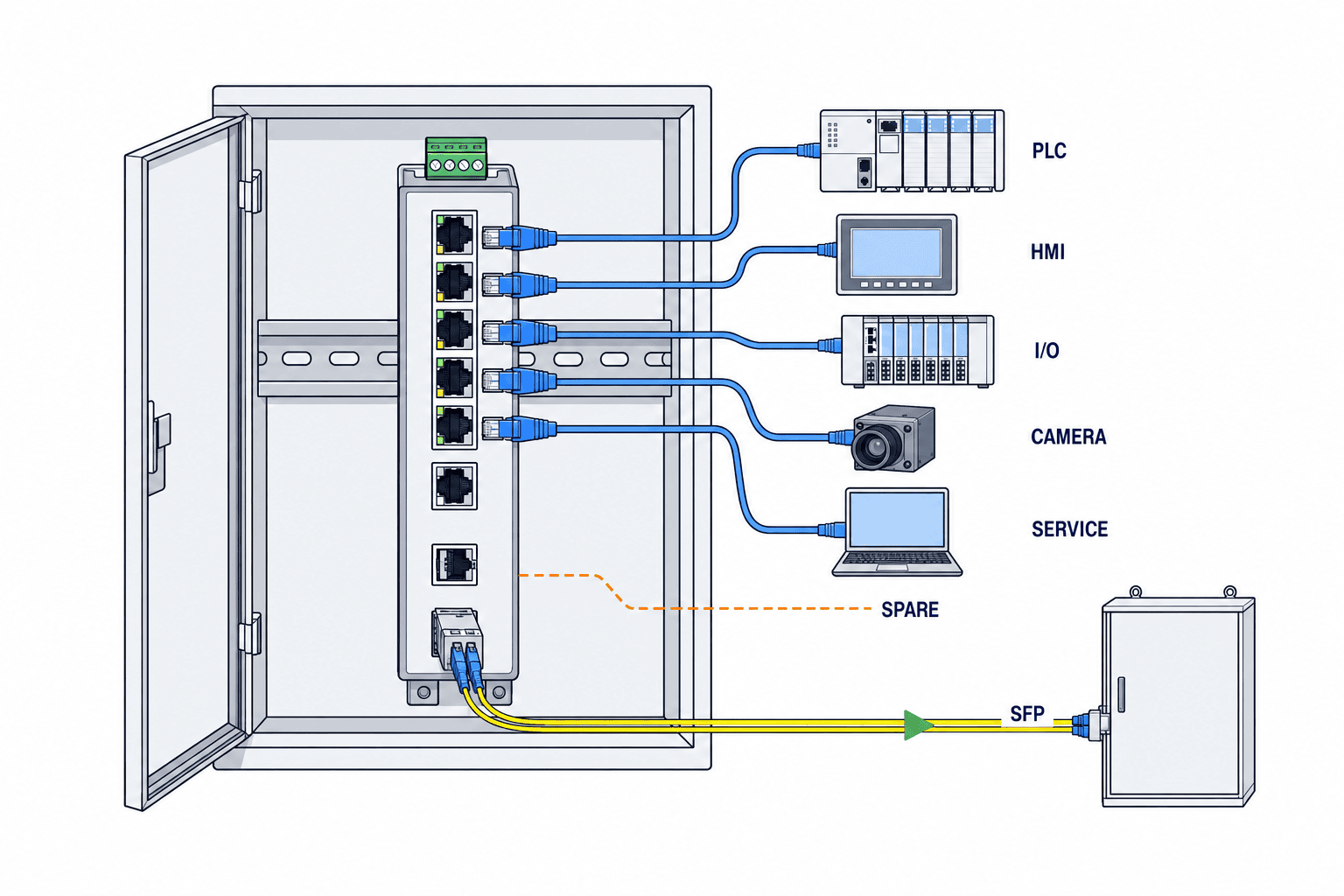
First, for each piece of equipment, list the terminal name, communication protocol, terminal-side speed, terminal-side connector, copper or fiber, cable length, power supply method, and whether it is permanent or temporary. Concluding that “eight RJ45s are needed” alone risks missing uplink or maintenance ports. Separate columns should be used for current permanent terminals, uplinks, future expansions, spares, and test ports. The spare ratio is not a fixed value common to all factories but should be determined based on expansion plans and spare parts policy. If unused ports are left, also decide who will be authorized to enable them after operation starts.
Do not simply total copper ports and SFP slots as “total ports.” For each candidate, check whether SFPs are combo ports exclusive with fixed copper ports, supported speeds such as 100M/1G, types of optical modules and fiber, connectors, and distances. Since SFP module compatibility and recommended products differ by model, do not judge the feasibility of optical connections based only on the switch body quotation. If there are strong electromagnetic noise sources along the wiring route or inter-building connections, do not assume that simply adopting fiber media will solve everything; evaluate grounding, insulation, routing, and media conversion at the terminal side as part of the installation design.
Phoenix Contact’s current product lineup includes models with different RJ45 and SFP configurations, PoE, protection ratings, and operating temperatures. This illustrates that the “industrial” label alone does not guarantee uniform specifications, and specific temperature ranges or port counts should not be assumed as common requirements for all products. Source: Phoenix Contact Industrial Ethernet Switches
The procurement table should include not only terminal ports but also the speed required for uplink connections, mirror ports for diagnostics, and the management unit for spare parts. If there are devices handling images, check not only the average bandwidth but also the timing and peak of simultaneous data transmission. Even if the catalog’s backplane value is high, actual performance will vary depending on the on-site camera settings, cables, and terminal capabilities. If necessary, specify in the contract documents the conditions for simultaneous operation of actual cameras, PLCs, and HMIs during FAT.
Decide Between Managed and Unmanaged Based on Diagnostic and Operational Requirements
Unmanaged switches reduce configuration work, but if you require per-port statistics, VLANs, access control, event notifications, etc., they may be excluded from consideration. However, it is also incorrect to assume that “any managed switch can do everything.” Functions depend on model, firmware, license, and management method. Selection should include not only whether the required functions exist, but also who will perform initial setup, where configuration files will be stored, and who will restore them in case of failure.
For a single, isolated small-scale system that does not require traffic separation or remote diagnostics, unmanaged switches may be candidates. On the other hand, if you want to separate access between PLCs, cameras, and maintenance terminals, have the maintenance department monitor port failures, or manage multicast and priority control, specify the required management functions in the RFP. The presence of management functions does not automatically guarantee communication quality. Default settings may not provide the expected behavior, and configuration changes can affect operations.
ODVA’s infrastructure guide for EtherNet/IP recommends considering IGMP snooping and queriers according to application. For control communications using multicast, confirm both the switch’s functions and the overall network configuration. Treating IGMP as a simple checkbox on a switch risks overlooking the absence of a querier or configuration mismatches. Source: ODVA Network Infrastructure for EtherNet/IP ODVA’s security document also states that while management functions such as port control, QoS, and IGMP can contribute to performance and protection, configuration testing is necessary to avoid blocking legitimate communications. Source: ODVA Securing EtherNet/IP Networks
When selecting, also check what can be read from port statistics. Can displays and notifications such as link up/down, error counters, discarded packets, PoE status, power supply abnormalities, and temperature abnormalities be used for on-site failure analysis? Even if SNMP support is listed, whether the required information is published in the MIB and whether the monitoring system can interpret it are separate issues. During FAT, intentionally disconnect cables and check which port appears on which screen or log after how many seconds. Monitoring functions that do not have a responsible recipient have little operational effect.
Do Not Confuse Required Functions of PROFINET and EtherNet/IP
The general term “Industrial Ethernet compatible” does not guarantee the functions required by the protocol used in your process. For PROFINET installations, you must confirm the adopted Conformance Class, diagnostics, topology detection, and compliance with the planned network configuration. The 2025 Design Guideline from PROFIBUS & PROFINET International organizes requirements such as certified switches, SNMP, and LLDP by Conformance Class, explaining that each class defines minimum functions. Always cross-check product certificates and technical documentation; do not assume the entire system is compliant just because a switch is labeled with a certain class. Source: PI PROFINET Design Guideline, 2025
For EtherNet/IP installations, focus on I/O communication methods, multicast usage, IGMP, QoS, and speed negotiation with existing devices. ODVA’s guide divides recommended conditions by network topology and application, so do not mechanically apply the same settings to every factory. Even if manufacturer documentation states “EtherNet/IP compatible,” always conduct FAT with the actual combination of PLCs, I/O, drives, and monitoring terminals to be connected. Source: ODVA Network Infrastructure for EtherNet/IP
If your configuration carries multiple protocols on a single device, list the bandwidth, priority, multicast, VLAN, and diagnostic methods for each terminal. Do not oversimplify priority settings as “just prioritize control”; for example, whether camera images reach inspection judgment in time must be evaluated against the process’s allowable time. Design changes involving gateways, firewalls, and upper-level IT networks cannot be solved by simply replacing switches. Obtain required ports, communication directions, and timing conditions from equipment manufacturers and feed them back into your on-site network design.
Distinguish Between Single Device PoE Rating and Simultaneous Power Supply on All Ports
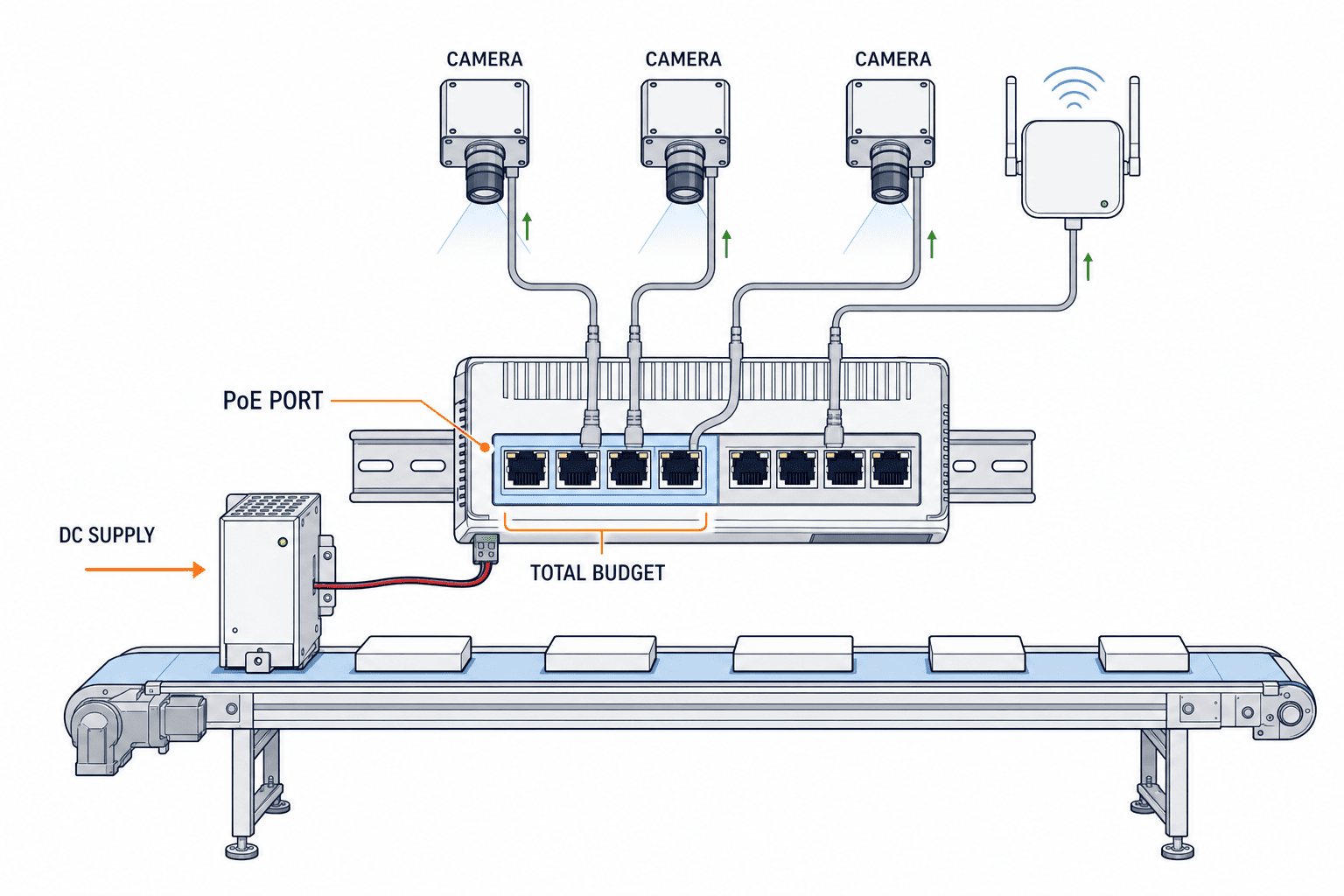
When powering cameras, wireless APs, and display terminals via PoE, do not purchase based solely on a switch’s “PoE compatible” label. For each connected device, check the required IEEE standard and class, maximum power consumption, startup behavior, and necessary connection cables. Next, separately verify the per-port limit and the total PoE budget for all ports on the switch. For example, even if the per-port limit is sufficient, starting multiple cameras and lights simultaneously may exceed the total power budget. Conversely, looking only at the total power may overlook a device’s per-port requirement.
PoE power conditions are not realized on the device side just by listing standard names. The IEEE 802.3bt working group indicates that the four-pair power standard was approved in 2018. For procurement, in addition to confirming compliance with the standard, check the combination of power sourcing equipment (PSE) and powered device (PD), cables, port assignments, and product-specific power budgets. Source: IEEE 802.3bt Task Force For calculations, gather the maximum requirements of all devices and confirm with the manufacturer, including design margins. There is no industry standard for a uniform margin rate.
PoE power supply also affects the switch’s own input power and heat generation. Even when using 24 V DC for DIN rail devices, the required input range and need for separate power sources vary by model. Check the power balance, including power supplies, fuses, terminals, panel temperature, and backup power. The product description for Phoenix Contact’s IP67 PoE switch specifies, for certain models, 7 PoE ports, a 150 W budget, and 24 V input conditions. These are specifications for that particular model and should not be generalized to other industrial switches. Source: Phoenix Contact Managed IP67 switches
During FAT, start all PoE devices simultaneously and confirm that power supply is not interrupted under the most demanding operating conditions. Record which devices start up first during reboot, and whether camera settings and PLC communications are restored after power cycling. During SAT, reconfirm with the actual cable lengths and power supplies on site. The purpose of these two stages is to absorb differences between catalog power conditions and actual installation conditions.
Assess Temperature, Humidity, Dust, and Vibration by Installation Location in Thai Factories
A simple judgment such as “Thailand is hot, so use high-temperature models” is risky. Conditions differ between control panels in air-conditioned control rooms, non-air-conditioned panels near outdoors, and line-side locations exposed to washdown. You must measure not only the average building temperature, but also the panel temperature at the candidate device’s mounting position, ventilation, heat from surrounding equipment, and conditions during shutdown and startup. Record humidity, condensation, dust, corrosive atmosphere, vibration, and cleaning methods for each installation location. Check whether the candidate’s operating temperature range and IP rating match site conditions, along with the manufacturer’s installation orientation and spacing instructions.
Selecting a model with a high protection rating does not eliminate the need for panel design. The choice of DIN rail mounting, external M12 connections, cable glands, and terminal blocks affects installation and maintenance. Do not confuse the IP rating of panel-mounted devices with the overall protection of the panel. Phoenix Contact’s product range includes both panel-mounted and field models such as IP67, but temperature, input voltage, and certifications differ by model. Source: Phoenix Contact Industrial Ethernet Switches Therefore, do not assume “industrial models can be used at high temperatures”; always link the latest datasheet for the specific SKU to your purchase order.
For vibration and electromagnetic noise, do not just include the terms in your RFP; specify proximity to machinery, routing with inverter wiring, grounding/shielding, and mounting orientation. Specify required test standards and certifications according to site and customer requirements, and confirm the applicable model numbers and versions for compliance certificates. If cables are difficult to replace, connector type and bend radius should also be considered at purchase. After installation, label so that port numbers and destinations match across drawings, physical equipment, and management screens.
Separate Power Supply and Shutdown Modes from Switch Failure Rate
Even if the switch itself has dual power inputs, connecting both to the same power supply unit does not avoid common-mode failures. Determine dependencies on power supplies, UPS, distribution, cables, terminals, and upstream systems based on the required allowable downtime. Confirm redundancy input, power alarms, and behavior during single power loss in both product specifications and testing. How control communications behave during switchover should be treated as a system test result including connected devices.
Communication redundancy such as ring or dual-path is not determined by switch model alone. You need to specify the adopted protocol, compatibility of all devices, wiring, failure points, and switchover conditions. In the current purchase table, write “required redundancy method,” “related models and versions,” “expected process behavior during failure,” and “FAT test conditions,” and check detailed topology in the aforementioned redundancy design documents. If the method is not described in the design documents, do not approve candidates simply labeled “ring compatible.”
Even when keeping a spare switch in the warehouse, recovery is only possible when configuration files, firmware, SFP, terminals, labels, and restoration procedures are all prepared. Decide at procurement whether the on-site maintenance team can restore settings or if you will rely on the vendor. If you lose track of the management password during a failure and stop the equipment, this is an operational cost not reflected in the purchase price.
Security Functions of Industrial Switches Should Be Ordered Together with Maintenance Procedures
For devices with a management interface, include initial account setup, password management, management network, unnecessary services, unused ports, configuration backup, and firmware updates as handover items. This is not just to follow general security best practices, but to define who can change what during maintenance operations. CISA’s ICS documentation recommends restricting management access of network devices to only necessary personnel, using secure management protocols, and highlights the risks of unprotected ports. Source: CISA Common Cybersecurity Vulnerabilities in ICS
However, disabling ports or services all at once on running equipment is dangerous. Since remote diagnostics by machine manufacturers or maintenance PC connections may be required, create an allowlist and work procedures first, and only apply them after confirming normal communication during FAT. Record configuration changes, including backups, reasons for changes, approvals, and rollback methods. ODVA also clearly states that filters must not block normal communications. Source: ODVA Securing EtherNet/IP Networks
Do not judge solely by whether firmware is new or old; check the manufacturer’s support period, update delivery method, vulnerability notifications, and configuration compatibility before and after updates. Updating during production requires planned downtime, verification in a test environment, and recovery procedures. Also compare whether candidate manufacturers can supply replacement units in Thailand and whether technical support is available locally or at nearby sites. If delivery lead time cannot be confirmed, do not describe it as “short lead time” in articles; instead, require it as part of the quotation response.
Specify Not Just “Function Names” in RFPs, But Also How Evidence Will Be Provided
Even with the same item names, if the level of detail in quotation responses differs, you cannot compare them. In the following table, requirements and evidence are paired. Fill in numerical values based on equipment asset lists and site conditions, and when quoting manufacturer public documents, record the model, firmware version, and datasheet date. If “equivalent products allowed,” define who will judge equivalence and how to compare.
| Requirement Area | Conditions to Specify in RFP | Evidence Required from Proposer |
|---|---|---|
| Ports | Number of copper/fiber/speed per device, uplink, spare | Port allocation table, SFP compatibility list, model-specific datasheet |
| PoE | Standard and max power per device, simultaneous startup, total budget | PSE/PD compatibility table, total port power calculation, power supply configuration |
| Communication | Required functions for PROFINET or EtherNet/IP | Certification/function documentation, actual device connection test plan |
| Management | VLAN, IGMP, QoS, SNMP, logs, configuration restore | Function list, configuration examples, monitoring data samples, restore procedures |
| Environment | Panel temperature, humidity, dust, vibration, mounting | Model-specific environmental ratings, installation manual, compliance certificate |
| Operation | Spare parts, support, maintenance contact, updates | Local supply response, lifecycle information, maintenance conditions |
When comparing prices, include not only the main unit, but also SFPs, PoE power supplies, additional power supplies, panel space, cables, configuration labor, testing labor, maintenance contracts, and replacement parts. If you only compare main unit prices for different configurations, post-installation costs will be hidden. Narrow down to candidates that meet the required conditions, then compare total procurement cost and recovery capability during downtime. Even if you buy a high-function model, if there is no one to configure or monitor it, those functions have no value.
In the RFP question section, require manufacturers to clearly state whether their answer is “standard feature,” “optional,” “planned for future,” or “not supported.” For features dependent on firmware version, confirm that they are available in the version delivered. If an alternative model is proposed, re-check not only ports but also power supply, temperature, dimensions, management functions, configuration migration, certification, and device compatibility. Deciding the final approver among IT, OT, equipment manufacturer, and maintenance will reduce rework during on-site installation.
Confirm “Documented Compliance” with Actual Devices During FAT and SAT
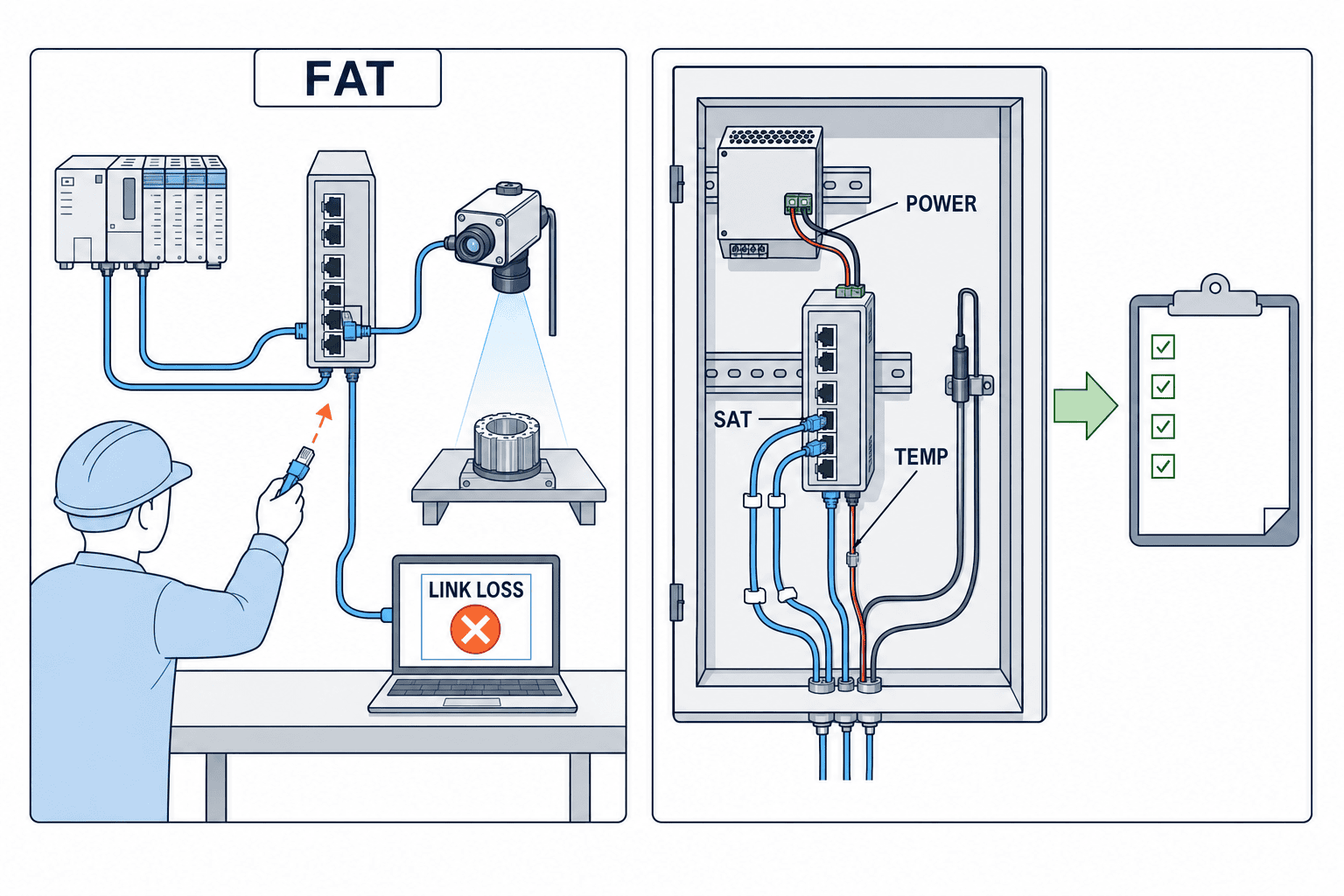
During FAT (Factory Acceptance Test), connect candidate switches with target PLCs, I/O, cameras, and HMIs as much as possible, and test not only normal operation but also simultaneous startup, peak communication, cable disconnection, single-side power failure, and configuration restore. If not all devices are available, clearly state the missing combinations and conditions to be carried over to SAT. Record the firmware, SFP, PoE devices, cable lengths, and power supplies used in the test, and note any differences from mass production equipment. The results should not just state “communication succeeded,” but also record alarms, timestamps, port statistics, and impact on the process.
During SAT (Site Acceptance Test), reconfirm with actual panel temperature, power supply, cable length, noise sources, grounding, and upper-level network. Also check changes when cameras are operated at maximum settings, when maintenance terminals are connected, and when planned spare ports are enabled. Cross-check all port labels and drawings, and verify that the links shown in the management interface match the physical devices. Conduct failure tests during time slots adjusted to minimize impact on production, and restore settings to normal after testing.
Acceptance records should include not only pass/fail thresholds, but also test conditions, measuring instruments, responsible personnel, date, and configuration file hash or version number. Confirm with the Thai site operators whether the maintenance team can read logs in either Japanese or English. Ideally, first-level troubleshooting during failures should be able to identify “which port,” “power supply,” “PoE,” or “device.” Even if the configuration passed FAT, if different cables, optical modules, or power supplies are used in SAT, reconfirmation is necessary.
Change Priorities with Three Concrete Selection Examples
Upgrading PLCs and I/O on Existing Lines. Even with few connected devices, the impact of downtime is significant. Prioritize existing communication protocols, speed, multicast, interoperability with upper-level devices, failure notifications, and configuration recovery. Simply copying the number of ports from the existing switch to the new model may result in insufficient connections for maintenance or future diagnostics. If the allowable downtime for existing equipment is short, prepare pre-tested configurations and old units for rollback. If device settings cannot be changed, state this constraint before selecting candidates.
Adding Cameras to Inspection Processes. Image size, frame rate, simultaneous transmission, PoE power, and device startup sequence become priorities. If PLC cyclic communication and images share the same network, confirm during FAT that both process conditions are met during peak load. Compare camera-side power requirements and switch-side per-port and total PoE budgets separately, and review panel power supply capacity. If proposing fiber uplink, compare quotations including SFPs, fiber, and counterpart ports.
Conveying Equipment Near Outdoor Areas. Panel temperature, condensation, vibration, cleaning, connector protection, and inspection access become priorities. Whether to use panel-mount or field-mount types changes cable handling, power supply, and replacement procedures. Do not look only at IP rating; check installation orientation, temperature derating, manufacturer’s installation instructions, and on-site maintenance tools. Even if network functions are excessive, if environmental conditions are not met, the candidate is not suitable.
What these three examples have in common is that you do not select the “strongest single unit,” but first decide what the process can afford to lose. Even if you cannot accurately quantify downtime losses, you can list the workpieces that will be scrapped during downtime, the work required for recovery, and the impact on quality records. If you define devices and operating conditions in the RFP, proposers can explain the necessary functions and configuration, and the purchaser can evaluate responses from different manufacturers under the same conditions.
Concrete Example: Evaluating Two Switch Candidates for an Inspection Line Under Identical Conditions
Suppose a Thai factory’s inspection line is being upgraded, involving one PLC, one HMI, two remote I/O units, three PoE cameras, and a single fiber uplink to the main control panel. Candidate A offers a lower base price and sufficient RJ45 ports, but the total PoE budget and SFP compatibility list are not attached to the quotation. Candidate B is more expensive, but provides per-device PoE calculations, SFP model numbers, port statistics, and configuration restoration procedures. At this stage, it is not necessary to disqualify A. However, if the lack of documentation is dismissed as “probably fine” and an order is placed, it may turn out after installation that external PoE power supplies or media converters are required, rendering the initial price comparison meaningless. Therefore, A should be asked to resubmit a quotation including the missing documentation and any additional components, and the total cost for the same configuration should be compared.
The RFP should include a complete list of actual devices, leaving no blanks for maximum camera power consumption, simultaneous startup requirements, PLC and camera communication timing, panel power supply, or measured temperature range inside the panel. Any unmeasured temperatures should be clearly marked as “unknown,” and a site survey should be conducted in advance. If future device expansion is anticipated, distinguish between confirmed additions and those still in the conceptual stage. For both candidates A and B, the submitted configuration should be comprehensive, including the main unit, SFPs, power supplies, required licenses, cables, and configuration labor. Aligning the assumptions for the quotations takes precedence over unit price negotiations.
| Evaluation Item | Response Before Order | Evidence Retained at FAT | Evidence Retained at SAT |
|---|---|---|---|
| Ports & Media | Device-by-device allocation and SFP compatibility documentation | Simultaneous connection records for PLC, I/O, and cameras | Consistency of actual port numbers, optical modules, and wiring diagrams |
| PoE & Power | Per-port limits, total PoE budget, input power diagram | Results of simultaneous startup and reboot of all devices | Stable operation with on-site power and actual cables |
| Communication & Diagnostics | Required functions such as IGMP and designated configuration personnel | Peak traffic, cable disconnection, and notification logs | Monitoring screens and fault recovery after uplink connection |
| Environment & Maintenance | Environmental ratings and replacement procedures for the model | Configuration file restoration exercise | In-panel temperature, labeling, and maintenance department replacement exercise |
A “pass” in the evaluation table is not given on the day the product catalog is received, but only when all evidence for the target configuration has been collected. If one camera is omitted during FAT, the simultaneous PoE test for all devices is considered incomplete, and the SAT date and responsible person must be specified. If the in-panel temperature exceeds the design value during SAT, not only the switch model but also panel ventilation, adjacent equipment, and installation spacing must be re-evaluated. If the PLC stops even momentarily during a fault test, do not pass based solely on the switch’s specifications; instead, return to the communication conditions including the PLC and devices. After any changes, hand over the configuration files, port allocation tables, and drawings in the same revision. This is the final step that connects procurement decisions to an operable facility.
Include the post-acceptance operation handover process as part of the candidate comparison. For example, when a PoE camera stops functioning, in what order should maintenance personnel investigate terminal failure, cable disconnection, switch power supply limitations, or a drop in panel power supply? Even if the switch management interface displays the power supply status for each port, if on-site personnel cannot access the interface, diagnostic time will not be reduced. Record in the acceptance documentation the management PC, access rights, log storage location, contact information, and spare parts storage location. For local staff at sites in Thailand, demonstrate on the actual device both the standard reboot procedures and which settings must not be changed arbitrarily. If the machine manufacturer will perform remote maintenance, stakeholders must decide whether to keep the maintenance connection permanently open or only temporarily permit access.
Ensure that the rationale behind initial decisions can be reused when, for example, additional cameras are installed six months later. Update the ledger with the PoE requirements and communication volume of the added devices, and recalculate available ports, total power, panel power supply, uplink bandwidth, and monitoring settings. Even if there are available ports according to the catalog, changes in the PoE budget or network segmentation policy may prevent direct connection. If the configuration change falls outside the FAT (Factory Acceptance Test) conditions, plan for retesting limited to the modified sections. When switching spare parts to a different lot, do not guarantee configuration compatibility based solely on the model name; verify the combination of firmware and optical modules. By including the effort required for such change management in the comparison of candidates, you can explain the difference between models with a low initial price and those that are easier to maintain on-site.
Frequently Asked Questions
How many spare ports should be considered when selecting an industrial Ethernet switch?
There is no fixed number that applies to all factories. Count separately for permanent devices, uplink connections, planned expansions, maintenance, and temporary testing. Also, decide how to manage unused ports. For combo ports, check the simultaneous usage limitations. If you purchase a large model without a clear basis for future expansion, it will increase panel space and power costs; if you choose too few ports, replacement will come sooner.
Is a managed switch always necessary?
Not always. If the required communications and maintenance conditions are met, unmanaged models can also be considered. However, if VLAN, IGMP, QoS, port statistics, remote notifications, configuration backup, etc. are required, confirm the model and firmware version of a managed switch with those functions. Note that “being manageable” and “having a management system in place” are separate points to verify.
Can all cameras be connected if the switch supports PoE?
No. Check the PoE standard and power required by the device, the per-port and total power budget of the switch, input power supply, and cable conditions. Test simultaneous startup, long-term operation, and reboot with actual equipment. When camera or lighting specifications change, update the power table and re-evaluate the margin.
Is it sufficient to adopt a switch just because it is labeled as PROFINET-compatible?
No, this is insufficient for adoption decisions. Confirm the required Conformance Class, certification, diagnostics, topology, and interoperability with the target PLC. Conduct FAT with the entire configuration, including not only the switch but also devices and settings. Use the function classifications in the PI design guide to compare product documentation with on-site requirements.
Is it enough to keep only the switch body as a spare for replacement?
In addition to the main unit, you need to confirm the same firmware or compatibility, configuration backup, storage of management credentials, SFPs, terminals, recovery procedures, and post-replacement checklists. Also clarify the procurement route and responsible personnel for replacement units. If maintenance is to be performed in-house, conducting SAT drills will help identify any missing procedures.
Summary
Selection of industrial Ethernet switches should start from the device inventory, and consolidate requirements for ports and media, protocols, PoE per-port and total power, site environment, power supply, diagnostics, security, and maintenance into a single procurement specification. In the RFP, specify evidence documents and measurement conditions along with function names, verify combinations with actual equipment in FAT, and confirm installation conditions for Thai factories in SAT. Always refer back to the latest documentation for the specific model regarding temperature, ports, power, and certifications—do not substitute general statements for model guarantees.
If you are at the stage of updating existing equipment or selecting switches for a new line in a Thai factory, you can organize comparison criteria once the device inventory and panel drawings are ready. For consultation on PoE capacity, PLC and camera coexistence, diagnostics, or the scope of FAT/SAT, please contact us.


