


A factory usually starts looking at a document management system for one of two reasons. Either an ISO 9001 audit raised a finding about how documents are controlled, or nobody could tell which drawing in the shared folder was the current one and production stopped. In both cases the discussion moves straight to “let us digitise it”, and in both cases the same problem comes back a few years later. This article separates the question into three layers, storage, version control and approval, and sets out how to judge a system against each one.
The classic failure is going digital while the paper routine survives
Walk into a Japanese-owned factory in Thailand and you will see the same picture again and again. The documents are on a server or in cloud storage. But approvals are printed out, circulated for a physical seal, scanned back in, and the resulting PDF is dropped into a different folder. The revision history exists only in a spreadsheet kept by quality assurance, and only one person is allowed to update it. Anyone on the floor who needs to know the current drawing revision ends up walking over to ask that person.
This is not a case of digitisation being half finished. It is a structural problem. Of three separate functions, only one has been replaced. If you compare products without separating those three, the gap between expectation and reality will show up after go-live, not before.
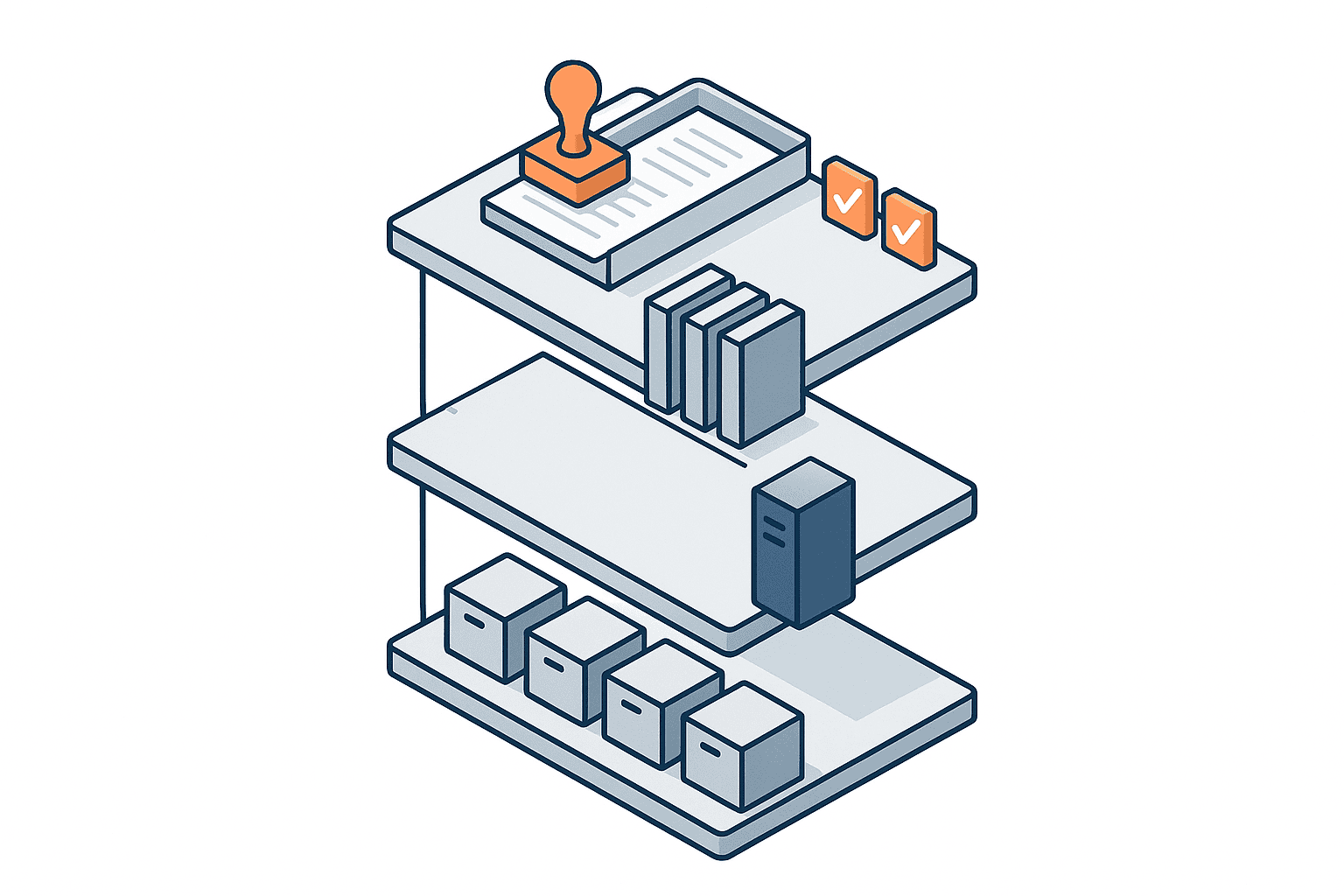
Storage, version control and approval are different functions
The phrase “document management system” covers three layers at once. Each layer answers a different question and needs different features.
| Layer | Question it answers | Typical features |
|---|---|---|
| Storage | Where is the document | Folder structure, full-text search, access rights, capacity |
| Version control | Which one is current, and what changed when | Automatic revision numbering, change history, locking of superseded revisions, comparison |
| Approval | Who approved what, and when | Approval routes, electronic signature, protection of approval records, audit trail |
Most factories attack the storage layer first. Move the shared folder to cloud storage, make it searchable. That work finishes quickly and the improvement is easy to feel, so it looks like a success. But if version control and approval stay on the paper-and-seal routine, the two most painful areas, audit response and cross-site drawing distribution, remain untouched.
What happens to an organisation that only solved the first layer
Here is what actually happens in a factory that replaced storage alone.
- The current revision sits in the cloud while stale local copies remain on shop-floor PCs
- The approved PDF and the editable source file live in different folders and both get updated
- Answering “who approved this” means digging a sealed paper out of a storeroom
- Someone has to update the register by hand at every revision, so entries get missed
- When a drawing is sent to the parent company or a sister plant, there is no record of which revision went out
None of these disappear no matter how much you improve the storage layer. Faster search does not reduce duplicate management.
The storage layer no longer differentiates products
Storage is a mature problem. Even general-purpose cloud storage now covers full-text search, folder-level permissions, external sharing links and audit logs.
Microsoft’s published plan comparison, for example, lists Microsoft 365 Business Basic at $7.00 per user per month and Microsoft 365 Business Standard with Copilot at $23.50 per user per month, both prices paid yearly, and both including 1 TB of cloud storage per user. If capacity and access rights are the whole problem, that price band is enough.
That is exactly why comparing products on the storage layer produces no meaningful difference. The comparison that matters happens in the next two layers.
Being able to find a document is not the same as controlling it
The storage layer carries a separate problem of its own, which is retrieval. Wanting to search legacy drawings faster is an extremely common request in Thai factories, and it is a topic in its own right. We covered the search side separately in how AI search works on legacy drawings.
One warning, though. Better retrieval is not a substitute for version control. When a search returns 10 candidates, nothing in the search engine tells you which of them is the valid revision.
In the version control layer, can the system answer instead of a person

The version control layer poses one question only. Given a drawing number, can the system, rather than a person, state which revision is currently valid?
Three moments when paper and spreadsheet registers break
A paper-and-spreadsheet register works in normal conditions. It breaks at three specific moments.
- When the person who maintains the register is on leave or leaves the company
- When the same drawing number is revised twice in quick succession and two revisions run in parallel
- When an auditor or a customer asks you to show which revision was valid on a particular past date
The third is the nasty one. A spreadsheet register holds the current state, but usually not the state at an arbitrary past point in time. Once it has been saved over, you cannot reconstruct which revision was valid six months ago.
How far does the version history in general cloud storage take you
General-purpose cloud storage does have version history. What divides opinion in practice is the condition under which that history is retained.
Microsoft’s documentation explains that version history limits for a SharePoint document library can be set at organisation, site, library and OneDrive user account level, and that there are two types, an automatic setting and a manual setting. Under the manual setting you combine a major version count with an expiration period. Configure a library for 500 major versions with a 365-day expiration and the system keeps no more than 500 versions and automatically deletes any version older than 365 days. The same page states that when versions exceed the limit set on the library, they are marked for permanent deletion, bypass the recycle bin and cannot be recovered from it.
Box’s pricing page shows version history stepping up by plan, with Business at 50 versions, Enterprise at 100 versions, and Enterprise Plus and above unlimited.
In other words, version history in general storage is a recovery feature. It was not designed to guarantee that a defined retention period is met. For quality documents with a fixed retention period, you have to check before signing that the version-limit configuration does not contradict that retention period.
Requirements that are specific to drawing management
Drawings carry three complications that ordinary documents do not.
- One drawing is referenced by several parent assemblies, so the impact of a revision does not stay inside that single drawing
- The CAD source file and the converted PDF issued to the shop floor must always be kept at the same revision
- Drawing number and revision conventions sometimes differ per customer, so an internal numbering rule alone is not enough
Handle this inside a general-purpose document management system and a human ends up maintaining the reference relationships in a register, which means you are back in a spreadsheet. In factories with a high drawing count, the practical split is to hold reference relationships in a drawing management system or PDM and keep ordinary documents in a general-purpose system.
In the approval layer, everything comes down to what you can prove

The approval layer is the last one to be replaced and the one where replacement pays the most.
What clause 7.5 of ISO 9001 actually requires
ISO 9001:2015 folds documents and records into a single term, documented information, and clause 7.5 governs how it is controlled. The structure worth memorising is as follows.
Start with scope, precisely. What clause 7.5.3 requires to be controlled is documented information required by the quality management system and by the standard, not every file that exists in the company. Try to bring personal notes and working drafts under the same control and the routine will collapse. Fixing the scope of controlled documents is work that has to happen before system selection, not after.
On that basis, the control requirements of clause 7.5 map out like this.
| Clause | What is required | What the system has to provide |
|---|---|---|
| 7.5.2 Creating and updating | Identification and description, format and media, review and approval for suitability and adequacy | Mandatory document attributes, defined approval routes |
| 7.5.3.1 | Available and suitable for use where and when needed, adequately protected | Access rights, availability, backup |
| 7.5.3.2 | Distribution, access, retrieval and use, storage and preservation, control of changes, retention and disposition | Automatic revision numbering, isolation of superseded revisions, retention settings |
Of that table, the only part a shared folder or cloud storage satisfies naturally is a portion of 7.5.3.1. Review and approval under 7.5.2, and control of changes under 7.5.3.2, are not met unless the features are explicitly configured.
General storage does have approval features, to be fair. Microsoft’s support documentation explains that when content approval is enabled on a SharePoint library an item stays in Pending status until someone with permission approves it, and that draft item security can be set to users who can read items, only users who can edit items, or only users who can approve items plus the author. The same page warns that if site permissions allow any user to read items, everyone with read permission can see all items whether or not they are approved. That is a textbook example of the difference between having a feature and having a configuration that survives an audit.
As of August 2026 the ISO 9001 revision has not yet been published
If a revision is your trigger for buying a system, get the timing right. ISO/TC 176/SC 2 announced on 7 August 2026 that ISO/FDIS 9001 had been approved with overwhelming international support and that the sixth edition is scheduled for release on 16 September 2026. As of the date this article was written, 22 August 2026, it has not yet been formally published.
Certification bodies have published their own expectations for the length of the transition period, but formally it is not settled until after publication. It is safer not to tell your organisation a specific transition deadline yet.
The practical implication for a buying decision is simple. The backbone of the documented information requirements has not shifted dramatically in past revisions. If you wait for formal publication before you start choosing a document management system, the transition work and the implementation will land in the same months. What has to wait for the revision is the content of your documents, not the mechanism that controls them.
What Thai law says about electronic documents
In Thailand the Electronic Transactions Act B.E. 2544 (2001) sets out the legal treatment of electronic documents. The provisions that bear directly on practice, taken from the English version published by ETDA, are these.
Section 3 states that the Act applies to all civil and commercial transactions performed by using a data message, except transactions prescribed by a Royal Decree to be excluded wholly or partly. Note the scope. It attaches to transactions, so not every internal document automatically falls under this Act.
Section 8 provides that where the law requires a transaction to be made in writing, evidenced in writing or supported by a document, information generated in the form of a data message that is accessible and usable for subsequent reference without its meaning being altered is deemed to be made in writing.
Section 9 treats a data message as bearing a signature if the method used is capable of identifying the signatory and indicating that the signatory has approved the information contained in it, and if that method is reliable and appropriate for the purpose, having regard to the circumstances or an agreement between the parties.
Section 12 is the retention provision. Where the law requires documents or information to be retained, retention in the form of a data message is deemed to satisfy the legal requirement if all three of the following hold.
- The data message is accessible so as to be usable for subsequent reference without its meaning being altered
- It is retained in the format in which it was generated, sent or received, or in a format which can be demonstrated to represent that information accurately
- Where such information exists, the information specifying the source, origin and destination of the data message, including the date and time sent or received, is retained
The third condition speaks directly to system selection. If you cannot preserve who sent what, when and to whom, going digital may not by itself satisfy the requirement, and a plain file server cannot preserve it. Section 12 further provides that the State agency responsible for retaining a document may prescribe additional details, so long as they do not conflict with that section.
Compare document management systems as four types, not as product names
Start the comparison at product-name level and the list never converges. Narrowed to factories, there are effectively four types.
| Type | Strong at | Weak at |
|---|---|---|
| General cloud storage | Storage, search, external sharing, low entry cost | Protecting approval records, strictly guaranteeing retention periods |
| General document management system | Version control, approval routes, retention, audit trail | CAD reference relationships, very large files |
| Drawing management system and PDM | Drawing and revision conventions, reference relationships, CAD integration | Flexible handling of ordinary documents, usability outside engineering |
| QMS-integrated platform | ISO document control, linkage to corrective action and training records | Implementation cost, connection to the engineering change process |
Map those four types onto the three layers above and the gaps become visible.
| Type | Storage | Version control | Approval |
|---|---|---|---|
| General cloud storage | Sufficient | Partial, depends on configuration | Partial, depends on configuration |
| General document management system | Sufficient | Sufficient | Sufficient |
| Drawing management system and PDM | Sufficient for drawings only | Sufficient for drawings only | Sufficient for drawings only |
| QMS-integrated platform | Sufficient | Sufficient | Sufficient |
Before you read that table and conclude “so buy a general document management system or a QMS platform”, let us talk about cost. A product that covers all three layers is, unsurprisingly, more expensive.
Working the cost of a document management system through a model case
Everything below is a model calculation built for this article using a fictional factory, not a published result from another company. The assumptions are stated, and the arithmetic is completed inside the article. Real figures move a great deal with the product, the contract form and the volume of content to be migrated.
Assumptions
| Item | Value |
|---|---|
| Location and sector | Thailand, Japanese-owned automotive parts plant |
| Employees | 320 |
| People who handle documents | 60 |
| Of those, people needing edit rights | 20 |
| View-only users | 40 |
| Controlled documents | 4,200 |
| Breakdown | Drawings 2,500, work instructions 900, specifications 550, record forms 250 |
| Revisions per year | 1,100 |
| Internal labour rate | 300 THB per hour |
| ISO 9001 | Certified |
| Current approval lead time | 5 working days |
Assume this factory adopts a cloud document management system that includes version control and approval workflow.
Cost assumptions
| Item | Calculation | Amount |
|---|---|---|
| Editor licences | 700 THB per user-month times 20 users times 12 months | 168,000 THB per year |
| Viewer licences | 200 THB per user-month times 40 users times 12 months | 96,000 THB per year |
| Annual licence cost | 168,000 THB plus 96,000 THB | 264,000 THB per year |
| Initial build | Document classification design, migration, training | 450,000 THB, first year only |
| First-year total | 264,000 THB plus 450,000 THB | 714,000 THB |
The unit prices are assumptions set for this model with reference to published SaaS price bands. They are not figures you can put into a real quotation.
Benefit assumptions
The benefits are built up as four separate items. The reason for keeping them separate comes later.
| Benefit | Calculation | Annual value |
|---|---|---|
| Reduced revision administration | 1,100 revisions times 0.5 hours times 300 THB | 165,000 THB |
| Fewer reworks caused by superseded revisions | 6 incidents minus 1 incident, times 60,000 THB | 300,000 THB |
| Reduced audit preparation effort | 3 audits times 28 hours times 300 THB | 25,200 THB |
| Reduced document search time | 60 people times 20 minutes per week times 48 weeks times 300 THB | 288,000 THB |
| Total | 778,200 THB per year |
For rework, the assumption is that incidents caused by using a superseded revision fall from 6 per year to 1 per year, with a loss of 60,000 THB per incident. For audits, the assumption covers 3 events per year, one certification body surveillance visit and two customer audits, with preparation effort falling from 40 hours to 12 hours. For search time, 60 people each save 20 minutes per week across 48 working weeks.
Payback, and the condition under which the benefit vanishes
Monthly, the benefit is 778,200 THB divided by 12, or 64,850 THB per month, and the licence cost is 264,000 THB divided by 12, or 22,000 THB per month. The difference of 42,850 THB per month goes toward recovering the initial build, so 450,000 THB divided by 42,850 THB gives payback in roughly 11 months.
Now one sensitivity check. Of the four benefits, the one most likely to be overstated is reduced search time. It is hard to measure, and there is no guarantee the freed-up time is spent on something else productive. So set that 288,000 THB to zero entirely. The benefit becomes 490,200 THB per year, or 40,850 THB per month. Subtract the licence cost and you have 18,850 THB per month, so 450,000 THB divided by 18,850 THB gives payback in roughly 24 months. A year later, but still a viable investment.
There is one case where it is not viable. That is replacing the storage layer only. Suppose you change where files live but leave approval on paper seals and the revision register in a spreadsheet. Rework caused by superseded revisions does not fall. Approval records are not held electronically, so audit preparation effort does not fall either. All that remains is 165,000 THB per year of revision administration savings, which is 13,750 THB per month. That is below the annual licence cost of 264,000 THB, or 22,000 THB per month, so the investment is never recovered.
Written out as arithmetic it looks obvious. In reality a great many factories are sitting in exactly that state. That is why the three layers have to be separated.
Four practical points that keep an implementation from failing
Design the classification around approval units, not around how people browse
The first task during migration is designing the folder structure. Prioritise “an arrangement the shop floor finds easy to browse” and you will not be able to configure approval routes afterwards. Approval routes are determined by document type, so a workable structure puts document type at the first level and process or product below it. Browsing convenience is delivered through search and attributes instead.
Limit migration to current revisions and records still inside their retention period
Try to migrate every historical file and the initial build cost balloons until the project stalls. Restrict the migration scope to revisions that are currently valid and records whose retention period has not expired. Everything else goes to an archive held somewhere separate and is pulled out only on demand. Drawing that line early is the single biggest lever on initial cost.
Confirm that it can be operated in the language used on the floor
In a Thai factory, the people who actually use the work instructions are Thai operators. If the interface only appears in Japanese and English, the floor will fall back on printed paper and the current revision will never reach them. Check two things before you buy. Can the document body be held in Thai, and do approval notifications arrive in Thai. Whether attribute names can be held in multiple languages is also hard to change later.
Settle the cross-site drawing distribution rule before choosing the system
If you run more than one site, you cannot configure the system until you have decided which site holds the master and at what point it is distributed to the others. Aligning standards and formats that differ between sites is covered in how to bring overseas plant quality management onto one standard. Implementing a document management system is, among other things, an opportunity that forces you to do that alignment.
Frequently asked questions
What is a document management system
It is a mechanism that provides three functions together, storing documents, controlling revisions, and recording approvals. What separates it from a shared folder or cloud storage is that it holds features which manage the state of a document, such as automatic revision numbering, isolation of superseded revisions and preservation of approval history. It is not simply a word for a place to put files.
How much does a document management system cost
Cloud products are usually charged per user, and many split the unit price between users with edit rights and view-only users. As a reference point, Microsoft’s published plans list Microsoft 365 Business Basic, a general-purpose cloud storage offering, at $7.00 per user per month paid yearly. A document management system with approval workflow and an audit trail sits above that band. On top of that you need an initial build cost for classification design and migration of existing documents, and in most cases that is the figure with the wider spread.
Should a drawing management system be kept separate from a document management system
If the drawing count is high and the CAD source has to stay in step with the PDF issued to the floor, keeping them separate is easier to control. Trying to express drawing reference relationships inside a general-purpose document management system tends to resurrect the spreadsheet register. That said, keep the approval record format identical across both, or an audit will turn into an exercise in reconciling two sets of evidence.
Is ISO document control acceptable in the cloud
Clause 7.5 of ISO 9001 does not prescribe a medium. The question is not paper versus electronic but whether identification, review and approval, distribution, control of changes, and retention and disposition are controlled. What a cloud deployment adds to the checklist is confirming that the retention period and the version history settings do not contradict each other, and that approval records are protected from unintended alteration.
How do you handle resistance on the floor when introducing revision control
Resistance usually comes from the people who author documents, not from the people who approve them, because every additional attribute to fill in at revision time makes the job visibly heavier. Keep mandatory attributes to a minimum and automate everything that can be filled in for you, such as author, timestamp and revision number. The other effective move is to let people experience, before go-live, that hunting for the right revision has disappeared.
Can we start with a system for work instructions only
That is fine, and arguably better. Starting with work instructions, which are revised often and involve a limited set of people, contains the damage if something goes wrong far better than migrating every document including drawings at once. How the instructions themselves reach the floor, and how superseded revisions are taken out of circulation, is covered in choosing a work instruction system. Be aware, though, that the numbering convention and the approval routing you decide at that point will carry over when you later extend to drawings and specifications. Design the first pass as if it were going to cover everything.
Summary
What goes wrong in factory document management system selection is not a misread feature matrix. It is failing to separate the problem into three.
- The storage layer is mature and general-purpose cloud storage is enough
- In the version control layer, check that the storage product’s version history does not contradict your retention periods
- In the approval layer, the deciding factor is whether who approved what and when can be shown to an auditor
- Replace storage alone and, in the model calculation, the investment is never recovered
- The ISO 9001 revision is scheduled for release on 16 September 2026 and had not been published as of the writing of this article
You can find out which layer your own site is stuck in with one question. “For that drawing revised last month, can you show me which revision is valid now, and who approved it, within 5 minutes and without asking anyone?” If you cannot, the layer you are stuck in is not storage.
If you would like help simply working out which of the three layers your current setup stops at, and which type of product fits, that is a fine place to start. We are happy to talk at the exploratory stage, before any decision has been made, so please get in touch through our contact page. We will work through the current situation with you on the assumption of day-to-day operation in a Japanese-owned factory in Thailand.
References
- ISO/TC 176/SC 2 news, ISO 9001 revision update
- Electronic Transactions Act B.E. 2544 (2001), English version, ETDA
- Microsoft SharePoint plan comparison
- Microsoft Learn, version history limits for document library and OneDrive
- Microsoft Support, require approval of items in a list or library
- Box pricing plans
- How AI search works on legacy drawings
- How to bring overseas plant quality management onto one standard


